
Solved ThinkPad Basic USB 3.0 Dock (4X10A066WW)

squirtmph

New member
Member
VIP
Local time
9:52 PM
Messages
235
Location
PDX

Attachments

My Computer

Computer type
Laptop
Computer Manufacturer/Model Number
Azure Blade 15.6
OS
Windows 10 Pro Version 22H2 64-bit Edition
CPU
Intel(R) Core(TM) i7-10875H CPU @ 2.30GHz 2.30 GHz
Memory
2.0 GB (31.8 GB usable)
Monitor(s) Displays
4K UHD OLED TOUCH
Screen Resolution
3840 x 2160
Hard Drives
1 TB
Mouse
Logitech MX Master 3S
Antivirus
Windows Security
Browser
Google Chrome
Other Info
______________________________________________


______________________________________________
Hi ...Was the Manual no help ? ... Try the Troubleshooting section on Page 17 ....

Was the Firmware updated ? ...
 

My Computer

Computer Manufacturer/Model Number
W530-3630QM1
OS
windows 7 home 64bit
CPU
INTEL-CORE I7
Memory
16GB
Hard Drives
750GB
Browser
Chrome
Hi, Thank you for you're response
I can have access to external drives I have plugged to DOCK, I just wanted to fix exclamation/yellow warnings
but I have find out to do that I needed to do bellow steps.

How to Install and use
=========================
For nomal installation in OS, Please double click the driver package exe file and follow the screen guidance to install the driver. ( This its the part I follow)

For silent install/uninstall w/o SCCM environment, install the driver in single PC at first,
then go to:
C:\SWTOOLS\DRIVERS\Dock to get the file:ThinkPad_Basic_USB_3.0_Dock_V10765.exe
Follow C1 ,C2 command to install driver. (If I have to do this, I could not find file location, again what do I needed to do this If I have done first suggestion)

Command line parameters for SCCM
============================================================
Install command:
ThinkPad_Basic_USB_3.0_Dock_V10746.exe /verysilent /norestart

Uninstall command:
ThinkPad_Basic_USB_3.0_Dock_V10746.exe /uninstall /verysilent /norestart

* You must restart the target system to make driver actived after installed / uninstalled driver package.


C2. Command line parameters for Silent Install / uninstall
===========================================================
You must restart the system to make driver actived after installed / uninstalled driver package.
You can choice either "/sidlent /norestart" or "/verysilent" parameter as bellow.

Silent install usage:

- Restart manually. (How could I know Flie Location Folder)
C:\[Flie Located folder]\ThinkPad_Basic_USB_3.0_Dock_V10746.exe /silent /norestart

- Restart automatically. (How could I know Flie Location Folder)
C:\[Flie Located folder]\ThinkPad_Basic_USB_3.0_Dock_V10746.exe /verysilent

Silent uninstall usage:

- Restart manually. To do this can I just past_copy below CMD?
32 bit => C:\Program Files\Lenovo\Basic USB Dock\unins000.exe /silent /norestart
64 bit => C:\Program Files (x86)\Lenovo\Basic USB Dock\unins000.exe /silent /norestart

- Restart automatically.
32 bit => C:\Program Files\Lenovo\Basic USB Dock\unins000.exe /verysilent
64 bit => C:\Program Files (x86)\Lenovo\Basic USB Dock\unins000.exe /verysilent

Thank you for you response to my question
 

My Computer

Computer type
Laptop
Computer Manufacturer/Model Number
Azure Blade 15.6
OS
Windows 10 Pro Version 22H2 64-bit Edition
CPU
Intel(R) Core(TM) i7-10875H CPU @ 2.30GHz 2.30 GHz
Memory
2.0 GB (31.8 GB usable)
Monitor(s) Displays
4K UHD OLED TOUCH
Screen Resolution
3840 x 2160
Hard Drives
1 TB
Mouse
Logitech MX Master 3S
Antivirus
Windows Security
Browser
Google Chrome
Other Info
______________________________________________

______________________________________________
Glad you got the issue sorted ...
 

My Computer

Computer Manufacturer/Model Number
W530-3630QM1
OS
windows 7 home 64bit
CPU
INTEL-CORE I7
Memory
16GB
Hard Drives
750GB
Browser
Chrome
I havent work it out

all red link, I was asking you a question on how to do that ):
I meant if I have installed! (Normal Mode)
why Do I have exclamation point on device manager?

This is my main concern, how can I repair or fix it, o another words what else do I needed to do since I dont have physical location or understand it ):

Thank you for youre help, again
 
Last edited:

My Computer

Computer type
Laptop
Computer Manufacturer/Model Number
Azure Blade 15.6
OS
Windows 10 Pro Version 22H2 64-bit Edition
CPU
Intel(R) Core(TM) i7-10875H CPU @ 2.30GHz 2.30 GHz
Memory
2.0 GB (31.8 GB usable)
Monitor(s) Displays
4K UHD OLED TOUCH
Screen Resolution
3840 x 2160
Hard Drives
1 TB
Mouse
Logitech MX Master 3S
Antivirus
Windows Security
Browser
Google Chrome
Other Info
______________________________________________


______________________________________________
many thanks for keeping coming back!

Thanks before I start to my question for the link!
I have read and follow Instruction before by Installing driver and follow screen instruction, how ever where I highlight on red I have a question for you!

4. Restart your computer after the completion message is displayed. The system will automatically identify
and configure the dock. The video output function of the dock will be automatically enabled after the
configuration is completed.


Q.I haven't configure device to windows, would this be why I have exclamation warning's?
thank for you response to my question
 

My Computer

Computer type
Laptop
Computer Manufacturer/Model Number
Azure Blade 15.6
OS
Windows 10 Pro Version 22H2 64-bit Edition
CPU
Intel(R) Core(TM) i7-10875H CPU @ 2.30GHz 2.30 GHz
Memory
2.0 GB (31.8 GB usable)
Monitor(s) Displays
4K UHD OLED TOUCH
Screen Resolution
3840 x 2160
Hard Drives
1 TB
Mouse
Logitech MX Master 3S
Antivirus
Windows Security
Browser
Google Chrome
Other Info
______________________________________________


______________________________________________
Q.I haven't configure device to windows, would this be why I have exclamation warning's?
thank for you response to my question


That should happen automatically ...


What is the Model Number of your Computer ? ...
 

My Computer

Computer Manufacturer/Model Number
W530-3630QM1
OS
windows 7 home 64bit
CPU
INTEL-CORE I7
Memory
16GB
Hard Drives
750GB
Browser
Chrome
Qosmio X505 Q894
Part# PQX33U-051025
 

My Computer

Computer type
Laptop
Computer Manufacturer/Model Number
Azure Blade 15.6
OS
Windows 10 Pro Version 22H2 64-bit Edition
CPU
Intel(R) Core(TM) i7-10875H CPU @ 2.30GHz 2.30 GHz
Memory
2.0 GB (31.8 GB usable)
Monitor(s) Displays
4K UHD OLED TOUCH
Screen Resolution
3840 x 2160
Hard Drives
1 TB
Mouse
Logitech MX Master 3S
Antivirus
Windows Security
Browser
Google Chrome
Other Info
______________________________________________


______________________________________________
Did the Dock come with a CD ? ...
 

My Computer

Computer Manufacturer/Model Number
W530-3630QM1
OS
windows 7 home 64bit
CPU
INTEL-CORE I7
Memory
16GB
Hard Drives
750GB
Browser
Chrome
Exellent question

No( To you question)

What i did was, I goggle by search engine by Model Part #.
I download hard driver, compatible with windows 7

Once downloaded.
1.Disable all software running on desktop mainly AVG register software
2. Installed Drivers
3.Restart
4.Firmware update (Here I had a warning but I cant remember what it was)
Here it ls website where I got it from:
ThinkPad USB 3.0 Dock - Overview - Lenovo Support (US)

Thank you very much
 

My Computer

Computer type
Laptop
Computer Manufacturer/Model Number
Azure Blade 15.6
OS
Windows 10 Pro Version 22H2 64-bit Edition
CPU
Intel(R) Core(TM) i7-10875H CPU @ 2.30GHz 2.30 GHz
Memory
2.0 GB (31.8 GB usable)
Monitor(s) Displays
4K UHD OLED TOUCH
Screen Resolution
3840 x 2160
Hard Drives
1 TB
Mouse
Logitech MX Master 3S
Antivirus
Windows Security
Browser
Google Chrome
Other Info
______________________________________________


______________________________________________

My Computer

Computer Manufacturer/Model Number
W530-3630QM1
OS
windows 7 home 64bit
CPU
INTEL-CORE I7
Memory
16GB
Hard Drives
750GB
Browser
Chrome
Should I do these again:
1.DisplayLink Updated Driver:26 August 2014
DisplayLink: Windows Software
2.Install update/ Restart Driver from here:18 Feb 2015
But this is only for display viewers
DisplayLink: Windows Software
3.Install firmware
I like believe may be here its my problem, since I dont remember was installed correctly, What if I downloaded and rein-stalled it. would be safe to do that!

Thasnks
 
Last edited:

My Computer

Computer type
Laptop
Computer Manufacturer/Model Number
Azure Blade 15.6
OS
Windows 10 Pro Version 22H2 64-bit Edition
CPU
Intel(R) Core(TM) i7-10875H CPU @ 2.30GHz 2.30 GHz
Memory
2.0 GB (31.8 GB usable)
Monitor(s) Displays
4K UHD OLED TOUCH
Screen Resolution
3840 x 2160
Hard Drives
1 TB
Mouse
Logitech MX Master 3S
Antivirus
Windows Security
Browser
Google Chrome
Other Info
______________________________________________


______________________________________________
Sure try to Re-Install it ... It will not do any harm either way ...
 

My Computer

Computer Manufacturer/Model Number
W530-3630QM1
OS
windows 7 home 64bit
CPU
INTEL-CORE I7
Memory
16GB
Hard Drives
750GB
Browser
Chrome
No CD Room

No when I bought it din't come with software, was second hand as you might called it!
 

My Computer

Computer type
Laptop
Computer Manufacturer/Model Number
Azure Blade 15.6
OS
Windows 10 Pro Version 22H2 64-bit Edition
CPU
Intel(R) Core(TM) i7-10875H CPU @ 2.30GHz 2.30 GHz
Memory
2.0 GB (31.8 GB usable)
Monitor(s) Displays
4K UHD OLED TOUCH
Screen Resolution
3840 x 2160
Hard Drives
1 TB
Mouse
Logitech MX Master 3S
Antivirus
Windows Security
Browser
Google Chrome
Other Info
______________________________________________


______________________________________________
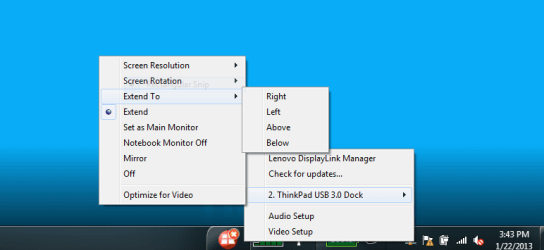
When you Install the Driver for the Dock ...

Do you see the Image below ? ...


Dock.PNG
 

My Computer

Computer Manufacturer/Model Number
W530-3630QM1
OS
windows 7 home 64bit
CPU
INTEL-CORE I7
Memory
16GB
Hard Drives
750GB
Browser
Chrome
Desktop Image

No I dont have none/any of this option, again Good question!
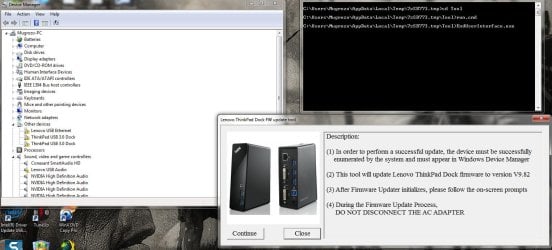
from:CMD
1.Initialization ,. Success
2. start update
3. searching for device
4.!! No device found!
5.Press any key to continue
 

Attachments

  • Desktop_143759.jpg
    Desktop_143759.jpg
    817.7 KB · Views: 1
  • Lenovo FirmwareUpdate2015-03-24_14-54-29.jpg
    Lenovo FirmwareUpdate2015-03-24_14-54-29.jpg
    129.8 KB · Views: 1
Last edited:

My Computer

Computer type
Laptop
Computer Manufacturer/Model Number
Azure Blade 15.6
OS
Windows 10 Pro Version 22H2 64-bit Edition
CPU
Intel(R) Core(TM) i7-10875H CPU @ 2.30GHz 2.30 GHz
Memory
2.0 GB (31.8 GB usable)
Monitor(s) Displays
4K UHD OLED TOUCH
Screen Resolution
3840 x 2160
Hard Drives
1 TB
Mouse
Logitech MX Master 3S
Antivirus
Windows Security
Browser
Google Chrome
Other Info
______________________________________________


______________________________________________
Does the Dock Icon show in Windows notification area.?
 

My Computer

Computer Manufacturer/Model Number
W530-3630QM1
OS
windows 7 home 64bit
CPU
INTEL-CORE I7
Memory
16GB
Hard Drives
750GB
Browser
Chrome
I don't see any Icon or something will say Lenovo, I can't always take a photo if you like to see what its running?
 

My Computer

Computer type
Laptop
Computer Manufacturer/Model Number
Azure Blade 15.6
OS
Windows 10 Pro Version 22H2 64-bit Edition
CPU
Intel(R) Core(TM) i7-10875H CPU @ 2.30GHz 2.30 GHz
Memory
2.0 GB (31.8 GB usable)
Monitor(s) Displays
4K UHD OLED TOUCH
Screen Resolution
3840 x 2160
Hard Drives
1 TB
Mouse
Logitech MX Master 3S
Antivirus
Windows Security
Browser
Google Chrome
Other Info
______________________________________________


______________________________________________
Back
Top