
This computer's video card can't play themes

I actually told a slight tale in my last post. I didn't have it installed but did a while ago and knew it worked well.

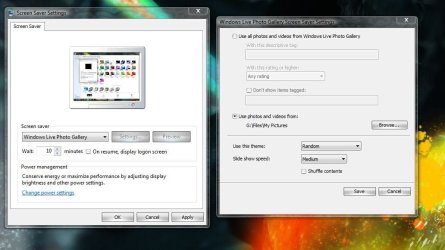
So I downloaded it from Windows Update and installed so to give you 100% certainty. (Grrr now I have to reset my default programs to open picture files. lol) It functions perfectly well when I hit "preview."

This is the result:
 

Attachments
  • Capture.JPG
    Capture.JPG
    74.9 KB · Views: 140

My Computer My Computer

At a glance

7600.20510 x86P4 550 3.4 GHz HT running at 3.5 GHzOCZ 2 GB(2x1GB) DDR400mHz running @ 414 mHzHIS Radeon HD 3850 IceQ 3 Turbo HDMI Dual DL-...
Computer Manufacturer/Model Number
self built
OS
7600.20510 x86
CPU
P4 550 3.4 GHz HT running at 3.5 GHz
Motherboard
MSI PM8M3-V (MS-7211 v1.x) Micro-ATX mainboard
Memory
OCZ 2 GB(2x1GB) DDR400mHz running @ 414 mHz
Graphics Card(s)
HIS Radeon HD 3850 IceQ 3 Turbo HDMI Dual DL-DVI AGP
Sound Card
MOTU Traveler firewire studio interface 192 kHz 24 bit
Monitor(s) Displays
22" widescreen Acer X223W LCD, 17" Compaq P75 CRT
Screen Resolution
1680x1050 and 1280x1024
Hard Drives
SATA I x2 WD, 400 GB and 120 GB, SATA 2 WD Caviar Black 1 TB
PSU
350W generic
Case
Cybertronpc, it glows blue
Cooling
stock cpu fan, Ice-Q 3 gpu and system, many case fans
Keyboard
Logitch Classical Keyboard 200
Mouse
Logitech Mediaplay cordless
Internet Speed
1792/448 kbits/sec
Other Info
SATA II PCI fake RAID adapter, 1 GB Readyboost, original ATI Remote Wonder (even works with WMC perfectly), Logitech Rumblepad 2 game controller x2
torrentg,

I really appretiate that you took this bullet for me!

This gives me hope that it should work!

I'll report back as soon as I know anything new.

Regards,
Johan
 

My Computer My Computer

At a glance

Windows 7 64 bit Home PremiumCore2Duo E8400 3GHz4Gb, Corsair 2 x XMS2 CM2x2048-6400C5C 800MHzRadeon 4870 512Mb
OS
Windows 7 64 bit Home Premium
CPU
Core2Duo E8400 3GHz
Motherboard
Asus P5Q Turbo
Memory
4Gb, Corsair 2 x XMS2 CM2x2048-6400C5C 800MHz
Graphics Card(s)
Radeon 4870 512Mb
Monitor(s) Displays
Dell 2209 WA
Hard Drives
2x Seagate Barracuda 500Gb 7200.11 in RAID0
PSU
Corsair HX520
Case
Cooler Master Sileo 500
Cooling
Xigmatek Achilles s1284
You're welcome. Come to think of it, on my secondary machine (not in specs, but with NVIDIA AGP 6200A-LE) I had the same error you're getting with this. I didn't do anything special and it just seemed to resolve itself one day.

Maybe it's because I updated chipset drivers or video card drivers along the way. I don't really know.

But ya - the fact is that it wasn't working there and then did all of a sudden.
 

My Computer My Computer

At a glance

7600.20510 x86P4 550 3.4 GHz HT running at 3.5 GHzOCZ 2 GB(2x1GB) DDR400mHz running @ 414 mHzHIS Radeon HD 3850 IceQ 3 Turbo HDMI Dual DL-...
Computer Manufacturer/Model Number
self built
OS
7600.20510 x86
CPU
P4 550 3.4 GHz HT running at 3.5 GHz
Motherboard
MSI PM8M3-V (MS-7211 v1.x) Micro-ATX mainboard
Memory
OCZ 2 GB(2x1GB) DDR400mHz running @ 414 mHz
Graphics Card(s)
HIS Radeon HD 3850 IceQ 3 Turbo HDMI Dual DL-DVI AGP
Sound Card
MOTU Traveler firewire studio interface 192 kHz 24 bit
Monitor(s) Displays
22" widescreen Acer X223W LCD, 17" Compaq P75 CRT
Screen Resolution
1680x1050 and 1280x1024
Hard Drives
SATA I x2 WD, 400 GB and 120 GB, SATA 2 WD Caviar Black 1 TB
PSU
350W generic
Case
Cybertronpc, it glows blue
Cooling
stock cpu fan, Ice-Q 3 gpu and system, many case fans
Keyboard
Logitch Classical Keyboard 200
Mouse
Logitech Mediaplay cordless
Internet Speed
1792/448 kbits/sec
Other Info
SATA II PCI fake RAID adapter, 1 GB Readyboost, original ATI Remote Wonder (even works with WMC perfectly), Logitech Rumblepad 2 game controller x2
I ran Driver sweeper in safe mode and checked the ATI box, I did not check the 3 Nvida boxes since I didn't understand them. But I guess I shouldn't have Nvida installed anyway.

Unfortunately it was not possible to install the driver in safe mode so I had to do it in normal mode, but still the problem persist.

Chipset driver was mentioned, I don't really know how to find the latest, at Asus homepage the latest driver was from 22 September and it's the one I have.
 

My Computer My Computer

At a glance

Windows 7 64 bit Home PremiumCore2Duo E8400 3GHz4Gb, Corsair 2 x XMS2 CM2x2048-6400C5C 800MHzRadeon 4870 512Mb
OS
Windows 7 64 bit Home Premium
CPU
Core2Duo E8400 3GHz
Motherboard
Asus P5Q Turbo
Memory
4Gb, Corsair 2 x XMS2 CM2x2048-6400C5C 800MHz
Graphics Card(s)
Radeon 4870 512Mb
Monitor(s) Displays
Dell 2209 WA
Hard Drives
2x Seagate Barracuda 500Gb 7200.11 in RAID0
PSU
Corsair HX520
Case
Cooler Master Sileo 500
Cooling
Xigmatek Achilles s1284
Why didn't the driver install in safe mode? If anything, it should have installed.
 

My Computer My Computer

At a glance

Windows 7 Ultimate x86-64[email protected] 1066MHz FSB6GB DDR3 1066MHz9300M GS 256MB Dedicated (Speed) + Intel4500M...
Computer Manufacturer/Model Number
Sony Vaio Z46GDU
OS
Windows 7 Ultimate x86-64
CPU
[email protected] 1066MHz FSB
Motherboard
Sony branded
Memory
6GB DDR3 1066MHz
Graphics Card(s)
9300M GS 256MB Dedicated (Speed) + Intel4500MHD (Stamina)
Sound Card
Realtek HD Audio
Monitor(s) Displays
13.1' WXGA
Screen Resolution
1600x900
Hard Drives
320GB 7200RPM w/ 16MB cache
Internet Speed
1MB/s
Mine worked fine right after I installed the Windows Live Photo Gallery on a very fresh install of Windows 7. However, the next day it stopped working. So Torrentg, please let us know if your themes continue to work in a few days.

I installed the Windows Live Essentials on 10/27 and on 10/28 Windows Update downloaded and installed 6 updates. They were various security updates, an update for Silverlight, Office XP and IE 8 compatablilty list. These were the only changes made to my system (that I'm aware of) between the time the Windows Photo Gallery themes worked and when they did not. Just more info to perhaps trigger some ideas....or not. :)
 

My Computer My Computer

At a glance

Win 7 64bitCore i7 9206GB DDR3Sapphire Vapor-X Radeon HD4870 1GB
OS
Win 7 64bit
CPU
Core i7 920
Motherboard
Asus P6T Deluxe V2
Memory
6GB DDR3
Graphics Card(s)
Sapphire Vapor-X Radeon HD4870 1GB
Sound Card
Integrated
Monitor(s) Displays
Samsung SyncMaster 226bw
Hard Drives
Seagate Barracuda 1tb 7200 RPM SATA
PSU
Corsair 650TX
Case
Antec 900
Cooling
Coolermaster V8
Frostmourne: I recieved some error messages that I didn't write down and at the end of the process the program concluded that the installation failed. I re-started a couple of times in safe mode but still the same.

But I understand why it's a good idea to to this in safe mode since it only take a minute or two without the driver for Windows to "fix the issue itself"... so what I did was to restart normally and run the drivers as fast as possible to "beat" the system, but I don't know if I was successful.
 

My Computer My Computer

At a glance

Windows 7 64 bit Home PremiumCore2Duo E8400 3GHz4Gb, Corsair 2 x XMS2 CM2x2048-6400C5C 800MHzRadeon 4870 512Mb
OS
Windows 7 64 bit Home Premium
CPU
Core2Duo E8400 3GHz
Motherboard
Asus P5Q Turbo
Memory
4Gb, Corsair 2 x XMS2 CM2x2048-6400C5C 800MHz
Graphics Card(s)
Radeon 4870 512Mb
Monitor(s) Displays
Dell 2209 WA
Hard Drives
2x Seagate Barracuda 500Gb 7200.11 in RAID0
PSU
Corsair HX520
Case
Cooler Master Sileo 500
Cooling
Xigmatek Achilles s1284
so what I did was to restart normally and run the drivers as fast as possible to "beat" the system, but I don't know if I was successful.

Unfortunately it's not a race, so either it was successful or it wasn't :huh:

Any driver hand over (from the default VGA driver to the ATI driver) has already been done by the time you have hit the desktop.
 

My Computer My Computer

At a glance

8 Pro x64i7 3770K 4.6GHz16GB G.Skill Trident X 2666mhzx2 EVGA 780 Ti Superclocked SLI
Computer type
PC/Desktop
Computer Manufacturer/Model Number
Systems by SmartEyeball
OS
8 Pro x64
CPU
i7 3770K 4.6GHz
Motherboard
ASUS P8Z77 WS
Memory
16GB G.Skill Trident X 2666mhz
Graphics Card(s)
x2 EVGA 780 Ti Superclocked SLI
Sound Card
SB X-FI Surround 5.1 PRO USB / ATH-AD900 Headphones
Monitor(s) Displays
x3 Dell U2410 / 58" Samsung
Screen Resolution
5760*1200/ 1920*1200
Hard Drives
2x Intel 520 240GB (RAID 0) * 2x WD Caviar Blacks 2TB (RAID 0) * 2TB WD Caviar Black * Sony Optirac DVD
PSU
Silverstone Strider Evolution 1200W
Case
Thermaltake Level 10 GT Snow Edition
Cooling
Noctua NH-D14
Keyboard
Topre Realforce // Ducky Shine MX Black // Filco Ninja TKL
Mouse
Thermaltake Theron (Highly Recommended) + Razer Imperator
Antivirus
MSE
Browser
IE, FF, WaterFox
Other Info
GT Extreme V2 Sim Racing Cockpit + 40" LCD and K/B Mouse stand ▼
Fanatec CSR Elite Wheel + Clubsport V1 Pedals + CSR shifter/7G-H ▼Saitek X52 Pro ▼ TrackIR 5 Pro
Buttkicker v2 Seat Rumbler with Dedicated 5.1 and Sub Woofer attached to frame ▼
=
Bloody Big Grin
Any update on solving this issue? Mine also initially worked then later on I noticed it stopped working.
 

My Computer My Computer

At a glance

Microsoft Windows 7 ProfessionalIntel Core i7 920 @ 2.66gHzOCZ 6gbBFG Tech Nvidia GeForce 280 GTX
OS
Microsoft Windows 7 Professional
CPU
Intel Core i7 920 @ 2.66gHz
Motherboard
Asus Rampage II Extreme
Memory
OCZ 6gb
Graphics Card(s)
BFG Tech Nvidia GeForce 280 GTX
Sound Card
SoundBlaster X-Fi XtremeGamer
Monitor(s) Displays
Dell 2405 FWP
Screen Resolution
1920 x 1200
Hard Drives
OCZ-Vertex (120gb)
WD Raptor (74gb)
PSU
Thermaltake 1000w
Case
Nvidia CM Stacker 830
Cooling
Air
Keyboard
Logitech G15
Mouse
Razer Mamba
Internet Speed
7mb/768k ADSL
I don't know if it helps but if as many persons as possible click "I need an answer to this question" in the following Microsoft support links maybe some kind of aftermarket quality trigger is set and Microsoft starts working on it.

So if you have problem with this please visit these three Microsoft support links, and click to the "I need an answer"
"This computer's video card can't play themes." (in this thread an interesting solution was proposed, basically to manually set the performance of the computer but it was a Vista guide and I did not manage to do it for Windows 7. But then again I didn't even know how to enter the Registry at first so there you got a snapshot of my computer skills...

Windows 7 have downgraded Photo screen saver compared to Vista?

Did Microsoft remove features from the screen saver in Windows 7 that were present in Windows Vista?

Regards,
Johan
 

My Computer My Computer

At a glance

Windows 7 64 bit Home PremiumCore2Duo E8400 3GHz4Gb, Corsair 2 x XMS2 CM2x2048-6400C5C 800MHzRadeon 4870 512Mb
OS
Windows 7 64 bit Home Premium
CPU
Core2Duo E8400 3GHz
Motherboard
Asus P5Q Turbo
Memory
4Gb, Corsair 2 x XMS2 CM2x2048-6400C5C 800MHz
Graphics Card(s)
Radeon 4870 512Mb
Monitor(s) Displays
Dell 2209 WA
Hard Drives
2x Seagate Barracuda 500Gb 7200.11 in RAID0
PSU
Corsair HX520
Case
Cooler Master Sileo 500
Cooling
Xigmatek Achilles s1284
To enter the registry type regedit in the start menu and press enter.
 

My Computer My Computer

At a glance

Windows 7 Ultimate x86-64[email protected] 1066MHz FSB6GB DDR3 1066MHz9300M GS 256MB Dedicated (Speed) + Intel4500M...
Computer Manufacturer/Model Number
Sony Vaio Z46GDU
OS
Windows 7 Ultimate x86-64
CPU
[email protected] 1066MHz FSB
Motherboard
Sony branded
Memory
6GB DDR3 1066MHz
Graphics Card(s)
9300M GS 256MB Dedicated (Speed) + Intel4500MHD (Stamina)
Sound Card
Realtek HD Audio
Monitor(s) Displays
13.1' WXGA
Screen Resolution
1600x900
Hard Drives
320GB 7200RPM w/ 16MB cache
Internet Speed
1MB/s
Thanks, I managed finally but it didn't look the same in the Registry as descibed in the post so I didn't suceed in getting this to work anyway.
 

My Computer My Computer

At a glance

Windows 7 64 bit Home PremiumCore2Duo E8400 3GHz4Gb, Corsair 2 x XMS2 CM2x2048-6400C5C 800MHzRadeon 4870 512Mb
OS
Windows 7 64 bit Home Premium
CPU
Core2Duo E8400 3GHz
Motherboard
Asus P5Q Turbo
Memory
4Gb, Corsair 2 x XMS2 CM2x2048-6400C5C 800MHz
Graphics Card(s)
Radeon 4870 512Mb
Monitor(s) Displays
Dell 2209 WA
Hard Drives
2x Seagate Barracuda 500Gb 7200.11 in RAID0
PSU
Corsair HX520
Case
Cooler Master Sileo 500
Cooling
Xigmatek Achilles s1284
Well I tried exporting the registry key from my laptop to my desktop but without success. Maybe I need to go higher in the tree, will test out tonight when I go home. This is where I'm looking at right now:

HKEY_CURRENT_USER\Software\Microsoft\Windows Live\Photo Gallery\Slideshow

In the LastRunSettings key there's a list of the enabled themes which was present in my laptop but not my desktop.
 

My Computer My Computer

At a glance

Microsoft Windows 7 ProfessionalIntel Core i7 920 @ 2.66gHzOCZ 6gbBFG Tech Nvidia GeForce 280 GTX
OS
Microsoft Windows 7 Professional
CPU
Intel Core i7 920 @ 2.66gHz
Motherboard
Asus Rampage II Extreme
Memory
OCZ 6gb
Graphics Card(s)
BFG Tech Nvidia GeForce 280 GTX
Sound Card
SoundBlaster X-Fi XtremeGamer
Monitor(s) Displays
Dell 2405 FWP
Screen Resolution
1920 x 1200
Hard Drives
OCZ-Vertex (120gb)
WD Raptor (74gb)
PSU
Thermaltake 1000w
Case
Nvidia CM Stacker 830
Cooling
Air
Keyboard
Logitech G15
Mouse
Razer Mamba
Internet Speed
7mb/768k ADSL
Hello!!!!

It's solved, please follow the guide that Ramesh at Microsoft made after assisting me in this thread "This computer's video card can't play themes."

It seams to be possible to give "credits" to these guys so if you go into this link please do that since he is the only one (I came across) at Microsoft that 1. understood that it was a problem and 2. solved it.

Regards,
Johan
 
Last edited:

My Computer My Computer

At a glance

Windows 7 64 bit Home PremiumCore2Duo E8400 3GHz4Gb, Corsair 2 x XMS2 CM2x2048-6400C5C 800MHzRadeon 4870 512Mb
OS
Windows 7 64 bit Home Premium
CPU
Core2Duo E8400 3GHz
Motherboard
Asus P5Q Turbo
Memory
4Gb, Corsair 2 x XMS2 CM2x2048-6400C5C 800MHz
Graphics Card(s)
Radeon 4870 512Mb
Monitor(s) Displays
Dell 2209 WA
Hard Drives
2x Seagate Barracuda 500Gb 7200.11 in RAID0
PSU
Corsair HX520
Case
Cooler Master Sileo 500
Cooling
Xigmatek Achilles s1284
Great work, Ramesh!
 

My Computer My Computer

At a glance

7600.20510 x86P4 550 3.4 GHz HT running at 3.5 GHzOCZ 2 GB(2x1GB) DDR400mHz running @ 414 mHzHIS Radeon HD 3850 IceQ 3 Turbo HDMI Dual DL-...
Computer Manufacturer/Model Number
self built
OS
7600.20510 x86
CPU
P4 550 3.4 GHz HT running at 3.5 GHz
Motherboard
MSI PM8M3-V (MS-7211 v1.x) Micro-ATX mainboard
Memory
OCZ 2 GB(2x1GB) DDR400mHz running @ 414 mHz
Graphics Card(s)
HIS Radeon HD 3850 IceQ 3 Turbo HDMI Dual DL-DVI AGP
Sound Card
MOTU Traveler firewire studio interface 192 kHz 24 bit
Monitor(s) Displays
22" widescreen Acer X223W LCD, 17" Compaq P75 CRT
Screen Resolution
1680x1050 and 1280x1024
Hard Drives
SATA I x2 WD, 400 GB and 120 GB, SATA 2 WD Caviar Black 1 TB
PSU
350W generic
Case
Cybertronpc, it glows blue
Cooling
stock cpu fan, Ice-Q 3 gpu and system, many case fans
Keyboard
Logitch Classical Keyboard 200
Mouse
Logitech Mediaplay cordless
Internet Speed
1792/448 kbits/sec
Other Info
SATA II PCI fake RAID adapter, 1 GB Readyboost, original ATI Remote Wonder (even works with WMC perfectly), Logitech Rumblepad 2 game controller x2
Can't wait to get home and fix my computer now! :D
 

My Computer My Computer

At a glance

Microsoft Windows 7 ProfessionalIntel Core i7 920 @ 2.66gHzOCZ 6gbBFG Tech Nvidia GeForce 280 GTX
OS
Microsoft Windows 7 Professional
CPU
Intel Core i7 920 @ 2.66gHz
Motherboard
Asus Rampage II Extreme
Memory
OCZ 6gb
Graphics Card(s)
BFG Tech Nvidia GeForce 280 GTX
Sound Card
SoundBlaster X-Fi XtremeGamer
Monitor(s) Displays
Dell 2405 FWP
Screen Resolution
1920 x 1200
Hard Drives
OCZ-Vertex (120gb)
WD Raptor (74gb)
PSU
Thermaltake 1000w
Case
Nvidia CM Stacker 830
Cooling
Air
Keyboard
Logitech G15
Mouse
Razer Mamba
Internet Speed
7mb/768k ADSL
Next issue just arised.

In this photo screen saver it doesn't matter if I have the "shuffle" box ticked in or not. It's always starting from the same picture (first...) so if the computer are running for a very long time I'm happy if I'm in 2004. So it get's a bit boring.

I must have bad carma...
 

My Computer My Computer

At a glance

Windows 7 64 bit Home PremiumCore2Duo E8400 3GHz4Gb, Corsair 2 x XMS2 CM2x2048-6400C5C 800MHzRadeon 4870 512Mb
OS
Windows 7 64 bit Home Premium
CPU
Core2Duo E8400 3GHz
Motherboard
Asus P5Q Turbo
Memory
4Gb, Corsair 2 x XMS2 CM2x2048-6400C5C 800MHz
Graphics Card(s)
Radeon 4870 512Mb
Monitor(s) Displays
Dell 2209 WA
Hard Drives
2x Seagate Barracuda 500Gb 7200.11 in RAID0
PSU
Corsair HX520
Case
Cooler Master Sileo 500
Cooling
Xigmatek Achilles s1284
Back
Top