Solved This copy of Windows is not genuine error

Stevieb2685

New member
Local time
10:46 AM
Messages
26
Location
Long Island, NY
I was using my laptop as usual and I got a pop up. I then closed that pop up message and it restarted. I am able to login, but I can't do much more than that. I can't even type in a product key. I have no idea why this happened. I wish I could go back and do a system restore, but that's not possible right now for obvious reasons. If I try to type in a product key, I get this message in the screenshot. Also, I'm not looking to do a clean install as it would wipe all data I have on the HD and have no room on my external to back up otherwise I would do a clean install. I'm looking to undo any changes before this happened.

Please help!
Steve

Posting this from my iPad
 

Attachments

  • image.jpeg
    image.jpeg
    456.3 KB · Views: 4

My Computer My Computer

At a glance

Microsoft Windows 7 Home Premium 64-bit 7601 ...Intel(R) Core(TM) i5-2430M CPU @ 2.40GHzTotal: 8.00 GB Usable: 7.90 GB(1) NVIDIA GeForce GT 525M (2) Intel(R) HD Gr...
Computer type
Laptop
Computer Manufacturer/Model Number
Dell
OS
Microsoft Windows 7 Home Premium 64-bit 7601 Multiprocessor Free Service Pack 1
CPU
Intel(R) Core(TM) i5-2430M CPU @ 2.40GHz
Motherboard
Dell Inc. 0YR8NN
Memory
Total: 8.00 GB Usable: 7.90 GB
Graphics Card(s)
(1) NVIDIA GeForce GT 525M (2) Intel(R) HD Graphics Famil
Sound Card
(1) Realtek High Definition Audio (2) Intel(R) Display Aud
Hard Drives
ST9750420AS
WD MyBook 1TB External
Seagate BackupPlus Desktop Drive 5TB External
Mouse
Logitech Wireless Mouse M705
Antivirus
Microsoft Security Essentials
Browser
Google Chrome

My Computer My Computer

At a glance

Win 10 Pro x64Intel I5-2500K @3.3GHz16GB G.Skill Ripjaws X (4x4GB)EVGA GeForce 750 Ti SC 2GB
Computer type
PC/Desktop
Computer Manufacturer/Model Number
Self Built
OS
Win 10 Pro x64
CPU
Intel I5-2500K @3.3GHz
Motherboard
Asrock P67 Extreme4
Memory
16GB G.Skill Ripjaws X (4x4GB)
Graphics Card(s)
EVGA GeForce 750 Ti SC 2GB
Sound Card
ASUS Xonar DG 5.1 Channels 24-bit 96KHz PCI Interface Sound
Monitor(s) Displays
auria eq2367
Screen Resolution
1920 x 1080
Hard Drives
250GB Samsung 850 EVO SSD
1TB WD Blue
1TB Hitachi
PSU
SeaSonic X 650W 80 Plus Gold
Case
Corsair Obsidian 750D
Cooling
Corsair H60, Three 140mm case fans
Keyboard
Logitech Wireless Keyboard K520
Mouse
Logitech Wireless Mouse M310
Internet Speed
Wave Broadband ~ 100 dn 5 up
Antivirus
Windows Defender, Malwarebytes Premium
Browser
Edge, IE11, Chrome
Other Info
Laptop specs: HP g7-1365dx /
CPU: AMD A6-3420M APU with Radeon(tm) HD Graphics /
RAM: Crucial 8Gb (2x4Gb) /
SSD: Crucial M4-CT128M4SSD2 ATA Device/ FW 000F /
GFX: AMD Radeon HD 6520G /
OS: Windows 10 Pro x64
Ok, I made a hitman pro usb drive (had to download the 32-bit version as that's the only laptop I had available not infected and it's loaded with Vista, I think it did load the 64-bit version on the usb). I shut down my laptop, connected the usb and when it came time for me to hit f12 and boot the usb to use hitman pro, it said it was loading it, but then automatically loaded startup repair for some reason. I let that run, shut down the lappy, turned it on and let it go to the login screen. I selected shut down and tried again with the usb and the same result. What am I doing wrong? I just want this virus gone and access to my laptop again! :mad:

Still posting from my iPad
 

My Computer My Computer

At a glance

Microsoft Windows 7 Home Premium 64-bit 7601 ...Intel(R) Core(TM) i5-2430M CPU @ 2.40GHzTotal: 8.00 GB Usable: 7.90 GB(1) NVIDIA GeForce GT 525M (2) Intel(R) HD Gr...
Computer type
Laptop
Computer Manufacturer/Model Number
Dell
OS
Microsoft Windows 7 Home Premium 64-bit 7601 Multiprocessor Free Service Pack 1
CPU
Intel(R) Core(TM) i5-2430M CPU @ 2.40GHz
Motherboard
Dell Inc. 0YR8NN
Memory
Total: 8.00 GB Usable: 7.90 GB
Graphics Card(s)
(1) NVIDIA GeForce GT 525M (2) Intel(R) HD Graphics Famil
Sound Card
(1) Realtek High Definition Audio (2) Intel(R) Display Aud
Hard Drives
ST9750420AS
WD MyBook 1TB External
Seagate BackupPlus Desktop Drive 5TB External
Mouse
Logitech Wireless Mouse M705
Antivirus
Microsoft Security Essentials
Browser
Google Chrome
Can anyone help?
 

My Computer My Computer

At a glance

Microsoft Windows 7 Home Premium 64-bit 7601 ...Intel(R) Core(TM) i5-2430M CPU @ 2.40GHzTotal: 8.00 GB Usable: 7.90 GB(1) NVIDIA GeForce GT 525M (2) Intel(R) HD Gr...
Computer type
Laptop
Computer Manufacturer/Model Number
Dell
OS
Microsoft Windows 7 Home Premium 64-bit 7601 Multiprocessor Free Service Pack 1
CPU
Intel(R) Core(TM) i5-2430M CPU @ 2.40GHz
Motherboard
Dell Inc. 0YR8NN
Memory
Total: 8.00 GB Usable: 7.90 GB
Graphics Card(s)
(1) NVIDIA GeForce GT 525M (2) Intel(R) HD Graphics Famil
Sound Card
(1) Realtek High Definition Audio (2) Intel(R) Display Aud
Hard Drives
ST9750420AS
WD MyBook 1TB External
Seagate BackupPlus Desktop Drive 5TB External
Mouse
Logitech Wireless Mouse M705
Antivirus
Microsoft Security Essentials
Browser
Google Chrome
Hi. Sorry about your troubles. Please give me a few to put some things together for you.
 

My Computer My Computer

At a glance

W7 64bit
Computer type
PC/Desktop
OS
W7 64bit
Are you able to use CDs or do we need to use USB Flash drives please?
 

My Computer My Computer

At a glance

W7 64bit
Computer type
PC/Desktop
OS
W7 64bit
Okay, I have some bootable rescue media suggestions which should help you get back into your system. Keep in mind that it won't matter if you run 32 or 64 bit on your 64-bit machine; 64-bit machines are capable of running 32-bit programs. Also, one of these is actually based on Windows 10, but it makes no difference, as you are booting your system to it, and not utilizing the existing OS.

Option #1
Kyhi's Rescue Media
Windows 10 Recovery Tools - Bootable Rescue Disk - Windows 10 Forums
From one of our sister forums, this member has put together rescue media with a plethora of useful tools, one of them being Malwarebytes Antimalware. Boot the infected computer to it, run Malwarebytes Antimalware from the rescue media's desktop, update the virus definitions, select a custom scan, check the box to scan drive C, check the box to include scanning for rootkits.

If you need to create a bootable USB drive using the above ISO, please use RUFUS:
https://rufus.akeo.ie/


Option #2
Kaspersky Rescue Media
Download Kaspersky Rescue Disk 10
See option #2 here for instructions and downloads to create a USB device:
How to record Kaspersky Rescue Disk 10 to a USB device and boot a computer from it

Option #3
Avira Rescue Media
Download Avira Rescue System | Official Website

Once you get your system back under control and can boot to your normal W7 desktop, we'll need to do some cleaning to get rid of the leftover infection.

Will wait for your reply.
 

My Computer My Computer

At a glance

W7 64bit
Computer type
PC/Desktop
OS
W7 64bit
Are you able to use CDs or do we need to use USB Flash drives please?


Sorry for getting back to you so late (I work from 3-11:30pm M-F). Infected lappy's internal cd/dvd rom drive is broken, so flash drive would be best. I am running Win7 on the infected laptop. Is there any way to run Malwarebytes Anti-Malware with Safe Mode?
 
Last edited:

My Computer My Computer

At a glance

Microsoft Windows 7 Home Premium 64-bit 7601 ...Intel(R) Core(TM) i5-2430M CPU @ 2.40GHzTotal: 8.00 GB Usable: 7.90 GB(1) NVIDIA GeForce GT 525M (2) Intel(R) HD Gr...
Computer type
Laptop
Computer Manufacturer/Model Number
Dell
OS
Microsoft Windows 7 Home Premium 64-bit 7601 Multiprocessor Free Service Pack 1
CPU
Intel(R) Core(TM) i5-2430M CPU @ 2.40GHz
Motherboard
Dell Inc. 0YR8NN
Memory
Total: 8.00 GB Usable: 7.90 GB
Graphics Card(s)
(1) NVIDIA GeForce GT 525M (2) Intel(R) HD Graphics Famil
Sound Card
(1) Realtek High Definition Audio (2) Intel(R) Display Aud
Hard Drives
ST9750420AS
WD MyBook 1TB External
Seagate BackupPlus Desktop Drive 5TB External
Mouse
Logitech Wireless Mouse M705
Antivirus
Microsoft Security Essentials
Browser
Google Chrome
Are you able to use CDs or do we need to use USB Flash drives please?


Sorry for getting back to you so late (I work from 3-11:30pm M-F). Infected lappy's internal cd/dvd rom drive is broken, so flash drive would be best. I am running Win7 on the infected laptop. Is there any way to run Malwarebytes Anti-Malware with Safe Mode?

Hi Steve,
Not a problem at all.
If you can boot to the first option I gave you (Kyhi's custom rescue media) it has Malwarebytes installed and you can run it from there (follow instructions to update defs and check the boxes as I described).

Also, while in that media, you can use File Explorer:
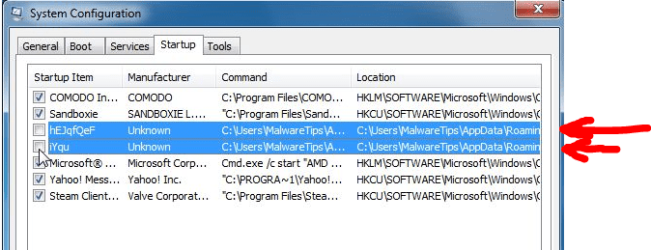
Navigate to your user's AppData-Roaming directory on your OS drive, and see if you can find entries like the ones shown in option #3 of the link derekimo posted for you:


If you find something similar to these, you can manually delete them.

Let me know how you get on.
 

Attachments

  • genuine-malware.PNG
    genuine-malware.PNG
    57.6 KB · Views: 28
Last edited:

My Computer My Computer

At a glance

W7 64bit
Computer type
PC/Desktop
OS
W7 64bit
If you can boot to the first option I gave you (Kyhi's custom rescue media) it has Malwarebytes installed and you can run it from there (follow instructions to update defs and check the boxes as I described).

Just a few notes re: MBAM.

1) Running MBAM in Windows Safe Mode is not recommended. In order to work properly, it needs to be installed and run from the Windows Boot Drive in Normal mode. If that does not work because of severe infection, then the built-in Chameleon technology would be the next step. If even that does not work, then running some additional tools from outside Windows might be needed first.

2) I do not work for Malwarebytes and am not a lawyer. However, unless the creator of Kyhi's custom rescue media has specific authorization from Malwarebytes Corporation, use of the product on such a "custom" rescue tool is not officially supported and probably violates the EULA. <just sayin'>

I will now defer to @simrick for further assistance.:)

Cheers,
MM
 

My Computer My Computer

At a glance

OEM Windows 7 Ult (x64) SP1Intel Core-i7 3770 @ 3.4 GHz16 GB DDR3 SDRAM @ 1333 MHzNVidia GeForce GT620 1 GB
Computer type
PC/Desktop
Computer Manufacturer/Model Number
Dell Studio XPS 8500
OS
OEM Windows 7 Ult (x64) SP1
CPU
Intel Core-i7 3770 @ 3.4 GHz
Motherboard
"Dell" branded
Memory
16 GB DDR3 SDRAM @ 1333 MHz
Graphics Card(s)
NVidia GeForce GT620 1 GB
Sound Card
THX TruStudio PC
Monitor(s) Displays
Dell U2410 Full HD
Hard Drives
2.0 TB SATA2 @ 7200 RPM
PSU
350W
Keyboard
MS 4000 Ergon - Wired
Mouse
Logitech Anywhere MX
Internet Speed
Cable HSI w/Turbo (router)
Antivirus
KIS-MBAM Premium-MBAE Premium
Browser
Fx (current version); IE
Other Info
And a Win7/64 Pro laptop; And a Win10/64 Pro desktop.
Followed the instructions on bleepingcomputer suggested by Microsoft's forum and it seems the nasty ass virus is gone! Thanks for all your suggestions derekimo and simrick!
 

My Computer My Computer

At a glance

Microsoft Windows 7 Home Premium 64-bit 7601 ...Intel(R) Core(TM) i5-2430M CPU @ 2.40GHzTotal: 8.00 GB Usable: 7.90 GB(1) NVIDIA GeForce GT 525M (2) Intel(R) HD Gr...
Computer type
Laptop
Computer Manufacturer/Model Number
Dell
OS
Microsoft Windows 7 Home Premium 64-bit 7601 Multiprocessor Free Service Pack 1
CPU
Intel(R) Core(TM) i5-2430M CPU @ 2.40GHz
Motherboard
Dell Inc. 0YR8NN
Memory
Total: 8.00 GB Usable: 7.90 GB
Graphics Card(s)
(1) NVIDIA GeForce GT 525M (2) Intel(R) HD Graphics Famil
Sound Card
(1) Realtek High Definition Audio (2) Intel(R) Display Aud
Hard Drives
ST9750420AS
WD MyBook 1TB External
Seagate BackupPlus Desktop Drive 5TB External
Mouse
Logitech Wireless Mouse M705
Antivirus
Microsoft Security Essentials
Browser
Google Chrome
You're welcome, glad you got rid of it. :)
 

My Computer My Computer

At a glance

Win 10 Pro x64Intel I5-2500K @3.3GHz16GB G.Skill Ripjaws X (4x4GB)EVGA GeForce 750 Ti SC 2GB
Computer type
PC/Desktop
Computer Manufacturer/Model Number
Self Built
OS
Win 10 Pro x64
CPU
Intel I5-2500K @3.3GHz
Motherboard
Asrock P67 Extreme4
Memory
16GB G.Skill Ripjaws X (4x4GB)
Graphics Card(s)
EVGA GeForce 750 Ti SC 2GB
Sound Card
ASUS Xonar DG 5.1 Channels 24-bit 96KHz PCI Interface Sound
Monitor(s) Displays
auria eq2367
Screen Resolution
1920 x 1080
Hard Drives
250GB Samsung 850 EVO SSD
1TB WD Blue
1TB Hitachi
PSU
SeaSonic X 650W 80 Plus Gold
Case
Corsair Obsidian 750D
Cooling
Corsair H60, Three 140mm case fans
Keyboard
Logitech Wireless Keyboard K520
Mouse
Logitech Wireless Mouse M310
Internet Speed
Wave Broadband ~ 100 dn 5 up
Antivirus
Windows Defender, Malwarebytes Premium
Browser
Edge, IE11, Chrome
Other Info
Laptop specs: HP g7-1365dx /
CPU: AMD A6-3420M APU with Radeon(tm) HD Graphics /
RAM: Crucial 8Gb (2x4Gb) /
SSD: Crucial M4-CT128M4SSD2 ATA Device/ FW 000F /
GFX: AMD Radeon HD 6520G /
OS: Windows 10 Pro x64
Followed the instructions on bleepingcomputer suggested by Microsoft's forum and it seems the nasty ass virus is gone! Thanks for all your suggestions derekimo and simrick!

Good news! Care to share the link of what you used, for future users who may read this? Thanks.
 

My Computer My Computer

At a glance

W7 64bit
Computer type
PC/Desktop
OS
W7 64bit

My Computer My Computer

At a glance

Microsoft Windows 7 Home Premium 64-bit 7601 ...Intel(R) Core(TM) i5-2430M CPU @ 2.40GHzTotal: 8.00 GB Usable: 7.90 GB(1) NVIDIA GeForce GT 525M (2) Intel(R) HD Gr...
Computer type
Laptop
Computer Manufacturer/Model Number
Dell
OS
Microsoft Windows 7 Home Premium 64-bit 7601 Multiprocessor Free Service Pack 1
CPU
Intel(R) Core(TM) i5-2430M CPU @ 2.40GHz
Motherboard
Dell Inc. 0YR8NN
Memory
Total: 8.00 GB Usable: 7.90 GB
Graphics Card(s)
(1) NVIDIA GeForce GT 525M (2) Intel(R) HD Graphics Famil
Sound Card
(1) Realtek High Definition Audio (2) Intel(R) Display Aud
Hard Drives
ST9750420AS
WD MyBook 1TB External
Seagate BackupPlus Desktop Drive 5TB External
Mouse
Logitech Wireless Mouse M705
Antivirus
Microsoft Security Essentials
Browser
Google Chrome
Back
Top