This is a Security issue, but more!!!

Status
Not open for further replies.

pjvex386

New member
Local time
12:32 AM
Messages
57
Location
Chicago - Milwaukee
OK..... I need some help!! My first born to be named after the individual who can exorcise the demons from my laptop.

I am pretty Windows savvy, my weakest points are controlling arcane environmental settings in the registry, and perhaps a few other things..... But other than that, I am solid. I never thought I would be posting to this board. However, due to the strangest security breach I have ever seen, coupled with my inability to rid my laptop of this breach (maybe a worm--although it is not autonomous, it is smart and is being controlled by some nefarious individual(s). I had no choice. Seek help, or throw out my laptop, or maybe I move to Hawaii (but that might not even help).

Ok, here is the best I can do in the way of a summary:

First my specs:
Dell HP Pavillion 2212
Dual Core 1.6GHz
2GB Ram
120 GB HD
500GB USB Western Digital My Book
Broadcom bcm43xx wireless adapter
NVIDIA HOST Controller as LAN Adapter
+++ this is new: a "loopback adapter" (<--- I know what one is, but it never showed up as an adapter choice prior to this problem.

Operating System: Windows 7 B7000.

About 6 weeks ago, I authenticated with a wireless network near my residence and used the internet for a bit. I did this again over the next few days, and then started noticing some very strange things ocuring. My task manager had a number of processes that I never recognized (even though I was using Windows 7 beta), and it seemed as if I had a lot of services that were server based.

After trying to look further into what was happening, I started getting "access denied" messages all over the place. I enabled my Administrator user, and logged in. Still no luck.... I was encountering "Access Denied" whenever I tried to look at either certain files in System32 or in the Registry.

Below, I am including my latest complete Remote Access Diagnostics dump (netsh interface ras), but before I get there, I would like to share my theory. Laugh if you must...almost everyone (in IT or not) has laughed at me as if I was some sort of conspiracy nut!!

I think because WIndows 7 and Windows Vista install with ipv6 adapters (ISATAP, TEREDO, etc) advertising from the get-go, I am being hijacked and I cannot find a way to rid my pc of this problem... I do not know how they are getting in... Even after I log in, I disable ALL adapters, and then set state disabled to netsh interface 6to4, ISATAP, TEREDO, etc. I reset ipv4 and ipv6, and reset Winsock (which is loaded with items). AND, the trick they are using is UDP... UDP in most cases can bypass NAT and firewalls, so its quick and they can find me in seconds---

FYI: I have reformated (slow not quick) my drive and reinstalled Windows 7 no less than 40 times.

Somehow this cretin is still finding access into my PC. I try to install Kapersky's Techinical Preview, but this intruder knows how to filter it rendering it mostly useless.

I know this is a weakness from Microsoft....I mean all I need is to find a room with lead-lined walls to reinstall Windows 7 in and I am good... Because I can go 5 miles from where the network was originally, and somehow, I am advertising some beacon which IDs me on the internet and creates a tunnel....

No matter where I go, I cannot escape this.... I am nearing insanity. Please, please help.... I have deleted all of the ipv6 addresses from ROUTE as well as my loopback adapter address.... But nothing works...

Here is my Netsh interface ras diagnostic dump. Given its length.... I have attached it as a .pdf

Please someone help this poor Windows 7 user. I just want to use my damn laptop!!!! Without its resources going to sustain some alien life or something.....
 

Attachments

My Computer

OS
Windows 7
Let's see if MBam picks anything up.

Download Malwarebytes' Anti-Malware to your desktop
|MG| Malwarebytes Anti-Malware 1.34

* Double-click mbam-setup.exe and follow the prompts to install the program.
* At the end, be sure a checkmark is placed next to Update Malwarebytes' Anti-Malware and Launch Malwarebytes' Anti-Malware, then click Finish.
* If an update is found, it will download and install the latest version.
* Once the program has loaded, select Perform full scan, then click Scan.
* When the scan is complete, click OK, then Show Results to view the results.
* Be sure that everything is checked, and click Remove Selected.
* When completed, a log will open in Notepad. Please save it to a convenient location. Copy and Paste that log into your next reply.
 

My Computer

Computer type
PC/Desktop
Computer Manufacturer/Model Number
Bruce ... somewhere in his 40's
OS
Windows 7 Ultimate 32bit SP1
CPU
Intel(R) Core(TM)2 Quad CPU @ 2.40GHz, 2400 MHz
Motherboard
INTEL/D975XBX2
Memory
4 GB
Graphics Card(s)
ATI Radeon HD 2600 Pro
Monitor(s) Displays
Samsung SyncMaster 914v
Screen Resolution
1280 x 1024
Hard Drives
2/500GB each ... ST3500630AS ATA Device.
One is not connected
PSU
Rocketfish 700 W
Case
G.Skill Gigabyte Chassis
Keyboard
Standard PS/2 Keyboard
Mouse
Microsoft PS/2 Mouse
Internet Speed
DSL
Antivirus
Avira Internet Security
Browser
IE 11
Other Info
ATI HDMI Audio
I know I'm probably way off base here but you mention it's a Dell and someone in another thread said their Internet problems were caused by a program called "Dell Remote Access"

Just thought I'd throw this idea in although it's probably nothing to do with your problems at all :shock:
 

My Computer

Computer type
PC/Desktop
Computer Manufacturer/Model Number
Acer Aspire XC-704 x64 bit/ Asus K55A Notebook PC/HP Envy x360 Convertible 15-bq0xx
OS
Windows 10 64bit/Windows 10 64bit/Windows 10 64bit
CPU
Intel Pentium J3710 @ 60GHz/Intel B820,1.7GHz/AMD A9 Radeon
Motherboard
Acer Aspire XC-704 (SOCKET 0)/Asus/HP 8312 (Socket FP4)
Memory
8.00GB DDR3 @ 1599MHz/8GB 2 x 4GB DDR3/8.00GB Dual-Channel
Graphics Card(s)
Intel HD Graphics/Intel/512MB ATI AMD Radeon R5 Graphics (HP
Sound Card
Realtek High Definition Audio/Onboard/AMD High Definition Au
Monitor(s) Displays
Acer LCD K222HQL /Asus 15.6/Generic PnP Monitor (1920x1080@6
Screen Resolution
1920x1080@59Hz/1366 x 768/1920x1080@60Hz
Hard Drives
1863GBWesternn Digital WDC/Asus/119GB SanDisk SD8SN8U-128G-1006 (SSD)
931GB Hitachi HGST HTS721010A9E630 (SATA)
Keyboard
Microsoft Natural Ergonomic Keyboard 4000 (UK)/Inbuilt/Inbui
Mouse
Microsoft Optical Wheel Mouse/Same plus Touchpad/Same + Pad
Internet Speed
Infinity 2 up to 76 Mbps
Antivirus
MSE/MSE/MSE and all 3 have MalwareBytes Premium
Browser
Edge, Firefox/Edge, Firefox/Edge, Firefox, Chrome
Other Info
Seagate Expansion 500GB External Desktop Drive
Seagate Expansion Portable Drives 500GB and 1TB
Epson XP-332 Wireless Printer
Welcome to the Se7en Forums pjvex386 :party:

Your post was very well prepared and will provide everyone with the information to assist you.

I will start looking at your services and processes and see if anything stands out. We have a great team of Windows 7 Guru's that will be assisting you as well.
 

My Computer

Computer Manufacturer/Model Number
Dell XPS 420
OS
Windows 7 RC
CPU
Intel Q6600 Quad Core
Motherboard
Dell Proprietary
Memory
4 GB DDR 800
Graphics Card(s)
Nvidia 8800GT
Sound Card
Integrated - Sigmatel HD Audio
Monitor(s) Displays
Dual Dell 22" Wide Screen
Screen Resolution
3360x1050
Hard Drives
320 GB internal
2.5 TB external
PSU
Big Enough
Case
Dell XPS 420
Cooling
Air
Keyboard
Dell USB
Mouse
Wireless MS mouse
Internet Speed
DSL 3MB Down
Other Info
WEI 5.9 (Windows 7 RC), Not too bad for an off the shelf PC :)
one thing i can recomend is to keep your install as clean as possible...
disable anything not needed
also did you download this from somewhere other than ms cause that the installer might have been bugged....
 

My Computer

Computer Manufacturer/Model Number
Tx2500z Tablet Pc/Homemade Server
OS
Windows 7 Ult x64(x2), HomePrem x32(x4), Server 08 (+VM), 08 R2 (VM) , SuSe 11.2 (VM), XP 32 (VM)
CPU
Turion X2 ultra (oh well came with laptop)/P4 @3.2 (yes P4)
Motherboard
IDK HP Motherboard / Intel DG965SS
Memory
OCZ Dual Channel 4GB kit/ 1gb Dual Channel
Graphics Card(s)
HD 3200 graphics /GMA x3100 (yay for intergrated!!)
Sound Card
Realtek HD Audio(mic working, well sort of)/Siig IC-70012
Monitor(s) Displays
built-in Hp 12" laptop screen/ Acer 19"
Screen Resolution
1280x800 /1440x900
Cooling
All Air Cooled
Mouse
Logi MX Rev. /MS Wheel Optical 1.1A /Logitech Optical Mouse
Internet Speed
College baby but its still routed through vpn to 1536k...
Other Info
love my wacom pen and pressure sensitivity...
wished it worked in 7, SUSE for that matter though
Hi pjvex386,

I know that this forum is for W7, but can you try to install Vista to see if you get the same problem? If you do, we can probably think of looking at the physical setup of your laptop. One thing that does alarm me - according to the manuals, the wireless function is enabled at the factory and is set to ON by default - see the link below. In my opinion, this should be set to OFF and you should enable it yourself if you want to use this facility. When you install W7 (or indeed any OS), you should ensure that ALL network devices are turned off or unplugged as until the OS is fully installed your system could be vulnerable.

http://h10032.www1.hp.com/ctg/Manual/c00820049.pdf
 

My Computer

Computer type
PC/Desktop
Computer Manufacturer/Model Number
Dwarf Dwf/11/2012 r09/2013
OS
Windows 8.1 Pro RTM x64
CPU
Intel Core-i5-3570K 4-core @ 3.4GHz (Ivy Bridge) (OC 4.4GHz)
Motherboard
ASRock Z77 Extreme4-M
Memory
4 x 4GB DDR3-1600 Corsair Vengeance CMZ8GX3M2A1600C9B (16GB)
Graphics Card(s)
MSI GeForce GTX770 Gaming OC 2GB
Sound Card
Realtek High Definition on board solution (ALC 898)
Monitor(s) Displays
ViewSonic VA1912w Widescreen (VGA)
Screen Resolution
1440x900
Hard Drives
OCZ Agility 3 SSD 120GB SATA III x2 (RAID 0)
Samsung HD501LJ 500GB SATA II x2
Hitachi HDS721010CLA332 1TB SATA II
Iomega 1.5TB Ext USB 2.0
WD 2.0TB Ext USB 3.0
PSU
XFX Pro Series 850W Semi-Modular
Case
Gigabyte IF233
Cooling
1 x 120mm Front Inlet 1 x 120mm Rear Exhaust
Keyboard
Microsoft Comfort Curve Keyboard 3000 (USB)
Mouse
Microsoft Comfort Mouse 3000 for Business (USB)
Internet Speed
NetGear DG834Gv3 ADSL Modem/Router (Ethernet) ~4.0 Mb/s (O2)
Antivirus
Avast! 8.0.1497
Browser
IE 11
Other Info
Optical Drive: HL-DT-ST BD-RE BH10LS30 SATA Bluray
Lexmark S305 Printer/Scanner/Copier (USB)
WEI Score: 8.1/8.1/8.5/8.5/8.25
Asus Eee PC 1011PX Netbook (Windows 7 x86 Starter)
OK, here is the deal - I found a lot of inconsistencies in your services list from my services list - some are easily explained, and some are not:

List of services you have running that I don't have started:
  • Acronis Scheduler2 Service (I don't have Acronis)
  • Application Host Helper Service (Not even listed in my set of services)
  • CNG Key Isolation - my setting - Manual, not started
  • Diagnostic System Host - my setting - Manual, not started
  • Extensible Authentication Protocol - my setting - Manual, not started
  • IKE and AuthIP IPsec Keying Modules - my setting - Manual, not started
  • IPsec Policy Agent - my setting - Manual, not started
  • Kaspersky Anti-Virus 8.0 (I don't have Kaspersky)
  • Multimedia Class Scheduler - my setting - Automatic, not started - this means I have not had anything interface with Windows for a multimedia file class at all as of yet - yours is normal, leave it alone.
  • QBCFMonitorService (Not even listed in my set of services) - meaning it could be from Kaspersky or Acronis, but it could be malicious
  • RIP Listener (Not even listed in my set of services) - meaning it could be from Kaspersky or Acronis, but it could be malicious
  • Software Protection - my setting - Automatic (Delayed start), not started
  • Telephony - my setting - Manual, not started
  • WLAN AutoConfig - my setting - Manual, not started

And now for services I have running that you do not (I am excluding any machine specific services on my end):

  • Application Information - my setting - Automatic, started
  • DNS Client - my setting - Automatic, started
  • Program Compatibility Assistant Service - my setting - Automatic, started

Now of the three I am running that you are not, that DNS one is going to be needed unless Kaspersky is also using a firewall and using its own DNS system - you'll have to contact them to find out. Also, that last one is pretty important as it is needed for automatically checking program compatibility with W7 - and since this is a Beta OS, I highly recommend you leave it on so it can tell you before installation if a program may have issues.

Finally, take note - I see RIP listener, for example, but I remember that in the past you had to manually install that from Programs and Features, so my next set of questions are *critical* and need to be answered:

1) When you said you had installed W7 locally 40 times, are you using the default ISO image from the download, or have you modified it using something like vLite? If not modifying it, are you adding some of these features manually?

2) If this is a generic Windows 7 CD, please do as mentioned above - turn off your wireless *manually* and the format and reinstall W7 - ***and use a different user name and PW*** - then connect ***and do not use the network nearby in your neighborhood***.

3) Have you tried searching for a possible rootkit installation on your machine? Do you have access to spare HDs that you can temporarily replace your current one with and install W7 and see if the problem persists?
 

My Computers

System One System Two

  • Computer type
    PC/Desktop
    Computer Manufacturer/Model Number
    The Beast Model A (homebrew)
    OS
    Windows 11 21H2 Current build
    CPU
    AMD Ryzen 9 3950X
    Motherboard
    MSI MEG X570 GODLIKE
    Memory
    4 * 32 GB - Corsair Vengeance 3600 MHz
    Graphics Card(s)
    EVGA GeForce RTX 3080 Ti XC3 ULTRA GAMING (12G-P5-3955-KR)
    Sound Card
    Realtek® ALC1220 Codec
    Monitor(s) Displays
    2x Eve Spectrum ES07D03 4K Gaming Monitor (Matte) | Eve Spec
    Screen Resolution
    3x 3840 x 2160
    Hard Drives
    3x Samsung 980 Pro NVMe PCIe 4 M.2 2 TB SSD (MZ-V8P2T0B/AM) } 3x Sabrent Rocket NVMe 4.0 1 TB SSD
    PSU
    PC Power & Cooling’s Silencer Series 1050 Watt, 80 Plus Plat
    Case
    Fractal Design Define 7 XL Dark ATX Full Tower Case
    Cooling
    SteelSeries Apex Pro Wired Gaming Keyboard
    Keyboard
    SteelSeries Apex Pro
    Mouse
    Logitech MX Master 3S | MX Master 3 for business
    Internet Speed
    AT&T LightSpeed Gigabit Duplex Ftth
    Antivirus
    Windows Defender + MB 3
    Browser
    Nightly (default) + Firefox (stable),Chrome, Edge
  • Computer type
    PC/Desktop
    System Manufacturer/Model Number
    Dell Latitude E5470
    OS
    ChromeOS Flex Dev Channel (current)
    CPU
    Intel(R) Core(TM) i5-6300U CPU @ 2.40GHz, 2501 Mhz, 2 Core(s), 4 Logical Processor(s)
    Motherboard
    Dell
    Memory
    16 GB
    Graphics Card(s)
    Intel(R) HD Graphics 520
    Sound Card
    Intel(R) HD Graphics 520 + RealTek Audio
    Monitor(s) Displays
    Dell laptop display 15"
    Screen Resolution
    1920 * 1080
    Hard Drives
    Toshiba 128GB M.2 22300 drive
    INTEL Cherryville 520 Series SSDSC2CW180A 180 GB SATA III SSD
    PSU
    Dell
    Case
    Dell
    Cooling
    Dell
    Keyboard
    Dell
    Mouse
    Logitech MX Master 3S (shared w. Sys 1) | Dell TouchPad
    Internet Speed
    AT&T LightSpeed Gigabit Duplex Ftth
I'm assuming your wireless connection has a password and is encrypted, right? They might be gaining access from that to your laptop.

I would make sure both have passwords if not.
 

My Computer

Computer Manufacturer/Model Number
myself
OS
Windows 7 Ultimate 64bit
CPU
Intel Core 2 Duo E8400 3.0ghz Wolfdale
Motherboard
ASUS P5Q Pro ATX LGA775
Memory
OCZ Gold XTC PC2-6400 4GB
Graphics Card(s)
BFG Geforce 8800GT OC
Sound Card
onboard (HD)
Monitor(s) Displays
HP w2207h
Screen Resolution
1680x1050
Hard Drives
Western Digital Caviar SE16 640GB
PSU
Antec Earthwatts 500w
Case
Antec Sonata III
Cooling
Arctic Cooling Accelero S1 Rev 2 Passive VGA Cooler
Keyboard
Logitech
Mouse
Ocz equalizer
Internet Speed
750+
The following services are legitimate:

QBCFMonitorService - SystemLookup - QuickBooks Database Manager Service (QBCFMonitorService)

RIP Listener - Windows Vista Service Pack 1 Services Information - RIP Listener

This one, however, is suspicious because it is associated with both legitimate AND non-legitimate (malware) items:

Application Host Helper Service - SystemLookup - Global Search

Having said that, a further check of SystemLookup - An online database of what's good and bad on your computer reveals this could also be associated with Small Business Accounting Software | QuickBooks 2008 by Intuit which links with QBCFMonitorService mentioned above, but ONLY if you have QuickBooks installed.
 

My Computer

Computer type
PC/Desktop
Computer Manufacturer/Model Number
Dwarf Dwf/11/2012 r09/2013
OS
Windows 8.1 Pro RTM x64
CPU
Intel Core-i5-3570K 4-core @ 3.4GHz (Ivy Bridge) (OC 4.4GHz)
Motherboard
ASRock Z77 Extreme4-M
Memory
4 x 4GB DDR3-1600 Corsair Vengeance CMZ8GX3M2A1600C9B (16GB)
Graphics Card(s)
MSI GeForce GTX770 Gaming OC 2GB
Sound Card
Realtek High Definition on board solution (ALC 898)
Monitor(s) Displays
ViewSonic VA1912w Widescreen (VGA)
Screen Resolution
1440x900
Hard Drives
OCZ Agility 3 SSD 120GB SATA III x2 (RAID 0)
Samsung HD501LJ 500GB SATA II x2
Hitachi HDS721010CLA332 1TB SATA II
Iomega 1.5TB Ext USB 2.0
WD 2.0TB Ext USB 3.0
PSU
XFX Pro Series 850W Semi-Modular
Case
Gigabyte IF233
Cooling
1 x 120mm Front Inlet 1 x 120mm Rear Exhaust
Keyboard
Microsoft Comfort Curve Keyboard 3000 (USB)
Mouse
Microsoft Comfort Mouse 3000 for Business (USB)
Internet Speed
NetGear DG834Gv3 ADSL Modem/Router (Ethernet) ~4.0 Mb/s (O2)
Antivirus
Avast! 8.0.1497
Browser
IE 11
Other Info
Optical Drive: HL-DT-ST BD-RE BH10LS30 SATA Bluray
Lexmark S305 Printer/Scanner/Copier (USB)
WEI Score: 8.1/8.1/8.5/8.5/8.25
Asus Eee PC 1011PX Netbook (Windows 7 x86 Starter)
RIP Listener is a legit Windows System service - problem is that it is never installed by default - hence my note about it.

Thanks for the info on the other two.
 

My Computers

System One System Two

  • Computer type
    PC/Desktop
    Computer Manufacturer/Model Number
    The Beast Model A (homebrew)
    OS
    Windows 11 21H2 Current build
    CPU
    AMD Ryzen 9 3950X
    Motherboard
    MSI MEG X570 GODLIKE
    Memory
    4 * 32 GB - Corsair Vengeance 3600 MHz
    Graphics Card(s)
    EVGA GeForce RTX 3080 Ti XC3 ULTRA GAMING (12G-P5-3955-KR)
    Sound Card
    Realtek® ALC1220 Codec
    Monitor(s) Displays
    2x Eve Spectrum ES07D03 4K Gaming Monitor (Matte) | Eve Spec
    Screen Resolution
    3x 3840 x 2160
    Hard Drives
    3x Samsung 980 Pro NVMe PCIe 4 M.2 2 TB SSD (MZ-V8P2T0B/AM) } 3x Sabrent Rocket NVMe 4.0 1 TB SSD
    PSU
    PC Power & Cooling’s Silencer Series 1050 Watt, 80 Plus Plat
    Case
    Fractal Design Define 7 XL Dark ATX Full Tower Case
    Cooling
    SteelSeries Apex Pro Wired Gaming Keyboard
    Keyboard
    SteelSeries Apex Pro
    Mouse
    Logitech MX Master 3S | MX Master 3 for business
    Internet Speed
    AT&T LightSpeed Gigabit Duplex Ftth
    Antivirus
    Windows Defender + MB 3
    Browser
    Nightly (default) + Firefox (stable),Chrome, Edge
  • Computer type
    PC/Desktop
    System Manufacturer/Model Number
    Dell Latitude E5470
    OS
    ChromeOS Flex Dev Channel (current)
    CPU
    Intel(R) Core(TM) i5-6300U CPU @ 2.40GHz, 2501 Mhz, 2 Core(s), 4 Logical Processor(s)
    Motherboard
    Dell
    Memory
    16 GB
    Graphics Card(s)
    Intel(R) HD Graphics 520
    Sound Card
    Intel(R) HD Graphics 520 + RealTek Audio
    Monitor(s) Displays
    Dell laptop display 15"
    Screen Resolution
    1920 * 1080
    Hard Drives
    Toshiba 128GB M.2 22300 drive
    INTEL Cherryville 520 Series SSDSC2CW180A 180 GB SATA III SSD
    PSU
    Dell
    Case
    Dell
    Cooling
    Dell
    Keyboard
    Dell
    Mouse
    Logitech MX Master 3S (shared w. Sys 1) | Dell TouchPad
    Internet Speed
    AT&T LightSpeed Gigabit Duplex Ftth
Thank you guys...

OK. I want to thank you for all of your answers... I have to say it is quite a relief to have some other minds working with me on this problem as I either end up talking to someone with a blank, glassy-eyed stare as they have no idea what I am talking about, or, if they do, they think I am on some psychotropic substance.

But to the topic. I do not want to sound cocky, but this IS in fact some strange hijacking. Here are some stats. (A) Number of times installed Windows Vista (in the beginning): 2x. (B) # of times I have either wiped the HD and did a slow format and installed Windows 7 straight from the DVD which I burned from the MS image.....untouched from the download (i.e., Build 7000): 40 to 50 times. (C) # times I have reformated my hard drive and installed Ubuntu, only to suffer similar problems with network funny-business (suddenly iwconfig was no longer recognized as a command, or suddenly, I have no wireless adapter.)

I am attaching a number of other docs to this post, namely output from wininternals utilities. I have also included some other items. Please look at them... Some I understand, some I don't (not quite sure how handles work for instance). I will say, irrespective of my complete understanding of all of this output, after about 10 minutes of looking at this stuff, if you have been working with computers for anywhere over 5 years (and I am going on 20...in various areas), something just SMELLS. IT is undeniable. I do not know if this guy who is trying to ruin my life is doing this to several wireless PC's outhtere to build some sort of chained netowrk of his own (if that makes sense), but given the amount of time he has had to have put inot this endeavor, it would seem it has gone beyond a simple revenge for my intrusion into a network to use the net.


Docs attached:

-A VMMAP (sysinternals) report on a service called WmiPrvSE )always in my task manager)
-Another VMMap of services.exe--a common process in taskmanager, but this one that is particularly important to this guy. If I lower the priority (or kill it of course), he shuts down my system (but the system is still on, if you know what I mean, i.e. lights are on --screen is dead). Also, Services.exe has about 10-15 svchost processes running immediately after I login after installation. This cannot be right.
-Pipelist (from sysinternals as well)
-AccessEnum (sysinternals).... OK, look at this. Why are their so many network based processes on here? Why is trustedinstaller everywhere????? [FYI, in the registry where all of these ISATAP and other adapters exists, I have modified them so they will not work (did not touch my wireless adapter), made my Administrator the sole owner of these keys, and made user "SERVICE" (i.e., TrustedInstaller) a user with all privs denied. I actually was able to use my PC for about 4 hours after this!!!!
--autorunsc (wininternals)
Also very strange.
--Accesschk (wininternals) -f -t -s (file is called perm.txt) (I think those were the switches) on drive c: Please tell me this does not look crazy.... This is my f&*!inG LAPTOP!!!!

--Laslty, I am sending a copy of HKLM. It also seems unusual, although I will admit, the registry and me are only good friends, not intimate in any way :) .

I really think the only way I am able to install win 7 is to find a hospital or lead-lined room where there is no RF or WIFI. Then install a firewall to keep this guys UDP packets from hitting my adapter. And yes, my adapters are all on. PLUS two ISATAP, TEREDO, SSDP, and a bunch of others... I will try to send a screenshot of my device manager tomorrow (it is loaded with "unknown devices" and numerous other devices when one shows "hidden devices" from the menu.

Thanks again guys.... I owe you big.... I am about to use this fine 1.5 year old dual core HP as a paperweight....beause after 3 different OS installations in locations all over Chicago, I still cannot use my PC as I am accustomed.

Paul
 

My Computer

OS
Windows 7
i cut this is pieces so that it makes it easier to answer

OK. I want to thank you for all of your answers... I have to say it is quite a relief to have some other minds working with me on this problem as I either end up talking to someone with a blank, glassy-eyed stare as they have no idea what I am talking about, or, if they do, they think I am on some psychotropic substance.

theres alot of these snobbish people thinking that you are paraniod...;)
trust me ive seen them in action in my schools in some places of business

But to the topic. I do not want to sound cocky, but this IS in fact some strange hijacking. Here are some stats. (A) Number of times installed Windows Vista (in the beginning): 2x. (B) # of times I have either wiped the HD and did a slow format and installed Windows 7 straight from the DVD which I burned from the MS image.....untouched from the download (i.e., Build 7000): 40 to 50 times. (C) # times I have reformated my hard drive and installed Ubuntu, only to suffer similar problems with network funny-business (suddenly iwconfig was no longer recognized as a command, or suddenly, I have no wireless adapter.)
the ubuntu problem seems more problematic with either your password (a easy to guess password would be obvious or a the same password used frequently or not even having a password also count) or you are using a very weak WPA password or a WEP key...(never use WEP if you can use WPA2)
as for the adapter dispearing we can make sure its not someone changing things in your computer by using a completely different password (that no-one can guess)
if this is still happening in ubuntu then we can be almost positive this might be a hardware problem (as ubuntu and Windows are completely different OS and the only thing that would have in common would be passwords and hardware....)
also make sure no-one has access to your machine between the time you changed the password (and i mean no-one...;)) but you so we can check off that it is not a remote attack


I am attaching a number of other docs to this post, namely output from wininternals utilities. I have also included some other items. Please look at them... Some I understand, some I don't (not quite sure how handles work for instance). I will say, irrespective of my complete understanding of all of this output, after about 10 minutes of looking at this stuff, if you have been working with computers for anywhere over 5 years (and I am going on 20...in various areas), something just SMELLS. IT is undeniable. I do not know if this guy who is trying to ruin my life is doing this to several wireless PC's outhtere to build some sort of chained netowrk of his own (if that makes sense), but given the amount of time he has had to have put inot this endeavor, it would seem it has gone beyond a simple revenge for my intrusion into a network to use the net.

Docs attached:

-A VMMAP (sysinternals) report on a service called WmiPrvSE )always in my task manager)
-Another VMMap of services.exe--a common process in taskmanager, but this one that is particularly important to this guy. If I lower the priority (or kill it of course), he shuts down my system (but the system is still on, if you know what I mean, i.e. lights are on --screen is dead). Also, Services.exe has about 10-15 svchost processes running immediately after I login after installation. This cannot be right.
-Pipelist (from sysinternals as well)
-AccessEnum (sysinternals).... OK, look at this. Why are their so many network based processes on here? Why is trustedinstaller everywhere????? [FYI, in the registry where all of these ISATAP and other adapters exists, I have modified them so they will not work (did not touch my wireless adapter), made my Administrator the sole owner of these keys, and made user "SERVICE" (i.e., TrustedInstaller) a user with all privs denied. I actually was able to use my PC for about 4 hours after this!!!!
--autorunsc (wininternals)
Also very strange.
--Accesschk (wininternals) -f -t -s (file is called perm.txt) (I think those were the switches) on drive c: Please tell me this does not look crazy.... This is my f&*!inG LAPTOP!!!!

as for the svhosts yeah there are supposed to be there
what would be unsual would be if they are running from another location other than the default which is "C:\Windows\System32\svchost.exe"
also check in (if you are in windows)
now the trustedinstaller is there for reason so that users donot mess up the computer by not giving acess to core components (such as special OS keys kernel components [stuff that if its modified can break your computer] and that only windows updates should be accessing and modifying])
this should simplify what this means
Wiki said:
Windows File Protection worked by registering for notification of file changes in Winlogon. If any changes were detected to a protected system file, the modified file was restored from a cached copy located in a compressed folder at %WinDir%\System32\dllcache. Windows Resource Protection works by setting discretionary access control lists (DACLs) and access control lists (ACLs) defined for protected resources. Permission for full access to modify WRP-protected resources is restricted to the processes using the Windows Modules Installer service (TrustedInstaller.exe). Administrators no longer have full rights to system files. Protected resources can be modified or replaced only if administrators take ownership of the resource and add the appropriate Access Control Entries (ACEs).
Windows Resource Protection - Wikipedia, the free encyclopedia
System File Checker - Wikipedia, the free encyclopedia
the machine is simply protecting itself from what it thinks is a attack as such actions are not usually needed for normal operation of a machine

as for the teredo adapters they are installed for use of IPv6 (which i admit is not useful yet) but as long as you make sure that you read this as this will explain some of the network technologies vista brought (and that xp had to some extent)
Windows Vista networking technologies - Wikipedia, the free encyclopedia
and IPv6
IPv6 - Wikipedia, the free encyclopedia
what you need to know is that networking is know carried out a little differently compared to xp


--Laslty, I am sending a copy of HKLM. It also seems unusual, although I will admit, the registry and me are only good friends, not intimate in any way :) .

I really think the only way I am able to install win 7 is to find a hospital or lead-lined room where there is no RF or WIFI. Then install a firewall to keep this guys UDP packets from hitting my adapter. And yes, my adapters are all on. PLUS two ISATAP, TEREDO, SSDP, and a bunch of others... I will try to send a screenshot of my device manager tomorrow (it is loaded with "unknown devices" and numerous other devices when one shows "hidden devices" from the menu.

Thanks again guys.... I owe you big.... I am about to use this fine 1.5 year old dual core HP as a paperweight....beause after 3 different OS installations in locations all over Chicago, I still cannot use my PC as I am accustomed.

Paul

please make sure that instead of deleting these keys and unnistalling these devices you disabled them
this should be good: How to Disable TCP/IPv6 Teredo Tunneling in Vista » My Digital Life
one thing you can do is to delete all your backups and start completely fresh (i mean completely....) use ubuntu to delete anything you can download from the net fresh and clean...
since what im thinking is that some of your files might be infected with a malware...
please make sure you one more reinstall of windows
make sure your router is using WPA or WPA2 to broadcast you network (use a very strong password)
same with windows password
never have your computer running without no password
also for a period of time do not let anyone access the router ( a week should be enough) except you to make sure that someone that was not using your router and your Access point as a point of attack....
install any updates (include any drivers too)
download avast and have it running...
of course have a firewall and have that running too...;)
make sure that *any* apps are download from
 

My Computer

Computer Manufacturer/Model Number
Tx2500z Tablet Pc/Homemade Server
OS
Windows 7 Ult x64(x2), HomePrem x32(x4), Server 08 (+VM), 08 R2 (VM) , SuSe 11.2 (VM), XP 32 (VM)
CPU
Turion X2 ultra (oh well came with laptop)/P4 @3.2 (yes P4)
Motherboard
IDK HP Motherboard / Intel DG965SS
Memory
OCZ Dual Channel 4GB kit/ 1gb Dual Channel
Graphics Card(s)
HD 3200 graphics /GMA x3100 (yay for intergrated!!)
Sound Card
Realtek HD Audio(mic working, well sort of)/Siig IC-70012
Monitor(s) Displays
built-in Hp 12" laptop screen/ Acer 19"
Screen Resolution
1280x800 /1440x900
Cooling
All Air Cooled
Mouse
Logi MX Rev. /MS Wheel Optical 1.1A /Logitech Optical Mouse
Internet Speed
College baby but its still routed through vpn to 1536k...
Other Info
love my wacom pen and pressure sensitivity...
wished it worked in 7, SUSE for that matter though
run a scan with malwarebytes and check if ur system is running properly in safe mode
 

My Computer

Computer Manufacturer/Model Number
Intel
OS
Windows7
CPU
2.66Ghz
Motherboard
Intel PentiumD
Memory
512MB
Graphics Card(s)
ATI RaedonXpress2000
Sound Card
RealtekAudio Driver
Monitor(s) Displays
SyncMaster40N
Screen Resolution
1024x768
Hard Drives
SAMSUNG SP0842N ATA Device
Keyboard
A4Tech Keyboard
Mouse
Genius Mouse
Internet Speed
100mbps
since what im thinking is that some of your files might be infected with a malware...

viewing from a distance this sounds the most likely to me :geek:

nobody is going to sit at a computer with a remote connection waiting for that very moment that your connection appears in order to exploit it :huh:

many ppl have used malware/trojans to place exe's that send echo requests to remote computers that will activate as soon as a network connection is made ;)

this can only mean that the trigger is on your computer and somewhere in YOUR files :confused:
 

My Computer

Computer Manufacturer/Model Number
built my own
OS
win7 ultimate / virtual box
CPU
Intel Core i7 3770K,1155, Ivy Bridge
Motherboard
MSI Z77A-G43
Memory
GSkill Ripjaws Z Series 1600 CL 9.0 16GB
Graphics Card(s)
KFA2 GeForce GTX 670 EX OC 2048MB GDDR5 PCI-E gfx card
Sound Card
onboard Nvidia HDMI audio
Monitor(s) Displays
ASUS VK222H 22" widescreen LCD monitor
Screen Resolution
1680x1050
Hard Drives
Kingston 128gb SSD
OCZ Vertex 90gb SSD
500GB WDCaviar 16mb 5000KS
320GB WDCaviar 16mb 3200AAKS sata 2
1TB Samsung 16mb HD103SJ sata 2
PSU
Corsair HX 750W ATX2.2 Modular
Cooling
Antec 25 Kuhler H2O 620
Keyboard
logitech
Mouse
logitech MX518
Internet Speed
7mb adsl
Well, no one is going to sit at a computer and keep doing it - but there are *plenty* of bots that will sit there and keep trying over and over again.

However, I think there is something else related here. I think it is hardware still - or a rootkit.
 

My Computers

System One System Two

  • Computer type
    PC/Desktop
    Computer Manufacturer/Model Number
    The Beast Model A (homebrew)
    OS
    Windows 11 21H2 Current build
    CPU
    AMD Ryzen 9 3950X
    Motherboard
    MSI MEG X570 GODLIKE
    Memory
    4 * 32 GB - Corsair Vengeance 3600 MHz
    Graphics Card(s)
    EVGA GeForce RTX 3080 Ti XC3 ULTRA GAMING (12G-P5-3955-KR)
    Sound Card
    Realtek® ALC1220 Codec
    Monitor(s) Displays
    2x Eve Spectrum ES07D03 4K Gaming Monitor (Matte) | Eve Spec
    Screen Resolution
    3x 3840 x 2160
    Hard Drives
    3x Samsung 980 Pro NVMe PCIe 4 M.2 2 TB SSD (MZ-V8P2T0B/AM) } 3x Sabrent Rocket NVMe 4.0 1 TB SSD
    PSU
    PC Power & Cooling’s Silencer Series 1050 Watt, 80 Plus Plat
    Case
    Fractal Design Define 7 XL Dark ATX Full Tower Case
    Cooling
    SteelSeries Apex Pro Wired Gaming Keyboard
    Keyboard
    SteelSeries Apex Pro
    Mouse
    Logitech MX Master 3S | MX Master 3 for business
    Internet Speed
    AT&T LightSpeed Gigabit Duplex Ftth
    Antivirus
    Windows Defender + MB 3
    Browser
    Nightly (default) + Firefox (stable),Chrome, Edge
  • Computer type
    PC/Desktop
    System Manufacturer/Model Number
    Dell Latitude E5470
    OS
    ChromeOS Flex Dev Channel (current)
    CPU
    Intel(R) Core(TM) i5-6300U CPU @ 2.40GHz, 2501 Mhz, 2 Core(s), 4 Logical Processor(s)
    Motherboard
    Dell
    Memory
    16 GB
    Graphics Card(s)
    Intel(R) HD Graphics 520
    Sound Card
    Intel(R) HD Graphics 520 + RealTek Audio
    Monitor(s) Displays
    Dell laptop display 15"
    Screen Resolution
    1920 * 1080
    Hard Drives
    Toshiba 128GB M.2 22300 drive
    INTEL Cherryville 520 Series SSDSC2CW180A 180 GB SATA III SSD
    PSU
    Dell
    Case
    Dell
    Cooling
    Dell
    Keyboard
    Dell
    Mouse
    Logitech MX Master 3S (shared w. Sys 1) | Dell TouchPad
    Internet Speed
    AT&T LightSpeed Gigabit Duplex Ftth
Again thank you guys for all your help. Dark, ickymay, etc. You all have valid points. I am losing my mind, my money, and my career (practically) because of this dilemma.

I am not going to say anything much.....except, you cannot realize how f*cked up my situation is and WEIRD.

Get this.... After complaining to everyone--including to you guys on this board, I decided to be a man, and well, I just wanted to get rid of what I know was the problem as originally described..(i.e., someone is hijacking my system -- whether I wipe the drive, and re-install W7, or zero it out with 8 passes--it doesn't matter. Same problem.). So, I opened it up and took out the wireless NIC. Thought my life would be fine..

Guess what....NOTHING HAS CHANGED!!!!!! Well, it is easier to be quicker than this guy and get to stuff and disable it because the RF/wireless card was a big help to him....but although it defies the law of physics. Someone is accessing my computer which does not have wireless capability on some other protocal.....

to prove this (I hope). I am attaching the output of several sysinternals utilities. The enviornment I ran them in was a wiped disk, then booted to the PE recovery mode. with the x: prompt.... So windows is not fully installed, and the rest of the drive is clean clean clean....

But--I think NOW I know the solution. aAs ickymay suggested, it is a trojan (it is actually a P2P Worm). But as this guy is a very very very sophisticated individual, the worm is on protected storage.... So this means I have to do a low level format.

But I want to wait to hear your responses before I do this because, if you are thinking like I am......this is pretty significant to Microsoft if someone can do this.... meaning.....someone can, through various protocols, access and take-over my PC.....and what's more dangerous is that even if the wireless NIC is removed, it may improve your situation, but it does not eliminate it.

Talk to me... I think I should write an article on this or something.... I could tell you more but I am at a public PC cafe and I can no longer afford it because I cannot work because I cannot get my laptop to function with wireless nor have complete control over it. I am not lying.
 

Attachments

My Computer

OS
Windows 7
Again thank you guys for all your help. Dark, ickymay, etc. You all have valid points. I am losing my mind, my money, and my career (practically) because of this dilemma.

I am not going to say anything much.....except, you cannot realize how f*cked up my situation is and WEIRD.

Get this.... After complaining to everyone--including to you guys on this board, I decided to be a man, and well, I just wanted to get rid of what I know was the problem as originally described..(i.e., someone is hijacking my system -- whether I wipe the drive, and re-install W7, or zero it out with 8 passes--it doesn't matter. Same problem.). So, I opened it up and took out the wireless NIC. Thought my life would be fine..

Guess what....NOTHING HAS CHANGED!!!!!! Well, it is easier to be quicker than this guy and get to stuff and disable it because the RF/wireless card was a big help to him....but although it defies the law of physics. Someone is accessing my computer which does not have wireless capability on some other protocal.....

to prove this (I hope). I am attaching the output of several sysinternals utilities. The enviornment I ran them in was a wiped disk, then booted to the PE recovery mode. with the x: prompt.... So windows is not fully installed, and the rest of the drive is clean clean clean....

But--I think NOW I know the solution. aAs ickymay suggested, it is a trojan (it is actually a P2P Worm). But as this guy is a very very very sophisticated individual, the worm is on protected storage.... So this means I have to do a low level format.

But I want to wait to hear your responses before I do this because, if you are thinking like I am......this is pretty significant to Microsoft if someone can do this.... meaning.....someone can, through various protocols, access and take-over my PC.....and what's more dangerous is that even if the wireless NIC is removed, it may improve your situation, but it does not eliminate it.

Talk to me... I think I should write an article on this or something.... I could tell you more but I am at a public PC cafe and I can no longer afford it because I cannot work because I cannot get my laptop to function with wireless nor have complete control over it. I am not lying.

ok hold on did you read what the other poster have posted?
also did you actually physically remove the Wireless nic or just disable it...
man i would love getting my hands on this laptop...:p
i just want to see how he's getting into your machine...:huh:
like i said have you changed your passwords in safe mode?
and make it very hard to guess...
how do you check if your password is good enough you ask?
my favorite site is here
Strength Test
while i also advise this site it does not like my passwords http://www.passwordmeter.com/ (most likely because they wont fit... on the first i got overkill...
Length: 60
Strength: Very Strong - More often than not, this level of security is overkill.
Entropy: 156.7 bits
Charset Size: 62 characters:p)
 
Last edited:

My Computer

Computer Manufacturer/Model Number
Tx2500z Tablet Pc/Homemade Server
OS
Windows 7 Ult x64(x2), HomePrem x32(x4), Server 08 (+VM), 08 R2 (VM) , SuSe 11.2 (VM), XP 32 (VM)
CPU
Turion X2 ultra (oh well came with laptop)/P4 @3.2 (yes P4)
Motherboard
IDK HP Motherboard / Intel DG965SS
Memory
OCZ Dual Channel 4GB kit/ 1gb Dual Channel
Graphics Card(s)
HD 3200 graphics /GMA x3100 (yay for intergrated!!)
Sound Card
Realtek HD Audio(mic working, well sort of)/Siig IC-70012
Monitor(s) Displays
built-in Hp 12" laptop screen/ Acer 19"
Screen Resolution
1280x800 /1440x900
Cooling
All Air Cooled
Mouse
Logi MX Rev. /MS Wheel Optical 1.1A /Logitech Optical Mouse
Internet Speed
College baby but its still routed through vpn to 1536k...
Other Info
love my wacom pen and pressure sensitivity...
wished it worked in 7, SUSE for that matter though
I decided to be a man, and well, I just wanted to get rid of what I know was the problem as originally described..(i.e., someone is hijacking my system -- whether I wipe the drive, and re-install W7, or zero it out with 8 passes--it doesn't matter. Same problem.). So, I opened it up and took out the wireless NIC. Thought my life would be fine..

Guess what....NOTHING HAS CHANGED!!!!!! Well, it is easier to be quicker than this guy and get to stuff and disable it because the RF/wireless card was a big help to him....but although it defies the law of physics. Someone is accessing my computer which does not have wireless capability on some other protocal......

If I didn't know better this sounds like a peice of hardware on your system designed specifically for remote access similar to the Dell DRAC5 Remote Management Card does :huh:

now I know they have equivalent devices for laptop's so can I ask where did you get the laptop and was it from a corporate entity that might have used or have use for such a device ?

does your laptop have an embedded remote access controller , on the dell 2650 this is known as ERA and dell says "ERA is an embedded controller with its own microprocessor and memory that uses a proprietary bus and is powered by the system in which it is installed."

their website talks about it here

now is it possible you are experiencing legitimate or possibly illegal use of this device :geek:

if you do have this device (which operates independantly of any OS) maybe you just need to reconfigure it :)
 

My Computer

Computer Manufacturer/Model Number
built my own
OS
win7 ultimate / virtual box
CPU
Intel Core i7 3770K,1155, Ivy Bridge
Motherboard
MSI Z77A-G43
Memory
GSkill Ripjaws Z Series 1600 CL 9.0 16GB
Graphics Card(s)
KFA2 GeForce GTX 670 EX OC 2048MB GDDR5 PCI-E gfx card
Sound Card
onboard Nvidia HDMI audio
Monitor(s) Displays
ASUS VK222H 22" widescreen LCD monitor
Screen Resolution
1680x1050
Hard Drives
Kingston 128gb SSD
OCZ Vertex 90gb SSD
500GB WDCaviar 16mb 5000KS
320GB WDCaviar 16mb 3200AAKS sata 2
1TB Samsung 16mb HD103SJ sata 2
PSU
Corsair HX 750W ATX2.2 Modular
Cooling
Antec 25 Kuhler H2O 620
Keyboard
logitech
Mouse
logitech MX518
Internet Speed
7mb adsl
First my specs:
Dell HP Pavillion 2212
Dual Core 1.6GHz
[/SIZE][/FONT]

I cannot find anywhere that lists your laptop :confused:

theres a 2212 opteron chip that HP use but no laptop listed on dell or HP's site with the name you quote :huh:

do you have the actual name of this machine or am i missing something :o
 

My Computer

Computer Manufacturer/Model Number
built my own
OS
win7 ultimate / virtual box
CPU
Intel Core i7 3770K,1155, Ivy Bridge
Motherboard
MSI Z77A-G43
Memory
GSkill Ripjaws Z Series 1600 CL 9.0 16GB
Graphics Card(s)
KFA2 GeForce GTX 670 EX OC 2048MB GDDR5 PCI-E gfx card
Sound Card
onboard Nvidia HDMI audio
Monitor(s) Displays
ASUS VK222H 22" widescreen LCD monitor
Screen Resolution
1680x1050
Hard Drives
Kingston 128gb SSD
OCZ Vertex 90gb SSD
500GB WDCaviar 16mb 5000KS
320GB WDCaviar 16mb 3200AAKS sata 2
1TB Samsung 16mb HD103SJ sata 2
PSU
Corsair HX 750W ATX2.2 Modular
Cooling
Antec 25 Kuhler H2O 620
Keyboard
logitech
Mouse
logitech MX518
Internet Speed
7mb adsl
forgot a few things

Sorry.

First to Ickyman, I was not thinking or something, but my laptop is a HP Pavillion dv200 laptop (specific sub-model is an HP 2210us), so let's start with that for purposes of clarity.

Second.... I was not paying attention to the upload requirements, and about six of the files had extensions "not permitted". So I will either convert them to .pdf, or if they are formatted to read by one of the WinsysinternalsSuite utilities, I will try to export it in some format that is allowed.

And, to darkassasin, or anyone else for that matter, I would be more than happy to allow one of you guys to SSH or tunnel to my laptop (if my intruder friend allows it that is), and while one the phone with you, you can do whatever you want.

I can tell you a few things from memory (since this has consumed my energy for so long)... First the services he will not let me have access to under any conditions are RPC, RPC End Mapper, Plug N Play, DCOM Server, and Group Policy Client (in other words, in Properties, everything on every tab is greyed out.

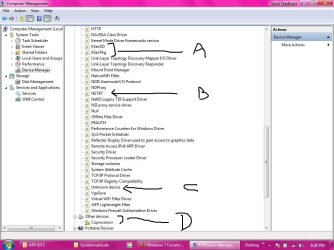
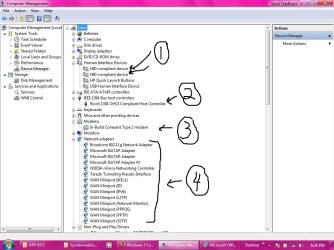
Futher, I am attaching a few screenshots. Two .jpegs are of the device manager screen. In both "DeviceMan I.jpg" and "DeviceMan II.jpg" I tried to annotate it with MS-Paint (didn't want to try to complicate things by putting them in photoshop) so I can explain what I think about them. Keep in mind, I may not know what the hell I am talking about.

In Deviceman I, Item "1" shows two HID devices that seem somehow unneeded and yet always there. Items "2" and "3" are almost certainly being used -- I cannot say why, I just know in the past when I disabled them, I would get "spanked" somehow (for example, I often play MP3s through itunes -- never had a problem-- BUT after disabling one or both of these devices, my audio would be gone and nothing I did (reload drivers, or rebooting) would correct the problem (but then... after 2 or 3 hours I would start the laptop and everything was fine.) [Note: maybe this is somebody my dad hired to teach me discipline,the value of a dollar, and the evils of rock and roll]

Item "4" in DeviceMan.jpg I shows all the protocols available (after checking "Show Hidden Devices".

In DeviceMan II.jpg, Items "A" and "B" are somehow important to his process. Item "C" is one of the strange "unknown device" entries.

Now Item "D" requires a little extra info. As I mentioned in my last post, I pulled out my wireless NIC (and I pulled the whole card out, I did not just disconnect the leads). Things worked ok, but it seemed to really make him mad, and he did what he could to stop his significant loss of control... eventually after causing the PC to stop (with lights on, screen black), and I restarted it, I could not get any Wireless connection. [Note: One trick I know he employs when I get too close or agressive in stopping processes or services or deleting/modifying registry keys (which in each case were done based on educated guesses), my system would stop as mentioned above, then when I would reboot, it a recovery dialog box for Startup Repair would come up suggesting the usual. I would skip this, and whether I was booting to Windows proper, or ANY safe mode, or even "Last Good Known Configuration", I would get a blue screen and a dump. Being skeptical, I would boot from my installation disk, make the choice myself to go to Advanced Repairs, run Startup repair, and 10 seconds later, I get a message essentialy telling me I was a moron beause there was nothing wrong with my startup. I would check the report, and sure enough, every test that was run would be successful. Now if I let the first Startup Repair run on a whim, it would take 10 minutes or more, then tell me either Windows could not repair the problem (diagnostic report would still say all was fine), OR the "startup repair" tool (which I suspect is a bit of hacker/cracker ledgerdemain) would scan other peripheral HDs and say that I had to restore certain files from them! This was confusing... but a few days later I went to the USB HD drive in question (the 500GB WD "MY BOOK") and at a prompt look at the directory with "DIR" and switch /a, which you all may know shows hidden files... Let's just say I thought I was looking at a virtual copy of %winddir%/system32. So I think he was trying to be efficient and use my drive to transfer files he needed from it rather than upload them via whatever alien net protocol he would use (and we know for instance that Teredo is pretty slow).

I say all of this because, to my surprise (although it is a very hesitant and wary surprise), I am sending this from the laptop in question. Why this is possible is because of this theory of mine. Today, I was desperate and really needed to get on the net (there is an open network that I have can get on), and I was going to take a chance and reinstall the wireless NIC, then instal Win-7, and pray that my "new dad" would let me use the car to go to slashdot.com or someplace similar. Before I began, I thought. WHy not start with a little advantage, and install the OS first, then reinstall the Wireless Nic. I did this, and while his presence is still evident in the taskmanager and in services (the grayed ones), and elsewhere, he seems to be a little calmer and not quite so abusive in usurping my PC. However...I have one other farfetched theory as to why this may be happening.... Yesterday -- before I reinstalled the NIC and WIN7, I booted up with a LIVE ubuntu CD, and put in a flash drive which I had saved a low level formatting tool. I was simply doing this to confirm it was there and that the application was saved in such a way to make the flash drive bootable. Well, when in Linux, he actually deleted the files for this utility!!! So I had to go back to my local internet cafe and get another copy. But, methinks he may know I have found his secret and rather than be pushy and restrict me from whatever he wants, he is playing nice, using my system for whatever he using it for and allowing me to do what I need to do with very little interference.... It's like we made up and suddenly he has decided after all that perhaps he and I can live happily together on my laptop.....rather than risking my format and him losing all access to my laptop. I know this sounds so damn strange, but it is happeneing, I can assure you.

OK. I am signing off... but one more thing, I do not know if this site limits the number of files I can upload, but I have 4 more that I have repeatedly tried to upload and have been unable. Since I have been living with this "Gremlin" paranoia.... [e.g., the other day the Send button on my cell phone didn't work, and immediately a reflexive wave of fear overcame me as I thought "My god, he has gotten into my cell phone too!!!". I might need to go on Zoloft for a few months after this ordeal is over so I stop thinking I am being tracked and surveiled by Ashcroft, a radical NSA program, or perhaps Ewoks.

Thanks again... I hope this all results in something interesting.... because I have really been ridiculed over it all....(the other day I told someone at Best Buys' Geek Squad (I know the futility of this but I thought I would ask their top windows guy what he thought. Know what he said? When I said I removed the wireless NIC and was still having intrusion problems, he laughed at me and told me I needed a priest, not a service professional from their "esteemed" group of crack technicions. Well, what the ol' Squad lacks in skill, they at least make up in a glib sense of humor.....
 

Attachments

My Computer

OS
Windows 7
Status
Not open for further replies.
Back
Top