This is a Security issue, but more!!!

Status
Not open for further replies.
Forgot to finish a thought in my last post....

POSTSCRIPT Number 2... I never really finished my comment on Item "D" in DeviceMan II.jpeg.... As I said things on my laptop tpday are virutally without problem because I installed WIN 7 and then the card (or my theory that the low level format threat has caused him to back off).

Anyway, Item D is a coprecessor that is some HP bug I believe and it should not be there.. BUT until this day, when I would install WIN-7 normally, there would be 5 other devices under this "Other Devices" category. They would be Base Device in 4 instances, and an "unknown device" in the last instance.

Now I think because I was able uninstal these software based devices yesterday when I just instaled windows without the card. So maybe it is too dificultfor him to get these things reinstalled now that we are both experienced with tactics of the other.... By the way, these Base Devices would show up in the registry too... Cannot remember where, but if someone is interested, go through the HKLM I attached last week...

Also, still cannot seem to attach 3 zip files and one txt file which I think would be helpful. Do not know if it is ALF living in my laptop or I just need to reboot....which I do not want to do lest my old problems return.....
Thanks,

Paul
 

My Computer

OS
Windows 7
Trying to make this easier for any or everyone...

....who is helping me or just interested in this phenomenon. More information if anyone wants to look at it.

Plus another text file containing output from TCPview.exe (another sysinternalssuite utility). Prior to today, I was never able to run this utility. It generated a strange error which can only be attributed to the problem I am having.

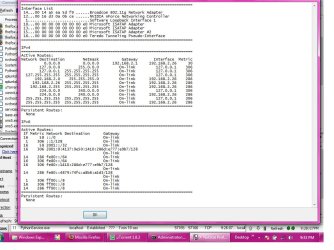
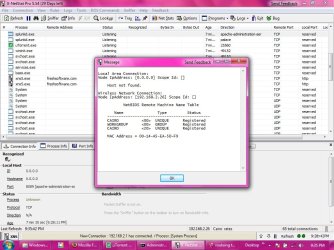
I am also attaching two jpegs. I was trying to install Splunk (a very interesting application btw --check it out if not familiar), and in the process of information gathering for configuration, I ran my X-Netstat GUI utility. While doing this, I saw some items that might be of interest to those following...

The first jpeg is the Routing Table. And the second is the NetBios Remote machine list/table.

I am also attaching the latest secedit output (which was included in my very first post). This is an update.

AND, lastly, a zip file containing several output files from VMMAP (again from sysinternals). Unfortunately there is no way to view these files unless you have the utility... free from microsoft (who evidently bought sysinterals a few years ago).

I know this is an overwhelming amount of data. But I guess the reason I am here is because I am not quite skilled enough to look at this info and put it together in some coherent fashion.

I still am trying to climb the learning curve for ipv6. I say this because of the numerous ipv6 addresses in routing table.....
 

Attachments

My Computer

OS
Windows 7
This is very puzzling. According to your IP address, you are based in Chicago, Illinois. However, the file you supplied, tcp-view3-19.txt, mentions Cairo numerous times. One of the entries also links to the University of Minho, based in Portugal. There are also an alarming number of uTorrent connections, linking to Argentina, Serbia, Philippines.
Do you have a torrent client installed and running, and do you have any connection in any way whatsoever with the aforementioned Portuguese University?
 

My Computer

Computer type
PC/Desktop
Computer Manufacturer/Model Number
Dwarf Dwf/11/2012 r09/2013
OS
Windows 8.1 Pro RTM x64
CPU
Intel Core-i5-3570K 4-core @ 3.4GHz (Ivy Bridge) (OC 4.4GHz)
Motherboard
ASRock Z77 Extreme4-M
Memory
4 x 4GB DDR3-1600 Corsair Vengeance CMZ8GX3M2A1600C9B (16GB)
Graphics Card(s)
MSI GeForce GTX770 Gaming OC 2GB
Sound Card
Realtek High Definition on board solution (ALC 898)
Monitor(s) Displays
ViewSonic VA1912w Widescreen (VGA)
Screen Resolution
1440x900
Hard Drives
OCZ Agility 3 SSD 120GB SATA III x2 (RAID 0)
Samsung HD501LJ 500GB SATA II x2
Hitachi HDS721010CLA332 1TB SATA II
Iomega 1.5TB Ext USB 2.0
WD 2.0TB Ext USB 3.0
PSU
XFX Pro Series 850W Semi-Modular
Case
Gigabyte IF233
Cooling
1 x 120mm Front Inlet 1 x 120mm Rear Exhaust
Keyboard
Microsoft Comfort Curve Keyboard 3000 (USB)
Mouse
Microsoft Comfort Mouse 3000 for Business (USB)
Internet Speed
NetGear DG834Gv3 ADSL Modem/Router (Ethernet) ~4.0 Mb/s (O2)
Antivirus
Avast! 8.0.1497
Browser
IE 11
Other Info
Optical Drive: HL-DT-ST BD-RE BH10LS30 SATA Bluray
Lexmark S305 Printer/Scanner/Copier (USB)
WEI Score: 8.1/8.1/8.5/8.5/8.25
Asus Eee PC 1011PX Netbook (Windows 7 x86 Starter)
Going back to the start :)

About 6 weeks ago, I authenticated with a wireless network near my residence and used the internet for a bit. I did this again over the next few days, and then started noticing some very strange things ocuring. My task manager had a number of processes that I never recognized (even though I was using Windows 7 beta), and it seemed as if I had a lot of services that were server based.
this is not unusual in windows (more so in win 7) , what where the names of the services ? (you can make a copy from within task manager)
After trying to look further into what was happening, I started getting "access denied" messages all over the place. I enabled my Administrator user, and logged in. Still no luck.... I was encountering "Access Denied" whenever I tried to look at either certain files in System32 or in the Registry.
this is not unusual albeit annoying with windows 7 where permissions are "stiffer" and can seem to be even more obtrusive , the same happens to me :mad:
Below, I am including my latest complete Remote Access Diagnostics dump (netsh interface ras), but before I get there, I would like to share my theory. Laugh if you must...almost everyone (in IT or not) has laughed at me as if I was some sort of conspiracy nut!!

I think because WIndows 7 and Windows Vista install with ipv6 adapters (ISATAP, TEREDO, etc) advertising from the get-go, I am being hijacked and I cannot find a way to rid my pc of this problem... I do not know how they are getting in... Even after I log in, I disable ALL adapters, and then set state disabled to netsh interface 6to4, ISATAP, TEREDO, etc. I reset ipv4 and ipv6, and reset Winsock (which is loaded with items). AND, the trick they are using is UDP... UDP in most cases can bypass NAT and firewalls, so its quick and they can find me in seconds---
on the hardware in your laptop your drivers are unlikely to properly utilise ipv6 !!
FYI: I have reformated (slow not quick) my drive and reinstalled Windows 7 no less than 40 times.
reinstalling 40 times is more than excessive and is madly chasing down the wrong route :confused:
Somehow this cretin is still finding access into my PC. I try to install Kapersky's Techinical Preview, but this intruder knows how to filter it rendering it mostly useless.
what where the error messages ?
I know this is a weakness from Microsoft....I mean all I need is to find a room with lead-lined walls to reinstall Windows 7 in and I am good... Because I can go 5 miles from where the network was originally, and somehow, I am advertising some beacon which IDs me on the internet and creates a tunnel....
sorry but this is a conspiracy theory :p
No matter where I go, I cannot escape this.... I am nearing insanity. Please, please help.... I have deleted all of the ipv6 addresses from ROUTE as well as my loopback adapter address.... But nothing works...
I can't see the point in deleting things as this is just going to generate even more strange responses from the OS :o

I can't help feeling that with your self confessed limited knowledge you have made this whole situation look very complicated , and If you genuinally want to solve this issue I suggest you make sure any sensitive information is safely removed and backed up to a disc or stick then start again with a fresh install , DO NOT install anything other than the OS (such as 3rd party progs) and then try answer some of the questions to the problems you origonally encountered above ??

If anyone is gaining access we need to keep it simple to nail it down and if there's nothing sensitive on your lappie then they cannot gain anything other than a bit of free time messing with your life which we can turn to our advantage ;)
 

My Computer

Computer Manufacturer/Model Number
built my own
OS
win7 ultimate / virtual box
CPU
Intel Core i7 3770K,1155, Ivy Bridge
Motherboard
MSI Z77A-G43
Memory
GSkill Ripjaws Z Series 1600 CL 9.0 16GB
Graphics Card(s)
KFA2 GeForce GTX 670 EX OC 2048MB GDDR5 PCI-E gfx card
Sound Card
onboard Nvidia HDMI audio
Monitor(s) Displays
ASUS VK222H 22" widescreen LCD monitor
Screen Resolution
1680x1050
Hard Drives
Kingston 128gb SSD
OCZ Vertex 90gb SSD
500GB WDCaviar 16mb 5000KS
320GB WDCaviar 16mb 3200AAKS sata 2
1TB Samsung 16mb HD103SJ sata 2
PSU
Corsair HX 750W ATX2.2 Modular
Cooling
Antec 25 Kuhler H2O 620
Keyboard
logitech
Mouse
logitech MX518
Internet Speed
7mb adsl
pjvex386, did you ever run Malwarebyte's AntiMalware? If you did, can you copy and paste the .txt log? I'd like to see it please.
 

My Computer

Computer type
PC/Desktop
Computer Manufacturer/Model Number
Bruce ... somewhere in his 40's
OS
Windows 7 Ultimate 32bit SP1
CPU
Intel(R) Core(TM)2 Quad CPU @ 2.40GHz, 2400 MHz
Motherboard
INTEL/D975XBX2
Memory
4 GB
Graphics Card(s)
ATI Radeon HD 2600 Pro
Monitor(s) Displays
Samsung SyncMaster 914v
Screen Resolution
1280 x 1024
Hard Drives
2/500GB each ... ST3500630AS ATA Device.
One is not connected
PSU
Rocketfish 700 W
Case
G.Skill Gigabyte Chassis
Keyboard
Standard PS/2 Keyboard
Mouse
Microsoft PS/2 Mouse
Internet Speed
DSL
Antivirus
Avira Internet Security
Browser
IE 11
Other Info
ATI HDMI Audio
Back again

Well, today was not as good as yesterday. After having a good day merely because I had uninterrupted internet access all day, I thought that before I retired for the evening, I would push my luck and attempt to install the Kapersky Technical Review for WIN7.

Now if you are amused that I say push my luck, I can understand your reaction. I probably would be thinking that this poor idiot is much closer to a "conspiracy theory" mindset than I am to fact and the immutable laws of physics. I guess it would be fair to say that this ordeal is making me feel like I am experiencing the famed "Helsinki Syndrome"...., i.e. since I have become so exasperated and fatigued over this problem, part of me has surrendered. In other words, if I am lucky enough to have a day (or an hour) when I have internet access (because the either the adapter is not missing, or irretrieveably disabled in the device manager or the registry, or it is only able to access local network service), I feel myself become become obsequious to my invisible guest and be as nice as possible to this entity so they won't cutoff my wireless adapter...this means I do not disable anything unusual in device manager or start deleting restrictive key values in the registry (which I am competant enough to know how to do as it relates to a good number of hardware and software components)

But, though I thought my troubles were diminishing or perhaps gone, it was not to be. The bad news was that it was clear that -- upon installation of Kapersky -- someone didn't like it because when Kapersky finished installing and the configuration process began, I noticed the password protect fields and "Run As" options where grayed out and inaccessible. I wasn't even surprised although this was a first. Prior to this, he or whomever only prevented me from checking an option to specifically monitor the possibility of peer-to-peer worms (this was accomplished by disabling the "P2P Worm" option box, in other words, if I would check it-along with the other trojacns and viruses, then close the window, if I then immediately re-opened it, the P2P worm checkbox remained unchecked, yet all of the other nasty worms and trojans were still checked).

So I tried to continue to confiure various things, and was even able to update the virus database, but then I see "page cannot be displayed" in a firefox tab. So I check the icon in the systray and well, perhaps coincidentally, but perhaps not, it shows that now I only have Local Access I have been using a strong network for 4 hours and it goes to local access at the same time I am doing something that might block his UDP packets (which is the primary means of access used). I did decide to block a few very unusual UDP packets that did not seem right. Then everything froze. Now if blocking a few outbound UDP packets can freeze my entire PC, then I still have a lot to learn because that seems a bit much.

When I rebooted, everything was amok.... The windows updates that were installed 4 hours earlier (the normal post Win-7 installation updates) were gone and my desktop was dim, and the Aero feature didn't work. I also tried going to MMC which I had successfully been able to do as only an Administrator-User, but now, as THE ADMINISTRATOR I could only pull up a "volatile" version of MMC....it was worthless to even try to use it as it was merely a red herring which kept me occupied while I thought I was actually looking at genuine information or actualy making true configurations (in other words, MMC would behave much like the P2P checkbox incident above).

BUT, the good news was that I was able to use System Restore (another first), and it actually had every restore point it should have had.... So I went back to a point pre-Kapersky and all was has been well ever since.

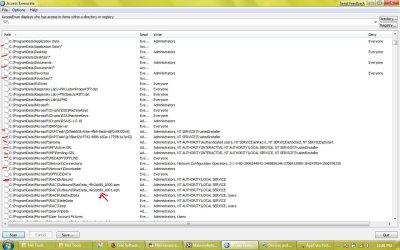
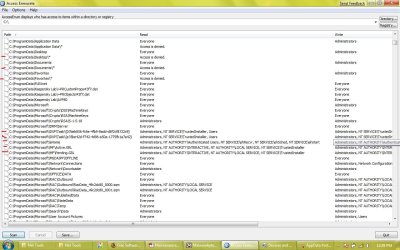
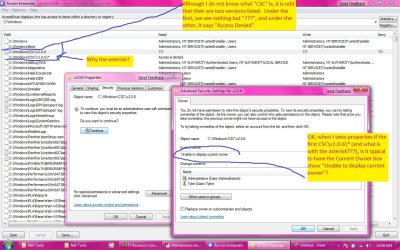
I have to run right now, but I am attaching a few screenshots that are interesting. I ran an AccessEnum utility from"Net Tools" and I was bewildered. When using the sysinternals accessenum utility, I would not get these results....

Just look at the line items I have marked in red, and et me know if you think I am being rash in my supposition that this is an entity and not a virus or some other malware.

BTW, I am running a FULL scan of MBAM and will send the report/log of it in my next post.

Paul

Check next post for attachments. For some reason, the pop-up screen says I am logged out.... so I am just going to send this post as it.
 

My Computer

OS
Windows 7
Hi Paul,

Just in case you are wondering, the Kaspersky Technical Review for WIN7 has now expired (I was using that, but have now switched to Avast! Home Edition).
 

My Computer

Computer type
PC/Desktop
Computer Manufacturer/Model Number
Dwarf Dwf/11/2012 r09/2013
OS
Windows 8.1 Pro RTM x64
CPU
Intel Core-i5-3570K 4-core @ 3.4GHz (Ivy Bridge) (OC 4.4GHz)
Motherboard
ASRock Z77 Extreme4-M
Memory
4 x 4GB DDR3-1600 Corsair Vengeance CMZ8GX3M2A1600C9B (16GB)
Graphics Card(s)
MSI GeForce GTX770 Gaming OC 2GB
Sound Card
Realtek High Definition on board solution (ALC 898)
Monitor(s) Displays
ViewSonic VA1912w Widescreen (VGA)
Screen Resolution
1440x900
Hard Drives
OCZ Agility 3 SSD 120GB SATA III x2 (RAID 0)
Samsung HD501LJ 500GB SATA II x2
Hitachi HDS721010CLA332 1TB SATA II
Iomega 1.5TB Ext USB 2.0
WD 2.0TB Ext USB 3.0
PSU
XFX Pro Series 850W Semi-Modular
Case
Gigabyte IF233
Cooling
1 x 120mm Front Inlet 1 x 120mm Rear Exhaust
Keyboard
Microsoft Comfort Curve Keyboard 3000 (USB)
Mouse
Microsoft Comfort Mouse 3000 for Business (USB)
Internet Speed
NetGear DG834Gv3 ADSL Modem/Router (Ethernet) ~4.0 Mb/s (O2)
Antivirus
Avast! 8.0.1497
Browser
IE 11
Other Info
Optical Drive: HL-DT-ST BD-RE BH10LS30 SATA Bluray
Lexmark S305 Printer/Scanner/Copier (USB)
WEI Score: 8.1/8.1/8.5/8.5/8.25
Asus Eee PC 1011PX Netbook (Windows 7 x86 Starter)
Attachments

Here are the attachments I spoke of in my last post.

Accessenum.jpg is of the windows directory showing read access, write access, and deny.... I have annotated the jpeg with my comments......


AccessenumRoot.jpg is shows the same thing on the C;| drive. Some odd things here too. See red marks.....

AccessenumAppdata.jpg shows part of Program Files/AppData. The "Read" users were SIDS in some cases and therefore quite long, so as to show the entirety, I did this in two screenshots. The first part shows the read permissions, and in Accessenum part II, I moved the scrollbar over so the Write and Deny Fields were visible.

Then please post here and tell me that what you see in these screenshots is neither abnormal nor some WIN-7 oddity...... I have wanted it to be something explainable or normal for a long time..... Because if this is or has been done to anyone else, they might not have noticed...... I only caught on because I get a little annoyed when I see a process, a file, or an object I do not recognize......

BTW, I tried to run the same accessenum utility on HKLM. But for some reason, after using it all over my hard drive, when I went to the registry it crashed. It crashes everytime I try to re-run the utility-- but only when I scan he registry. Coincidence? Perhaps.... after all this is a beta OS, and you never know.... but at the same time, from the opposite perspective.....you never know! :rolleyes:
 

Attachments

  • AppData Part II.jpg
    AppData Part II.jpg
    135.9 KB · Views: 24
  • AppData Part I.jpg
    AppData Part I.jpg
    141.1 KB · Views: 32
  • accessenumROOT.jpg
    accessenumROOT.jpg
    145.3 KB · Views: 39
  • accessenum.jpg
    accessenum.jpg
    179.7 KB · Views: 52

My Computer

OS
Windows 7
Oh, I had written another post earlier addressing some things a few of you brought up, and I either lost it or something happened because I had to rewrite it.

But I forgot to include a reply to Dwarf. Dwarf: Yes... sorry if that made it confusing... I was using uTorrent at the time... Because I had not been able to use the net on my laptop for so long, I was downloading some things I needed...... But I do not want anyone to infer that I have buggy "warez". Virtually all my software is purchased or share/free ware. Whatever is not has been with me for a long time... and it wouldn't be the cause of this problem..

Also, to Darkassassin. Thank you for your lengthy reply. I am trying to heed your advice.... And trust me, I knew that reformatting my dive and re-installing that number of times was excessive.... but at least 70% of those instances, I was unable to reboot using ANY FORM of recovery..... I own the Stanek "Windows Command Line" second edition which covers Vista, and a SAMS Administrators Guide to Vista, and anything in either of those books which describes a recovery without a full reinstall has or had been tried before I resorted to re-installation...

I only reformatted because I figured why take the chance something was left in some disk sector.... so I would do a reformat (either slow or quick)
 

My Computer

OS
Windows 7
Hi Paul,

Those attachments look fine. All the asterisk indicates is that the contents of the folder(s) in question is/are not currently accessible because of a permissions/ownership issue. The reason why you see 2 entries with these is because you can actually see the folder itself, but you cannot open it to access the contents.

Going back to your earlier post, and the file tcp-view3-19.txt, do you have any connection in any way whatsoever with the University of Minho, based in Portugal?
 

My Computer

Computer type
PC/Desktop
Computer Manufacturer/Model Number
Dwarf Dwf/11/2012 r09/2013
OS
Windows 8.1 Pro RTM x64
CPU
Intel Core-i5-3570K 4-core @ 3.4GHz (Ivy Bridge) (OC 4.4GHz)
Motherboard
ASRock Z77 Extreme4-M
Memory
4 x 4GB DDR3-1600 Corsair Vengeance CMZ8GX3M2A1600C9B (16GB)
Graphics Card(s)
MSI GeForce GTX770 Gaming OC 2GB
Sound Card
Realtek High Definition on board solution (ALC 898)
Monitor(s) Displays
ViewSonic VA1912w Widescreen (VGA)
Screen Resolution
1440x900
Hard Drives
OCZ Agility 3 SSD 120GB SATA III x2 (RAID 0)
Samsung HD501LJ 500GB SATA II x2
Hitachi HDS721010CLA332 1TB SATA II
Iomega 1.5TB Ext USB 2.0
WD 2.0TB Ext USB 3.0
PSU
XFX Pro Series 850W Semi-Modular
Case
Gigabyte IF233
Cooling
1 x 120mm Front Inlet 1 x 120mm Rear Exhaust
Keyboard
Microsoft Comfort Curve Keyboard 3000 (USB)
Mouse
Microsoft Comfort Mouse 3000 for Business (USB)
Internet Speed
NetGear DG834Gv3 ADSL Modem/Router (Ethernet) ~4.0 Mb/s (O2)
Antivirus
Avast! 8.0.1497
Browser
IE 11
Other Info
Optical Drive: HL-DT-ST BD-RE BH10LS30 SATA Bluray
Lexmark S305 Printer/Scanner/Copier (USB)
WEI Score: 8.1/8.1/8.5/8.5/8.25
Asus Eee PC 1011PX Netbook (Windows 7 x86 Starter)
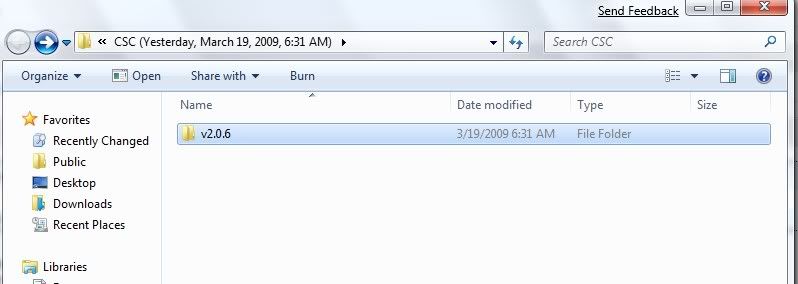
The CSV\v2.06 is most likely okay, because it's also on my computer


It's a *Command line compiler* for Microsoft C# it gets installed with the .NET SDK

I can't find anything on DXP\Task ....
It could be a backdoor Trojan
Troj/VB-DXP Trojan - Sophos security analysis

In which case I would suggest that you go to a known 'clean' computer and change all your passwords. Don't try to do this on a suspected, infected machine.

Next, download HostsXpert 4.3 - Hosts File Manager.
  • Unzip HostsXpert 4.3 - Hosts File Manager to a convenient folder such as C:\HostsXpert
  • Click HostsXpert.exe to Run HostsXpert 3.7 - Hosts File Manager from its new home
  • Click "Make Hosts Writable?" in the upper right corner (If available).
  • Click Restore Microsoft's Hosts file and then click OK.
  • Click the X to exit the program.
  • Note: If you were using a custom Hosts file you will need to replace any of those entries yourself.

Now, flush your DNS Cache:
Sometimes a bad DNS entry will be cached and you will need to either flush the DNS cache to get rid of it, or wait up to 24 hours for it to be dropped from the cache automatically.

Open a command prompt....from the Start menu, select Run > In the box/"open field", enter cmd.exe
enter ipconfig /flushdns press 'enter'

You might see if Kaspersky online Virus scanner will run now.
 

My Computer

Computer type
PC/Desktop
Computer Manufacturer/Model Number
Bruce ... somewhere in his 40's
OS
Windows 7 Ultimate 32bit SP1
CPU
Intel(R) Core(TM)2 Quad CPU @ 2.40GHz, 2400 MHz
Motherboard
INTEL/D975XBX2
Memory
4 GB
Graphics Card(s)
ATI Radeon HD 2600 Pro
Monitor(s) Displays
Samsung SyncMaster 914v
Screen Resolution
1280 x 1024
Hard Drives
2/500GB each ... ST3500630AS ATA Device.
One is not connected
PSU
Rocketfish 700 W
Case
G.Skill Gigabyte Chassis
Keyboard
Standard PS/2 Keyboard
Mouse
Microsoft PS/2 Mouse
Internet Speed
DSL
Antivirus
Avira Internet Security
Browser
IE 11
Other Info
ATI HDMI Audio
Ah Ha! I found DXP on my machine too ... looks to be safe :)
DXP - Device Experience Platform Microsoft Corporation c:\windows\system32\dxp.dll
 

My Computer

Computer type
PC/Desktop
Computer Manufacturer/Model Number
Bruce ... somewhere in his 40's
OS
Windows 7 Ultimate 32bit SP1
CPU
Intel(R) Core(TM)2 Quad CPU @ 2.40GHz, 2400 MHz
Motherboard
INTEL/D975XBX2
Memory
4 GB
Graphics Card(s)
ATI Radeon HD 2600 Pro
Monitor(s) Displays
Samsung SyncMaster 914v
Screen Resolution
1280 x 1024
Hard Drives
2/500GB each ... ST3500630AS ATA Device.
One is not connected
PSU
Rocketfish 700 W
Case
G.Skill Gigabyte Chassis
Keyboard
Standard PS/2 Keyboard
Mouse
Microsoft PS/2 Mouse
Internet Speed
DSL
Antivirus
Avira Internet Security
Browser
IE 11
Other Info
ATI HDMI Audio
No. And I am not (to my knowledge) using any proxies. Which address was did that resolve from? Was it ipv6?

I have always been ready to admit I was wrong in this. But I am still left with countless questions as to why so many things starting happening all at the same time, and virtually all in response to a defense of my actions which were either investigatory (no deletion or changing of files or the registry), and why it seemed to behave in this way with so many outbound UDP packets (according to Kaspersky) to the same address. And why would any OS feature, reach out and change permissions in accessing peripheral drives (the WD 500GB drive, flash drives,etc.) which not even the esteemed, invoke-only-as-needed "Administrator" user would be able to access or change on a stand-alone workstation (or more accurately, my laptop), unless they were doing something which from all perspectives I can envision seem furtive, possessing element of concealment, agression, and even a very real sense that at times, the OS was taking steps simply for punitive purposes??? And why after using Slackware (from a persistent changes, 4GB Flash drive) for a year, would my switching to a conventional HD installation of Ubuntu soon after all of these problems started cause a different but stable and highly regarded OS such as Ubuntu Linux to have adapter problems and odd environmental events such as the sudden disappearance of my ability to use iwconfig, or have ipconfig output look radically different than to what I am accustomed. I mean bash is bash pretty much and ubuntu worked fine for about an hour, then it was like my Luddite ghost had returned to wreak havoc on my life.....?????

Jacee
attached is the MBAM log.... All clear!!!


Attached for
 

Attachments

My Computer

OS
Windows 7
article that may be enlightening

FIrst, attached I included a HijackThis! log. I know there are many things that should not be there... I have deleted them before, and I just stopped even trying a few weeks ago...

But, on a stronger note, the following link is to an article that gives me a little comfort as to why I see many things I see....

Security in Windows 7: Firewall and Networking - Reviews by PC Magazine


Paul
 

My Computer

OS
Windows 7
Oh, and thank you Jacee for the helpful info...I feel relieved that there are other competent and skilled individuals who may not recognize some items as typical windows components. I will take all the steps you outline--I want to research this a bit more to know what kind of trojan this may be. Also, when you say a clean machine, you mean head on over to Kinkos or something right???? And by passwords, you mean any web app passwords, correct???

In connection with my last post and the link contained therein, what is everyone's take on having a third party commercial firewall? Do I need one???

Thanks as always
 

My Computer

OS
Windows 7
This is just to confirm the HijackThis log made it through the upload... Didn't see it when I refreshed...

Oh see the problem now....I forgot about those file extension limitations on uploads....
 

Attachments

My Computer

OS
Windows 7

My Computer

Computer type
PC/Desktop
Computer Manufacturer/Model Number
Bruce ... somewhere in his 40's
OS
Windows 7 Ultimate 32bit SP1
CPU
Intel(R) Core(TM)2 Quad CPU @ 2.40GHz, 2400 MHz
Motherboard
INTEL/D975XBX2
Memory
4 GB
Graphics Card(s)
ATI Radeon HD 2600 Pro
Monitor(s) Displays
Samsung SyncMaster 914v
Screen Resolution
1280 x 1024
Hard Drives
2/500GB each ... ST3500630AS ATA Device.
One is not connected
PSU
Rocketfish 700 W
Case
G.Skill Gigabyte Chassis
Keyboard
Standard PS/2 Keyboard
Mouse
Microsoft PS/2 Mouse
Internet Speed
DSL
Antivirus
Avira Internet Security
Browser
IE 11
Other Info
ATI HDMI Audio
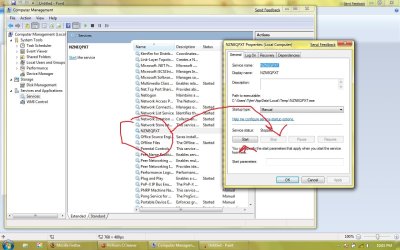
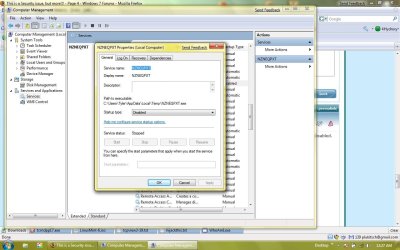
Strange... but though the file NZNEQPXT shows as active in HijackThis, it does not look quite the same in services.... see screenshot attached...

Also, I cannot enable the Administrator (which always happens when I cannot open a prompt "As an administrator"....

THe task manager no longer has the "Run this task as Administrator" checkbox (I have seen this before). My "RUN" in the start menu (which is a fight as it is to enable in the start menu properties) no longer has the "Run as Administrator" checkbox option... and "Runas" at the command prompt gives me some weird error like "class is not installed"....

I feel like Bruce Willis in Die Hard when he says to the all the police and SWAT on the ground below "welcome to the party!!" . This is only a fracion of the same stuff I have been seing for weeks on end despite wipes, reformats and reinstalls from a Microsoft download.... I know the installation disk is clean.....

So...at this point (if I did not otherwise have the internet up and running as I do now), I would usually reformat and reinstall.

As I responded above (mostly to Darkassassin who said my reformatting 40 times was excessive, and to which I agree) I believe I have tried most other recovery methods that do not involve a full re-installation.... but as I said in the post a few back, I am working from Administrator books for Vista, so if you have some idea.... let me know...

GIven all that I have said, if this is a trojan or a worm, could it be in protected storage????

Paul
 

Attachments

  • services.jpg
    services.jpg
    129.1 KB · Views: 29

My Computer

OS
Windows 7
Right click on the service again and choose properties. Click on the dropdown box and set it to disabled. Click 'stop', apply and ok your way out.
Please see if you can get C:\Users\Tyler\AppData\Local\Temp\NZNEQPXT.exe
scanned by one or both links supplied above.

Next,
go to this link and download whoamI?
wng's blog: WhoAmI
This is a small script that will be a notepad .txt file on your desktop. Post it.

Mine looks like this because I have not turned UAC off:
WhoAmI by wng_z3r0
3/20/2009
9:22 PM
******************
Operating system:
Microsoft Windows 7 Ultimate
Ram: 3325 mb
Accounts on this computer:
Administrator
Guest
Jacee
Current User: Jacee
User is not an admin
End of file
 

My Computer

Computer type
PC/Desktop
Computer Manufacturer/Model Number
Bruce ... somewhere in his 40's
OS
Windows 7 Ultimate 32bit SP1
CPU
Intel(R) Core(TM)2 Quad CPU @ 2.40GHz, 2400 MHz
Motherboard
INTEL/D975XBX2
Memory
4 GB
Graphics Card(s)
ATI Radeon HD 2600 Pro
Monitor(s) Displays
Samsung SyncMaster 914v
Screen Resolution
1280 x 1024
Hard Drives
2/500GB each ... ST3500630AS ATA Device.
One is not connected
PSU
Rocketfish 700 W
Case
G.Skill Gigabyte Chassis
Keyboard
Standard PS/2 Keyboard
Mouse
Microsoft PS/2 Mouse
Internet Speed
DSL
Antivirus
Avira Internet Security
Browser
IE 11
Other Info
ATI HDMI Audio
Status
Not open for further replies.
Back
Top