This is a Security issue, but more!!!

Status
Not open for further replies.
That's why I asked you to run the woamI script .... you never posted it for me, can you do so now, please?

It's located here:
wng's blog: WhoAmI
 

My Computer

Computer type
PC/Desktop
Computer Manufacturer/Model Number
Bruce ... somewhere in his 40's
OS
Windows 7 Ultimate 32bit SP1
CPU
Intel(R) Core(TM)2 Quad CPU @ 2.40GHz, 2400 MHz
Motherboard
INTEL/D975XBX2
Memory
4 GB
Graphics Card(s)
ATI Radeon HD 2600 Pro
Monitor(s) Displays
Samsung SyncMaster 914v
Screen Resolution
1280 x 1024
Hard Drives
2/500GB each ... ST3500630AS ATA Device.
One is not connected
PSU
Rocketfish 700 W
Case
G.Skill Gigabyte Chassis
Keyboard
Standard PS/2 Keyboard
Mouse
Microsoft PS/2 Mouse
Internet Speed
DSL
Antivirus
Avira Internet Security
Browser
IE 11
Other Info
ATI HDMI Audio
So, I'm new here, but i saw this thread and i had to say I'm intrigued.
I'm no stranger to security, forensics, and system hardening, so i might be of some service to you.

My recommendations are as follows:
1. Re-download your windows 7 ISO from Microsoft, and burn.
2. Disable all network adapters, and disconnect all removable storage.
3. Re-install windows 7.
4. Use a NEW administrator password, one you haven't used before, something random, mixed alpha numeric, and symbol characters.
5. Use a program like Acronis true image, or other free alternative to take an image of you operating system.
6. Enable network devices.
7. Use windows update, and install other needed drivers.
8. Take another image of your operating system with all needed drivers 9. Tweak services, and install needed applications, and a good firewall, and anti-virus (Outpost firewall, ESET NOD32)
10. Take yet another image of your operating system, the way you like it. 11. Boot from a live CD, connect your external storage devices, use anti-virus software on the live cd to scan all your disks, including external storage devices. If your files are infected, either format the external storage, or clean the infection via your live cd.
12. Boot into windows, enjoy


There are only a few methods for a security breach to remain after a hard drive format, and with no network access. These methods are not usually employed in your circumstances, as they require tailor made code. The methods that are public, that I'm aware of right now are, GPU, bios, ACPI and rootkits that infect your boot record. These possibilities are highly unlikely in your case. I think if you follow the above steps, you should be on your way to a perfectly infection free machine.

Hope this helps, and let me know how it goes.

Good luck.


*EDIT*

Another possible thought, you could also be exposing yourself to this breach via your web browser. I would suggest installing firefox, with the no-script add-on, and browsing the web via a limited user account, or using dropmyrights.exe (available here: Browsing the Web and Reading E-mail Safely as an Administrator)
 
Last edited:

My Computer

OS
Windows 7, Windows XP SP3 x86
i would like to add to compussrnj excellent post is to use adblock in conjunction with noscript...;)
 

My Computer

Computer Manufacturer/Model Number
Tx2500z Tablet Pc/Homemade Server
OS
Windows 7 Ult x64(x2), HomePrem x32(x4), Server 08 (+VM), 08 R2 (VM) , SuSe 11.2 (VM), XP 32 (VM)
CPU
Turion X2 ultra (oh well came with laptop)/P4 @3.2 (yes P4)
Motherboard
IDK HP Motherboard / Intel DG965SS
Memory
OCZ Dual Channel 4GB kit/ 1gb Dual Channel
Graphics Card(s)
HD 3200 graphics /GMA x3100 (yay for intergrated!!)
Sound Card
Realtek HD Audio(mic working, well sort of)/Siig IC-70012
Monitor(s) Displays
built-in Hp 12" laptop screen/ Acer 19"
Screen Resolution
1280x800 /1440x900
Cooling
All Air Cooled
Mouse
Logi MX Rev. /MS Wheel Optical 1.1A /Logitech Optical Mouse
Internet Speed
College baby but its still routed through vpn to 1536k...
Other Info
love my wacom pen and pressure sensitivity...
wished it worked in 7, SUSE for that matter though
I am glad this thread has something of valid interest. Don't want to become the "sideshow freak" of threads.

OK.. I have a lot to say, but I will say it quickly (leave out jokes, arcane references, and anecdotes).

I am in Firefox at the moment working off of a Mint Linux Live CD because my RNAV and I had a very big battle today (my trying to kill him/his connection & him trying to prevent me). I didn't lose necessarily; I went too fast....just like when I missed the fact that Baarod said he lived in Chicago (where I live as well) about 3 thread pages ago. He offered to help me if my latest plan at the time failed. I would have met him anywhere in the city for his help...and for someone else to see/witness this first hand. [NOTE TO BAAROD: Sorry I missed that last sentence in your post a few pages back. My mistake! But I do think we are close in any event (except it is no less unbelievable), but if I am still dealing with this in the next 24-48 hours, I would be glad to take you up on any help you would give. We can go to the Starbucks of your choice, I will buy coffee and you can use my laptop for 30 minutes.]

AND JACEE, AS SOON AS I AM ABLE TO GET BACK INTO WINDOWS, I WILL PROMPTLY RETURN THE OUTPUT. I APOLOGIZE FOR NOT RETURNING IT TO YOU AS YOU HAD ASKED.


When I say I went too fast in my fight today, I refer to a post by Darkassasin from a week or two ago. He mentioned Avast had a bootable antivirus disk. I managed to procure a clean one-time emergency use .iso of this item from an online friend. I managed to burn the CD, and restarted.... However, when I looked at the Avast page earlier, I did not take note of the fact that it if for XP. Reason this is a problem is because the original XP image never had SATA drivers, so I get the BSOD just when it gets to the menu on an XP installation disk. I had downloaded a XP Black version with SATA drivers--to use as a last resort (as I do not think XP has the same "cutting edge vulnerabilities" that Vista and WIN 7 do), so I have SATA drivers already extracted and ready to be combined with the AV bootCD--which was my plan.

I went into the Linux Live CD and was about to leave to find a another clean computer (well...... "clean" at this point, means working) and rebuild an XP image, with both the necessary SATA drivers and the antivirus software, but I started doing research in MSDN (where it is easy to get immersed for quite some time), and when I checked the time, it was about an 1.5 hours later...So by then the places I know (or friends having PCs), were closed or unavailable, respectively. So tomorrow morning I will build and use the bootable AV cd.

A few things I learned about this thing today. I actually managed to injure it to the point where he needed me to reboot to take back his former control.... Strangely the only thingone that has injured this thing yet has been the utility Registry Booster. I do not even use registry utilities anymore, but I found a site which did a "scan" for malware last night, and it turned out to be an advertisement for Uniblue's Registry Booster. So I went ahead and got it. At one time I used this same program quite often...back then if I ran the utility every other day, I might get 100-140 registry errors on a bad day....(btw, the errors are classified in several categories, like .dlls, invalid shortcuts, OLE/COM/ActiveXt, etc.). I ran this frequently utility and went to a web page to read something, and a few minutes later I went back and noticed that there were 600 errors in "System Software". I was warily encouraged, so I let it run. But it never stopped. It got up to 3000 errors in this category, so I stopped the utility. I then cleaned the errors. It did clean them...sort of... but whatever it did do was not healthy for my RNAV because (this is the cross-my-heart-truth) the mouse pointer was literally vibrating when it was in the "cleaning" stage. After that, I refused the "restart now" request by the application and instead ran it 3 or 4 more times... Each time it had a large number of errors--most of them located in the 64 to 32 bit conversion section of the registry (the WOW64to32 windows module--I think you can see the actual process (or service?) in one of my task manager screen shots.of late).

Though you will all probably be annoyed since I persist at this, but I ask you to just scan the following links...

HTML:
http://msdn.microsoft.com/en-us/library/aa457707.aspx
HTML:
http://msdn.microsoft.com/en-us/library/aa916286.aspx
HTML:
http://msdn.microsoft.com/en-us/library/aa916530.aspx
OK...three links are enough, but they are from pages upon pages of incredibly informative material in MSDN regarding bluetooth. I felt like I was reading keywords from bad dreams that I had forgotten...so much about bluetooth (from the MS Windows description and implementation of it) in Windows Mobile and actual full PC Windows platforms fit like a veritable glove with so much of what I have observed.....

If you do not read those links and the numerous related ones, I will just share a few key points...(I want to add that I am not forcing a deduction on this either...the whole thing has spooked me and has made me uncomfortable/skittish... while I very much appreciate everyone's help, I will admit that it tortures the alpha male side of my ego that I--who has often been described by friends and family as "really good with computers" for the past 20-25 years--could not take care of this virus/trojan/worm/whatever three months ago and without seeking professional/expert help.)

I. FIrst, bluetooth can pair with any device in an unsecured (i.e., without authentication) and silent manner. As used in the previous sentence, the word "Device" includes PCs, APs (access points) and modems.

II. Most of the drivers used inconnection with bluetooth were related.to audio services.

III. Bluetooth requires the .Net framework to function (Ummm...I had forgot to mention this to you guys before as it did not seem entirely strange when I noticed it because MS can be ubiquitous however and whenever it wants to be, but in the past 2-3 weeks I have consistently noticed that before opening up firefox for the first time, and immediately after (re-)installation of my OS and all other applications, Firefox would report "one new add-on [had been] installed". The add-on in question was for .Net 2.0).

IV. The MSDN specifically refers to "Mobile PCs" as a primary or intended target within the scope of what the MSDN calls "API controlled devices". Mobile PCs, as it is defined includes laptops and notebook computers". <<<--- it might be merely the nascent mental disorder of which I shall succomb in the near future, but I almost heard thunder when I read that....!

I'll stop there, but seriously, I could go on and on and on...Well, OK, here are a few more quickly....

V. Someplace in this thread I mention that in Linux, my eth1 (wireless) adapter disappears completely and is replaced by pan0. Never saw that in reference to anything wireless until I read about bluetooth using and enabling a Personal Area Network.

VI. Mobile PCs have a new platform which developers can use to extend the functionality of their applications...called Windows SideShow Platform -- known on VIsta and Windows 7 as Windows Sidebar... For weeks (and I thought this was an innocuous bug), the Windows Sidebar would come up at startup no matter how many times I removed it or disabled it from doing so....read below:

Introduction
Gadgets for Sidebar, though developed using the functionality of the Microsoft HTML (MSHTML) runtime, are not limited by the standard browser security model. Since gadgets are locally installed mini-applications that provide a rich set of system access APIs, a packaging and deployment method similar to a typical executable distribution is employed. Packaging

A gadget is downloaded as a "package" of resources and configuration files. The package is distributed as a zip file or as a Windows cabinet (.cab) file. Both methods of distribution require the file extension, .zip or .cab, to be changed to .gadget. If the file is packaged as a .cab file, you can use a code signing certificate to provide information about the origin of the gadget. The user is then presented with this information before the gadget files are extracted. The signtool.exe application included with Visual Studio 2005 can be used to sign a gadget.

Note There is no requirement for gadgets to be digitally signed since the certificates are costly and not commonly used by the developer community likely to create gadgets.
Downloading

Windows Defender is a free program that helps protect your computer against pop-ups, slow performance, and security threats caused by spyware and other unwanted software. When integrated with Internet Explorer, Windows Defender performs file scanning on downloads to help ensure that one does not accidentally download malicious software. Gadget packages are included in the Windows Defender scan.
VII. Also...here is a frightening white paper....a page in the MSDN references a white paper entitled "Wireless Web: Microsoft Mobile Internet Toolkit Lets Your Web Application Target Any Device Anywhere"
But for some strange (!) reason I could not access it.

VIII. Then.....there is this paper:
Windows Mobile 5.0 Application Security Jason Fuller, Microsoft Corporation, May 2005
Summary: Every Windows Mobile–based device implements a set of security policies that determine whether an application is allowed to run and, if allowed, with what level of trust. To develop an application for a Windows Mobile–based device, you need to know what the security configuration of your device is. You also need to know how to sign your application with the appropriate certificate to allow the application to run (and to run with the needed level of trust). (9 printed pages)
Note This document describes the designed and intended functionality of the security model. This does not guarantee that a targeted malicious attack cannot compromise the intended security protections. The following security functionality is provided as is and is for informational purposes only. Microsoft makes no warranties, expressed, implied or statutory as to the performance of this functionality.
IX There is a section called [MS-RAIW]: Remote Administrative Interface: WINS Specification. A sub-topic of this is called Remote Administrative Interface: WINS protocol relies on RPC [MS-RPCE] as a transport. It is used to manage WINS service on servers that implement the Windows Internet Naming Service (WINS) Replication and Autodiscovery Protocol [MS-WINSRA].

X. And remember what I said about the service "Plug and Play"??? A service I would usually disable but since early on I am prohibited to do so???? Read the following straight from the MSDN (emphasis added):

Universal Plug and Play (UPnP) is a distributed, open networking architecture that enhances peer-to-peer network connectivity for personal computers, wireless devices, and other intelligent appliances. UPnP uses existing standard protocols, such as TCP/IP, Hypertext Transfer Protocol (HTTP), and Extensible Markup Language (XML) to seamlessly connect networked devices and to manage data transfer among connected devices.

[...]

UPnP provides an architectural framework for creating self-configuring, self-describing devices and services. Networks managed by UPnP require no setup by users or network administrators because UPnP supports automatic discovery.

UPnP enables a device to dynamically join a network, obtain an IP address, and convey its capabilities on request. Control points can use the UPnP application programming interface (API) to learn about the presence and capabilities of devices that are registered on the network. A device can leave a network smoothly and automatically when it is no longer in use.

UPnP uses no device drivers. It is media-independent and can be used on any operating system (OS). UPnP offers programmatic control to applications. UPnP enables developers to write their own user interfaces for devices, forgoing the vendor-provided interface.

Security Note: (thanks MS for making this section easily discoverable and with all implied risks outlned thoroughky!!!)
Because a UPnP service can potentially be remotely activated without authentication, it presents an area of vulnerability for a networked system. When UPnP services are deployed in a controlled environment, such as a home or business intranet where all the users are trusted, the risk of malicious attack is lessened.

XI. Another interesting quote:

The Remote API (RAPI)

The Windows CE Remote API is a specialized remote procedure call (RPC) facility. We call it a "remote procedure call" API because RAPI functions cause remote function calls on connected devices. It is "specialized" because you can only call a limited subset of device-side functions. Most RAPI functions provide access to a device's object store and device-side file systems. As we describe in Chapter 16, the object store is the permanently mounted RAM-based storage area that contains the built-in file system, the system registry, and property databases. This is not the only storage available, however, and RAPI also lets you access whatever installable file system is present to support removable Compact Flash cards, Smart Media cards, disk drives, etc. [Comment 21cs.49]

Remote API and .NET Remoting [Comment 21cs.50]
If you have worked with the desktop .NET Framework, you might have heard about .NET Remoting and be wondering about its relationship to the Remote API. Aside from similar names, these two technologies have nothing in common. [Comment 21cs.51]
The ability to access the object store means that a RAPI program can access any stored data. You can, for example, open a file and copy part of it – or all of it – from the device to the desktop. You could open the system registry and create new keys, or read and write values on existing keys. You have complete access to the property databases in the object store, so that you can create a database, delete a database, add or remove database records, and read or write individual property values. [Comment 21cs.52]
The Remote API is a set of functions that are exactly like the Win32 functions used to access files, registry entries, and CE databases. The only difference is that each of the functions has a slightly different name – a prefix of "Ce." For example, the Win32 function to open a file is CreateFile; its RAPI equivalent is CeCreateFile. Once a file is opened, you read a file's contents by calling CeReadFile, and close the file by calling CeCloseHandle. This is different from the approach we took to file access in Chapter 15, where we discuss using System.IO classes. And instead of ADO .NET classes, access to property databases is through a set of C-callable functions with names like CeCreateDatabase and CeWriteRecordProps. [Comment 21cs.53]

***I mentioned to Jacee earlier today that the RPC service (along with Plug and Play) have, since the beginning of this, been strictly off-limits to me...

XII. Quote on .Net Services 4/2009.NET Services Overview
Microsoft .NET Services is a set of Microsoft-built and hosted Windows Communication Foundation services for building Internet-enabled applications. .NET Services provides applications with a common infrastructure to name, discover, expose, secure, and orchestrate Web services.
In This Section

.NET Services is designed to significantly lower the entry barriers for new types of interconnected Internet-scale applications regardless of whether they are Web-based, they work through application-to-application federation, or they want to exploit the rich user experience and media capabilities of modern desktop environments. .NET Services consists of the following three services:

Service Bus The Service Bus provides a hosted, secure, and broadly accessible infrastructure for pervasive communication, large-scale event distribution, naming, and service publishing. The Service Bus provides connectivity options for service endpoint, providing connectivity options for service endpoints that would otherwise be difficult or impossible to reach. Endpoints can be located behind network address translation (NAT) boundaries, or bound to frequently changing, dynamically assigned IP addresses, or both.[...]
**I had a problem with the Serivce Bus looking for an audio driver just yesterday.
----------------------------------------

OK, I know that is alot (and there is so much more that directly correlates to things on my system), and you may have skimmed it, but I am telling you with absolute conviction, this is a schematic for what is happening to me -- at least in part. If you all put on your old hacker hats--the ones that made you really think out of the box about how to make something do what it was not intended to do (now in one's career in IT, they call that "problem solving"), you could conceive very easily of the potential for misuse....I read perhaps 60 pages from the MSDN, and the recipe for this all system and for what is happening to me jumped out Even if I had not seen so many of the protocols, methods, support platforms, and other unusual things on my system that one does not typically encounter

I have a little more to say (I have not said much actually, since everything above this is a quote), but I am going to post this now before I lose it--that is part of the paranoia I have been developing over the months.

Paul

 
Last edited:

My Computer

OS
Windows 7
Ahh, not so quickly there Mr. Admin. He still has a chance of redeeming the thread. (lol)

He could do that by stating in 100 words or less, no graphs, screenshots, or copy/paste jobs why he believes he is currently being hacked.
 

My Computer

Computer Manufacturer/Model Number
self built
OS
7600.20510 x86
CPU
P4 550 3.4 GHz HT running at 3.5 GHz
Motherboard
MSI PM8M3-V (MS-7211 v1.x) Micro-ATX mainboard
Memory
OCZ 2 GB(2x1GB) DDR400mHz running @ 414 mHz
Graphics Card(s)
HIS Radeon HD 3850 IceQ 3 Turbo HDMI Dual DL-DVI AGP
Sound Card
MOTU Traveler firewire studio interface 192 kHz 24 bit
Monitor(s) Displays
22" widescreen Acer X223W LCD, 17" Compaq P75 CRT
Screen Resolution
1680x1050 and 1280x1024
Hard Drives
SATA I x2 WD, 400 GB and 120 GB, SATA 2 WD Caviar Black 1 TB
PSU
350W generic
Case
Cybertronpc, it glows blue
Cooling
stock cpu fan, Ice-Q 3 gpu and system, many case fans
Keyboard
Logitch Classical Keyboard 200
Mouse
Logitech Mediaplay cordless
Internet Speed
1792/448 kbits/sec
Other Info
SATA II PCI fake RAID adapter, 1 GB Readyboost, original ATI Remote Wonder (even works with WMC perfectly), Logitech Rumblepad 2 game controller x2
I had downloaded a XP Black version with SATA drivers--to use as a last resort (as I do not think XP has the same "cutting edge vulnerabilities" that Vista and WIN 7 do), so I have SATA drivers already extracted and ready to be combined with the AV bootCD--which was my plan.

XP has hundreds if not thousands of vulnerability endpoints, its lost every hack-contest that's ever existed plus downloaded copy's of XP do contain malware embedded in the disk image so I wouldn't download them from if I was concerned about security because you have no way of knowing what that image contains.

A few things I learned about this thing today. I actually managed to injure it to the point where he needed me to reboot to take back his former control.... Strangely the only thingone that has injured this thing yet has been the utility Registry Booster. I do not even use registry utilities anymore, but I found a site which did a "scan" for malware last night, and it turned out to be an advertisement for Uniblue's Registry Booster. So I went ahead and got it. At one time I used this same program quite often...back then if I ran the utility every other day, I might get 100-140 registry errors on a bad day....(btw, the errors are classified in several categories, like .dlls, invalid shortcuts, OLE/COM/ActiveXt, etc.). I ran this frequently utility and went to a web page to read something, and a few minutes later I went back and noticed that there were 600 errors in "System Software". I was warily encouraged, so I let it run. But it never stopped. It got up to 3000 errors in this category, so I stopped the utility. I then cleaned the errors. It did clean them...sort of... but whatever it did do was not healthy for my RNAV because (this is the cross-my-heart-truth) the mouse pointer was literally vibrating when it was in the "cleaning" stage. After that, I refused the "restart now" request by the application and instead ran it 3 or 4 more times... Each time it had a large number of errors--most of them located in the 64 to 32 bit conversion section of the registry (the WOW64to32 windows module--I think you can see the actual process (or service?) in one of my task manager screen shots.of late).
Registry cleaners are nothing but snake oil, its completely dependable on the programmer as to how entry's are detected as useless, invalid or not needed. Since Vista the registry is saved on disk in a special file, if you get something like 5000 entry's showing as removable then its only going to save 0.05K of disk space and 90% of the time every registry cleaner application is going to remove things that are actually needed by the System especially on Windows7 since these applications have not excluded critical keys from being detected incorrectly and will not prevent them from being removed.

"Cleaning" your registry is like trying to clean your Windows and System32 directory's of system files and has zero performance increase, zero security benefits and zero usefulness, It can and probably will cause security and instability issues in the future from my experience with these tools.

If you do not read those links and the numerous related ones, I will just share a few key points...

I. FIrst, bluetooth can pair with any device in an unsecured (i.e., without authentication) and silent manner. As used in the previous sentence, the word "Device" includes PCs, APs (access points) and modems.
You can not silently authenticate with a bluetooth device on Windows. :sarc:

II. Most of the drivers used inconnection with bluetooth were related.to audio services.

III. Bluetooth requires the .Net framework to function (Ummm...I had forgot to mention this to you guys before as it did not seem entirely strange when I noticed it because MS can be ubiquitous however and whenever it wants to be, but in the past 2-3 weeks I have consistently noticed that before opening up firefox for the first time, and immediately after (re-)installation of my OS and all other applications, Firefox would report "one new add-on [had been] installed". The add-on in question was for .Net 2.0).
Yes Firefox installs an addon called "Microsoft .NET Framework assistant 1.1", that addon only adds ClickOnce deployment support for applications. Ive used ClickOnce before and its support by Firefox is most welcome.

IV. The MSDN specifically refers to "Mobile PCs" as a primary or intended target within the scope of what the MSDN calls "API controlled devices". Mobile PCs, as it is defined includes laptops and notebook computers". <<<--- it might be merely the nascent mental disorder of which I shall succomb in the near future, but I almost heard thunder when I read that....!
Did you know every device on your system is an "API controlled device"? Your graphics card for example is one "API controlled device", A game will access the DirectX APIs for controlling the Instruction Sets required for the game's graphics.


V. Someplace in this thread I mention that in Linux, my eth1 (wireless) adapter disappears completely and is replaced by pan0. Never saw that in reference to anything wireless until I read about bluetooth using and enabling a Personal Area Network.
Different Linux distributions use network adapters differently, Some will only show the Active device while others will show all devices. You will need to check your iwconfig and ifconfig configuration and the related config files on the filesystem.

I think that distribution you where using, was only showing Pan0 because it was the only auto-configured device or the only detected network device, Its hard to know though because each distribution handles networking differently.

VI. Mobile PCs have a new platform which developers can use to extend the functionality of their applications...called Windows SideShow Platform -- known on VIsta and Windows 7 as Windows Sidebar... For weeks (and I thought this was an innocuous bug), the Windows Sidebar would come up at startup no matter how many times I removed it or disabled it from doing so....read below:

VII. Also...here is a frightening white paper....a page in the MSDN references a white paper entitled "Wireless Web: Microsoft Mobile Internet Toolkit Lets Your Web Application Target Any Device Anywhere"
But for some strange (!) reason I could not access it.
I cant access that page either so its yet another MSDN library bug, Ive found hundreds over the last few weeks so just report it in the MSDN forum and one of the Administrators will have it fixed over the next two weeks.

VIII. Then.....there is this paper:
Windows Mobile 5.0 Application Security Jason Fuller, Microsoft Corporation, May 2005
Summary: Every Windows Mobile–based device implements a set of security policies that determine whether an application is allowed to run and, if allowed, with what level of trust. To develop an application for a Windows Mobile–based device, you need to know what the security configuration of your device is. You also need to know how to sign your application with the appropriate certificate to allow the application to run (and to run with the needed level of trust). (9 printed pages)IX There is a section called [MS-RAIW]: Remote Administrative Interface: WINS Specification. A sub-topic of this is called Remote Administrative Interface: WINS protocol relies on RPC [MS-RPCE] as a transport. It is used to manage WINS service on servers that implement the Windows Internet Naming Service (WINS) Replication and Autodiscovery Protocol [MS-WINSRA].

FYI Windows Mobile documentation doesn't apply to Windows however WINS and RPC are actually part of Windows and they actually require configuration locally on your machine before they are accessible remotely and can only be remotely configured by Group Policy on a Domain network.

X. And remember what I said about the service "Plug and Play"??? A service I would usually disable but since early on I am prohibited to do so???? Read the following straight from the MSDN (emphasis added):

Universal Plug and Play (UPnP) is a distributed, open networking architecture that enhances peer-to-peer network connectivity for personal computers, wireless devices, and other intelligent appliances. UPnP uses existing standard protocols, such as TCP/IP, Hypertext Transfer Protocol (HTTP), and Extensible Markup Language (XML) to seamlessly connect networked devices and to manage data transfer among connected devices.

[...]

UPnP provides an architectural framework for creating self-configuring, self-describing devices and services. Networks managed by UPnP require no setup by users or network administrators because UPnP supports automatic discovery.

UPnP enables a device to dynamically join a network, obtain an IP address, and convey its capabilities on request. Control points can use the UPnP application programming interface (API) to learn about the presence and capabilities of devices that are registered on the network. A device can leave a network smoothly and automatically when it is no longer in use.

UPnP uses no device drivers. It is media-independent and can be used on any operating system (OS). UPnP offers programmatic control to applications. UPnP enables developers to write their own user interfaces for devices, forgoing the vendor-provided interface.

Security Note: (thanks MS for making this section easily discoverable and with all implied risks outlned thoroughky!!!)
Because a UPnP service can potentially be remotely activated without authentication, it presents an area of vulnerability for a networked system. When UPnP services are deployed in a controlled environment, such as a home or business intranet where all the users are trusted, the risk of malicious attack is lessened.

UPnP is only accessible on your local network, It would require someone directly connected to your LAN to make changes to UPnP and even then all it does is allow you to configure your Modem's ports without having to manually confgure them. Messenger and UTorrent use UPnP to automatically forward ports from your router to your local machine when your transferring files and they are automatically closed afterwards.

UPnP would only be of interest to a hacker if he was already on your LAN and wanted to forward ports from your router to a machine but if he was already on your LAN then he wouldn't need UPnP todo this.

XI. Another interesting quote:

The Remote API (RAPI)

The Windows CE Remote API is a specialized remote procedure call (RPC) facility. We call it a "remote procedure call" API because RAPI functions cause remote function calls on connected devices. It is "specialized" because you can only call a limited subset of device-side functions. Most RAPI functions provide access to a device's object store and device-side file systems. As we describe in Chapter 16, the object store is the permanently mounted RAM-based storage area that contains the built-in file system, the system registry, and property databases. This is not the only storage available, however, and RAPI also lets you access whatever installable file system is present to support removable Compact Flash cards, Smart Media cards, disk drives, etc. [Comment 21cs.49]

Remote API and .NET Remoting [Comment 21cs.50]
If you have worked with the desktop .NET Framework, you might have heard about .NET Remoting and be wondering about its relationship to the Remote API. Aside from similar names, these two technologies have nothing in common. [Comment 21cs.51]
The ability to access the object store means that a RAPI program can access any stored data. You can, for example, open a file and copy part of it – or all of it – from the device to the desktop. You could open the system registry and create new keys, or read and write values on existing keys. You have complete access to the property databases in the object store, so that you can create a database, delete a database, add or remove database records, and read or write individual property values. [Comment 21cs.52]
The Remote API is a set of functions that are exactly like the Win32 functions used to access files, registry entries, and CE databases. The only difference is that each of the functions has a slightly different name – a prefix of "Ce." For example, the Win32 function to open a file is CreateFile; its RAPI equivalent is CeCreateFile. Once a file is opened, you read a file's contents by calling CeReadFile, and close the file by calling CeCloseHandle. This is different from the approach we took to file access in Chapter 15, where we discuss using System.IO classes. And instead of ADO .NET classes, access to property databases is through a set of C-callable functions with names like CeCreateDatabase and CeWriteRecordProps. [Comment 21cs.53]

***I mentioned to Jacee earlier today that the RPC service (along with Plug and Play) have, since the beginning of this, been strictly off-limits to me...
FYI thats a specialized WindowsCE API and doesn't apply to XP, Vista or Win7. It only allows a limited subset of functions to be called remotely on a machine running WindowsCE.

The RPC service is completely off-limits because if you change a single setting used by the RPC service you will either BSOD your machine instantly and than on every start-up or cause your entire Windows OS to become corrupted and unusable, RPC is used internally by the System for nearly everything and when Ive used the registry to manually configure the service it has always resulted in reinstalling the OS.

. Quote on .Net Services 4/2009.NET Services Overview
Microsoft .NET Services is a set of Microsoft-built and hosted Windows Communication Foundation services for building Internet-enabled applications. .NET Services provides applications with a common infrastructure to name, discover, expose, secure, and orchestrate Web services.
In This Section

.NET Services is designed to significantly lower the entry barriers for new types of interconnected Internet-scale applications regardless of whether they are Web-based, they work through application-to-application federation, or they want to exploit the rich user experience and media capabilities of modern desktop environments. .NET Services consists of the following three services:

Service Bus The Service Bus provides a hosted, secure, and broadly accessible infrastructure for pervasive communication, large-scale event distribution, naming, and service publishing. The Service Bus provides connectivity options for service endpoint, providing connectivity options for service endpoints that would otherwise be difficult or impossible to reach. Endpoints can be located behind network address translation (NAT) boundaries, or bound to frequently changing, dynamically assigned IP addresses, or both.[...]
**I had a problem with the Serivce Bus looking for an audio driver just yesterday.
----------------------------------------
Thats completely unrelated to your Service Bus Audio driver problem, The MSDN document you linked for Service Bus hasn't even been Released to Manufacturing (RTM) yet, its still a Community Technology Preview aka CTP beta release :sarc:

OK, I know that is alot (and there is so much more that directly correlates to things on my system) but I am telling you with absolute conviction, this is a schematic for what is happening to me -- at least in part. If you all put on your old hacker hats--the ones that made you really think out of the box about how to make something do what it was not intended to do (now in one's career in IT, they call that "problem solving"), you could conceive very easily of the potential for misuse....I read perhaps 60 pages from the MSDN, and the recipe for this all system and for what is happening to me jumped out Even if I had not seen so many of the protocols, methods, support platforms, and other unusual things on my system that one does not typically encounter
Im one of the top contributors to the MSDN library (MSDN Library) You can find "schematics" for everything included with Windows on the MSDN documentation, from hooking your keyboard driver (keylogging) to creating Games, managing digital certificates, rewriting webpages with IE on the Fly, downloading files, writing drivers, reconfiguring the system, remote access, remote desktop, Windows Error Reporting, WMI, setup projects (MSI), ClickOnce... I can go on forever listing the things and samples provided on the documentation, by others and even ones Ive posted myself...

Nothing you will find on the MSDN documentation will be useful to you, Ive read thousands of pages and theres nothing there to show that your system is exploitable remotely unless you open that security hole yourself, That was one of the major changes between XP and Vista, XP is insecure by default and can be hacked within seconds while Vista and Windows 7 are Secure by default and can only be accessed remotely if you configure your machine to allow that access ;)

I still haven't seen anything that makes me believe your being hacked unless you installed it yourself :sarc:

Steven
 
Now that is a very good post.
 

My Computer

Computer Manufacturer/Model Number
Self Build 64bit
OS
Vista Ult64, Win7600
CPU
Intel Core 2 Quad Q6600 @ 2400 MHz 64bit OS
Motherboard
Asus P5E3 Deluxe WiFi @p 64 bit OS
Memory
4096 MB DDR3-SDRAM
Graphics Card(s)
ATI Radeon HD 3870 Series x2 Crossfired
Sound Card
Realtek on board
Monitor(s) Displays
Samsung SyncMaster - 23 inches
Screen Resolution
1680x1050 pixels at 60 Hz in True Colors
Hard Drives
Hitachi (250 GB)/Samsung 750 GB. /Barracuda 160 GB.
My Book 1 TB external..
PSU
Cooler Master 1000w
Case
Cooler Master Cosmos 1000.
Cooling
Fans and fresh air,
Keyboard
Wireless
Mouse
Wireless
Internet Speed
Never fast enough
Other Info
I use a Magnum.
I just came across this thread, and must admit I'm absolutely fascinated by it. I have a few ideas in terms of Linux live disks for you, pjvex386. I've dealt with some fairly infected machines and had a few successes.

I want to first suggest to you to download and burn Parted Magic. This little live disk is a brilliant utility for partitioning and, should there be any hidden partitions, will allow you to see and manipulate them. One reason I recommend this particular distro (which has saved me many times over) is that internet connections are not enabled at boot time by default. I never really thought I'd say this as a positive trait, but I've had difficulties with enabling wireless using Parted Magic--which is ideal for your situation.

A second distribution that's saved my sanity in dealing with naughty computers is NimbleX, which is small enough to boot strictly into ram (using the toram option at boot). Have your laptop connected to a wired line. You can download and run a copy of f-prot and remove all those pests which lie sleeping in your quiescent hard disk. (guide taken from here). You can do that by opening "konsole" (the little TV like icon at the bottom of your Knoppix screen) and entering the following commands.

wget http://files.f-prot.com/files/linux-x86/fp-Linux-i686-ws.tar.gz
tar xzvf fp-Linux-i686-ws.tar.gz
cd f-prot/
./install-f-prot.pl
fpscan /media/sda1 | tee fprot.log

If any of these commands don't work, please let me know and I'll be glad to help guide you through any alterations needed.

The Linux Mint disk is also a decent choice since I believe it comes with Java. TrendMicro has an online scanner that can run under Linux via Java. However, the other two disks I mentioned have limited connectivity, and I've found Java to be a security vulnerablility in and of itself.

Ubuntu does a few things a little differently than many other distributions and users recommend. I'm personally not fond of the use of the "sudo" command over a separate root account. Ubuntu also does not come with a firewall by default. I'm not sure if Mint follows suit from it's parental *buntu or not.

On a last note: I know it's been mentioned before, but I'd recommend physically removing your wireless card and anything else that's not absolutely essential for booting up. Completely isolate your computer so you can better troubleshoot your issue. And don't even think to connect ANY peripherals until it's resolved. As far as I'm concerned, any external drives, etc. are suspect until otherwise proven.

EDIT: I just noticed in one of your posts that you mentioned usually running Windows with elevated administrative rights...It's usually good practice to run your daily tasks with more restrictive access. Just a thought...
 

My Computer

OS
Windows 7 64-bit
CPU
Intel C2D E8400 Wolfdale
Motherboard
Asus Maximus Formula
Memory
Mushkin 2GB DDR2 800
Graphics Card(s)
Asus 8800GT
Hard Drives
2x Seagate Barracuda ES.2 ST3250310NS 250GB 7200 RPM 32MB Cache SATA-II
PSU
Cooler Master Real Power Pro RS-650-ACAA-A1
Case
Lian-li PC-1010B
Mouse
Logitech G7
Again I will say thank you to anyone who spends anytime reading this thread and providing feedback with the intention of solving my problem. Writing this from Linux LIVE. Windows is too hazardous at the moment.

Secondly, I wish to for the record say that while I have made a lot of jokes here and am not in the IT industry (but reconsidering it coincidentally) , but rather more of a severe hobbyist. Beginning in 1979 (I was 11-12?) with an Apple II and a 10 oz card which held Applesoft BASIC. I started there. Because BASIC only provided so much functionality, and there was nothing else except the manuals with that came with the Apple II, I taught myself Assembly at 11. I wasn't very proficient, but I could certainly soup a a program in BASIC on the Apple with a short subroutine that "poked" hex entries (in decimal form) into registers that consequently created a 15 to 30 line (i.e., "line" means 8 8-bit hex entries (it had the column on the right showing the mnemonic functions that show the "language" that was intended to be a level up from machine language, for those who are familiar) which created flashy output that BASIC could never produce.....

I got a job at 13 as a night administrator at a computer consulting firm doing maintenance from the console on a IBM 4300 mainframe computer. Through the end of high school (wherein I learned Pascal and was introduced to SQL), I continued to work at the same company after school and during the summer, programming in VSAM, DL/1, and PL/1-based COBOL, the debugging of which included learning to read memory dumps, which further required going through the 30-60 greenbar pages of hex that was thrown out and even further and most important, it required no small amount of keen (and accrued) insight as to how a computer processor accesses memory and when. In short, by high school, I had to understand core computer fundamentals, or how computers "think", better than many of the people who were even in the computer industry at the time (~1984-85)

I continued in college briefly learning LISP, FORTRAN, then started a semester in C programming, but by then I got a little bored with the idea of being a programmer (bad idea considering I only needed to wait about 8 years to make some good cash with those acquired skills). I went into heavy science intending on medical school, but like my posts here, I got a bit distracted. i graduated from UW-Madison with a B.S. and a (meager) History major (but was maybe 15 credits short of 4 other majors, so these days I usually say my major was "game show contestant"). After that, unsure of what I wanted to do, I took the LSATs and went to law school at Loyola in Chicago (exactly when I should have been coding the first HTML based web pages). I was and still am an attorney, having practiced in transactional Real Estate and Corporate law. I also have a patent license having passed the USPTO bar exam studying for 4 weeks when the recommended period for successful studying for this 28% passage-rate exam is 8 months. Law eventually burned me out about a 1.5 years ago (after billling 2600 hours/year for god knows how long), and since then I have seriously rediscovered my old love of computers. I had learned VBA while I was at the law firms so I could do excel spreadsheets quicker and more effectively than any secretary of mine... And in the last 12 months I have practiced law on the side, learning Perl and Python, and reacquainting myself with Unix/Linux. I am in a financial crunch now because as a miserable lawyer, I was very wealthy, but as a much happier person writing easier Perl scripts (before last February) for small businesses for added income, I am moderately poor. Without the huge law income, I was forced to cut back my expenses oh, I would say 500%. I sold my condo and my car, pawned my Rolex, and am now hoping to end this little early mid-life crisis by figuring out exactly where I would like to take my still developing IT skills.

Dmex: I agree with Jfar, your post was thorough, well thought-out, easily readable, and obviously, more believable, or perhaps I should say plausible in its rejection of my apparent conjecture regarding spooks in my laptop accessing via Bluetooth.

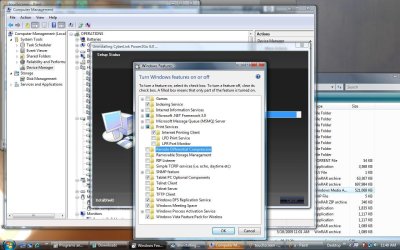
Nonetheless, as of this moment, more than anytime in the past 3.5 weeks since I found myself left with nothing else except bluetooth as a means of penetration (since I had exhausted my options to fix or block I would say 99% of every other possible means), I stand behind this postulation with firm conviction. Yes, it was a theory originally. But in the past month, after paying a bit more attention to my problem, reading about the Windows services I did not recognize, exploring certain corners of Windows I had not investigated before (like environment variables), and now, after spending an aggregate of approximately 8 hours reading MSDN, covering what I could in that time pertaining to .NET, Bluetooth, and the finer points of various MS Mobile platform implementations and their related APIs and the functionality among them, I stand firmer than ever of the concept. Bluetooth, at least as a initial means, is accessing my laptop from an AP, the signal originating from who knows where, and because I do not want it there restricting me as I have never been restricted before in windows (I never really investigated RPCsvc before Dmex, but in an earlier post, I asked which services of the ones I was prohibited from altering were already hardened in Windows, like grpsvc is), I take steps to change the situation, and that results in more reactions by my opponent, and then, of course still further actions, by me. There is a client-server relationship. There is synchronization taking place, there are dialog boxes at random times popping up in IE8 (when I happen to be in there) stating "Unsigned ActiveX scripts are not that harmful. Would you like to enable them?", I have existed with Vista and no gadgets/sidebar for a year on a laptop after deciding I did not want Sidebar to startup with Windows. Never had a problem after that. Now, everytime I restart, there is that Sidebar again. Why? Why the Windows Sidebar? Is this only coincidental that it also happens to be a mobile platform that could potentially enable or assist through scripting, a larger and more significant breach of my laptop? Why is Cyberlink Power2Go (nothing but audio related apps) installed on my system when I checked the web and determined that HP did not bundle that with the laptop. Is it just coincidental that audio drivers, or the Tablet service are both used with Bluetooth and Windows Mobile PC? Is it coincidence that Remote Differential Compression and RIP listener, again both potentially used with Mobile PC and Bluetooth, turned on as a Windows feature? Coincidence? How many coincidences before they start becoming possibilities?

Now I know that each of you altruistic individuals who have shown me generosity of time and knowledge over the past four months are not shrinks, but I offer that resume/bio only because I wish to impress upon you that I may not know the heaps and stacks and threads of windows processes, but I do understand computers....and like everyone here, I have used windows since it was a clumsy, jerry-rigged, mac/xerox imitation GUI, scotch-taped over DOS, where you were lucky if it didn't crash once an hour.

And with that knowledge, I may joke about going crazy (I still may be), and I do realize there are a lot of things one could do with the information found on MSDN, but I am hoping you will not write me off by saying that I am simply some nervous, hyperactive, paranoid, quasi-articulate computer layman, and therefore my speculations deserve no minimal consideration. I hope that maybe if you now know my background, in addition to coming up with very plausible rejections to my notions, you might give working backwards a chance and see if it is possible, as one alternative route, to perhaps suggest actions or steps I could take that would put my theory to rest based on the merits of those educated suggestions.

I am exhausted and could tell you so much more about what has happened today. I will post later to explain them, but I can only leave you with screenshots I was very lucky to get. Think out of the box please. Beyond the viruses/trojans/worms we all know and all somewhat comfortably understand through and including our understanding of the Conflicker family of worms (unless there has been something more novel and threatening that I missed in the news or on the boards).

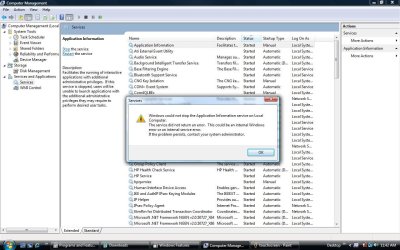
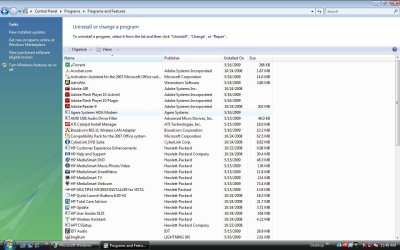
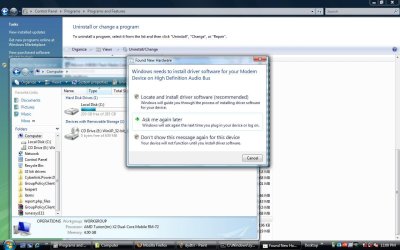
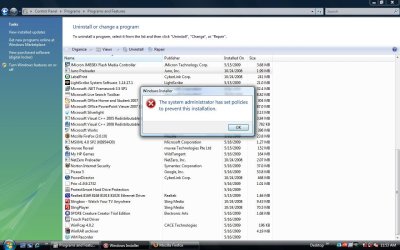
Look at these screenshots. And again, I could say so many more things right now that might push (or pull) you over to my side, but I need to sleep. The only thing I will say is that when you look at these screenshots, keep in mind that every application, or service or component in windows that you can spot in these pictures--aside from a very few items--either came with a native Vista installation (or with the HP programs bundled with the laptop) or someone else put them there. Someone other than MS, HP, or myself.

Thank you for your understanding.

Paul
 

Attachments

  • a.jpg
    a.jpg
    122.9 KB · Views: 32
  • y.jpg
    y.jpg
    137.7 KB · Views: 29
  • touchscreen.jpg
    touchscreen.jpg
    125 KB · Views: 23
  • prog2.jpg
    prog2.jpg
    121.6 KB · Views: 15
  • prog.jpg
    prog.jpg
    120.8 KB · Views: 18
  • modem.jpg
    modem.jpg
    108.9 KB · Views: 33
  • dydtrr.jpg
    dydtrr.jpg
    129.9 KB · Views: 21
  • d.jpg
    d.jpg
    138 KB · Views: 23
  • cannotuninstall.jpg
    cannotuninstall.jpg
    116.9 KB · Views: 25
Last edited:

My Computer

OS
Windows 7
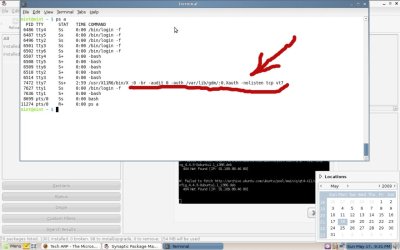
Here is a screenshot in Linux where I know he is in addition to Windows. To anyone with strong Linux skills who knows precisely what "ps a" was designed as a command to show the user, tell me what it is in fact, showing us?

I can get around in Linux but do not have the same knowledge that I have in Windows.. the man page for ps a states the following (for option/switch "a"), which is too confusing for me....

a - Lift the BSD-style "only yourself" restriction, which
is imposed upon the set of all processes when some
BSD-style (without "-") options are used or when the ps
personality setting is BSD-like. The set of processes
selected in this manner is in addition to the set of
processes selected by other means. An alternate
description is that this option causes ps to list all
processes with a terminal (tty), or to list all
processes when used together with the x option.


Note in the screenshot that the X11 process is the only one that has a timestamp -- good evidence running to the possibility that it is from another machine. And X11 is a terminal emulator. I did not want to describe anything I didn't know, so I pasted this from a Linux site.
GlossaryThe X Window System was specifically designed to allow the graphical output of a program running on one machine to appear on a different machine, possibly one that is physically remote and/or a different make and architecture. In other words, X11 was designed to be a platform-independent, networked graphics framework.


In X11 parlance, the "display" denotes the box on which the graphical output will appear. Interestingly, an individual display is defined by the X11 documentation as having exactly one keyboard and one pointer (i.e., mouse), but potentially multiple CPUs, monitors, etc.


The "screen" corresponds to the actual physical display device; in most cases this will be a monitor. X11 allows for an arbitrary number of screens to be connected to each display. Think of a workstation with two monitors or a departmental server, connected to a larger number of (relatively dumb) X terminals.
Jacee: Until I get back into Windows, this is the best evidence I have of another machine networked to mine. I hope to get back in soon... I do not know if I want to reinstall everything on a clean drive or just install 7 (which still keeps the old system on the root, correct?). I have used this particular installation for a few days now and I would like to retrieve some things from it.

Also, I want to tell of at least one added observation I had in the course of the last 12 hours. While in Linux (or at some other time, but based on what I will describe shortly, the time requirements must have been such that I had to have the laptop on and not be in Windows, and it is not too frequent that I am in Linux for the several hours I was last night reading from MSDN.

When I left Linux and tried to start windows, I found that I came to a black screen about 10 seconds after BIOS. I was surprised also that no function keys except F10 worked during the BIOS startup, UNLESS I entered BIOS using F10, loaded default settings, saved them, and came back out to restart. Then I could use function keys--one of which is a shortcut menu to modify the boot sequence--so I could force the PC to go to the CD, since the CD/DVD drive, which had a bootable CD in it, was not being accessed although it has long since been ordered to boot from floppy, CD, USB, then HD. The floppy had been disabled (I don't have one, but it is just an observation) as well.

When I finally got to the Windows 7 PE environment, I opened notepad to look around at the volumes. My Recovery partition, which is to restore my system to factory settings and image, had been decimated and moved. Well, it was copied. There were four log files in the Windows directory of the now mostly empty Recovery directory. They showed that a script had run to move certain Windows elements to another volume which had been assign the letter D. Anything else was deleted. Also, there was another log file that had about 30 lines showing "PRELOAD BASEX.wim" where X was sequentially numbered starting from 1. So this explained to me how he is always there before me ready to go. He has all of his functionality which I do not have before I even login to Windows. Now here is one coincidence that is very unfortunate: I immediately thought to grab those log files. But, I was in PE, and I think I mentioned that my WD backup drive--usually always connected--is not working right now. If memory serves, USB flash drives were always recognized in PE, but today, I could not get one to show up. I even used a new one which I had been saving for the day that I was rid of this problem and if I needed a flash drive I would have a clean one available. But I could do nothing. I do not know how to burn a CD from the command line -- nor if it is even possible from PE, but I would have done that. I was stuck looking at the best evidence yet of the existence of something that showed more than a typical virus' sense of purpose, and I could not copy it or move it to post it here. Sorry. I hope this type of thing never happens again, or I surely will go crazy. During this I had the dreadful thought that even if I actually met Baarod for his help my laptop would somehow seem as if nothing out of the ordinary was taking place. But I do not think that will happen as there have been far more times when I have not had any problems taking a screenshot, pasting it into Paint, then saving it to a flash drive for safe-keeping...

Another point I confirmed was when I was in Linux today, I did a command which shows active and running hardware. One line in particular caught my eye. It said "Kernel, time since start=22:10". Which means the CPU had been with power for 22 hours. This is twice now I have observed in either Windows or Linux, that my PC has been "on" or, with power, far longer than I have realized.

Yesterday, prior to my reading MSDN, I left my house with my laptop and took a walk. I was hoping to avoid going to find another PC to create a bootable AV CD as I intended originally. I thought if I changed location and kept moving, perhaps I could boot the PC and burn an image quickly.

While I was walking, at least three times I powered down the laptop using my usual routine of taking the battery out, and holding down the power button for 15-30 seconds (approx.). I know now that this is far to short of a period to completely discharge the motherboard. 22 hours earlier I had put the battery back in the notebook because I decided that I would leave it out while I slept last night -- for all of 3 hours -- which was not enough for me, but enough to apparently discharge the notebook completely. I will have to check specs on HP's website, but I wonder how long the notebook can hold power without the battery.... I had suggested in an earlier post that this might be half of the confusion....he always seems to be in there (my laptop) -- and he survives the swapping of hard drives (maybe), because he rarely needs to leave since there is power....

The notebook never completely loses power unless the battery is removed for a minimum period. And right now, my only evidence as to this information is that 3 hours is enough time but I wish I knew a shortcut to discharging it a bit more quickly.

Paul

and good night
 

Attachments

  • ftfbfh.jpg
    ftfbfh.jpg
    92.2 KB · Views: 37
Last edited:

My Computer

OS
Windows 7
pjvex386,

I've been following your thread for awhile now, and I'm really wondering if you read my post, a page or so ago. I'm certain this will be sufficent to rid your infection.

When you booted into the Linux live-cd (which is write protected so it operates from memory only) the possibility of you being infected are probably less than 1%. The reason being, as stated above the live-cd runs in your CPU/RAM only. It dosen't touch your disk. You could remove all hard drives in their entirety, and still boot the live cd, and use it. The only possible way any infection that is using advanced technequies such as infecting your recovery partition, bios, or GPU, could possibly compromise the linux distro running entirely in ram, is if it was memory resident, and had the capability to realtime patch data in your memory, on windows, and alinux flavors. This would be VERY complicated to do as each operating system stores data in diffrent areas of memory. The attacker would need to be intimate with your specefic hardware, and bios. The possibility of this is extremely low.


I suggest you read my previous post, follow all the steps, and enjoy your clean windows machine.

Good luck!


*EDIT*

The screenshot you supplied looks fine!
 
Last edited:

My Computer

OS
Windows 7, Windows XP SP3 x86
pjvex386,

I've been following your thread for awhile now, and I'm really wondering if you read my post, a page or so ago. I'm certain this will be sufficent to rid your infection.

When you booted into the Linux live-cd (which is write protected so it operates from memory only) the possibility of you being infected are probably less than 1%. The reason being, as stated above the live-cd runs in your CPU/RAM only. It dosen't touch your disk. You could remove all hard drives in their entirety, and still boot the live cd, and use it. The only possible way any infection that is using advanced technequies such as infecting your recovery partition, bios, or GPU, could possibly compromise the linux distro running entirely in ram, is if it was memory resident, and had the capability to realtime patch data in your memory, on windows, and alinux flavors. This would be VERY complicated to do as each operating system stores data in diffrent areas of memory. The attacker would need to be intimate with your specefic hardware, and bios. The possibility of this is extremely low.


I suggest you read my previous post, follow all the steps, and enjoy your clean windows machine.

Good luck!


*EDIT*

The screenshot you supplied looks fine!
I'd say you have two chances of that happening, this man does not do anything that he is asked to do, he just goes on and on trying to convince everybody that he is telling the truth, and just seems to ignore everyones requests to do certain things, that may help him.
 

My Computer

Computer Manufacturer/Model Number
Self Build 64bit
OS
Vista Ult64, Win7600
CPU
Intel Core 2 Quad Q6600 @ 2400 MHz 64bit OS
Motherboard
Asus P5E3 Deluxe WiFi @p 64 bit OS
Memory
4096 MB DDR3-SDRAM
Graphics Card(s)
ATI Radeon HD 3870 Series x2 Crossfired
Sound Card
Realtek on board
Monitor(s) Displays
Samsung SyncMaster - 23 inches
Screen Resolution
1680x1050 pixels at 60 Hz in True Colors
Hard Drives
Hitachi (250 GB)/Samsung 750 GB. /Barracuda 160 GB.
My Book 1 TB external..
PSU
Cooler Master 1000w
Case
Cooler Master Cosmos 1000.
Cooling
Fans and fresh air,
Keyboard
Wireless
Mouse
Wireless
Internet Speed
Never fast enough
Other Info
I use a Magnum.
I agree with jfar ...all apparent good help has been ignored. So either pjvex386 is conducting his own experiments or is just missing the boat completely.
 

My Computer

Computer type
PC/Desktop
Computer Manufacturer/Model Number
Bruce ... somewhere in his 40's
OS
Windows 7 Ultimate 32bit SP1
CPU
Intel(R) Core(TM)2 Quad CPU @ 2.40GHz, 2400 MHz
Motherboard
INTEL/D975XBX2
Memory
4 GB
Graphics Card(s)
ATI Radeon HD 2600 Pro
Monitor(s) Displays
Samsung SyncMaster 914v
Screen Resolution
1280 x 1024
Hard Drives
2/500GB each ... ST3500630AS ATA Device.
One is not connected
PSU
Rocketfish 700 W
Case
G.Skill Gigabyte Chassis
Keyboard
Standard PS/2 Keyboard
Mouse
Microsoft PS/2 Mouse
Internet Speed
DSL
Antivirus
Avira Internet Security
Browser
IE 11
Other Info
ATI HDMI Audio
I concur and think he is doing this for his own amusement. When the admin verifies as a "freak thread", it does add an lol factor.
 

My Computer

Computer Manufacturer/Model Number
self built
OS
7600.20510 x86
CPU
P4 550 3.4 GHz HT running at 3.5 GHz
Motherboard
MSI PM8M3-V (MS-7211 v1.x) Micro-ATX mainboard
Memory
OCZ 2 GB(2x1GB) DDR400mHz running @ 414 mHz
Graphics Card(s)
HIS Radeon HD 3850 IceQ 3 Turbo HDMI Dual DL-DVI AGP
Sound Card
MOTU Traveler firewire studio interface 192 kHz 24 bit
Monitor(s) Displays
22" widescreen Acer X223W LCD, 17" Compaq P75 CRT
Screen Resolution
1680x1050 and 1280x1024
Hard Drives
SATA I x2 WD, 400 GB and 120 GB, SATA 2 WD Caviar Black 1 TB
PSU
350W generic
Case
Cybertronpc, it glows blue
Cooling
stock cpu fan, Ice-Q 3 gpu and system, many case fans
Keyboard
Logitch Classical Keyboard 200
Mouse
Logitech Mediaplay cordless
Internet Speed
1792/448 kbits/sec
Other Info
SATA II PCI fake RAID adapter, 1 GB Readyboost, original ATI Remote Wonder (even works with WMC perfectly), Logitech Rumblepad 2 game controller x2
Yes, i agree, this must be a lonely troll doing it for kicks. If that's the case (Which I'm almost certain) i hope he has a nasty run-in with parite.
 

My Computer

OS
Windows 7, Windows XP SP3 x86
Hey pjvex386,

I have two suggestions for you:
One, go buy a BRAND NEW HDD and destroy the old one (or nuke it but Boot and Nuke).
Two, go buy a LEGAL copy of WINDOWS (anyone) from a damn STORE! Get a LEGIT CD key, and INSTALL IT FRESH. Then, go BUY a ROUTER from a STORE, and SIGN UP for a ISP service and get a MODEM. BUY a AV/FIREWALL and INSTALL it FIRST thing after installing you LEGAL copy of Windows, WHILE YOU ARE NOT CONNECTED TO THE INTERNET.

If this DOES NOT solve it, then you should ACTUALLY DO IT, and stop being so paranoid.

~Lordbob
 

My Computer

Computer Manufacturer/Model Number
Hera
OS
Windows 7 Ultimate x64, Mint 9
CPU
Intel i5-2500k
Motherboard
ASUS P8P67 Pro
Memory
2x 4Gb Corsair VENGEANCE DDR3-1600
Graphics Card(s)
NVidia GeForce N260GTX Twin Frozr
Sound Card
Realtek HD OnBoard Audio
Monitor(s) Displays
ASUS 24" Monitor
Screen Resolution
1920x1080
Hard Drives
G.SKILL Phoenix Series 60GB SATA II MLC Internal Solid State Drive (SSD)
SAMSUNG Spinpoint F3R 1TB 7200 RPM 32MB Cache SATA II
PSU
Cooler Master Real Power Pro 750W
Case
Cooler Master Haf 932
Cooling
Fans
Keyboard
Razer Tarantula
Mouse
Razer Lachesis
Internet Speed
not fast enough
Hey pjvex386,

I have two suggestions for you:
One, go buy a BRAND NEW HDD and destroy the old one (or nuke it but Boot and Nuke).


~Lordbob

If you read through the thread carefully, you'll see that a new hd was already purchased to replace the original.

In reply to the ps command, a quick search reveals that it lists what processes are currently running the -A switch, like ls -a, lists all processes, while the lower case "-a" switch lists info on the most requested processes.

Would you have been doing this around 10 pm, by any chance?
 

My Computer

OS
Windows 7 64-bit
CPU
Intel C2D E8400 Wolfdale
Motherboard
Asus Maximus Formula
Memory
Mushkin 2GB DDR2 800
Graphics Card(s)
Asus 8800GT
Hard Drives
2x Seagate Barracuda ES.2 ST3250310NS 250GB 7200 RPM 32MB Cache SATA-II
PSU
Cooler Master Real Power Pro RS-650-ACAA-A1
Case
Lian-li PC-1010B
Mouse
Logitech G7
Correct - however, if you're running a version of Linux that has a GUI of any kind running, you can pretty much bet that there is going to be an X process running, on top of which your DM of choice will run, right?

So how is that X call unusual? Only way I can see it being unusual is if you're running a strictly command line client that never calls X to start.
 

My Computers

System One System Two

  • Computer type
    PC/Desktop
    Computer Manufacturer/Model Number
    The Beast Model A (homebrew)
    OS
    Windows 11 21H2 Current build
    CPU
    AMD Ryzen 9 3950X
    Motherboard
    MSI MEG X570 GODLIKE
    Memory
    4 * 32 GB - Corsair Vengeance 3600 MHz
    Graphics Card(s)
    EVGA GeForce RTX 3080 Ti XC3 ULTRA GAMING (12G-P5-3955-KR)
    Sound Card
    Realtek® ALC1220 Codec
    Monitor(s) Displays
    2x Eve Spectrum ES07D03 4K Gaming Monitor (Matte) | Eve Spec
    Screen Resolution
    3x 3840 x 2160
    Hard Drives
    3x Samsung 980 Pro NVMe PCIe 4 M.2 2 TB SSD (MZ-V8P2T0B/AM) } 3x Sabrent Rocket NVMe 4.0 1 TB SSD
    PSU
    PC Power & Cooling’s Silencer Series 1050 Watt, 80 Plus Plat
    Case
    Fractal Design Define 7 XL Dark ATX Full Tower Case
    Cooling
    SteelSeries Apex Pro Wired Gaming Keyboard
    Keyboard
    SteelSeries Apex Pro
    Mouse
    Logitech MX Master 3S | MX Master 3 for business
    Internet Speed
    AT&T LightSpeed Gigabit Duplex Ftth
    Antivirus
    Windows Defender + MB 3
    Browser
    Nightly (default) + Firefox (stable),Chrome, Edge
  • Computer type
    PC/Desktop
    System Manufacturer/Model Number
    Dell Latitude E5470
    OS
    ChromeOS Flex Dev Channel (current)
    CPU
    Intel(R) Core(TM) i5-6300U CPU @ 2.40GHz, 2501 Mhz, 2 Core(s), 4 Logical Processor(s)
    Motherboard
    Dell
    Memory
    16 GB
    Graphics Card(s)
    Intel(R) HD Graphics 520
    Sound Card
    Intel(R) HD Graphics 520 + RealTek Audio
    Monitor(s) Displays
    Dell laptop display 15"
    Screen Resolution
    1920 * 1080
    Hard Drives
    Toshiba 128GB M.2 22300 drive
    INTEL Cherryville 520 Series SSDSC2CW180A 180 GB SATA III SSD
    PSU
    Dell
    Case
    Dell
    Cooling
    Dell
    Keyboard
    Dell
    Mouse
    Logitech MX Master 3S (shared w. Sys 1) | Dell TouchPad
    Internet Speed
    AT&T LightSpeed Gigabit Duplex Ftth
What an interesting read, I would have to concur with the last few posts and the Admins conclusive findings on this one.

May I suggest turning down the transmit power on your wifi router or bluetooth, as you say you took a walk and say this little man is still in there hacking you. :sarc: I think the power may be at such a level it's frying something other than eggs. :geek:
 

My Computer

Computer Manufacturer/Model Number
Asus Component Home Brew
OS
Windows 7 x86
CPU
Intel E8400
Motherboard
ASUS P5E Deluxe
Memory
2x Corsair 2gig
Graphics Card(s)
Asus Geforce 9800 GTX+
Sound Card
Auzentech X-Fi Prelude 7.1
Monitor(s) Displays
3x Samsung SyncMaster 245B
Screen Resolution
3x 1920 x 1200
PSU
Corsair 550vx
Case
Old black one
Cooling
Dusty fans
Keyboard
Razer Tarantula
Mouse
Logitec G5
Internet Speed
Some times fast - Other times insanely fast
Other Info
Logitech Z-5500 speakers - Outpost OSS 6.7 - MediaMonkey it rocks - TrackIR Pro 4 - Hotas Cougar - Saitek Pro Yoke - Matrox TripleHeader
Status
Not open for further replies.
Back
Top