This is ridiculous

bambi

New member
Member
Local time
8:12 PM
Messages
65
Ok, this is a completely biased argument since i have just wasted about 2 hours wrestling with Windows 7's permissons. This is going to end up in a rant but ill try to explain.

All i wanted to do was install 1 program, steam. Since i couldn't play counter strike i thought well i've tried everything bar a full re-install. So getting rid of it was the easy part. Now i had to re-install it. What a bad mistake....

"You do not have the permissons to delete this file (Steam.exe)" Retry or ignore.

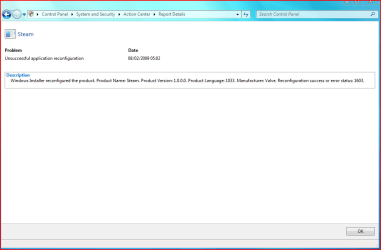
No matter where i tried to instal this. I could not install it. Then when i finally managed to, steam created a steamnew.exe and steamtmp.exe and tried to update itself and re-write over the old steam.exe and lo and behold "Fatel error, Could not delete steam.exe you need the administrarors permisson." Well Thank you Windows but, my accout is set to administrator.

So ok, ill play ball, i enabled the built-in admin acount via a tut here (nice and detailed thanks :p ) and tried the same thing.... Oh wait i forgot it's windows...

"You need the administrators permisson before deleting this file." Are you serious? No matter what i tried the permissons of the folder Steam were all set to full control bar the CREATOR ACCOUNT. So i tried to enable that full control, but everytime i clicked apply or ok, it just closed the window and the radio buttons weren't checked nor the permissons changed. The UAC has been on full, then half full and off. Didn't make a difference.

Now don't get me wrong Windows 7 > XP any day, but this is down-right stupid. This is the reason why i loved XP, If your account was set to Admin, then it actually meant u could do anythin since you were Admin. Windows 7 and this whole UAC permissons thing is the most fustrating and patronising thing i have come accross....

That ends my rant and in a nutshell, i want to install steam but cant since i dont have the right permissions, how would i go about getting them and Why can't i delete files that i have made?

Thanks for reading this :)

-baMBi-
 

My Computer

OS
Windows 7 7000; Windows XP Pro SP3
I've noticed this happening on my system as well when there are certain folders/files that you've recently accessed then want to delete them and Windows wont let you even with full admin privileges. The only way to delete these files/folders for me, is to do a restart, go back to it then delete it.

Anyone noticed this on their system and any fix?
 

My Computer

Computer Manufacturer/Model Number
Custom Build
OS
Windows 7 Build 7048 x64
CPU
Athlon 64 X2 Dual Core 4600+
Motherboard
EMX-AMD750G-PRO
Memory
4 x 1GB Kingston 400MHz 6-6-6-18 (800MHz)
Graphics Card(s)
ATI Radeon 3650
Sound Card
Realtek HD Audio
Monitor(s) Displays
22" AOC 2216Vw
Screen Resolution
1680x1050
Cooling
Arctic Cooling Freezer 64 Pro PWM
Keyboard
Generic Enhanced Natural Keyboard
Mouse
Logitech VX Nano
Other Info
Edifier M1550
I have rebooted about 6 times, i still need permissons... I have calmed down now, but why can't you delete things that you have either authorised or made yourself? does that seem too il-logical to you?

-baMBi-
 

My Computer

OS
Windows 7 7000; Windows XP Pro SP3
well, no, but also had a similar problem with accessing a folder named "my documents" on another HD, not system (OS), just a copy of mydocs on another drive, backup basically, but not in sync with anything

[edit] only way i know or can think of is thru safe mode, uninstall or manually remove all entries and files along with registry, reboot then try another clean install of steam
 

My Computer

Computer Manufacturer/Model Number
CUSTOM
OS
XP/win7 x86 build 7127
CPU
Athlon64 X2 DUAL 4200+ 2.21ghz
Motherboard
ASUS K8 PRO SLI
Memory
2GB Dual Chan DDR2 Corsair
Graphics Card(s)
Nvidia 6800GT
Sound Card
nvidia
Monitor(s) Displays
19' LCD
Screen Resolution
1280x1024
Hard Drives
WD 250, 2x500, 2x1TB IDE/USB
WD 250 SATA (system)
SEAGATE 120 Sata
PSU
coolermaster 450
Case
SUPERFLOWER
Cooling
1 HDD bay fan, 5x80mm Case Fans, AEROGATE II Fan/Temp
Keyboard
MS wireless
Mouse
MS Wireless
Internet Speed
fassssssssst
Yes it is... Well, try to check this out, it might be helpful in taking ownership of files/folders you're tweaking ;)
 

My Computer

Computer Manufacturer/Model Number
Custom Build
OS
Windows 7 Build 7048 x64
CPU
Athlon 64 X2 Dual Core 4600+
Motherboard
EMX-AMD750G-PRO
Memory
4 x 1GB Kingston 400MHz 6-6-6-18 (800MHz)
Graphics Card(s)
ATI Radeon 3650
Sound Card
Realtek HD Audio
Monitor(s) Displays
22" AOC 2216Vw
Screen Resolution
1680x1050
Cooling
Arctic Cooling Freezer 64 Pro PWM
Keyboard
Generic Enhanced Natural Keyboard
Mouse
Logitech VX Nano
Other Info
Edifier M1550
Tried the Take Ownership reg, it helped in removing files manually, but when steam updates it seems to want to make and delete its own files and thus won't work there...

-baMBi-
 

My Computer

OS
Windows 7 7000; Windows XP Pro SP3
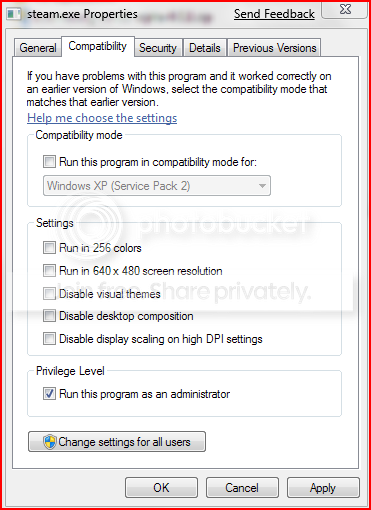
You've of course set the program to run as administrator by default?

Capture0.png
 

My Computer

Computer Manufacturer/Model Number
Custom Build
OS
Windows 7 Build 7048 x64
CPU
Athlon 64 X2 Dual Core 4600+
Motherboard
EMX-AMD750G-PRO
Memory
4 x 1GB Kingston 400MHz 6-6-6-18 (800MHz)
Graphics Card(s)
ATI Radeon 3650
Sound Card
Realtek HD Audio
Monitor(s) Displays
22" AOC 2216Vw
Screen Resolution
1680x1050
Cooling
Arctic Cooling Freezer 64 Pro PWM
Keyboard
Generic Enhanced Natural Keyboard
Mouse
Logitech VX Nano
Other Info
Edifier M1550
hello bambi

Where are the files you wish to delete located, if they are in program files, which is a protected area, you may find that running explorer.exe as an admin will allow you to delete the files. Normal explorer operations are run with the users standard user rights and explorer does not prompt for elevation.

another workaround is to explicitly give yourself full rights to the folders/files concerned right click - take ownership then give yourself full control that should permit deletion.

It can be very frustrating when this sort of thing happens, I know from personal experience :cry::mad:
 

My Computers

System One System Two

  • Computer type
    PC/Desktop
    Computer Manufacturer/Model Number
    ChillBlast - Custom to my design
    OS
    Windows 11 Pro x64 [Latest Release and Release Preview]
    CPU
    Ryzen 9 5950X, 3.8 - 5.2 MHz
    Motherboard
    Asus Prime X570-Pro
    Memory
    64GB [2 x 32GB] DDR4 3200MHz
    Graphics Card(s)
    4GB NVIDIA GEFORCE GTX 1650 Ti
    Sound Card
    On-board SPDIF to 5.1 System + HDMI [5.1 system]
    Monitor(s) Displays
    32" UHD 32 Bit HDR Monitor + 43" UHD 4K 32Bit HDR TV
    Screen Resolution
    2 x 3840 x 2160 @60Hz
    Hard Drives
    1TB M2 SSD OS, 500GB Fast Access SSD, 2 x 8TB Data + Various Externals from 1TB to 4TB, 10TB NAS
    PSU
    NZXT C750 80 PLUS Gold 750W Modular PSU
    Case
    Workstation Case [Matt Black]
    Cooling
    NZXT Kraken X63 280mm CPU Cooler +2x Quiet Case fans
    Keyboard
    Logitech Wireless MX Keys & K400 + others
    Mouse
    Logitech Wireless MX Master 3S
    Internet Speed
    920 MB Down 50 MB Up
    Antivirus
    BitDefender Total Security Pro
    Browser
    Chrome (always run latest Non-Beta)
    Other Info
    Also run ...
    Laptop - Quad 8GB - Windows 10 Pro x64
    Nexus 7 Android tablet x2
    Samsung 10.2" tablet
    Blackview TAB 8 4G Android Tablet c/w Keyboard
    Wacom Intuos Pro Medium Pen Pad
    Wacom Intuos Pro Small Pen Pad
    Wacom Expresskeys Remote
    Loopdeck+ Graphics Controller
    Shuttle Pro v2 Control
  • Computer type
    Laptop
    System Manufacturer/Model Number
    Dell XPS 17 10750H
    OS
    Windows 11 Pro x64 Latest RP
    CPU
    Intel I7 10750H 5.0GHz
    Motherboard
    Dell XPS
    Memory
    32GB [2x16GB] DDR4 2933 MHz
    Graphics Card(s)
    nVidia GTX1650Ti 4 GB GDDR6
    Sound Card
    Stock [Realtek] 4 Speaker
    Monitor(s) Displays
    17" IPS UHD+ Infinity Edge Touchscreen
    Screen Resolution
    3840 x 2400
    Hard Drives
    2TB M2 NVMe, 4TB External + various 500GB & 1TB External NVMe (also have access to spinner HDD from
    PSU
    Stock
    Case
    Stock XPS Aluminium & Carbon Fibre
    Cooling
    Stock - Active Fan Control
    Keyboard
    Backlit + Various Logitech
    Mouse
    Stock Track Pad + Logitech MX Trackball
    Internet Speed
    72 MB Down 18MB Up
    Browser
    Chrome
    Other Info
    Also run ...
    Laptop - Quad 8GB - Windows 10 Pro x64
    Nexus 7 Android tablet x2
    10.2" tablet
    Sony Z3 Android Smartphone
    Wacom Intuos Pro Medium Pen Pad
    Wacom Intuos Pro Small Pen Pad
    Wacom Expresskeys Remote
    Loopdeck+ Graphics Controller
    Shuttle Pro v2 Control Pad
    10TB NAS
Yes i have/had run as admin on.
As for the explorer thing i didnt know that and will give it a go, but i tried to set my entire C drive as full control, but i got so many "Access denied" due to permissions i just clicked abort lol. But i'll give the explorer a go :)

-baMBi-
 

My Computer

OS
Windows 7 7000; Windows XP Pro SP3
Unfortunately, I don't use steam.
If the module that updates steam files is different from the one you've given run as admin, you might want to give that module run as admin as well. Just a thought :)
 

My Computer

Computer Manufacturer/Model Number
Custom Build
OS
Windows 7 Build 7048 x64
CPU
Athlon 64 X2 Dual Core 4600+
Motherboard
EMX-AMD750G-PRO
Memory
4 x 1GB Kingston 400MHz 6-6-6-18 (800MHz)
Graphics Card(s)
ATI Radeon 3650
Sound Card
Realtek HD Audio
Monitor(s) Displays
22" AOC 2216Vw
Screen Resolution
1680x1050
Cooling
Arctic Cooling Freezer 64 Pro PWM
Keyboard
Generic Enhanced Natural Keyboard
Mouse
Logitech VX Nano
Other Info
Edifier M1550
I sympathise with ya bambi, I'm in same position, I can't for the life of me, get Steam to install on my Win7 setup? Tried everything, taking ownership, running as Admin etc etc, it will just not install :mad: or rather, it installs eventually, but will not complete/update and run.

WTF is goin on here? I know I'm getting on in age a little, lol, but I ain't that stupid! :rolleyes:

I'm on hold with Steam ATM, kinda annoying, but love Win7 too much to go back to XP. ;)
 

My Computer

OS
XP
If I understand your problem correctly, you could try this. Go to "Control Panel", click on "Action Center". in the left panel, select "User Account Control Settings", move the slide to the bottom, and click "OK"
 

My Computer

OS
Windows 7
If I understand your problem correctly, you could try this. Go to "Control Panel", click on "Action Center". in the left panel, select "User Account Control Settings", move the slide to the bottom, and click "OK"

Slider already at bottom buddy :)
 

My Computer

OS
XP
Tried a few times now, no go!
 

Attachments

  • steam1.PNG
    steam1.PNG
    33.4 KB · Views: 41
  • steam2.PNG
    steam2.PNG
    18.7 KB · Views: 22

My Computer

OS
XP
I gave up :) it just caused me to waste time and infuriate me. Such a shame however, since i wasn't half bad at Counter Strike ;).

But it is very annoying thought. :(

-baMBi-
 

My Computer

OS
Windows 7 7000; Windows XP Pro SP3
Finally!, finally got it working lol, been at it all night :o:D

OK, the problem lies in the steamtmp file not being able to be written to, and this can't happen because, wait for it lol, the steam folder is READ ONLY!!

Yup, even though I'm an Administrator, it only allows me to read and NOT write to any file in this folder. You can see this if you right click and choose 'properties', then 'security' tab, then select your user name. Clicking the administrator details shows 'full access' (read & write), but for some reason, although I am administrator, the steam installation is taking the 'user' permissions into consideration when the installation is executed. Dunno if thats a bug with Win7 or Steam??? :confused:

Anyway, long and short of it is, to run the installer msi, do it with 'Run As Administrator' anyway, and let the install finish. DO NOT CLICK ON OK to finish the installation and update <---- IMPORTANT!! Leave that as is for now, we will come back to that later.

Go to your steam directory where installed and 'right click' on steam folder, select 'properties', and on 'general' tab, untick READ ONLY, it will give you an option to include all folders or only files inside folder, choose just the files.

Now you will instantly start seeing files appear within this folder, as if they were hidden, perhaps they were? (I did wonder why the steam folder was so small after installation).

Now that folder is writable, go back to where we last left installer, and now click on OK. Update will complete, and steam will launch asking for username, pass etc. :D:D

Kinda long winded lol!, but I got there in the end, seems to be working fine for the moment.
 

My Computer

OS
XP
Same problem--Catch 22

I have a problem with Norton 360 beta and Win 7. There is a dll file within Norton that causes Explorer to crash whenever you try to right click to do anything. Not only that, it crashes when you select a file and choose "Properties" from the Menu, so I can't delete it, rename it, or change it in any way. I'm at a loss about how to fix this other than deleting Norton, which I'll probably do if I can't find a fix.
 

My Computer

OS
Windows 7
I am a rabid Norton hater and suggest you uninstall it . :p

Probably best you start a new thread so that people will see your post, it is easily missed sitting here .

Good luck .
 

My Computer

Computer Manufacturer/Model Number
Home made.
OS
7068 64 bit + XP Pro
CPU
[email protected]
Motherboard
Gigabyte GA-P35-DS3L
Memory
4x1Gb Geil Ultra 800Mhz
Graphics Card(s)
Gigabyte 9600GT
Sound Card
Onboard
Monitor(s) Displays
ViewSonic 22" 5000:1 2ms
Screen Resolution
1680x1050
Hard Drives
Samsung Sata 300, 320Gb,
Western Digital 200Gb IDE
PSU
Cheapo 430w Thermaltake
Case
Antec Performance2
Cooling
Standard Intel for CPU, various others for case+ Hardcano.
Keyboard
Microsoft , wired
Mouse
Microsoft, wired Optimouse
hmm...it seems like the famous UAC is at it's best again...I had that problem...so I turned off UAC completely...it fixed the problem with deleting certain files...also, as already been pointed out here, run as admin works too...sometimes a process is using the file so it can't be deleted by that reason...open task manager and look at witch process are running on your computer...and terminate...

By the way...a funny thing happend when I shut down the UAC...then the gadgets wouldn't start...it turns out that Microsoft WANTS people to use UAC...thats why...so the choice is UAC and gadgets or nothing at all...but UAC is imporved under Windows 7 so now theres a switch so you can adjuste the settings to whatever controll you want...from TOTAL TERROR to something the non-thinking user can accept...

There is a small program, Unlocker, that locks up processes of files so you can delete them...I used it in both Windows XP and Windows Vista...works fine but I don't know if its working in Windows 7 Beta...Havent try that yet...anyway, the program can be found at UNLOCKER 1.8.7 BY CEDRICK 'NITCH' COLLOMB

But as I said, I dont know if its working in Win 7...
 

My Computer

Computer Manufacturer/Model Number
Fujitsu Amilo Li1718 HP Pavillon
OS
Windows 7, Vista, Mandriva 2008
Back
Top