This users' small gripes of IE9

Airbot

----------------------
VIP
SF Team
Local time
3:53 AM
Messages
18,396
Just a thread of my little dislikes of IE9 RTM.

*Not to be confused with a general IE9 availability discussion thread.*


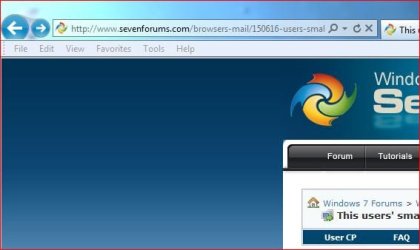
1.) Why they chose to keep the Back Button so that it under-laps the bar underneath it is beyond me. Just looks wrong, sorry.

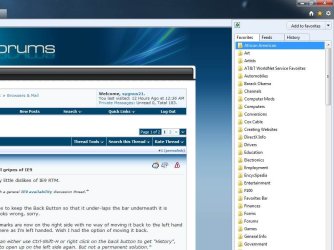
2.) Favorites/bookmarks are now on the right side with no way of moving it back to the left hand side. Don't like it there as I'm left handed. Wish I had the option of moving it back.

*Notice that you can either use Ctrl-Shift-H or right click on the back button to get "History", and the Favorites to open up on the left side again. But not a permanent solution.*

3.) Homepage/favorites/tools icons are all on the right side with no way of moving or customizing them. Again, annoying for me being left handed.

*Can have the Menu Bar enabled yeah, but would rather be able to have the icons movable to left or right and not use the Menu Bar at all.*

4.) Default download location box doesn't let the Drive letter show up if you change it to another Drive location. Say I want downloads to go to another Drive - G:/Downloads. It will just say - downloads.

While this is a minor thing, it took a download of something to actually know that the download was going to the drive I specified it to.

Could just show the complete address in the Browse list to begin with.

5.) No native in-line spell checker. Not sure why there still isn't one. Can use third party add-on (Speckie, iespell), but why not just have one native?

6.)
Although it seems fast, I don't see it being any faster than the other major browsers like some are stating, in fact it seems a little slower to me in some parts so far against FF4.


May in fact grow on me the more I use it and probably will, although (besides the tab locations) the lack of available basic customization is kind of disappointing.


Just wanted to state some of my own personal opinions, cosmetic or irrelevant as they may be.

Not to be confused with a fanboi or flame thread.
 
Last edited:

My Computer My Computer

At a glance

Windows 7 Ultimate x64 SP1Core i7 920 (D0) @ 4Ghz, *26c idle *65c full ...12GB DDR3 Corsair Dominator -CMD12GX3M6A1600C...Zotac Geforce GTX 770
Computer type
PC/Desktop
Computer Manufacturer/Model Number
Airbot 2.0
OS
Windows 7 Ultimate x64 SP1
CPU
Core i7 920 (D0) @ 4Ghz, *26c idle *65c full load on air
Motherboard
Asus P6X58D Premium - Sata 6Gb/s - USB 3.0
Memory
12GB DDR3 Corsair Dominator -CMD12GX3M6A1600C8 at 1600MHz
Graphics Card(s)
Zotac Geforce GTX 770
Sound Card
ASUS Xonar D2X
Monitor(s) Displays
1 LG 24" Flatron W2453V-PF 1 Samsung 24" P2450H both 2ms RT
Screen Resolution
1920x1080@60hz
Hard Drives
1 Samsung 250GB 840 Evo SSD
1 OCZ Vertex2 180GB SSD
1 TB Samsung Spinpoint F1 7200RPM 32MB cache
2 500GB WD Caviar Blacks 7200RPM 32MB cache (WD5001AALS)

Pioneer DVD Burner DVR-S18M
PSU
Corsair HX1000W
Case
Cooler Master HAF 932
Cooling
Case Fans *3 230mm, *1 140mm/CPU - *Tuniq Tower 120 Extreme
Keyboard
Logitech Wireless MK700
Mouse
Logitech Wireless MK700
Internet Speed
DL 15 Mbps UL 0.98 Mbps
Antivirus
None
Browser
Firefox Nightly
Other Info
Processor-7.7 *RAM- 7.9 *Graphics-7.9 *Gaming Graphics- 7.9 *SSD- 7.8 W.E.I final score= 7.7
*Phone- LG Nexus 5
I have two immediate observations:

(1) No spell-check. This is crazy. I would love to know MS's logic of consistently not having this in IE.
(2) GMail, while working just fine, is oddly rendered. Just looks different. Or, maybe I have been using Chrome for too long.

Edit:

(3) If MS was going to redesign the UI of IE9 radically, which they did, then why did they not make the various tool bars (command bar, fav bar etc.) more in line with the overall UI of the browser. They do look ugly and out of place. They certainly could have made it much much better.

Otherwise, I am finding IE9 to be fast and I do like the exteme minimalism.
 

My Computer My Computer

At a glance

Win 7 Professional 64bit
OS
Win 7 Professional 64bit
just a few reasons for being a die hard firefox fan:D
 

My Computer My Computer

At a glance

Microsoft Windows 7 Home Premium 64-bit 7600IIx4 amd athelon 635 processor2x2gbati radeon HD 5450
Computer Manufacturer/Model Number
Hewlett packard/p6512uk
OS
Microsoft Windows 7 Home Premium 64-bit 7600
CPU
IIx4 amd athelon 635 processor
Motherboard
FOXCONN 2AA9
Memory
2x2gb
Graphics Card(s)
ati radeon HD 5450
Sound Card
(1) Realtek High Definition Audio (2) AMD High Definition
Monitor(s) Displays
samsung lcd tv 32"
Screen Resolution
1360x 768
Hard Drives
(1) WDC WD10 01FAES-60Z2A0 SATA Disk Device (2) Maxtor OneTouch USB Device (3) ST310003 33AS USB Device (4) WD My Book 1111 USB Device
PSU
?
Cooling
air!
Keyboard
wireless hp
Mouse
wireless Hp,optical
Internet Speed
1.10mb/s
Antivirus
MSE
Browser
Firefox
Just a thread of my little dislikes of IE9 RTM.

*Not to be confused with a general IE9 availability discussion thread.*


1.) Why they chose to keep the Back Button so that it under-laps the bar underneath it is beyond me. Just looks wrong, sorry.

2.) Favorites/bookmarks are now on the right side with no way of moving it back to the left hand side. Don't like it there as I'm left handed. Wish I had the option of moving it back.


3.) Homepage/favorites/tools icons are all on the right side with no way of moving or customizing them. Again, annoying for me being left handed.

I agree with all of these. I noticed the back button on the pre-releases and it drove me nuts. I don't use it, I use the 4 way mousewheel to go back and forth, but it just doesn't......look right.

And everything being on the right side annoys me, and i'm not left handed. I'm so used to them being on the left, or at least being able to move them that this is just awkward. Same here with the menu bar too, I don't turn on the menu bar. I like the real estate on the page.
 

My Computer My Computer

At a glance

Windows 7 Home PremiumAmd Semperon 2.10GHz2 GigATI Radeon 3100
Computer Manufacturer/Model Number
Toshiba Satellite L455D
OS
Windows 7 Home Premium
CPU
Amd Semperon 2.10GHz
Memory
2 Gig
Graphics Card(s)
ATI Radeon 3100
Sound Card
Realtek
Monitor(s) Displays
15.6 inch
Screen Resolution
1366x768
Hard Drives
250gig
Mouse
Logitech Wireless
Internet Speed
16/2 cable
What's up with the awful crappy fonts due to the hardware acceleration features? I had this with FF4 RC and with IE9. In FF, i disbled hardware acceleration, in IE9, I turned on compatibility mode for all websites.

On my laptop, IE9 and FF4 RC look just fine and dandy. On my desktop with an Nvidia 9800GTX+, and my 23" 1920x1080 monitor it looks bad.
 

My Computer My Computer

At a glance

Windows 7 Ultimate x64Intel Q9550 2.83Ghz OC'd to 3.40Ghz8GB G.Skill PI DDR2-800, 4-4-4-12 timingsEVGA 1280MB Nvidia GeForce GTX570
Computer Manufacturer/Model Number
Self-Built in July 2009
OS
Windows 7 Ultimate x64
CPU
Intel Q9550 2.83Ghz OC'd to 3.40Ghz
Motherboard
Gigabyte GA-EP45-UD3R rev. 1.1, F12 BIOS
Memory
8GB G.Skill PI DDR2-800, 4-4-4-12 timings
Graphics Card(s)
EVGA 1280MB Nvidia GeForce GTX570
Sound Card
Realtek ALC899A 8 channel onboard audio
Monitor(s) Displays
23" Acer x233H
Screen Resolution
1920x1080
Hard Drives
Intel X25-M 80GB Gen 2 SSD
Western Digital 1TB Caviar Black, 32MB cache. WD1001FALS
PSU
Corsair 620HX modular
Case
Antec P182
Cooling
stock
Keyboard
ABS M1 Mechanical
Mouse
Logitech G9 Laser Mouse
Internet Speed
15/2 cable modem
Other Info
Windows and Linux enthusiast. Logitech G35 Headset.
Puzzled why Microsoft took so long to come up with so little.
Amazing how few options there are reminds me off a straightjacket , has even less options than Chrome.
 

My Computer My Computer

At a glance

Windows 7 Ultimate 64 bitIntel Core i7 4770K overclocked to 4.7GHz Qua...16GB Team Group Vulcan Gold 2133MHzATI Radeon HD 7880 Series Display adapter
Computer type
PC/Desktop
Computer Manufacturer/Model Number
self build
OS
Windows 7 Ultimate 64 bit
CPU
Intel Core i7 4770K overclocked to 4.7GHz Quad Core Haswell
Motherboard
Asus Z87 Pro (Socket 1150) ATX Motherboard
Memory
16GB Team Group Vulcan Gold 2133MHz
Graphics Card(s)
ATI Radeon HD 7880 Series Display adapter
Monitor(s) Displays
NEC LCD2690WUXi2
Screen Resolution
26" 1920 x 1200
Hard Drives
Samsung 500GB SSD 840 EVO SATA 6Gb/s
Samsung 250GB SSD 840 EVO SATA 6Gb/s
PSU
Corsair AX760 Platinum
Case
Cooler Master HAF X Gaming Tower
Cooling
XSPC RayStorm 750 RS360 Water cooling
Mouse
Razer Death Adder left handed
Internet Speed
126Mb download 11.5Mb up
Antivirus
Avast free
Browser
Opera
Other Info
Main Browser is Opera
Favorite software Adobe Lightroom & Photoshop
best plugins Nik software
Firewall : Private firewall 7
Yeah, they can have their kindergarten browser back. I'm going to reinstall Windows and keep IE8.

I don't necessarilly like "simplicity". Might even define it differently too.

What bugs me more than anything, surprisingly, are these south park like square tabs and then keeping rounded browser. If I wanted chrome I would have installed it. Certainly diodn't expect a knockoff of that ugly browser from Microsoft.

That Back button is driving me nuts too. It's just so....yuk. Not even finished. Rough.

Very slow browser too.

All in all, if my dog looked like IE9 I think I'd have to shave his butt and train him to walk backwards.

I'm sure the fanboy types will enjoy IE9 but i have work to do. sorry.

I'll be formatting now. :mad:
 

My Computer My Computer

At a glance

Windows 7 Home Premium 64bit3.00GB
Computer Manufacturer/Model Number
Hewlett-Packard
OS
Windows 7 Home Premium 64bit
Memory
3.00GB
Just downloaded it myself and I have to say I am underwhelmed. It's an improvement on IE8 but I think I'll stick with Chrome/Firefox for now.
 

My Computer My Computer

At a glance

Microsoft Windows 7 Home Premium 64-bit Servi...Intel(R) Core(TM) i3 CPU M 330 @ 2.13GHz8 GB DDR3Intel(R) HD Graphics
Computer type
Laptop
Computer Manufacturer/Model Number
Hewlett-Packard/G62-107SA Notebook
OS
Microsoft Windows 7 Home Premium 64-bit Service Pack 1
CPU
Intel(R) Core(TM) i3 CPU M 330 @ 2.13GHz
Motherboard
Hewlett-Packard 1425
Memory
8 GB DDR3
Graphics Card(s)
Intel(R) HD Graphics
Sound Card
Realtek High Definition Audio
Monitor(s) Displays
Builtin
Screen Resolution
1366 x 768 x 32 bits (4294967296 colors) @ 60 Hz
Hard Drives
250 GB SATA Hard Disk Drive 7200 rpm
2TB Seagate GoFlex USB 2 Drive
1TB Iomega Prestige USB 2 Drive
1.5TB Iomega Prestige USB 2 Drive (Samsung)
2TB WD MyBook Live NAS.
Mouse
Logitech Anywhere MX
Internet Speed
152 Mbs download 10 Mbs upload
Antivirus
Norton 360
Browser
Chrome
I agree with all the above. One more to add for me. I use a triple monitor set-up, and whenever I go to another webpage, all my desktop icons flash right when the webpage is finishing loading. Sometimes other applications flash on my other screens also. I thought maybe I had to let IE settle in since it uses HA, but even after hours of being up, and several restarts, everything still flashes. It's only for a brief second, but still, very strange, and annoying. I tried it on two different computers, and they both do it. If you want to test it on a single monitor set-up just snap IE to one of the sides of your monitor so you can see your desktop with the icons, and then load a webpage. You will see the icons flash.


***EDIT***

Oh, and a really really annoying thing just happened, and it did so in the RC also. After visiting several webpages I noticed images stop appearing. One page they are there, and I go to another one, and boom, no images just text. The only way to resolve it is to close IE, and restart it. Refresh does nothing to get the images to display.
 

My Computer My Computer

At a glance

Windows 7 Ultimate
Computer type
Laptop
Computer Manufacturer/Model Number
Dell Inspiron
OS
Windows 7 Ultimate
It is encouraging to see others who also don't think that IE9 is a tremendous accomplishment that deserves tons and tons of praise for Microsoft. It's alright, but underwhelmed is a great description. I think once the web becomes full of rich content requiring hardware acceleration that it will be more exciting, but I'm better we will be beyond IE9 by that time.
 

My Computer My Computer

At a glance

Windows 7 Ultimate x64Intel Q9550 2.83Ghz OC'd to 3.40Ghz8GB G.Skill PI DDR2-800, 4-4-4-12 timingsEVGA 1280MB Nvidia GeForce GTX570
Computer Manufacturer/Model Number
Self-Built in July 2009
OS
Windows 7 Ultimate x64
CPU
Intel Q9550 2.83Ghz OC'd to 3.40Ghz
Motherboard
Gigabyte GA-EP45-UD3R rev. 1.1, F12 BIOS
Memory
8GB G.Skill PI DDR2-800, 4-4-4-12 timings
Graphics Card(s)
EVGA 1280MB Nvidia GeForce GTX570
Sound Card
Realtek ALC899A 8 channel onboard audio
Monitor(s) Displays
23" Acer x233H
Screen Resolution
1920x1080
Hard Drives
Intel X25-M 80GB Gen 2 SSD
Western Digital 1TB Caviar Black, 32MB cache. WD1001FALS
PSU
Corsair 620HX modular
Case
Antec P182
Cooling
stock
Keyboard
ABS M1 Mechanical
Mouse
Logitech G9 Laser Mouse
Internet Speed
15/2 cable modem
Other Info
Windows and Linux enthusiast. Logitech G35 Headset.
It is a good browser(far better than IE8), but it has some nasty bugs currently.(and i am not the only one who is expirience it).

Check out my thread about IE9 youtube bug if you are interested...
 

My Computer My Computer

At a glance

Windows 7 profesional[email protected] ghzkingston DDR2 667mhzATI(sapphire)4870
OS
Windows 7 profesional
CPU
[email protected] ghz
Motherboard
GA-P35-DQ6
Memory
kingston DDR2 667mhz
Graphics Card(s)
ATI(sapphire)4870
Sound Card
speedlink STAGE 4 channel PCI sound card
I agree with all the above. One more to add for me. I use a triple monitor set-up, and whenever I go to another webpage, all my desktop icons flash right when the webpage is finishing loading. Sometimes other applications flash on my other screens also. I thought maybe I had to let IE settle in since it uses HA, but even after hours of being up, and several restarts, everything still flashes. It's only for a brief second, but still, very strange, and annoying. I tried it on two different computers, and they both do it. If you want to test it on a single monitor set-up just snap IE to one of the sides of your monitor so you can see your desktop with the icons, and then load a webpage. You will see the icons flash.


Oh, I now notice this too. Very slight and doesn't always happen every time, but there. :mad:
 

My Computer My Computer

At a glance

Windows 7 Ultimate x64 SP1Core i7 920 (D0) @ 4Ghz, *26c idle *65c full ...12GB DDR3 Corsair Dominator -CMD12GX3M6A1600C...Zotac Geforce GTX 770
Computer type
PC/Desktop
Computer Manufacturer/Model Number
Airbot 2.0
OS
Windows 7 Ultimate x64 SP1
CPU
Core i7 920 (D0) @ 4Ghz, *26c idle *65c full load on air
Motherboard
Asus P6X58D Premium - Sata 6Gb/s - USB 3.0
Memory
12GB DDR3 Corsair Dominator -CMD12GX3M6A1600C8 at 1600MHz
Graphics Card(s)
Zotac Geforce GTX 770
Sound Card
ASUS Xonar D2X
Monitor(s) Displays
1 LG 24" Flatron W2453V-PF 1 Samsung 24" P2450H both 2ms RT
Screen Resolution
1920x1080@60hz
Hard Drives
1 Samsung 250GB 840 Evo SSD
1 OCZ Vertex2 180GB SSD
1 TB Samsung Spinpoint F1 7200RPM 32MB cache
2 500GB WD Caviar Blacks 7200RPM 32MB cache (WD5001AALS)

Pioneer DVD Burner DVR-S18M
PSU
Corsair HX1000W
Case
Cooler Master HAF 932
Cooling
Case Fans *3 230mm, *1 140mm/CPU - *Tuniq Tower 120 Extreme
Keyboard
Logitech Wireless MK700
Mouse
Logitech Wireless MK700
Internet Speed
DL 15 Mbps UL 0.98 Mbps
Antivirus
None
Browser
Firefox Nightly
Other Info
Processor-7.7 *RAM- 7.9 *Graphics-7.9 *Gaming Graphics- 7.9 *SSD- 7.8 W.E.I final score= 7.7
*Phone- LG Nexus 5
2.) Favorites/bookmarks are now on the right side with no way of moving it back to the left hand side. Don't like it there as I'm left handed. Wish I had the option of moving it back.

*Notice that you can either use Ctrl-Shift-H or right click on the back button to get "History", and the Favorites to open up on the left side again. But not a permanent solution.*

Agreed. However there are two ways around this.....

The best way for me is to enable the Menu Bar and use the Favorites from there....

IE Menu Bar.JPG

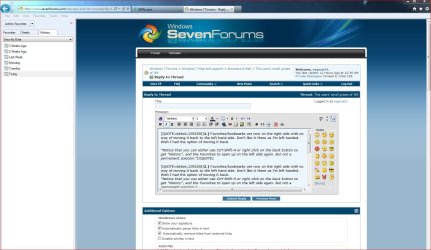
The other more space hogging way is to "Pin" (click the green arrow) the favorites to the left side....

IE Issues.jpg
IE Favorites.jpg

But yeah, it is less intuitive then earlier versions of IE

4.) Default download location box doesn't let the Drive letter show up if you change it to another Drive location. Say I want downloads to go to another Drive - G:/Downloads. It will just say - downloads.

While this is a minor thing, it took a download of something to actually know that the download was going to the drive I specified it to.

Hehe... this one annoyed the heck out of me too :mad:

However you can change the default location by clicking Tools, View Downloads, at the lower left downloads box there's a blue hyper link named Options click it and choose a location of your choice.....

IE Downloads.JPG

On the downloading I REALLY wish they would have left it like it was in IE8 where you could choose on the fly where you wanted your downloads to go. I have a Downloads partition that has various folders for all sorts of stuff so I don't always want stuff I download going to the same location. This new download system takes that choice away. Sure you can change the download location as I pointed out above, but everything you download goes there with out letting you change your mind :mad:

I basically feel the same as you though I've worked my way around some of the issues.


Not to be confused with a fanboi or flame thread.

Thanks ;)

Anyway I feel your gripes, and agree.
 

My Computer My Computer

At a glance

Windows 10 ProIntel Core i7-4770K (3.5Ghz)32 gig Corsair Dominator Platinum (4x8Gig)Sapphire Tri-X R9 Fury
Computer type
PC/Desktop
Computer Manufacturer/Model Number
Custom built by me.
OS
Windows 10 Pro
CPU
Intel Core i7-4770K (3.5Ghz)
Motherboard
Gigabyte G1 Sniper 5 (F10 Bios)
Memory
32 gig Corsair Dominator Platinum (4x8Gig)
Graphics Card(s)
Sapphire Tri-X R9 Fury
Sound Card
Soundblaster ZXR
Monitor(s) Displays
NEC PA242W 24" LCD Monitor
Screen Resolution
1920 x 1200
Hard Drives
Primary - Samsung 850 Pro (512gig), Samsung 840 Pro (256gig), 2TB WD Caviar Black.
PSU
EVGA Supernova 1000 G2
Case
Cooler Master HAF X
Cooling
Corsair H100i with Corsair Air Series SP120 Quiet Fans
Keyboard
Logitech Wireless Wave
Mouse
Logitech Performance MX
Internet Speed
High Speed Cable
Antivirus
Norton Security
Browser
IE11
Other Info
Memory Timings - 1866MHz @ 9-9-9-27-1T @ 1.5 volts
Anyone know how to make the tabs smoother? I don't like the sharp edges.
 

My Computer My Computer

At a glance

Windows 7 Ultimate 32bit SP1Intel(R) Core(TM)2 Quad CPU @ 2.40GHz, 2400 MHz4 GBATI Radeon HD 2600 Pro
Computer type
PC/Desktop
Computer Manufacturer/Model Number
Bruce ... somewhere in his 40's
OS
Windows 7 Ultimate 32bit SP1
CPU
Intel(R) Core(TM)2 Quad CPU @ 2.40GHz, 2400 MHz
Motherboard
INTEL/D975XBX2
Memory
4 GB
Graphics Card(s)
ATI Radeon HD 2600 Pro
Monitor(s) Displays
Samsung SyncMaster 914v
Screen Resolution
1280 x 1024
Hard Drives
2/500GB each ... ST3500630AS ATA Device.
One is not connected
PSU
Rocketfish 700 W
Case
G.Skill Gigabyte Chassis
Keyboard
Standard PS/2 Keyboard
Mouse
Microsoft PS/2 Mouse
Internet Speed
DSL
Antivirus
Avira Internet Security
Browser
IE 11
Other Info
ATI HDMI Audio
One thing that I really do like about IE9 is that it can be uninstalled by simply uninstalling the update.

Saved me from a reinstall of Windows.

I think you're stuck with those tabs, Jacee.
 

My Computer My Computer

At a glance

Windows 7 Home Premium 64bit3.00GB
Computer Manufacturer/Model Number
Hewlett-Packard
OS
Windows 7 Home Premium 64bit
Memory
3.00GB
I have two immediate observations:

(1) No spell-check. This is crazy. I would love to know MS's logic of consistently not having this in IE.
(2) GMail, while working just fine, is oddly rendered. Just looks different. Or, maybe I have been using Chrome for too long.

Edit:

(3) If MS was going to redesign the UI of IE9 radically, which they did, then why did they not make the various tool bars (command bar, fav bar etc.) more in line with the overall UI of the browser. They do look ugly and out of place. They certainly could have made it much much better.

Otherwise, I am finding IE9 to be fast and I do like the exteme minimalism.

Hi there

The spell check is probably quite tricky because for example if IE is installed in standard English what would you use : American or British.

Also if you change your Windows display language then IE spell checker will be rather pointless -- especially if you are posting in say ENGLISH while your display language is say Welsh or whatever.

For example see attachment IE8 in Icelandic (Windows 7 English version with Icelandic Language pack installed) -- Not sure how a spell checker would work here.

Google Chrome doesn't have this problem as it assumes English although I haven't checked to see if it uses US or UK spelling.

Incidentally IE9 doesn't change the menu language etc from English even if you have the Language packs installed -- could be a problem in some cases.


Cheers
jimbo
 

Attachments

  • ie8is.png
    ie8is.png
    9.8 KB · Views: 7
Last edited:

My Computer My Computer

At a glance

Linux CENTOS 7 / various Windows OS'es and se...Intel i7 Intel i58GB, 16GBOn Motherboard
Computer type
PC/Desktop
Computer Manufacturer/Model Number
Custom built, several laptops HP/ASUS
OS
Linux CENTOS 7 / various Windows OS'es and servers
CPU
Intel i7 Intel i5
Memory
8GB, 16GB
Graphics Card(s)
On Motherboard
Sound Card
Realtek HD audio
Monitor(s) Displays
Apple Cinema display, Samsung LCD
Screen Resolution
1920 X 1080
Hard Drives
4 X 1TB SATA
Mouse
Toshiba wireless laser
Internet Speed
> 20MB up
The spell check is probably quite tricky because for example if IE is installed in standard English what would you use : American or British.

Also if you change your Windows display language then IE spell checker will be rather pointless -- especially if you are posting in say ENGLISH while your display language is say Welsh or whatever.

Its easy if you use a modern browser like Opera , just have to select the word & right click it , dictionaries is the bottom option. The default is us.eng
 

Attachments

  • op spell.JPG
    op spell.JPG
    158 KB · Views: 8

My Computer My Computer

At a glance

Windows 7 Ultimate 64 bitIntel Core i7 4770K overclocked to 4.7GHz Qua...16GB Team Group Vulcan Gold 2133MHzATI Radeon HD 7880 Series Display adapter
Computer type
PC/Desktop
Computer Manufacturer/Model Number
self build
OS
Windows 7 Ultimate 64 bit
CPU
Intel Core i7 4770K overclocked to 4.7GHz Quad Core Haswell
Motherboard
Asus Z87 Pro (Socket 1150) ATX Motherboard
Memory
16GB Team Group Vulcan Gold 2133MHz
Graphics Card(s)
ATI Radeon HD 7880 Series Display adapter
Monitor(s) Displays
NEC LCD2690WUXi2
Screen Resolution
26" 1920 x 1200
Hard Drives
Samsung 500GB SSD 840 EVO SATA 6Gb/s
Samsung 250GB SSD 840 EVO SATA 6Gb/s
PSU
Corsair AX760 Platinum
Case
Cooler Master HAF X Gaming Tower
Cooling
XSPC RayStorm 750 RS360 Water cooling
Mouse
Razer Death Adder left handed
Internet Speed
126Mb download 11.5Mb up
Antivirus
Avast free
Browser
Opera
Other Info
Main Browser is Opera
Favorite software Adobe Lightroom & Photoshop
best plugins Nik software
Firewall : Private firewall 7
I still don't get why(and it did this in the Beta and the RC) it WILL NOT remember login info for some sites, but will for others. It has worked for a majority of the sites, but like, here, Vista Forums, and the 8 Forums, it never asked, and I can't figure out how to trick it into actually asking me if I want it to "remember" the logins.
 

My Computer My Computer

At a glance

Windows 7 Home PremiumAmd Semperon 2.10GHz2 GigATI Radeon 3100
Computer Manufacturer/Model Number
Toshiba Satellite L455D
OS
Windows 7 Home Premium
CPU
Amd Semperon 2.10GHz
Memory
2 Gig
Graphics Card(s)
ATI Radeon 3100
Sound Card
Realtek
Monitor(s) Displays
15.6 inch
Screen Resolution
1366x768
Hard Drives
250gig
Mouse
Logitech Wireless
Internet Speed
16/2 cable

My Computer My Computer

At a glance

Vista, Windows7, Mint Mate, Zorin, Windows 8from 1.6GHz Duo to i7
Computer Manufacturer/Model Number
HP, Dell, Gateway, Toshiba - 4 laptops and 2 desktops
OS
Vista, Windows7, Mint Mate, Zorin, Windows 8
CPU
from 1.6GHz Duo to i7
Monitor(s) Displays
2x HP w2207
Hard Drives
5x HDD, 7x SSD, 12x Externals
Keyboard
with trackball - no mices
Mouse
Trackball mice
Internet Speed
DSL 6000
Really not a permanent open and close solution though. Only temporary once you click on the X.
 

My Computer My Computer

At a glance

Windows 7 Ultimate x64 SP1Core i7 920 (D0) @ 4Ghz, *26c idle *65c full ...12GB DDR3 Corsair Dominator -CMD12GX3M6A1600C...Zotac Geforce GTX 770
Computer type
PC/Desktop
Computer Manufacturer/Model Number
Airbot 2.0
OS
Windows 7 Ultimate x64 SP1
CPU
Core i7 920 (D0) @ 4Ghz, *26c idle *65c full load on air
Motherboard
Asus P6X58D Premium - Sata 6Gb/s - USB 3.0
Memory
12GB DDR3 Corsair Dominator -CMD12GX3M6A1600C8 at 1600MHz
Graphics Card(s)
Zotac Geforce GTX 770
Sound Card
ASUS Xonar D2X
Monitor(s) Displays
1 LG 24" Flatron W2453V-PF 1 Samsung 24" P2450H both 2ms RT
Screen Resolution
1920x1080@60hz
Hard Drives
1 Samsung 250GB 840 Evo SSD
1 OCZ Vertex2 180GB SSD
1 TB Samsung Spinpoint F1 7200RPM 32MB cache
2 500GB WD Caviar Blacks 7200RPM 32MB cache (WD5001AALS)

Pioneer DVD Burner DVR-S18M
PSU
Corsair HX1000W
Case
Cooler Master HAF 932
Cooling
Case Fans *3 230mm, *1 140mm/CPU - *Tuniq Tower 120 Extreme
Keyboard
Logitech Wireless MK700
Mouse
Logitech Wireless MK700
Internet Speed
DL 15 Mbps UL 0.98 Mbps
Antivirus
None
Browser
Firefox Nightly
Other Info
Processor-7.7 *RAM- 7.9 *Graphics-7.9 *Gaming Graphics- 7.9 *SSD- 7.8 W.E.I final score= 7.7
*Phone- LG Nexus 5
Back
Top