This users' small gripes of IE9

My Computer My Computer

At a glance

Windows 10 ProIntel Core i7-4770K (3.5Ghz)32 gig Corsair Dominator Platinum (4x8Gig)Sapphire Tri-X R9 Fury
Computer type
PC/Desktop
Computer Manufacturer/Model Number
Custom built by me.
OS
Windows 10 Pro
CPU
Intel Core i7-4770K (3.5Ghz)
Motherboard
Gigabyte G1 Sniper 5 (F10 Bios)
Memory
32 gig Corsair Dominator Platinum (4x8Gig)
Graphics Card(s)
Sapphire Tri-X R9 Fury
Sound Card
Soundblaster ZXR
Monitor(s) Displays
NEC PA242W 24" LCD Monitor
Screen Resolution
1920 x 1200
Hard Drives
Primary - Samsung 850 Pro (512gig), Samsung 840 Pro (256gig), 2TB WD Caviar Black.
PSU
EVGA Supernova 1000 G2
Case
Cooler Master HAF X
Cooling
Corsair H100i with Corsair Air Series SP120 Quiet Fans
Keyboard
Logitech Wireless Wave
Mouse
Logitech Performance MX
Internet Speed
High Speed Cable
Antivirus
Norton Security
Browser
IE11
Other Info
Memory Timings - 1866MHz @ 9-9-9-27-1T @ 1.5 volts

My Computer My Computer

At a glance

Windows 7 Professional 32-bit (6.1, Build 7600)Intel(R) Pentium(R) 4 3.00 GHz HT2.0 GBATI Mobility Radeon 9600 64MB
Computer Manufacturer/Model Number
Averatec 6130HS-20
OS
Windows 7 Professional 32-bit (6.1, Build 7600)
CPU
Intel(R) Pentium(R) 4 3.00 GHz HT
Memory
2.0 GB
Graphics Card(s)
ATI Mobility Radeon 9600 64MB
Sound Card
Realtek AC'97 Audio
Screen Resolution
1280 x 800
Hard Drives
Seagate 96023A 60GB 7200RPM -
Seagate FreeAgentDesktop 250GB
Cooling
20 Inch Box Fan
Mouse
Targus PAWM10 Wireless Optical Laptop Mouse
I still don't get why(and it did this in the Beta and the RC) it WILL NOT remember login info for some sites, but will for others. It has worked for a majority of the sites, but like, here, Vista Forums, and the 8 Forums, it never asked, and I can't figure out how to trick it into actually asking me if I want it to "remember" the logins.
You need to clear all cookies.
 

My Computer My Computer

At a glance

Windows 7 Ultimate 32bit SP1Intel(R) Core(TM)2 Quad CPU @ 2.40GHz, 2400 MHz4 GBATI Radeon HD 2600 Pro
Computer type
PC/Desktop
Computer Manufacturer/Model Number
Bruce ... somewhere in his 40's
OS
Windows 7 Ultimate 32bit SP1
CPU
Intel(R) Core(TM)2 Quad CPU @ 2.40GHz, 2400 MHz
Motherboard
INTEL/D975XBX2
Memory
4 GB
Graphics Card(s)
ATI Radeon HD 2600 Pro
Monitor(s) Displays
Samsung SyncMaster 914v
Screen Resolution
1280 x 1024
Hard Drives
2/500GB each ... ST3500630AS ATA Device.
One is not connected
PSU
Rocketfish 700 W
Case
G.Skill Gigabyte Chassis
Keyboard
Standard PS/2 Keyboard
Mouse
Microsoft PS/2 Mouse
Internet Speed
DSL
Antivirus
Avira Internet Security
Browser
IE 11
Other Info
ATI HDMI Audio
The thing with IE9 is, much like Vista, 95% of the work was done on the guts and are not "visible" by just looking at it and opening menus. So it seems like "so much work for so little". But...

HTML5 was an astronomically huge update. HW accelleration (Really needed by HTML5) was also a fairly large task. You might well ask what it taking FF4 so long to come out and in the end will it really look and act on the surface much different?

Its the internals that everyone is working their butts off to improve and the window dressing is just enough to get people to update based on looks alone while they (mostly unknowningly) pull in a modern browser engine that will serve the web for the next 5-10 years...

As for spell check... wel lit might be nice of course, but it WOULD bloat it up a lot and would be a major bit of work to port over say the Office spell checker into IE install (Though it might be nice if they installed it WITH office). But much like a ton of other features... "There's a plugin for that". MS doesn't necessarily need to do absolutely everything. :)

My single gripe with IE is the constant corss site scripting modification announcement that brings up a HUGE popup covering the bottom of the window every other page I visit. (Yes I have security settings on). THey make a streamlined browser then they pop that thing up, completely removing any space saving they gained at the top :(

Oh, and as far as "Just more reasons to like FF"... you DO realize that there are PLENTY of gripes about FF that could be made in it's own thread right? In fact they are made in nearly every FF thread that comes up! :/
 

My Computer My Computer

At a glance

Windows 7 x64 Ultimatei7 96012 Gig Corsair DominatorNvidia 480
Computer Manufacturer/Model Number
Scratch built
OS
Windows 7 x64 Ultimate
CPU
i7 960
Motherboard
Asus P6X58D
Memory
12 Gig Corsair Dominator
Graphics Card(s)
Nvidia 480
Sound Card
Maudio Delta 44 + breakout box
Monitor(s) Displays
Dell UltraSharp U2410 24in and Samsung 21 dual monitors
Screen Resolution
1920x1200 and 1280x1024
Hard Drives
Primary: Intel X-25M G2 160G SSD
Secondary: Segate baracuda 1.0 TB
HDs in AHCI mode.
PSU
Corasair TX850
Case
Cooler Master HAF
Cooling
Corsair H50
Keyboard
Logitech G15 + N52 game pad
Mouse
Logitech MX518
Internet Speed
15kbs down 4.5kbps up
Other Info
WEI 7.6
CPU & RAM 7.6
Graphics 7.9
Hard disk 7.7
On the problem with the Favorites on the left, Shawn just wrote a tut: http://www.sevenforums.com/tutorial...r-9-favorites-center-pin-unpin-left-side.html This may not be as it was, but it may help.

What I miss is the little triangle next to the forward button (top left). Seems to be AWOL.

Seems just as easy for me to right click the back/forward for the drop down menu of previously visited sites. I would still like the drop down arrow though.
Yeah, I guess that's how they want us to do it. But the little arrow was handy.

Regarding the spell checker: I think it is good that there is no default spell checker. Especially on the forums we use so much jargon that there would be always a lot of red flags. I use IEspell and that works very well.
 

My Computer My Computer

At a glance

Vista, Windows7, Mint Mate, Zorin, Windows 8from 1.6GHz Duo to i7
Computer Manufacturer/Model Number
HP, Dell, Gateway, Toshiba - 4 laptops and 2 desktops
OS
Vista, Windows7, Mint Mate, Zorin, Windows 8
CPU
from 1.6GHz Duo to i7
Monitor(s) Displays
2x HP w2207
Hard Drives
5x HDD, 7x SSD, 12x Externals
Keyboard
with trackball - no mices
Mouse
Trackball mice
Internet Speed
DSL 6000
Are you talking about the dropdown History arrow?
CTRL + H opens the History dialog so that you can check the websites browsed. Press ESC to close the dialog.


My Computer My Computer

At a glance

Windows 7 Ultimate 32bit SP1Intel(R) Core(TM)2 Quad CPU @ 2.40GHz, 2400 MHz4 GBATI Radeon HD 2600 Pro
Computer type
PC/Desktop
Computer Manufacturer/Model Number
Bruce ... somewhere in his 40's
OS
Windows 7 Ultimate 32bit SP1
CPU
Intel(R) Core(TM)2 Quad CPU @ 2.40GHz, 2400 MHz
Motherboard
INTEL/D975XBX2
Memory
4 GB
Graphics Card(s)
ATI Radeon HD 2600 Pro
Monitor(s) Displays
Samsung SyncMaster 914v
Screen Resolution
1280 x 1024
Hard Drives
2/500GB each ... ST3500630AS ATA Device.
One is not connected
PSU
Rocketfish 700 W
Case
G.Skill Gigabyte Chassis
Keyboard
Standard PS/2 Keyboard
Mouse
Microsoft PS/2 Mouse
Internet Speed
DSL
Antivirus
Avira Internet Security
Browser
IE 11
Other Info
ATI HDMI Audio
On the problem with the Favorites on the left, Shawn just wrote a tut: http://www.sevenforums.com/tutorial...r-9-favorites-center-pin-unpin-left-side.html This may not be as it was, but it may help.

What I miss is the little triangle next to the forward button (top left). Seems to be AWOL.

Seems just as easy for me to right click the back/forward for the drop down menu of previously visited sites. I would still like the drop down arrow though.
I use IEspell and that works very well.

IEspell seems to be working well for me also. I've read that some folks are having issues with it. I haven't found any yet
 

My Computer My Computer

At a glance

Windows 7 Professional 32-bit (6.1, Build 7600)Intel(R) Pentium(R) 4 3.00 GHz HT2.0 GBATI Mobility Radeon 9600 64MB
Computer Manufacturer/Model Number
Averatec 6130HS-20
OS
Windows 7 Professional 32-bit (6.1, Build 7600)
CPU
Intel(R) Pentium(R) 4 3.00 GHz HT
Memory
2.0 GB
Graphics Card(s)
ATI Mobility Radeon 9600 64MB
Sound Card
Realtek AC'97 Audio
Screen Resolution
1280 x 800
Hard Drives
Seagate 96023A 60GB 7200RPM -
Seagate FreeAgentDesktop 250GB
Cooling
20 Inch Box Fan
Mouse
Targus PAWM10 Wireless Optical Laptop Mouse
IEspell seems to be working well for me also. I've read that some folks are having issues with it. I haven't found any yet[/QUOTE]


Hi .
I got IEspell check 2.6 installed ...
Can you show how to use it ....
Thank you ..
 

My Computer My Computer

At a glance

WDS 7 Home Pre.x64Intel Core i5 2450M @ 2.50GHz8GB Kingston[2x4] Dual-Channel DDR3 @ 1333MHzAMD Radeon(TM) HD 6470M + Intel(R) HD Graph 3000
Computer type
Laptop
Computer Manufacturer/Model Number
Sony Vaio VPC-SE23FXS
OS
WDS 7 Home Pre.x64
CPU
Intel Core i5 2450M @ 2.50GHz
Memory
8GB Kingston[2x4] Dual-Channel DDR3 @ 1333MHz
Graphics Card(s)
AMD Radeon(TM) HD 6470M + Intel(R) HD Graph 3000
Hard Drives
TOSHIBA MK6459GSXP 600GB x 5400RPM (SATA)
IEspell seems to be working well for me also. I've read that some folks are having issues with it. I haven't found any yet


Hi .
I got IEspell check 2.6 installed ...
Can you show how to use it ....
Thank you ..[/QUOTE]


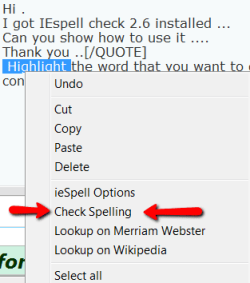
Highlight the word that you want to check and then right click on it. You get this context menu:
 

Attachments

  • 2011-03-17_1345.png
    2011-03-17_1345.png
    6.3 KB · Views: 1

My Computer My Computer

At a glance

Vista, Windows7, Mint Mate, Zorin, Windows 8from 1.6GHz Duo to i7
Computer Manufacturer/Model Number
HP, Dell, Gateway, Toshiba - 4 laptops and 2 desktops
OS
Vista, Windows7, Mint Mate, Zorin, Windows 8
CPU
from 1.6GHz Duo to i7
Monitor(s) Displays
2x HP w2207
Hard Drives
5x HDD, 7x SSD, 12x Externals
Keyboard
with trackball - no mices
Mouse
Trackball mice
Internet Speed
DSL 6000
Are you talking about the dropdown History arrow?
CTRL + H opens the History dialog so that you can check the websites browsed. Press ESC to close the dialog.
Thanks Jacee. That is handy too. But I was talking about this which I guess is CTL+Shift+H:
 

Attachments

  • 2011-03-17_1348.png
    2011-03-17_1348.png
    13.6 KB · Views: 0

My Computer My Computer

At a glance

Vista, Windows7, Mint Mate, Zorin, Windows 8from 1.6GHz Duo to i7
Computer Manufacturer/Model Number
HP, Dell, Gateway, Toshiba - 4 laptops and 2 desktops
OS
Vista, Windows7, Mint Mate, Zorin, Windows 8
CPU
from 1.6GHz Duo to i7
Monitor(s) Displays
2x HP w2207
Hard Drives
5x HDD, 7x SSD, 12x Externals
Keyboard
with trackball - no mices
Mouse
Trackball mice
Internet Speed
DSL 6000

My Computer My Computer

At a glance

WDS 7 Home Pre.x64Intel Core i5 2450M @ 2.50GHz8GB Kingston[2x4] Dual-Channel DDR3 @ 1333MHzAMD Radeon(TM) HD 6470M + Intel(R) HD Graph 3000
Computer type
Laptop
Computer Manufacturer/Model Number
Sony Vaio VPC-SE23FXS
OS
WDS 7 Home Pre.x64
CPU
Intel Core i5 2450M @ 2.50GHz
Memory
8GB Kingston[2x4] Dual-Channel DDR3 @ 1333MHz
Graphics Card(s)
AMD Radeon(TM) HD 6470M + Intel(R) HD Graph 3000
Hard Drives
TOSHIBA MK6459GSXP 600GB x 5400RPM (SATA)
Really not a permanent open and close solution though. Only temporary once you click on the X.

This is correct, there's no permanent way to open up Favorites from the left side in just 1 click. You must always open it from the right then pin it to the left, it was a classic example of an unnecessary change.


Until there's a hack, mod, or a patch to allow Favorites to be restored to their pre-IE9 state, here are some workarounds I've come up with.


Note: I don't like adding more rows onto my browser other than a Favorites Bar for quick links, I don't like having either the Menu or Command bars visible.

1. Press ALT. This will temporarily expose the MENU BAR. Now you can open Favorites and will open from the left side. Once you're done with it, you'll see that the MENU BAR will go back into hiding.

2. Use your mouse software to bind the key combination CTRL + Shift + I. I use a Logitech Anywhere MX wireless mouse and Logitech's software allows me to bind that key combo to the little button below the scroll wheel. You can use any programmable mouse that allows you to customize a special button for that use.

In just 1 button press it will open Favorites in IE9 from the left side.


Hope this helps.
 

My Computer My Computer

At a glance

Windows 7 Ultimate x64 / OS X Snow Leopard 10...i7 QM720 - AMD MV40 - i5 2.3Ghz SB8GB - 4GB - 8GBNvidia 310M - ATI 3200M - Intel HD3000
Computer Manufacturer/Model Number
Sony / IBM / Apple MB Pro 2011
OS
Windows 7 Ultimate x64 / OS X Snow Leopard 10.6.8
CPU
i7 QM720 - AMD MV40 - i5 2.3Ghz SB
Memory
8GB - 4GB - 8GB
Graphics Card(s)
Nvidia 310M - ATI 3200M - Intel HD3000
Sound Card
Various
Monitor(s) Displays
Sony 17 inch LCD - 12 inch - 13 inch
Hard Drives
OCZ Vertex 2 240Gb
Crucial RealSSD C330 256GB
OWC Mercury Extreme Pro 6G 240GB
Yeah, that is a workaround. But you get the fly-out version which I hate. You might as well press Start and click on Favorites.

I use another method. i have the Favorites folder in my (hidden) Rocket Dock. I select my next URL from there. With 500 folders and 1500 files that is the easiest way to find anything. Plus you can search in the Favorites folder if you do not remember where you stuck things - which happens all the time to me.
 

My Computer My Computer

At a glance

Vista, Windows7, Mint Mate, Zorin, Windows 8from 1.6GHz Duo to i7
Computer Manufacturer/Model Number
HP, Dell, Gateway, Toshiba - 4 laptops and 2 desktops
OS
Vista, Windows7, Mint Mate, Zorin, Windows 8
CPU
from 1.6GHz Duo to i7
Monitor(s) Displays
2x HP w2207
Hard Drives
5x HDD, 7x SSD, 12x Externals
Keyboard
with trackball - no mices
Mouse
Trackball mice
Internet Speed
DSL 6000
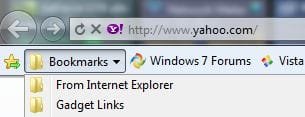
I do use only the favorites bar, so I just made a folder and slid it to the left with my bookmarks in it. Not the fancy looking favorites menu, but good enough I guess.

Capture.JPG
 

My Computer My Computer

At a glance

Windows 7 Ultimate x64 SP1Core i7 920 (D0) @ 4Ghz, *26c idle *65c full ...12GB DDR3 Corsair Dominator -CMD12GX3M6A1600C...Zotac Geforce GTX 770
Computer type
PC/Desktop
Computer Manufacturer/Model Number
Airbot 2.0
OS
Windows 7 Ultimate x64 SP1
CPU
Core i7 920 (D0) @ 4Ghz, *26c idle *65c full load on air
Motherboard
Asus P6X58D Premium - Sata 6Gb/s - USB 3.0
Memory
12GB DDR3 Corsair Dominator -CMD12GX3M6A1600C8 at 1600MHz
Graphics Card(s)
Zotac Geforce GTX 770
Sound Card
ASUS Xonar D2X
Monitor(s) Displays
1 LG 24" Flatron W2453V-PF 1 Samsung 24" P2450H both 2ms RT
Screen Resolution
1920x1080@60hz
Hard Drives
1 Samsung 250GB 840 Evo SSD
1 OCZ Vertex2 180GB SSD
1 TB Samsung Spinpoint F1 7200RPM 32MB cache
2 500GB WD Caviar Blacks 7200RPM 32MB cache (WD5001AALS)

Pioneer DVD Burner DVR-S18M
PSU
Corsair HX1000W
Case
Cooler Master HAF 932
Cooling
Case Fans *3 230mm, *1 140mm/CPU - *Tuniq Tower 120 Extreme
Keyboard
Logitech Wireless MK700
Mouse
Logitech Wireless MK700
Internet Speed
DL 15 Mbps UL 0.98 Mbps
Antivirus
None
Browser
Firefox Nightly
Other Info
Processor-7.7 *RAM- 7.9 *Graphics-7.9 *Gaming Graphics- 7.9 *SSD- 7.8 W.E.I final score= 7.7
*Phone- LG Nexus 5

My Computer My Computer

At a glance

Windows 7 Ultimate x64 / OS X Snow Leopard 10...i7 QM720 - AMD MV40 - i5 2.3Ghz SB8GB - 4GB - 8GBNvidia 310M - ATI 3200M - Intel HD3000
Computer Manufacturer/Model Number
Sony / IBM / Apple MB Pro 2011
OS
Windows 7 Ultimate x64 / OS X Snow Leopard 10.6.8
CPU
i7 QM720 - AMD MV40 - i5 2.3Ghz SB
Memory
8GB - 4GB - 8GB
Graphics Card(s)
Nvidia 310M - ATI 3200M - Intel HD3000
Sound Card
Various
Monitor(s) Displays
Sony 17 inch LCD - 12 inch - 13 inch
Hard Drives
OCZ Vertex 2 240Gb
Crucial RealSSD C330 256GB
OWC Mercury Extreme Pro 6G 240GB
My only problem is whenever I add a favourite my desktop icons refresh - this has been happening since RC, the betas were fine.
Anyone found a workaround?
 

My Computer My Computer

At a glance

Windows 7 x64 Ultimate, Server 2008 R2, Ubunt...Intel i7 2600k8GB Corsair DDR3 1800Asus NVIDIA GTX 580
Computer Manufacturer/Model Number
Limited Edition Computers
OS
Windows 7 x64 Ultimate, Server 2008 R2, Ubuntu 8.04 & 10.04 LTS Server
CPU
Intel i7 2600k
Motherboard
Asus Maximus IV Extreme P67
Memory
8GB Corsair DDR3 1800
Graphics Card(s)
Asus NVIDIA GTX 580
Sound Card
Asus Xonar D2X
Monitor(s) Displays
Samsung 24" BX2450
Screen Resolution
1920x1080
Hard Drives
3x 640GB Wester Digital Black RAID 0
PSU
Corsair 1000watt
Case
Silverston TJ07
Cooling
Corsair A50
Keyboard
Logitech G510
Mouse
Logitech G9
Internet Speed
10mb
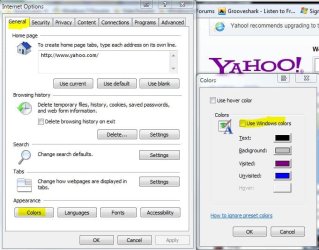
I still haven't found a way to change colors like I can in FF. Tools, Content, Colors.
 

My Computer My Computer

At a glance

Windows 10 Pro. 64/ version 1709 Windows 7 Pr...Intel i7-6800K @ 4.3Corsair Platinum 16 gig @2400EVGA GTX 1070 OC
Computer type
PC/Desktop
Computer Manufacturer/Model Number
Home made Desktop
OS
Windows 10 Pro. 64/ version 1709 Windows 7 Pro/64
CPU
Intel i7-6800K @ 4.3
Motherboard
ASUS X-99 Deluxe II
Memory
Corsair Platinum 16 gig @2400
Graphics Card(s)
EVGA GTX 1070 OC
Monitor(s) Displays
Asus 27" LED LCD/VE278Q
Screen Resolution
1920-1080 or 1280-720 HDMI
Hard Drives
INTEL SSD 730-240 Gb Sata 3.0/
PSU
EVGA Platium 1200W
Case
Phanteks Luxe Tempered Glass 8 fans/ one radiator
Cooling
XSPC/ Water Cooled CPU
Keyboard
Das 4 Professional
Mouse
Logitech M705/MX Anywhere 2-S
Internet Speed
100 mbits
Antivirus
Microsoft Security Essentials/ Malwarebytes Premium 3.0/ SAS
Browser
I.E. 11 default/Firefox/ ISP Time Warner Cable/Spectrum
Other Info
LG BluRay Burner/
Sound system-KLipsch-THX/
Icy Dock ssd Hot Swap bays.
Capture5.JPG
 

My Computer My Computer

At a glance

Windows 7 Ultimate x64 SP1Core i7 920 (D0) @ 4Ghz, *26c idle *65c full ...12GB DDR3 Corsair Dominator -CMD12GX3M6A1600C...Zotac Geforce GTX 770
Computer type
PC/Desktop
Computer Manufacturer/Model Number
Airbot 2.0
OS
Windows 7 Ultimate x64 SP1
CPU
Core i7 920 (D0) @ 4Ghz, *26c idle *65c full load on air
Motherboard
Asus P6X58D Premium - Sata 6Gb/s - USB 3.0
Memory
12GB DDR3 Corsair Dominator -CMD12GX3M6A1600C8 at 1600MHz
Graphics Card(s)
Zotac Geforce GTX 770
Sound Card
ASUS Xonar D2X
Monitor(s) Displays
1 LG 24" Flatron W2453V-PF 1 Samsung 24" P2450H both 2ms RT
Screen Resolution
1920x1080@60hz
Hard Drives
1 Samsung 250GB 840 Evo SSD
1 OCZ Vertex2 180GB SSD
1 TB Samsung Spinpoint F1 7200RPM 32MB cache
2 500GB WD Caviar Blacks 7200RPM 32MB cache (WD5001AALS)

Pioneer DVD Burner DVR-S18M
PSU
Corsair HX1000W
Case
Cooler Master HAF 932
Cooling
Case Fans *3 230mm, *1 140mm/CPU - *Tuniq Tower 120 Extreme
Keyboard
Logitech Wireless MK700
Mouse
Logitech Wireless MK700
Internet Speed
DL 15 Mbps UL 0.98 Mbps
Antivirus
None
Browser
Firefox Nightly
Other Info
Processor-7.7 *RAM- 7.9 *Graphics-7.9 *Gaming Graphics- 7.9 *SSD- 7.8 W.E.I final score= 7.7
*Phone- LG Nexus 5
I agree with the left hand side favourites gripe.
I much prefer all the controls and links to be on the same side, preferably the left.

I'm right handed BTW too.
 

My Computer My Computer

At a glance

Windows 7 Home Premium x64i7 5930KCorsair Dominator, DDR4 16GBEVGA GTX 980 SLI
OS
Windows 7 Home Premium x64
CPU
i7 5930K
Motherboard
Asus X99-A
Memory
Corsair Dominator, DDR4 16GB
Graphics Card(s)
EVGA GTX 980 SLI
Sound Card
Onboard Realtek HD
Monitor(s) Displays
Dell U3011
Screen Resolution
2560x1600 (16:10, as god intended)
Hard Drives
Samsung 850 EVO 1TB SSD (Boot OS)
2 x Hitachi 7K3000 2TB (Storage)
PSU
Seasonic 1250W
Case
Corsair 900D
Cooling
Corsair H110 280
Keyboard
Logitech Wireless Illuminated keyboard K800
Mouse
Loigitech M950 Performance
Internet Speed
ADSL 2+
Antivirus
MS SE
Browser
Chrome
I agree with the left hand side favourites gripe.
I much prefer all the controls and links to be on the same side, preferably the left.
I'm right handed BTW too.

+1 for favorites on the left side like IE8 and be able to close it there! I'll just use the favorite toolbar for now...
 

My Computer My Computer

At a glance

Windows 7 Home Premium 64bit SP1AMD Athlon™ Neo MV-40 Processor Technology 1....4 GBATI Radeon HD3200
Computer type
PC/Desktop
Computer Manufacturer/Model Number
Micro Stars Int. / U230 Light-087US
OS
Windows 7 Home Premium 64bit SP1
CPU
AMD Athlon™ Neo MV-40 Processor Technology 1.60 GHz
Motherboard
AMD RS-880MN+SB710
Memory
4 GB
Graphics Card(s)
ATI Radeon HD3200
Monitor(s) Displays
LCD 11.6" HD
Screen Resolution
1366 x 768
Hard Drives
250GB SATA
Internet Speed
Gigabit LAN 10/100/1000
Other Info
3.3 lbs (with 4hour 6 cell battery)
1.3 MP Webcam
USB2.0 X 3
HDMI out
Back
Top