Solved Thoughts on a solid state drive?

Max Pen

Creative Kid
Member
VIP
Local time
10:17 PM
Messages
165
Location
Belgium, Flanders
Are they worth getting? Don't they break faster then the classic drive? Also they cost alot to get the same storage capacity as a normal drive?
 

My Computer

Computer type
PC/Desktop
Computer Manufacturer/Model Number
Asus
OS
Windows 7 Ultimate 64-bit
Browser
Chrome
SSD drives don't break faster than mechanical drives, in fact, since there are no mechanical parts, they should be more reliable.
They do cost more than mechanical drives but the prices have come down since they were first introduced.

Are they worth it? I personally think they are for the operating system and programs. They increase the performance of the computer.

I use mechanical drives for storing data.
 

My Computer

Computer type
PC/Desktop
Computer Manufacturer/Model Number
Custom Built
OS
Windows 10 Pro x64, Windows 8.1 Pro x64, Windows 7 Ultimate x64 SP1,
CPU
INTEL i9-7920X LGA 2066
Motherboard
Gigabyte X299-WU8 F3
Memory
64 GB (4 X 16 GB) G-Skill V Series DDR4 3200 Quad Channel
Graphics Card(s)
EVGA GTX 1060 SC 3 GB
Sound Card
Realtek Onboard ALC1220
Monitor(s) Displays
2 x Samsung S27E310
Screen Resolution
1920x1080
Hard Drives
Samsung 2 x 970 EVO Plus 500 GB NVMe
1 x 6TB WD 6003FZBX SATA
1 x 6TB WD 60EFRX SATA
12 x 3TB WD 30EFRX SATA
PSU
Seasonic X-1050
Case
Thermaltake Armor+
Cooling
Corsair H80i V2 Liquid AOI Cooler
Keyboard
Logitech G510s
Mouse
Logitech MX Master 2S
Internet Speed
200 Mb/s
Antivirus
ESET NOD32 13.1
Browser
EDGE (Dev, Canary, Beta), Chrome
Other Info
ASUS RT-AC68U router
Malwarebytes 4.0.4
For most people in most circumstances, an SSD is probably the biggest performance increase you can make for under $100.

You can still keep your spinning drive for all of your data, assuming your PC has the internal space for 2 drives. It should. Put Windows and most or all applications on the SSD, and your data on the spinning drive.

An 80 or 120 GB SSD is large enough for most users. Cost for that is well under $100 for good brands---Samsung, Crucial, Intel.

SSDs often come with software to facilitate moving Windows from the spinning drive to the SSD, but you can certainly use other third-party applications for that purpose--or do a clean install if you prefer.

Faster boot times, faster application opening, lower noise, lower electricity usage, less heat, and a generally "snappier" system. Reliability probably greater as well.
 

My Computer

Computer type
PC/Desktop
Computer Manufacturer/Model Number
Ignatz Special; 4 speed manual gearbox; factory air conditioning; one of one
OS
Windows 7 Home Premium SP1, 64-bit
CPU
Intel Skylake i5-6600K, not overclocked
Motherboard
AsRock Z170M Extreme 4, micro ATX
Memory
8 GB HyperX DDR4-2666 (2 x 4 GB)
Graphics Card(s)
none; graphics are integrated on CPU
Sound Card
onboard: Realtek ALC1150; external: USB Behringer UF0-202
Monitor(s) Displays
Dell S2340M 23 inch IPS
Screen Resolution
1600 x 900
Hard Drives
System: Crucial MX100 series SSD, 128 GB;
Data: Samsung Spinpoint 103SJ, 1 TB;
Backup: WD Caviar Green WD30EZRX-00D8PB0, 3 TB
PSU
Rosewill SilentNight 500 watt fanless, semi-modular
Case
Antec Solo II
Cooling
Noctua NH-U12S; Noctua F12 intake, Noctua S12A exhaust
Keyboard
Microsoft 200 6JH-00001 USB
Mouse
Dell or Microsoft optical wired; USB
Antivirus
Microsoft Security Essentials and Malwarebytes Premium
Browser
Pale Moon
Other Info
All fans PWM; speeds at idle: CPU circa 500 rpm; intake circa 600 rpm; exhaust circa 600 rpm; CPU temps 27 idle and 47 C load in a warm room (27 C/81 F) when running Intel Extreme Tuning Utility stress test.
SSDs are still too expensive for mass data storage and, unless moving massive amounts of data at once, very little performance gain will be realized. However, when used for the OS and programs only, the performance gain is phenomenal, with the greatest improvement being in the speed up of boot times and program loading. As ignatzsonic stated, an SSD is the single best upgrade one can make to a computer (increasing RAM in a computer without enough in the first place is the next best). While good SSDs large enough for a boot drive (a drive with just the OS and programs on it) can be had for under $100, I recommend shelling out a bit more for a 128GB Samsung 840 Pro. With the 850 Pro coming out later this month, the prices on the 840 Pro should plummet so watch for sales.

Now, on a laptop with room for only one drive that doesn't get heavy use, a larger SSD is needed. For that, I would suggest one of the 840 EVOs. Their performance is pretty much as good as the Pros but cost less. While theoretical write life of the EVOs is less than that of the Pros, tests have shown the EVOs will probably outlive any machine they get put into.
 

My Computer

Computer type
PC/Desktop
Computer Manufacturer/Model Number
Custom Build
OS
Win 7 Ultimate 64 bit
CPU
Intel i7-3930K
Motherboard
ASUS P9X79 WS
Memory
Kingston HyperX Genesis 32GB Kit (8x4GB Modules) 1600MHz DDR
Graphics Card(s)
MSI R7850 Twin Frozr 2GD5/OC Radeon HD 7850 2GB 256-bit GDDR
Sound Card
Asus Xonar Essence STX
Monitor(s) Displays
3x Asus VG248QE 24", Vizio 32" TV
Screen Resolution
1920 x 1080, ?
Hard Drives
Samsung 128GB 840 Pro SSD (1),
Samsung 4TB 850 EVO SSDs (4)
Samsung 4TB 850 EVO SSDs (16) external backup drives used in 2.5" hot swap bays in the computer.
PSU
Corsair HX750w
Case
Antec Two Hundred v2 (modified)
Cooling
Cooler Master GeminII S524 120mm (fan replaced with a 140mm)
Keyboard
Logitech G510s
Mouse
Logitech M525 (two in use)
Internet Speed
=< 32Mbps down, 8Mbps up
Antivirus
AVAST!, MBAM, SAS, Spybot S&D (all but MBAM free) Glary Util
Browser
IE11
Other Info
LSI 9211-8i HBA card (8 SATA III ports), 2.5" & 3.5" Hot Swap Bays, HooToo HT-CR001 PCI-E to USB 3.0 Internal Hub + 6 Slot Card Reader, and LG Model CH12LS28 BD-ROM Optical Drive. Also, ScanSnap S1500 ADF duplexing scanner, Canon 9000F flat bed scanner, Corsair SP2500 2.1 speakers, Samsung CLP 415nw laser color printer, Cyberpower PP2200SW UPS
Unless you specifically need an SSD for its inherent characteristics (lack of moving parts, resistant to physical shock, fast access times, etc.) owing to its design compared to HDDs, SSDs are still largely a luxury item. HDDs are still king when it comes to "bytes per buck".

I've also used computers with SSDs and they aren't nearly as fast as most people make them out to be. Yes, SSDs allow for blazing boot times and whatnot, but unless you require such performances for things such as professional requirements (eg: video recording) an HDD will serve most average users perfectly fine.

I will say though that with laptops, SSDs have more argument in becoming a neccesity rather than a luxury. Most laptops are handled roughly and a HDD is weak to physical shock and stress due to its design, something that SSDs are almost impervious to.
 

My Computer

Computer type
PC/Desktop
Computer Manufacturer/Model Number
N/A (custom-built)
OS
Windows 7 Ultimate x64 SP1
CPU
Intel Core i7 2700K @ 3.5GHz (TurboBoost disabled)
Motherboard
ASUS P8Z68-V/GEN3
Memory
16GB (4x4GB) Kingston HyperX DDR3 1600MHz @ 1333MHz
Graphics Card(s)
Nvidia EVGA GeForce GTX 1060 6GB
Sound Card
Realtek High Definition Audio (motherboard integrated)
Monitor(s) Displays
NEC Multisync EX231W
Screen Resolution
1920x1080 @ 60Hz via DVI-D
Hard Drives
2x Western Digital 1TB SATA3 Caviar Black Internal HDD // 1x WD 500GB USB 3.0 "My Passport Essential" External HDD // 1x WD 1TB USB 3.0 "My Passport Essential" External HDD // 2x WD 2TB USB 3.0 "My Passport Essential" External HDD
PSU
Corsair Professional Series Gold AX850
Case
Antec 300
Cooling
Air-cooling
Keyboard
Steelseries 6Gv2
Mouse
Steelseries Sensei RAW Glossy, Logitech M500
Internet Speed
DSL (AT&T)
Antivirus
Microsoft Security Essentials
Browser
Pale Moon, Mozilla Firefox 12, Opera 12, Chromium, IE9
Other Info
Virtual Machines (VirtualBox):
* Japanese Windows XP Professional SP3
* Japanese Windows 7 Professional SP1
How much money you are willing to spend is not my concern. It's your money.
To me a quality brand name ssd is a wise buy.
I would not own a PC with out a ssd.
Once you use one you will want more.
The two brands I use without any problems are Intel and Samsung.

Two things you must do with a ssd.
1. Make sure defrag is tunned off
2. Use it and enjoy.
 

My Computer

Computer type
PC/Desktop
Computer Manufacturer/Model Number
Home made Desktop
OS
Windows 10 Pro. 64/ version 1709 Windows 7 Pro/64
CPU
Intel i7-6800K @ 4.3
Motherboard
ASUS X-99 Deluxe II
Memory
Corsair Platinum 16 gig @2400
Graphics Card(s)
EVGA GTX 1070 OC
Monitor(s) Displays
Asus 27" LED LCD/VE278Q
Screen Resolution
1920-1080 or 1280-720 HDMI
Hard Drives
INTEL SSD 730-240 Gb Sata 3.0/
PSU
EVGA Platium 1200W
Case
Phanteks Luxe Tempered Glass 8 fans/ one radiator
Cooling
XSPC/ Water Cooled CPU
Keyboard
Das 4 Professional
Mouse
Logitech M705/MX Anywhere 2-S
Internet Speed
100 mbits
Antivirus
Microsoft Security Essentials/ Malwarebytes Premium 3.0/ SAS
Browser
I.E. 11 default/Firefox/ ISP Time Warner Cable/Spectrum
Other Info
LG BluRay Burner/
Sound system-KLipsch-THX/
Icy Dock ssd Hot Swap bays.
Unless you specifically need an SSD for its inherent characteristics (lack of moving parts, resistant to physical shock, fast access times, etc.) owing to its design compared to HDDs, SSDs are still largely a luxury item. HDDs are still king when it comes to "bytes per buck".

I've also used computers with SSDs and they aren't nearly as fast as most people make them out to be. Yes, SSDs allow for blazing boot times and whatnot, but unless you require such performances for things such as professional requirements (eg: video recording) an HDD will serve most average users perfectly fine.

I will say though that with laptops, SSDs have more argument in becoming a neccesity rather than a luxury. Most laptops are handled roughly and a HDD is weak to physical shock and stress due to its design, something that SSDs are almost impervious to.

You must be using some pretty crappy SSDs, then, or they weren't set up properly because that definitely hasn't been my experience. My desktop computer runs 24/7 and I reboot only once a week or so and I still wouldn't have a computer without an SSD. Besides faster boot times, programs start faster and, if programs have to access modules frequently, they do so faster.

I agree that mass data storage is best done on HDDs. SSDs are still too expensive for data storage and would be noticeably faster only when moving massive amounts of data at once (which most of us do not).

I also agree that SSDs in laptops are becoming more a necessity than a luxury but not for the reasons you gave. I've yet to have a HDD fail in a laptop due to rough handling. However, I won't have one without an SSD for the reasons I gave above. The speedup in boot and program loading times is even more dramatic most of the time because most laptops use 5400rpm drives to conserve battery power and those are slower than the 7200rpm drives usually used in desktops. Laptop battery life also improves significantly when HDDs are replaced with SSDs.

Frankly, you are one of about two or three people I've seen who have been disappointed with SSDs. The vast majority of people report that, having had a SSD, they will never be without one again.
 
Last edited:

My Computer

Computer type
PC/Desktop
Computer Manufacturer/Model Number
Custom Build
OS
Win 7 Ultimate 64 bit
CPU
Intel i7-3930K
Motherboard
ASUS P9X79 WS
Memory
Kingston HyperX Genesis 32GB Kit (8x4GB Modules) 1600MHz DDR
Graphics Card(s)
MSI R7850 Twin Frozr 2GD5/OC Radeon HD 7850 2GB 256-bit GDDR
Sound Card
Asus Xonar Essence STX
Monitor(s) Displays
3x Asus VG248QE 24", Vizio 32" TV
Screen Resolution
1920 x 1080, ?
Hard Drives
Samsung 128GB 840 Pro SSD (1),
Samsung 4TB 850 EVO SSDs (4)
Samsung 4TB 850 EVO SSDs (16) external backup drives used in 2.5" hot swap bays in the computer.
PSU
Corsair HX750w
Case
Antec Two Hundred v2 (modified)
Cooling
Cooler Master GeminII S524 120mm (fan replaced with a 140mm)
Keyboard
Logitech G510s
Mouse
Logitech M525 (two in use)
Internet Speed
=< 32Mbps down, 8Mbps up
Antivirus
AVAST!, MBAM, SAS, Spybot S&D (all but MBAM free) Glary Util
Browser
IE11
Other Info
LSI 9211-8i HBA card (8 SATA III ports), 2.5" & 3.5" Hot Swap Bays, HooToo HT-CR001 PCI-E to USB 3.0 Internal Hub + 6 Slot Card Reader, and LG Model CH12LS28 BD-ROM Optical Drive. Also, ScanSnap S1500 ADF duplexing scanner, Canon 9000F flat bed scanner, Corsair SP2500 2.1 speakers, Samsung CLP 415nw laser color printer, Cyberpower PP2200SW UPS
I would never build a pc for myself again without an SSD!

dont listen to the negative folk! the difference is night and day!!

as soon as you boot it up for the first time youll think youve got 64gb ram and a $700 processor upgrade!

im such a convert im looking at completely ditching mechanical drives and even using an SSD for my mass storage!

the price of a 240gb drive these days is under half if what I paid for my original 80gb version 4 years ago.

its a well worthy investment, and not one you would regret. just use it and enjoy!
 

My Computer

Computer type
PC/Desktop
Computer Manufacturer/Model Number
Built by badgers!!!
OS
Windows 7 Ultimate x64, & Mac OS X 10.9.2
CPU
Intel Core i5 2500k
Motherboard
Asus P8z68 LE
Memory
Corsair Vengence 8gb 1866mhz
Graphics Card(s)
Nvidia GTX 770 OC
Monitor(s) Displays
2x ASUS LED 22" IPS
Screen Resolution
3840x1080
Hard Drives
240GB Crucial M500 SSD
120gb Corsair Force 3 SSD
1TB Western Digital
PSU
Corsair HX650w Modular
Case
Corsair Air 540
Cooling
Corsair H60 Push/Pull
Keyboard
Corsair K70/ Logitech G27 wheel
Mouse
Saitek R.A.T 9
Internet Speed
Too slow!
Other Info
AMD fusion E350N Home server-Windows Home Server 2011 (also made by badgers!)
2011 Macbook 2.4ghz Core2Duo, 4gb ddr3, 120gb Ocz Vertex SSD
Unless you have the bare minimums for running Windows 7 anyway, you should benefit at least a noticable increase in performance from upgrading to a SSD unless you do not use software that uses the storage often.
 

My Computer

Computer type
PC/Desktop
Computer Manufacturer/Model Number
Dell Vostro 400/Dell XPS 8700(Slightly Customized for me by Dell)/Toshiba Satellite T135
OS
Windows 7 Professional 32-bit/Windows 8 64-bit/Win7 Pro64-bit
CPU
Intel Core 2 Quad Q6600/Intel Core i7 4790/Intel Pentium
Memory
2GB/16GB/4GB
Graphics Card(s)
Intel G33/G31 Express(Vostro)/NVIDIA GeForce GTX 745(XPS)
Monitor(s) Displays
HP 2009m(Vostro)/ViewSonic VX2250wm-LED(XPS)
Screen Resolution
1600x900(Vostro)/1920x1080(XPS)
Hard Drives
Seagate ST3160815AS(Vostro)/Western Digital Blue(Satellite)
External:
Western Digital My Passport 0748
Samsung HM121HC
Keyboard
Dell L100)(Vostro)/Dell KB2133p(XPS)
Mouse
Dell M-UAV-DEL8(XPS)
Internet Speed
100 Mbit/s(Only when IPTV is plugged out)
Antivirus
Avast, Malwarebytes PRO
Browser
Internet Explorer 11
Other Info
Note: Names with slashes between two different parts mean that the left is my old desktop and the right is my old laptop and the middle is my new desktop.(Unless specified)
Ping is horrible for servers overseas in US and Europe.
New laptop:LG Gram(Not available in US) Processor:Intel Core i3 4th Gen Ultra Low Power RAM:4GB Hard Drive:SK Hynix OEM MSATA or M.2 Graphics:Intel HD
I own 7 SSDs - the oldest from 2008. One broke after more than 2 years of use. It was replaced by the manufacturer within 24 hours. Today's SSDs are more reliable than any HDD. They now have reliable controllers and any SSD should last longer than you care to keep it.

I would not want to live without SSDs. Repalcing the HDD with a SSD is always the first action I take with a new laptop. For desktops I just add a small SSD (60GB) for the OS.

Yes they are more expensive on a per GB basis than HDDs. But prices have come down considerably. My first 60GB OCZ cost as much as a 512GB SSD today.
 

My Computer

Computer Manufacturer/Model Number
HP, Dell, Gateway, Toshiba - 4 laptops and 2 desktops
OS
Vista, Windows7, Mint Mate, Zorin, Windows 8
CPU
from 1.6GHz Duo to i7
Monitor(s) Displays
2x HP w2207
Hard Drives
5x HDD, 7x SSD, 12x Externals
Keyboard
with trackball - no mices
Mouse
Trackball mice
Internet Speed
DSL 6000
SSD's from a reputable manufacturer are blazing fast, and reliable as the day is long. According to some torture tests that have been done, some will write several thousand terabytes of information before they just go bad.........several thousand terabytes, or several petabytes. Let that sink in. Your hard drives will likely go bad before a good SSD will.
 

My Computer

Computer type
PC/Desktop
Computer Manufacturer/Model Number
Custom Built
OS
Windows 7 Professional 64bit SP1
CPU
Intel Core i5-3570K @ 4.5GHz
Motherboard
Asus Sabertooth Z77
Memory
Corsair Vengeance 16GB (4x4) @1866MHz CL 9-9-9-24 1T
Graphics Card(s)
EVGA GTX 750 Ti FTW
Sound Card
Onboard Audio
Monitor(s) Displays
Dell S2309W
Screen Resolution
1920x1080
Hard Drives
Samsung 830 128GB SSD - OS
(4) Seagate 5TB HDD
(1) Seagate 2TB HDD
PSU
Seasonic X750 80+ Gold Full Modular
Case
Antec Eleven Hundred Super Mid Tower
Cooling
Intel Liquid Cooler
Keyboard
Max Nighthawk X8 Mechanical keyboard
Mouse
Mionix Naos 7000
Internet Speed
50 Mbps Down / 10 Mbps Up
Antivirus
Microsoft Security Essentials/Malwarebytes Anti-Malware
Browser
Chrome/Firefox
Other Info
Klipsch ProMedia 2.1's
Asus RT-N66R Wireless Router
This is an extremely long thread, but it is what Kbrady was talking about. SSDs are more reliable than mechanical hard drives, and will typically last much longer. SSD Write Endurance 25nm Vs 34nm - Page 56
 

My Computers

System One System Two

  • Computer type
    PC/Desktop
    Computer Manufacturer/Model Number
    ALWAYS UNDER CONSTRUCTION
    OS
    Windows 11 Pro
    CPU
    Ryzen 9 5900X
    Motherboard
    Asus X570 Crosshair Viii Hero
    Memory
    32GB G Skill DDR4-3600
    Graphics Card(s)
    EVGA RTX 3080 FTW 3 Ultra
    Sound Card
    On Board/Sennheiser PC37X Headset
    Monitor(s) Displays
    3 X Asus 27"
    Screen Resolution
    2560x1440
    Hard Drives
    2 X 1 TB NVME drives
    PSU
    EVGA 850
    Case
    Phanteks Eclipse P400A
    Cooling
    EVGA 280 AIO
    Keyboard
    Logitech G510s/ Logitech G13
    Mouse
    Logitech G502
    Internet Speed
    24/1
    Antivirus
    ESET/MBAM Pro/SAS Pro
    Browser
    Chrome/ Firefox/ Edge
  • Computer type
    Laptop
    System Manufacturer/Model Number
    Dell 16 Plus
    OS
    Windows 11 Pro
    CPU
    Intel Ultra 9 288V
    Memory
    32 GB LPDDR5X 8533
    Monitor(s) Displays
    16" Mini-LED HDR600 Touch 90 Hz
    Screen Resolution
    2560X1600
    Hard Drives
    1 TB NVME
You must be using some pretty crappy SSDs, then, or they weren't set up properly because that definitely hasn't been my experience. My desktop computer runs 24/7 and I reboot only once a week or so and I still wouldn't have a computer without an SSD. Besides faster boot times, programs start faster and, if programs have to access modules frequently, they do so faster.

The SSDs used in the computers in question are Intel SSDs and as far as I am aware have been setup properly, the operating system on them are Windows 7. Indeed, there is a noticable boost in boot and execution times (among others) compared to HDD systems, but the performance difference is honestly not worthy of saying "wow I cannot live without SSDs" under average computer use situations.
 

My Computer

Computer type
PC/Desktop
Computer Manufacturer/Model Number
N/A (custom-built)
OS
Windows 7 Ultimate x64 SP1
CPU
Intel Core i7 2700K @ 3.5GHz (TurboBoost disabled)
Motherboard
ASUS P8Z68-V/GEN3
Memory
16GB (4x4GB) Kingston HyperX DDR3 1600MHz @ 1333MHz
Graphics Card(s)
Nvidia EVGA GeForce GTX 1060 6GB
Sound Card
Realtek High Definition Audio (motherboard integrated)
Monitor(s) Displays
NEC Multisync EX231W
Screen Resolution
1920x1080 @ 60Hz via DVI-D
Hard Drives
2x Western Digital 1TB SATA3 Caviar Black Internal HDD // 1x WD 500GB USB 3.0 "My Passport Essential" External HDD // 1x WD 1TB USB 3.0 "My Passport Essential" External HDD // 2x WD 2TB USB 3.0 "My Passport Essential" External HDD
PSU
Corsair Professional Series Gold AX850
Case
Antec 300
Cooling
Air-cooling
Keyboard
Steelseries 6Gv2
Mouse
Steelseries Sensei RAW Glossy, Logitech M500
Internet Speed
DSL (AT&T)
Antivirus
Microsoft Security Essentials
Browser
Pale Moon, Mozilla Firefox 12, Opera 12, Chromium, IE9
Other Info
Virtual Machines (VirtualBox):
* Japanese Windows XP Professional SP3
* Japanese Windows 7 Professional SP1
King Arthur I'm sorry you have had a bad experience with your ssd.
As you can see reading this thread the rest of us have nothing but good to say about ssd's.

Price is relative to ones desires and ability to pay.

Here is example of two Intel 120 gb ssd I have bought and still use.

March 2011 $286.00
June 2014 $100.00

Bought both from the same local dealer.
 

My Computer

Computer type
PC/Desktop
Computer Manufacturer/Model Number
Home made Desktop
OS
Windows 10 Pro. 64/ version 1709 Windows 7 Pro/64
CPU
Intel i7-6800K @ 4.3
Motherboard
ASUS X-99 Deluxe II
Memory
Corsair Platinum 16 gig @2400
Graphics Card(s)
EVGA GTX 1070 OC
Monitor(s) Displays
Asus 27" LED LCD/VE278Q
Screen Resolution
1920-1080 or 1280-720 HDMI
Hard Drives
INTEL SSD 730-240 Gb Sata 3.0/
PSU
EVGA Platium 1200W
Case
Phanteks Luxe Tempered Glass 8 fans/ one radiator
Cooling
XSPC/ Water Cooled CPU
Keyboard
Das 4 Professional
Mouse
Logitech M705/MX Anywhere 2-S
Internet Speed
100 mbits
Antivirus
Microsoft Security Essentials/ Malwarebytes Premium 3.0/ SAS
Browser
I.E. 11 default/Firefox/ ISP Time Warner Cable/Spectrum
Other Info
LG BluRay Burner/
Sound system-KLipsch-THX/
Icy Dock ssd Hot Swap bays.
Go for it Max. I'm no computer wiz but I've found the difference in speed is night and day. I researched a lot before settling on the Samsung 840 Pro and picked up a 256gb for $165 Australian. A WD 1tb black at the same time cost me $90 but I'm glad I went for the SSD as the primary drive. I've got Windows 7 O/S, Microsoft office, all the necessary antivirus and malware programs plus various other programs to cover everything I want to do. Total space taken up on the SSD is only just 70gb so I still have around 170gb to play with and still have the WD spinner for storage and any rarely used programs. Best decision I've made since I left home to get a newspaper in 1975 and never went back!
Pros: faster, quieter, more reliable
Cons: A bit more cost but well worth it.
 

My Computer

Computer type
PC/Desktop
Computer Manufacturer/Model Number
Self built
OS
Windows 7 home premium 64bit
CPU
intel Core i7 4790 3.6Ghz
Motherboard
Gigabyte H97-D3H
Memory
16Gb G.Skill Sniper
Graphics Card(s)
Nvidia GTX 760
Sound Card
Realtek ALC1150 115dB SNR HD Audio
Monitor(s) Displays
LG 32" TV as monitor
Screen Resolution
1920 x 1080
Hard Drives
Samsung 840 PRO series SATA3 256Gb SSD.
Western Digital Black SATA3 -1Tb.
Western Digital external HDD-1TB.

Pioneer DVD-RW.
PSU
Antec HCG 620w
Case
Thermaltake A41
Cooling
Stock fans x 3. After market Arctic Freezer i11 cpu cooler
Keyboard
Logitech M520r wireless
Mouse
Logitech M310t wireless
Internet Speed
Fair to middlin'
Antivirus
Avast free
Browser
Firefox
Other Info
MBAM Pro
SuperAntiSpyware free edition
AdwCleaner
Ccleaner
Revo uninstaller Pro
Storage is still the slowest piece of hardware in your computer. Slower than the CPU, Graphics card and RAM. A hard drive is exponentially slower than an SSD and an SSD is still slower than the other components. For the foreseeable future, that's the way it's gonna be.........storage is gonna be the bottleneck in any system. That being said, there is no area in which an SSD doesn't outperform a HDD by a substantial amount......sequential read/write, Random 4k's and access times. It's been said above in this thread, but I will stress this point......there is absolutely no piece of hardware you can buy that will be more significant an upgrade than an SSD. So by adding an SSD into your system, you are boosting the slowest component up a substantial amount, and getting it closer in terms of raw speed to your other components.

Once you get an SSD, you will never settle for less.

 

My Computer

Computer type
PC/Desktop
Computer Manufacturer/Model Number
Custom Built
OS
Windows 7 Professional 64bit SP1
CPU
Intel Core i5-3570K @ 4.5GHz
Motherboard
Asus Sabertooth Z77
Memory
Corsair Vengeance 16GB (4x4) @1866MHz CL 9-9-9-24 1T
Graphics Card(s)
EVGA GTX 750 Ti FTW
Sound Card
Onboard Audio
Monitor(s) Displays
Dell S2309W
Screen Resolution
1920x1080
Hard Drives
Samsung 830 128GB SSD - OS
(4) Seagate 5TB HDD
(1) Seagate 2TB HDD
PSU
Seasonic X750 80+ Gold Full Modular
Case
Antec Eleven Hundred Super Mid Tower
Cooling
Intel Liquid Cooler
Keyboard
Max Nighthawk X8 Mechanical keyboard
Mouse
Mionix Naos 7000
Internet Speed
50 Mbps Down / 10 Mbps Up
Antivirus
Microsoft Security Essentials/Malwarebytes Anti-Malware
Browser
Chrome/Firefox
Other Info
Klipsch ProMedia 2.1's
Asus RT-N66R Wireless Router
Go for it Max. I'm no computer wiz but I've found the difference in speed is night and day. I researched a lot before settling on the Samsung 840 Pro and picked up a 256gb for $165 Australian. A WD 1tb black at the same time cost me $90 but I'm glad I went for the SSD as the primary drive. I've got Windows 7 O/S, Microsoft office, all the necessary antivirus and malware programs plus various other programs to cover everything I want to do. Total space taken up on the SSD is only just 70gb so I still have around 170gb to play with and still have the WD spinner for storage and any rarely used programs. Best decision I've made since I left home to get a newspaper in 1975 and never went back!
Pros: faster, quieter, more reliable
Cons: A bit more cost but well worth it.

Storage is still the slowest piece of hardware in your computer. Slower than the CPU, Graphics card and RAM. A hard drive is exponentially slower than an SSD and an SSD is still slower than the other components. For the foreseeable future, that's the way it's gonna be.........storage is gonna be the bottleneck in any system. That being said, there is no area in which an SSD doesn't outperform a HDD by a substantial amount......sequential read/write, Random 4k's and access times. It's been said above in this thread, but I will stress this point......there is absolutely no piece of hardware you can buy that will be more significant an upgrade than an SSD. So by adding an SSD into your system, you are boosting the slowest component up a substantial amount, and getting it closer in terms of raw speed to your other components.

Once you get an SSD, you will never settle for less.
:ditto::ditto:
 

My Computer

Computer type
PC/Desktop
Computer Manufacturer/Model Number
Home Built Desktop By DataTech
OS
Windows 7 Ultimate X64 SP1
CPU
Intel i5-2550K, Differing ~4.4-4.8GHz No built in GPU
Motherboard
ASUS P8Z68-V PRO/GEN3
Memory
16GB G.Skill Sniper 1866MHz @ 2133MHz 2x8GB
Graphics Card(s)
ASUS GTX650TIB-DC2OC-2GD5, (650TI Boost)
Sound Card
Onboard Realtek 5-1
Monitor(s) Displays
Samsung P2570HD
Screen Resolution
1920x1080
Hard Drives
Samsung 840 Pro 256GB SSD for OS, 500GB Seagate Constellation (Enterprise drive) for Data
PSU
Corsair HX650W
Case
Inwin Dragon Rider
Cooling
Hyper 212 EVO w/two Noctua fans, push-pull, @1300 RPM
Keyboard
E-Z Eyes, bright yellow keys with large characters
Mouse
steelseries SENSEI Laser Pro Gaming
Internet Speed
48-51Mbs Mbs down, 11 Mbs up Xfinity Cable
Antivirus
Norton Internet Security 2013
Browser
IE 10, Opera, Pale Moon if needed
Other Info
4 case fans, LG BluRay-RE, ASUS DVD-RW, Mr. Fusion power supply, 1.21 gigawatts.
I have 2 computers with SSD's and one SSD shipping to me as I type. My wife and I have a Toshiba 256 GB SSD boot drive in our main machines. I have a Kingston 120 GB one in a 2009 Dell T3400 Precision workstation which I think is SATA II. I put a Kingston 120 GB drive in an Asus Eepc and it made the netbook very responsive and usable. In all cases the computers are far faster than increasing the ram CPU speed or any other tweaks you can think of. The operating system boots in seconds and the programs start instantly. On the point of long term reliability there have been horror stories but they are generally more reliable and not susceptible to shock. They have no moving parts. I am saving up for another 256 GB SSD for my other main PC. An SSD is the best upgrade you can make for a PC without doubt.

The Kingston drive is here: Amazon.com: Kingston Digital 120GB SSDNow V300 SATA 3 2.5 (7mm height) with Adapter Solid State Drive 2.5-Inch SV300S37A/120G: Computers & Accessories

The Toshiba Amazon.com: Toshiba 256GB Q Series Pro PC Internal Solid State Drive (HDTS325XZSTA): Computers & Accessories

My aim is to put SSD boot drives in all my computers over the next year or so. 256 GB for the better machines and 120GB for the rest.
Get an SSD, you will not regret it.
 

My Computer

Computer type
PC/Desktop
Computer Manufacturer/Model Number
Bluethunder II
OS
Windows 7 x64 Ultimate and numerous virtual machines
CPU
AMD FX-8350 Vishera 32nm Technology @ 4.2 GHz default
Motherboard
ASUSTeK COMPUTER INC. SABERTOOTH 990FX R2.0 (Socket 942)
Memory
G Skill 32.0GB Dual-Channel DDR3 @ 1204MHz (11-13-13-31)
Graphics Card(s)
EVGA GeForce GTX 960 4GB Super SC ACX 2.0+ with Back Plate
Sound Card
Creative X-Fi Titanium HD Audiophile PCIe
Monitor(s) Displays
LG L227WTG x 3
Screen Resolution
1680 x 1050 16:10
Hard Drives
238GB Samsung850 PRO SATA Disk Device (SSD)
1863GB Seagate ST2000DM 001-1CH164 (SATA)
1397GB Seagate ST1500DL 003-9VT16L(SATA)
466GB Western Digital WDC WD50 03AZEX-00K1GA0 (SATA) x 2
932GB Seagate ST310005 28AS SATA Disk Device (SATA)
PSU
Enermax Revolution87+ 1000 Watts Gold Certified Power Supply
Case
Rocketfish Full Tower
Cooling
Cooler Master Hyper 212 EVO Push Pull 120mm Fans
Keyboard
Logitech K740
Mouse
Logitech G100S Laser LED + Logitech Gamepad F310
Internet Speed
500 mbs down and 30mbs up
Antivirus
Malwarebytes Pro & Avast and MSE on certain Virtual Machines
Browser
Firefox (Main) Chrome, Internet Explorer (Back Up)
Other Info
Logitech X 230 2.1 Stereo System and 5.1 Yamaha RX V2090
B&W DM6 Monitor Speakers + Center and Surround Speakers
Using Mouse Without Borders (Google it)
Storage is still the slowest piece of hardware in your computer. Slower than the CPU, Graphics card and RAM. A hard drive is exponentially slower than an SSD and an SSD is still slower than the other components. For the foreseeable future, that's the way it's gonna be.........storage is gonna be the bottleneck in any system. That being said, there is no area in which an SSD doesn't outperform a HDD by a substantial amount......sequential read/write, Random 4k's and access times. It's been said above in this thread, but I will stress this point......there is absolutely no piece of hardware you can buy that will be more significant an upgrade than an SSD. So by adding an SSD into your system, you are boosting the slowest component up a substantial amount, and getting it closer in terms of raw speed to your other components.

Once you get an SSD, you will never settle for less.

Just for an example, the access time (from the time you push the button until the hard drive starts opening the program) for the average Mechanical hard drive is 14-15ms, the access time for any decent SSD is 0.1ms.
 

My Computers

System One System Two

  • Computer type
    PC/Desktop
    Computer Manufacturer/Model Number
    ALWAYS UNDER CONSTRUCTION
    OS
    Windows 11 Pro
    CPU
    Ryzen 9 5900X
    Motherboard
    Asus X570 Crosshair Viii Hero
    Memory
    32GB G Skill DDR4-3600
    Graphics Card(s)
    EVGA RTX 3080 FTW 3 Ultra
    Sound Card
    On Board/Sennheiser PC37X Headset
    Monitor(s) Displays
    3 X Asus 27"
    Screen Resolution
    2560x1440
    Hard Drives
    2 X 1 TB NVME drives
    PSU
    EVGA 850
    Case
    Phanteks Eclipse P400A
    Cooling
    EVGA 280 AIO
    Keyboard
    Logitech G510s/ Logitech G13
    Mouse
    Logitech G502
    Internet Speed
    24/1
    Antivirus
    ESET/MBAM Pro/SAS Pro
    Browser
    Chrome/ Firefox/ Edge
  • Computer type
    Laptop
    System Manufacturer/Model Number
    Dell 16 Plus
    OS
    Windows 11 Pro
    CPU
    Intel Ultra 9 288V
    Memory
    32 GB LPDDR5X 8533
    Monitor(s) Displays
    16" Mini-LED HDR600 Touch 90 Hz
    Screen Resolution
    2560X1600
    Hard Drives
    1 TB NVME
Storage is still the slowest piece of hardware in your computer. Slower than the CPU, Graphics card and RAM. A hard drive is exponentially slower than an SSD and an SSD is still slower than the other components. For the foreseeable future, that's the way it's gonna be.........storage is gonna be the bottleneck in any system. That being said, there is no area in which an SSD doesn't outperform a HDD by a substantial amount......sequential read/write, Random 4k's and access times. It's been said above in this thread, but I will stress this point......there is absolutely no piece of hardware you can buy that will be more significant an upgrade than an SSD. So by adding an SSD into your system, you are boosting the slowest component up a substantial amount, and getting it closer in terms of raw speed to your other components.

Once you get an SSD, you will never settle for less.

Just for an example, the access time (from the time you push the button until the hard drive starts opening the program) for the average Mechanical hard drive is 14-15ms, the access time for any decent SSD is 0.1ms.

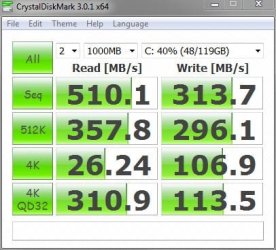
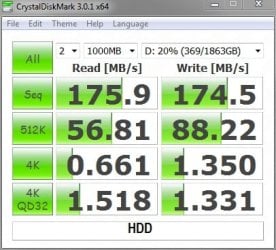
Very true......and that is Real World performance that you can feel. Random 4K Reads/Writes are exponentially faster as well, which is what the OS consists of. Here is a snippet of my Samsung 830 SSD and a Seagate 7200 RPM 2TB HDD......note the difference in 4K scores.

8-24 Test 1.JPG Seagate Barracuda.jpg
 

My Computer

Computer type
PC/Desktop
Computer Manufacturer/Model Number
Custom Built
OS
Windows 7 Professional 64bit SP1
CPU
Intel Core i5-3570K @ 4.5GHz
Motherboard
Asus Sabertooth Z77
Memory
Corsair Vengeance 16GB (4x4) @1866MHz CL 9-9-9-24 1T
Graphics Card(s)
EVGA GTX 750 Ti FTW
Sound Card
Onboard Audio
Monitor(s) Displays
Dell S2309W
Screen Resolution
1920x1080
Hard Drives
Samsung 830 128GB SSD - OS
(4) Seagate 5TB HDD
(1) Seagate 2TB HDD
PSU
Seasonic X750 80+ Gold Full Modular
Case
Antec Eleven Hundred Super Mid Tower
Cooling
Intel Liquid Cooler
Keyboard
Max Nighthawk X8 Mechanical keyboard
Mouse
Mionix Naos 7000
Internet Speed
50 Mbps Down / 10 Mbps Up
Antivirus
Microsoft Security Essentials/Malwarebytes Anti-Malware
Browser
Chrome/Firefox
Other Info
Klipsch ProMedia 2.1's
Asus RT-N66R Wireless Router
Back
Top