
Jheeioh
New member
Hi! I've been using Windows 7 since 2010 and I got this problem/s:
Problem 1:
Windows detected a Hard Disk Failure
Windows tells me to back up my files and contact the manufacturer of my PC. Yet, I notice no symptoms at all. So, I just chose to stop Windows alerting me for that problem.:sarc:
Problem 2:
I always used Readyboost to speed up my PC. But, after some months from the alerts above, I cannot use Readyboost. In the ReadyBoost tab under Properties, it says that
" ReadyBoost is not enabled because the service responsible for ReadyBoost (Sysmain) has been turned off on this computer. An administrator can turn the Sysmain service back on."
I tried to search the web for that and I found out that the service has the name Superfetch in services.msc. It is stopped. I tried to manually turn it on but it displays the error "Windows could not start the Superfetch service on Local Computer. Error 2: The system cannot find the file specified. I was wondering if this is the cause of the Hard Disk failure...
Problem 3:
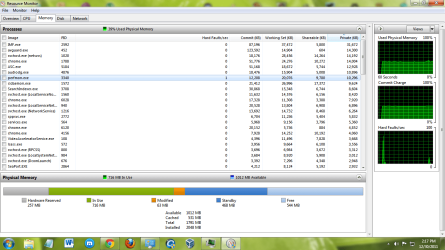
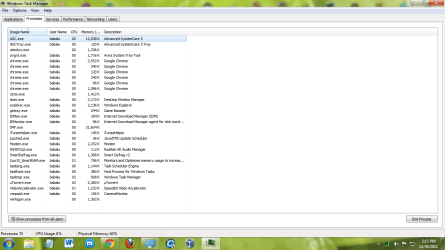
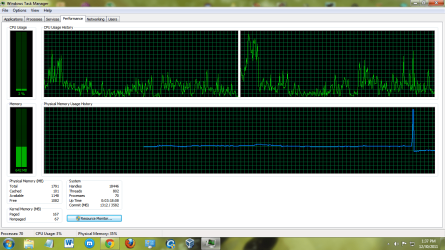
After some time, I noticed that my RAM usage is quite high. It is usually above 40% (I have 2 GB RAM), and it sometimes peak to 70 or 80%. To resolve it, I run Smart RAM in Advanced SystemCare to push it down. And, it returns to 20-30%. But, after about 15 mins. it returns to 40% or above. I have to use Smart RAM again...
I have been searching different websites for those three problems and I can't find a solution. Below are some of my Task Manager screenshots. Thanks in advance!
Problem 1:
Windows detected a Hard Disk Failure
Windows tells me to back up my files and contact the manufacturer of my PC. Yet, I notice no symptoms at all. So, I just chose to stop Windows alerting me for that problem.:sarc:
Problem 2:
I always used Readyboost to speed up my PC. But, after some months from the alerts above, I cannot use Readyboost. In the ReadyBoost tab under Properties, it says that
" ReadyBoost is not enabled because the service responsible for ReadyBoost (Sysmain) has been turned off on this computer. An administrator can turn the Sysmain service back on."
I tried to search the web for that and I found out that the service has the name Superfetch in services.msc. It is stopped. I tried to manually turn it on but it displays the error "Windows could not start the Superfetch service on Local Computer. Error 2: The system cannot find the file specified. I was wondering if this is the cause of the Hard Disk failure...
Problem 3:
After some time, I noticed that my RAM usage is quite high. It is usually above 40% (I have 2 GB RAM), and it sometimes peak to 70 or 80%. To resolve it, I run Smart RAM in Advanced SystemCare to push it down. And, it returns to 20-30%. But, after about 15 mins. it returns to 40% or above. I have to use Smart RAM again...
I have been searching different websites for those three problems and I can't find a solution. Below are some of my Task Manager screenshots. Thanks in advance!
Attachments
My Computer
At a glance
Windows 7 Ultimate 32bitAMD Athlon(tm) II x2 225 Processor 3.10 GHz2.00 GB (1.75 usable)ATI Radeon HD 4250
- Computer Manufacturer/Model Number
- O.E.M.
- OS
- Windows 7 Ultimate 32bit
- CPU
- AMD Athlon(tm) II x2 225 Processor 3.10 GHz
- Motherboard
- eMaxx
- Memory
- 2.00 GB (1.75 usable)
- Graphics Card(s)
- ATI Radeon HD 4250
- Sound Card
- Realtek High Defenition Audio
- Monitor(s) Displays
- VA1931
- Screen Resolution
- 1366x768
- Hard Drives
- C: D: E: (Windows installed on C:)
SAMSUNG HD322HJ ATA Device
- Keyboard
- Standard PS/2 Keyboard
- Mouse
- Microsoft PS/2 Mouse
- Internet Speed
- 3.6 Mbps


