
Solved Three Routers Problem.

PauloAgojo277

Virus Helper ! >_<
Member
Local time
6:18 AM
Messages
66
Location
Philippines
Hi,

So I buy a new router that supports wireless repeater and I wireless connect it to my main/root router then I connect a network/ethernet cable to one of my router (aztech router) making it to successfully bridge to it, but I failed :cry: ..
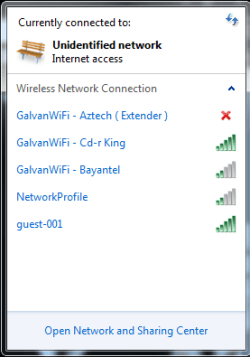
It keeps saying that Unidentified Network, fluctuating with red X mark to the name of my SSID what can I do with the Aztech router.

Please Help, Thanks In Advance :o
 

My Computer

Computer type
PC/Desktop
Computer Manufacturer/Model Number
AsusTEK Computer INC.
OS
Windows Ultimate 32-bit x86 Service-Pack-1
CPU
Intel Pentium Dual Core CPU E5400 @2.70 Ghz 2.70Ghz
Motherboard
Asus P5G41T-M LX3
Memory
2.00 GB Kingston RAM
Graphics Card(s)
Nvidia Geforce GT 630 2GB DDR3
Sound Card
RealTek Audio HD Manager
Monitor(s) Displays
ViewSonic V1616wSERIES
Screen Resolution
1366x768
Hard Drives
WDC WD1600AAJS-00WAA0 ATA Drive - Old Hard Drive = 120 GB
Hitachi HDS721050DLE630ATA Drive - New Hard Drive = 500 GB
PSU
I Think Hitachi PSU
Case
HiP Case w/ Power Supply
Cooling
Intel Fan - CPU - Integrated Fan - GPU - Chassis Fan -
Keyboard
Cruiser Keyboard
Mouse
iMega Plus Mouse
Internet Speed
1.9 Mbps Up :D And 1.0 Upload/s :D
Antivirus
avast! Antivirus
Browser
Mozilla FireFox - Google Chrome 28 - Opera - Safari
Other Info
Games: 2000 - 2008 - Some (2014)

avast! 2038 = Paid!
Hi from Sevenforums,

Make and models please.

Can you list your router 1(connected to internet)?

List router 2 aztech how it is connected to router 1?

List router 3 which router which router is it connected to?
 

My Computer

Computer Manufacturer/Model Number
HP Compaq 6715B
OS
Windows 7 Ultimate x64
CPU
AMD turion 64x2 TL-64 2.2Ghz
Motherboard
HC030
Memory
Sodimm DDR2 4GB
Graphics Card(s)
ATI Radeon 1250 128MB IGP
Hard Drives
Fujitsu Siemens 500GB sata 3.0 Gb/s
Hi Sir, Thank You For The Reply,

The One Connected To the Internet is a
zte zxv10 w300 - ZTE BRAND - From Our ISP - Bayantel Communication

2nd
The Aztech DSL605ew - I get from my aunt.

and the last router and new router
Cd-r king wireless-N indoor AP Router WR-NET-047-LO Series
~ Supports Repeater that's why i did but it.

so here's what I want

1st Router --> Repeater ( 3rd Router ) --> Bridge it to --> Aztech router (2nd router ) the only rpoblem is i cant .. the problem is stated at the first post :)

EDIT: Post Some ScreenShot
When I Plugged it works when I connect to that 2x it will says unidentifed network but no internet access SCREENSHOT is just lying LoL

EDIT: When I Try Using Windows Troubleshooter It tells that Investigative Router or Broadband Issues.. and I Followed that instruction and it works also or default gateway bla bla and it says FIXED and it fixed ...
 

Attachments

  • someti,e.png
    someti,e.png
    8.1 KB · Views: 12
Last edited:

My Computer

Computer type
PC/Desktop
Computer Manufacturer/Model Number
AsusTEK Computer INC.
OS
Windows Ultimate 32-bit x86 Service-Pack-1
CPU
Intel Pentium Dual Core CPU E5400 @2.70 Ghz 2.70Ghz
Motherboard
Asus P5G41T-M LX3
Memory
2.00 GB Kingston RAM
Graphics Card(s)
Nvidia Geforce GT 630 2GB DDR3
Sound Card
RealTek Audio HD Manager
Monitor(s) Displays
ViewSonic V1616wSERIES
Screen Resolution
1366x768
Hard Drives
WDC WD1600AAJS-00WAA0 ATA Drive - Old Hard Drive = 120 GB
Hitachi HDS721050DLE630ATA Drive - New Hard Drive = 500 GB
PSU
I Think Hitachi PSU
Case
HiP Case w/ Power Supply
Cooling
Intel Fan - CPU - Integrated Fan - GPU - Chassis Fan -
Keyboard
Cruiser Keyboard
Mouse
iMega Plus Mouse
Internet Speed
1.9 Mbps Up :D And 1.0 Upload/s :D
Antivirus
avast! Antivirus
Browser
Mozilla FireFox - Google Chrome 28 - Opera - Safari
Other Info
Games: 2000 - 2008 - Some (2014)

avast! 2038 = Paid!
So you are briding wirelessly to the second but out of the network list you put the first router but you enter the wireless settings of the second router thatis probably why you get unidentified network.

You would bridge over to the second router and choose the second router out of the network list.
 

My Computer

Computer Manufacturer/Model Number
HP Compaq 6715B
OS
Windows 7 Ultimate x64
CPU
AMD turion 64x2 TL-64 2.2Ghz
Motherboard
HC030
Memory
Sodimm DDR2 4GB
Graphics Card(s)
ATI Radeon 1250 128MB IGP
Hard Drives
Fujitsu Siemens 500GB sata 3.0 Gb/s
No, I Bridge It Using Ethernet Cable and it doesn't work there I disable DHCP Server. Still Not Working
 

My Computer

Computer type
PC/Desktop
Computer Manufacturer/Model Number
AsusTEK Computer INC.
OS
Windows Ultimate 32-bit x86 Service-Pack-1
CPU
Intel Pentium Dual Core CPU E5400 @2.70 Ghz 2.70Ghz
Motherboard
Asus P5G41T-M LX3
Memory
2.00 GB Kingston RAM
Graphics Card(s)
Nvidia Geforce GT 630 2GB DDR3
Sound Card
RealTek Audio HD Manager
Monitor(s) Displays
ViewSonic V1616wSERIES
Screen Resolution
1366x768
Hard Drives
WDC WD1600AAJS-00WAA0 ATA Drive - Old Hard Drive = 120 GB
Hitachi HDS721050DLE630ATA Drive - New Hard Drive = 500 GB
PSU
I Think Hitachi PSU
Case
HiP Case w/ Power Supply
Cooling
Intel Fan - CPU - Integrated Fan - GPU - Chassis Fan -
Keyboard
Cruiser Keyboard
Mouse
iMega Plus Mouse
Internet Speed
1.9 Mbps Up :D And 1.0 Upload/s :D
Antivirus
avast! Antivirus
Browser
Mozilla FireFox - Google Chrome 28 - Opera - Safari
Other Info
Games: 2000 - 2008 - Some (2014)

avast! 2038 = Paid!
You bridge it using ethernet cable to router 1?

Do you use no other configuration at all?
 
Last edited:

My Computer

Computer Manufacturer/Model Number
HP Compaq 6715B
OS
Windows 7 Ultimate x64
CPU
AMD turion 64x2 TL-64 2.2Ghz
Motherboard
HC030
Memory
Sodimm DDR2 4GB
Graphics Card(s)
ATI Radeon 1250 128MB IGP
Hard Drives
Fujitsu Siemens 500GB sata 3.0 Gb/s
Back
Top