Thumbnail not load!!

Ahmad64

New member
Local time
10:16 PM
Messages
10
Hi
Last week I installed a game, but after restart I understand that my windows doesn't load Thimbnails anymore!
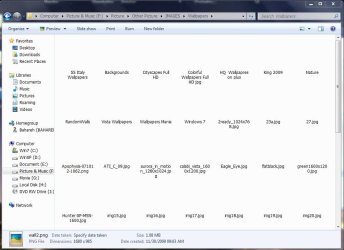
3.JPG

It also happens to my Video clips, and while I delete a folder including pictures, it's thumbnail doesn't show!
2.JPG

Th worse thing is that I can't see pictures for Desktop Backgrounds:
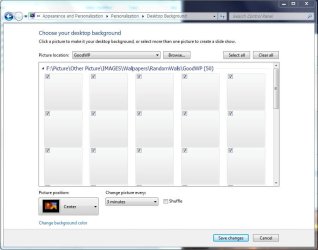
1.JPG

I uninstalled my game and I've been searched a lot of technical sites for my issue, I checked my Folder Option:
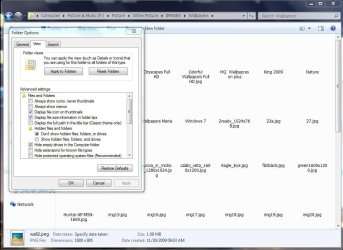
4.JPG

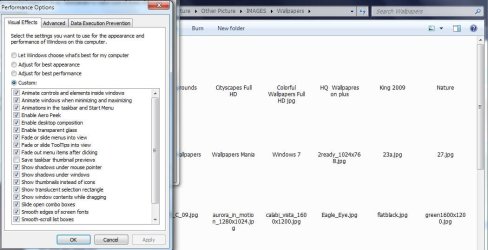
I checked My Performance:
6.JPG

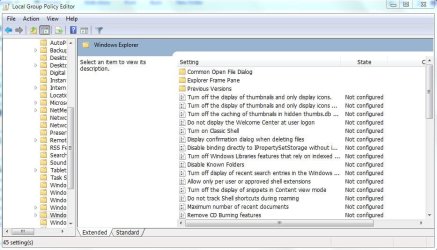
I checked My Policy:
8.JPG

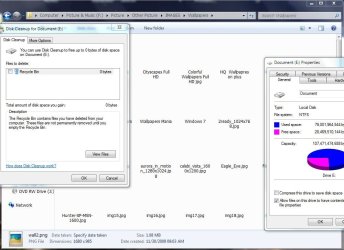
I cleaned My thumbnail cache by CCLeaner and Disk Cleanup:
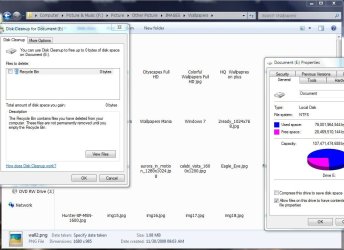
9.JPG

as I don't have any Restore point, I'm really disappointed...
Please Help me to solve this.
Thanks
 

My Computer

OS
Windows 7 Ultimate x64
CPU
E8400
Motherboard
ASUS P5Q PRO
Memory
OCZ 1066 2G Dual
Graphics Card(s)
ATI HD4870-1G
Monitor(s) Displays
Samsung T1900
Hard Drives
500G Maxtor
PSU
Green 585B
Case
GMC

My Computer

Computer Manufacturer/Model Number
Custom Build
OS
Windows 7 Ultimate x64/Windows 8 Consumer Preview x64/Ubuntu 11.04
CPU
Intel Pentium Dual Core E6700 3.2GHz
Motherboard
ASUS P5G41T-M LX
Memory
Strontium 8192MB DDR3 1333Mhz
Graphics Card(s)
msi GeForce N560GTX-M2D1GD5 1GB
Sound Card
Realtek HD Audio
Monitor(s) Displays
CHIMEI CMV 221D 22"
Screen Resolution
1680x1050
Hard Drives
Seagate Barracuda LP Green 3.5'' 2TB Internal HDD 5900RPM + WD Elements Desktop 1TB External HDD 7200RPM
PSU
SHAW Viper-1500w Gaming PSU
Case
Black eMaxx ATX Mini Tower Case
Keyboard
Microsoft Wireless Keyboard 1000
Mouse
Microsoft Wireless Optical Mouse 2000
Internet Speed
100GB @ 4.76Mbps
I have read somewhere that your Codec packs can clash/conflict with thumbnails. I'm not an expert on this but it's worth a try, uninstall your codec pack if you have one installed and see if that works.

I tried both, rebiuld Icon, and run SFC
and Reinstall K-Lite Codeck pack...
But still shows No Thumnail...
 
Last edited by a moderator:

My Computer

OS
Windows 7 Ultimate x64
CPU
E8400
Motherboard
ASUS P5Q PRO
Memory
OCZ 1066 2G Dual
Graphics Card(s)
ATI HD4870-1G
Monitor(s) Displays
Samsung T1900
Hard Drives
500G Maxtor
PSU
Green 585B
Case
GMC

My Computer

Computer Manufacturer/Model Number
Custom Build
OS
Windows 7 Ultimate x64/Windows 8 Consumer Preview x64/Ubuntu 11.04
CPU
Intel Pentium Dual Core E6700 3.2GHz
Motherboard
ASUS P5G41T-M LX
Memory
Strontium 8192MB DDR3 1333Mhz
Graphics Card(s)
msi GeForce N560GTX-M2D1GD5 1GB
Sound Card
Realtek HD Audio
Monitor(s) Displays
CHIMEI CMV 221D 22"
Screen Resolution
1680x1050
Hard Drives
Seagate Barracuda LP Green 3.5'' 2TB Internal HDD 5900RPM + WD Elements Desktop 1TB External HDD 7200RPM
PSU
SHAW Viper-1500w Gaming PSU
Case
Black eMaxx ATX Mini Tower Case
Keyboard
Microsoft Wireless Keyboard 1000
Mouse
Microsoft Wireless Optical Mouse 2000
Internet Speed
100GB @ 4.76Mbps
Try clearing and resetting the cache rather than rebuilding it.
http://www.sevenforums.com/tutorials/10797-thumbnail-cache-clear-reset.html

What game did you install that started this problem? You should also fully uninstall the game using something like the free version of Revo Uninstaller.

I cleaned my thumbnail cache with CCleaner ,but in disk cleanup I there's no Thumbnail option!
9.JPG

I'm not sure, but I think after installing Dirt3 and Windows Game For Windows, it lost Thumbnails...

By the way
when in explorer, I change View to Tile and Mediom Icons, thumbnails shows, but in larg Icons it appears and then with refresh click it disappears...
Thanks for your attention...
 

My Computer

OS
Windows 7 Ultimate x64
CPU
E8400
Motherboard
ASUS P5Q PRO
Memory
OCZ 1066 2G Dual
Graphics Card(s)
ATI HD4870-1G
Monitor(s) Displays
Samsung T1900
Hard Drives
500G Maxtor
PSU
Green 585B
Case
GMC
I'm still waiting for your Help...!
 

My Computer

OS
Windows 7 Ultimate x64
CPU
E8400
Motherboard
ASUS P5Q PRO
Memory
OCZ 1066 2G Dual
Graphics Card(s)
ATI HD4870-1G
Monitor(s) Displays
Samsung T1900
Hard Drives
500G Maxtor
PSU
Green 585B
Case
GMC

My Computer

Computer type
PC/Desktop
Computer Manufacturer/Model Number
Novatech iRush Pro
OS
Windows 7 Ultimate SP1 - 64 Bit
CPU
Intel Core i5 2500k
Motherboard
Foxconn H67M-S/H67M-V/H67
Memory
2x4GB DDR3 1333Hz
Graphics Card(s)
Ati Radeon 6770
Sound Card
None
Monitor(s) Displays
Samsung S22B150
Screen Resolution
1920x1080
Hard Drives
2x500GB
PSU
500W
Cooling
Fan
Keyboard
HP KU0316
Mouse
Wireless Logitech M185
Internet Speed
20MB/s
Antivirus
Avast Free
Browser
Google Chrome
Other Info
Logitech M185 Mouse
KU-M316 Keyboard

My Computer

Computer type
PC/Desktop
Computer Manufacturer/Model Number
Novatech iRush Pro
OS
Windows 7 Ultimate SP1 - 64 Bit
CPU
Intel Core i5 2500k
Motherboard
Foxconn H67M-S/H67M-V/H67
Memory
2x4GB DDR3 1333Hz
Graphics Card(s)
Ati Radeon 6770
Sound Card
None
Monitor(s) Displays
Samsung S22B150
Screen Resolution
1920x1080
Hard Drives
2x500GB
PSU
500W
Cooling
Fan
Keyboard
HP KU0316
Mouse
Wireless Logitech M185
Internet Speed
20MB/s
Antivirus
Avast Free
Browser
Google Chrome
Other Info
Logitech M185 Mouse
KU-M316 Keyboard

My Computer

Computer Manufacturer/Model Number
Custom Build
OS
Windows 7 Ultimate x64/Windows 8 Consumer Preview x64/Ubuntu 11.04
CPU
Intel Pentium Dual Core E6700 3.2GHz
Motherboard
ASUS P5G41T-M LX
Memory
Strontium 8192MB DDR3 1333Mhz
Graphics Card(s)
msi GeForce N560GTX-M2D1GD5 1GB
Sound Card
Realtek HD Audio
Monitor(s) Displays
CHIMEI CMV 221D 22"
Screen Resolution
1680x1050
Hard Drives
Seagate Barracuda LP Green 3.5'' 2TB Internal HDD 5900RPM + WD Elements Desktop 1TB External HDD 7200RPM
PSU
SHAW Viper-1500w Gaming PSU
Case
Black eMaxx ATX Mini Tower Case
Keyboard
Microsoft Wireless Keyboard 1000
Mouse
Microsoft Wireless Optical Mouse 2000
Internet Speed
100GB @ 4.76Mbps

My Computer

OS
Windows 7 Ultimate x64
CPU
E8400
Motherboard
ASUS P5Q PRO
Memory
OCZ 1066 2G Dual
Graphics Card(s)
ATI HD4870-1G
Monitor(s) Displays
Samsung T1900
Hard Drives
500G Maxtor
PSU
Green 585B
Case
GMC
Any Solution?

I have to change My Windows , and loosing my updates.... :(
 

My Computer

OS
Windows 7 Ultimate x64
CPU
E8400
Motherboard
ASUS P5Q PRO
Memory
OCZ 1066 2G Dual
Graphics Card(s)
ATI HD4870-1G
Monitor(s) Displays
Samsung T1900
Hard Drives
500G Maxtor
PSU
Green 585B
Case
GMC
It is probably a false dll, have you got a Recovery Partition or a restore disk?
 

My Computer

Computer type
PC/Desktop
Computer Manufacturer/Model Number
Novatech iRush Pro
OS
Windows 7 Ultimate SP1 - 64 Bit
CPU
Intel Core i5 2500k
Motherboard
Foxconn H67M-S/H67M-V/H67
Memory
2x4GB DDR3 1333Hz
Graphics Card(s)
Ati Radeon 6770
Sound Card
None
Monitor(s) Displays
Samsung S22B150
Screen Resolution
1920x1080
Hard Drives
2x500GB
PSU
500W
Cooling
Fan
Keyboard
HP KU0316
Mouse
Wireless Logitech M185
Internet Speed
20MB/s
Antivirus
Avast Free
Browser
Google Chrome
Other Info
Logitech M185 Mouse
KU-M316 Keyboard
Hi Ahmed :)
I would like to know at first, if you disable thumbnail preview , does the generic icons load up rightly ? To know this , try http://www.sevenforums.com/tutorials/11738-thumbnail-previews-enable-disable.html . If the generic icons load properly, it is a problem associated with thumbs.db .... somehow it is corrupter, and maybe it is not rebuilding anymore.

At the same time, I would like to know another thing .... if you try to load the thumbnails directly from the hard disk insted of the thumb.db file, what happens ? To know, try http://www.sevenforums.com/tutorials/10794-thumbnail-cache-enable-disable.html . if the thumbnails load with thumbnail cache disabled, we will be sure about our previous inference.

Only in this situation, but not the otherwise, a http://www.sevenforums.com/tutorials/3413-repair-install.html will solve it. But for the otherwise, I am worry that there will be only one feasible solution , that is http://www.sevenforums.com/tutorials/1649-clean-install-windows-7-a.html .

If , unfortunately, you need to go with http://www.sevenforums.com/tutorials/1649-clean-install-windows-7-a.html , first have a backup of your user files externally, coz it will wipe up the entire C drive .

Let us know what the situation is. We know that such an issue causes some impatience, but you are to keep patience, as the issue is a critical one.

Best of luck.
 

My Computer

Computer type
PC/Desktop
Computer Manufacturer/Model Number
Self Assembled
OS
Microsoft Windows 10 Pro Insider Preview 64-bit
CPU
Intel(R) Core(TM) i3-4130 CPU @ 3.40GHz
Motherboard
Gigabyte Technology Co., Ltd. B85M-D3H
Memory
Corsair Vengence 4GB x2 (8.00GB Dual-Channel DDR3 @ 798MHz)
Graphics Card(s)
2047MB GeForce GTS 450 (ZOTAC International)
Sound Card
Onboard (Realtek High Definition Audio)
Monitor(s) Displays
LG Flatron E2040T
Screen Resolution
1600x900
Hard Drives
Western Digital 1 TB
Seagate 500 GB
PSU
Corsair VS550
Case
Cooler Master K380
Cooling
Cooler Master Seidon 120V Plus
Keyboard
Logitech MK260r
Mouse
Logitech MK260r
Internet Speed
PMPL Broadband
Antivirus
Windows Defender + MBAM
Browser
Firefox
Other Info
Dell Studio 15" Laptop
Hi Ahmed :)
I would like to know at first, if you disable thumbnail preview , does the generic icons load up rightly ? To know this , try http://www.sevenforums.com/tutorials/11738-thumbnail-previews-enable-disable.html . If the generic icons load properly, it is a problem associated with thumbs.db .... somehow it is corrupter, and maybe it is not rebuilding anymore.

At the same time, I would like to know another thing .... if you try to load the thumbnails directly from the hard disk insted of the thumb.db file, what happens ? To know, try http://www.sevenforums.com/tutorials/10794-thumbnail-cache-enable-disable.html . if the thumbnails load with thumbnail cache disabled, we will be sure about our previous inference.

Only in this situation, but not the otherwise, a http://www.sevenforums.com/tutorials/3413-repair-install.html will solve it. But for the otherwise, I am worry that there will be only one feasible solution , that is http://www.sevenforums.com/tutorials/1649-clean-install-windows-7-a.html .

If , unfortunately, you need to go with http://www.sevenforums.com/tutorials/1649-clean-install-windows-7-a.html , first have a backup of your user files externally, coz it will wipe up the entire C drive .

Let us know what the situation is. We know that such an issue causes some impatience, but you are to keep patience, as the issue is a critical one.

Best of luck.
------------------------------------
Hi dear friend, thanks for your advice.
Yes, when I disable thumbnail view the generic Icons load,
but after I enabled "Turn off caching of thumbnail pictures" policy, it didn't work after reboot.

You are right, last solution is clean install windows.

Thanks for your care ;)


My Computer

OS
Windows 7 Ultimate x64
CPU
E8400
Motherboard
ASUS P5Q PRO
Memory
OCZ 1066 2G Dual
Graphics Card(s)
ATI HD4870-1G
Monitor(s) Displays
Samsung T1900
Hard Drives
500G Maxtor
PSU
Green 585B
Case
GMC
Hi Ahmed, better you opt for a Repair Install at first. As the generic icons load rightly a repair will resolve the issue, will keep the user data, and user account settings.

You can perform a clean install anytime, but before and after clean install, there is a lot of workload :sarc:
 

My Computer

Computer type
PC/Desktop
Computer Manufacturer/Model Number
Self Assembled
OS
Microsoft Windows 10 Pro Insider Preview 64-bit
CPU
Intel(R) Core(TM) i3-4130 CPU @ 3.40GHz
Motherboard
Gigabyte Technology Co., Ltd. B85M-D3H
Memory
Corsair Vengence 4GB x2 (8.00GB Dual-Channel DDR3 @ 798MHz)
Graphics Card(s)
2047MB GeForce GTS 450 (ZOTAC International)
Sound Card
Onboard (Realtek High Definition Audio)
Monitor(s) Displays
LG Flatron E2040T
Screen Resolution
1600x900
Hard Drives
Western Digital 1 TB
Seagate 500 GB
PSU
Corsair VS550
Case
Cooler Master K380
Cooling
Cooler Master Seidon 120V Plus
Keyboard
Logitech MK260r
Mouse
Logitech MK260r
Internet Speed
PMPL Broadband
Antivirus
Windows Defender + MBAM
Browser
Firefox
Other Info
Dell Studio 15" Laptop
Back
Top