Thumbnail Previews - Enable or Disable

How to Enable or Disable Explorer Thumbnail Previews in Windows 7 and Windows 8

   Information
This tutorial will show you how to enable or disable thumbnail previews in Windows Explorer for all or specific users in Windows 7 and Windows 8.

   Note
Displaying thumbnails in Windows Explorer will require that Windows Photo Viewer is set as the default program with all of it's default associations (except .gif files) set with it as well.

If you disable thumbnail previews, then they will also not display in the preview pane in Windows 7 or Windows 8.

   Tip
If there are a lot of thumbnails in a Windows Explorer window, then it can slow down your computer while you wait for the thumbnails to load. If this happens, then disabling thumbnails will speed up how fast a Windows Explorer window will open by displaying only icons instead of thumbnails.

   Warning
When thumbnail previews is enabled, you will need to have the icon view size in the Windows Explorer window set to either Medium Icons, Large Icons, or Extra Large Icons to see a thumbnail of the file or folder.


EXAMPLE: Thumbnails Enabled in Windows Explorer

images.jpgFolder_ON.jpgImage_On.jpg
EXAMPLE: Thumbnails Disabled in Windows Explorer Folder_OFF.jpgImage_Off.jpg



OPTION ONE

To Enable or Disable Thumbnail Previews in Folder Options


NOTE: This option will only enable or disable thumbnails in your account. If this option is not available in Folder Options, then you will need to enable either OPTION THREE or OPTION FOUR below to enable for all users. 1. Open Folder Options in Windows 7 or Windows 8, and click/tap on the View tab. (see screenshot below) Folder_Options.jpg
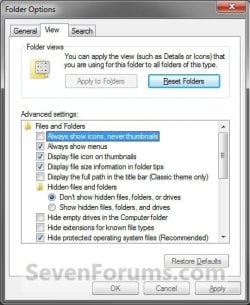
2. Do step 3 or 4 below for what you would like to do.

3. To Turn Off Thumbnails A) Check Always show icons, never thumbnails, and click/tap on OK. (See screenshot above)
4. To Turn On Thumbnails
NOTE: This is the default setting. A) Uncheck Always show icons, never thumbnails, and click/tap on OK. (See screenshot below step 2)


OPTION TWO

To Enable or Disable Thumbnail Previews in Visual Effects


NOTE: This option will only enable or disable thumbnails in your user account. 1. Open Visual Effects settings in Windows 7 or Windows 8. (see screenshot below) Visual_Effects.jpg
2. To Turn Off Thumbnails A) Uncheck Show thumbnails instead of icons, and click/tap on OK. (See screenshot above)
3. To Turn On Thumbnails
NOTE: This is the default setting. A) Check Show thumbnails instead of icons, and click/tap on OK. (See screenshot below step 1)
NOTE: If this option will not stay checked when you reopen this window, then you will need to enable either OPTION THREE or OPTION FOUR below.


OPTION THREE

To Enable or Disable Thumbnail Previews using a REG File

1. To Disable All Users Thumbnails
NOTE: This option will disable thumbnails for all users on the computer and overrides step 3 and 4 below. This is the same as doing OPTION FOUR with Group Policy. You must be logged in as an administrator to be able to do this option. A) Click/tap on the Download button below to download the file below, and go to step 5 below. Disable_Explorer_Thumbnails_All_Users.reg


Download


2. To Enable All Users Thumbnails
NOTE: This is the default setting. This option will enable thumbnails for all users on the computer and overrides step 3 and 4 below. This is the same as doing OPTION FOUR with Group Policy. You must be logged in as an administrator to be able to do this option. A) Click/tap on the Download button below to download the file below, and go to step 5 below. Enable_Explorer_Thumbnails_All_Users.reg

Download


3. To Disable Only Your Thumbnails
NOTE: This option will disable thumbnails for only the currently logged in user. This is the same as doing OPTION ONE or OPTION TWO above. A) Click/tap on the Download button below to download the file below, and go to step 5 below. Disable_Explorer_Thumbnails_Current_User.reg


Download


4. To Enable Only Your Thumbnails
NOTE: This is the default setting. This option will enable thumbnails for only the currently logged in user. This is the same as doing OPTION ONE or OPTION TWO above. A) Click/tap on the Download button below to download the file below, and go to step 5 below. Enable_Explorer_Thumbnails_Current_User.reg

Download


5. Save the .reg file to your desktop.

6. Double click/tap on the downloaded .reg file to merge it.

7. Click/tap on Run, Yes (UAC), Yes, and OK when prompted.

8. Log off and log on, or restart the computer to apply.

9. When finished, you can delete the downloaded .reg file if you like.


OPTION FOUR

To Enable or Disable Thumbnail Previews in Group Policy


NOTE: You must be logged in as an administrator to be able to do this option. 1. Open the all users, specific users or groups, or all users except administrators Local Group Policy Editor for how you want this policy applied.

2. In the left pane, click on the arrow to expand User Configuration, Administrative Templates, Windows Components, and Windows Explorer (Windows 7) or File Explorer (Windows 8). (see screenshot below) Group_Policy.jpg
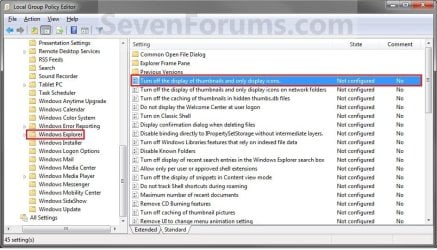
3. In the right pane of Windows Explorer (Windows 7) or File Explorer (Windows 8), double click/tap on Turn off the display of thumbnails and only display icons to edit it. (see screenshot above)

4. Do step 5 or 6 below for what you would like to do.

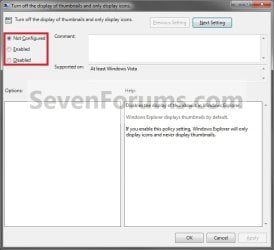
5. To Enable Thumbnails A) Select (dot) Not Configured or Disabled, and go to step 7 below. (see screenshot below step 7)
NOTE: Not Configured is the default setting.
6. To Disable Thumbnails A) Select (dot) Enabled, and go to step 7 below. (see screenshot below step 7)
7. Click/tap on OK. (See screenshot below) Poperties.jpg
8. Close the Local Group Policy Editor.
That's it,
Shawn


Attachments

Last edited:
Any way to disable thumbnail viewing on the Desktop only ???
 

My Computer

Computer Manufacturer/Model Number
HP d4996t (upgraded)
OS
XP MCE .... XP Pro 64 .... W7 U x64
CPU
E6750, 2.67GHz C2D
Memory
4GB, PC2 6400
Graphics Card(s)
GeForce 9400GT
Monitor(s) Displays
Twin Samsung 2443BWT
Screen Resolution
1920x1200
Hard Drives
Many .. 3 Installed
PSU
460W
Internet Speed
Cable
Not that I know of. :(
 

My Computer

Computer type
PC/Desktop
Computer Manufacturer/Model Number
Self built custom
OS
64-bit Windows 11 Pro for Workstations
CPU
Intel i7-8700K OC'd to 5 GHz
Motherboard
ASUS ROG Maximus XI Formula Z390
Memory
64 GB (4x16GB) G.SKILL TridentZ RGB DDR4 3600 MHz
Graphics Card(s)
ASUS ROG-STRIX-GTX1080TI-O11G-GAMING
Sound Card
Integrated
Monitor(s) Displays
2 x Samsung Odyssey G7 27"
Screen Resolution
2560x1440
Hard Drives
1TB Samsung 990 PRO M.2,
4TB Samsung 990 PRO PRO M.2,
TerraMaster F8 SSD Plus NAS
PSU
Seasonic Prime Titanium 850W
Case
Thermaltake Core P3
Cooling
Corsair Hydro H115i
Keyboard
Logitech wireless K800
Mouse
Logitech MX Master 4
Internet Speed
2 Gb/s Download and 100 Mb/s Upload
Antivirus
Malwarebyte Anti-Malware Premium
Browser
Google Chrome
Other Info
Logitech Z625 speaker system,
Logitech BRIO 4K Pro webcam,
HP Color LaserJet Pro MFP M477fdn,
APC SMART-UPS RT 1000 XL - SURT1000XLI,
Galaxy S23 Plus phone
Tried Option 3

Tried both with no changes, but now I can't get it back to what it was prior. Can someone help me with the exact registry files so I can get in there and remove both.

Thank you.
 

My Computer

OS
Windows 7
Hello HulaLady, and welcome to Seven Forums.

I would be happy to help, but could you give more details on exactly what problem you are having with thumbnails and if you are wanting to enable or disable them?

Also, check the NOTE box at the top of the tutorial to see if that may be the issue for now. :)
 

My Computer

Computer type
PC/Desktop
Computer Manufacturer/Model Number
Self built custom
OS
64-bit Windows 11 Pro for Workstations
CPU
Intel i7-8700K OC'd to 5 GHz
Motherboard
ASUS ROG Maximus XI Formula Z390
Memory
64 GB (4x16GB) G.SKILL TridentZ RGB DDR4 3600 MHz
Graphics Card(s)
ASUS ROG-STRIX-GTX1080TI-O11G-GAMING
Sound Card
Integrated
Monitor(s) Displays
2 x Samsung Odyssey G7 27"
Screen Resolution
2560x1440
Hard Drives
1TB Samsung 990 PRO M.2,
4TB Samsung 990 PRO PRO M.2,
TerraMaster F8 SSD Plus NAS
PSU
Seasonic Prime Titanium 850W
Case
Thermaltake Core P3
Cooling
Corsair Hydro H115i
Keyboard
Logitech wireless K800
Mouse
Logitech MX Master 4
Internet Speed
2 Gb/s Download and 100 Mb/s Upload
Antivirus
Malwarebyte Anti-Malware Premium
Browser
Google Chrome
Other Info
Logitech Z625 speaker system,
Logitech BRIO 4K Pro webcam,
HP Color LaserJet Pro MFP M477fdn,
APC SMART-UPS RT 1000 XL - SURT1000XLI,
Galaxy S23 Plus phone
I used to use Thumbnail Handler which automatically showed my Paint Shop Pro tubes (versus just a PSP icon), but have been unsuccessful locating a program that will do this. I found this site and downloaded both and installed both. Nothing worked, so I am wondering if I should delete the registry files that these downloads installed (thus my asking if anyone had the exact file name that I should delete).

If anyone does have a PSP Thumbnail Handler that works with Windows 7 64 bit, for all versions of PSP, I would appreciate hearing back. Thank you Brink for your prompt response.

I spent hours at this site, thank you so much for sharing your knowledge....

Aloha all
 

My Computer

OS
Windows 7
Aloha HulaLady,

I'm sorry, but I do not know of one for Paint Shop Pro files. Hopefully someone may though. :(


If you wanted to use the default thumbnail handler again for them, then using Windows Photo Gallery as described in the blue NOTE box at the top of the tutorial will restore that for you. The downloads in the tutorial are just default settings, so installing on or the other will either enable or disable thumbnails. No need to do anything with them other than to make sure that you have it enabled again.

Hope this helps,
Shawn
 

My Computer

Computer type
PC/Desktop
Computer Manufacturer/Model Number
Self built custom
OS
64-bit Windows 11 Pro for Workstations
CPU
Intel i7-8700K OC'd to 5 GHz
Motherboard
ASUS ROG Maximus XI Formula Z390
Memory
64 GB (4x16GB) G.SKILL TridentZ RGB DDR4 3600 MHz
Graphics Card(s)
ASUS ROG-STRIX-GTX1080TI-O11G-GAMING
Sound Card
Integrated
Monitor(s) Displays
2 x Samsung Odyssey G7 27"
Screen Resolution
2560x1440
Hard Drives
1TB Samsung 990 PRO M.2,
4TB Samsung 990 PRO PRO M.2,
TerraMaster F8 SSD Plus NAS
PSU
Seasonic Prime Titanium 850W
Case
Thermaltake Core P3
Cooling
Corsair Hydro H115i
Keyboard
Logitech wireless K800
Mouse
Logitech MX Master 4
Internet Speed
2 Gb/s Download and 100 Mb/s Upload
Antivirus
Malwarebyte Anti-Malware Premium
Browser
Google Chrome
Other Info
Logitech Z625 speaker system,
Logitech BRIO 4K Pro webcam,
HP Color LaserJet Pro MFP M477fdn,
APC SMART-UPS RT 1000 XL - SURT1000XLI,
Galaxy S23 Plus phone
Thank you Shawn, for now I have the icon feature turned off (default), so I can see what's in my folders. I have ISOs in the PSP community regarding this issue, if I am successful, I will be sure to post back here.

Happy Holidays
 

My Computer

OS
Windows 7
Happy Holidays HulaLady. I hope it goes well. :)
 

My Computer

Computer type
PC/Desktop
Computer Manufacturer/Model Number
Self built custom
OS
64-bit Windows 11 Pro for Workstations
CPU
Intel i7-8700K OC'd to 5 GHz
Motherboard
ASUS ROG Maximus XI Formula Z390
Memory
64 GB (4x16GB) G.SKILL TridentZ RGB DDR4 3600 MHz
Graphics Card(s)
ASUS ROG-STRIX-GTX1080TI-O11G-GAMING
Sound Card
Integrated
Monitor(s) Displays
2 x Samsung Odyssey G7 27"
Screen Resolution
2560x1440
Hard Drives
1TB Samsung 990 PRO M.2,
4TB Samsung 990 PRO PRO M.2,
TerraMaster F8 SSD Plus NAS
PSU
Seasonic Prime Titanium 850W
Case
Thermaltake Core P3
Cooling
Corsair Hydro H115i
Keyboard
Logitech wireless K800
Mouse
Logitech MX Master 4
Internet Speed
2 Gb/s Download and 100 Mb/s Upload
Antivirus
Malwarebyte Anti-Malware Premium
Browser
Google Chrome
Other Info
Logitech Z625 speaker system,
Logitech BRIO 4K Pro webcam,
HP Color LaserJet Pro MFP M477fdn,
APC SMART-UPS RT 1000 XL - SURT1000XLI,
Galaxy S23 Plus phone
Any way to disable thumbnail viewing on the Desktop only ???

That's my problem :(

They work for a second user and in all my sub folders - just not on the desktop.
 

My Computer

Computer Manufacturer/Model Number
Novatech (UK) iRush Pro
OS
MSDN Home Premium
CPU
Intel i5
Motherboard
Intel DP55WB
Memory
4Gb
Graphics Card(s)
ATI Radeon HD 5770
Sound Card
On Board
Monitor(s) Displays
Philips 170B
Hard Drives
1 x 1Tb
(7 Partitions)
PSU
750W
Case
Antec 300
Cooling
Tricool Fans
Keyboard
Microsoft 3000 Wireless
Mouse
Microsoft 5000 Wireless BlueTrack
Internet Speed
6.1 Mbps
I was beginning to think I'm the only one who think it's Stupid to replace some, but not all, Icons on the desktop with Thumbnails.

I've tried to track all the registry changes with all Thumbs disabled ...
But I can't figure out which ones (if any) will turn off the thumbs on the desktop only.
 

My Computer

Computer Manufacturer/Model Number
HP d4996t (upgraded)
OS
XP MCE .... XP Pro 64 .... W7 U x64
CPU
E6750, 2.67GHz C2D
Memory
4GB, PC2 6400
Graphics Card(s)
GeForce 9400GT
Monitor(s) Displays
Twin Samsung 2443BWT
Screen Resolution
1920x1200
Hard Drives
Many .. 3 Installed
PSU
460W
Internet Speed
Cable
Hello Kremmen,

I'm afraid that it's all or none. :(
 

My Computer

Computer type
PC/Desktop
Computer Manufacturer/Model Number
Self built custom
OS
64-bit Windows 11 Pro for Workstations
CPU
Intel i7-8700K OC'd to 5 GHz
Motherboard
ASUS ROG Maximus XI Formula Z390
Memory
64 GB (4x16GB) G.SKILL TridentZ RGB DDR4 3600 MHz
Graphics Card(s)
ASUS ROG-STRIX-GTX1080TI-O11G-GAMING
Sound Card
Integrated
Monitor(s) Displays
2 x Samsung Odyssey G7 27"
Screen Resolution
2560x1440
Hard Drives
1TB Samsung 990 PRO M.2,
4TB Samsung 990 PRO PRO M.2,
TerraMaster F8 SSD Plus NAS
PSU
Seasonic Prime Titanium 850W
Case
Thermaltake Core P3
Cooling
Corsair Hydro H115i
Keyboard
Logitech wireless K800
Mouse
Logitech MX Master 4
Internet Speed
2 Gb/s Download and 100 Mb/s Upload
Antivirus
Malwarebyte Anti-Malware Premium
Browser
Google Chrome
Other Info
Logitech Z625 speaker system,
Logitech BRIO 4K Pro webcam,
HP Color LaserJet Pro MFP M477fdn,
APC SMART-UPS RT 1000 XL - SURT1000XLI,
Galaxy S23 Plus phone
I used to use Thumbnail Handler which automatically showed my Paint Shop Pro tubes (versus just a PSP icon), but have been unsuccessful locating a program that will do this. I found this site and downloaded both and installed both. Nothing worked, so I am wondering if I should delete the registry files that these downloads installed (thus my asking if anyone had the exact file name that I should delete).

If anyone does have a PSP Thumbnail Handler that works with Windows 7 64 bit, for all versions of PSP, I would appreciate hearing back. Thank you Brink for your prompt response.

I spent hours at this site, thank you so much for sharing your knowledge....

Aloha all


to view PSP files thumbnails just unzip this dll put it anywhere then run cmd goto where you put the file and run "regsvr32 psdcodec.dll"

All done restart explorer and you will see thubnails
 

Attachments

My Computer

Computer Manufacturer/Model Number
gigabyte q1580l
OS
windows 7
CPU
2.16 celeron
Motherboard
gigabyte
Memory
2gb
Graphics Card(s)
intem gma 450
Sound Card
realtek hd
Monitor(s) Displays
lcd
Hard Drives
160gb
any way to disable thumbnail viewing on the folders only and show thumbnails for other files like pictures?
 

My Computer

Computer Manufacturer/Model Number
Macbook Pro 13' 7.1
OS
Windows 7 Ultimate x86
CPU
Intel Core 2 Duo 2.4 Ghz
Memory
4GB
Graphics Card(s)
nVidia Geforce 320M
Screen Resolution
1280x800
Hello iFission,

Sorry, but it's either a all or none setting. :(
 

My Computer

Computer type
PC/Desktop
Computer Manufacturer/Model Number
Self built custom
OS
64-bit Windows 11 Pro for Workstations
CPU
Intel i7-8700K OC'd to 5 GHz
Motherboard
ASUS ROG Maximus XI Formula Z390
Memory
64 GB (4x16GB) G.SKILL TridentZ RGB DDR4 3600 MHz
Graphics Card(s)
ASUS ROG-STRIX-GTX1080TI-O11G-GAMING
Sound Card
Integrated
Monitor(s) Displays
2 x Samsung Odyssey G7 27"
Screen Resolution
2560x1440
Hard Drives
1TB Samsung 990 PRO M.2,
4TB Samsung 990 PRO PRO M.2,
TerraMaster F8 SSD Plus NAS
PSU
Seasonic Prime Titanium 850W
Case
Thermaltake Core P3
Cooling
Corsair Hydro H115i
Keyboard
Logitech wireless K800
Mouse
Logitech MX Master 4
Internet Speed
2 Gb/s Download and 100 Mb/s Upload
Antivirus
Malwarebyte Anti-Malware Premium
Browser
Google Chrome
Other Info
Logitech Z625 speaker system,
Logitech BRIO 4K Pro webcam,
HP Color LaserJet Pro MFP M477fdn,
APC SMART-UPS RT 1000 XL - SURT1000XLI,
Galaxy S23 Plus phone

Attachments

  • Folder Image.png
    Folder Image.png
    8.5 KB · Views: 6,168

My Computer

Computer Manufacturer/Model Number
Custom
OS
Windows 7 Home Premium
CPU
E75OO OC ~ 3.7O GHz
Motherboard
Gigabyte P45
Memory
2 GB OC ~ 1066 MHz DualChannel
Graphics Card(s)
96OO GT OC
Sound Card
Onboard
Monitor(s) Displays
LG 22"
Screen Resolution
1920x1080
Hard Drives
Seagate 1000GB 7200.12
Seagate 500GB 7200.12
WDC 500GB 7200 RPM
PSU
Nameless 450W
Case
CiRCLE FullATX
Cooling
Stock
Keyboard
Logitech Combo
Mouse
-
Internet Speed
512 Kbps
Hello Sam, and welcome to Seven Forums.

You could disable thumbnail previews, then do OPTION ONE in the tutorial below to change the default folder icon with your icon above.

How to Change the Windows 7 Default Folder Icon

Hope this helps,
Shawn
 

My Computer

Computer type
PC/Desktop
Computer Manufacturer/Model Number
Self built custom
OS
64-bit Windows 11 Pro for Workstations
CPU
Intel i7-8700K OC'd to 5 GHz
Motherboard
ASUS ROG Maximus XI Formula Z390
Memory
64 GB (4x16GB) G.SKILL TridentZ RGB DDR4 3600 MHz
Graphics Card(s)
ASUS ROG-STRIX-GTX1080TI-O11G-GAMING
Sound Card
Integrated
Monitor(s) Displays
2 x Samsung Odyssey G7 27"
Screen Resolution
2560x1440
Hard Drives
1TB Samsung 990 PRO M.2,
4TB Samsung 990 PRO PRO M.2,
TerraMaster F8 SSD Plus NAS
PSU
Seasonic Prime Titanium 850W
Case
Thermaltake Core P3
Cooling
Corsair Hydro H115i
Keyboard
Logitech wireless K800
Mouse
Logitech MX Master 4
Internet Speed
2 Gb/s Download and 100 Mb/s Upload
Antivirus
Malwarebyte Anti-Malware Premium
Browser
Google Chrome
Other Info
Logitech Z625 speaker system,
Logitech BRIO 4K Pro webcam,
HP Color LaserJet Pro MFP M477fdn,
APC SMART-UPS RT 1000 XL - SURT1000XLI,
Galaxy S23 Plus phone
Hello Sam, and welcome to Seven Forums.

You could disable thumbnail previews, then do OPTION ONE in the tutorial below to change the default folder icon with your icon above.

How to Change the Windows 7 Default Folder Icon

Hope this helps,
Shawn

Hi Shawn,

I have changed the folder icon. The thing is I don;t want thumbnails over the folder icon (saying which images are inide the folder). So I disable the thumbnails option but then I cannot see image thumbnails too unlike XP where only picture folder shown thumbnails over the folder which too can be cutomised . But as you said its all or none, which sucks :(
 

Attachments

  • desktop_[1].jpg
    desktop_[1].jpg
    92.7 KB · Views: 931

My Computer

Computer Manufacturer/Model Number
Custom
OS
Windows 7 Home Premium
CPU
E75OO OC ~ 3.7O GHz
Motherboard
Gigabyte P45
Memory
2 GB OC ~ 1066 MHz DualChannel
Graphics Card(s)
96OO GT OC
Sound Card
Onboard
Monitor(s) Displays
LG 22"
Screen Resolution
1920x1080
Hard Drives
Seagate 1000GB 7200.12
Seagate 500GB 7200.12
WDC 500GB 7200 RPM
PSU
Nameless 450W
Case
CiRCLE FullATX
Cooling
Stock
Keyboard
Logitech Combo
Mouse
-
Internet Speed
512 Kbps
Is there a way to do what sam2O1O wants to do?

I need it that way, to work just like XP.

I don't understand how that option is not available :-S
 

My Computer

OS
Windows 7 x64

My Computer

Computer type
PC/Desktop
Computer Manufacturer/Model Number
Self built custom
OS
64-bit Windows 11 Pro for Workstations
CPU
Intel i7-8700K OC'd to 5 GHz
Motherboard
ASUS ROG Maximus XI Formula Z390
Memory
64 GB (4x16GB) G.SKILL TridentZ RGB DDR4 3600 MHz
Graphics Card(s)
ASUS ROG-STRIX-GTX1080TI-O11G-GAMING
Sound Card
Integrated
Monitor(s) Displays
2 x Samsung Odyssey G7 27"
Screen Resolution
2560x1440
Hard Drives
1TB Samsung 990 PRO M.2,
4TB Samsung 990 PRO PRO M.2,
TerraMaster F8 SSD Plus NAS
PSU
Seasonic Prime Titanium 850W
Case
Thermaltake Core P3
Cooling
Corsair Hydro H115i
Keyboard
Logitech wireless K800
Mouse
Logitech MX Master 4
Internet Speed
2 Gb/s Download and 100 Mb/s Upload
Antivirus
Malwarebyte Anti-Malware Premium
Browser
Google Chrome
Other Info
Logitech Z625 speaker system,
Logitech BRIO 4K Pro webcam,
HP Color LaserJet Pro MFP M477fdn,
APC SMART-UPS RT 1000 XL - SURT1000XLI,
Galaxy S23 Plus phone
Back
Top