Solved Thumbnails get corrupted when using ccleaner

cquinn

New member
Local time
4:04 PM
Messages
13
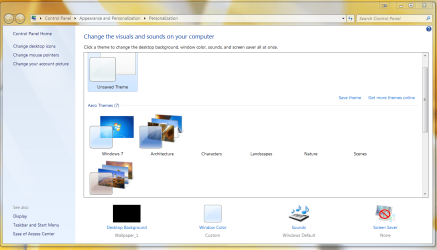
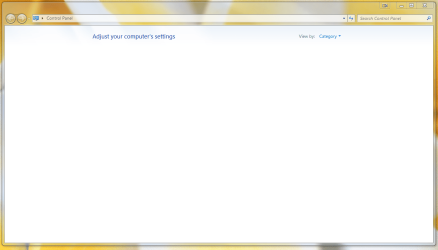
I've been fighting this problem for a couple of weeks now. I build a new windows 7/64 pro box over the holidays and whenever i use ccleaner my thumbnails go haywire. I get a control panel page that has nothing on it except for the title 'control panel'. half my themes thumbnails are missing. and worst of all my display fusion thumbnails are half missing. I have a windows 7/64 home box that this new one replaced and i never has a single problem with that one.

using -
microsoft security essentials and comodo firewall

I've tried -
restoring to an earlier time -no results
clearing the thumbnail cache - no results
deleting all the thumbnail .db files and letting windows rebuild them - no results
ran sfc\scannow - no results (no integrity violations)

when i reinstall windows (third time now) everything is fine until i run ccleaner. could really use another suggestion.
 

Attachments
  • thumbs1.PNG
    thumbs1.PNG
    95.4 KB · Views: 0
  • thumbs2.PNG
    thumbs2.PNG
    104.4 KB · Views: 0
  • thumbs3.PNG
    thumbs3.PNG
    66.2 KB · Views: 1
Last edited:

My Computer

OS
Windows 7 Home Premium 64bit.

My Computer

Computer type
PC/Desktop
Computer Manufacturer/Model Number
Custom Asus Build
OS
Microsoft Windows 8.1 Pro 64-bit
CPU
Intel(R) Core(TM) i3-4130 CPU @ 3.40GHz
Motherboard
B85M-E
Memory
8.00 GB
Graphics Card(s)
None
Sound Card
Realtek High Definition Audio
Monitor(s) Displays
Asus 23.6" Monitor
Screen Resolution
1920 x 1080 x 32 bits (4294967296 colors) @ 60 Hz
Hard Drives
INTEL SSDSC2BW180A4
Samsung SSD 840 PRO Series
PSU
Seasonic S12II-380Bronze
Case
Lian Li
Cooling
Fan, Passive
Keyboard
Logitech K120
Mouse
Microsoft Touch Mouse
Internet Speed
4ms Ping, 19.0 Mbps Download, 19.0 Mbps Upload
Antivirus
Eset Endpoint
Browser
Internet Explorer, Chrome
On ccleaner i did uncheck scan of thumbnails and your suggestion is number two of the things i tried with no success. thanks for the suggestions though. maybe i should post some photos eh?
 

My Computer

OS
Windows 7 Home Premium 64bit.
Do a scan, unchecking thumbnails, and post a pic of what Ccleaner finds. Also, Before you scan, make sure the lastest windows updates are installed and the latest Ccleaner is installed.

Try doing all this without your extra firewall installed. If it is installed, remove it with Revo uninstaller (or something similar to make sure it is completely removed). This is just to see if we can pinpoint the issue

Avast! shouldn't have any issues, but I'm not ruling it out. It is an antivirus program after all.
 

My Computer

Computer type
PC/Desktop
Computer Manufacturer/Model Number
Custom Asus Build
OS
Microsoft Windows 8.1 Pro 64-bit
CPU
Intel(R) Core(TM) i3-4130 CPU @ 3.40GHz
Motherboard
B85M-E
Memory
8.00 GB
Graphics Card(s)
None
Sound Card
Realtek High Definition Audio
Monitor(s) Displays
Asus 23.6" Monitor
Screen Resolution
1920 x 1080 x 32 bits (4294967296 colors) @ 60 Hz
Hard Drives
INTEL SSDSC2BW180A4
Samsung SSD 840 PRO Series
PSU
Seasonic S12II-380Bronze
Case
Lian Li
Cooling
Fan, Passive
Keyboard
Logitech K120
Mouse
Microsoft Touch Mouse
Internet Speed
4ms Ping, 19.0 Mbps Download, 19.0 Mbps Upload
Antivirus
Eset Endpoint
Browser
Internet Explorer, Chrome
*Updated last post* please re-read it :D
 

My Computer

Computer type
PC/Desktop
Computer Manufacturer/Model Number
Custom Asus Build
OS
Microsoft Windows 8.1 Pro 64-bit
CPU
Intel(R) Core(TM) i3-4130 CPU @ 3.40GHz
Motherboard
B85M-E
Memory
8.00 GB
Graphics Card(s)
None
Sound Card
Realtek High Definition Audio
Monitor(s) Displays
Asus 23.6" Monitor
Screen Resolution
1920 x 1080 x 32 bits (4294967296 colors) @ 60 Hz
Hard Drives
INTEL SSDSC2BW180A4
Samsung SSD 840 PRO Series
PSU
Seasonic S12II-380Bronze
Case
Lian Li
Cooling
Fan, Passive
Keyboard
Logitech K120
Mouse
Microsoft Touch Mouse
Internet Speed
4ms Ping, 19.0 Mbps Download, 19.0 Mbps Upload
Antivirus
Eset Endpoint
Browser
Internet Explorer, Chrome
I changed several .cpl files to .cpz in windows\system32 and that brought back both the thumbnails on my themes and on control panel. here's a list -

bthprops
infocardcpl
irprops

I followed the instructions here:
how to recover missing control panel icons ? - Microsoft Community

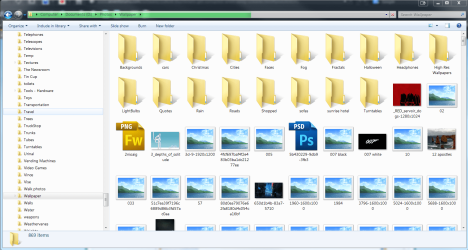
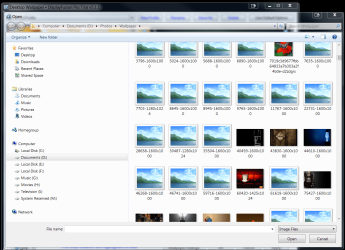
still having a problem with thumbs in windows explorer though (see below)

also when launching explorer and navigating to the folder i want i get a green progress bar across the title bar that never seems to stop. it gets close to the end and just keeps running without moving.
 

Attachments

  • thumbs4.PNG
    thumbs4.PNG
    99.1 KB · Views: 0

My Computer

OS
Windows 7 Home Premium 64bit.
Never would have guessed it. Glad it's working now!
 

My Computer

Computer type
PC/Desktop
Computer Manufacturer/Model Number
Custom Asus Build
OS
Microsoft Windows 8.1 Pro 64-bit
CPU
Intel(R) Core(TM) i3-4130 CPU @ 3.40GHz
Motherboard
B85M-E
Memory
8.00 GB
Graphics Card(s)
None
Sound Card
Realtek High Definition Audio
Monitor(s) Displays
Asus 23.6" Monitor
Screen Resolution
1920 x 1080 x 32 bits (4294967296 colors) @ 60 Hz
Hard Drives
INTEL SSDSC2BW180A4
Samsung SSD 840 PRO Series
PSU
Seasonic S12II-380Bronze
Case
Lian Li
Cooling
Fan, Passive
Keyboard
Logitech K120
Mouse
Microsoft Touch Mouse
Internet Speed
4ms Ping, 19.0 Mbps Download, 19.0 Mbps Upload
Antivirus
Eset Endpoint
Browser
Internet Explorer, Chrome
then the real question is why would ccleaner corrupt those files? I suppose i should ask piriform
 

My Computer

OS
Windows 7 Home Premium 64bit.
Some guesses on my part:
  1. Not all updates are installed
  2. Ccleaner may not have been updated to the latest release
  3. A program, such as the firewall or antivirus, are interfering somehow. This could include any other program that may be interfering
  4. Ccleaner is not fool-proof. You must look through each and every item selected for deletion. If an incorrect item is selected, deselect it and do not allow Ccleaner to delete it.
  5. Make sure Ccleaner is only scanning the areas you want it to scan, including registry or application scans
  6. You can see what Ccleaner selects with a full scan in a new installation of windows. All of those files should be safe to keep (do not delete), as windows is a brand new install after all. You might even write them down to make sure they are not deleted in the future
 

My Computer

Computer type
PC/Desktop
Computer Manufacturer/Model Number
Custom Asus Build
OS
Microsoft Windows 8.1 Pro 64-bit
CPU
Intel(R) Core(TM) i3-4130 CPU @ 3.40GHz
Motherboard
B85M-E
Memory
8.00 GB
Graphics Card(s)
None
Sound Card
Realtek High Definition Audio
Monitor(s) Displays
Asus 23.6" Monitor
Screen Resolution
1920 x 1080 x 32 bits (4294967296 colors) @ 60 Hz
Hard Drives
INTEL SSDSC2BW180A4
Samsung SSD 840 PRO Series
PSU
Seasonic S12II-380Bronze
Case
Lian Li
Cooling
Fan, Passive
Keyboard
Logitech K120
Mouse
Microsoft Touch Mouse
Internet Speed
4ms Ping, 19.0 Mbps Download, 19.0 Mbps Upload
Antivirus
Eset Endpoint
Browser
Internet Explorer, Chrome
Thought I'd report back for anyone who might be having a similar problem.

It was a corrupt YouTube download that was sitting on my desktop that was at the heart of my problem. Windows indexing service kept trying and failing to index this one file and kept getting hung. Once I went into safe mode and deleted the file all my problems disappeared. I was also having low on memory notifications that also disappeared once I deleted that one corrupt file.
 

My Computer

OS
Windows 7 Home Premium 64bit.
Back
Top