
Solved Timeout error when launching a file

Callender

New member
Guru
Gold Member
VIP
Local time
7:46 PM
Messages
4,776
Location
United Kingdom
I'm getting a timeout error when using Universal Virus Sniffer to check for active file infections. I'm not sure how this is supposed to work but it downloads a randomly named file to:

C:\Users\Chris\Desktop\Toolbox 2\Universal Virus Sniffer\random.exe

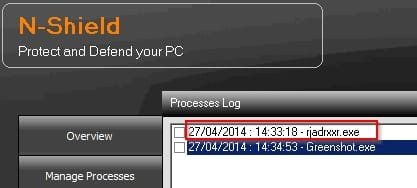
The file does launch as shown by the process log:
N-Shield 1.jpg

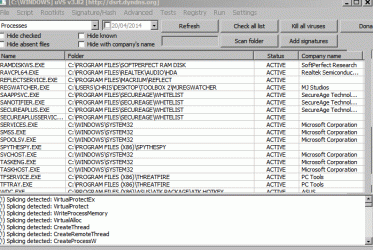
However nothing happens and I get a Timeout error message.

I've tried a few times hence different file names are shown in the screenshots.
Test.gif

I've tried disabling anything that I can think of that could be interfering with this file. Disabled Firewall, Auto-Sandboxing and other stuff.

Does anyone have a suggestion on how to resolve this?
 
Last edited:

My Computer

Computer type
Laptop
Computer Manufacturer/Model Number
ASUS
OS
Microsoft Windows 7 Home Premium 64-bit 7601 Multiprocessor Free Service Pack 1
CPU
AMD C-60 APU with Radeon(tm) HD Graphics
Motherboard
ASUSTeK COMPUTER INC. X501U
Memory
4.00 GB
Graphics Card(s)
AMD Radeon HD 6290 Graphics
Sound Card
(1) AMD High Definition Audio Device (2) Realtek High Defi
Screen Resolution
1366 x 768 x 32 bits (4294967296 colors) @ 60 Hz
Hard Drives
Hitachi HTS545050A7E380 SATA Disk Device
Antivirus
Comodo CIS & FW, SecureAplus App Whitelisting, Threatfire
Browser
Cyberfox 64bit, Opera 64bit, Airfox
Other Info
Spy-The-Spy, HitmanPro.Alert, Norton Connect Safe, MJRegWatcher, BitDefender TrafficLight, Voodoo Shield, Zemana AntiMalware

Create file - path not found

After running a ProcMon capture I see the following:

UVS ProcMon Capture.jpg

Inspection of the folder reveals that "C:\Users\Chris\Desktop\Toolbox 2\Universal Virus Sniffer\ui" does not exist even after reinstalling the software. If I create a folder named ui will that solve the issue?

EDIT: That didn't work!
 
Last edited:

My Computer

Computer type
Laptop
Computer Manufacturer/Model Number
ASUS
OS
Microsoft Windows 7 Home Premium 64-bit 7601 Multiprocessor Free Service Pack 1
CPU
AMD C-60 APU with Radeon(tm) HD Graphics
Motherboard
ASUSTeK COMPUTER INC. X501U
Memory
4.00 GB
Graphics Card(s)
AMD Radeon HD 6290 Graphics
Sound Card
(1) AMD High Definition Audio Device (2) Realtek High Defi
Screen Resolution
1366 x 768 x 32 bits (4294967296 colors) @ 60 Hz
Hard Drives
Hitachi HTS545050A7E380 SATA Disk Device
Antivirus
Comodo CIS & FW, SecureAplus App Whitelisting, Threatfire
Browser
Cyberfox 64bit, Opera 64bit, Airfox
Other Info
Spy-The-Spy, HitmanPro.Alert, Norton Connect Safe, MJRegWatcher, BitDefender TrafficLight, Voodoo Shield, Zemana AntiMalware
After running a ProcMon capture I see the following:

View attachment 315561

Inspection of the folder reveals that "C:\Users\Chris\Desktop\Toolbox 2\Universal Virus Sniffer\ui" does not exist even after reinstalling the software. If I create a folder named ui will that solve the issue?

EDIT: That didn't work!

The following site has an email address for contacting the author.

http://freesoft.ru/?author=15528
 

My Computer

Computer type
PC/Desktop
Computer Manufacturer/Model Number
Custom Built
OS
Windows 7 Professional x64
CPU
Intel i5 quad processor
Motherboard
DP67BG
Memory
16 GB
Graphics Card(s)
Radeon HD 5770
Sound Card
Realtek High Definition Audio
Monitor(s) Displays
Samsung SyncMaster
Screen Resolution
1920X1080
Hard Drives
WD 2TB (SATA Internal)
WD 1TB (USB External)
PSU
Corsair GS800
Case
Tower (Generic)
Cooling
3 Internal Fans
Keyboard
MS Wireless
Mouse
MS Optical Wired
Internet Speed
54 mbps
Antivirus
Emsisoft
Browser
IE-Version 9, Palemoon-Version 24.2.0
Solved - kind of.

After running a ProcMon capture I see the following:

View attachment 315561

Inspection of the folder reveals that "C:\Users\Chris\Desktop\Toolbox 2\Universal Virus Sniffer\ui" does not exist even after reinstalling the software. If I create a folder named ui will that solve the issue?

EDIT: That didn't work!

The following site has an email address for contacting the author.

???????? ?.?.

Thanks Sir George. Unfortunately that contact link gives the error message "invalid email address" when used but your suggestion gave me an idea! I downloaded the help files (English Version) and there was a contact email address for the author in one of the documents. I'll use it to contact him directly.
 

My Computer

Computer type
Laptop
Computer Manufacturer/Model Number
ASUS
OS
Microsoft Windows 7 Home Premium 64-bit 7601 Multiprocessor Free Service Pack 1
CPU
AMD C-60 APU with Radeon(tm) HD Graphics
Motherboard
ASUSTeK COMPUTER INC. X501U
Memory
4.00 GB
Graphics Card(s)
AMD Radeon HD 6290 Graphics
Sound Card
(1) AMD High Definition Audio Device (2) Realtek High Defi
Screen Resolution
1366 x 768 x 32 bits (4294967296 colors) @ 60 Hz
Hard Drives
Hitachi HTS545050A7E380 SATA Disk Device
Antivirus
Comodo CIS & FW, SecureAplus App Whitelisting, Threatfire
Browser
Cyberfox 64bit, Opera 64bit, Airfox
Other Info
Spy-The-Spy, HitmanPro.Alert, Norton Connect Safe, MJRegWatcher, BitDefender TrafficLight, Voodoo Shield, Zemana AntiMalware
After running a ProcMon capture I see the following:

View attachment 315561

Inspection of the folder reveals that "C:\Users\Chris\Desktop\Toolbox 2\Universal Virus Sniffer\ui" does not exist even after reinstalling the software. If I create a folder named ui will that solve the issue?

EDIT: That didn't work!

The following site has an email address for contacting the author.

???????? ?.?.

Thanks Sir George. Unfortunately that contact link gives the error message "invalid email address" when used but your suggestion gave me an idea! I downloaded the help files (English Version) and there was a contact email address for the author in one of the documents. I'll use it to contact him directly.

Well I'm glad my post provided some benefit.
 

My Computer

Computer type
PC/Desktop
Computer Manufacturer/Model Number
Custom Built
OS
Windows 7 Professional x64
CPU
Intel i5 quad processor
Motherboard
DP67BG
Memory
16 GB
Graphics Card(s)
Radeon HD 5770
Sound Card
Realtek High Definition Audio
Monitor(s) Displays
Samsung SyncMaster
Screen Resolution
1920X1080
Hard Drives
WD 2TB (SATA Internal)
WD 1TB (USB External)
PSU
Corsair GS800
Case
Tower (Generic)
Cooling
3 Internal Fans
Keyboard
MS Wireless
Mouse
MS Optical Wired
Internet Speed
54 mbps
Antivirus
Emsisoft
Browser
IE-Version 9, Palemoon-Version 24.2.0
Solved - Universal Virus Sniffer

Just to add the actual solution to this thread:

UVS is a 32bit application and some (but not all) features don't work when run on a 64bit system even if run in compatibility mode.
 
Last edited:

My Computer

Computer type
Laptop
Computer Manufacturer/Model Number
ASUS
OS
Microsoft Windows 7 Home Premium 64-bit 7601 Multiprocessor Free Service Pack 1
CPU
AMD C-60 APU with Radeon(tm) HD Graphics
Motherboard
ASUSTeK COMPUTER INC. X501U
Memory
4.00 GB
Graphics Card(s)
AMD Radeon HD 6290 Graphics
Sound Card
(1) AMD High Definition Audio Device (2) Realtek High Defi
Screen Resolution
1366 x 768 x 32 bits (4294967296 colors) @ 60 Hz
Hard Drives
Hitachi HTS545050A7E380 SATA Disk Device
Antivirus
Comodo CIS & FW, SecureAplus App Whitelisting, Threatfire
Browser
Cyberfox 64bit, Opera 64bit, Airfox
Other Info
Spy-The-Spy, HitmanPro.Alert, Norton Connect Safe, MJRegWatcher, BitDefender TrafficLight, Voodoo Shield, Zemana AntiMalware
Back
Top