
Tiny white lines on wallpaper

mark4supra

New member
Local time
3:53 PM
Messages
21
Hi!
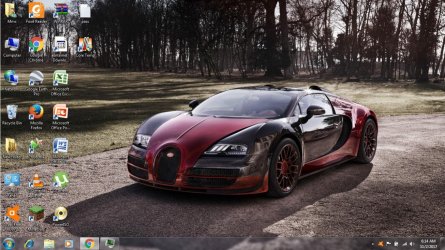
My laptop has a resoultion of 1366x768. So obviously i will download 1366x768 wallpapers.
But when i use the wallpaper small white lines appear on left. But when i use the 1280x720 version the line dissappears. And when i check the 1366x768 image in windows photo viewer the line isnt there. I changed the position in personalization, didnt ix it. You can see a bit of the line in the screenshot.
 

Attachments
  • Untitled.jpg
    Untitled.jpg
    232 KB · Views: 5

My Computer

Computer type
PC/Desktop
Computer Manufacturer/Model Number
hp
OS
64
CPU
i5 2430m
Memory
4gb
Graphics Card(s)
hd 3000
I can't see any white lines. Perhaps there is a problem with your monitor or your graphics adapter. Or maybe something else which is local to your computer.

If you display the "white line" images as wallpaper on another computer, do the white lines show?

By the way, what OS are you running? Your System Specs say only that your OS is "64".
 

My Computer

Computer type
PC/Desktop
Computer Manufacturer/Model Number
Dell
OS
Linux Mint 18.2 xfce 64-bit (VMWare host) / Windows 8.1 Pro 32-bit (VMWare guest)
CPU
Haswell
Memory
4 GB
Monitor(s) Displays
Acer 23"
Screen Resolution
1920 x 1080
Hard Drives
Two hard drives, 1TB each: One for Linux, one for my data.
Keyboard
IBM Model M
Antivirus
Sophos (Linux), Trend Micro (Windows)
Browser
Firefox, Opera
Other Info
I use Samba to share my data drive with the other computers at my house and with my guest session in VMWare Workstation Player.
Os is windows 7 64 bit. There isnt a problem with the screen as the 1280x720 wallpaper works fine.
 

My Computer

Computer type
PC/Desktop
Computer Manufacturer/Model Number
hp
OS
64
CPU
i5 2430m
Memory
4gb
Graphics Card(s)
hd 3000
One thing that it could be is an issue with the actual LCD/LED Panel.

A lot of the panels now used in Laptop devices are not designed for Computer use, but are actually those for TV use. TV output does not always fill the complete 16:9 aspect ratio so case bevels are designed to cover up the white lines produced,

An UnderScan or Overscan is used to fill the screen. With a true image that you get from the computer output the overscan has to be set differently for an image that is exactly correct to the size/aspect requirements, than for a broadcast TV image . Unfortunately although this is correctable on a case by case basis (every panel is unique in the settings required) the controls for this are not available to the user.

The fact that the larger images display correctly is likely to be due to the resize algorithm used adding the extra line back in to the image

Unfortunately there is not much that can be done with the issue as unlike the older CRT monitors that came with user controls for video lock, Height, Width Etc for control of the analog signals . these are only found on panels used in specific computer Monitor applications.

You will sometimes see that the graphics chip is showing that it is set to 59Hz instead of the standard 60Hz and creating a custom screen setting to change this may correct the issue although it could also make the screen totally unusable so you would need to set the information apply and let the screen automatically reset if it does not work, I would only do this with a laptop if I had access to an alternate external monitor/TV
 

My Computers

System One System Two

  • Computer type
    PC/Desktop
    Computer Manufacturer/Model Number
    ChillBlast - Custom to my design
    OS
    Windows 11 Pro x64 [Latest Release and Release Preview]
    CPU
    Ryzen 9 5950X, 3.8 - 5.2 MHz
    Motherboard
    Asus Prime X570-Pro
    Memory
    64GB [2 x 32GB] DDR4 3200MHz
    Graphics Card(s)
    4GB NVIDIA GEFORCE GTX 1650 Ti
    Sound Card
    On-board SPDIF to 5.1 System + HDMI [5.1 system]
    Monitor(s) Displays
    32" UHD 32 Bit HDR Monitor + 43" UHD 4K 32Bit HDR TV
    Screen Resolution
    2 x 3840 x 2160 @60Hz
    Hard Drives
    1TB M2 SSD OS, 500GB Fast Access SSD, 2 x 8TB Data + Various Externals from 1TB to 4TB, 10TB NAS
    PSU
    NZXT C750 80 PLUS Gold 750W Modular PSU
    Case
    Workstation Case [Matt Black]
    Cooling
    NZXT Kraken X63 280mm CPU Cooler +2x Quiet Case fans
    Keyboard
    Logitech Wireless MX Keys & K400 + others
    Mouse
    Logitech Wireless MX Master 3S
    Internet Speed
    920 MB Down 50 MB Up
    Antivirus
    BitDefender Total Security Pro
    Browser
    Chrome (always run latest Non-Beta)
    Other Info
    Also run ...
    Laptop - Quad 8GB - Windows 10 Pro x64
    Nexus 7 Android tablet x2
    Samsung 10.2" tablet
    Blackview TAB 8 4G Android Tablet c/w Keyboard
    Wacom Intuos Pro Medium Pen Pad
    Wacom Intuos Pro Small Pen Pad
    Wacom Expresskeys Remote
    Loopdeck+ Graphics Controller
    Shuttle Pro v2 Control
  • Computer type
    Laptop
    System Manufacturer/Model Number
    Dell XPS 17 10750H
    OS
    Windows 11 Pro x64 Latest RP
    CPU
    Intel I7 10750H 5.0GHz
    Motherboard
    Dell XPS
    Memory
    32GB [2x16GB] DDR4 2933 MHz
    Graphics Card(s)
    nVidia GTX1650Ti 4 GB GDDR6
    Sound Card
    Stock [Realtek] 4 Speaker
    Monitor(s) Displays
    17" IPS UHD+ Infinity Edge Touchscreen
    Screen Resolution
    3840 x 2400
    Hard Drives
    2TB M2 NVMe, 4TB External + various 500GB & 1TB External NVMe (also have access to spinner HDD from
    PSU
    Stock
    Case
    Stock XPS Aluminium & Carbon Fibre
    Cooling
    Stock - Active Fan Control
    Keyboard
    Backlit + Various Logitech
    Mouse
    Stock Track Pad + Logitech MX Trackball
    Internet Speed
    72 MB Down 18MB Up
    Browser
    Chrome
    Other Info
    Also run ...
    Laptop - Quad 8GB - Windows 10 Pro x64
    Nexus 7 Android tablet x2
    10.2" tablet
    Sony Z3 Android Smartphone
    Wacom Intuos Pro Medium Pen Pad
    Wacom Intuos Pro Small Pen Pad
    Wacom Expresskeys Remote
    Loopdeck+ Graphics Controller
    Shuttle Pro v2 Control Pad
    10TB NAS
Back
Top