Solved Tips Display Capture

MourningStar

(_x_)
Power User
VIP
Local time
8:43 AM
Messages
1,308
When I place my cursor over a file, for example an mp3 file, a display appears that shows all the file's details. Is there any way to capture this specific display? Because as soon as the cursor is moved away it disappears. Selecting the file and going to properties does not contain all of the details that the tips display shows.

(please do not suggest 'print screen', and paste into a 'Paint'-type program)

thank you
 

My Computer

Computer type
PC/Desktop
Computer Manufacturer/Model Number
HP (HP-P6212F)
OS
Microsoft Windows 7 Home Premium 64-bit 7601 Multiprocessor Free Service Pack 1
CPU
Pentium(R) Dual-Core CPU E5300 @ 2.60GHz
Motherboard
PEGATRON CORPORATION Benicia
Memory
6.00 GB
Graphics Card(s)
Intel(R) G33/G31 Express Chipset Family
Sound Card
Realtek High Definition Audio
Monitor(s) Displays
24'' HP WS LCD
Screen Resolution
1920 x 1080 x 32 bits (4294967296 colors) @ 60 Hz
Hard Drives
(1) ATA Hitachi HDT72106 SCSI Disk Device (2) Generic- Compact Flash USB Device (3) Generic- MS/MS-Pro USB Device (4) Generic- SD/MMC USB Device (5) Generic- SM/xD-Picture USB Device (6) Verbatim STORE N GO USB Device
Keyboard
Logitech G510s
Mouse
Logitech Trackball M570
Antivirus
Microsoft Security Essentials / Malwarebytes
Browser
IE / Firefox / Chrome
When I place my cursor over a file, for example an mp3 file, a display appears that shows all the file's details. Is there any way to capture this specific display? Because as soon as the cursor is moved away it disappears. Selecting the file and going to properties does not contain all of the details that the tips display shows.

(please do not suggest 'print screen', and paste into a 'Paint'-type program)

thank you

In the case of mp3 files, that info comes from the tags and file properties.

You can view the file properties of any mp3 by right clicking it and looking at the details tab.

There are mp3 applications such as EncSpot that you can use to open up an entire directory of mp3 files and view many of their details.

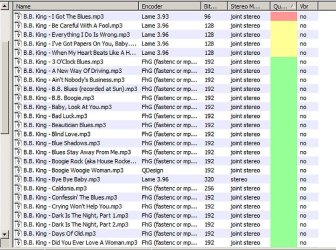
Here is an example, which shows only what I have chosen it to show. You can customize the columns to reveal whatever you need to know.
 

Attachments

  • Untitled-1.jpg
    Untitled-1.jpg
    147.9 KB · Views: 10

My Computer

Computer type
PC/Desktop
Computer Manufacturer/Model Number
Ignatz Special; 4 speed manual gearbox; factory air conditioning; one of one
OS
Windows 7 Home Premium SP1, 64-bit
CPU
Intel Skylake i5-6600K, not overclocked
Motherboard
AsRock Z170M Extreme 4, micro ATX
Memory
8 GB HyperX DDR4-2666 (2 x 4 GB)
Graphics Card(s)
none; graphics are integrated on CPU
Sound Card
onboard: Realtek ALC1150; external: USB Behringer UF0-202
Monitor(s) Displays
Dell S2340M 23 inch IPS
Screen Resolution
1600 x 900
Hard Drives
System: Crucial MX100 series SSD, 128 GB;
Data: Samsung Spinpoint 103SJ, 1 TB;
Backup: WD Caviar Green WD30EZRX-00D8PB0, 3 TB
PSU
Rosewill SilentNight 500 watt fanless, semi-modular
Case
Antec Solo II
Cooling
Noctua NH-U12S; Noctua F12 intake, Noctua S12A exhaust
Keyboard
Microsoft 200 6JH-00001 USB
Mouse
Dell or Microsoft optical wired; USB
Antivirus
Microsoft Security Essentials and Malwarebytes Premium
Browser
Pale Moon
Other Info
All fans PWM; speeds at idle: CPU circa 500 rpm; intake circa 600 rpm; exhaust circa 600 rpm; CPU temps 27 idle and 47 C load in a warm room (27 C/81 F) when running Intel Extreme Tuning Utility stress test.
When I place my cursor over a file, for example an mp3 file, a display appears that shows all the file's details. Is there any way to capture this specific display? Because as soon as the cursor is moved away it disappears. Selecting the file and going to properties does not contain all of the details that the tips display shows.

(please do not suggest 'print screen', and paste into a 'Paint'-type program)

thank you


Download KaKeeware ToolTip Thief Free - Copy the content of tooltips - Softpedia

<http://www.softpedia.com/get/System/System-Miscellaneous/KaKeeware-ToolTip-Thief.shtml>


By the way, you can set up a lot of stuff like this yourself using;

AutoIt v3 - Automate and Script Windows Tasks - For Free!

<http://www.autoitscript.com/autoit3/index.shtml>

or

AutoHotkey - Free Mouse and Keyboard Macro Program with Hotkeys and AutoText

http://www.autohotkey.com/


Here are scripts to capture tool tips;

Get the text content of a tool tip window

<http://www.autohotkey.com/forum/topic58023.html&highlight=tool+tip>

http://www.autohotkey.com/forum/topic54333.html

<http://www.autohotkey.com/forum/topic54333.html>

from here;

AutoHotkey Community - Mouse and Keyboard Macros and Hotkeys

http://www.autohotkey.com/forum/


Regards....Mike Connor
 
Last edited by a moderator:

My Computer

OS
Several, including Windows 7 x64 Ultimate
thanks for the replies. can someone show me, a computer-illiterate, a step-by-step on using that ToolTip Thief thingy? I downloaded it, un-packed it, cliked on it and a warning appeared telling me if I didn't know what I was doing the 'system could crash, continue?' so obviously I aborted it.

thnx!
 

My Computer

Computer type
PC/Desktop
Computer Manufacturer/Model Number
HP (HP-P6212F)
OS
Microsoft Windows 7 Home Premium 64-bit 7601 Multiprocessor Free Service Pack 1
CPU
Pentium(R) Dual-Core CPU E5300 @ 2.60GHz
Motherboard
PEGATRON CORPORATION Benicia
Memory
6.00 GB
Graphics Card(s)
Intel(R) G33/G31 Express Chipset Family
Sound Card
Realtek High Definition Audio
Monitor(s) Displays
24'' HP WS LCD
Screen Resolution
1920 x 1080 x 32 bits (4294967296 colors) @ 60 Hz
Hard Drives
(1) ATA Hitachi HDT72106 SCSI Disk Device (2) Generic- Compact Flash USB Device (3) Generic- MS/MS-Pro USB Device (4) Generic- SD/MMC USB Device (5) Generic- SM/xD-Picture USB Device (6) Verbatim STORE N GO USB Device
Keyboard
Logitech G510s
Mouse
Logitech Trackball M570
Antivirus
Microsoft Security Essentials / Malwarebytes
Browser
IE / Firefox / Chrome
Because the program uses some particular code it may be seen as a virus by some security software. As far as I can tell, this is a false positive. Softpedia also gives their malware free guarantee for it.

The problem with trying to explain some of these things to a "computer illiterate" is that you wont understand what I write.

The program runs on a machine I have which is not connected to the internet. It works, and has caused no crashes, or shown any other unusual behaviour, but that is not to say that it wont.

If you are worried about it then don't use it. I will try to find something else to do the job for you.

Regards....Mike Connor
 

My Computer

OS
Several, including Windows 7 x64 Ultimate
I am working on a script for you to capture the tips to the clipboard. May take a moment or two. When it is finished I will compile it as an executable and upload it somewhere so that you can grab it.

Regards....Mike Connor
 

My Computer

OS
Several, including Windows 7 x64 Ultimate
Thnx Mike - The program downloaded and unzipped fine. That warning I refer to was generated by the program itself. Weird. Warning dialogue display is attached.

Hmmm, this has me thinking ... in addition to capturing the tool-tip, this last excercise has me now asking for a way to capture contents of dialogue/display boxes (such as the one attached here) as well since the text in most, if not all, are unable to be select/copy/pasted.

i don't think we're going to find anything simpler than the 'print screen' option I mentioned earlier, but I hold out hope!
 

Attachments

  • tt1.jpg
    tt1.jpg
    43.6 KB · Views: 12

My Computer

Computer type
PC/Desktop
Computer Manufacturer/Model Number
HP (HP-P6212F)
OS
Microsoft Windows 7 Home Premium 64-bit 7601 Multiprocessor Free Service Pack 1
CPU
Pentium(R) Dual-Core CPU E5300 @ 2.60GHz
Motherboard
PEGATRON CORPORATION Benicia
Memory
6.00 GB
Graphics Card(s)
Intel(R) G33/G31 Express Chipset Family
Sound Card
Realtek High Definition Audio
Monitor(s) Displays
24'' HP WS LCD
Screen Resolution
1920 x 1080 x 32 bits (4294967296 colors) @ 60 Hz
Hard Drives
(1) ATA Hitachi HDT72106 SCSI Disk Device (2) Generic- Compact Flash USB Device (3) Generic- MS/MS-Pro USB Device (4) Generic- SD/MMC USB Device (5) Generic- SM/xD-Picture USB Device (6) Verbatim STORE N GO USB Device
Keyboard
Logitech G510s
Mouse
Logitech Trackball M570
Antivirus
Microsoft Security Essentials / Malwarebytes
Browser
IE / Firefox / Chrome
Some programs will crash windows, and if the programmer is not certain, he gives a warning.

I am working on it. I have a couple of basic scripts already, but I would in that case like to offer you a dialogue and other captures as well. May take a little while but it should not be a major problem.

I will get back to this thread as soon as I have something useful to show.

Regards....Mike Connor
 

My Computer

OS
Several, including Windows 7 x64 Ultimate
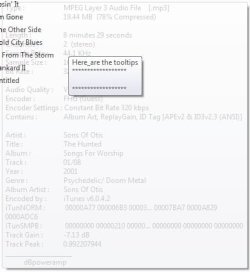
OK. I have a workaround at least which produces this from the tool tip popups;


This was accomplished by running this Autohotkey script;

Code:
CoordMode, Mouse, screen

wanted_class=tooltips_class32
;wanted_class=VsTipWindow


settimer, f2, 200
return


;======== show the information from a single tooltip =========
F1::
ControlGetText, tooltip2,,ahk_class tooltips_class32
MsgBox, The text is %OutputVar%
;tooltip, ******************`n%tooltip2%`n******************, 1300, 300
;sleep, 1000
;tooltip
msgbox, %tooltip2%
return


;======== show the information from a multiple tooltips =========
F2::
WinGet, ID, LIST,ahk_class %wanted_class%
tt_text= Here_are the tooltips`n
Loop, %id%
{
  this_id := id%A_Index%
  ControlGetText, tooltip2,,ahk_id %this_id%

  ifinstring, tooltip2, Here_are    ; prevents 'tooltip infinity' where a tooltip repeats itself and therefore grows in size towards infinity
   continue

  tt_text.= "******************`n" tooltip2 "`n******************`n"
}

tooltip, %tt_text%, 300, 300
;msgbox, %tt_text%
;sleep, 3000
;tooltip

return


esc::exitapp

I snaffled this script from this gentleman at the autohotkey forums;

http://www.autohotkey.com/forum/topic58023.html

<http://www.autohotkey.com/forum/topic58023.html>


and then using PicPick;

http://picpick.wiziple.net/?mid=download

<http://picpick.wiziple.net/?mid=download>

to capture the results. PicPick will already capture dialog boxes and stuff like that. ( what I use all the time for screenshots).When it is running in the tray one merely needs to press;

<SHIFT> <Print Screen> and one can select any area to snip.

Or

<CTRL> <Print Screen> to select any windows control.

<Alt> <Print Screen> captures the whole window.

All you need to run this now as a script is autohotkey;

AutoHotkey - Free Mouse and Keyboard Macro Program with Hotkeys and AutoText

<http://www.autohotkey.com/>

and the script above. You can also compile the script with autohotkey so that it runs directly as an executable.

I will still work on grabbing just the tool tip texts to Notepad or the clipboad, but this solution is likely to be more flexible for many.

Regards....Mike Connor
 

My Computer

OS
Several, including Windows 7 x64 Ultimate
^
Oh wow Mike ... guess you missed my comment on my being computer-illiterate. Barely got the PicPick workin' for me. Pretty cool so far ... but all that code and script stuff? I really wasn't kiddin' when I used the terms 'step-by-step'. I'll understand if you're too busy to lead the blind. Looks like I've got plenty of homework to do.

much appreciated my friend.

-Marcos
 

My Computer

Computer type
PC/Desktop
Computer Manufacturer/Model Number
HP (HP-P6212F)
OS
Microsoft Windows 7 Home Premium 64-bit 7601 Multiprocessor Free Service Pack 1
CPU
Pentium(R) Dual-Core CPU E5300 @ 2.60GHz
Motherboard
PEGATRON CORPORATION Benicia
Memory
6.00 GB
Graphics Card(s)
Intel(R) G33/G31 Express Chipset Family
Sound Card
Realtek High Definition Audio
Monitor(s) Displays
24'' HP WS LCD
Screen Resolution
1920 x 1080 x 32 bits (4294967296 colors) @ 60 Hz
Hard Drives
(1) ATA Hitachi HDT72106 SCSI Disk Device (2) Generic- Compact Flash USB Device (3) Generic- MS/MS-Pro USB Device (4) Generic- SD/MMC USB Device (5) Generic- SM/xD-Picture USB Device (6) Verbatim STORE N GO USB Device
Keyboard
Logitech G510s
Mouse
Logitech Trackball M570
Antivirus
Microsoft Security Essentials / Malwarebytes
Browser
IE / Firefox / Chrome
My pleasure. If you need a walk through that's no problem. It's all quite easy really. You don't actually need to know much in order to use these things.

Where do you want to start?

Regards....Mike Connor
 

My Computer

OS
Several, including Windows 7 x64 Ultimate

My Computer

OS
Win7U 64 RTM
CPU
Q9550
Motherboard
GA-EP45-UD3R
Memory
8GB Gskill
Graphics Card(s)
ASUS|EAH4850/HTDI/1GD3/A
Sound Card
xfi Plat
Monitor(s) Displays
Dell 2405fpw
Screen Resolution
1920x1200
Hard Drives
Seagate & WD sata Drives
PSU
Antec
Case
Antec
Keyboard
MS Natural Ergonomic 4000
Mouse
Logitech MX610 USB Cordless
Hi James, thnx for the welcome and the tip, will do.

Mike, I d/l autokey. Here's my limited understanding : I'm guessing the autokey pgm is used to create a pgm file where one inputs code that defines a keyboard key to run the tool tip capture? I assume the end goal is to put the cursor over a file so that the tool tip appears and then to press the prgrm'd key?
 

My Computer

Computer type
PC/Desktop
Computer Manufacturer/Model Number
HP (HP-P6212F)
OS
Microsoft Windows 7 Home Premium 64-bit 7601 Multiprocessor Free Service Pack 1
CPU
Pentium(R) Dual-Core CPU E5300 @ 2.60GHz
Motherboard
PEGATRON CORPORATION Benicia
Memory
6.00 GB
Graphics Card(s)
Intel(R) G33/G31 Express Chipset Family
Sound Card
Realtek High Definition Audio
Monitor(s) Displays
24'' HP WS LCD
Screen Resolution
1920 x 1080 x 32 bits (4294967296 colors) @ 60 Hz
Hard Drives
(1) ATA Hitachi HDT72106 SCSI Disk Device (2) Generic- Compact Flash USB Device (3) Generic- MS/MS-Pro USB Device (4) Generic- SD/MMC USB Device (5) Generic- SM/xD-Picture USB Device (6) Verbatim STORE N GO USB Device
Keyboard
Logitech G510s
Mouse
Logitech Trackball M570
Antivirus
Microsoft Security Essentials / Malwarebytes
Browser
IE / Firefox / Chrome
Autohotkey itself is a program that runs in the background on your machine. When it starts you get an icon in the tray, a green "H"


This allows you to run scripts easily and do a lot of other things.

PicPick is a resident program that runs in the tray, and can do all sorts of things. That is the "Artists Palette" in the tray.
 
Last edited:

My Computer

OS
Several, including Windows 7 x64 Ultimate
To run a script all you need is a text file containing the script, and you save it as "filename.ahk"

Autohotkey automatically accepts scripts with the file extension .ahk

There are thousands of ready made scripts on the net and you can usually find one to do what you want.

when you run a script and it works, then you can "compile" it. It is then a stand alone executable file.

These are all autohotkey programs written by "skrommel";

http://www.donationcoder.com/Software/Skrommel/

<http://www.donationcoder.com/Software/Skrommel/>

there are thousands more of these available and the source scripts in the form of text files are usually available.
 

My Computer

OS
Several, including Windows 7 x64 Ultimate
Thnx Mike - OK I have a file of type 'AutoHotKey Script' named 'ToolTipCapture' with the contents copied & pasted from your post above in My Documents folder. In the sys tray are the two icons (AHK and PicPick). What next?
 

My Computer

Computer type
PC/Desktop
Computer Manufacturer/Model Number
HP (HP-P6212F)
OS
Microsoft Windows 7 Home Premium 64-bit 7601 Multiprocessor Free Service Pack 1
CPU
Pentium(R) Dual-Core CPU E5300 @ 2.60GHz
Motherboard
PEGATRON CORPORATION Benicia
Memory
6.00 GB
Graphics Card(s)
Intel(R) G33/G31 Express Chipset Family
Sound Card
Realtek High Definition Audio
Monitor(s) Displays
24'' HP WS LCD
Screen Resolution
1920 x 1080 x 32 bits (4294967296 colors) @ 60 Hz
Hard Drives
(1) ATA Hitachi HDT72106 SCSI Disk Device (2) Generic- Compact Flash USB Device (3) Generic- MS/MS-Pro USB Device (4) Generic- SD/MMC USB Device (5) Generic- SM/xD-Picture USB Device (6) Verbatim STORE N GO USB Device
Keyboard
Logitech G510s
Mouse
Logitech Trackball M570
Antivirus
Microsoft Security Essentials / Malwarebytes
Browser
IE / Firefox / Chrome
now save the script as "tooltips.ahk" ( without the quotation marks ).

Now, when you right click on that script autohotkey will give you options what to do with it;


These are;

Run script
Compile Script
Edit script

Choose run script and the script will run, and in this case a small window will appear on your screen with the text "Here_are the tooltips"

When you move your mouse over a file with a tooltip, the tooltip text from that file is captured and shown in a separate box on the screen;


You can now capture this box by pressing <Shift> <Print Screen>

Which opens PicPick capture tool. Move the PicPick cursor to the box and then hold the left mouse button down and draw a rectangle around what you want to capture. As soon as you let go of the mouse button PicPick captures everything in the rectangle, and gives you a menu so you can choose what to do with what you have captured.

Are you following me so far?
 

My Computer

OS
Several, including Windows 7 x64 Ultimate
^
yes, I'm with you - not the result I expected. The desired image is ghosted behind a small mssg window and the folder contents display :
 

Attachments

  • Image 1.jpg
    Image 1.jpg
    17.1 KB · Views: 5

My Computer

Computer type
PC/Desktop
Computer Manufacturer/Model Number
HP (HP-P6212F)
OS
Microsoft Windows 7 Home Premium 64-bit 7601 Multiprocessor Free Service Pack 1
CPU
Pentium(R) Dual-Core CPU E5300 @ 2.60GHz
Motherboard
PEGATRON CORPORATION Benicia
Memory
6.00 GB
Graphics Card(s)
Intel(R) G33/G31 Express Chipset Family
Sound Card
Realtek High Definition Audio
Monitor(s) Displays
24'' HP WS LCD
Screen Resolution
1920 x 1080 x 32 bits (4294967296 colors) @ 60 Hz
Hard Drives
(1) ATA Hitachi HDT72106 SCSI Disk Device (2) Generic- Compact Flash USB Device (3) Generic- MS/MS-Pro USB Device (4) Generic- SD/MMC USB Device (5) Generic- SM/xD-Picture USB Device (6) Verbatim STORE N GO USB Device
Keyboard
Logitech G510s
Mouse
Logitech Trackball M570
Antivirus
Microsoft Security Essentials / Malwarebytes
Browser
IE / Firefox / Chrome
... also that little tooltips window is following my cursor whereever I go. How do I turn it off?
 

My Computer

Computer type
PC/Desktop
Computer Manufacturer/Model Number
HP (HP-P6212F)
OS
Microsoft Windows 7 Home Premium 64-bit 7601 Multiprocessor Free Service Pack 1
CPU
Pentium(R) Dual-Core CPU E5300 @ 2.60GHz
Motherboard
PEGATRON CORPORATION Benicia
Memory
6.00 GB
Graphics Card(s)
Intel(R) G33/G31 Express Chipset Family
Sound Card
Realtek High Definition Audio
Monitor(s) Displays
24'' HP WS LCD
Screen Resolution
1920 x 1080 x 32 bits (4294967296 colors) @ 60 Hz
Hard Drives
(1) ATA Hitachi HDT72106 SCSI Disk Device (2) Generic- Compact Flash USB Device (3) Generic- MS/MS-Pro USB Device (4) Generic- SD/MMC USB Device (5) Generic- SM/xD-Picture USB Device (6) Verbatim STORE N GO USB Device
Keyboard
Logitech G510s
Mouse
Logitech Trackball M570
Antivirus
Microsoft Security Essentials / Malwarebytes
Browser
IE / Firefox / Chrome
... also that little tooltips window is following my cursor whereever I go. How do I turn it off?

You now have two green "H" icons in the tray. Right click on the second one, and you get an option menu.
 

My Computer

OS
Several, including Windows 7 x64 Ultimate
Back
Top