Tips on Troubleshooting Game Issues

sygnus21 why are you calling 8 series gforce card DX9 card when it is DX10 card?
(yes DX10, well DX11 not supported, but its not DX9 card)
please dont missinform forum readers.
i played DX10 games in DX10 mode with geforce 8800GS
 

My Computer

Computer type
PC/Desktop
Computer Manufacturer/Model Number
Self Built PC
OS
Windows 7 pro 64bit. (SP1)
CPU
Intel core I5 2400
Motherboard
Gigabyte H61
Memory
8GB DDR3 Kingston
Graphics Card(s)
Gigabyte GF GTX650OC
Sound Card
Realtek HD audio
Monitor(s) Displays
LCD 20"
Screen Resolution
1600x900
Hard Drives
INTEL SSD 320 80GB +Seagate 7200.12 1TBx3
PSU
Coolermaster RX450W
Case
Coolermaster atx case
Cooling
stock cooler
Keyboard
logitech
Mouse
logitech
Internet Speed
FTTD 100mbps
Yes, a gforce 8400 is DX10 capable. The tone of the post still remains the same.

Have a good day.
 

My Computer

Computer type
PC/Desktop
Computer Manufacturer/Model Number
Custom built by me.
OS
Windows 10 Pro
CPU
Intel Core i7-4770K (3.5Ghz)
Motherboard
Gigabyte G1 Sniper 5 (F10 Bios)
Memory
32 gig Corsair Dominator Platinum (4x8Gig)
Graphics Card(s)
Sapphire Tri-X R9 Fury
Sound Card
Soundblaster ZXR
Monitor(s) Displays
NEC PA242W 24" LCD Monitor
Screen Resolution
1920 x 1200
Hard Drives
Primary - Samsung 850 Pro (512gig), Samsung 840 Pro (256gig), 2TB WD Caviar Black.
PSU
EVGA Supernova 1000 G2
Case
Cooler Master HAF X
Cooling
Corsair H100i with Corsair Air Series SP120 Quiet Fans
Keyboard
Logitech Wireless Wave
Mouse
Logitech Performance MX
Internet Speed
High Speed Cable
Antivirus
Norton Security
Browser
IE11
Other Info
Memory Timings - 1866MHz @ 9-9-9-27-1T @ 1.5 volts
great stuff

If I may suggest to add a couple more pointers:

setting affinity to a single core through Task Manager. Maybe using a utility program for that you probably know better.

ScummVM for old Lucas Arts adventure games
DosBox for really old Dos based games
x360ce for getting XBOX 360 controller to work with older "Games for Windows" games
 

My Computer

Computer Manufacturer/Model Number
selfmade
OS
Windows 7 Ultimate x64
CPU
Intel i7 860
Motherboard
asus p7p55d
Memory
8 gig
Graphics Card(s)
ATI HD 5700
Sound Card
onboard Realtek HD
Monitor(s) Displays
LG LX40
Screen Resolution
1280 x 1024
Hard Drives
1 TB
Case
generic
Cooling
some generic fans
Keyboard
reg
Mouse
laser A4
Hi asdfen, welcome to sevenforums....

As I stated it's not possible to include everything, nor will it, considering there are hundreds of things to try when troubleshooting PC games. This is simply a reminder of some basics.

Also the post would be pages long as opposed to a single post. In some regards I think it's a bit long now. Again I just wanted to give a basic starting point.

Hope you understand and thanks for the suggestions.
 

My Computer

Computer type
PC/Desktop
Computer Manufacturer/Model Number
Custom built by me.
OS
Windows 10 Pro
CPU
Intel Core i7-4770K (3.5Ghz)
Motherboard
Gigabyte G1 Sniper 5 (F10 Bios)
Memory
32 gig Corsair Dominator Platinum (4x8Gig)
Graphics Card(s)
Sapphire Tri-X R9 Fury
Sound Card
Soundblaster ZXR
Monitor(s) Displays
NEC PA242W 24" LCD Monitor
Screen Resolution
1920 x 1200
Hard Drives
Primary - Samsung 850 Pro (512gig), Samsung 840 Pro (256gig), 2TB WD Caviar Black.
PSU
EVGA Supernova 1000 G2
Case
Cooler Master HAF X
Cooling
Corsair H100i with Corsair Air Series SP120 Quiet Fans
Keyboard
Logitech Wireless Wave
Mouse
Logitech Performance MX
Internet Speed
High Speed Cable
Antivirus
Norton Security
Browser
IE11
Other Info
Memory Timings - 1866MHz @ 9-9-9-27-1T @ 1.5 volts
thank you. Help me a lot. Yippi
 

My Computer

Computer Manufacturer/Model Number
Toshiba Qosmio F750 - PQF75L-012002
OS
Windows 7 Home Premium 32bit
Memory
4096MB DDR3 1333MHz SDRAM
Graphics Card(s)
NVIDIA GeFORCE GT 540M 2GB VRAM
Sound Card
HARMON KARDON 16-BIT STEREO
Monitor(s) Displays
15.6 WXGA HD CLEAR SUPERVIEW LED BACKLIGHT 16:9 1,366 x 768
Hard Drives
640GB HIGH-SPEED SATA (7200 RPM)
thanks a lot for info
 

My Computer

Computer type
PC/Desktop
Computer Manufacturer/Model Number
iBUYPOWER Computers
OS
Windows 7 Home Premium x64 SP1
CPU
Intel(R) Core(TM) i5-2500K CPU @ 3.30GHz
Motherboard
ASUSTeK Computer INC. P8Z68-V GEN3
Memory
G.SKILL Sniper Series 8GB DDR3 1866 (PC3 14900)
Graphics Card(s)
ASUS GTX660 TI-DC2O-2GD5
Sound Card
HT | OMEGA Claro Halo
Monitor(s) Displays
ASUS VE247H Black 23.6" 2ms
Screen Resolution
1920 x 1080
Hard Drives
1TB SATAII/128GB SSD
Case
NZXT Guardian921 Gaming Tower
Keyboard
Razer DeathStalker
Mouse
Razer Naga Hex
Internet Speed
96.71
Antivirus
Microsoft Security Essentials
Browser
Google Chrome
Other Info
speaker: Logitech Z506
Laptop: Lenovo y510p
mousepad:Razer Vespula
mic: Logitech 980186-0403 Silver USB Connector USB Desktop Microphone
Windows 7 installation.

I'm having this similar problem when I try to install Heroes 2 or 3 on my Windows 7 computer.

Quote: Originally Posted by annu
"So I too have a problem with the game. I tried what was explained here, nothing helped.

So my prob is that when I press Autorun it pops up that window with Instal, Play and so on clickers, and None of them buttons work. The window disappears after I press any of them. Any ideas?"
"I had the same problem, when i tried to run autorun or setup nothing happens.
My solution was safe mode, just run windows in safe mode and run setup again.
sry for my english "


Somehow I was about to install Heroes 1.

As far as specs I have a Lenovo Thinkpad. Windows 7 64 bit processor. 4 GB of Ram. Hopefully that's enough info for you to give me a clear answer. FYI I do not have the compatibility tab when I go into the properties section of the game. Please help. I really want to play this cool game again.

PS Does anyone know how to play any of the Heroes (1,2, & 3) online??? I would like to play against my brother who is out of state. Thank you.

Kimball
 

My Computer

OS
Windows 7 Ultimate x64
I'm having this similar problem when I try to install Heroes 2 or 3 on my Windows 7 computer.
It would be best if you made a new thread in the gaming section because you would be able to get more help their. But you could try windows xp mode .
Here more about xp mode in this link and try it in the virtual machine and are you sure there is no compatibly mode >>>> Download Windows XP Mode
 

My Computer

Computer type
PC/Desktop
Computer Manufacturer/Model Number
custom build
OS
Windows 10 64bit
CPU
AMD Phenom II X4 925 (Deneb)(2.8GHz) OC 3.4GHz
Motherboard
M5A78L-MLX Plus
Memory
Corsair Vengeance DDR3 4GBX2 (8192MB)
Graphics Card(s)
XFX HD 6870 1GB (OC)- 940MHz core, mem 1150MHz
Monitor(s) Displays
Vizio 26' 1920x1080 / Acer 1336x768
Screen Resolution
1920x1080 60Hz /1336x768
Hard Drives
Kingston Digital 60GB SSDNow V300/500gb HDD Western Digital 7200rpm (/WD 160GB HDD 7200rpm
PSU
CORSAIR CX600 600w
Case
AZZA Orion 202 EVO
Cooling
cooler master hyper TX3 cpu cooler
Keyboard
Razer DeathStalker
Mouse
Logitech Optical Gaming Mouse G400
Antivirus
Defualt on win 10
Browser
Firefox
Other Info
cpu is overclocked in bios
I'm having this similar problem when I try to install Heroes 2 or 3 on my Windows 7 computer.

Please note this is a guide for troubleshooting game issues. It is not a thread to fixing those issues. As M1GU31 stated, you need to create a seperate thread for your actual game issue.

And "if" you're talking about Hero's of Might and Magic 2 & 3

Heroes of Might and Magic II - Wikipedia, the free encyclopedia (released 1996)

Heroes of Might and Magic III - Wikipedia, the free encyclopedia (released 1999)

I'm not even sure those can be run on Windows 7, especially the 64-bit version. According to this Windows 7 Compatibility for hero's of might and magic 2: Drivers, Updates, Downloads only V is compatible with Windows 7.

Anyway you'll have to create your own thread for further discussion.


Thanks.
 

My Computer

Computer type
PC/Desktop
Computer Manufacturer/Model Number
Custom built by me.
OS
Windows 10 Pro
CPU
Intel Core i7-4770K (3.5Ghz)
Motherboard
Gigabyte G1 Sniper 5 (F10 Bios)
Memory
32 gig Corsair Dominator Platinum (4x8Gig)
Graphics Card(s)
Sapphire Tri-X R9 Fury
Sound Card
Soundblaster ZXR
Monitor(s) Displays
NEC PA242W 24" LCD Monitor
Screen Resolution
1920 x 1200
Hard Drives
Primary - Samsung 850 Pro (512gig), Samsung 840 Pro (256gig), 2TB WD Caviar Black.
PSU
EVGA Supernova 1000 G2
Case
Cooler Master HAF X
Cooling
Corsair H100i with Corsair Air Series SP120 Quiet Fans
Keyboard
Logitech Wireless Wave
Mouse
Logitech Performance MX
Internet Speed
High Speed Cable
Antivirus
Norton Security
Browser
IE11
Other Info
Memory Timings - 1866MHz @ 9-9-9-27-1T @ 1.5 volts
You should add that "Mass Effect (1)" have to be patched to version v1.02 in order to be played on Windows 7:

Update 1.02
 

My Computer

Computer type
PC/Desktop
Computer Manufacturer/Model Number
Custom Build
OS
Windows 7 Professional SP1 - x64 [Non-UEFI Boot]
CPU
Ivy Bridge Core i5 3570K (Delidded)
Motherboard
Asus P8Z77-V LE PLUS
Memory
G.Skill "Ares" DDR3 PC3-12800 - 1600MHz (16Gb)
Graphics Card(s)
Asus Dual-RX480-O4G
Sound Card
Creative Sound Blaster Z w/5.1 sound system
Monitor(s) Displays
Asus IPS 23"
Screen Resolution
16/9
Hard Drives
Internal:
500Go Sata 6Gb/s (x2)
500Go Sata 3Gb/s (x2)
SSD 60Go Sata 6Gb/s
PSU
In Win C 900W Series 80+ Platinum
Case
Thermaltake Chaser A71
Cooling
Custom Water Cooling Loop
Keyboard
Cooler Master QuickFire XTi
Mouse
Razer Imperator 2012 (4G)
Antivirus
MSE
Browser
IE 11.0.xxx Rtm
Other Info
"Raid0" with Intel Smart Response Technology (HDD/SSD)
You should add that "Mass Effect (1)" have to be patched to version v1.02 in order to be played on Windows 7:

Update 1.02

Hi NoN,

That's good info. Unfortunately I can't account for every situation out there or the guide would become so big that it would become overwhelming and lose its usefulness. In fact I kind of think it's a little too now.

Anyway there is a section in there about making sure games have the latest patches installed, updating drivers, and making sure Windows has the latest updates, to include Direct X.

Thanks.
 

My Computer

Computer type
PC/Desktop
Computer Manufacturer/Model Number
Custom built by me.
OS
Windows 10 Pro
CPU
Intel Core i7-4770K (3.5Ghz)
Motherboard
Gigabyte G1 Sniper 5 (F10 Bios)
Memory
32 gig Corsair Dominator Platinum (4x8Gig)
Graphics Card(s)
Sapphire Tri-X R9 Fury
Sound Card
Soundblaster ZXR
Monitor(s) Displays
NEC PA242W 24" LCD Monitor
Screen Resolution
1920 x 1200
Hard Drives
Primary - Samsung 850 Pro (512gig), Samsung 840 Pro (256gig), 2TB WD Caviar Black.
PSU
EVGA Supernova 1000 G2
Case
Cooler Master HAF X
Cooling
Corsair H100i with Corsair Air Series SP120 Quiet Fans
Keyboard
Logitech Wireless Wave
Mouse
Logitech Performance MX
Internet Speed
High Speed Cable
Antivirus
Norton Security
Browser
IE11
Other Info
Memory Timings - 1866MHz @ 9-9-9-27-1T @ 1.5 volts
You should add that "Mass Effect (1)" have to be patched to version v1.02 in order to be played on Windows 7:

Update 1.02

Hi NoN,

That's good info. Unfortunately I can't account for every situation out there or the guide would become so big that it would become overwhelming and lose its usefulness. In fact I kind of think it's a little too now.

Anyway there is a section in there about making sure games have the latest patches installed, updating drivers, and making sure Windows has the latest updates, to include Direct X.

Thanks.

Yeah , I know that...you've done a good job on this page and that's why i readed it!!:)

3 - Game Patches – A lot of issues can be solved by simply updating the game with the latest patch.

Mass Effect (1) is a little particular for that patch have to be mentionned. Sure some that haven't played it (like me) before it got patched for Windows 7, would certainly not know for sure the game will work straight on their computer.

Didn't took me long to find out it have to be patched, but at the second uninstall of this game i started to think it must be a patch around to start it!

Good job! And the page is quite accessible to read, don't worry for that.:cool:

Regards
 

My Computer

Computer type
PC/Desktop
Computer Manufacturer/Model Number
Custom Build
OS
Windows 7 Professional SP1 - x64 [Non-UEFI Boot]
CPU
Ivy Bridge Core i5 3570K (Delidded)
Motherboard
Asus P8Z77-V LE PLUS
Memory
G.Skill "Ares" DDR3 PC3-12800 - 1600MHz (16Gb)
Graphics Card(s)
Asus Dual-RX480-O4G
Sound Card
Creative Sound Blaster Z w/5.1 sound system
Monitor(s) Displays
Asus IPS 23"
Screen Resolution
16/9
Hard Drives
Internal:
500Go Sata 6Gb/s (x2)
500Go Sata 3Gb/s (x2)
SSD 60Go Sata 6Gb/s
PSU
In Win C 900W Series 80+ Platinum
Case
Thermaltake Chaser A71
Cooling
Custom Water Cooling Loop
Keyboard
Cooler Master QuickFire XTi
Mouse
Razer Imperator 2012 (4G)
Antivirus
MSE
Browser
IE 11.0.xxx Rtm
Other Info
"Raid0" with Intel Smart Response Technology (HDD/SSD)
Personally speaking any gamer should know they should have the latest patch installed for any game, especially if they're having issues with it.

At any rate it's noted in this thread. And yes, I have Mass Effect 1 & 2. Haven't pick up 3 yet.

Thanks.
 

My Computer

Computer type
PC/Desktop
Computer Manufacturer/Model Number
Custom built by me.
OS
Windows 10 Pro
CPU
Intel Core i7-4770K (3.5Ghz)
Motherboard
Gigabyte G1 Sniper 5 (F10 Bios)
Memory
32 gig Corsair Dominator Platinum (4x8Gig)
Graphics Card(s)
Sapphire Tri-X R9 Fury
Sound Card
Soundblaster ZXR
Monitor(s) Displays
NEC PA242W 24" LCD Monitor
Screen Resolution
1920 x 1200
Hard Drives
Primary - Samsung 850 Pro (512gig), Samsung 840 Pro (256gig), 2TB WD Caviar Black.
PSU
EVGA Supernova 1000 G2
Case
Cooler Master HAF X
Cooling
Corsair H100i with Corsair Air Series SP120 Quiet Fans
Keyboard
Logitech Wireless Wave
Mouse
Logitech Performance MX
Internet Speed
High Speed Cable
Antivirus
Norton Security
Browser
IE11
Other Info
Memory Timings - 1866MHz @ 9-9-9-27-1T @ 1.5 volts
Personally speaking any gamer should know they should have the latest patch installed for any game, especially if they're having issues with it.

At any rate it's noted in this thread. And yes, I have Mass Effect 1 & 2. Haven't pick up 3 yet.

Thanks.

I'm little gaming only...

Bought a week ago ME3 and it was already patched to v1.03.

There's plenty of new downloadable episodes for free at EA.

Quite enjoyable!

Cheers.
 

My Computer

Computer type
PC/Desktop
Computer Manufacturer/Model Number
Custom Build
OS
Windows 7 Professional SP1 - x64 [Non-UEFI Boot]
CPU
Ivy Bridge Core i5 3570K (Delidded)
Motherboard
Asus P8Z77-V LE PLUS
Memory
G.Skill "Ares" DDR3 PC3-12800 - 1600MHz (16Gb)
Graphics Card(s)
Asus Dual-RX480-O4G
Sound Card
Creative Sound Blaster Z w/5.1 sound system
Monitor(s) Displays
Asus IPS 23"
Screen Resolution
16/9
Hard Drives
Internal:
500Go Sata 6Gb/s (x2)
500Go Sata 3Gb/s (x2)
SSD 60Go Sata 6Gb/s
PSU
In Win C 900W Series 80+ Platinum
Case
Thermaltake Chaser A71
Cooling
Custom Water Cooling Loop
Keyboard
Cooler Master QuickFire XTi
Mouse
Razer Imperator 2012 (4G)
Antivirus
MSE
Browser
IE 11.0.xxx Rtm
Other Info
"Raid0" with Intel Smart Response Technology (HDD/SSD)
Yeah I kind of boycotted ME3 due to EA's day 1 DLC with the game, and the fact that you had to pay an extra 10 bucks for to get the DLC. They were clearly trying to exploit gamers. Anyway the only way I'll be getting Mass Effect 3 is if it comes out in a Game of the Year edition with all the DLC included at a reduced price - $39.99 or less.

For laughs on the subject you might want to check this video out - http://www.sevenforums.com/gaming/214260-mass-effect-3-demo-released-4.html#post1815768. t's just the funniest thing i've seen in a while :)

At any rate we can get back to the point of this thread - discussion of game tips.

Thanks.
 

My Computer

Computer type
PC/Desktop
Computer Manufacturer/Model Number
Custom built by me.
OS
Windows 10 Pro
CPU
Intel Core i7-4770K (3.5Ghz)
Motherboard
Gigabyte G1 Sniper 5 (F10 Bios)
Memory
32 gig Corsair Dominator Platinum (4x8Gig)
Graphics Card(s)
Sapphire Tri-X R9 Fury
Sound Card
Soundblaster ZXR
Monitor(s) Displays
NEC PA242W 24" LCD Monitor
Screen Resolution
1920 x 1200
Hard Drives
Primary - Samsung 850 Pro (512gig), Samsung 840 Pro (256gig), 2TB WD Caviar Black.
PSU
EVGA Supernova 1000 G2
Case
Cooler Master HAF X
Cooling
Corsair H100i with Corsair Air Series SP120 Quiet Fans
Keyboard
Logitech Wireless Wave
Mouse
Logitech Performance MX
Internet Speed
High Speed Cable
Antivirus
Norton Security
Browser
IE11
Other Info
Memory Timings - 1866MHz @ 9-9-9-27-1T @ 1.5 volts
Thnxs
 

My Computer

Computer type
PC/Desktop
Computer Manufacturer/Model Number
AsusTEK Computer INC.
OS
Windows Ultimate 32-bit x86 Service-Pack-1
CPU
Intel Pentium Dual Core CPU E5400 @2.70 Ghz 2.70Ghz
Motherboard
Asus P5G41T-M LX3
Memory
2.00 GB Kingston RAM
Graphics Card(s)
Nvidia Geforce GT 630 2GB DDR3
Sound Card
RealTek Audio HD Manager
Monitor(s) Displays
ViewSonic V1616wSERIES
Screen Resolution
1366x768
Hard Drives
WDC WD1600AAJS-00WAA0 ATA Drive - Old Hard Drive = 120 GB
Hitachi HDS721050DLE630ATA Drive - New Hard Drive = 500 GB
PSU
I Think Hitachi PSU
Case
HiP Case w/ Power Supply
Cooling
Intel Fan - CPU - Integrated Fan - GPU - Chassis Fan -
Keyboard
Cruiser Keyboard
Mouse
iMega Plus Mouse
Internet Speed
1.9 Mbps Up :D And 1.0 Upload/s :D
Antivirus
avast! Antivirus
Browser
Mozilla FireFox - Google Chrome 28 - Opera - Safari
Other Info
Games: 2000 - 2008 - Some (2014)

avast! 2038 = Paid!
I have some kind of a same problem here.
I am running on w7 ultimate x64 and my war3 won't start becouse I dont have the 8.1 or 9 version of direct x.But as you may know, w7 ultimate comes with 11 version of direct x preinstalled.
I checked a lot of forums and there are some topics with the same problem as mine, but there are also some guys which say that they have war3 running on w7 x64. I aslo downgraded the version of directx to 9 but it didnt solve the problem.So ..can some1 tell me how to solve this?Please.!

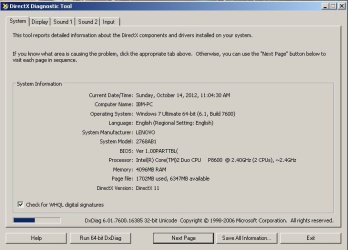
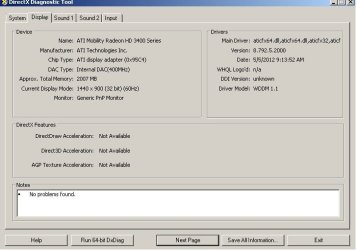
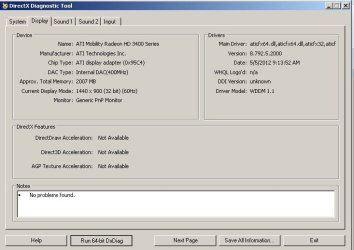
Here are some screens from dixdiag.
Untitled.jpg
Untitled1.jpg

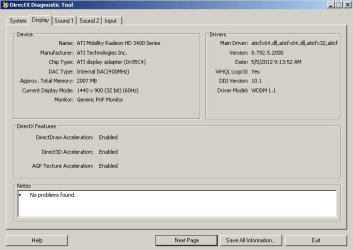
but there is something I dont understand here. When I hit "Run 64-bit DxDiag" button, DirectDraw, Direct3D and AGP Texture Acceleration will show as Enabled...Why?!

Untitled2.jpg
Untitled3.jpg
 
Last edited:

My Computer

OS
Windows 7 Ultimate x64
baecedar,

Please note this is a guide for troubleshooting game issues. It is not a thread to fixing those issues. You'll need to create a seperate thread for your own game issue.

Thanks.
 

My Computer

Computer type
PC/Desktop
Computer Manufacturer/Model Number
Custom built by me.
OS
Windows 10 Pro
CPU
Intel Core i7-4770K (3.5Ghz)
Motherboard
Gigabyte G1 Sniper 5 (F10 Bios)
Memory
32 gig Corsair Dominator Platinum (4x8Gig)
Graphics Card(s)
Sapphire Tri-X R9 Fury
Sound Card
Soundblaster ZXR
Monitor(s) Displays
NEC PA242W 24" LCD Monitor
Screen Resolution
1920 x 1200
Hard Drives
Primary - Samsung 850 Pro (512gig), Samsung 840 Pro (256gig), 2TB WD Caviar Black.
PSU
EVGA Supernova 1000 G2
Case
Cooler Master HAF X
Cooling
Corsair H100i with Corsair Air Series SP120 Quiet Fans
Keyboard
Logitech Wireless Wave
Mouse
Logitech Performance MX
Internet Speed
High Speed Cable
Antivirus
Norton Security
Browser
IE11
Other Info
Memory Timings - 1866MHz @ 9-9-9-27-1T @ 1.5 volts
Personally speaking any gamer should know they should have the latest patch installed for any game, especially if they're having issues with it.

At any rate it's noted in this thread. And yes, I have Mass Effect 1 & 2. Haven't pick up 3 yet.

Thanks.

I disagree, I'm afraid..
if a game is sold as a working product, it should work straight away
with a minimum of fuss - patching should be automatic and not
depend on the buyer having to dig through programs to force them to work correctly..

- if I could sue them, I wouldn't hesitate - it's false marketing..:mad:
 

My Computer

Computer type
PC/Desktop
Computer Manufacturer/Model Number
benchtec, built to personal specs
OS
Windows10 Pro - 64Bit vs.10547
CPU
i7-965 Extreme Edition (8 Cores) at 3.3GHz (no OC)
Motherboard
BloodRageX58 (Socket1366)
Memory
12G Corsair Dominator DDR3 - tripled
Graphics Card(s)
2xAMD SapphireNITRO R9 380(4G) crossfire
Sound Card
Sonar(SB)X-Fi onboard
Monitor(s) Displays
SyncMaster P2050 20"
Screen Resolution
1600x900 (widescreen)
Hard Drives
480G\OCZSolid3SSD, 64G\OCZVertex3SSD,60G\OCZVertex2SSD, 1TB\spinpointF1SATAHDD
PSU
1200w Power Station Gold
Case
ANTEC 900/2 all blue lights, etc..
Cooling
Noctua SE1366 NH-U12P - a tight fit, but a monster cooler!!
Keyboard
Logitech G19 (wired)
Mouse
Logitech G9 Laser (wired)
Internet Speed
150mb unlimited
Browser
IE11(RP)
Other Info
Xbox One, Nokia735 Windows10 mobile, LG HD/DVD/Blu-Ray r/w, CyberlinkPowerDVD15, LogitechZ5500-SS(5.1), LogitechG35Phones-SS(7.1),MSOffice 2007,CorelDrawX7,Painter2016, Wacom Intuos Pro-SE
Personally speaking any gamer should know they should have the latest patch installed for any game, especially if they're having issues with it.

At any rate it's noted in this thread. And yes, I have Mass Effect 1 & 2. Haven't pick up 3 yet.

Thanks.

I disagree, I'm afraid..
if a game is sold as a working product, it should work straight away
with a minimum of fuss - patching should be automatic and not
depend on the buyer having to dig through programs to force them to work correctly..

- if I could sue them, I wouldn't hesitate - it's false marketing..:mad:

Then we'll agree to disagree agreeably and move on from here.

Anyway this can be discussed in another thread as this one is simply for troubleshooting game issues.

Peace :cool:
 

My Computer

Computer type
PC/Desktop
Computer Manufacturer/Model Number
Custom built by me.
OS
Windows 10 Pro
CPU
Intel Core i7-4770K (3.5Ghz)
Motherboard
Gigabyte G1 Sniper 5 (F10 Bios)
Memory
32 gig Corsair Dominator Platinum (4x8Gig)
Graphics Card(s)
Sapphire Tri-X R9 Fury
Sound Card
Soundblaster ZXR
Monitor(s) Displays
NEC PA242W 24" LCD Monitor
Screen Resolution
1920 x 1200
Hard Drives
Primary - Samsung 850 Pro (512gig), Samsung 840 Pro (256gig), 2TB WD Caviar Black.
PSU
EVGA Supernova 1000 G2
Case
Cooler Master HAF X
Cooling
Corsair H100i with Corsair Air Series SP120 Quiet Fans
Keyboard
Logitech Wireless Wave
Mouse
Logitech Performance MX
Internet Speed
High Speed Cable
Antivirus
Norton Security
Browser
IE11
Other Info
Memory Timings - 1866MHz @ 9-9-9-27-1T @ 1.5 volts
Back
Top