

Please note this is a guide for troubleshooting game issues. It is not a thread to fixing those issues. You'll need to create a seperate thread for your own game issue.
====================================================
We see lots posts about problems with games that won’t run, have bad performance, or simply won’t install under Windows 7/8/8.1. The purpose of this post is to provide some simple tips on troubleshooting basic game issues. It is not all inclusive, nor is it meant to be; it’s simply a guide or starting point.
First off, in order to provide adequate support we need to know your systems specs. The importance of this can’t be overstated since game performance is highly dependent on hardware. That said, if you don’t know what your system specs are, or don’t know how to upload them, see these tutorials…
Now, a word about Minimum Vs Recommended system specs for games. Most gamers are aware that in order to get the best possible performance out of a game they need to "exceed" the "Recommended" requirements of said game. Notice I said "exceed the Recommended". Check out Fallout 3's System requirements. Really??? I think we can all agree that Minimum means barely plays at the lowest settings. Honestly….Don’t expect too much out of today’s games using "Minimum" System Requirements. My opinion
With that said - Here’s my tips on troubleshooting game issues…
1- Make sure all your drivers are updated, especially sound and video.
3 - Game Patches – A lot of issues can be solved by simply updating the game with the latest patch.
4 - Windows updates (Yes Windows Update!!!) – Microsoft often releases compatibility patches (hint "Compatibility"!!!). If a compatibility patch is released, install it! It’s a compatibility patch for a reason!!! I would also add that any "critical update" be installed for the proper and efficient operation of the OS.
5 - Update your Direct X files- Contrary to popular belief, just because Windows 7 is DX11 capable doesn’t mean it has the latest DX9 files!!! Most game issues can be fixed by simply updating the DX files. Redistributable - Latest DirectX Redist›
Also - Diagnosing basic problems with DirectX.....
6 - Speaking of DirectX 11 – Just because Windows 7 (and now Vista) is DX11 capable doesn’t mean your games automatically run in DX11 mode!!! In order to run in DX11 (or 10 for that matter) 3 things must happen:
1- The Operating System must support the modes – Windows Vista, 7 and 8/8.1
2- The game must support the Mode(s) - Games with DX11 Support, Games with DX10 Support
3- The video card must support the Mode(s) – Basically any (dedicated) video card after 2010. See Windows 7 Compatibility Center for compatible cards.
If any one of those 3 requirements isn’t met the game defaults to the lowest DX mode possible - DX9 (or lower depending on the game).
Here's an example - You have Fallout 3 (DX10), Windows 7 (DX10 & 11) an ATI X1950 PRO or Nvidia GT 7950 (DX9 cards) - well….Fallout 3 will run in DX9 because the video cards are only capable of running in DX9 mode.
On the other hand, using Fallout 3 (DX10), If we have an ATI 5970 (DX11) and Window 7 (DX10 & 11), the game will run in DX10 mode because the game does not support DX11.
Now, if we have a game like Metro 2033 (DX11), Windows 7 (DX11), and an ATI 5970 (DX11), well…we have all the requirements met and the system will run in full DX11 mode!!!
But… say you are running a DX10 or 11 game and wish to run in DX 9 – some games like Crysis, Crysis Warhead, or Bioshock will let you by simply right-clicking the game’s .exe and choosing the mode you want to run in. See this post - http://www.sevenforums.com/gaming/59397-force-directx-9-a-2.html#post541173
So… To sum it up, unless ALL components are DX11, you are running in DX9 (or lower depending on the game) by default!!!
7 - Adjust in-game settings - One of the first things I do is turn off shadows If I start experiencing performance issues in a game, followed by lowering details, etc… Whichever way you choose, look at changing settings until you find a happy balance for the game.
8 - GPU (Video card) Control Panel – Check that the control panel - ATI’s Catalyst Control Center (CCC), Nvidia’s Forceware Control Panel, are not "fighting" the game’s settings. Example - Anti-Aliasing 4x in control panel, 8x in the game’s options. I usually leave CCC at its default settings, which allows the in-game settings to take priority. Choose one or the other, not both.
9 - Adjust your display settings...
a - Can your game run in that resolution? – Some games aren’t designed to be run at ultra-high resolutions, especially older games. Check that your game can support the resolution.
b - Can your video card efficiently run that game at high game settings? Remember the higher the resolution/game settings, the more powerful your card needs to be to render those images, especially if you have the game’s settings maxed out! If you find that the game is lagging or stuttering, try reducing the resolution and/or game settings to try and find a happy medium.
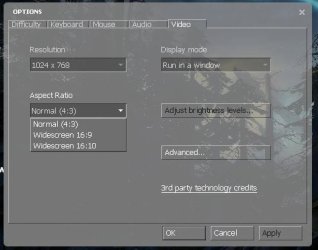
c - Are you using the correct resolution for the Monitor? – Aspect Ratio 16:9 and 16:10 have different native resolution settings, and some games like Half-Life 2 – EP2 for example, require you to set the correct "Aspect Ratio" for a given resolution. For example, using HL2 EP2, if the aspect ratio is 4:3, then you can’t set a resolution of 1680 x1050. If your game has an Aspect Ratio setting, check it.
d - Full Screen Issues? Again, some games, like Half-Life2 EP2, have options to either run the game in full screen or Windowed mode. If you’re having issues with a game not running in full screen, you might want to check for this setting under video settings.
10 - Anti-Virus? – In the past I would disable my AV during gaming sessions. Today however I no longer do this as I feel it does not impact game performance. In fact I rarely disable my AV unless I’m troubleshooting. That said, if your AV is enabled and you feel its impacting game performance, try disabling it to see if it solves the issue. If so… you might consider another AV as I would not recommend leaving your AV disabled!
11 - Game Managers - Some games use game managers or download systems for updates, achievements, and digital rights management, and they are usually installed with the game (you don’t get a choice). So….If you’re have gaming issues, you’ll need to look at these as well. Below are the three most popular ones….
Games For Windows Marketplace (now shutdown) - is a free online gaming service that lets you connect and play with friends and is reported to have than 14 million Xbox LIVE members. It will notify you of any updates to itself or its games.
Steam is a digital game distribution system as well as a digital rights management, multiplayer and communications platform developed by Valve. It is used to distribute a large number of games and related media entirely over the internet, including automated updates. Issues? - Steam Support
Origin – Like Steam, is a digital distribution/digital rights management system from Electronic Arts which also allows users to purchase and download games to your computer.
- Connection Problems with game managers???….
- Games for Windows LIVE: Troubleshoot connection problems
- Steam - Troubleshooting Network Connectivity
- Origin Connection Problems
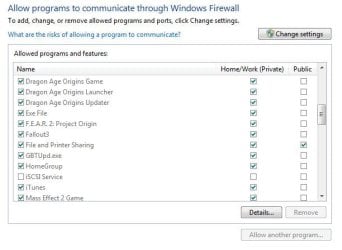
11b - Speaking of connection problems... check to see that your Anti-Virus or Windows firewall isn't blocking you. For Windows - Control Panel, Windows Firewall, click "Allow a program or feature through Windows Firewall" and that your game is allowed through (a checked box). Check your AV’s manual to access its firewall.
12 - SecuROM – There has been much discussion about SecuROM as well as its "conflict" with emulation software - ex: Daemon Tools. If you’re having issues with a game that uses SecuROM, or get the "Emulator detected!" error. Visit SecuROM’s support section. If you’re running Daemon Tools, well…
13 - Overclocking – Just because a benchmark app passed your overclocks doesn’t mean your game will!!! I’ve seen games like Half-Life 2 struggle on a simple overclock where 3DMark passed with flying colors. It’s been known to happen. If you’re overclocking and experience game issues try using the default settings. If the game(s) runs without issue, you may need to rethink your overclocks.
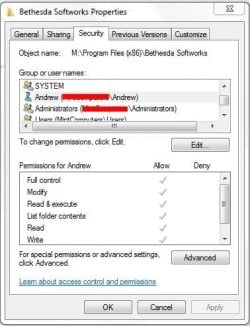
14 – Permissions – For various reasons Windows security features may limit permissions to folders or drives. If you’re having issues starting or saving games, check to make sure your user name is included in the "Security" tab and has full read/write permission for the game’s folder(s). Requires Admin rights! See Tutorial on Sharing and Permissions – If you don’t want/need to share the folder just do steps 1-7
Also see this post if you get a "Windows Parental Control" notification - http://www.sevenforums.com/gaming/159519-windows-parental-control-issue.html#post1368401 (provided there are in fact no Parental Controls in place to begin with)
15 - Game Mods – make sure you "read" the instructions for the mod you’re installing. Some require special instructions that if not followed could lead to a poorly functioning mod and/or game. RTFM!!!
16 - Compatibility Mode allows older games or programs that worked under earlier versions of Windows to run in Windows 7 (maybe). If you find you’re having a hard time running or installing the game, give compatibility mode a try. See this tutorial on running in Compatibility Mode. For Windows 8 go here - Compatibility Mode - Use in Windows 8
17 - Check for known issues – Some games have known issues that may have a work around or temp fix provided by the game publisher or gamers themselves. Check the game publisher's website or forums.
a – Visit the game’s forums – While we have a wealth of knowledge here, sometimes we need a specialist. I’d expect Bethesda to know more about Fallout 3 then most of us here… just as I’d expect Windows 7 forum to know more about the OS than a game’s website.
b - Call or e-mail Tech Support – Calling (or e-mailing) support may actually resolve your issue. Also note that some fixes are not always available to the general public and can only be obtained by calling/e-mailing tech support. Trust me it happens.
18 - Search – The search function works like a charm here, and many of the questions posed has already been asked, and answered. Give it a try. Hmmm…..how many Fallout 3 threads are there?
19- Have an old game? - How to make old games work on Windows 7 | News | TechRadar UK.
BTW looking to get Halo 2 running on Windows 7? http://www.sevenforums.com/gaming/252972-how-get-halo-2-working-under-windows-7-a.html. What about the original Deus Ex – Playing Deus Ex
Other considerations….
Overclocking – If your system is over clocked, chances are that you card is as well. Or, you may be simply overclocking the card by itself. Either way, back off and see what happens.
Overheating – The card could simply be overheating from a faulty or low running fan, to the thermo past on the heat sink wearing out or being inadequate for the job. Inspect the video card and insure everything is in good working order and that there are no loose parts.
Case Cooling – If your case is small and cramped or has inadequate ventilation or fans, well, not only will the case get hot, but so will the components inside, including the CPU and GPU, which puts out enough heat on their own!!! Plus overclocking also causes heat!!! Something to think about.
Power supply - Many of today's GPU's require at least a 550 watt power supply. Is your power supply adequate for the job? Check with the card manufacture. Also, if the card requires a power connection (4-pin connector) double check to make sure it's connected!
For information and reviews on power supplies check out johnnyguru.com
Check that hardware!? – Faulty hardware can wreck havoc on a system, especially a faulty or over heating video card. Also if your power supply is doing all it can to keep up with your high gaming demands…you might want to look at replacing it. Two things you don’t want to skimp on…Monitors – You have to look at them every day, and Power Supplies – Your system is dependent on a stable and steady constant flow of power.
In closing... I basically follow three rules in insuring I have a relatively problem free gaming experience…
1 - Keep both software and hardware patched and updated to include Windows updates.
2 - Staying away from nefarious software, including piracy. Free isn’t always free
3 - Extreme overclocks. As I said earlier, just because you passed a benchmark doesn’t necessarily mean your game will pass it. Don’t forget you’re typically running games a lot longer than benchmarks.
That’s it. Hope this helps.
Peace
====================================================
We see lots posts about problems with games that won’t run, have bad performance, or simply won’t install under Windows 7/8/8.1. The purpose of this post is to provide some simple tips on troubleshooting basic game issues. It is not all inclusive, nor is it meant to be; it’s simply a guide or starting point.
First off, in order to provide adequate support we need to know your systems specs. The importance of this can’t be overstated since game performance is highly dependent on hardware. That said, if you don’t know what your system specs are, or don’t know how to upload them, see these tutorials…
- http://www.sevenforums.com/tutorials/311593-speccy-publish-snapshot-your-system-specs.html
- http://www.sevenforums.com/tutorials/180324-system-info-see-your-system-specs.html
Now, a word about Minimum Vs Recommended system specs for games. Most gamers are aware that in order to get the best possible performance out of a game they need to "exceed" the "Recommended" requirements of said game. Notice I said "exceed the Recommended". Check out Fallout 3's System requirements. Really??? I think we can all agree that Minimum means barely plays at the lowest settings. Honestly….Don’t expect too much out of today’s games using "Minimum" System Requirements. My opinion
With that said - Here’s my tips on troubleshooting game issues…
1- Make sure all your drivers are updated, especially sound and video.
- -AMD Video Card Drivers
- -Nvidia Video Card Drivers
- -Creative Sound Cards Drivers
- -Realtek Downloads
- -Intel Graphics Drivers
3 - Game Patches – A lot of issues can be solved by simply updating the game with the latest patch.
4 - Windows updates (Yes Windows Update!!!) – Microsoft often releases compatibility patches (hint "Compatibility"!!!). If a compatibility patch is released, install it! It’s a compatibility patch for a reason!!! I would also add that any "critical update" be installed for the proper and efficient operation of the OS.
5 - Update your Direct X files- Contrary to popular belief, just because Windows 7 is DX11 capable doesn’t mean it has the latest DX9 files!!! Most game issues can be fixed by simply updating the DX files. Redistributable - Latest DirectX Redist›
Also - Diagnosing basic problems with DirectX.....
- Check the version of DirectX that your application or game requires
Some applications and games require DirectX 9. However, Windows 7 is installed with a more recent version of DirectX....
....If you receive the same error message after reinstalling the application or game, go to the DirectX End-User Runtime Web Installer webpage and follow the instructions to install DirectX 9 and receive updates to DirectX 9 and previous versions of DirectX.
6 - Speaking of DirectX 11 – Just because Windows 7 (and now Vista) is DX11 capable doesn’t mean your games automatically run in DX11 mode!!! In order to run in DX11 (or 10 for that matter) 3 things must happen:
1- The Operating System must support the modes – Windows Vista, 7 and 8/8.1
2- The game must support the Mode(s) - Games with DX11 Support, Games with DX10 Support
3- The video card must support the Mode(s) – Basically any (dedicated) video card after 2010. See Windows 7 Compatibility Center for compatible cards.
If any one of those 3 requirements isn’t met the game defaults to the lowest DX mode possible - DX9 (or lower depending on the game).
Here's an example - You have Fallout 3 (DX10), Windows 7 (DX10 & 11) an ATI X1950 PRO or Nvidia GT 7950 (DX9 cards) - well….Fallout 3 will run in DX9 because the video cards are only capable of running in DX9 mode.
On the other hand, using Fallout 3 (DX10), If we have an ATI 5970 (DX11) and Window 7 (DX10 & 11), the game will run in DX10 mode because the game does not support DX11.
Now, if we have a game like Metro 2033 (DX11), Windows 7 (DX11), and an ATI 5970 (DX11), well…we have all the requirements met and the system will run in full DX11 mode!!!
But… say you are running a DX10 or 11 game and wish to run in DX 9 – some games like Crysis, Crysis Warhead, or Bioshock will let you by simply right-clicking the game’s .exe and choosing the mode you want to run in. See this post - http://www.sevenforums.com/gaming/59397-force-directx-9-a-2.html#post541173
So… To sum it up, unless ALL components are DX11, you are running in DX9 (or lower depending on the game) by default!!!
7 - Adjust in-game settings - One of the first things I do is turn off shadows If I start experiencing performance issues in a game, followed by lowering details, etc… Whichever way you choose, look at changing settings until you find a happy balance for the game.
8 - GPU (Video card) Control Panel – Check that the control panel - ATI’s Catalyst Control Center (CCC), Nvidia’s Forceware Control Panel, are not "fighting" the game’s settings. Example - Anti-Aliasing 4x in control panel, 8x in the game’s options. I usually leave CCC at its default settings, which allows the in-game settings to take priority. Choose one or the other, not both.
9 - Adjust your display settings...
a - Can your game run in that resolution? – Some games aren’t designed to be run at ultra-high resolutions, especially older games. Check that your game can support the resolution.
b - Can your video card efficiently run that game at high game settings? Remember the higher the resolution/game settings, the more powerful your card needs to be to render those images, especially if you have the game’s settings maxed out! If you find that the game is lagging or stuttering, try reducing the resolution and/or game settings to try and find a happy medium.
c - Are you using the correct resolution for the Monitor? – Aspect Ratio 16:9 and 16:10 have different native resolution settings, and some games like Half-Life 2 – EP2 for example, require you to set the correct "Aspect Ratio" for a given resolution. For example, using HL2 EP2, if the aspect ratio is 4:3, then you can’t set a resolution of 1680 x1050. If your game has an Aspect Ratio setting, check it.
d - Full Screen Issues? Again, some games, like Half-Life2 EP2, have options to either run the game in full screen or Windowed mode. If you’re having issues with a game not running in full screen, you might want to check for this setting under video settings.
10 - Anti-Virus? – In the past I would disable my AV during gaming sessions. Today however I no longer do this as I feel it does not impact game performance. In fact I rarely disable my AV unless I’m troubleshooting. That said, if your AV is enabled and you feel its impacting game performance, try disabling it to see if it solves the issue. If so… you might consider another AV as I would not recommend leaving your AV disabled!
11 - Game Managers - Some games use game managers or download systems for updates, achievements, and digital rights management, and they are usually installed with the game (you don’t get a choice). So….If you’re have gaming issues, you’ll need to look at these as well. Below are the three most popular ones….
Games For Windows Marketplace (now shutdown) - is a free online gaming service that lets you connect and play with friends and is reported to have than 14 million Xbox LIVE members. It will notify you of any updates to itself or its games.
Steam is a digital game distribution system as well as a digital rights management, multiplayer and communications platform developed by Valve. It is used to distribute a large number of games and related media entirely over the internet, including automated updates. Issues? - Steam Support
Origin – Like Steam, is a digital distribution/digital rights management system from Electronic Arts which also allows users to purchase and download games to your computer.
- Connection Problems with game managers???….
- Games for Windows LIVE: Troubleshoot connection problems
- Steam - Troubleshooting Network Connectivity
- Origin Connection Problems
11b - Speaking of connection problems... check to see that your Anti-Virus or Windows firewall isn't blocking you. For Windows - Control Panel, Windows Firewall, click "Allow a program or feature through Windows Firewall" and that your game is allowed through (a checked box). Check your AV’s manual to access its firewall.
12 - SecuROM – There has been much discussion about SecuROM as well as its "conflict" with emulation software - ex: Daemon Tools. If you’re having issues with a game that uses SecuROM, or get the "Emulator detected!" error. Visit SecuROM’s support section. If you’re running Daemon Tools, well…
13 - Overclocking – Just because a benchmark app passed your overclocks doesn’t mean your game will!!! I’ve seen games like Half-Life 2 struggle on a simple overclock where 3DMark passed with flying colors. It’s been known to happen. If you’re overclocking and experience game issues try using the default settings. If the game(s) runs without issue, you may need to rethink your overclocks.
14 – Permissions – For various reasons Windows security features may limit permissions to folders or drives. If you’re having issues starting or saving games, check to make sure your user name is included in the "Security" tab and has full read/write permission for the game’s folder(s). Requires Admin rights! See Tutorial on Sharing and Permissions – If you don’t want/need to share the folder just do steps 1-7
Also see this post if you get a "Windows Parental Control" notification - http://www.sevenforums.com/gaming/159519-windows-parental-control-issue.html#post1368401 (provided there are in fact no Parental Controls in place to begin with)
15 - Game Mods – make sure you "read" the instructions for the mod you’re installing. Some require special instructions that if not followed could lead to a poorly functioning mod and/or game. RTFM!!!
16 - Compatibility Mode allows older games or programs that worked under earlier versions of Windows to run in Windows 7 (maybe). If you find you’re having a hard time running or installing the game, give compatibility mode a try. See this tutorial on running in Compatibility Mode. For Windows 8 go here - Compatibility Mode - Use in Windows 8
17 - Check for known issues – Some games have known issues that may have a work around or temp fix provided by the game publisher or gamers themselves. Check the game publisher's website or forums.
a – Visit the game’s forums – While we have a wealth of knowledge here, sometimes we need a specialist. I’d expect Bethesda to know more about Fallout 3 then most of us here… just as I’d expect Windows 7 forum to know more about the OS than a game’s website.
b - Call or e-mail Tech Support – Calling (or e-mailing) support may actually resolve your issue. Also note that some fixes are not always available to the general public and can only be obtained by calling/e-mailing tech support. Trust me it happens.
18 - Search – The search function works like a charm here, and many of the questions posed has already been asked, and answered. Give it a try. Hmmm…..how many Fallout 3 threads are there?
19- Have an old game? - How to make old games work on Windows 7 | News | TechRadar UK.
BTW looking to get Halo 2 running on Windows 7? http://www.sevenforums.com/gaming/252972-how-get-halo-2-working-under-windows-7-a.html. What about the original Deus Ex – Playing Deus Ex
Other considerations….
Overclocking – If your system is over clocked, chances are that you card is as well. Or, you may be simply overclocking the card by itself. Either way, back off and see what happens.
Overheating – The card could simply be overheating from a faulty or low running fan, to the thermo past on the heat sink wearing out or being inadequate for the job. Inspect the video card and insure everything is in good working order and that there are no loose parts.
Case Cooling – If your case is small and cramped or has inadequate ventilation or fans, well, not only will the case get hot, but so will the components inside, including the CPU and GPU, which puts out enough heat on their own!!! Plus overclocking also causes heat!!! Something to think about.
Power supply - Many of today's GPU's require at least a 550 watt power supply. Is your power supply adequate for the job? Check with the card manufacture. Also, if the card requires a power connection (4-pin connector) double check to make sure it's connected!
For information and reviews on power supplies check out johnnyguru.com
Check that hardware!? – Faulty hardware can wreck havoc on a system, especially a faulty or over heating video card. Also if your power supply is doing all it can to keep up with your high gaming demands…you might want to look at replacing it. Two things you don’t want to skimp on…Monitors – You have to look at them every day, and Power Supplies – Your system is dependent on a stable and steady constant flow of power.
In closing... I basically follow three rules in insuring I have a relatively problem free gaming experience…
1 - Keep both software and hardware patched and updated to include Windows updates.
2 - Staying away from nefarious software, including piracy. Free isn’t always free
3 - Extreme overclocks. As I said earlier, just because you passed a benchmark doesn’t necessarily mean your game will pass it. Don’t forget you’re typically running games a lot longer than benchmarks.
That’s it. Hope this helps.
Peace
Last edited:
My Computer
At a glance
Windows 10 ProIntel Core i7-4770K (3.5Ghz)32 gig Corsair Dominator Platinum (4x8Gig)Sapphire Tri-X R9 Fury
- Computer type
- PC/Desktop
- Computer Manufacturer/Model Number
- Custom built by me.
- OS
- Windows 10 Pro
- CPU
- Intel Core i7-4770K (3.5Ghz)
- Motherboard
- Gigabyte G1 Sniper 5 (F10 Bios)
- Memory
- 32 gig Corsair Dominator Platinum (4x8Gig)
- Graphics Card(s)
- Sapphire Tri-X R9 Fury
- Sound Card
- Soundblaster ZXR
- Monitor(s) Displays
- NEC PA242W 24" LCD Monitor
- Screen Resolution
- 1920 x 1200
- Hard Drives
- Primary - Samsung 850 Pro (512gig), Samsung 840 Pro (256gig), 2TB WD Caviar Black.
- PSU
- EVGA Supernova 1000 G2
- Case
- Cooler Master HAF X
- Cooling
- Corsair H100i with Corsair Air Series SP120 Quiet Fans
- Keyboard
- Logitech Wireless Wave
- Mouse
- Logitech Performance MX
- Internet Speed
- High Speed Cable
- Antivirus
- Norton Security
- Browser
- IE11
- Other Info
- Memory Timings - 1866MHz @ 9-9-9-27-1T @ 1.5 volts


