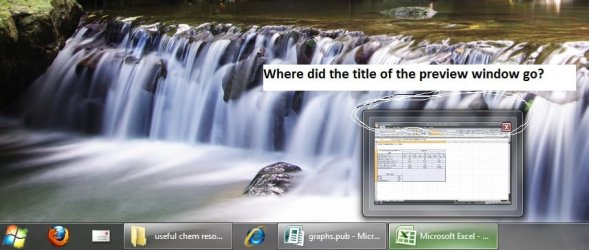
Titles of Taskbar Preview windows disappeared

win7user2010

New member
Member
Local time
11:03 AM
Messages
84
Hi, I noticed that the the titles of my taskbar preview thumbnails that are supposed to appear right above the thumbnail have disappeared. I can't find the setting to bring them back...

Attached is a screenshot
 

Attachments

  • Untitled.jpg
    Untitled.jpg
    51 KB · Views: 42

My Computer My Computer

At a glance

windows 7
OS
windows 7
There is no title. Never has been in Windows 7.
 

My Computer My Computer

At a glance

Windows 10 Pro (x64)Intel Core i7-3930K (3.2GHz - 4.5GHz)4x Samsung 4GB PC3-12800 DDR3 (16GB 1600MHz)Nvidia Geforce GTX 690
Computer type
PC/Desktop
Computer Manufacturer/Model Number
Alienware Aurora ALX R4
OS
Windows 10 Pro (x64)
CPU
Intel Core i7-3930K (3.2GHz - 4.5GHz)
Motherboard
Alienware Aurora-R4 x79
Memory
4x Samsung 4GB PC3-12800 DDR3 (16GB 1600MHz)
Graphics Card(s)
Nvidia Geforce GTX 690
Sound Card
SteelSeries Siberia Elite
Monitor(s) Displays
Dell UltraSharp U3011
Screen Resolution
2560x1600
Hard Drives
Samsung 850 Pro 256 GB, Seagate 1TB Desktop Hybrid HDD, 2x Western Digital 4TB Green HDD
PSU
875W Some Dell PSU <.<
Case
Alienware Aurora ALX
Cooling
Custom Liquid Cooling (EK CPU & GPU blocks) dual EK 480RAD
Keyboard
Logitech G710+ Mechanical
Mouse
Logitech G700s
Internet Speed
Verizon Fios (50 mbps average)
Other Info
Server: Intel NUC D54250WYK: i5-4250U, 16GB, 256 GB mSATA, Windows Server 2012 R2
There is no title. Never has been in Windows 7.

Mine shows the window title... but for some reason I can't seem to get a snip of it.
 

My Computer My Computer

At a glance

XP Pro SP3 X86 / Win7 Pro X86Amd 64 x2 4200 (2.4ghz)Kingston DDR2 800 2gbNvidia GF-8400
Computer Manufacturer/Model Number
Homebrew
OS
XP Pro SP3 X86 / Win7 Pro X86
CPU
Amd 64 x2 4200 (2.4ghz)
Motherboard
Asus M2N-MX SE Plus
Memory
Kingston DDR2 800 2gb
Graphics Card(s)
Nvidia GF-8400
Sound Card
Realtek on Motherboard
Monitor(s) Displays
Acer x-193bw
Screen Resolution
1440 x 900
Hard Drives
Western Digital 500g
PSU
350watt In-Win
Case
In-Win
Cooling
Air
Keyboard
yes
Mouse
yes
Internet Speed
5mpbs
Other Info
Also ASRock ION 330 as HTPC (on XP).
Acer Aspire as GP netbook (on XP).
You mean the titles as shown here?

Capture.PNG

@CommonTater: Use the PrtScn key and then paste the captured image into Paint. You can then use the Snipping Tool to select the part of the image you are interested in.
 

My Computer My Computer

At a glance

Windows 8.1 Pro RTM x64Intel Core-i5-3570K 4-core @ 3.4GHz (Ivy Brid...4 x 4GB DDR3-1600 Corsair Vengeance CMZ8GX3M2...MSI GeForce GTX770 Gaming OC 2GB
Computer type
PC/Desktop
Computer Manufacturer/Model Number
Dwarf Dwf/11/2012 r09/2013
OS
Windows 8.1 Pro RTM x64
CPU
Intel Core-i5-3570K 4-core @ 3.4GHz (Ivy Bridge) (OC 4.4GHz)
Motherboard
ASRock Z77 Extreme4-M
Memory
4 x 4GB DDR3-1600 Corsair Vengeance CMZ8GX3M2A1600C9B (16GB)
Graphics Card(s)
MSI GeForce GTX770 Gaming OC 2GB
Sound Card
Realtek High Definition on board solution (ALC 898)
Monitor(s) Displays
ViewSonic VA1912w Widescreen (VGA)
Screen Resolution
1440x900
Hard Drives
OCZ Agility 3 SSD 120GB SATA III x2 (RAID 0)
Samsung HD501LJ 500GB SATA II x2
Hitachi HDS721010CLA332 1TB SATA II
Iomega 1.5TB Ext USB 2.0
WD 2.0TB Ext USB 3.0
PSU
XFX Pro Series 850W Semi-Modular
Case
Gigabyte IF233
Cooling
1 x 120mm Front Inlet 1 x 120mm Rear Exhaust
Keyboard
Microsoft Comfort Curve Keyboard 3000 (USB)
Mouse
Microsoft Comfort Mouse 3000 for Business (USB)
Internet Speed
NetGear DG834Gv3 ADSL Modem/Router (Ethernet) ~4.0 Mb/s (O2)
Antivirus
Avast! 8.0.1497
Browser
IE 11
Other Info
Optical Drive: HL-DT-ST BD-RE BH10LS30 SATA Bluray
Lexmark S305 Printer/Scanner/Copier (USB)
WEI Score: 8.1/8.1/8.5/8.5/8.25
Asus Eee PC 1011PX Netbook (Windows 7 x86 Starter)
You mean the titles as shown here?

View attachment 67403

@CommonTater: Use the PrtScn key and then paste the captured image into Paint. You can then use the Snipping Tool to select the part of the image you are interested in.

Yep, those titles...

And hey, thanks for the Print Screen tip...
 

My Computer My Computer

At a glance

XP Pro SP3 X86 / Win7 Pro X86Amd 64 x2 4200 (2.4ghz)Kingston DDR2 800 2gbNvidia GF-8400
Computer Manufacturer/Model Number
Homebrew
OS
XP Pro SP3 X86 / Win7 Pro X86
CPU
Amd 64 x2 4200 (2.4ghz)
Motherboard
Asus M2N-MX SE Plus
Memory
Kingston DDR2 800 2gb
Graphics Card(s)
Nvidia GF-8400
Sound Card
Realtek on Motherboard
Monitor(s) Displays
Acer x-193bw
Screen Resolution
1440 x 900
Hard Drives
Western Digital 500g
PSU
350watt In-Win
Case
In-Win
Cooling
Air
Keyboard
yes
Mouse
yes
Internet Speed
5mpbs
Other Info
Also ASRock ION 330 as HTPC (on XP).
Acer Aspire as GP netbook (on XP).
Yes, those are the titles I'm referring to. I'm not sure how they disappeared, it took me a while to notice. Maybe there is a registry key that can bring it back or something?
 

My Computer My Computer

At a glance

windows 7
OS
windows 7

My Computer My Computer

At a glance

Windows 7 Professional 64-bitPentium(R) Dual-Core CPU E5300 @260GHz
Computer Manufacturer/Model Number
HP/p6207c
OS
Windows 7 Professional 64-bit
CPU
Pentium(R) Dual-Core CPU E5300 @260GHz
Sound Card
RealTek High Def Audio
Monitor(s) Displays
HP 2159m
Screen Resolution
1920 x 1080 x 60
Mouse
HP M/N: M-U0009-HP1
Internet Speed
Broadband
Thank you, but AeroPeek was not what I'm referring to. Please refer to the screenshots provided by myself and by Dwarf in the preceding posts.
 

My Computer My Computer

At a glance

windows 7
OS
windows 7
Oh, that is because I have the option "Taskbar buttons: Combine when taskbar is full". the title is not shown in the preview for that case. I didn't think about the label-less iconic mode. :o
 
Last edited:

My Computer My Computer

At a glance

Windows 10 Pro (x64)Intel Core i7-3930K (3.2GHz - 4.5GHz)4x Samsung 4GB PC3-12800 DDR3 (16GB 1600MHz)Nvidia Geforce GTX 690
Computer type
PC/Desktop
Computer Manufacturer/Model Number
Alienware Aurora ALX R4
OS
Windows 10 Pro (x64)
CPU
Intel Core i7-3930K (3.2GHz - 4.5GHz)
Motherboard
Alienware Aurora-R4 x79
Memory
4x Samsung 4GB PC3-12800 DDR3 (16GB 1600MHz)
Graphics Card(s)
Nvidia Geforce GTX 690
Sound Card
SteelSeries Siberia Elite
Monitor(s) Displays
Dell UltraSharp U3011
Screen Resolution
2560x1600
Hard Drives
Samsung 850 Pro 256 GB, Seagate 1TB Desktop Hybrid HDD, 2x Western Digital 4TB Green HDD
PSU
875W Some Dell PSU <.<
Case
Alienware Aurora ALX
Cooling
Custom Liquid Cooling (EK CPU & GPU blocks) dual EK 480RAD
Keyboard
Logitech G710+ Mechanical
Mouse
Logitech G700s
Internet Speed
Verizon Fios (50 mbps average)
Other Info
Server: Intel NUC D54250WYK: i5-4250U, 16GB, 256 GB mSATA, Windows Server 2012 R2
Wow! Thank you Logicearth, I think you helped me figure it out.

Based on what you wrote, I tested out the different taskbar options. I found when I put on "Always Combine, Hide Labels", the titles above the preview thumbnail return.

I recently put my icons on "Never Combine" which for whatever reason caused the titles above the thumbnails to disappear. I think I would prefer if they didn't disappear on "Never Combine", but at least I know that I didn't mess something up on my computer.

Thank you everyone for your assistance
 

My Computer My Computer

At a glance

windows 7
OS
windows 7
Back
Top