Solved To do or not to do that is the question! 32bit / 64bit install updates

peter4076

New member
Member
VIP
Local time
11:41 AM
Messages
118
Apologies if question has been asked before. Microsoft informs me that I have 143Mb to update, on looking at the updates prior to downloading & installing, I notice that 80+Mb is for windows 32 bit system, I am running 64bit, is it advisable to install, if not how do I rid myself of the nag that reminds me daily?:sarc:
 

My Computer My Computer

At a glance

Home Premium 64bit
OS
Home Premium 64bit
If you are using 32-bit software on your 64-bit computer you will receive relevant updates for the applications in question.

It is quite safe to install the 32-bit updates and you should do so.

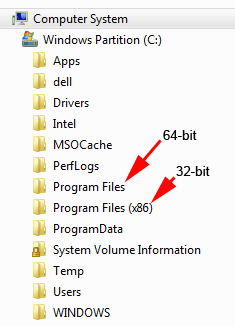
If you look under the C drive in Windows Explorer, you'll see two folders: Program Files & Program Files (x86).

The former stores 64-bit programs while the latter stores 32-bit programs.

Win.PNG
 

My Computer My Computer

At a glance

Windows 7 Ultimate SP1 64-BitIntel Core i7 870 @ 2.93GHz8Gb Dual-Channel DDR3 @ 664MHznVidia GeForce GTX 460 1024MB dedicated RAM
Computer Manufacturer/Model Number
HP Pavilion Elite 495UK
OS
Windows 7 Ultimate SP1 64-Bit
CPU
Intel Core i7 870 @ 2.93GHz
Motherboard
MSI 2A9C (CPU1)
Memory
8Gb Dual-Channel DDR3 @ 664MHz
Graphics Card(s)
nVidia GeForce GTX 460 1024MB dedicated RAM
Sound Card
Realtek HD Audio
Monitor(s) Displays
HP2310i
Screen Resolution
1920 x 1080
Hard Drives
1x1954GB Hitachi HDS22020ALA 330 (RAID), 1x1954GB Hitachi External for backup and storage
PSU
460W
Case
HP Elite
Cooling
Air cooled
Keyboard
Logitech K750 solar-powered keyboard
Mouse
Logitech Wireless M180 mouse
Internet Speed
2Mb
Other Info
Pure Avanti Flow Internet Radio with iPod Dock, 64Gb iPod, HP USB Speakers, Sony MDR-V500 Headphones, Sony Vaio F-Series Laptop
Cheers for that, will proceed with download.
 

My Computer My Computer

At a glance

Home Premium 64bit
OS
Home Premium 64bit
You're very welcome.
 

My Computer My Computer

At a glance

Windows 7 Ultimate SP1 64-BitIntel Core i7 870 @ 2.93GHz8Gb Dual-Channel DDR3 @ 664MHznVidia GeForce GTX 460 1024MB dedicated RAM
Computer Manufacturer/Model Number
HP Pavilion Elite 495UK
OS
Windows 7 Ultimate SP1 64-Bit
CPU
Intel Core i7 870 @ 2.93GHz
Motherboard
MSI 2A9C (CPU1)
Memory
8Gb Dual-Channel DDR3 @ 664MHz
Graphics Card(s)
nVidia GeForce GTX 460 1024MB dedicated RAM
Sound Card
Realtek HD Audio
Monitor(s) Displays
HP2310i
Screen Resolution
1920 x 1080
Hard Drives
1x1954GB Hitachi HDS22020ALA 330 (RAID), 1x1954GB Hitachi External for backup and storage
PSU
460W
Case
HP Elite
Cooling
Air cooled
Keyboard
Logitech K750 solar-powered keyboard
Mouse
Logitech Wireless M180 mouse
Internet Speed
2Mb
Other Info
Pure Avanti Flow Internet Radio with iPod Dock, 64Gb iPod, HP USB Speakers, Sony MDR-V500 Headphones, Sony Vaio F-Series Laptop
peter,
In addition to SeaVixen's advice,
Win 7 is not eXPired.

Install each and every Win 7 update.

Yes, this first time out there will be many, many updates.

Here is the procedure I use:

UPDATING YOUR WIN 7
ASSURE THAT YOU RECEIVE ALL UPDATES
WIN | type WINDOWS UPDATE | ENTER |
Change settings (left-hand column) |
checkmark all four of the boxes | OK
button

Approve any dialog boxes presented. Let Windows install any update features.

WIN is the key with the Microsoft flag on top.

INSTALL CRITICAL UPDATES
Check for Updates
(left-hand column)
Install ALL critical updates.
Restart your computer (even if not prompted)

Repeat this procedure until there are no more critical updates.

DO NOT TRUST the “Windows is up to date” in center of dialog. until you see that TWICE IN A ROW!

INSTALL IMPORTANT UPDATES
Use the “critical update” procedure until all important updates are installed.

INSTALL OPTIONAL UPDATES
Use the “critical update” procedure until all optional updates are installed.

Under Optional updates you will be presented with a list of about 34 language updates.
You can hide those updates so that aren't continually notified of those updates. When you click on 34 optional updates are available, then you
a) highlight all of the language updates,
b) right-click anywhere in the highlighted list.
c) click on Hide Updates,
d) OK button.


UPDATE GOLDEN RULES

Install ALL, yes, ALL updates.
This is Win 7 and not Vista or XP (eXPired).

UPDATE IS HUNG –TAKING FOREVER
Hung is very doubtful unless you interrupted updates.

CTRL + SHIFT + ESC key combo will pop-up the Task Manager.
Lo and behold, Windows Update is still running!

You hold down the CTRL and SHIFT keys.
While holding them down, tap the ESC key once.
==================================================

 

My Computer My Computer

At a glance

MS Windows 7 Ultimate SP1 64-bitAMD A10-4600M6.00 GB Dual-Channel DDR3 @ 798MHz (11-11-12-28)AMD Radeon HD 7660G
Computer Manufacturer/Model Number
Toshiba Satellite S875D-S7239 laptop
OS
MS Windows 7 Ultimate SP1 64-bit
CPU
AMD A10-4600M
Motherboard
AMD Pumori (Socket FT1)
Memory
6.00 GB Dual-Channel DDR3 @ 798MHz (11-11-12-28)
Graphics Card(s)
AMD Radeon HD 7660G
Sound Card
High Definition Audio Device
Monitor(s) Displays
Generic PnP Monitor (1600x900@60Hz)
Screen Resolution
1600x900@60Hz
Hard Drives
SSD 119GB Corsair CSSD-V128GB2 ATA Device
Keyboard
Standard PS/2 Keyboard
Mouse
HP Wireless Optical Mobile Mouse Model FHA-3410
Internet Speed
What the local pub, local coffee shop offers.
Other Info
Optical Drive:MATSHITA BD-CMB UJ160B ATA Device


Also have an Asus ha1002xp netbook with Win 7 Ultimate installed.
karlsnooks: Thanks for your very detailed input, so just make myself a coffee and let everything take it's course, I even have a silverlight update waiting to be installed, just install and let the force happen, and query nothing!, your 6000+ posts confirms that you know far more than me, so will heed your advice, once again thank you.
 

My Computer My Computer

At a glance

Home Premium 64bit
OS
Home Premium 64bit
Enjoy that coffee while I try to determine why SevenForums is swallowing linefeeds/returns again.
 

My Computer My Computer

At a glance

MS Windows 7 Ultimate SP1 64-bitAMD A10-4600M6.00 GB Dual-Channel DDR3 @ 798MHz (11-11-12-28)AMD Radeon HD 7660G
Computer Manufacturer/Model Number
Toshiba Satellite S875D-S7239 laptop
OS
MS Windows 7 Ultimate SP1 64-bit
CPU
AMD A10-4600M
Motherboard
AMD Pumori (Socket FT1)
Memory
6.00 GB Dual-Channel DDR3 @ 798MHz (11-11-12-28)
Graphics Card(s)
AMD Radeon HD 7660G
Sound Card
High Definition Audio Device
Monitor(s) Displays
Generic PnP Monitor (1600x900@60Hz)
Screen Resolution
1600x900@60Hz
Hard Drives
SSD 119GB Corsair CSSD-V128GB2 ATA Device
Keyboard
Standard PS/2 Keyboard
Mouse
HP Wireless Optical Mobile Mouse Model FHA-3410
Internet Speed
What the local pub, local coffee shop offers.
Other Info
Optical Drive:MATSHITA BD-CMB UJ160B ATA Device


Also have an Asus ha1002xp netbook with Win 7 Ultimate installed.
Back
Top