To raid or not to raid

WolfSoul

New member
Pro User
Local time
9:32 PM
Messages
302
Location
Belgium
Well this isn't exactly a problem.. more a question
I got a COZ vertex 2 160 GB and Im thinking bout another one
Now Im thinking bout using the second to put games on
Of course raid would be faster.. but I don't know
Besides 1 disk breaks the whole array is gone
What's anyone else doing with more than 1 SSD btw
 

My Computer My Computer

At a glance

Windows 7 Ultimate 64 RetailI7-9604 X 4 GB Kingston DDR3-1600Gigabyte GTX670
Computer type
PC/Desktop
Computer Manufacturer/Model Number
Black Trooper Rampage
OS
Windows 7 Ultimate 64 Retail
CPU
I7-960
Motherboard
Asus Rampage III Extreme
Memory
4 X 4 GB Kingston DDR3-1600
Graphics Card(s)
Gigabyte GTX670
Sound Card
X-Fi Titanium Fatality Champion
Monitor(s) Displays
Dell U2412M
Screen Resolution
1920 X 1200
Hard Drives
2 X Samsung 830 256 GB
Velociraptor 1TB
2 x 2 TB WD Caviar Black
Seagate Barrcuda 2 TB
PSU
Cooler Master Silent Pro Gold 1000 W
Case
Cooler Master Trooper
Keyboard
Logitech G19
Mouse
Logitech G9x
Internet Speed
30 MBPS +/- VDSL
The biggest advantage to an SSD is it's incredibly low access time to any file on the drive....this doesn't improve in a RAID configuration.

Personally, I don't have 2 SSD's in the same box...heck I don't have 2 SSD's period.

If it were me, I would run one SSD for my OS only and run a second SSD with my games on it. This should increase your performance a small bit, without the complexities of RAID and the issues when 1 drive fails. Plus, this easily allows you to image each of the drives separately for backup purposes with something like Macrium, Paragon, Acronis, etc.
 

My Computer My Computer

At a glance

Windows 7 Ultimate x64Intel Q9550 2.83Ghz OC'd to 3.40Ghz8GB G.Skill PI DDR2-800, 4-4-4-12 timingsEVGA 1280MB Nvidia GeForce GTX570
Computer Manufacturer/Model Number
Self-Built in July 2009
OS
Windows 7 Ultimate x64
CPU
Intel Q9550 2.83Ghz OC'd to 3.40Ghz
Motherboard
Gigabyte GA-EP45-UD3R rev. 1.1, F12 BIOS
Memory
8GB G.Skill PI DDR2-800, 4-4-4-12 timings
Graphics Card(s)
EVGA 1280MB Nvidia GeForce GTX570
Sound Card
Realtek ALC899A 8 channel onboard audio
Monitor(s) Displays
23" Acer x233H
Screen Resolution
1920x1080
Hard Drives
Intel X25-M 80GB Gen 2 SSD
Western Digital 1TB Caviar Black, 32MB cache. WD1001FALS
PSU
Corsair 620HX modular
Case
Antec P182
Cooling
stock
Keyboard
ABS M1 Mechanical
Mouse
Logitech G9 Laser Mouse
Internet Speed
15/2 cable modem
Other Info
Windows and Linux enthusiast. Logitech G35 Headset.
I agree whole harditly with pparks1. If you do want to dabble with a raid set up, get a couple of cheap/inexpenisve hardrives and start with raid 0, then expirement with 1, 5 and 10 but in those set ups a minimum of 3 hard drives it required. This little video gives you the basics of riad. It's a little cheesy but the idea is explained.

HowStuffWorks Videos "Episode 8 - RAID Explained"
 

My Computer My Computer

At a glance

Windows 7 Ultimate 64 bitAMD Phenom II X4 965 Black EditionGSkill 4 X 2 GB PC 8500XFX Radeon HD 6790 D
Computer Manufacturer/Model Number
Custom built
OS
Windows 7 Ultimate 64 bit
CPU
AMD Phenom II X4 965 Black Edition
Motherboard
Gigabyte GA-MA790X-DS4
Memory
GSkill 4 X 2 GB PC 8500
Graphics Card(s)
XFX Radeon HD 6790 D
Sound Card
On board RealTek HD
Monitor(s) Displays
Dual monitors:Samsung SyncMaster S20B300
Screen Resolution
1600 X 900
Hard Drives
Seagate Barracuda 1TB (primary)
Seagate Barracuda 2 X 320 GB
PSU
Ultra X4 750 watt fully modular
Case
Thermaltake Overseer RX 1 full tower
Cooling
Core-Contact 92 mm CPU Cooler
Keyboard
Logitech G510
Mouse
Razor DeathAdder
Internet Speed
50/5 Mbps UL/DL
Other Info
Optical: Super Muliti DVD burner w/lightscribe, Hauppauge WinTV HVR-1800
Ive had a raid before.. it was with 2 samsung Spinpoints.. but I think I felt rather uncomfortable with it
besides.. like you said I believe SSDs are already great in speed without even raid
 

My Computer My Computer

At a glance

Windows 7 Ultimate 64 RetailI7-9604 X 4 GB Kingston DDR3-1600Gigabyte GTX670
Computer type
PC/Desktop
Computer Manufacturer/Model Number
Black Trooper Rampage
OS
Windows 7 Ultimate 64 Retail
CPU
I7-960
Motherboard
Asus Rampage III Extreme
Memory
4 X 4 GB Kingston DDR3-1600
Graphics Card(s)
Gigabyte GTX670
Sound Card
X-Fi Titanium Fatality Champion
Monitor(s) Displays
Dell U2412M
Screen Resolution
1920 X 1200
Hard Drives
2 X Samsung 830 256 GB
Velociraptor 1TB
2 x 2 TB WD Caviar Black
Seagate Barrcuda 2 TB
PSU
Cooler Master Silent Pro Gold 1000 W
Case
Cooler Master Trooper
Keyboard
Logitech G19
Mouse
Logitech G9x
Internet Speed
30 MBPS +/- VDSL
Raid them the speed difference justifies it and the drives should be a lot more durable then rotating disk technology of yesterday
 

My Computer My Computer

At a glance

Ultimate 71055T @ 3.716g CorsairHD5770
Computer Manufacturer/Model Number
MSI
OS
Ultimate 7
CPU
1055T @ 3.7
Motherboard
MSI
Memory
16g Corsair
Graphics Card(s)
HD5770
Sound Card
Onboard
Monitor(s) Displays
FLat 23
Hard Drives
SSD 64g Kingston
500 Gig Western
PSU
850 Thermaltake
In benchmarks it will look great. Check real life performance. For example, lets say that you open up Call of Duty Black Ops and it loads 750MB of texture files into video RAM. Let's say the standard SSD loads them in 200MB/sec. So, it would take 3.75 seconds to load the textures. Let's say a RAID 0 config sped you up to 375MB/sec so that would drop you from 3.75 seconds to 2.0. So, coupled with the processing time of the video card...which should be the same....he question is whether that 1.75 seconds is worth it. And lets assume that you have a spinner hard drive that runs at 85MB/sec. That drive would take 9 seconds to load that file.....dropping from 9 to 3.75 is a 5.25 second difference. The drop yet again with a RAID setup would only be 2 more seconds...so, only about 1/3 the improvement of going to the SSD.

The other thing to consider is lets say that you were loading the game and it only loaded up a 175MB texture file. On a single SSD, that would take .875 seconds. Now, with the RAID configuration, it only takes 0.47 seconds...can you really see the 0.405 second difference?

On the flip side, if you used these drives for storage, and needed to make a backup copy of your 21,500MB virtual hard drive file...with the Single SSD it would take 1min and 47 seconds...but with the RAID configuration it would take 57 seconds. If you were doing massively large file copies all day, that RAID would be awesome and hugely beneficial. But you likely aren't using 2 x SSD drives for storage.
 

My Computer My Computer

At a glance

Windows 7 Ultimate x64Intel Q9550 2.83Ghz OC'd to 3.40Ghz8GB G.Skill PI DDR2-800, 4-4-4-12 timingsEVGA 1280MB Nvidia GeForce GTX570
Computer Manufacturer/Model Number
Self-Built in July 2009
OS
Windows 7 Ultimate x64
CPU
Intel Q9550 2.83Ghz OC'd to 3.40Ghz
Motherboard
Gigabyte GA-EP45-UD3R rev. 1.1, F12 BIOS
Memory
8GB G.Skill PI DDR2-800, 4-4-4-12 timings
Graphics Card(s)
EVGA 1280MB Nvidia GeForce GTX570
Sound Card
Realtek ALC899A 8 channel onboard audio
Monitor(s) Displays
23" Acer x233H
Screen Resolution
1920x1080
Hard Drives
Intel X25-M 80GB Gen 2 SSD
Western Digital 1TB Caviar Black, 32MB cache. WD1001FALS
PSU
Corsair 620HX modular
Case
Antec P182
Cooling
stock
Keyboard
ABS M1 Mechanical
Mouse
Logitech G9 Laser Mouse
Internet Speed
15/2 cable modem
Other Info
Windows and Linux enthusiast. Logitech G35 Headset.
I was bout to ask that... would I really notice the difference?
 

My Computer My Computer

At a glance

Windows 7 Ultimate 64 RetailI7-9604 X 4 GB Kingston DDR3-1600Gigabyte GTX670
Computer type
PC/Desktop
Computer Manufacturer/Model Number
Black Trooper Rampage
OS
Windows 7 Ultimate 64 Retail
CPU
I7-960
Motherboard
Asus Rampage III Extreme
Memory
4 X 4 GB Kingston DDR3-1600
Graphics Card(s)
Gigabyte GTX670
Sound Card
X-Fi Titanium Fatality Champion
Monitor(s) Displays
Dell U2412M
Screen Resolution
1920 X 1200
Hard Drives
2 X Samsung 830 256 GB
Velociraptor 1TB
2 x 2 TB WD Caviar Black
Seagate Barrcuda 2 TB
PSU
Cooler Master Silent Pro Gold 1000 W
Case
Cooler Master Trooper
Keyboard
Logitech G19
Mouse
Logitech G9x
Internet Speed
30 MBPS +/- VDSL
Hi WolfSoul - I agree with pparks too but for slightly different reasons (though his reasoning is valid as well). I used 10,000 rpm raptors in Raid 0 very heavily every day for 3 years and never had any disk problems (so I was lucky) and I did appreciate the speed bump and the increased volume size - BUT, BUT - the OCZ's don't have "Garbage Collection", they use TRIM support and Wear Leveling to prevent SSD performance degradation.

And Windows 7 DOES support the SSD TRIM command - BUT, BUT - the TRIM wont work (at this time) if the drives are setup in a RAID configuration. Someday they'll get TRIM to work in a RAID system but it hasnt happened yet.

I think you're better off with using the second SSD as a "second system drive" for your games. I have two SSD's and thats what I've done. I also moved the majority of my page file to the second SSD. I have 12 GB of ram and I'm one of those folks that harbors the notion that the page file should be equal in size to the installed ram - so I moved 11 GB of the page file to the second SSD and only keep 1 GB of it on the OS boot SSD. I've tried to setup the OS SSD so that it gets written to as little as possible and I've tried to keep the amount of used space on it to a minimum. All I keep on the primary SSD is the OS and my system programs.

I don't want to see degradation in either SSD but keeping the OS SSD as fast as possible (over the long haul) is my primary goal. So far it's been working pretty well - I use my rig for maybe 8 hours a day and so far (after 7 months) my SSD's read and write speeds haven't deteriorated at all.

This is just what I do personally, we all do our own thing, don't we ...... Cheers :):):)
 

My Computer My Computer

At a glance

Win 7 Ultimate x64Core I7 980X O.C. to 4.0 Ghz12GB 1600 mhz triple channel DDR3 - KingstonATI Radeon HD 5970 2GB Video Card
Computer Manufacturer/Model Number
Alienware Aurora
OS
Win 7 Ultimate x64
CPU
Core I7 980X O.C. to 4.0 Ghz
Motherboard
Custom Intel mATX (Bios ver A10)
Memory
12GB 1600 mhz triple channel DDR3 - Kingston
Graphics Card(s)
ATI Radeon HD 5970 2GB Video Card
Sound Card
Creative Labs Titanium sound blaster
Monitor(s) Displays
30" Dell LCD
Screen Resolution
2560 x 1600
Hard Drives
240 GB OCZ Vertex 2 SSD
256 GB Samsung V2 SSD
2TB WD Black Caviar 7200 rpm SATA3
600GB WD Velociraptor 10,000 rpm SATA3
3TB WD MyBook Essential USB 3.0 7200 rpm External
PSU
850 Watt
Case
Alienware Aurora
Cooling
Water
Keyboard
Logitech G15 (original version)
Mouse
Logitech MX1000 Laser - Wireless
Internet Speed
Cable 22 Mb/sec download
Other Info
USB 3.0,
Blue Ray DVD Read/Writer
Bose Companion 3 Speakers
WRT54G Wireless Router
I have 12 GB of ram and I'm one of those folks that harbors the notion that the page file should be equal in size to the installed ram
You aren't alone. I have 8GB of RAM, and I set my pagefile to 1.5x my RAM. So, I've given 12GB to the page file, all of it on my spinner drive. While my page file is hardly ever touched, I've also got over 500GB free on my 1TB drive...so I don't need the space for anything else.
 

My Computer My Computer

At a glance

Windows 7 Ultimate x64Intel Q9550 2.83Ghz OC'd to 3.40Ghz8GB G.Skill PI DDR2-800, 4-4-4-12 timingsEVGA 1280MB Nvidia GeForce GTX570
Computer Manufacturer/Model Number
Self-Built in July 2009
OS
Windows 7 Ultimate x64
CPU
Intel Q9550 2.83Ghz OC'd to 3.40Ghz
Motherboard
Gigabyte GA-EP45-UD3R rev. 1.1, F12 BIOS
Memory
8GB G.Skill PI DDR2-800, 4-4-4-12 timings
Graphics Card(s)
EVGA 1280MB Nvidia GeForce GTX570
Sound Card
Realtek ALC899A 8 channel onboard audio
Monitor(s) Displays
23" Acer x233H
Screen Resolution
1920x1080
Hard Drives
Intel X25-M 80GB Gen 2 SSD
Western Digital 1TB Caviar Black, 32MB cache. WD1001FALS
PSU
Corsair 620HX modular
Case
Antec P182
Cooling
stock
Keyboard
ABS M1 Mechanical
Mouse
Logitech G9 Laser Mouse
Internet Speed
15/2 cable modem
Other Info
Windows and Linux enthusiast. Logitech G35 Headset.
8 GB RAM here too.. and don't have a second SSD yet btw, was just throwing this out here
The SSD thing also still feels rather new to me
 

My Computer My Computer

At a glance

Windows 7 Ultimate 64 RetailI7-9604 X 4 GB Kingston DDR3-1600Gigabyte GTX670
Computer type
PC/Desktop
Computer Manufacturer/Model Number
Black Trooper Rampage
OS
Windows 7 Ultimate 64 Retail
CPU
I7-960
Motherboard
Asus Rampage III Extreme
Memory
4 X 4 GB Kingston DDR3-1600
Graphics Card(s)
Gigabyte GTX670
Sound Card
X-Fi Titanium Fatality Champion
Monitor(s) Displays
Dell U2412M
Screen Resolution
1920 X 1200
Hard Drives
2 X Samsung 830 256 GB
Velociraptor 1TB
2 x 2 TB WD Caviar Black
Seagate Barrcuda 2 TB
PSU
Cooler Master Silent Pro Gold 1000 W
Case
Cooler Master Trooper
Keyboard
Logitech G19
Mouse
Logitech G9x
Internet Speed
30 MBPS +/- VDSL
pparks1: I agree with your theory, but you can apply the same with every piece of hardware. How much of a real world difference did you notice after OC’ing your CPU?

I actually don’t see what the fuss is over RAID. Having your data on 2 RAID0 drives is just the same amount of risk as having it on 1 single drive. You lose 1 drive you lose it ALL! And I think we can all agree that SSD drives are much less susceptible to failure than mechanical! Perform routine backups as you would with any configuration and you will be good as gold!

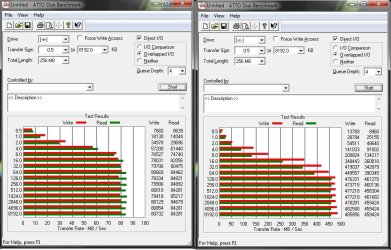
I run 2 Corsair Force 120 SSD’s in RAID0 and the performance is phenomenal!! Surpassing the claimed manufactures speeds on a SATAIII port! I’ve attached a ATTO benchmark, the SSD’s in RAID0 is on the right (a 1TB WD green drive is on the left!)
 

Attachments

  • HD Benchmark.jpg
    HD Benchmark.jpg
    111 KB · Views: 44

My Computer My Computer

At a glance

Windows 7 ProfessionalIntel i7 4790K32 GB G.SKILL TridentX F3-2400C10D-GTXEVGA GeForce GTX 980 Superclocked X2 SLI
Computer type
PC/Desktop
Computer Manufacturer/Model Number
Misfits Machine!
OS
Windows 7 Professional
CPU
Intel i7 4790K
Motherboard
ASUS Maximus VII Hero
Memory
32 GB G.SKILL TridentX F3-2400C10D-GTX
Graphics Card(s)
EVGA GeForce GTX 980 Superclocked X2 SLI
Sound Card
Teac UD-501 External USB DAC/Bryston BHA-1 Headphone Amp
Monitor(s) Displays
BenQ BL3200PT
Screen Resolution
2560x1440
Hard Drives
Samsung 850 Pro Series 256GB SSD
Western Digital Red 3TB
PSU
Corsair RM Series Gold 1000W
Case
Corsair Carbide Series Air 540
Cooling
Corsair Hydro Series H110
Keyboard
Corsair Vengeance K70 - Cherry MX Red/Razer Orbweaver Elite
Mouse
Razer DeathAdder Chroma
pparks1: I agree with your theory, but you can apply the same with every piece of hardware. How much of a real world difference did you notice after OC’ing your CPU?
Yes you can and you should. If nothing but benchmarks really show improvement, why bother in the first place? My overclock did very, very little performance wise. I notice a bit of a difference...about 10% when I am re-encoding DVD's or using Sony Vegas Movie HD to convert my AVCHD 1080p digital camcorder files into smaller digital movie files....with everything else, there is no noticeable difference whatsover. But since I primarily use my machine for video file editing, the 10% gain and 1 degree increase in associated temp was worth it to me.

I actually don’t see what the fuss is over RAID. Having your data on 2 RAID0 drives is just the same amount of risk as having it on 1 single drive. You lose 1 drive you lose it ALL!
Yes, but since you have 2 physical discs which "could" potentially fail...you have increased the possibility of failure.

I run 2 Corsair Force 120 SSD’s in RAID0 and the performance is phenomenal!!
Did you check performance with a single Corsair F120 SSD installed? I bet performance is still phenomenal.
 

My Computer My Computer

At a glance

Windows 7 Ultimate x64Intel Q9550 2.83Ghz OC'd to 3.40Ghz8GB G.Skill PI DDR2-800, 4-4-4-12 timingsEVGA 1280MB Nvidia GeForce GTX570
Computer Manufacturer/Model Number
Self-Built in July 2009
OS
Windows 7 Ultimate x64
CPU
Intel Q9550 2.83Ghz OC'd to 3.40Ghz
Motherboard
Gigabyte GA-EP45-UD3R rev. 1.1, F12 BIOS
Memory
8GB G.Skill PI DDR2-800, 4-4-4-12 timings
Graphics Card(s)
EVGA 1280MB Nvidia GeForce GTX570
Sound Card
Realtek ALC899A 8 channel onboard audio
Monitor(s) Displays
23" Acer x233H
Screen Resolution
1920x1080
Hard Drives
Intel X25-M 80GB Gen 2 SSD
Western Digital 1TB Caviar Black, 32MB cache. WD1001FALS
PSU
Corsair 620HX modular
Case
Antec P182
Cooling
stock
Keyboard
ABS M1 Mechanical
Mouse
Logitech G9 Laser Mouse
Internet Speed
15/2 cable modem
Other Info
Windows and Linux enthusiast. Logitech G35 Headset.
I have 2 SSDs, but do not Raid them. Just run them as single discs.

The main one I installed Win7 and all apps on.
I have 1 spinner for Music,Videos, Pictures Etc and another spinner for Games.

The second SSD I use for the main PF, & certain Games.
Mostly the ones that hit the HD often, or a new game Im playing.

Some Games I can not tell any difference being on the SSD, others it helps alot.
 

My Computer My Computer

At a glance

Windows 7 Home Premium 64bitIntel Core i7 2700k8GB Mushkin Redline Ridgebacks @1866EVGA GTX570 SC
Computer Manufacturer/Model Number
Custom (Self Build)
OS
Windows 7 Home Premium 64bit
CPU
Intel Core i7 2700k
Motherboard
eVGA P67 SLI
Memory
8GB Mushkin Redline Ridgebacks @1866
Graphics Card(s)
EVGA GTX570 SC
Sound Card
XiFi Titanium HD
Monitor(s) Displays
LG W2453V
Screen Resolution
1920x1080
Hard Drives
Intel 320 80GB -- Intel X25-V 40GB --WD Black 1TB x2 -- WD Blue 640GB
PSU
Seasonic x750
Case
Corsair 600T SE White
Cooling
eVGA Superclocked CPU Cooler
Keyboard
Saitek Cyborg
Antivirus
Kaspersky
Browser
IE
Other Info
LG BD/DVD
Not all RAID controllers created equal, some maybe able to support the increased bandwidth of two SSD drives in RAID 0 while others may not. As such, the RAID 0 performance may or may not be near linear when compared to a single drive.

While a single SSD drive makes any machine faster, two would make it even faster, it is still the slowest subsystem of the PC. Building RAID x with SSDs makes sense as long as the technology catches up with the SSD RAID. Intel's Sandy Bridge isn't it for motherboard based RAID since its throughput maxis out at 6Gbs or 750MBs. With 150MBs used up by the protocol overhead, it leaves maximum of 600 MBs actual data transfer. Put two C300 SSD drives, each with 350MBs read speed, in to RAID 0 and these drives won't perform at their max. Then there's the "coming soon" Vertex 3 Pro SSD capable to do 550MBs read speed, it would be a waste to put them into a RAID 0 using the motherboard RAID controller.

The available bandwidth is one of the reasons why OCZ moving the SSD into a PCIe x4 slot with the OCZ RevoDrive PCI-Express SSD; the 20Gbs transfer rate of PCIe x4 ought to be enough for awhile at least. Most of the add on SSD RAID cards also require a PCIe x4 slot as well to support the required bandwidth.

The PCI x4 lane can be made available for RAID on the motherboard, but that isn't going to happen anytime soon. Until the technology catches up with the SSD drives, pparks1 is right; in real life, placing two SSD drives in to RAID 0 isn't going to give you much improvement. Here's a link that recently tested SSD RAID 0:

Corsair Force Series F90 Solid State Drive RAID Report - Benchmarks - PCMark Vantage Hard Disk Tests :: TweakTown USA Edition

In benchmark tests yes, two drives are faster; throw in PCMark Vantage benchmarks and the RAID 0 looses its edge.
 

My Computer My Computer

At a glance

Windows 7 64-bit, Windows 8.1 64-bit, OSX El ...Intel i5-3350P 3.1 GHz16 GBs GSkill SniperRadeon HD 7850
Computer type
PC/Desktop
Computer Manufacturer/Model Number
Custom built at Home
OS
Windows 7 64-bit, Windows 8.1 64-bit, OSX El Capitan, Windows 10 (VMware)
CPU
Intel i5-3350P 3.1 GHz
Motherboard
Gigabyte GA-Z77X-UP5 TH
Memory
16 GBs GSkill Sniper
Graphics Card(s)
Radeon HD 7850
Sound Card
VIA HD Audio
Monitor(s) Displays
Dell U2410 24"
Screen Resolution
1920x1200
Hard Drives
1 x Intel 520 240 GBs
1 x Seagate 1TBs SATA 2.0,
1 x Seagate 1TBs eSATA 2.0
PSU
Thermaltake 850W
Case
Antec P183
Cooling
Noctua NH-D14 Heatsink 2 x 120mm fans, 4 x 120mm case fans
Keyboard
Dell Multimedia keyboard
Mouse
Logitech Trackball
Internet Speed
28.5 Mb/s
Well anyway I have a P7P55D-E Evo
 

My Computer My Computer

At a glance

Windows 7 Ultimate 64 RetailI7-9604 X 4 GB Kingston DDR3-1600Gigabyte GTX670
Computer type
PC/Desktop
Computer Manufacturer/Model Number
Black Trooper Rampage
OS
Windows 7 Ultimate 64 Retail
CPU
I7-960
Motherboard
Asus Rampage III Extreme
Memory
4 X 4 GB Kingston DDR3-1600
Graphics Card(s)
Gigabyte GTX670
Sound Card
X-Fi Titanium Fatality Champion
Monitor(s) Displays
Dell U2412M
Screen Resolution
1920 X 1200
Hard Drives
2 X Samsung 830 256 GB
Velociraptor 1TB
2 x 2 TB WD Caviar Black
Seagate Barrcuda 2 TB
PSU
Cooler Master Silent Pro Gold 1000 W
Case
Cooler Master Trooper
Keyboard
Logitech G19
Mouse
Logitech G9x
Internet Speed
30 MBPS +/- VDSL
The biggest advantage to an SSD is it's incredibly low access time to any file on the drive....this doesn't improve in a RAID configuration.

Personally, I don't have 2 SSD's in the same box...heck I don't have 2 SSD's period.

If it were me, I would run one SSD for my OS only and run a second SSD with my games on it. This should increase your performance a small bit, without the complexities of RAID and the issues when 1 drive fails. Plus, this easily allows you to image each of the drives separately for backup purposes with something like Macrium, Paragon, Acronis, etc.

I fully support this post. This is the way I am currently configured on my primary box, only it's standard drives. the thinking is the same. I actually keep the pagefile on yet a third drive. The performance over a straight forward config is noticeable even with standard drives.
 

My Computer My Computer

At a glance

Windows 7 x64Intel i7 2600kG.skill Ripjaw 16gigs @ 1866Nvidia gtx580 (evga)
Computer Manufacturer/Model Number
Insane hobo technologies. ;-)
OS
Windows 7 x64
CPU
Intel i7 2600k
Motherboard
Asrock z68 extreme 4 gen 3
Memory
G.skill Ripjaw 16gigs @ 1866
Graphics Card(s)
Nvidia gtx580 (evga)
Sound Card
Integrated HD audio + hdmi
Monitor(s) Displays
24" ASUS widescreen + 42" insignia
Screen Resolution
1080p (1920x1080)
Hard Drives
128 Samsung 830
256 Samsung 840
3 x 1tb storage drive (various)
1 western digital 1tb (eSATA)
1 Seagate 1tb (eSATA)
PSU
1 kilowatt SLI/Crossfire rated Silverstone modular
Case
NZXT Phantom + additional 220 fan
Cooling
Zalmann
Keyboard
Microsoft wireless 3000 (v2)
Mouse
MS - wireless 5000 (bluetrack)
Internet Speed
depends on if you ask me or my provider.
Other Info
The above information is provided as is, and the author assumes no responsibility for issues it may cause with your sanity or fanboyism.
After checking that link.. when I look at gaming seems a single SSD beats out RAID 0 in that test
 

My Computer My Computer

At a glance

Windows 7 Ultimate 64 RetailI7-9604 X 4 GB Kingston DDR3-1600Gigabyte GTX670
Computer type
PC/Desktop
Computer Manufacturer/Model Number
Black Trooper Rampage
OS
Windows 7 Ultimate 64 Retail
CPU
I7-960
Motherboard
Asus Rampage III Extreme
Memory
4 X 4 GB Kingston DDR3-1600
Graphics Card(s)
Gigabyte GTX670
Sound Card
X-Fi Titanium Fatality Champion
Monitor(s) Displays
Dell U2412M
Screen Resolution
1920 X 1200
Hard Drives
2 X Samsung 830 256 GB
Velociraptor 1TB
2 x 2 TB WD Caviar Black
Seagate Barrcuda 2 TB
PSU
Cooler Master Silent Pro Gold 1000 W
Case
Cooler Master Trooper
Keyboard
Logitech G19
Mouse
Logitech G9x
Internet Speed
30 MBPS +/- VDSL
I actually don’t see what the fuss is over RAID. Having your data on 2 RAID0 drives is just the same amount of risk as having it on 1 single drive. You lose 1 drive you lose it ALL!

Hi,

I'm afraid that is not correct. Since the RAID has two disks in it, you have doubled the chance of failure (doubled your risk). Basic probability theory.

Whilst a RAID0 across SSD yields better performance from a benchmarking perspective, in real-world scenarios its not a good idea. In my experience RAID0's real advantage lies in sustained (several hours and days) WRITE, not as much READ.

Since we all know that SSD's live longer by minimising WRITE activity to them, it seems logical not to use them in high level WRITE environment (e.g. several extremely large Gigabyte size data files written too constantly over several days or a few weeks), unless you have an extremely large budget.

My opinion is :

Single SSD - for OS and program files
Multiple HDD (in RAID or not) - for data files/storage/backup

Regards,
Golden
 

My Computer My Computer

At a glance

Windows 10 Pro x64 ; Xubuntu x64Intel i7 860 @ 2.80 GHz O/C'ed to 4.0GHz16GB Corsair Vengance DDR3 @ 661 MHz Dual Cha...EVGA NVidia GTX 560 1024MB
Computer type
PC/Desktop
Computer Manufacturer/Model Number
Golden Mk. I.4
OS
Windows 10 Pro x64 ; Xubuntu x64
CPU
Intel i7 860 @ 2.80 GHz O/C'ed to 4.0GHz
Motherboard
Gigabyte P55A-UD3R Rev.1. Award BIOS F13
Memory
16GB Corsair Vengance DDR3 @ 661 MHz Dual Channel (9-9-9-24)
Graphics Card(s)
EVGA NVidia GTX 560 1024MB
Sound Card
Realtek Integrated
Monitor(s) Displays
Dual Samsung SyncMaster 2494HS
Screen Resolution
1920*1080 and 1920*1080
Hard Drives
1*Samsung 840 EVO 120GB SSD;
1*OCZ Vertex 2 60GB SSD;
2*Samsung F3 SpinPoint 1TB in RAID0;
1*Samsung F1 SpinPoint 1TB;
2*Western Digital 1TB External USB 3.0
1*Western Digital 500GB External USB 3.0
1*Seagate 500GB External USB 2.0
PSU
Thermaltake ToughPower QFan 750W
Case
Thermaltake Element S VK60001W2Z
Cooling
Corsair H60 Water Cooling, 2*230mm and 2*80mm case fans
Keyboard
Logitech G110
Mouse
Logitech MX518
Im guessing a second for games is a bad idea then
 

My Computer My Computer

At a glance

Windows 7 Ultimate 64 RetailI7-9604 X 4 GB Kingston DDR3-1600Gigabyte GTX670
Computer type
PC/Desktop
Computer Manufacturer/Model Number
Black Trooper Rampage
OS
Windows 7 Ultimate 64 Retail
CPU
I7-960
Motherboard
Asus Rampage III Extreme
Memory
4 X 4 GB Kingston DDR3-1600
Graphics Card(s)
Gigabyte GTX670
Sound Card
X-Fi Titanium Fatality Champion
Monitor(s) Displays
Dell U2412M
Screen Resolution
1920 X 1200
Hard Drives
2 X Samsung 830 256 GB
Velociraptor 1TB
2 x 2 TB WD Caviar Black
Seagate Barrcuda 2 TB
PSU
Cooler Master Silent Pro Gold 1000 W
Case
Cooler Master Trooper
Keyboard
Logitech G19
Mouse
Logitech G9x
Internet Speed
30 MBPS +/- VDSL
pparks1: I agree with your theory, but you can apply the same with every piece of hardware. How much of a real world difference did you notice after OC’ing your CPU?
Yes you can and you should. If nothing but benchmarks really show improvement, why bother in the first place? My overclock did very, very little performance wise. I notice a bit of a difference...about 10% when I am re-encoding DVD's or using Sony Vegas Movie HD to convert my AVCHD 1080p digital camcorder files into smaller digital movie files....with everything else, there is no noticeable difference whatsover. But since I primarily use my machine for video file editing, the 10% gain and 1 degree increase in associated temp was worth it to me.

I actually don’t see what the fuss is over RAID. Having your data on 2 RAID0 drives is just the same amount of risk as having it on 1 single drive. You lose 1 drive you lose it ALL!
Yes, but since you have 2 physical discs which "could" potentially fail...you have increased the possibility of failure.

I run 2 Corsair Force 120 SSD’s in RAID0 and the performance is phenomenal!!
Did you check performance with a single Corsair F120 SSD installed? I bet performance is still phenomenal.


Very true, but we cannot safe guard ourselves for every possible failure or incident. Approximately 15 years ago my home was broken into and approximately 400 CD’s were stolen. All the insurance in the world could not replace the time and effort I put into that collection. Sorry for the dark comparison!

I originally purchased only 1 SSD on sale and was so blown away by its performance I grabbed another before the sale ended (2 x120GB of SSD drives was cheaper than most single 160GB SSD drives!!!). Set up the RAID0 out of curiosity. Unfortunately I did not record any real life performance between the 2 setups. Fully agree that benchmarks do not reflect real life performance and should be taken with a grain of salt. But a benchmarked 270MB/s for a single SSD vs 460MB/s RAID reads must speak for something… even if it is only a small increase in real world performance.

The bottom line is we all strive for a faster machine!
 

My Computer My Computer

At a glance

Windows 7 ProfessionalIntel i7 4790K32 GB G.SKILL TridentX F3-2400C10D-GTXEVGA GeForce GTX 980 Superclocked X2 SLI
Computer type
PC/Desktop
Computer Manufacturer/Model Number
Misfits Machine!
OS
Windows 7 Professional
CPU
Intel i7 4790K
Motherboard
ASUS Maximus VII Hero
Memory
32 GB G.SKILL TridentX F3-2400C10D-GTX
Graphics Card(s)
EVGA GeForce GTX 980 Superclocked X2 SLI
Sound Card
Teac UD-501 External USB DAC/Bryston BHA-1 Headphone Amp
Monitor(s) Displays
BenQ BL3200PT
Screen Resolution
2560x1440
Hard Drives
Samsung 850 Pro Series 256GB SSD
Western Digital Red 3TB
PSU
Corsair RM Series Gold 1000W
Case
Corsair Carbide Series Air 540
Cooling
Corsair Hydro Series H110
Keyboard
Corsair Vengeance K70 - Cherry MX Red/Razer Orbweaver Elite
Mouse
Razer DeathAdder Chroma
Back
Top