
Solved tom982 - sfc /scannow unable to repair missing ATL80.dll file

bluegreen1

New member
Local time
11:46 PM
Messages
21
Hello, I read with interest that tom982 has a way of giving special instructions for repairing corrupt or missing files that sfc /scannow is unable to repair. Maybe others can also help me with this, but I only looked at the following thread mentioning tom982 (so far): http://www.sevenforums.com/performa...ou-fix-corrupted-files-found-sfc-scannow.html

Here's the problem that was posted in the CBS log (everything else seems to be okay with the log):

2014-12-07 13:14:57, Info CSI 0000019b [SR] Cannot repair member file [l:18{9}]"ATL80.dll" of Microsoft.VC80.ATL, Version = 8.0.50727.6195, pA = PROCESSOR_ARCHITECTURE_INTEL (0), Culture neutral, VersionScope neutral, PublicKeyToken = {l:8 b:1fc8b3b9a1e18e3b}, Type = [l:10{5}]"win32", TypeName neutral, PublicKey neutral in the store, file is missing

I also downloaded and ran the Microsoft Visual C++ 2005 Service Pack 1 Redistributable Package MFC Security Update, as well as the Microsoft Visual C++ 2005 Service Pack 1 Redistributable Package ATL Security Update. I then tested one of the applications that gave the missing ATL80.dll message (Snipping Tool), and did not get the error message. But then I checked again, and the missing ATL80.dll error is returning again, consistently.

I will be very grateful for any help you can give me. Thank you very much!
 

My Computer My Computer

At a glance

Windows 7 Professional, SP 1, 32 bit; Intel(R...Intel(R) Core(TM)2 Duo CPU T7300 @ 2.00GHzRAM: 4.00 GB Samsung DIMM DDRGraphics Card: NVIDIA GeForce 8400M GS, 128 Mb
Computer type
Laptop
Computer Manufacturer/Model Number
Dell Vostro 1400
OS
Windows 7 Professional, SP 1, 32 bit; Intel(R) Core(TM)2 Duo CPU T7300
CPU
Intel(R) Core(TM)2 Duo CPU T7300 @ 2.00GHz
Motherboard
Dell Inc., 0TT361
Memory
RAM: 4.00 GB Samsung DIMM DDR
Graphics Card(s)
Graphics Card: NVIDIA GeForce 8400M GS, 128 Mb
Sound Card
SigmaTel High Definition Audio CODEC
Monitor(s) Displays
Generic PnP Monitor
Hard Drives
Hard Drives: C: Total - 152524 MB, Free - 85322 MB / ST9160821AS
Keyboard
Standard PS/2 Keyboard
Mouse
PS/2 Compatible Mouse
Antivirus
Avast! Free Antivirus 2015
Browser
Chrome
Other Info
Phoenix ROM BIOS PLUS Version 1.10 A09; Laptop Integrated Webcam; PIONEER DVD+/-RW DR-K17Y ATA Device.

My Computer My Computer

At a glance

Desk1 7 Home Prem / Desk2 10 Pro / Main lap A...Desk1 i5 3750K / Laptop i7 GTX 860M / Desk2 i...Desk1 8GB (1866) / Desk2 16GB (1333) / Laptop...Desk 1& 2NVidia GTX 650 & Laptops on board Intel
Computer type
PC/Desktop
Computer Manufacturer/Model Number
Own build (new) Desk1 / Asus ROG Win 7 / Desk2 1st build
OS
Desk1 7 Home Prem / Desk2 10 Pro / Main lap Asus ROG 10 Pro 2 laptop Toshiba 7 Pro Asus P2520 7 & 10
CPU
Desk1 i5 3750K / Laptop i7 GTX 860M / Desk2 i5 2500
Motherboard
Desk1 Asus P877-V / Desk2 Gigabyte H67 UD3H / Laptop ?
Memory
Desk1 8GB (1866) / Desk2 16GB (1333) / Laptop 8Gb DDR3
Graphics Card(s)
Desk 1& 2NVidia GTX 650 & Laptops on board Intel
Sound Card
Desk 1 & 2 -XONAR DG Realtek High Def audio Laptop
Monitor(s) Displays
Desk 1 Benq HD 2450 / Desk2 Philips 24" / Laptop 17.5"
Screen Resolution
1920x1080 D1 & D2 & Laptop 1
Hard Drives
Desk1 Samsung 120GB 830 SSD
Asus ROG 256GB 850 Pro SSD
Desk2 Samsung 840 256 SSD
Toshiba 120GB EVO
PSU
Desk 1 Corsair HX 1050/ Laptop ? / Desk 2 Corsair HX 650
Case
Desk 1 Cooler HAF XM ? Toshiba laptop / Desk2 Coolermaster
Cooling
Fans on all Desk1 -2 Desk2 - all Coolermasters 5 Laptop ?
Keyboard
Desk 1 MS Sidewinder X6 Desk 2 MS Sidewinder X 4
Mouse
Desk 1&2 - Gigabyte MS 900 gamer - laptop - Logitec wireless
Internet Speed
ADSL2+
Other Info
One other Desktop (tester) and spare Toshba laptop both with SSD's
Running Kaspersky 2016 ISS on all machines config'd identically
Logitec audio stereo systems on each machine (x3)
Canon MG5250MFC
Router/modem TP-Link running WPA2SK
Thanks so much for helping with this. I ran chkdsk as you suggested, and here are the results from event viewer:

EventData

Checking file system on C: The type of the file system is NTFS. A disk check has been scheduled. Windows will now check the disk. CHKDSK is verifying files (stage 1 of 5)... 130304 file records processed. File verification completed. 1598 large file records processed. 0 bad file records processed. 2 EA records processed. 79 reparse records processed. CHKDSK is verifying indexes (stage 2 of 5)... 165416 index entries processed. Index verification completed. 0 unindexed files scanned. 0 unindexed files recovered. CHKDSK is verifying security descriptors (stage 3 of 5)... 130304 file SDs/SIDs processed. Cleaning up 2056 unused index entries from index $SII of file 0x9. Cleaning up 2056 unused index entries from index $SDH of file 0x9. Cleaning up 2056 unused security descriptors. Security descriptor verification completed. 17557 data files processed. CHKDSK is verifying Usn Journal... 35726568 USN bytes processed. Usn Journal verification completed. CHKDSK is verifying file data (stage 4 of 5)... 130288 files processed. File data verification completed. CHKDSK is verifying free space (stage 5 of 5)... 21892552 free clusters processed. Free space verification is complete. CHKDSK discovered free space marked as allocated in the master file table (MFT) bitmap. CHKDSK discovered free space marked as allocated in the volume bitmap. Windows has made corrections to the file system. 156185599 KB total disk space. 68318216 KB in 101739 files. 59140 KB in 17558 indexes. 0 KB in bad sectors. 238031 KB in use by the system. 65536 KB occupied by the log file. 87570212 KB available on disk. 4096 bytes in each allocation unit. 39046399 total allocation units on disk. 21892553 allocation units available on disk. Internal Info: 00 fd 01 00 0b d2 01 00 9e 2e 03 00 00 00 00 00 ................ 2f 31 00 00 4f 00 00 00 00 00 00 00 00 00 00 00 /1..O........... 08 8c 31 00 50 01 30 00 48 19 30 00 00 00 30 00 ..1.P.0.H.0...0. Windows has finished checking your disk. Please wait while your computer restarts.

What do you think of these results?

I tried the Snipping Tool again after the reboot following chkdsk, and I'm still getting the missing ATL80.DLL error. While chkdsk was running, I looked at another computer running the same OS (Win 7 Pro, SP 1, 32-bit), and there was no ATL80.DLL to be found. Yet I tried the Snipping Tool on that computer and it worked with no problem. (The other computer does have ATL.DLL, but not ATL80.DLL.)

What do you think I should try next? Thanks again for your help!

(Here's another thought: In my first post you'll notice that I had searched and found that downloading the Microsoft Visual C++ 2005 Service Pack 1 Redistributable Package MFC Security Update could fix a missing ATL80.DLL problem, though it didn't for me. When I looked at the other computer that doesn't have the problem, I see that it's not running the Microsoft Visual C++ 2005 Service Pack 1 Redistributable Package, but is running the Microsoft Visual C++ 2008 Redistributable. Maybe I should change to the set-up of the other computer? But I don't have a clue about how that would be done....)
 
Last edited:

My Computer My Computer

At a glance

Windows 7 Professional, SP 1, 32 bit; Intel(R...Intel(R) Core(TM)2 Duo CPU T7300 @ 2.00GHzRAM: 4.00 GB Samsung DIMM DDRGraphics Card: NVIDIA GeForce 8400M GS, 128 Mb
Computer type
Laptop
Computer Manufacturer/Model Number
Dell Vostro 1400
OS
Windows 7 Professional, SP 1, 32 bit; Intel(R) Core(TM)2 Duo CPU T7300
CPU
Intel(R) Core(TM)2 Duo CPU T7300 @ 2.00GHz
Motherboard
Dell Inc., 0TT361
Memory
RAM: 4.00 GB Samsung DIMM DDR
Graphics Card(s)
Graphics Card: NVIDIA GeForce 8400M GS, 128 Mb
Sound Card
SigmaTel High Definition Audio CODEC
Monitor(s) Displays
Generic PnP Monitor
Hard Drives
Hard Drives: C: Total - 152524 MB, Free - 85322 MB / ST9160821AS
Keyboard
Standard PS/2 Keyboard
Mouse
PS/2 Compatible Mouse
Antivirus
Avast! Free Antivirus 2015
Browser
Chrome
Other Info
Phoenix ROM BIOS PLUS Version 1.10 A09; Laptop Integrated Webcam; PIONEER DVD+/-RW DR-K17Y ATA Device.
Regarding the ATL80.DLL before you go looking for a download I think it would be good to read this http://pcsupport.about.com/od/findbyerrormessage/a/atl80-dll-not-found-missing-error.htm
From it I would run a malware check first up
http://www.superantispyware.com/
http://www.malwarebytes.org/products/malwarebytes_free/
http://www.bleepingcomputer.com/download/adwcleaner/
download from bleeping computer – delete any rubbish these find.

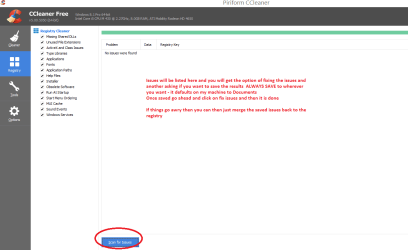
I would then run a registry clean up and the only one I would and do use is the one in CCleaner https://www.piriform.com/ccleaner/download the free one is fine.
Now when you scan for issues in the registry when it throws up the results ALWAYS SAVE them as a document because if the fix issues makes the problem worse or causes new ones then you can always reinstall them back from the saved results in Documents(or wherever you wish to save the results to) see my pic I have no issues but I have inserted what to do.
Now as a personal thing I always back the registry up in total after a clean install or before tweaking it for performance on the machine see this http://www.sevenforums.com/tutorials/4230-registry-backup-restore.html it is a life saver and takes all of two minutes to do. Plus the same applies to merging the registry back in CCleaner as outlined in the tutorial.

The chkdsk as far as I can see has done what it can but someone else more qualified than me might see something that is not overly obvious to me.
 

Attachments

  • CC REGISTRY.PNG
    CC REGISTRY.PNG
    19 KB · Views: 2

My Computer My Computer

At a glance

Desk1 7 Home Prem / Desk2 10 Pro / Main lap A...Desk1 i5 3750K / Laptop i7 GTX 860M / Desk2 i...Desk1 8GB (1866) / Desk2 16GB (1333) / Laptop...Desk 1& 2NVidia GTX 650 & Laptops on board Intel
Computer type
PC/Desktop
Computer Manufacturer/Model Number
Own build (new) Desk1 / Asus ROG Win 7 / Desk2 1st build
OS
Desk1 7 Home Prem / Desk2 10 Pro / Main lap Asus ROG 10 Pro 2 laptop Toshiba 7 Pro Asus P2520 7 & 10
CPU
Desk1 i5 3750K / Laptop i7 GTX 860M / Desk2 i5 2500
Motherboard
Desk1 Asus P877-V / Desk2 Gigabyte H67 UD3H / Laptop ?
Memory
Desk1 8GB (1866) / Desk2 16GB (1333) / Laptop 8Gb DDR3
Graphics Card(s)
Desk 1& 2NVidia GTX 650 & Laptops on board Intel
Sound Card
Desk 1 & 2 -XONAR DG Realtek High Def audio Laptop
Monitor(s) Displays
Desk 1 Benq HD 2450 / Desk2 Philips 24" / Laptop 17.5"
Screen Resolution
1920x1080 D1 & D2 & Laptop 1
Hard Drives
Desk1 Samsung 120GB 830 SSD
Asus ROG 256GB 850 Pro SSD
Desk2 Samsung 840 256 SSD
Toshiba 120GB EVO
PSU
Desk 1 Corsair HX 1050/ Laptop ? / Desk 2 Corsair HX 650
Case
Desk 1 Cooler HAF XM ? Toshiba laptop / Desk2 Coolermaster
Cooling
Fans on all Desk1 -2 Desk2 - all Coolermasters 5 Laptop ?
Keyboard
Desk 1 MS Sidewinder X6 Desk 2 MS Sidewinder X 4
Mouse
Desk 1&2 - Gigabyte MS 900 gamer - laptop - Logitec wireless
Internet Speed
ADSL2+
Other Info
One other Desktop (tester) and spare Toshba laptop both with SSD's
Running Kaspersky 2016 ISS on all machines config'd identically
Logitec audio stereo systems on each machine (x3)
Canon MG5250MFC
Router/modem TP-Link running WPA2SK
Thanks so much for your recommendations and for looking at the chkdsk results. I ran all of those scans and though there was a small amount of junk, there was nothing significant (I use three of those four scans regularly, so they looked pretty good).

I found some info when I saw this answer to someone also having a similar problem with this file at this link: How to reference ATL80.dll - .NET Framework

Here's a quote from the link:
"Does the machine you're trying to run the app on have ATL80.DLL installed.
It should be under the \windows\winsxs folder."


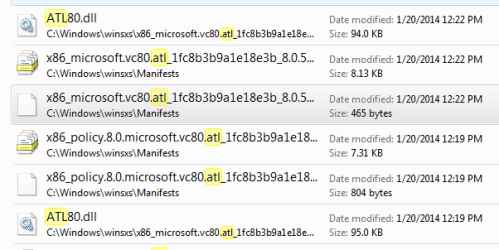
After I read the above, I went and found that I do have two copies of this file in the winsxs folder, yet I still get error messages that it is missing. I'll try to attach a screenshot of it.

After that, I found that someone else had struggled with this missing file also, at this link: Can I Add an MSI to Install Project...? [Archive] - Flexera Software Community Forums

Apparently the person solved the problem eventually, though much of this discussion is over my head:

The following is quoted from the link:
"I figured it out! Only took me like three weeks...LOL

"Ok, so apparently Flexera Software is supplying an OLD version of the Prerequisite file for "Visual C++ 2005 SP1 Redistributable Package (x86)". The version they point to and supply is for 8.0.50727.762, a newer version was released after that version with an ATL Security update, Version 8.0.50727.4053

It took me a while to tweak the PRQ file manually because I am using InstallShield Express and I don't have a PRQ Editor like in the Premium edition. But ultimately I got the latest (correct) version of VC++ 2005 SP1 to install. I made the following corrections:

Open "C:\Program Files\InstallShield\2011\SetupPrerequisites\Microsoft Visual C++ 2005 SP1 Redistributable Package (x86).prq" in notepad
Update the "condition" tag by changing the last portion of the registry key from "B25099274A207264182F8181ADD555D0" to "3e43b73803c7c394f8a6b2f0402e19c2"
Update the "file" tag so the URL="http://download.microsoft.com/download/6/B/B/6BB661D6-A8AE-4819-B79F-236472F6070C/vcredist_x86.exe"
CheckSum="6402438591B548121F54B0706A2C6423"
FileSize="0,2745256"
Save the file & exit Notepad
Now delete the directory "C:\Program Files\InstallShield\2011\SetupPrerequisites\VC 2005 SP1 Redist"
Startup InstallShield, Goto "Redistributables" tab
Right-Click "Visual C++ 2005 SP1 Redistributable Package (x86)" and select "Download Selected Item..."
DONE! You now have the latest version of MS VC++ 2005 SP1

"Hope this helps people out there!"


Do you think this might have the answer? If it does, I would still need some guidance as this solution sounds rather confusing to me. Thanks again.


Below is the screenshot of the two ATL80.DLL files in my winsxs folder:
 

Attachments

  • atl80.dll in winsxs folder.PNG
    atl80.dll in winsxs folder.PNG
    13.6 KB · Views: 39
Last edited:

My Computer My Computer

At a glance

Windows 7 Professional, SP 1, 32 bit; Intel(R...Intel(R) Core(TM)2 Duo CPU T7300 @ 2.00GHzRAM: 4.00 GB Samsung DIMM DDRGraphics Card: NVIDIA GeForce 8400M GS, 128 Mb
Computer type
Laptop
Computer Manufacturer/Model Number
Dell Vostro 1400
OS
Windows 7 Professional, SP 1, 32 bit; Intel(R) Core(TM)2 Duo CPU T7300
CPU
Intel(R) Core(TM)2 Duo CPU T7300 @ 2.00GHz
Motherboard
Dell Inc., 0TT361
Memory
RAM: 4.00 GB Samsung DIMM DDR
Graphics Card(s)
Graphics Card: NVIDIA GeForce 8400M GS, 128 Mb
Sound Card
SigmaTel High Definition Audio CODEC
Monitor(s) Displays
Generic PnP Monitor
Hard Drives
Hard Drives: C: Total - 152524 MB, Free - 85322 MB / ST9160821AS
Keyboard
Standard PS/2 Keyboard
Mouse
PS/2 Compatible Mouse
Antivirus
Avast! Free Antivirus 2015
Browser
Chrome
Other Info
Phoenix ROM BIOS PLUS Version 1.10 A09; Laptop Integrated Webcam; PIONEER DVD+/-RW DR-K17Y ATA Device.
Ok BG I shall ask for some help on this one mate as that code stuff is a bit beyond me and I was rather hoping the chkdsk stuff might have sorted something.
What has got me baffled is the machine that has it works ok on one machine with no ATL80 and yet not on your machine with no ATL80?
 

My Computer My Computer

At a glance

Desk1 7 Home Prem / Desk2 10 Pro / Main lap A...Desk1 i5 3750K / Laptop i7 GTX 860M / Desk2 i...Desk1 8GB (1866) / Desk2 16GB (1333) / Laptop...Desk 1& 2NVidia GTX 650 & Laptops on board Intel
Computer type
PC/Desktop
Computer Manufacturer/Model Number
Own build (new) Desk1 / Asus ROG Win 7 / Desk2 1st build
OS
Desk1 7 Home Prem / Desk2 10 Pro / Main lap Asus ROG 10 Pro 2 laptop Toshiba 7 Pro Asus P2520 7 & 10
CPU
Desk1 i5 3750K / Laptop i7 GTX 860M / Desk2 i5 2500
Motherboard
Desk1 Asus P877-V / Desk2 Gigabyte H67 UD3H / Laptop ?
Memory
Desk1 8GB (1866) / Desk2 16GB (1333) / Laptop 8Gb DDR3
Graphics Card(s)
Desk 1& 2NVidia GTX 650 & Laptops on board Intel
Sound Card
Desk 1 & 2 -XONAR DG Realtek High Def audio Laptop
Monitor(s) Displays
Desk 1 Benq HD 2450 / Desk2 Philips 24" / Laptop 17.5"
Screen Resolution
1920x1080 D1 & D2 & Laptop 1
Hard Drives
Desk1 Samsung 120GB 830 SSD
Asus ROG 256GB 850 Pro SSD
Desk2 Samsung 840 256 SSD
Toshiba 120GB EVO
PSU
Desk 1 Corsair HX 1050/ Laptop ? / Desk 2 Corsair HX 650
Case
Desk 1 Cooler HAF XM ? Toshiba laptop / Desk2 Coolermaster
Cooling
Fans on all Desk1 -2 Desk2 - all Coolermasters 5 Laptop ?
Keyboard
Desk 1 MS Sidewinder X6 Desk 2 MS Sidewinder X 4
Mouse
Desk 1&2 - Gigabyte MS 900 gamer - laptop - Logitec wireless
Internet Speed
ADSL2+
Other Info
One other Desktop (tester) and spare Toshba laptop both with SSD's
Running Kaspersky 2016 ISS on all machines config'd identically
Logitec audio stereo systems on each machine (x3)
Canon MG5250MFC
Router/modem TP-Link running WPA2SK
I need to see the full CBS data - and a CheckSUR log...

Please follow the Windows Update Posting Instructions and post the requested data

If the file is too large (8MB compressed), remove the older CBSPersist cab files until the final file is below the limit - you can always post them separately after zipping them. (the forum doesn't allow the upload of bare CAB files, for a number of reasons)
 

My Computer My Computer

At a glance

Win 7 x64 Home Premium (and x86 VirtualBox VM...i3 370M/i7 6500U8GB - finally :)/8GBit's an i3, dude!/dual Intel&nVidia
Computer type
Laptop
Computer Manufacturer/Model Number
Asus K52F or Lenovo B51-80
OS
Win 7 x64 Home Premium (and x86 VirtualBox VM)/Win10
CPU
i3 370M/i7 6500U
Motherboard
Asus/Lenovo
Memory
8GB - finally :)/8GB
Graphics Card(s)
it's an i3, dude!/dual Intel&nVidia
Sound Card
onboard
Monitor(s) Displays
15.6" built-in
Screen Resolution
1366x768/1920x1080
Hard Drives
750GB Seagate internal
Sundry external drives attached to other computers on the local network
1TB SSD on the Lenovo
PSU
n/a
Internet Speed
as much as I can get - usually on a dongle/phone, so <1MB/s
Antivirus
MSE/Defender
Browser
IE11/12/Edge/Chrome/FF(if I must)
CBS log attached, containing both scannow results and SURT results.

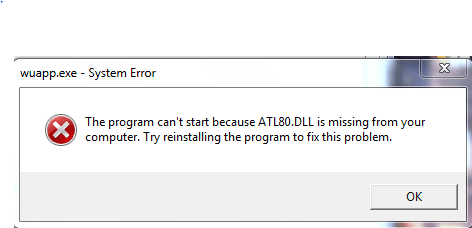
Screenshot of error message also attached.

Thank you!
 

Attachments

  • ATL80.DLL missing error.PNG
    ATL80.DLL missing error.PNG
    5.9 KB · Views: 36
Last edited:

My Computer My Computer

At a glance

Windows 7 Professional, SP 1, 32 bit; Intel(R...Intel(R) Core(TM)2 Duo CPU T7300 @ 2.00GHzRAM: 4.00 GB Samsung DIMM DDRGraphics Card: NVIDIA GeForce 8400M GS, 128 Mb
Computer type
Laptop
Computer Manufacturer/Model Number
Dell Vostro 1400
OS
Windows 7 Professional, SP 1, 32 bit; Intel(R) Core(TM)2 Duo CPU T7300
CPU
Intel(R) Core(TM)2 Duo CPU T7300 @ 2.00GHz
Motherboard
Dell Inc., 0TT361
Memory
RAM: 4.00 GB Samsung DIMM DDR
Graphics Card(s)
Graphics Card: NVIDIA GeForce 8400M GS, 128 Mb
Sound Card
SigmaTel High Definition Audio CODEC
Monitor(s) Displays
Generic PnP Monitor
Hard Drives
Hard Drives: C: Total - 152524 MB, Free - 85322 MB / ST9160821AS
Keyboard
Standard PS/2 Keyboard
Mouse
PS/2 Compatible Mouse
Antivirus
Avast! Free Antivirus 2015
Browser
Chrome
Other Info
Phoenix ROM BIOS PLUS Version 1.10 A09; Laptop Integrated Webcam; PIONEER DVD+/-RW DR-K17Y ATA Device.
The SFC scan results must have rolled off into the Persist files - but the CheckSUR scan gave me the data I needed...


I've uploaded a file - bg1aa.zip - to my OneDrive at Noel's OneDrive
Please download and save it.

Right-click on the saved file and select Extract all...
Change the target to C:\ and click on Extract
Close all windows (it would be a good idea to print these instructions!)

Now reboot to the Repair Environment - as soon as the machine restarts, start tapping F8 - this should bring up the Advanced Boot Menu, at the top of which should be the option 'Repair my Computer'
Pick that
You'll have to log in with your username and password.

Pick the option to use a Command Prompt
At the prompt type
DIR C:\bg1aa
hit the enter key - if you get a 'Not Found' error try
DIR D:\bg1aa
or
DIR E:\bg1aa


The drive letter in use when you find the folder will need to be substituted (for<drive>) into the following command...


XCOPY <drive>:\bg1aa <drive>:\windows\winsxs /y /i /s /v /h


(e.g. XCOPY P:\wfire P:\windows\winsxs /y /i /s /v /h )


run the command (it should take almost no time) and when the prompt returns, type
EXIT
and hit the Enter key to exit Command Prompt - reboot to Normal Mode Windows.

Now run SFC /SCANNOW in an Elevated Command Prompt
then reboot and upload the new CBS.log file to your reply
 

My Computer My Computer

At a glance

Win 7 x64 Home Premium (and x86 VirtualBox VM...i3 370M/i7 6500U8GB - finally :)/8GBit's an i3, dude!/dual Intel&nVidia
Computer type
Laptop
Computer Manufacturer/Model Number
Asus K52F or Lenovo B51-80
OS
Win 7 x64 Home Premium (and x86 VirtualBox VM)/Win10
CPU
i3 370M/i7 6500U
Motherboard
Asus/Lenovo
Memory
8GB - finally :)/8GB
Graphics Card(s)
it's an i3, dude!/dual Intel&nVidia
Sound Card
onboard
Monitor(s) Displays
15.6" built-in
Screen Resolution
1366x768/1920x1080
Hard Drives
750GB Seagate internal
Sundry external drives attached to other computers on the local network
1TB SSD on the Lenovo
PSU
n/a
Internet Speed
as much as I can get - usually on a dongle/phone, so <1MB/s
Antivirus
MSE/Defender
Browser
IE11/12/Edge/Chrome/FF(if I must)
Thank you! The D drive worked for the bg1aa file that you provided. The new CBS log is attached.
 

My Computer My Computer

At a glance

Windows 7 Professional, SP 1, 32 bit; Intel(R...Intel(R) Core(TM)2 Duo CPU T7300 @ 2.00GHzRAM: 4.00 GB Samsung DIMM DDRGraphics Card: NVIDIA GeForce 8400M GS, 128 Mb
Computer type
Laptop
Computer Manufacturer/Model Number
Dell Vostro 1400
OS
Windows 7 Professional, SP 1, 32 bit; Intel(R) Core(TM)2 Duo CPU T7300
CPU
Intel(R) Core(TM)2 Duo CPU T7300 @ 2.00GHz
Motherboard
Dell Inc., 0TT361
Memory
RAM: 4.00 GB Samsung DIMM DDR
Graphics Card(s)
Graphics Card: NVIDIA GeForce 8400M GS, 128 Mb
Sound Card
SigmaTel High Definition Audio CODEC
Monitor(s) Displays
Generic PnP Monitor
Hard Drives
Hard Drives: C: Total - 152524 MB, Free - 85322 MB / ST9160821AS
Keyboard
Standard PS/2 Keyboard
Mouse
PS/2 Compatible Mouse
Antivirus
Avast! Free Antivirus 2015
Browser
Chrome
Other Info
Phoenix ROM BIOS PLUS Version 1.10 A09; Laptop Integrated Webcam; PIONEER DVD+/-RW DR-K17Y ATA Device.
Hmmm - either the replacement didn't happen properly, or the error is actually in the registry.
I'll do some research and see what I can find out about the registry end of things.
 

My Computer My Computer

At a glance

Win 7 x64 Home Premium (and x86 VirtualBox VM...i3 370M/i7 6500U8GB - finally :)/8GBit's an i3, dude!/dual Intel&nVidia
Computer type
Laptop
Computer Manufacturer/Model Number
Asus K52F or Lenovo B51-80
OS
Win 7 x64 Home Premium (and x86 VirtualBox VM)/Win10
CPU
i3 370M/i7 6500U
Motherboard
Asus/Lenovo
Memory
8GB - finally :)/8GB
Graphics Card(s)
it's an i3, dude!/dual Intel&nVidia
Sound Card
onboard
Monitor(s) Displays
15.6" built-in
Screen Resolution
1366x768/1920x1080
Hard Drives
750GB Seagate internal
Sundry external drives attached to other computers on the local network
1TB SSD on the Lenovo
PSU
n/a
Internet Speed
as much as I can get - usually on a dongle/phone, so <1MB/s
Antivirus
MSE/Defender
Browser
IE11/12/Edge/Chrome/FF(if I must)
Thank you, Noel.

In the meantime, do you think it is safe to use this computer for more secure activities, like ordering from Amazon?

Before I came to this forum, I looked at some sites that suggested the problem could be malware. I ran Emsisoft, MalwareBytes, SuperAntispyware, and SpyBot without any serious problems found, although free Emsisoft was finding things with Behavior Blocker that mostly looked like cookies, until I disabled the search for PUP's. Some indicated that the behavior was similar to a backdoor vulnerability, but when I disabled the PUP selection, nothing whatsoever showed up after that. I had been using free Avast for protection, but uninstalled it temporarily, and also uninstalled free Emsisoft, and installed the trial of the full version of Emsisoft protection. Since using the new full-protection Emsisoft installation, nothing is showing up as a threat in Behavior Blocker, or otherwise. (I will probably return to Avast once the trial period for Emsisoft full protection is over.)

I also ran online Bitdefender and ESET with no threats found.

Then after I came to this forum, I ran MalwareBytes, SuperAntispyware, and CCleaner again, as well as adwcleaner, as recommended in post #4, with no enlightening results.

Another suggestion found online that I implemented was the possible need to download and run the Microsoft Visual C++ 2005 Service Pack 1 Redistributable Package MFC Security Update, as well as the Microsoft Visual C++ 2005 Service Pack 1 Redistributable Package ATL Security Update, as I mentioned in my initial post.

(There was still another suggestion that it could be the need for drivers to be updated. I checked the drivers and did update a couple of them, with no change to the problem.)

So my best guess is that the computer is likely safe from malware, but I wonder if you concur with that, as I am hesitating to use it for more secure activities.

Thanks so much for your help, Noel.
 

My Computer My Computer

At a glance

Windows 7 Professional, SP 1, 32 bit; Intel(R...Intel(R) Core(TM)2 Duo CPU T7300 @ 2.00GHzRAM: 4.00 GB Samsung DIMM DDRGraphics Card: NVIDIA GeForce 8400M GS, 128 Mb
Computer type
Laptop
Computer Manufacturer/Model Number
Dell Vostro 1400
OS
Windows 7 Professional, SP 1, 32 bit; Intel(R) Core(TM)2 Duo CPU T7300
CPU
Intel(R) Core(TM)2 Duo CPU T7300 @ 2.00GHz
Motherboard
Dell Inc., 0TT361
Memory
RAM: 4.00 GB Samsung DIMM DDR
Graphics Card(s)
Graphics Card: NVIDIA GeForce 8400M GS, 128 Mb
Sound Card
SigmaTel High Definition Audio CODEC
Monitor(s) Displays
Generic PnP Monitor
Hard Drives
Hard Drives: C: Total - 152524 MB, Free - 85322 MB / ST9160821AS
Keyboard
Standard PS/2 Keyboard
Mouse
PS/2 Compatible Mouse
Antivirus
Avast! Free Antivirus 2015
Browser
Chrome
Other Info
Phoenix ROM BIOS PLUS Version 1.10 A09; Laptop Integrated Webcam; PIONEER DVD+/-RW DR-K17Y ATA Device.
You've used some of the best malware tools around, so if they are consistently saying the system is clean, I'd tend to believe them.

Back Later
 

My Computer My Computer

At a glance

Win 7 x64 Home Premium (and x86 VirtualBox VM...i3 370M/i7 6500U8GB - finally :)/8GBit's an i3, dude!/dual Intel&nVidia
Computer type
Laptop
Computer Manufacturer/Model Number
Asus K52F or Lenovo B51-80
OS
Win 7 x64 Home Premium (and x86 VirtualBox VM)/Win10
CPU
i3 370M/i7 6500U
Motherboard
Asus/Lenovo
Memory
8GB - finally :)/8GB
Graphics Card(s)
it's an i3, dude!/dual Intel&nVidia
Sound Card
onboard
Monitor(s) Displays
15.6" built-in
Screen Resolution
1366x768/1920x1080
Hard Drives
750GB Seagate internal
Sundry external drives attached to other computers on the local network
1TB SSD on the Lenovo
PSU
n/a
Internet Speed
as much as I can get - usually on a dongle/phone, so <1MB/s
Antivirus
MSE/Defender
Browser
IE11/12/Edge/Chrome/FF(if I must)
Thanks, Noel. I was hoping I wasn't missing anything re: checking for malware. I can run the replacement again, if you think it would be worth a try?
 

My Computer My Computer

At a glance

Windows 7 Professional, SP 1, 32 bit; Intel(R...Intel(R) Core(TM)2 Duo CPU T7300 @ 2.00GHzRAM: 4.00 GB Samsung DIMM DDRGraphics Card: NVIDIA GeForce 8400M GS, 128 Mb
Computer type
Laptop
Computer Manufacturer/Model Number
Dell Vostro 1400
OS
Windows 7 Professional, SP 1, 32 bit; Intel(R) Core(TM)2 Duo CPU T7300
CPU
Intel(R) Core(TM)2 Duo CPU T7300 @ 2.00GHz
Motherboard
Dell Inc., 0TT361
Memory
RAM: 4.00 GB Samsung DIMM DDR
Graphics Card(s)
Graphics Card: NVIDIA GeForce 8400M GS, 128 Mb
Sound Card
SigmaTel High Definition Audio CODEC
Monitor(s) Displays
Generic PnP Monitor
Hard Drives
Hard Drives: C: Total - 152524 MB, Free - 85322 MB / ST9160821AS
Keyboard
Standard PS/2 Keyboard
Mouse
PS/2 Compatible Mouse
Antivirus
Avast! Free Antivirus 2015
Browser
Chrome
Other Info
Phoenix ROM BIOS PLUS Version 1.10 A09; Laptop Integrated Webcam; PIONEER DVD+/-RW DR-K17Y ATA Device.
Am still watching BG and I don't know what Noel thinks but personally I would run this as it doesn't involve Windows staring up and scans just about everything plus it doesn't take long.
Download Kaspersky Rescue Disk 10 a little more info at
Kaspersky Rescue Disk 10

There are other rescue bootable disks but this is usually the one to use - or at least I do.
 

My Computer My Computer

At a glance

Desk1 7 Home Prem / Desk2 10 Pro / Main lap A...Desk1 i5 3750K / Laptop i7 GTX 860M / Desk2 i...Desk1 8GB (1866) / Desk2 16GB (1333) / Laptop...Desk 1& 2NVidia GTX 650 & Laptops on board Intel
Computer type
PC/Desktop
Computer Manufacturer/Model Number
Own build (new) Desk1 / Asus ROG Win 7 / Desk2 1st build
OS
Desk1 7 Home Prem / Desk2 10 Pro / Main lap Asus ROG 10 Pro 2 laptop Toshiba 7 Pro Asus P2520 7 & 10
CPU
Desk1 i5 3750K / Laptop i7 GTX 860M / Desk2 i5 2500
Motherboard
Desk1 Asus P877-V / Desk2 Gigabyte H67 UD3H / Laptop ?
Memory
Desk1 8GB (1866) / Desk2 16GB (1333) / Laptop 8Gb DDR3
Graphics Card(s)
Desk 1& 2NVidia GTX 650 & Laptops on board Intel
Sound Card
Desk 1 & 2 -XONAR DG Realtek High Def audio Laptop
Monitor(s) Displays
Desk 1 Benq HD 2450 / Desk2 Philips 24" / Laptop 17.5"
Screen Resolution
1920x1080 D1 & D2 & Laptop 1
Hard Drives
Desk1 Samsung 120GB 830 SSD
Asus ROG 256GB 850 Pro SSD
Desk2 Samsung 840 256 SSD
Toshiba 120GB EVO
PSU
Desk 1 Corsair HX 1050/ Laptop ? / Desk 2 Corsair HX 650
Case
Desk 1 Cooler HAF XM ? Toshiba laptop / Desk2 Coolermaster
Cooling
Fans on all Desk1 -2 Desk2 - all Coolermasters 5 Laptop ?
Keyboard
Desk 1 MS Sidewinder X6 Desk 2 MS Sidewinder X 4
Mouse
Desk 1&2 - Gigabyte MS 900 gamer - laptop - Logitec wireless
Internet Speed
ADSL2+
Other Info
One other Desktop (tester) and spare Toshba laptop both with SSD's
Running Kaspersky 2016 ISS on all machines config'd identically
Logitec audio stereo systems on each machine (x3)
Canon MG5250MFC
Router/modem TP-Link running WPA2SK
Running the fix I posted again may work - make sure that you use the correct drive letter, and make a note of any error messages received in the process.
 

My Computer My Computer

At a glance

Win 7 x64 Home Premium (and x86 VirtualBox VM...i3 370M/i7 6500U8GB - finally :)/8GBit's an i3, dude!/dual Intel&nVidia
Computer type
Laptop
Computer Manufacturer/Model Number
Asus K52F or Lenovo B51-80
OS
Win 7 x64 Home Premium (and x86 VirtualBox VM)/Win10
CPU
i3 370M/i7 6500U
Motherboard
Asus/Lenovo
Memory
8GB - finally :)/8GB
Graphics Card(s)
it's an i3, dude!/dual Intel&nVidia
Sound Card
onboard
Monitor(s) Displays
15.6" built-in
Screen Resolution
1366x768/1920x1080
Hard Drives
750GB Seagate internal
Sundry external drives attached to other computers on the local network
1TB SSD on the Lenovo
PSU
n/a
Internet Speed
as much as I can get - usually on a dongle/phone, so <1MB/s
Antivirus
MSE/Defender
Browser
IE11/12/Edge/Chrome/FF(if I must)
Thanks IC and Noel.

I ran the fix again today - twice, actually. (Newest CBS Log is attached.) But the scannow results still gave the msg about being unable to fix corrupt files. (I'll run that Kaspersky scan next.)

I copied the following from the Repair My Computer command prompt window, after viewing the C drive Not Found message and then typing "DIR D:\bg1aa":

X:\windows\system32>DIR D:\bg1aa
Volume in Drive D has no label
Volume Serial Number is DC08-C659

Directory of DIR D:\bg1aa
12/10/2014 12:19 PM <DIR> . < that's one dot to the left
12/10/2014 12:19 PM <DIR> .. < two dots to the left
12/10/2014 12:19 PM <DIR> bg1aa
0 File(s) 0 bytes
3 DIR(s) 93,593,608,182 bytes free


I don't know if the above information is of any use, but there it is, just in case....

I'm also still wondering if there might be anything to the unusual possible fix I found and pasted to post #5 - what do you think?

Thanks again for helping me with this!
 

My Computer My Computer

At a glance

Windows 7 Professional, SP 1, 32 bit; Intel(R...Intel(R) Core(TM)2 Duo CPU T7300 @ 2.00GHzRAM: 4.00 GB Samsung DIMM DDRGraphics Card: NVIDIA GeForce 8400M GS, 128 Mb
Computer type
Laptop
Computer Manufacturer/Model Number
Dell Vostro 1400
OS
Windows 7 Professional, SP 1, 32 bit; Intel(R) Core(TM)2 Duo CPU T7300
CPU
Intel(R) Core(TM)2 Duo CPU T7300 @ 2.00GHz
Motherboard
Dell Inc., 0TT361
Memory
RAM: 4.00 GB Samsung DIMM DDR
Graphics Card(s)
Graphics Card: NVIDIA GeForce 8400M GS, 128 Mb
Sound Card
SigmaTel High Definition Audio CODEC
Monitor(s) Displays
Generic PnP Monitor
Hard Drives
Hard Drives: C: Total - 152524 MB, Free - 85322 MB / ST9160821AS
Keyboard
Standard PS/2 Keyboard
Mouse
PS/2 Compatible Mouse
Antivirus
Avast! Free Antivirus 2015
Browser
Chrome
Other Info
Phoenix ROM BIOS PLUS Version 1.10 A09; Laptop Integrated Webcam; PIONEER DVD+/-RW DR-K17Y ATA Device.
You need to use this command while in the Repair environment - you seem to have got an extra level into the folder structure...

XCOPY D:\bg1aa\bg1aa D:\windows\winsxs /y /i /s /v /h
 

My Computer My Computer

At a glance

Win 7 x64 Home Premium (and x86 VirtualBox VM...i3 370M/i7 6500U8GB - finally :)/8GBit's an i3, dude!/dual Intel&nVidia
Computer type
Laptop
Computer Manufacturer/Model Number
Asus K52F or Lenovo B51-80
OS
Win 7 x64 Home Premium (and x86 VirtualBox VM)/Win10
CPU
i3 370M/i7 6500U
Motherboard
Asus/Lenovo
Memory
8GB - finally :)/8GB
Graphics Card(s)
it's an i3, dude!/dual Intel&nVidia
Sound Card
onboard
Monitor(s) Displays
15.6" built-in
Screen Resolution
1366x768/1920x1080
Hard Drives
750GB Seagate internal
Sundry external drives attached to other computers on the local network
1TB SSD on the Lenovo
PSU
n/a
Internet Speed
as much as I can get - usually on a dongle/phone, so <1MB/s
Antivirus
MSE/Defender
Browser
IE11/12/Edge/Chrome/FF(if I must)
Here's the new CBS log. "Windows Resource Protection did not find any integrity violations."

So I guess ATL80.dll is now found! Maybe the problem is resolved completely? If so, do you know how the problem could have happened?

Thank you so much... I will test the areas where the problem popped up and let you know how that works.
 

My Computer My Computer

At a glance

Windows 7 Professional, SP 1, 32 bit; Intel(R...Intel(R) Core(TM)2 Duo CPU T7300 @ 2.00GHzRAM: 4.00 GB Samsung DIMM DDRGraphics Card: NVIDIA GeForce 8400M GS, 128 Mb
Computer type
Laptop
Computer Manufacturer/Model Number
Dell Vostro 1400
OS
Windows 7 Professional, SP 1, 32 bit; Intel(R) Core(TM)2 Duo CPU T7300
CPU
Intel(R) Core(TM)2 Duo CPU T7300 @ 2.00GHz
Motherboard
Dell Inc., 0TT361
Memory
RAM: 4.00 GB Samsung DIMM DDR
Graphics Card(s)
Graphics Card: NVIDIA GeForce 8400M GS, 128 Mb
Sound Card
SigmaTel High Definition Audio CODEC
Monitor(s) Displays
Generic PnP Monitor
Hard Drives
Hard Drives: C: Total - 152524 MB, Free - 85322 MB / ST9160821AS
Keyboard
Standard PS/2 Keyboard
Mouse
PS/2 Compatible Mouse
Antivirus
Avast! Free Antivirus 2015
Browser
Chrome
Other Info
Phoenix ROM BIOS PLUS Version 1.10 A09; Laptop Integrated Webcam; PIONEER DVD+/-RW DR-K17Y ATA Device.
Great - with any luck your error message will have gone as well.
There's no errors in the CBS data at all currently.
 

My Computer My Computer

At a glance

Win 7 x64 Home Premium (and x86 VirtualBox VM...i3 370M/i7 6500U8GB - finally :)/8GBit's an i3, dude!/dual Intel&nVidia
Computer type
Laptop
Computer Manufacturer/Model Number
Asus K52F or Lenovo B51-80
OS
Win 7 x64 Home Premium (and x86 VirtualBox VM)/Win10
CPU
i3 370M/i7 6500U
Motherboard
Asus/Lenovo
Memory
8GB - finally :)/8GB
Graphics Card(s)
it's an i3, dude!/dual Intel&nVidia
Sound Card
onboard
Monitor(s) Displays
15.6" built-in
Screen Resolution
1366x768/1920x1080
Hard Drives
750GB Seagate internal
Sundry external drives attached to other computers on the local network
1TB SSD on the Lenovo
PSU
n/a
Internet Speed
as much as I can get - usually on a dongle/phone, so <1MB/s
Antivirus
MSE/Defender
Browser
IE11/12/Edge/Chrome/FF(if I must)
Back
Top