bluegreen1
New member
- Local time
- 5:22 PM
- Messages
- 21
Hello, I read with interest that tom982 has a way of giving special instructions for repairing corrupt or missing files that sfc /scannow is unable to repair. Maybe others can also help me with this, but I only looked at the following thread mentioning tom982 (so far): http://www.sevenforums.com/performa...ou-fix-corrupted-files-found-sfc-scannow.html
Here's the problem that was posted in the CBS log (everything else seems to be okay with the log):
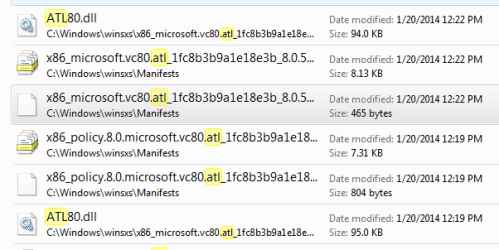
2014-12-07 13:14:57, Info CSI 0000019b [SR] Cannot repair member file [l:18{9}]"ATL80.dll" of Microsoft.VC80.ATL, Version = 8.0.50727.6195, pA = PROCESSOR_ARCHITECTURE_INTEL (0), Culture neutral, VersionScope neutral, PublicKeyToken = {l:8 b:1fc8b3b9a1e18e3b}, Type = [l:10{5}]"win32", TypeName neutral, PublicKey neutral in the store, file is missing
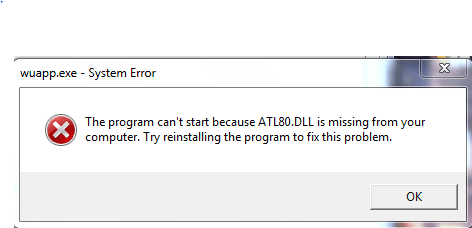
I also downloaded and ran the Microsoft Visual C++ 2005 Service Pack 1 Redistributable Package MFC Security Update, as well as the Microsoft Visual C++ 2005 Service Pack 1 Redistributable Package ATL Security Update. I then tested one of the applications that gave the missing ATL80.dll message (Snipping Tool), and did not get the error message. But then I checked again, and the missing ATL80.dll error is returning again, consistently.
I will be very grateful for any help you can give me. Thank you very much!
Here's the problem that was posted in the CBS log (everything else seems to be okay with the log):
2014-12-07 13:14:57, Info CSI 0000019b [SR] Cannot repair member file [l:18{9}]"ATL80.dll" of Microsoft.VC80.ATL, Version = 8.0.50727.6195, pA = PROCESSOR_ARCHITECTURE_INTEL (0), Culture neutral, VersionScope neutral, PublicKeyToken = {l:8 b:1fc8b3b9a1e18e3b}, Type = [l:10{5}]"win32", TypeName neutral, PublicKey neutral in the store, file is missing
I also downloaded and ran the Microsoft Visual C++ 2005 Service Pack 1 Redistributable Package MFC Security Update, as well as the Microsoft Visual C++ 2005 Service Pack 1 Redistributable Package ATL Security Update. I then tested one of the applications that gave the missing ATL80.dll message (Snipping Tool), and did not get the error message. But then I checked again, and the missing ATL80.dll error is returning again, consistently.
I will be very grateful for any help you can give me. Thank you very much!
My Computer
At a glance
Windows 7 Professional, SP 1, 32 bit; Intel(R...Intel(R) Core(TM)2 Duo CPU T7300 @ 2.00GHzRAM: 4.00 GB Samsung DIMM DDRGraphics Card: NVIDIA GeForce 8400M GS, 128 Mb
- Computer type
- Laptop
- Computer Manufacturer/Model Number
- Dell Vostro 1400
- OS
- Windows 7 Professional, SP 1, 32 bit; Intel(R) Core(TM)2 Duo CPU T7300
- CPU
- Intel(R) Core(TM)2 Duo CPU T7300 @ 2.00GHz
- Motherboard
- Dell Inc., 0TT361
- Memory
- RAM: 4.00 GB Samsung DIMM DDR
- Graphics Card(s)
- Graphics Card: NVIDIA GeForce 8400M GS, 128 Mb
- Sound Card
- SigmaTel High Definition Audio CODEC
- Monitor(s) Displays
- Generic PnP Monitor
- Hard Drives
- Hard Drives: C: Total - 152524 MB, Free - 85322 MB / ST9160821AS
- Keyboard
- Standard PS/2 Keyboard
- Mouse
- PS/2 Compatible Mouse
- Antivirus
- Avast! Free Antivirus 2015
- Browser
- Chrome
- Other Info
- Phoenix ROM BIOS PLUS Version 1.10 A09; Laptop Integrated Webcam; PIONEER DVD+/-RW DR-K17Y ATA Device.