Too many processes, modules and services running simultaneously on pc

Lord of Rings

New member
Member
Local time
1:26 PM
Messages
35
Hello everybody,

I have discovered a large number of modules (291), drivers (280), services (180) etc running on my computer without my explicit permission.

What is an average number of modules and drivers running on a typical windows 7 computer? I reckon that there is too much of that stuff running on my computer simultaneously. They are eating up my resources and slowing down my computer.

Is there a handy way (utility program) to control all these processes and modules? What's the best approach to that problem?

LOR
 

My Computer

Computer Manufacturer/Model Number
N/A
OS
N/A
CPU
N/A
Motherboard
N/A
Memory
N/A
Graphics Card(s)
N/A
Sound Card
N/A
Monitor(s) Displays
N/A
Hard Drives
N/A
PSU
N/A
Case
N/A
Cooling
N/A
All of those numbers are very reasonable except modules which are in fact very low. Under normal circumstances the resources consumed by system services and drivers are low and have little impact on performance. I see no reason to believe your situation is any different.

It would help if you could fill out the system specs. At present we know nothing at all about your computer.
 

My Computer

Computer type
PC/Desktop
Computer Manufacturer/Model Number
HP
OS
Windows 7 Pro 64 bit
CPU
Xeon W3520
Memory
8 GB
Graphics Card(s)
Nvidia Geforce 210
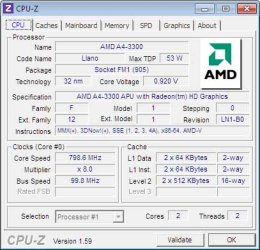
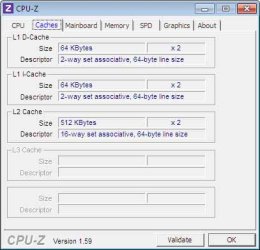
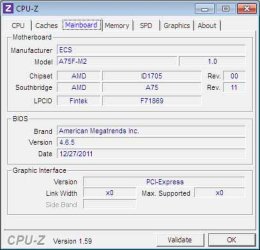
It's a windows 7 x64 system with the following components:
 

Attachments

  • sys01.jpg
    sys01.jpg
    50.4 KB · Views: 17
  • sys02.jpg
    sys02.jpg
    39.5 KB · Views: 17
  • sys03.jpg
    sys03.jpg
    39.9 KB · Views: 17
  • sys04.jpg
    sys04.jpg
    38.7 KB · Views: 17

My Computer

Computer Manufacturer/Model Number
N/A
OS
N/A
CPU
N/A
Motherboard
N/A
Memory
N/A
Graphics Card(s)
N/A
Sound Card
N/A
Monitor(s) Displays
N/A
Hard Drives
N/A
PSU
N/A
Case
N/A
Cooling
N/A
It would be best if you filled out the system specs in your user profile. That way they will be available to anyone at any time without finding this one post.
 

My Computer

Computer type
PC/Desktop
Computer Manufacturer/Model Number
HP
OS
Windows 7 Pro 64 bit
CPU
Xeon W3520
Memory
8 GB
Graphics Card(s)
Nvidia Geforce 210
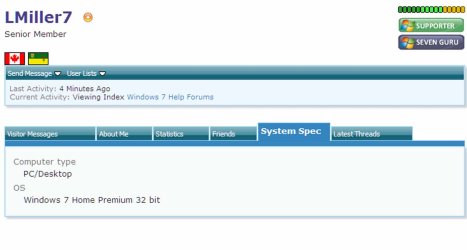
Like this...
 

Attachments

  • SysLMiller7.jpg
    SysLMiller7.jpg
    53.2 KB · Views: 0

My Computer

Computer Manufacturer/Model Number
N/A
OS
N/A
CPU
N/A
Motherboard
N/A
Memory
N/A
Graphics Card(s)
N/A
Sound Card
N/A
Monitor(s) Displays
N/A
Hard Drives
N/A
PSU
N/A
Case
N/A
Cooling
N/A

My Computer

Computer type
PC/Desktop
Computer Manufacturer/Model Number
Home made Desktop
OS
Windows 10 Pro. 64/ version 1709 Windows 7 Pro/64
CPU
Intel i7-6800K @ 4.3
Motherboard
ASUS X-99 Deluxe II
Memory
Corsair Platinum 16 gig @2400
Graphics Card(s)
EVGA GTX 1070 OC
Monitor(s) Displays
Asus 27" LED LCD/VE278Q
Screen Resolution
1920-1080 or 1280-720 HDMI
Hard Drives
INTEL SSD 730-240 Gb Sata 3.0/
PSU
EVGA Platium 1200W
Case
Phanteks Luxe Tempered Glass 8 fans/ one radiator
Cooling
XSPC/ Water Cooled CPU
Keyboard
Das 4 Professional
Mouse
Logitech M705/MX Anywhere 2-S
Internet Speed
100 mbits
Antivirus
Microsoft Security Essentials/ Malwarebytes Premium 3.0/ SAS
Browser
I.E. 11 default/Firefox/ ISP Time Warner Cable/Spectrum
Other Info
LG BluRay Burner/
Sound system-KLipsch-THX/
Icy Dock ssd Hot Swap bays.
Back
Top