Toolbar Positions on Taskbar Not Saved?

Munna2002

New member
Local time
8:55 PM
Messages
7
I recently added two custom Toolbars for the Desktop and the Quick Launch folders to my Windows taskbar. I positioned the Toolbars and locked the taskbar as per to my liking. However, after restarting the PC, my toolbars are randomly moved somewhere else on the taskbar.

How can I retain my toolbars' positions after restarting the PC? It's frustrating to adjust the toolbars after every boot-up.
 

My Computer My Computer

OS
Windows 7

My Computer My Computer

Computer Manufacturer/Model Number
Custom Build
OS
Windows 7 Ultimate x64/Windows 8 Consumer Preview x64/Ubuntu 11.04
CPU
Intel Pentium Dual Core E6700 3.2GHz
Motherboard
ASUS P5G41T-M LX
Memory
Strontium 8192MB DDR3 1333Mhz
Graphics Card(s)
msi GeForce N560GTX-M2D1GD5 1GB
Sound Card
Realtek HD Audio
Monitor(s) Displays
CHIMEI CMV 221D 22"
Screen Resolution
1680x1050
Hard Drives
Seagate Barracuda LP Green 3.5'' 2TB Internal HDD 5900RPM + WD Elements Desktop 1TB External HDD 7200RPM
PSU
SHAW Viper-1500w Gaming PSU
Case
Black eMaxx ATX Mini Tower Case
Keyboard
Microsoft Wireless Keyboard 1000
Mouse
Microsoft Wireless Optical Mouse 2000
Internet Speed
100GB @ 4.76Mbps
Thanks! I tried following the directions in your link and applied the attached registry item, but it did not work. After a restart, my toolbar positions resetted to another location. Is there something wrong with my registry file or is it another issue?

View attachment Default_Removed_NoSaveSettings.reg
 

My Computer My Computer

OS
Windows 7
No, as far as I can tell, the reg file is fine. What toolbars did you add?
 

My Computer My Computer

Computer Manufacturer/Model Number
Custom Build
OS
Windows 7 Ultimate x64/Windows 8 Consumer Preview x64/Ubuntu 11.04
CPU
Intel Pentium Dual Core E6700 3.2GHz
Motherboard
ASUS P5G41T-M LX
Memory
Strontium 8192MB DDR3 1333Mhz
Graphics Card(s)
msi GeForce N560GTX-M2D1GD5 1GB
Sound Card
Realtek HD Audio
Monitor(s) Displays
CHIMEI CMV 221D 22"
Screen Resolution
1680x1050
Hard Drives
Seagate Barracuda LP Green 3.5'' 2TB Internal HDD 5900RPM + WD Elements Desktop 1TB External HDD 7200RPM
PSU
SHAW Viper-1500w Gaming PSU
Case
Black eMaxx ATX Mini Tower Case
Keyboard
Microsoft Wireless Keyboard 1000
Mouse
Microsoft Wireless Optical Mouse 2000
Internet Speed
100GB @ 4.76Mbps
No, as far as I can tell, the reg file is fine. What toolbars did you add?

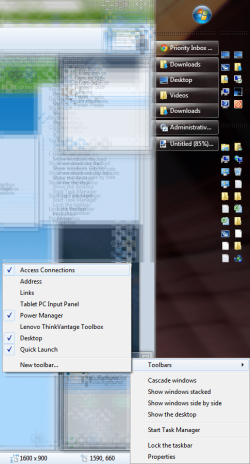
I added two toolbars. One for the Desktop and the other for the Quick Launch folder (%appdata%\Microsoft\Internet Explorer\Quick Launch).

See attached screenshot for the desired toolbar positions. After the restart, the toolbars are no longer in the same position. How can I fix this?

Toolbar.png
 

My Computer My Computer

OS
Windows 7
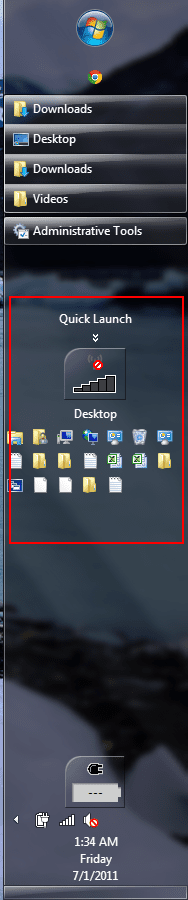
And here's the messed up looking toolbar with out of place positions:

Toolbar2.png
 

My Computer My Computer

OS
Windows 7
First of all, make sure once again that the taskbar is locked.

Is the problem only linked with Restarts? Try Shutting Down and then booting again. Also, when did this problem start? Do you have a System Restore point available? Just checking as a last resort. Oh, and try un-installing/removing both toolbars. One of the toolbars could be causing the problem while the other one is 'innocent'. :)
 

My Computer My Computer

Computer Manufacturer/Model Number
Custom Build
OS
Windows 7 Ultimate x64/Windows 8 Consumer Preview x64/Ubuntu 11.04
CPU
Intel Pentium Dual Core E6700 3.2GHz
Motherboard
ASUS P5G41T-M LX
Memory
Strontium 8192MB DDR3 1333Mhz
Graphics Card(s)
msi GeForce N560GTX-M2D1GD5 1GB
Sound Card
Realtek HD Audio
Monitor(s) Displays
CHIMEI CMV 221D 22"
Screen Resolution
1680x1050
Hard Drives
Seagate Barracuda LP Green 3.5'' 2TB Internal HDD 5900RPM + WD Elements Desktop 1TB External HDD 7200RPM
PSU
SHAW Viper-1500w Gaming PSU
Case
Black eMaxx ATX Mini Tower Case
Keyboard
Microsoft Wireless Keyboard 1000
Mouse
Microsoft Wireless Optical Mouse 2000
Internet Speed
100GB @ 4.76Mbps

My Computer My Computer

Computer type
Laptop
Computer Manufacturer/Model Number
Samsung NP 535U
OS
Windows 8 (64bit)
CPU
AMD A6
Memory
8GB
Hard Drives
500GB
Antivirus
avast 8.0
Back
Top