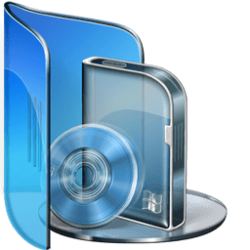
Toolbox icon

7ntn

New member
Local time
9:21 AM
Messages
23
New to the forum, HI there!
I'm in 7 bliss this weekend just playing around with 7. Best thing since ear hair trimmers! :p

Looking for a toolbox icon for 7 if anyone knows where one might be.
Thanks!
Mark
 

My Computer

OS
Windows 7

My Computer

Computer Manufacturer/Model Number
Custom
OS
Windows 7 Professional x64
CPU
Intel i7 2600K OC'd @ 4620 MHz
Motherboard
Asus P8Z68-V Pro
Memory
16GB GSkill Sniper 2133 Mhz (4x4GB)
Graphics Card(s)
EVGA GeForce GTX 480 SuperClocked+
Sound Card
Realtek High Definition Audio
Monitor(s) Displays
2x Acer S273HLbmii 27"
Screen Resolution
2 x 1920x1080
Hard Drives
64GB Crucial M4 SSD

Storage: Hitachi 1TB 5400RPM, Samsung 1.5TB 5400RPM
PSU
Corsair HW Series 750w (modular)
Case
Cooler Master HAF 932 Advanced Blue Edition
Cooling
CM Hyper 212+ CPU cooler, 3x 230mm + 1x 140mm case fans
Keyboard
Logitech MK320 (wireless)
Mouse
Logitech MK320 (wireless)
Internet Speed
30 Mb/s : 2 Mb/s
Very good. Thanks!
I did a search and found some already but actually there is one that is already in the 7 bundle but errrr...I can't find it. It was a red toolbox.....I liked it fine.
I've created a utilities folder and wanted it to look more cool.
:)
 

My Computer

OS
Windows 7
Hmm... I will poke around on my machine. I will post back if I see anything.
 

My Computer

Computer Manufacturer/Model Number
Custom
OS
Windows 7 Professional x64
CPU
Intel i7 2600K OC'd @ 4620 MHz
Motherboard
Asus P8Z68-V Pro
Memory
16GB GSkill Sniper 2133 Mhz (4x4GB)
Graphics Card(s)
EVGA GeForce GTX 480 SuperClocked+
Sound Card
Realtek High Definition Audio
Monitor(s) Displays
2x Acer S273HLbmii 27"
Screen Resolution
2 x 1920x1080
Hard Drives
64GB Crucial M4 SSD

Storage: Hitachi 1TB 5400RPM, Samsung 1.5TB 5400RPM
PSU
Corsair HW Series 750w (modular)
Case
Cooler Master HAF 932 Advanced Blue Edition
Cooling
CM Hyper 212+ CPU cooler, 3x 230mm + 1x 140mm case fans
Keyboard
Logitech MK320 (wireless)
Mouse
Logitech MK320 (wireless)
Internet Speed
30 Mb/s : 2 Mb/s
I found a good one on google......
 

Attachments

  • toolbox.png
    toolbox.png
    6.8 KB · Views: 1,942

My Computer

Computer type
PC/Desktop
Computer Manufacturer/Model Number
Self Build
OS
MS Windows 7 Professional 64-bit SP1
CPU
AMD FX(tm)-6100 Six-Core Processor Socket AM3+ (942)
Motherboard
ASUSTeK COMPUTER INC. SABERTOOTH 990FX (AM3r2)
Memory
8.00 GB Dual-Channel DDR3 @ 802MHz (11-11-11-36) 1.5Volts
Graphics Card(s)
NVIDIA GeForce GTX 560 Ti
Sound Card
Onboard Realtek HD
Monitor(s) Displays
shimian (1920x1080@60Hz)
Screen Resolution
1920*1080
Hard Drives
OCZ-AGIL ITY3 SATA Disk Device 120GB
PSU
Corsair TX 750
Case
Corsair
Cooling
WaterCooled
Keyboard
Microsoft Wired
Mouse
Logitech USB Optical TiltWheel Mouse
Internet Speed
Realtek PCIe GBE Family Controller 20MB*1MB
Antivirus
Avast
Browser
Firefox
Other Info
150GB Internal Hard Drive for Backing Up Important Files -
Hauppauge Nova-DT Dual DVB-T Tuner Device (+IR) -
USB PC Camera with Mic (SN9C105)
(Sorry for a not so timely reply; I just joined the forum.)
I too wanted an appropriate icon for my utilities folder.
I found it in \windows\system32\mmc.exe (the Microsoft Management Console).
 

My Computer

Computer type
PC/Desktop
Computer Manufacturer/Model Number
custom build
OS
Windows 7 Home Premium 64bit upgraded to Windows 10 Home
CPU
Intel Core2 Duo 2.53GHz
Motherboard
ECS
Memory
6.00GB
Graphics Card(s)
NVIDIA GeForce GT 240
Monitor(s) Displays
Samsung
Screen Resolution
1600x900
Hard Drives
Mushkin SSD 40GB SATA
Samsung 1TB SATA
Seagate 1TB SATA
Mouse
Kensington Expert Mouse Wireless
Antivirus
Vipre Internet Security 2014
Browser
Firefox
Rhor's Icons are the best!
 

Attachments

  • 07 - Utilities Blue.png
    07 - Utilities Blue.png
    33.1 KB · Views: 21

My Computer

Computer type
Laptop
Computer Manufacturer/Model Number
Toshiba Qosmio
OS
Windows 7 Ultimate 64bit
CPU
Intel Core I7
There are lots of really nice ones you can Google, download, and convert to icons if they aren't already of course, but in Windows 7 itself there's the red toolbox one in the Microsoft Mgmt Console app. Do  [ Change Icon… ]  on the item you want to change and in the Look for icons in this file:  field enter "%systemroot%\system32\mmc.exe" and hit Enter (or click Browse…), you'll see it there … may even be the only one there, if I remember right.

 

My Computer

OS
Windows® 7 (64-bit)
CPU
intel® Core™ i5-4690 @ 3.50 GHz
Motherboard
GIGABYTE™ H97-D3H
Memory
8 GB DDR3
Back
Top