
Toshiba C55-B5202 asks BIOS password?

Imrankhan

Enthusiast
Power User
VIP
Local time
2:35 PM
Messages
206
Location
Chennai, India
I have Toshiba C55-B5202 laptop. Yesterday when I turned on It showed Enter Password out of nowhere. To my knowledge it must be BIOS password. I searched for this in google, and I found few people had the same problem with different models of Toshiba laptops. Some people sorted out the problem by using jumpers on the motherboard.
I don't know which jumer to short in my laptop model. I had assembled PCs, so I have no hesitation in opening my laptop .Please help me. I am out of warranty.
 

Attachments
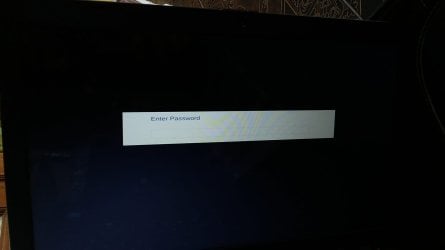
  • 20151004_121037.jpg
    20151004_121037.jpg
    64.8 KB · Views: 0
Last edited:

My Computer My Computer

At a glance

Windows 7 Home Premium 64bitIntel Core i7 2670QMSamsung 8GB 1333MhznVidia Geforce 540M GT 2GB
Computer type
Laptop
Computer Manufacturer/Model Number
Dell XPS L502x
OS
Windows 7 Home Premium 64bit
CPU
Intel Core i7 2670QM
Motherboard
Intel HM67 Mobile Express Chipset
Memory
Samsung 8GB 1333Mhz
Graphics Card(s)
nVidia Geforce 540M GT 2GB
Sound Card
Realtek High Definition Audio
Monitor(s) Displays
15.6" Dell Standard RGB-LED Backlit Display
Screen Resolution
1366x768
Hard Drives
Seagate Momentus 2.5" 750GB HDD 5400rpm
Internet Speed
3.1 Mbits/s
Antivirus
AVG Free, Kaspersky
Browser
Google chrome
Imrankhan mate I have been messing with Toshiba laptops for some time now and know of no jumpers in fact the last time I dealt with jumpers was on some very old XP machines and they were desktops.

Now it is possible you have been infected and as you cannot login I am suggesting you run this to check http://support.kaspersky.com/4162 you will of course need to make a bootable disk and set the BIOS to boot from the disk or stick whichever you intend to use.

I don't think the password message is coming from the BIOS itself as unless I am terribly wrong the BIOS password is used only for resetting BIOS functions within the BIOS.

Now some system specs on that machine please and please include the PART NO on the sticker on the back of the machine as it denotes where and for where the machine was manufactured for see pic
http://www.sevenforums.com/tutorials/180324-system-info-see-your-system-specs.html
 

Attachments

  • PART NO.PNG
    PART NO.PNG
    112.5 KB · Views: 0

My Computer My Computer

At a glance

Desk1 7 Home Prem / Desk2 10 Pro / Main lap A...Desk1 i5 3750K / Laptop i7 GTX 860M / Desk2 i...Desk1 8GB (1866) / Desk2 16GB (1333) / Laptop...Desk 1& 2NVidia GTX 650 & Laptops on board Intel
Computer type
PC/Desktop
Computer Manufacturer/Model Number
Own build (new) Desk1 / Asus ROG Win 7 / Desk2 1st build
OS
Desk1 7 Home Prem / Desk2 10 Pro / Main lap Asus ROG 10 Pro 2 laptop Toshiba 7 Pro Asus P2520 7 & 10
CPU
Desk1 i5 3750K / Laptop i7 GTX 860M / Desk2 i5 2500
Motherboard
Desk1 Asus P877-V / Desk2 Gigabyte H67 UD3H / Laptop ?
Memory
Desk1 8GB (1866) / Desk2 16GB (1333) / Laptop 8Gb DDR3
Graphics Card(s)
Desk 1& 2NVidia GTX 650 & Laptops on board Intel
Sound Card
Desk 1 & 2 -XONAR DG Realtek High Def audio Laptop
Monitor(s) Displays
Desk 1 Benq HD 2450 / Desk2 Philips 24" / Laptop 17.5"
Screen Resolution
1920x1080 D1 & D2 & Laptop 1
Hard Drives
Desk1 Samsung 120GB 830 SSD
Asus ROG 256GB 850 Pro SSD
Desk2 Samsung 840 256 SSD
Toshiba 120GB EVO
PSU
Desk 1 Corsair HX 1050/ Laptop ? / Desk 2 Corsair HX 650
Case
Desk 1 Cooler HAF XM ? Toshiba laptop / Desk2 Coolermaster
Cooling
Fans on all Desk1 -2 Desk2 - all Coolermasters 5 Laptop ?
Keyboard
Desk 1 MS Sidewinder X6 Desk 2 MS Sidewinder X 4
Mouse
Desk 1&2 - Gigabyte MS 900 gamer - laptop - Logitec wireless
Internet Speed
ADSL2+
Other Info
One other Desktop (tester) and spare Toshba laptop both with SSD's
Running Kaspersky 2016 ISS on all machines config'd identically
Logitec audio stereo systems on each machine (x3)
Canon MG5250MFC
Router/modem TP-Link running WPA2SK
I turn my laptop on, and It says Enter Password, right after Toshiba logo. Esc, F12,F2 nothing works.
 

My Computer My Computer

At a glance

Windows 7 Home Premium 64bitIntel Core i7 2670QMSamsung 8GB 1333MhznVidia Geforce 540M GT 2GB
Computer type
Laptop
Computer Manufacturer/Model Number
Dell XPS L502x
OS
Windows 7 Home Premium 64bit
CPU
Intel Core i7 2670QM
Motherboard
Intel HM67 Mobile Express Chipset
Memory
Samsung 8GB 1333Mhz
Graphics Card(s)
nVidia Geforce 540M GT 2GB
Sound Card
Realtek High Definition Audio
Monitor(s) Displays
15.6" Dell Standard RGB-LED Backlit Display
Screen Resolution
1366x768
Hard Drives
Seagate Momentus 2.5" 750GB HDD 5400rpm
Internet Speed
3.1 Mbits/s
Antivirus
AVG Free, Kaspersky
Browser
Google chrome
Back
Top