Toshiba Laptop RAM Upgrade not recognized in windows

stoes

New member
Local time
6:35 PM
Messages
1
Hello all,

Question regarding upgrading RAM for my laptop.

This is my setup:
- Toshiba laptop L755-1D5
- Intel Core i7-2670
- 4 gig ram
- Windows Home Premium 64 Bit

So I wanted to add some more RAM (2GB) and I ordered some named Ramaxel "RMT1970ED48E8F1333".
The problem is that it doesn"t get recognized in Windows and in the BIOS.

What I did:

- I swapped 4GB and the new 2GB because I have 2 slots. BIOS still showed 4GB.
- I solely used the 2GB but the system won't boot up.
- I updated the BIOS, no use.
- The "Intel Turbo boost" is enabled.
- The "Maximum memory" option in the boot options tab of msconfig is disabled.

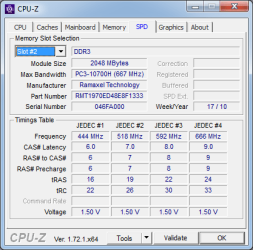
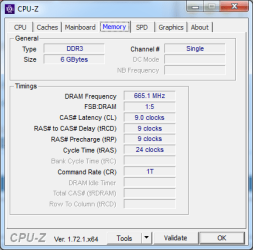
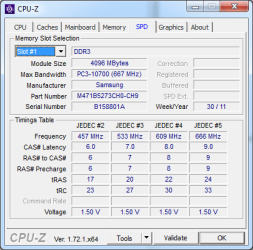
I used CPU-Z to find out if Windows recognizes the added RAM and it does.
Both RAM are SO-DIMM, DDR3 SDRAM which use a memory speed of DDR3-1333 and are 64 bit.

I saw that the Windows 7 Home Premium can have more than 4 gig ram.

Someone has an idea of what could be the root cause of Windows/BIOS not recognizing my added RAM?

The person who finds the solution is golden!

brgds
 

Attachments
  • ToshibaRAM.png
    ToshibaRAM.png
    12.4 KB · Views: 12
  • RamaxelRAM.png
    RamaxelRAM.png
    12.6 KB · Views: 12
  • RAMOverview.png
    RAMOverview.png
    12.4 KB · Views: 13
  • EverestSamsungRAM.png
    EverestSamsungRAM.png
    25.9 KB · Views: 0
  • EverestRamaxelRAM.png
    EverestRamaxelRAM.png
    24.8 KB · Views: 0

My Computer My Computer

At a glance

Windows 7 Home Premium 64 Bit
Computer type
PC/Desktop
OS
Windows 7 Home Premium 64 Bit
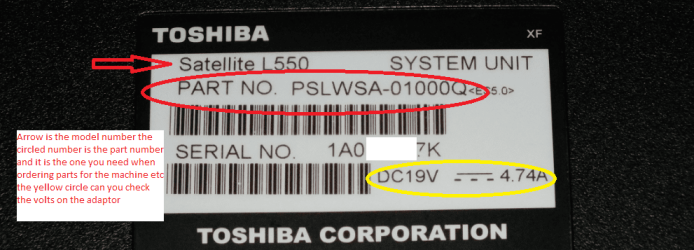
Hello and welcome stoes now mate when you order comments it is always a good idea to check the Toshiba site for compatibility and when you are checking you need to quote the PART NO: as in my pic as that denotes where it was made and where it was made for .

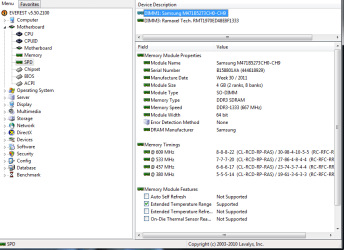
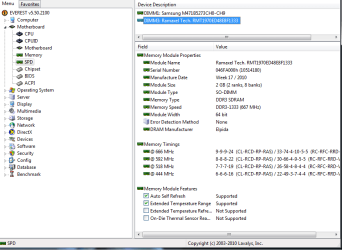
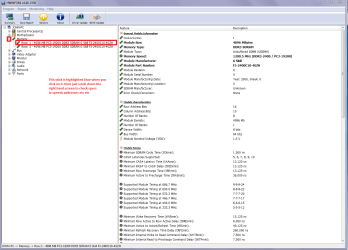
A good way of telling what you have in RAM and if it is even compatible with the other - is to use my ditty here and in PART B: you will see VERY detailed info on the RAM sticks see my pic - you will need to scroll down the screen to see it all. You might even see they are not really close in the specs

Personally I do not like mixing brands and one large stick is always better than two smaller ones because it will be the most matched in specs.

Using HW Info

PART A:
You can test the volts on the PSU with HW Info
HWiNFO, HWiNFO32/64 - Download < download theright bit version and close the right hand window select Sensors and scrolldown to the power section where you will see what the volts are doing see mypic. Now the section you want will be labelled - fpr example Asus boardsusually have "Nuvoton" and Gigabyte boards "ITE" in anycase the section you want will have Vbatt or VBAT in it (dead give away)
The original right hand window shows the machine running and is handy for thatbut for looking at the components in some detail close it and use the main lefthand side panel
FOR OTHER COMPONENTS
PART B:
Open each small square with + in it on the section the components are in andthen click on the individual component/s (it will highlight in blue) - in theright hand side will appear all sorts of details including brands speeds andother essential info that particular device. See pic for example.
detailed specs on the RAM sticks when clicked on.
 

Attachments

  • HW INFO-RAM.PNG
    HW INFO-RAM.PNG
    52 KB · Views: 1
  • PART NO.PNG
    PART NO.PNG
    112.5 KB · Views: 0

My Computer My Computer

At a glance

Desk1 7 Home Prem / Desk2 10 Pro / Main lap A...Desk1 i5 3750K / Laptop i7 GTX 860M / Desk2 i...Desk1 8GB (1866) / Desk2 16GB (1333) / Laptop...Desk 1& 2NVidia GTX 650 & Laptops on board Intel
Computer type
PC/Desktop
Computer Manufacturer/Model Number
Own build (new) Desk1 / Asus ROG Win 7 / Desk2 1st build
OS
Desk1 7 Home Prem / Desk2 10 Pro / Main lap Asus ROG 10 Pro 2 laptop Toshiba 7 Pro Asus P2520 7 & 10
CPU
Desk1 i5 3750K / Laptop i7 GTX 860M / Desk2 i5 2500
Motherboard
Desk1 Asus P877-V / Desk2 Gigabyte H67 UD3H / Laptop ?
Memory
Desk1 8GB (1866) / Desk2 16GB (1333) / Laptop 8Gb DDR3
Graphics Card(s)
Desk 1& 2NVidia GTX 650 & Laptops on board Intel
Sound Card
Desk 1 & 2 -XONAR DG Realtek High Def audio Laptop
Monitor(s) Displays
Desk 1 Benq HD 2450 / Desk2 Philips 24" / Laptop 17.5"
Screen Resolution
1920x1080 D1 & D2 & Laptop 1
Hard Drives
Desk1 Samsung 120GB 830 SSD
Asus ROG 256GB 850 Pro SSD
Desk2 Samsung 840 256 SSD
Toshiba 120GB EVO
PSU
Desk 1 Corsair HX 1050/ Laptop ? / Desk 2 Corsair HX 650
Case
Desk 1 Cooler HAF XM ? Toshiba laptop / Desk2 Coolermaster
Cooling
Fans on all Desk1 -2 Desk2 - all Coolermasters 5 Laptop ?
Keyboard
Desk 1 MS Sidewinder X6 Desk 2 MS Sidewinder X 4
Mouse
Desk 1&2 - Gigabyte MS 900 gamer - laptop - Logitec wireless
Internet Speed
ADSL2+
Other Info
One other Desktop (tester) and spare Toshba laptop both with SSD's
Running Kaspersky 2016 ISS on all machines config'd identically
Logitec audio stereo systems on each machine (x3)
Canon MG5250MFC
Router/modem TP-Link running WPA2SK
It appears that the added RAM is incompatible, defective, not receiving proper voltage, or some similar issue. I will leave such problems to others.

CPU-Z works by reading the memory identification information from the RAM modules. The ability to do this does not necessarily imply that the modules are good or fully compatible. Testing RAM modules to see if they are functional or good cannot be done while Windows is running.
 

My Computer My Computer

At a glance

Windows 7 Pro 64 bitXeon W35208 GBNvidia Geforce 210
Computer type
PC/Desktop
Computer Manufacturer/Model Number
HP
OS
Windows 7 Pro 64 bit
CPU
Xeon W3520
Memory
8 GB
Graphics Card(s)
Nvidia Geforce 210

My Computer My Computer

At a glance

Windows 7 Ultimate x64 SP1AMD Phenom 2 1090T2x8GB Kingston HyperX Fury Black 1600Mhz Unga...MSI GTX 970 Gaming 4G
Computer type
PC/Desktop
Computer Manufacturer/Model Number
Custom Build
OS
Windows 7 Ultimate x64 SP1
CPU
AMD Phenom 2 1090T
Motherboard
Gigabyte GA-890FXA-UD5
Memory
2x8GB Kingston HyperX Fury Black 1600Mhz Unganged
Graphics Card(s)
MSI GTX 970 Gaming 4G
Sound Card
Realtek On-Board HD 7.1 Audio / Logitech G35
Monitor(s) Displays
3xAcer GD245HQ
Screen Resolution
1920x1080
Hard Drives
Samsung 850 Pro 512GB SSD - OS /
WD Caviar Black SATA 3 - 1 TBx2 - Dynamic RAID 0 /
WD Caviar Green SATA 2 - 640GBx2 - Dynamic RAID 0 /
WD Caviar Green SATA 2 - 640GB - Internal Backup /
Seagate Barracude SATA 3 - 3TB - External Backup/ Sync
PSU
HighPower 1000W
Case
Cooler Master HAF 932
Cooling
Noctua NH-D14
Keyboard
Logitech G19
Mouse
Logitech G500
Internet Speed
100/4 Mbit Cable (100GB quota)
Antivirus
ZoneAlarm Extreme Security / MBAM Pro / MBAE Free / SAS Free
Browser
IE 11 - Firefox - Chrome
Other Info
Logitech F710/ G27/ G940/ Z5500 // TrackIR 5 // Nvidia 3D Surround Vision
Testing RAM modules to see if they are functional or good cannot be done while Windows is running.
Yes mate I know it is quite and exact science and very specialised equipment required but the program I suggested will show up those differences in the sub readings of each stick done separately if possible. Well enough in my mind for anyone to see obvious problems.

I also think that Gokay has a very valid point with the test too.

I have been fixing and using Toshibas for some years now and know the support from them for example is really quite (and usually ) poor.

One site I suggest the OP contacts and even join because what the forum admin Tradesman doesn't know is I would say minimal form my dealings with him in the past. Welcome to the G.SKILL TECH FORUM I know it says G Skill but it does deal with RAM problems in general .
 

My Computer My Computer

At a glance

Desk1 7 Home Prem / Desk2 10 Pro / Main lap A...Desk1 i5 3750K / Laptop i7 GTX 860M / Desk2 i...Desk1 8GB (1866) / Desk2 16GB (1333) / Laptop...Desk 1& 2NVidia GTX 650 & Laptops on board Intel
Computer type
PC/Desktop
Computer Manufacturer/Model Number
Own build (new) Desk1 / Asus ROG Win 7 / Desk2 1st build
OS
Desk1 7 Home Prem / Desk2 10 Pro / Main lap Asus ROG 10 Pro 2 laptop Toshiba 7 Pro Asus P2520 7 & 10
CPU
Desk1 i5 3750K / Laptop i7 GTX 860M / Desk2 i5 2500
Motherboard
Desk1 Asus P877-V / Desk2 Gigabyte H67 UD3H / Laptop ?
Memory
Desk1 8GB (1866) / Desk2 16GB (1333) / Laptop 8Gb DDR3
Graphics Card(s)
Desk 1& 2NVidia GTX 650 & Laptops on board Intel
Sound Card
Desk 1 & 2 -XONAR DG Realtek High Def audio Laptop
Monitor(s) Displays
Desk 1 Benq HD 2450 / Desk2 Philips 24" / Laptop 17.5"
Screen Resolution
1920x1080 D1 & D2 & Laptop 1
Hard Drives
Desk1 Samsung 120GB 830 SSD
Asus ROG 256GB 850 Pro SSD
Desk2 Samsung 840 256 SSD
Toshiba 120GB EVO
PSU
Desk 1 Corsair HX 1050/ Laptop ? / Desk 2 Corsair HX 650
Case
Desk 1 Cooler HAF XM ? Toshiba laptop / Desk2 Coolermaster
Cooling
Fans on all Desk1 -2 Desk2 - all Coolermasters 5 Laptop ?
Keyboard
Desk 1 MS Sidewinder X6 Desk 2 MS Sidewinder X 4
Mouse
Desk 1&2 - Gigabyte MS 900 gamer - laptop - Logitec wireless
Internet Speed
ADSL2+
Other Info
One other Desktop (tester) and spare Toshba laptop both with SSD's
Running Kaspersky 2016 ISS on all machines config'd identically
Logitec audio stereo systems on each machine (x3)
Canon MG5250MFC
Router/modem TP-Link running WPA2SK
Back
Top