TP-Link Router issues

web

New member
Member
VIP
Local time
12:56 AM
Messages
350
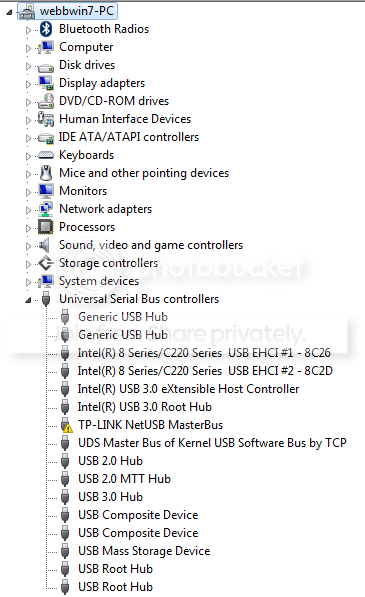
Hi all I got a TP-link Tl-WDR4900 (N900) Router that actually seems to work fine but I got a yellow triangle in control panel / devise manager see pic below, tried to update driver but it seems tp-link have stopped support for this model ??? I not had long and was £80 quid ish, I did get email support but was rubbish advise nearly destroyed my installation of windows manage to get back to square one but still got the triangle ???

reason for wanting triangle to be fixed one it should be, two think this is why I am having trouble with an external drive im trying to format in fat 32 ...... any help advice welcome
devise%20manager_zpsss0cyxel.png
 

My Computer

Computer type
PC/Desktop
Computer Manufacturer/Model Number
Antec 300
OS
Windows 7 Ultimate 64bit + Windows 10 pro 64bit duel boot
CPU
i7-4770k cpu @ 350GHz FC LGA1150
Motherboard
Asus Maximus VI Formula
Memory
32GB ballistik DDR3 1866 pc3-14900 cl9 1.5v w.X
Graphics Card(s)
Geforce GTX 1050 Ti Windforce 2x OC GDDR5
Sound Card
SupremeFX audio 8-channel on board
Monitor(s) Displays
AOC 12269Vwm x 2
Screen Resolution
1920 x 1080
Hard Drives
loads raid this that operating system on SSD
PSU
650 watt corsair erm still next upgrade
Case
antec 300
Cooling
Noctua NH-D14
Keyboard
CM Storm QuickFire Cherry MX Blue
Mouse
5500 dpi
Internet Speed
virgin 70mb
Antivirus
Kaspersky 2016
Other Info
Self build
Hello web I see you have been waiting for a while and yes I see what you mean by lack of support. I have a TP-Link modem router of a fair vintage now and I got really good support back then.
But if yours is fairly new then I would just contact them direct again - I had to when setting mine up and they were quite helpful.

Now you didn't say if the device came with any software?? The other option and I know you have just spent a bit of money on this thing is to get a modem / router the TP-Link TD-W8950N Wireless N 150 ADSL2+ out here is only $33 and this - TP-Link TD-W8970 300Mbps Wireless N Gigabit ADSL2+ Modem Router is $79 plus there is stuff in between then you have the whole show in one spot. Me I like cabled stuff and this one does both wifi and Ethernet cable.
 

My Computer

Computer type
PC/Desktop
Computer Manufacturer/Model Number
Own build (new) Desk1 / Asus ROG Win 7 / Desk2 1st build
OS
Desk1 7 Home Prem / Desk2 10 Pro / Main lap Asus ROG 10 Pro 2 laptop Toshiba 7 Pro Asus P2520 7 & 10
CPU
Desk1 i5 3750K / Laptop i7 GTX 860M / Desk2 i5 2500
Motherboard
Desk1 Asus P877-V / Desk2 Gigabyte H67 UD3H / Laptop ?
Memory
Desk1 8GB (1866) / Desk2 16GB (1333) / Laptop 8Gb DDR3
Graphics Card(s)
Desk 1& 2NVidia GTX 650 & Laptops on board Intel
Sound Card
Desk 1 & 2 -XONAR DG Realtek High Def audio Laptop
Monitor(s) Displays
Desk 1 Benq HD 2450 / Desk2 Philips 24" / Laptop 17.5"
Screen Resolution
1920x1080 D1 & D2 & Laptop 1
Hard Drives
Desk1 Samsung 120GB 830 SSD
Asus ROG 256GB 850 Pro SSD
Desk2 Samsung 840 256 SSD
Toshiba 120GB EVO
PSU
Desk 1 Corsair HX 1050/ Laptop ? / Desk 2 Corsair HX 650
Case
Desk 1 Cooler HAF XM ? Toshiba laptop / Desk2 Coolermaster
Cooling
Fans on all Desk1 -2 Desk2 - all Coolermasters 5 Laptop ?
Keyboard
Desk 1 MS Sidewinder X6 Desk 2 MS Sidewinder X 4
Mouse
Desk 1&2 - Gigabyte MS 900 gamer - laptop - Logitec wireless
Internet Speed
ADSL2+
Other Info
One other Desktop (tester) and spare Toshba laptop both with SSD's
Running Kaspersky 2016 ISS on all machines config'd identically
Logitec audio stereo systems on each machine (x3)
Canon MG5250MFC
Router/modem TP-Link running WPA2SK
Hello web I see you have been waiting for a while and yes I see what you mean by lack of support. I have a TP-Link modem router of a fair vintage now and I got really good support back then.
But if yours is fairly new then I would just contact them direct again - I had to when setting mine up and they were quite helpful.

Now you didn't say if the device came with any software?? The other option and I know you have just spent a bit of money on this thing is to get a modem / router the TP-Link TD-W8950N Wireless N 150 ADSL2+ out here is only $33 and this - TP-Link TD-W8970 300Mbps Wireless N Gigabit ADSL2+ Modem Router is $79 plus there is stuff in between then you have the whole show in one spot. Me I like cabled stuff and this one does both wifi and Ethernet cable.

Are any of these cheaper routers newer, better than mine ? most things at my end hard wired just iphone, nexus 7 wireless, I got separate modem .... virgin modem model E08C007 about 8 years old could this be the problem ??? ...... don't have any software with router updates online doesn't it ??
 

My Computer

Computer type
PC/Desktop
Computer Manufacturer/Model Number
Antec 300
OS
Windows 7 Ultimate 64bit + Windows 10 pro 64bit duel boot
CPU
i7-4770k cpu @ 350GHz FC LGA1150
Motherboard
Asus Maximus VI Formula
Memory
32GB ballistik DDR3 1866 pc3-14900 cl9 1.5v w.X
Graphics Card(s)
Geforce GTX 1050 Ti Windforce 2x OC GDDR5
Sound Card
SupremeFX audio 8-channel on board
Monitor(s) Displays
AOC 12269Vwm x 2
Screen Resolution
1920 x 1080
Hard Drives
loads raid this that operating system on SSD
PSU
650 watt corsair erm still next upgrade
Case
antec 300
Cooling
Noctua NH-D14
Keyboard
CM Storm QuickFire Cherry MX Blue
Mouse
5500 dpi
Internet Speed
virgin 70mb
Antivirus
Kaspersky 2016
Other Info
Self build
Yes web I think you might have the answer right there mate and my old TP-Link TD 8960N has served pretty well without a hitch for the last six years so yes mate as I said the modem / router fix or just a new modem might be the best way to go.

Like you say I couldn't find anything in the way of software / firmware for that device of yours and yes those devices I quoted are what is on offer and current at the moment.

Now if you want to see a complete list of the place where I get my gear from it is Modem Routers - PC Case Gear there is quite a bit of stuff / devices to choose from even the latest ac designated ones (it is the next gen speed / application to the b/g/n stuff) and if you click on the blue networking it will pull up the routers as well.

Personally I like TP-Link and even Netgear stuff is pretty good too. But it depends on your choice of what to do and your budget but I am guessing you could get a fairly good deal through Amazon UK - my brother who lives in Wiltshire uses it quite a bit and EBay (much to my annoyance;) - am ex pat Sussex)

See here Amazon.co.uk: modem routers: Computers & Accessories prices very much akin to what I have to pay:)

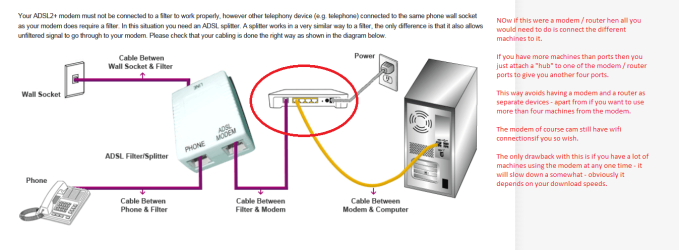
I even have an Ethernet hub which I use for my machines (5 in all) to extend the number I can hook up at once.

Let us know how you go as that router you have in my mind is way overpriced and as it is a problem.
 

My Computer

Computer type
PC/Desktop
Computer Manufacturer/Model Number
Own build (new) Desk1 / Asus ROG Win 7 / Desk2 1st build
OS
Desk1 7 Home Prem / Desk2 10 Pro / Main lap Asus ROG 10 Pro 2 laptop Toshiba 7 Pro Asus P2520 7 & 10
CPU
Desk1 i5 3750K / Laptop i7 GTX 860M / Desk2 i5 2500
Motherboard
Desk1 Asus P877-V / Desk2 Gigabyte H67 UD3H / Laptop ?
Memory
Desk1 8GB (1866) / Desk2 16GB (1333) / Laptop 8Gb DDR3
Graphics Card(s)
Desk 1& 2NVidia GTX 650 & Laptops on board Intel
Sound Card
Desk 1 & 2 -XONAR DG Realtek High Def audio Laptop
Monitor(s) Displays
Desk 1 Benq HD 2450 / Desk2 Philips 24" / Laptop 17.5"
Screen Resolution
1920x1080 D1 & D2 & Laptop 1
Hard Drives
Desk1 Samsung 120GB 830 SSD
Asus ROG 256GB 850 Pro SSD
Desk2 Samsung 840 256 SSD
Toshiba 120GB EVO
PSU
Desk 1 Corsair HX 1050/ Laptop ? / Desk 2 Corsair HX 650
Case
Desk 1 Cooler HAF XM ? Toshiba laptop / Desk2 Coolermaster
Cooling
Fans on all Desk1 -2 Desk2 - all Coolermasters 5 Laptop ?
Keyboard
Desk 1 MS Sidewinder X6 Desk 2 MS Sidewinder X 4
Mouse
Desk 1&2 - Gigabyte MS 900 gamer - laptop - Logitec wireless
Internet Speed
ADSL2+
Other Info
One other Desktop (tester) and spare Toshba laptop both with SSD's
Running Kaspersky 2016 ISS on all machines config'd identically
Logitec audio stereo systems on each machine (x3)
Canon MG5250MFC
Router/modem TP-Link running WPA2SK
Hello web I see you have been waiting for a while and yes I see what you mean by lack of support. I have a TP-Link modem router of a fair vintage now and I got really good support back then.
But if yours is fairly new then I would just contact them direct again - I had to when setting mine up and they were quite helpful.

Now you didn't say if the device came with any software?? The other option and I know you have just spent a bit of money on this thing is to get a modem / router the TP-Link TD-W8950N Wireless N 150 ADSL2+ out here is only $33 and this - TP-Link TD-W8970 300Mbps Wireless N Gigabit ADSL2+ Modem Router is $79 plus there is stuff in between then you have the whole show in one spot. Me I like cabled stuff and this one does both wifi and Ethernet cable.

TP-Link TD-W8970 300Mbps Wireless N Gigabit ADSL2+ Modem Router LOOK HERE
u mentioned before will this work with my cable i.e. (virgin media broadband ?) ....... because if this is a modem and router combined I cant see how I would connect my cable feed ( RF Connector ) ???
 

My Computer

Computer type
PC/Desktop
Computer Manufacturer/Model Number
Antec 300
OS
Windows 7 Ultimate 64bit + Windows 10 pro 64bit duel boot
CPU
i7-4770k cpu @ 350GHz FC LGA1150
Motherboard
Asus Maximus VI Formula
Memory
32GB ballistik DDR3 1866 pc3-14900 cl9 1.5v w.X
Graphics Card(s)
Geforce GTX 1050 Ti Windforce 2x OC GDDR5
Sound Card
SupremeFX audio 8-channel on board
Monitor(s) Displays
AOC 12269Vwm x 2
Screen Resolution
1920 x 1080
Hard Drives
loads raid this that operating system on SSD
PSU
650 watt corsair erm still next upgrade
Case
antec 300
Cooling
Noctua NH-D14
Keyboard
CM Storm QuickFire Cherry MX Blue
Mouse
5500 dpi
Internet Speed
virgin 70mb
Antivirus
Kaspersky 2016
Other Info
Self build
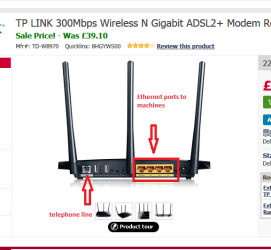
Sorry late reply mate now if you look at the back of the modem/ router you will see four Ethernet connection ports see the pic I have attached now you can use those to hook up 1 - 4 machines and / or the wifi via those aerials. I have five machines running off my modem / router using a hub from one of those ports ifn effect giving me about nine Ethernet connections.

I don't use them all at once - usually and one is for hooking up machines I have for fixing.

NB I thought there were RF to line adaptors but seems like I was wrong all the same I am sure there must be a way of hooking them up.
 

Attachments

  • WEB.PNG
    WEB.PNG
    85.5 KB · Views: 15
Last edited:

My Computer

Computer type
PC/Desktop
Computer Manufacturer/Model Number
Own build (new) Desk1 / Asus ROG Win 7 / Desk2 1st build
OS
Desk1 7 Home Prem / Desk2 10 Pro / Main lap Asus ROG 10 Pro 2 laptop Toshiba 7 Pro Asus P2520 7 & 10
CPU
Desk1 i5 3750K / Laptop i7 GTX 860M / Desk2 i5 2500
Motherboard
Desk1 Asus P877-V / Desk2 Gigabyte H67 UD3H / Laptop ?
Memory
Desk1 8GB (1866) / Desk2 16GB (1333) / Laptop 8Gb DDR3
Graphics Card(s)
Desk 1& 2NVidia GTX 650 & Laptops on board Intel
Sound Card
Desk 1 & 2 -XONAR DG Realtek High Def audio Laptop
Monitor(s) Displays
Desk 1 Benq HD 2450 / Desk2 Philips 24" / Laptop 17.5"
Screen Resolution
1920x1080 D1 & D2 & Laptop 1
Hard Drives
Desk1 Samsung 120GB 830 SSD
Asus ROG 256GB 850 Pro SSD
Desk2 Samsung 840 256 SSD
Toshiba 120GB EVO
PSU
Desk 1 Corsair HX 1050/ Laptop ? / Desk 2 Corsair HX 650
Case
Desk 1 Cooler HAF XM ? Toshiba laptop / Desk2 Coolermaster
Cooling
Fans on all Desk1 -2 Desk2 - all Coolermasters 5 Laptop ?
Keyboard
Desk 1 MS Sidewinder X6 Desk 2 MS Sidewinder X 4
Mouse
Desk 1&2 - Gigabyte MS 900 gamer - laptop - Logitec wireless
Internet Speed
ADSL2+
Other Info
One other Desktop (tester) and spare Toshba laptop both with SSD's
Running Kaspersky 2016 ISS on all machines config'd identically
Logitec audio stereo systems on each machine (x3)
Canon MG5250MFC
Router/modem TP-Link running WPA2SK
Sorry late reply mate now if you look at the back of the modem/ router you will see four Ethernet connection ports see the pic I have attached now you can use those to hook up 1 - 4 machines and / or the wifi via those aerials. I have five machines running off my modem / router using a hub from one of those ports ifn effect giving me about nine Ethernet connections.

I don't use them all at once - usually and one is for hooking up machines I have for fixing.

NB I thought there were RF to line adaptors but seems like I was wrong all the same I am sure there must be a way of hooking them up.

this is exactly what I have and use in the way u say only mine is a TL-WDR4900 or (n900) not had that long but seems not to be supported anymore ???? also mine is just a router and not a modem as well I have separate modem that has the RF connector PS im on virgin media or cable
 

My Computer

Computer type
PC/Desktop
Computer Manufacturer/Model Number
Antec 300
OS
Windows 7 Ultimate 64bit + Windows 10 pro 64bit duel boot
CPU
i7-4770k cpu @ 350GHz FC LGA1150
Motherboard
Asus Maximus VI Formula
Memory
32GB ballistik DDR3 1866 pc3-14900 cl9 1.5v w.X
Graphics Card(s)
Geforce GTX 1050 Ti Windforce 2x OC GDDR5
Sound Card
SupremeFX audio 8-channel on board
Monitor(s) Displays
AOC 12269Vwm x 2
Screen Resolution
1920 x 1080
Hard Drives
loads raid this that operating system on SSD
PSU
650 watt corsair erm still next upgrade
Case
antec 300
Cooling
Noctua NH-D14
Keyboard
CM Storm QuickFire Cherry MX Blue
Mouse
5500 dpi
Internet Speed
virgin 70mb
Antivirus
Kaspersky 2016
Other Info
Self build
Sorry late reply mate but I am having problems with my main machine losing posts so what I would like to see is a picture of the connection coming in from Virgin to the modem. If it is a RF one like in the pic then it is one I have not come across before.

Most modems I have ever come across have that set up I posted (post #6 ) that is usually coming from a splitter that splits the incoming signal - one to the telephone and one to the modem because it stops interference on either device.

Now connecting from the modem to the router should be the usual Ethernet one so no problems with that but I think the best solution to this is a modem / router that can be connected to the incoming line.

So before we go any further can you send the shot of the back of your modem showing how it is connected to the incoming line form the wall.
 

Attachments

  • RF.PNG
    RF.PNG
    546.2 KB · Views: 10

My Computer

Computer type
PC/Desktop
Computer Manufacturer/Model Number
Own build (new) Desk1 / Asus ROG Win 7 / Desk2 1st build
OS
Desk1 7 Home Prem / Desk2 10 Pro / Main lap Asus ROG 10 Pro 2 laptop Toshiba 7 Pro Asus P2520 7 & 10
CPU
Desk1 i5 3750K / Laptop i7 GTX 860M / Desk2 i5 2500
Motherboard
Desk1 Asus P877-V / Desk2 Gigabyte H67 UD3H / Laptop ?
Memory
Desk1 8GB (1866) / Desk2 16GB (1333) / Laptop 8Gb DDR3
Graphics Card(s)
Desk 1& 2NVidia GTX 650 & Laptops on board Intel
Sound Card
Desk 1 & 2 -XONAR DG Realtek High Def audio Laptop
Monitor(s) Displays
Desk 1 Benq HD 2450 / Desk2 Philips 24" / Laptop 17.5"
Screen Resolution
1920x1080 D1 & D2 & Laptop 1
Hard Drives
Desk1 Samsung 120GB 830 SSD
Asus ROG 256GB 850 Pro SSD
Desk2 Samsung 840 256 SSD
Toshiba 120GB EVO
PSU
Desk 1 Corsair HX 1050/ Laptop ? / Desk 2 Corsair HX 650
Case
Desk 1 Cooler HAF XM ? Toshiba laptop / Desk2 Coolermaster
Cooling
Fans on all Desk1 -2 Desk2 - all Coolermasters 5 Laptop ?
Keyboard
Desk 1 MS Sidewinder X6 Desk 2 MS Sidewinder X 4
Mouse
Desk 1&2 - Gigabyte MS 900 gamer - laptop - Logitec wireless
Internet Speed
ADSL2+
Other Info
One other Desktop (tester) and spare Toshba laptop both with SSD's
Running Kaspersky 2016 ISS on all machines config'd identically
Logitec audio stereo systems on each machine (x3)
Canon MG5250MFC
Router/modem TP-Link running WPA2SK
Thought this might explain things a little better see pic
 

Attachments

  • MODEM.PNG
    MODEM.PNG
    216.8 KB · Views: 1

My Computer

Computer type
PC/Desktop
Computer Manufacturer/Model Number
Own build (new) Desk1 / Asus ROG Win 7 / Desk2 1st build
OS
Desk1 7 Home Prem / Desk2 10 Pro / Main lap Asus ROG 10 Pro 2 laptop Toshiba 7 Pro Asus P2520 7 & 10
CPU
Desk1 i5 3750K / Laptop i7 GTX 860M / Desk2 i5 2500
Motherboard
Desk1 Asus P877-V / Desk2 Gigabyte H67 UD3H / Laptop ?
Memory
Desk1 8GB (1866) / Desk2 16GB (1333) / Laptop 8Gb DDR3
Graphics Card(s)
Desk 1& 2NVidia GTX 650 & Laptops on board Intel
Sound Card
Desk 1 & 2 -XONAR DG Realtek High Def audio Laptop
Monitor(s) Displays
Desk 1 Benq HD 2450 / Desk2 Philips 24" / Laptop 17.5"
Screen Resolution
1920x1080 D1 & D2 & Laptop 1
Hard Drives
Desk1 Samsung 120GB 830 SSD
Asus ROG 256GB 850 Pro SSD
Desk2 Samsung 840 256 SSD
Toshiba 120GB EVO
PSU
Desk 1 Corsair HX 1050/ Laptop ? / Desk 2 Corsair HX 650
Case
Desk 1 Cooler HAF XM ? Toshiba laptop / Desk2 Coolermaster
Cooling
Fans on all Desk1 -2 Desk2 - all Coolermasters 5 Laptop ?
Keyboard
Desk 1 MS Sidewinder X6 Desk 2 MS Sidewinder X 4
Mouse
Desk 1&2 - Gigabyte MS 900 gamer - laptop - Logitec wireless
Internet Speed
ADSL2+
Other Info
One other Desktop (tester) and spare Toshba laptop both with SSD's
Running Kaspersky 2016 ISS on all machines config'd identically
Logitec audio stereo systems on each machine (x3)
Canon MG5250MFC
Router/modem TP-Link running WPA2SK
Sorry late reply mate but I am having problems with my main machine losing posts so what I would like to see is a picture of the connection coming in from Virgin to the modem. If it is a RF one like in the pic then it is one I have not come across before.

Most modems I have ever come across have that set up I posted (post #6 ) that is usually coming from a splitter that splits the incoming signal - one to the telephone and one to the modem because it stops interference on either device.

Now connecting from the modem to the router should be the usual Ethernet one so no problems with that but I think the best solution to this is a modem / router that can be connected to the incoming line.

So before we go any further can you send the shot of the back of your modem showing how it is connected to the incoming line form the wall.

click HERE to see modem its separate from router modem connected to router by Ethernet
 

My Computer

Computer type
PC/Desktop
Computer Manufacturer/Model Number
Antec 300
OS
Windows 7 Ultimate 64bit + Windows 10 pro 64bit duel boot
CPU
i7-4770k cpu @ 350GHz FC LGA1150
Motherboard
Asus Maximus VI Formula
Memory
32GB ballistik DDR3 1866 pc3-14900 cl9 1.5v w.X
Graphics Card(s)
Geforce GTX 1050 Ti Windforce 2x OC GDDR5
Sound Card
SupremeFX audio 8-channel on board
Monitor(s) Displays
AOC 12269Vwm x 2
Screen Resolution
1920 x 1080
Hard Drives
loads raid this that operating system on SSD
PSU
650 watt corsair erm still next upgrade
Case
antec 300
Cooling
Noctua NH-D14
Keyboard
CM Storm QuickFire Cherry MX Blue
Mouse
5500 dpi
Internet Speed
virgin 70mb
Antivirus
Kaspersky 2016
Other Info
Self build

My Computer

Computer type
PC/Desktop
Computer Manufacturer/Model Number
Me
OS
Win 7 Ultimate x64
CPU
FX-8350 @ 4.6 GHz so far
Motherboard
Asus M5A97 EVO
Memory
ADATA XPG V1 Series Black 8GB DDR3 1600
Graphics Card(s)
Sapphire R9 270x Dual-X
Sound Card
Xonar DGX w/ Corsair Vengence 1300
Monitor(s) Displays
Acer S232HL Abid
Screen Resolution
1920x1080
Hard Drives
120 GB OCZ Vertex 3
500 GB Seagate 7200.12
PSU
Antec Earthwatts 650W Green
Case
Antec Three Hundred
Cooling
Cooler Master 212 EVO
Keyboard
Logitech G510
Mouse
Logitech G500s
Internet Speed
35000/3000
Ok mate I thought that what it would look like for the incoming signal. I don't have much experience with that sort of stuff pity it wasn't an plain bog standard cable coming in.

Now have a look at what stormy has put in because the printer normally operates off the machine as I have never seen one operate from a router direct - only wifi stuff which if that what it is then I would disregard that yellow triangle.
 

My Computer

Computer type
PC/Desktop
Computer Manufacturer/Model Number
Own build (new) Desk1 / Asus ROG Win 7 / Desk2 1st build
OS
Desk1 7 Home Prem / Desk2 10 Pro / Main lap Asus ROG 10 Pro 2 laptop Toshiba 7 Pro Asus P2520 7 & 10
CPU
Desk1 i5 3750K / Laptop i7 GTX 860M / Desk2 i5 2500
Motherboard
Desk1 Asus P877-V / Desk2 Gigabyte H67 UD3H / Laptop ?
Memory
Desk1 8GB (1866) / Desk2 16GB (1333) / Laptop 8Gb DDR3
Graphics Card(s)
Desk 1& 2NVidia GTX 650 & Laptops on board Intel
Sound Card
Desk 1 & 2 -XONAR DG Realtek High Def audio Laptop
Monitor(s) Displays
Desk 1 Benq HD 2450 / Desk2 Philips 24" / Laptop 17.5"
Screen Resolution
1920x1080 D1 & D2 & Laptop 1
Hard Drives
Desk1 Samsung 120GB 830 SSD
Asus ROG 256GB 850 Pro SSD
Desk2 Samsung 840 256 SSD
Toshiba 120GB EVO
PSU
Desk 1 Corsair HX 1050/ Laptop ? / Desk 2 Corsair HX 650
Case
Desk 1 Cooler HAF XM ? Toshiba laptop / Desk2 Coolermaster
Cooling
Fans on all Desk1 -2 Desk2 - all Coolermasters 5 Laptop ?
Keyboard
Desk 1 MS Sidewinder X6 Desk 2 MS Sidewinder X 4
Mouse
Desk 1&2 - Gigabyte MS 900 gamer - laptop - Logitec wireless
Internet Speed
ADSL2+
Other Info
One other Desktop (tester) and spare Toshba laptop both with SSD's
Running Kaspersky 2016 ISS on all machines config'd identically
Logitec audio stereo systems on each machine (x3)
Canon MG5250MFC
Router/modem TP-Link running WPA2SK
That driver has to do with the USB printer server, which if you haven't connected a printer to the router isn't needed. If you haven't you can safely just uninstall it.

http://www.tp-link.com/resources/document/TL-WDR4900_Print_Server_Applic.pdf

If you are connecting a printer to the router, try the driver available for download instead of the one that came on the disk,

TL-WDR4900 - Welcome to TP-LINK

thanks for your reply and I do have a printer connected to the router that prints wirelessly, ill check my firmware to see if the ones u posted are more currant, or the utility too, but my problems started or should I say I noticed I had a problem when I was trying to format an external drive to fat 32 to use with a TV but that's another post ?? maybe ?
 

My Computer

Computer type
PC/Desktop
Computer Manufacturer/Model Number
Antec 300
OS
Windows 7 Ultimate 64bit + Windows 10 pro 64bit duel boot
CPU
i7-4770k cpu @ 350GHz FC LGA1150
Motherboard
Asus Maximus VI Formula
Memory
32GB ballistik DDR3 1866 pc3-14900 cl9 1.5v w.X
Graphics Card(s)
Geforce GTX 1050 Ti Windforce 2x OC GDDR5
Sound Card
SupremeFX audio 8-channel on board
Monitor(s) Displays
AOC 12269Vwm x 2
Screen Resolution
1920 x 1080
Hard Drives
loads raid this that operating system on SSD
PSU
650 watt corsair erm still next upgrade
Case
antec 300
Cooling
Noctua NH-D14
Keyboard
CM Storm QuickFire Cherry MX Blue
Mouse
5500 dpi
Internet Speed
virgin 70mb
Antivirus
Kaspersky 2016
Other Info
Self build
Sorry late reply mate but I am having problems with my main machine losing posts so what I would like to see is a picture of the connection coming in from Virgin to the modem. If it is a RF one like in the pic then it is one I have not come across before.

Most modems I have ever come across have that set up I posted (post #6 ) that is usually coming from a splitter that splits the incoming signal - one to the telephone and one to the modem because it stops interference on either device.

Now connecting from the modem to the router should be the usual Ethernet one so no problems with that but I think the best solution to this is a modem / router that can be connected to the incoming line.

So before we go any further can you send the shot of the back of your modem showing how it is connected to the incoming line form the wall.

click HERE to see modem its separate from router modem connected to router by Ethernet

hey just notice on my virgin bill my broadband is up to 50mb but sure my modem can only handle 20mb trying to verify this before I ring them, herd there super hub is rubbish thought but can use in modem only mode use your own router
 

My Computer

Computer type
PC/Desktop
Computer Manufacturer/Model Number
Antec 300
OS
Windows 7 Ultimate 64bit + Windows 10 pro 64bit duel boot
CPU
i7-4770k cpu @ 350GHz FC LGA1150
Motherboard
Asus Maximus VI Formula
Memory
32GB ballistik DDR3 1866 pc3-14900 cl9 1.5v w.X
Graphics Card(s)
Geforce GTX 1050 Ti Windforce 2x OC GDDR5
Sound Card
SupremeFX audio 8-channel on board
Monitor(s) Displays
AOC 12269Vwm x 2
Screen Resolution
1920 x 1080
Hard Drives
loads raid this that operating system on SSD
PSU
650 watt corsair erm still next upgrade
Case
antec 300
Cooling
Noctua NH-D14
Keyboard
CM Storm QuickFire Cherry MX Blue
Mouse
5500 dpi
Internet Speed
virgin 70mb
Antivirus
Kaspersky 2016
Other Info
Self build
Ok so just so I have it right that is your download speed or as I suspect the total download. Now if that is the latter then is a piddling amount of download - for example my local (national) provider gives me 100GB of download per month and when I use my wifi adaptor I get 12GB for a year.

Now the amount of data your modem can handle for the life of me I cannot see why the amount it can only carry is 20MBs or is that GBs?? It seems rather ludicrous in this day and age for that to happen or are you on a plan where they limit you. Personally I would check around for a better deal. I am sure my brother who lives in Wiltshire can tell me more he is pretty savvy when it comes to deals like that.

Off the top of my head my download speeds can vary but average on 600MBs so whatever way you look at it Virgin are being very stingy with dowmloads speed or amount unless you meant GB or GBs as totatl and speed.

Now a little free program I use on my desktops is this FlorianGilles.com - NetSpeedMonitor and one can set it (I do) as in that first picture comes up. There are other monitors but I find this one good and it is a very small app to run.

Just as a matter of interest did you shop around for a provider when you set up the internet?? because as usual you get what you pay for and it need not be that expensive - Virgin from my experience has many fingers in many pies and I have to say that once they start something up they often sell it on.
A good example is my credit card out here they sold it onto a major bank who try desperately for me to change to theirs and I won't because the original deal came with no annual fee whereas the bank one does although they try to tempt you with what looks like a better deal.
 

My Computer

Computer type
PC/Desktop
Computer Manufacturer/Model Number
Own build (new) Desk1 / Asus ROG Win 7 / Desk2 1st build
OS
Desk1 7 Home Prem / Desk2 10 Pro / Main lap Asus ROG 10 Pro 2 laptop Toshiba 7 Pro Asus P2520 7 & 10
CPU
Desk1 i5 3750K / Laptop i7 GTX 860M / Desk2 i5 2500
Motherboard
Desk1 Asus P877-V / Desk2 Gigabyte H67 UD3H / Laptop ?
Memory
Desk1 8GB (1866) / Desk2 16GB (1333) / Laptop 8Gb DDR3
Graphics Card(s)
Desk 1& 2NVidia GTX 650 & Laptops on board Intel
Sound Card
Desk 1 & 2 -XONAR DG Realtek High Def audio Laptop
Monitor(s) Displays
Desk 1 Benq HD 2450 / Desk2 Philips 24" / Laptop 17.5"
Screen Resolution
1920x1080 D1 & D2 & Laptop 1
Hard Drives
Desk1 Samsung 120GB 830 SSD
Asus ROG 256GB 850 Pro SSD
Desk2 Samsung 840 256 SSD
Toshiba 120GB EVO
PSU
Desk 1 Corsair HX 1050/ Laptop ? / Desk 2 Corsair HX 650
Case
Desk 1 Cooler HAF XM ? Toshiba laptop / Desk2 Coolermaster
Cooling
Fans on all Desk1 -2 Desk2 - all Coolermasters 5 Laptop ?
Keyboard
Desk 1 MS Sidewinder X6 Desk 2 MS Sidewinder X 4
Mouse
Desk 1&2 - Gigabyte MS 900 gamer - laptop - Logitec wireless
Internet Speed
ADSL2+
Other Info
One other Desktop (tester) and spare Toshba laptop both with SSD's
Running Kaspersky 2016 ISS on all machines config'd identically
Logitec audio stereo systems on each machine (x3)
Canon MG5250MFC
Router/modem TP-Link running WPA2SK
Ok so just so I have it right that is your download speed or as I suspect the total download. Now if that is the latter then is a piddling amount of download - for example my local (national) provider gives me 100GB of download per month and when I use my wifi adaptor I get 12GB for a year.

Now the amount of data your modem can handle for the life of me I cannot see why the amount it can only carry is 20MBs or is that GBs?? It seems rather ludicrous in this day and age for that to happen or are you on a plan where they limit you. Personally I would check around for a better deal. I am sure my brother who lives in Wiltshire can tell me more he is pretty savvy when it comes to deals like that.

Off the top of my head my download speeds can vary but average on 600MBs so whatever way you look at it Virgin are being very stingy with dowmloads speed or amount unless you meant GB or GBs as totatl and speed.

Now a little free program I use on my desktops is this FlorianGilles.com - NetSpeedMonitor and one can set it (I do) as in that first picture comes up. There are other monitors but I find this one good and it is a very small app to run.

Just as a matter of interest did you shop around for a provider when you set up the internet?? because as usual you get what you pay for and it need not be that expensive - Virgin from my experience has many fingers in many pies and I have to say that once they start something up they often sell it on.
A good example is my credit card out here they sold it onto a major bank who try desperately for me to change to theirs and I won't because the original deal came with no annual fee whereas the bank one does although they try to tempt you with what looks like a better deal.

wow im know expert here, all I know is they say I can get up to 50mb but my modem only delivers 20mb, but surely my wired virgin broadband is the best I can get if a bit dear .... talk talk for instance gets well bad reviews but fraction of price ..... plus they (virgin media) just got back to me say I need the big superhub but to use as a modem grr its massive ???
 

My Computer

Computer type
PC/Desktop
Computer Manufacturer/Model Number
Antec 300
OS
Windows 7 Ultimate 64bit + Windows 10 pro 64bit duel boot
CPU
i7-4770k cpu @ 350GHz FC LGA1150
Motherboard
Asus Maximus VI Formula
Memory
32GB ballistik DDR3 1866 pc3-14900 cl9 1.5v w.X
Graphics Card(s)
Geforce GTX 1050 Ti Windforce 2x OC GDDR5
Sound Card
SupremeFX audio 8-channel on board
Monitor(s) Displays
AOC 12269Vwm x 2
Screen Resolution
1920 x 1080
Hard Drives
loads raid this that operating system on SSD
PSU
650 watt corsair erm still next upgrade
Case
antec 300
Cooling
Noctua NH-D14
Keyboard
CM Storm QuickFire Cherry MX Blue
Mouse
5500 dpi
Internet Speed
virgin 70mb
Antivirus
Kaspersky 2016
Other Info
Self build
Web I will mail my brother as O don't know how it works in the UK now he will have some idea just hang on for a while. Sounds to me you are getting the thin end of the stick mate because the last time I was in contact with him he said he has no issues with broadband. Good grief and I thought we were bad enough out here.
 

My Computer

Computer type
PC/Desktop
Computer Manufacturer/Model Number
Own build (new) Desk1 / Asus ROG Win 7 / Desk2 1st build
OS
Desk1 7 Home Prem / Desk2 10 Pro / Main lap Asus ROG 10 Pro 2 laptop Toshiba 7 Pro Asus P2520 7 & 10
CPU
Desk1 i5 3750K / Laptop i7 GTX 860M / Desk2 i5 2500
Motherboard
Desk1 Asus P877-V / Desk2 Gigabyte H67 UD3H / Laptop ?
Memory
Desk1 8GB (1866) / Desk2 16GB (1333) / Laptop 8Gb DDR3
Graphics Card(s)
Desk 1& 2NVidia GTX 650 & Laptops on board Intel
Sound Card
Desk 1 & 2 -XONAR DG Realtek High Def audio Laptop
Monitor(s) Displays
Desk 1 Benq HD 2450 / Desk2 Philips 24" / Laptop 17.5"
Screen Resolution
1920x1080 D1 & D2 & Laptop 1
Hard Drives
Desk1 Samsung 120GB 830 SSD
Asus ROG 256GB 850 Pro SSD
Desk2 Samsung 840 256 SSD
Toshiba 120GB EVO
PSU
Desk 1 Corsair HX 1050/ Laptop ? / Desk 2 Corsair HX 650
Case
Desk 1 Cooler HAF XM ? Toshiba laptop / Desk2 Coolermaster
Cooling
Fans on all Desk1 -2 Desk2 - all Coolermasters 5 Laptop ?
Keyboard
Desk 1 MS Sidewinder X6 Desk 2 MS Sidewinder X 4
Mouse
Desk 1&2 - Gigabyte MS 900 gamer - laptop - Logitec wireless
Internet Speed
ADSL2+
Other Info
One other Desktop (tester) and spare Toshba laptop both with SSD's
Running Kaspersky 2016 ISS on all machines config'd identically
Logitec audio stereo systems on each machine (x3)
Canon MG5250MFC
Router/modem TP-Link running WPA2SK
Back
Top