TP-Link WN710N permanently limited access

Lautrec

New member
Local time
4:39 PM
Messages
15
TP-Link WN725N time to time limited access

I have two tp-link products: TL-WN725N and TL-WR710N
I use wn710n like wifi router for all devices: laptop, mobile phones, tablet and desktop PC.

I use wr725n usb adapter to connect my desktop PC to network but suddenly, one-two days ago, the internet connection time to time limited access. Something more. Every device doesn't have access to the internet but the status "connected" is present.
By chance, until I was trying to figure out what the problem was, I found that the connection are restore if I deactivate / activate my internet connection from the usb wifi installed on my desktop PC.
The TCP/IPv4 is in automatically mode.
 
Last edited:

My Computer My Computer

OS
Windows 7 Ultimate
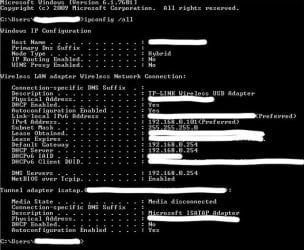
Open a CMD prompt type

Ipconfig /all

Post results limited access normally is you haven't got a default gateway what is issuing DHCP?
 

My Computer My Computer

Computer type
PC/Desktop
OS
win 8 32 bit
I forbid integrated LAN card from BIOS, but issue still presents.
From wifi property in advanced mode I changed WiFi value from performance to WiFi and unmarked "Allow the computer to turn off this device to save power", but nothing change.
 

Attachments

  • Windows Command Processor000_1.jpg
    Windows Command Processor000_1.jpg
    73.4 KB · Views: 22
Last edited:

My Computer My Computer

OS
Windows 7 Ultimate
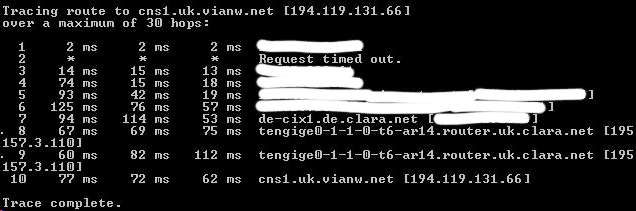
Can you try setting your DNS to 1.1.1.1 & 1.0.0.1 if it doesn't work from a CMD prompt type

Tracert 194.119.131.66

Post results
 

My Computer My Computer

Computer type
PC/Desktop
OS
win 8 32 bit
Changing DNS doesn't work. It's interesting. It seems like wifi usb adapter block the router's signal. If I disable adapter the internet is great. I want to change the MAC of the adapter to be the same like ruter but no option for this in windows. May be this will solve this issue, which is about to become to real problem. For now it is so annoying - disconnect/connect......
 

Attachments

  • clpDD3F.png
    clpDD3F.png
    13.1 KB · Views: 17

My Computer My Computer

OS
Windows 7 Ultimate
. I want to change the MAC of the adapter to be the same like ruter but no option for this in windows
Google Technitium MAC adress changer, but i don't think i will solve your problem. Try to find a more recent driver.
 

My Computer My Computer

Computer type
PC/Desktop
Computer Manufacturer/Model Number
Dell 64200
OS
Windows7 Pro 64
CPU
I7
Motherboard
Dell
Graphics Card(s)
Nvidea nv 4200
Hard Drives
500 gb
Antivirus
Security esssnsials
Browser
FFX/chroome hate ie
Blocking out text make the results useless so it hard to work out whats happening. If the trace was done with wireless its going out ok the test proves it. Changing the mac addesssame as the router will just brick the network as you can have 2 same mac address in the world
 

My Computer My Computer

Computer type
PC/Desktop
OS
win 8 32 bit
Back
Top