Hey folks! i just completed a new build. I have been having issues with my mobo (gigabyte ga-z87-hd3) not recgonizing my wifi adapter (tl-wdn4800). Everything else on mobo is working great. I have tried reseting cmos and i have tried both pcie ports and still nothing. Also this is my second card returned the first one to amazon. I have been pulling my hair out trying to figure this out. Any help with this problem would be a huge help. Thanks in advance for your time and expertise.
My Computer
At a glance
windows 7 64 bit sp1intel i5-4590corsair vengence 8gbmsi 650ti 1gb
Hello and welcome bdsmith mate I am assuming you have installed the driver? If you did it from the software disk then may I suggest you get it from here? as I am not a great fan of the Windows driver update feature TL-WDN4800 - Welcome to TP-LINK
My own experience with setting up a TP-Link (not a card) was convoluted to say the least and I resorted to contacting them via phone.
You will find data sheets and manuals at that site to that may throw some light on the problem.
My Computer
At a glance
Desk1 7 Home Prem / Desk2 10 Pro / Main lap A...Desk1 i5 3750K / Laptop i7 GTX 860M / Desk2 i...Desk1 8GB (1866) / Desk2 16GB (1333) / Laptop...Desk 1& 2NVidia GTX 650 & Laptops on board Intel
Computer type
PC/Desktop
Computer Manufacturer/Model Number
Own build (new) Desk1 / Asus ROG Win 7 / Desk2 1st build
OS
Desk1 7 Home Prem / Desk2 10 Pro / Main lap Asus ROG 10 Pro 2 laptop Toshiba 7 Pro Asus P2520 7 & 10
One other Desktop (tester) and spare Toshba laptop both with SSD's
Running Kaspersky 2016 ISS on all machines config'd identically
Logitec audio stereo systems on each machine (x3)
Canon MG5250MFC
Router/modem TP-Link running WPA2SK
Thank you for your reply. but alas I couldnt install driver (from the website) couldnt detect the wifi card. it says wireless network adapter not detected. At this point im wondering if its a motherboard issue but my video card works like a champ. no status light either almost as if theres no power to the card
My Computer
At a glance
windows 7 64 bit sp1intel i5-4590corsair vengence 8gbmsi 650ti 1gb
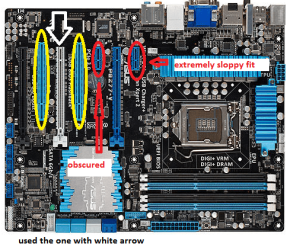
Hum BD I had a similar problem with a 3.0 USB extra port card very recently andI found the card very sloppy in the slot. I ended up putting the darn thing inthe PCI e slot and after a lot of mucking around found the right drivers.
See my pic not the same as your board but worth a try again as it took me about four goes to do this.
Have you tried looking in the BIOS to see if it is there - a no great expert but it should be somewhere.
If this doesn't help we might just ask for more help if you like.
Attachments
BOARD2.PNG
147.7 KB
· Views: 22
My Computer
At a glance
Desk1 7 Home Prem / Desk2 10 Pro / Main lap A...Desk1 i5 3750K / Laptop i7 GTX 860M / Desk2 i...Desk1 8GB (1866) / Desk2 16GB (1333) / Laptop...Desk 1& 2NVidia GTX 650 & Laptops on board Intel
Computer type
PC/Desktop
Computer Manufacturer/Model Number
Own build (new) Desk1 / Asus ROG Win 7 / Desk2 1st build
OS
Desk1 7 Home Prem / Desk2 10 Pro / Main lap Asus ROG 10 Pro 2 laptop Toshiba 7 Pro Asus P2520 7 & 10
One other Desktop (tester) and spare Toshba laptop both with SSD's
Running Kaspersky 2016 ISS on all machines config'd identically
Logitec audio stereo systems on each machine (x3)
Canon MG5250MFC
Router/modem TP-Link running WPA2SK
i currently have my video card in the white slot. i moved it there to make room for the wifi card to fit into one of the 2 (red circled) slots. will that wifi card fit into the (white circle) slot in your picture. the wifi card is currently in the (right red circle) in your picture. also it is not listed in the bios.
My Computer
At a glance
windows 7 64 bit sp1intel i5-4590corsair vengence 8gbmsi 650ti 1gb
Yep BF you can use any of those slots as I found out from the others as longas the card fits that slot configuration it should work. The only slots theywill not fit of course are the yellow circled ones in my pic See my other pic too to see if you have any spare as I cannot make out your board from the Google of it.
Attachments
BOARD4.PNG
135 KB
· Views: 22
My Computer
At a glance
Desk1 7 Home Prem / Desk2 10 Pro / Main lap A...Desk1 i5 3750K / Laptop i7 GTX 860M / Desk2 i...Desk1 8GB (1866) / Desk2 16GB (1333) / Laptop...Desk 1& 2NVidia GTX 650 & Laptops on board Intel
Computer type
PC/Desktop
Computer Manufacturer/Model Number
Own build (new) Desk1 / Asus ROG Win 7 / Desk2 1st build
OS
Desk1 7 Home Prem / Desk2 10 Pro / Main lap Asus ROG 10 Pro 2 laptop Toshiba 7 Pro Asus P2520 7 & 10
One other Desktop (tester) and spare Toshba laptop both with SSD's
Running Kaspersky 2016 ISS on all machines config'd identically
Logitec audio stereo systems on each machine (x3)
Canon MG5250MFC
Router/modem TP-Link running WPA2SK