TP-LINK TL-WN722NC Driver problem

marky0

New member
Local time
5:36 AM
Messages
11
Hello all,

I have just got this TL-WN722NC usb networking stick, but my win7 doesn't at all want to recongize it.

I have tried running the disc that came with the adapter, it installed O.K. without errors, but i do not see the adapter working at all. (no blinking from the green led on it, and it doesnt appear at the Networking adapters either)

So i went to Device Manager, this is what i see there:
1337319605.png


If i right click and select Update Driver Software.. and then select Search Automatically.. i get the following message:
1337293265.png


Then i have tried to uninstall all the drivers and software that the disc installed, restarted the PC and tried to Update Driver Software.. then Auto search.. it have resulted in this message:
1337271261.png


Then i tried to manually point the driver files in the Device manager (the ones on the CD, also the newest driver from their website) and always getting this message:
1337363566.png


So anyways.. what the hell? Before this i tried a TP-Link PCI wifi card (TL-WN350GD) and that had these same errors! (Code31 all the time)

Im really out of ideas by now, also tried going in safe mode.. installing it from there.. rebooting many times didnt help also.. even ran CCleaner all the time when trying another driver.

Please help me, i really dont understand why my win7 hates TP-Link products so much.

Many thanks and regards,
Marky
 

My Computer

OS
Windows 7 Ultimate 32bit SP1

My Computer

Computer type
PC/Desktop
Computer Manufacturer/Model Number
Me
OS
Win 7 Ultimate x64
CPU
FX-8350 @ 4.6 GHz so far
Motherboard
Asus M5A97 EVO
Memory
ADATA XPG V1 Series Black 8GB DDR3 1600
Graphics Card(s)
Sapphire R9 270x Dual-X
Sound Card
Xonar DGX w/ Corsair Vengence 1300
Monitor(s) Displays
Acer S232HL Abid
Screen Resolution
1920x1080
Hard Drives
120 GB OCZ Vertex 3
500 GB Seagate 7200.12
PSU
Antec Earthwatts 650W Green
Case
Antec Three Hundred
Cooling
Cooler Master 212 EVO
Keyboard
Logitech G510
Mouse
Logitech G500s
Internet Speed
35000/3000
i use tplink and used to get this problem. stormy is right dont use the disc or the tplink software windows will work fine without it as stormy said go to tplink and download the latest driver for your pc and install the .inf file using device manager and re-boot the pc. i have the driver here in the zip file for you if you want it.
 

Attachments

My Computer

Computer Manufacturer/Model Number
packard bell IXTREME M5722
OS
Operating System : Windows 7 Home Premium Edition 6.01.7600 SP1 (x64)
CPU
Processor : Intel Core 2 Quad Q8300 @ 2500 MHz
Motherboard
Mainboard : Packard Bell (Acer EG43M )
Memory
Physical Memory :8GB Corsair4x 2GB 800MHz C5 DDR2
Graphics Card(s)
Video Card : XFX 6700 AMD
Monitor(s) Displays
Maestro 234DL - BenQ V2220 - BenQ VW2420H
Screen Resolution
Current Display :1920x1080p pixels at 60 Hz in HD LED
Hard Drives
Hard Disks : WDC (1000 GB)
Drive C: (Hard Disk) : 428 GB available on 491 GB
Drive D: (Hard Disk) : 426 GB available on 492 GB
SAMSUNG spinpoint HD103SJ 1000.2 GB
(X 2) KINGSTON SSD NOW V 30GB
PSU
XFX ProSeries 550W PSU
Case
PACKARD BELL IXTREME
Cooling
System Blower Current: 150mA Air Flow16CFM ;Akasa 90mm rear
Keyboard
Gigabyte Aivia K8100
Mouse
TRUST-Wireless Laser Mouse - Carbon edition MI-7770C
Internet Speed
TP-LINK > TL-WN951N / AV500 Gigabit Powerline Adapters
Browser
chrome dev
Other Info
EXTRA COOLING>(FAN CONTROLLER) PC Bay Cooler 3 x 40mm fans; Akasa AK-HD-BL Blue hard drive cooler 2 x 40 mm fan 4500 rpm 29.7 dBA
Bios> American Megatrends Inc.
Version : P01-A1
Date : 08/31/2009
stormy13, i have tried the Fix It prog you have linked, ran it to check and fix all errors.. it just re-installed the driver of the adapter then gave me this page:
1337358850.png


brianzion, i have uninstalled, restarted, then installed the one you uploaded and same error while it was installing it:
1337357793.png


So the adapter still isn't working..

Regards,
Marky
 

My Computer

OS
Windows 7 Ultimate 32bit SP1
right ok, with the adapter plugged in go to device manager and un-install the the driver from the machine pull the adapter out and reboot. after windows is up and running plug adapter in a different usb port if possible and see if windows installs a generic driver. also have a close look at the adapter and check the number is right and if its version 1 etc. and match it on the website for the driver TL-WN722NC - Welcome to TP-LINK

have a read of this >> http://goo.gl/9nvvu

it appears there are two drivers for the adapter For TL-WN722NC and For TL-WN722NC V1
 

My Computer

Computer Manufacturer/Model Number
packard bell IXTREME M5722
OS
Operating System : Windows 7 Home Premium Edition 6.01.7600 SP1 (x64)
CPU
Processor : Intel Core 2 Quad Q8300 @ 2500 MHz
Motherboard
Mainboard : Packard Bell (Acer EG43M )
Memory
Physical Memory :8GB Corsair4x 2GB 800MHz C5 DDR2
Graphics Card(s)
Video Card : XFX 6700 AMD
Monitor(s) Displays
Maestro 234DL - BenQ V2220 - BenQ VW2420H
Screen Resolution
Current Display :1920x1080p pixels at 60 Hz in HD LED
Hard Drives
Hard Disks : WDC (1000 GB)
Drive C: (Hard Disk) : 428 GB available on 491 GB
Drive D: (Hard Disk) : 426 GB available on 492 GB
SAMSUNG spinpoint HD103SJ 1000.2 GB
(X 2) KINGSTON SSD NOW V 30GB
PSU
XFX ProSeries 550W PSU
Case
PACKARD BELL IXTREME
Cooling
System Blower Current: 150mA Air Flow16CFM ;Akasa 90mm rear
Keyboard
Gigabyte Aivia K8100
Mouse
TRUST-Wireless Laser Mouse - Carbon edition MI-7770C
Internet Speed
TP-LINK > TL-WN951N / AV500 Gigabit Powerline Adapters
Browser
chrome dev
Other Info
EXTRA COOLING>(FAN CONTROLLER) PC Bay Cooler 3 x 40mm fans; Akasa AK-HD-BL Blue hard drive cooler 2 x 40 mm fan 4500 rpm 29.7 dBA
Bios> American Megatrends Inc.
Version : P01-A1
Date : 08/31/2009
Right, tried your first advice.
Device plugged in -> Uninstall driver from device manager -> Device plugged out -> Restarted win7 -> Waited till it all started up and plugged it in a different never used before USB port and this is what i've got after some waiting:
1337324730.png


I have downloaded the other non v1 driver also, and used the method which you have linked. This is the result of it:
1337305439.png


It seems that whatever i do, there is always a Code31 error, always!

Regards,
Marky
 

My Computer

OS
Windows 7 Ultimate 32bit SP1
So in my total confusion.. i wanted to try if this adapter would work at another machine..

So here comes my netbook into action, running Windows 7 Home Premium 64bit.
Connected the adapter, then ignored the windows auto install thingy.
Then, used the guide linked above (How to Manually Install Adapters on Windows 7 - Welcome to TP-LINK) to install that exact v0 driver that is mentioned above also.
And i have to say.. it has installed it under a couple of seconds and i instantly saw the adapter in action detecting wifi hotspots and all.
So the device indeed works with win7!

But now again.. why doesn't it work with my main PC? (Windows 7 Ultimate 32bit)
It keeps giving me that same error all over again, even when using the same method that has worked on my netbook.
1337305439.png


Could it be some security settings? BIOS settings? (Mobo is ASUS-P5KV)
What the hell could be soooo wrong??

Im starting to beg for this to work.. i really need wireless on my main PC :(

Please help

Regards,
Marky
 

My Computer

OS
Windows 7 Ultimate 32bit SP1

My Computer

Computer Manufacturer/Model Number
packard bell IXTREME M5722
OS
Operating System : Windows 7 Home Premium Edition 6.01.7600 SP1 (x64)
CPU
Processor : Intel Core 2 Quad Q8300 @ 2500 MHz
Motherboard
Mainboard : Packard Bell (Acer EG43M )
Memory
Physical Memory :8GB Corsair4x 2GB 800MHz C5 DDR2
Graphics Card(s)
Video Card : XFX 6700 AMD
Monitor(s) Displays
Maestro 234DL - BenQ V2220 - BenQ VW2420H
Screen Resolution
Current Display :1920x1080p pixels at 60 Hz in HD LED
Hard Drives
Hard Disks : WDC (1000 GB)
Drive C: (Hard Disk) : 428 GB available on 491 GB
Drive D: (Hard Disk) : 426 GB available on 492 GB
SAMSUNG spinpoint HD103SJ 1000.2 GB
(X 2) KINGSTON SSD NOW V 30GB
PSU
XFX ProSeries 550W PSU
Case
PACKARD BELL IXTREME
Cooling
System Blower Current: 150mA Air Flow16CFM ;Akasa 90mm rear
Keyboard
Gigabyte Aivia K8100
Mouse
TRUST-Wireless Laser Mouse - Carbon edition MI-7770C
Internet Speed
TP-LINK > TL-WN951N / AV500 Gigabit Powerline Adapters
Browser
chrome dev
Other Info
EXTRA COOLING>(FAN CONTROLLER) PC Bay Cooler 3 x 40mm fans; Akasa AK-HD-BL Blue hard drive cooler 2 x 40 mm fan 4500 rpm 29.7 dBA
Bios> American Megatrends Inc.
Version : P01-A1
Date : 08/31/2009
I'm using ESET Smart Security 5, and it is installed with like the same settings as on my netbook, which installs the driver instantly without errors.

Well i'm the only user on my main PC, and it was installed like that back in the time.
So i guess im indeed the main administrator on it.

Seriously... wth is all up with this Code31 error?

Marky
 

My Computer

OS
Windows 7 Ultimate 32bit SP1
Anyone?

Whatever i do, i always get this error message:
1337305439.png


But it installs correctly on my netbook (Windows 7 Home Premium 64bit) with the same Antivir/firewall (Eset Smart Security 5).

Or is there any way i could clean every single driver file it installed before for this, and i can start from scrach? (From registry and from anywhere else)

Marky
 

My Computer

OS
Windows 7 Ultimate 32bit SP1
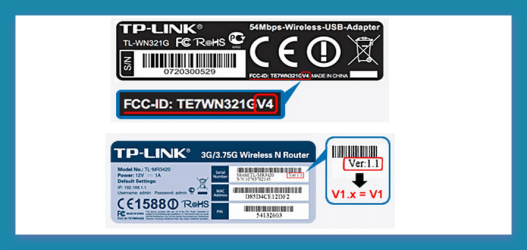
what is the code on the adapter is it version 1 ?

How to find the hardware version on a TP-Link device?

Some products have more than one hardware version, for example, a name ending with V1, V2, etc, and mostly, every version of product has a specific designed firmware.
If you want to upgrade your device for the latest firmware, you need to choose the correct version of firmware for your device.
Turn over the device, you can see a label at the back of the device, there is a character string “Ver:X.Y” (for example, Ver:1.0) in the Serial Number field, and the number X is the hardware version of the device. If the string is “Ver: 1.1”, it means that the hardware version is V1.
 

Attachments

  • Brys Snap 2012.05.20.png
    Brys Snap 2012.05.20.png
    67.7 KB · Views: 23

My Computer

Computer Manufacturer/Model Number
packard bell IXTREME M5722
OS
Operating System : Windows 7 Home Premium Edition 6.01.7600 SP1 (x64)
CPU
Processor : Intel Core 2 Quad Q8300 @ 2500 MHz
Motherboard
Mainboard : Packard Bell (Acer EG43M )
Memory
Physical Memory :8GB Corsair4x 2GB 800MHz C5 DDR2
Graphics Card(s)
Video Card : XFX 6700 AMD
Monitor(s) Displays
Maestro 234DL - BenQ V2220 - BenQ VW2420H
Screen Resolution
Current Display :1920x1080p pixels at 60 Hz in HD LED
Hard Drives
Hard Disks : WDC (1000 GB)
Drive C: (Hard Disk) : 428 GB available on 491 GB
Drive D: (Hard Disk) : 426 GB available on 492 GB
SAMSUNG spinpoint HD103SJ 1000.2 GB
(X 2) KINGSTON SSD NOW V 30GB
PSU
XFX ProSeries 550W PSU
Case
PACKARD BELL IXTREME
Cooling
System Blower Current: 150mA Air Flow16CFM ;Akasa 90mm rear
Keyboard
Gigabyte Aivia K8100
Mouse
TRUST-Wireless Laser Mouse - Carbon edition MI-7770C
Internet Speed
TP-LINK > TL-WN951N / AV500 Gigabit Powerline Adapters
Browser
chrome dev
Other Info
EXTRA COOLING>(FAN CONTROLLER) PC Bay Cooler 3 x 40mm fans; Akasa AK-HD-BL Blue hard drive cooler 2 x 40 mm fan 4500 rpm 29.7 dBA
Bios> American Megatrends Inc.
Version : P01-A1
Date : 08/31/2009
No idea, as i have tried all of the drivers from TP-Link's site for this device.

Anyway, pic of the back:
1337699972.jpg


But it installs correctly with the "v0" driver from the TP-Link site on my netbook.
But it fails every time with "Code31" on my main PC, with the exact same driver.

Marky
 

My Computer

OS
Windows 7 Ultimate 32bit SP1

Attachments

My Computer

Computer Manufacturer/Model Number
packard bell IXTREME M5722
OS
Operating System : Windows 7 Home Premium Edition 6.01.7600 SP1 (x64)
CPU
Processor : Intel Core 2 Quad Q8300 @ 2500 MHz
Motherboard
Mainboard : Packard Bell (Acer EG43M )
Memory
Physical Memory :8GB Corsair4x 2GB 800MHz C5 DDR2
Graphics Card(s)
Video Card : XFX 6700 AMD
Monitor(s) Displays
Maestro 234DL - BenQ V2220 - BenQ VW2420H
Screen Resolution
Current Display :1920x1080p pixels at 60 Hz in HD LED
Hard Drives
Hard Disks : WDC (1000 GB)
Drive C: (Hard Disk) : 428 GB available on 491 GB
Drive D: (Hard Disk) : 426 GB available on 492 GB
SAMSUNG spinpoint HD103SJ 1000.2 GB
(X 2) KINGSTON SSD NOW V 30GB
PSU
XFX ProSeries 550W PSU
Case
PACKARD BELL IXTREME
Cooling
System Blower Current: 150mA Air Flow16CFM ;Akasa 90mm rear
Keyboard
Gigabyte Aivia K8100
Mouse
TRUST-Wireless Laser Mouse - Carbon edition MI-7770C
Internet Speed
TP-LINK > TL-WN951N / AV500 Gigabit Powerline Adapters
Browser
chrome dev
Other Info
EXTRA COOLING>(FAN CONTROLLER) PC Bay Cooler 3 x 40mm fans; Akasa AK-HD-BL Blue hard drive cooler 2 x 40 mm fan 4500 rpm 29.7 dBA
Bios> American Megatrends Inc.
Version : P01-A1
Date : 08/31/2009
Did that exactly as you said, step by step.

Here is the result..

1337677335.png


Marky
 

My Computer

OS
Windows 7 Ultimate 32bit SP1
Hi,

I had a simliar problem with TL-WN722N, I was looking for result for the problem on the net, but I couldn't. I made everything, update, reinstall etc.

Now, I have a working adapter after I disabled wireless MAC Filter. Brrrr.
 

My Computer

OS
Windows 7 64 bit
Where have you disabled it?

Marky
 

My Computer

OS
Windows 7 Ultimate 32bit SP1
Hi Marky,

My router is a TL-WR741N.
Router menu (Browser 192.168.1.1 is depend on the router type, user and passwors as simliar specific, but the user's guide is contained)/Wireless/Wireless MAC Filtering enable/disable buttons.

Good Luck!

Drian
 

My Computer

OS
Windows 7 64 bit
Thanks, but i cannot get the device itself to work. So setting my router to another setting is pointless i think :)

Marky
 

My Computer

OS
Windows 7 Ultimate 32bit SP1
Update?

Did you ever resolve this issue? I have tried multiple drivers, reboots, removals, everything in this thread, all to no avail..
 

My Computer

OS
Windows 7 Ultimate 32 bit
Nope, the device is sitting on the shelf ever since.
 

My Computer

OS
Windows 7 Ultimate 32bit SP1
Back
Top