Transfer b/u image to new SSD drive?


Bought it earlier.

Getting an error: could not unlock the volume

I went to the site, and it seems others have the same issue, but it is yet unsolved.

Thanks.
 

My Computer My Computer

At a glance

W7 64 UltIntel Core i9-7940xGSkill 128GBAMD Radeon RX 560
Computer type
PC/Desktop
Computer Manufacturer/Model Number
Custom
OS
W7 64 Ult
CPU
Intel Core i9-7940x
Motherboard
ASUS x299 TUF
Memory
GSkill 128GB
Graphics Card(s)
AMD Radeon RX 560
Sound Card
RME
Screen Resolution
1920x1080
Hard Drives
5
PSU
BeQuiet!
Case
BeQuiet!
Keyboard
HyperX
Mouse
Logitech
Browser
IE - what else is there?
What are boot.wim image 2, winre.wim image 1, and Install.wim that you made reference to? Are those folders? I dont see those anywhere. Am I supposed to move the msu files there? How?

You put them in the right places. The nvme updates must have integrated successfully because ( after loading the oem drivers) you could see the nvme disk. The oem drivers you loaded cannot work unless the MS nvme updates are installed.

I don't why you said you had lots of error messages when running 7updater. :confused:

Did that.

Windows6.1-KB2990941-v3-x64.msu AND Windows6.1-KB3087873-v2-x64.msu are in 7UPDATERv22F\UPDATES\Bootx64

Windows6.1-KB2990941-v3-x64.msu AND Windows6.1-KB3087873-v2-x64.msu are in 7UPDATERv22F\\UPDATES\Installx64

That is correct. If you had put the oem drivers in DRIVERS\Bootx64 and UPDATES\Installx64 they should also have been integrated.
 

My Computers My Computers

  • At a glance

    7 X64i5 84002x8gb 3200mhz
    Computer type
    PC/Desktop
    OS
    7 X64
    CPU
    i5 8400
    Motherboard
    gigabyte b365m ds3h
    Memory
    2x8gb 3200mhz
    Hard Drives
    various
    PSU
    pure power 11 400w cm
    Case
    Coolermaster
    Cooling
    cryorig m9i
  • At a glance

    7x64g54008gb ddr4 2400
    Computer type
    PC/Desktop
    OS
    7x64
    CPU
    g5400
    Motherboard
    ga b365m ds3h
    Memory
    8gb ddr4 2400
    PSU
    xfx pro 450w
So, is there nothing else for me to try here?
 

My Computer My Computer

At a glance

W7 64 UltIntel Core i9-7940xGSkill 128GBAMD Radeon RX 560
Computer type
PC/Desktop
Computer Manufacturer/Model Number
Custom
OS
W7 64 Ult
CPU
Intel Core i9-7940x
Motherboard
ASUS x299 TUF
Memory
GSkill 128GB
Graphics Card(s)
AMD Radeon RX 560
Sound Card
RME
Screen Resolution
1920x1080
Hard Drives
5
PSU
BeQuiet!
Case
BeQuiet!
Keyboard
HyperX
Mouse
Logitech
Browser
IE - what else is there?

My Computers My Computers

  • At a glance

    Windows 7 HP 64i5 6600K - 800MHz to 4200MHz4+4G GSkill DDR4 3000IG - Intel 530
    Computer type
    PC/Desktop
    Computer Manufacturer/Model Number
    custom build
    OS
    Windows 7 HP 64
    CPU
    i5 6600K - 800MHz to 4200MHz
    Motherboard
    GA-Z170-HD3P
    Memory
    4+4G GSkill DDR4 3000
    Graphics Card(s)
    IG - Intel 530
    Monitor(s) Displays
    Samsung 226BW
    Screen Resolution
    1680x1050
    Hard Drives
    (1) -1 SM951 – 128GB M.2 AHCI PCIe SSD drive for Windows 7 and Lubuntu
    (2) -1 WD SATA 3 - 1T for Data
    (3) -1 WD SATA 3 - 1T for backup
    PSU
    Thermaltake 450W TR2 gold
    Keyboard
    Old and good Chicony mechanical keyboard
    Mouse
    Logitech mX performance - 9 buttons (had to disable some)
    Internet Speed
    500Mb/s
    Browser
    Firefox 64
    Other Info
    TinyWall firewall
  • At a glance

    Windows 7 Proi7-4500U 800MHz to 3.0GHz(4+4)G DDR3 1600IG intel 4400 + NVIDIA GeForce GT 745M
    Computer type
    Laptop
    System Manufacturer/Model Number
    Asus Q550LF
    OS
    Windows 7 Pro
    CPU
    i7-4500U 800MHz to 3.0GHz
    Motherboard
    Asus Q550LF
    Memory
    (4+4)G DDR3 1600
    Graphics Card(s)
    IG intel 4400 + NVIDIA GeForce GT 745M
    Sound Card
    Realtek
    Monitor(s) Displays
    LG Display LP156WF4-SPH1
    Screen Resolution
    1920 x 1080
    Hard Drives
    BX500 120G SSD for Windows and programs +
    1T HDD for data
    Internet Speed
    500 Mb/s
    Browser
    Firefox
    Other Info
    TinyWall firewall
So, is there nothing else for me to try here?

It looks like you integrated the nvme updates, but not the drivers.

The message you are getting "Windows cannot be installed to this location" is not unheard of. Try detaching any other disks and peripherals to see if that message goes away.
 

My Computers My Computers

  • At a glance

    7 X64i5 84002x8gb 3200mhz
    Computer type
    PC/Desktop
    OS
    7 X64
    CPU
    i5 8400
    Motherboard
    gigabyte b365m ds3h
    Memory
    2x8gb 3200mhz
    Hard Drives
    various
    PSU
    pure power 11 400w cm
    Case
    Coolermaster
    Cooling
    cryorig m9i
  • At a glance

    7x64g54008gb ddr4 2400
    Computer type
    PC/Desktop
    OS
    7x64
    CPU
    g5400
    Motherboard
    ga b365m ds3h
    Memory
    8gb ddr4 2400
    PSU
    xfx pro 450w
Say WHAT!


Yeah - I got a message saying something along the lines of "can't install here due to an MBR table being present". Or something...
 

My Computer My Computer

At a glance

W7 64 UltIntel Core i9-7940xGSkill 128GBAMD Radeon RX 560
Computer type
PC/Desktop
Computer Manufacturer/Model Number
Custom
OS
W7 64 Ult
CPU
Intel Core i9-7940x
Motherboard
ASUS x299 TUF
Memory
GSkill 128GB
Graphics Card(s)
AMD Radeon RX 560
Sound Card
RME
Screen Resolution
1920x1080
Hard Drives
5
PSU
BeQuiet!
Case
BeQuiet!
Keyboard
HyperX
Mouse
Logitech
Browser
IE - what else is there?
Ok, I am good. After AOEMI gave me the aforementioned error, I contacted support, and they sent me a newer vers. Even tho it's still in beta, it works. So, I now have an SSD with W7 on it, and after disconnecting my SATA HDD, I can boot into the OS on the SSD.

Now the next step is imaging sw. Want to see if newer versions of Acronis can image an restore W7 SSDs, and I will also look into the Macrom suggestions, mhz, so thanks for that post.

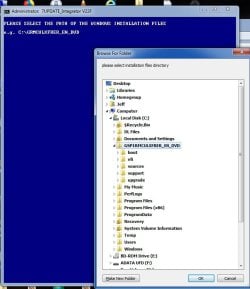
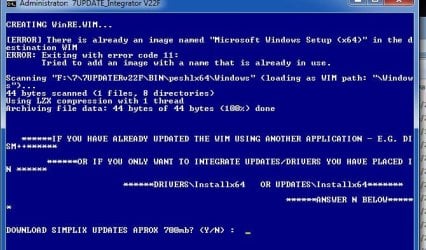
And thank you for trying SISW, but I simply could not get this working. Is it maybe due to the fact that I have an OEM vers? Some screens are in the post that follows.


Thanks to all for the time :)
 

My Computer My Computer

At a glance

W7 64 UltIntel Core i9-7940xGSkill 128GBAMD Radeon RX 560
Computer type
PC/Desktop
Computer Manufacturer/Model Number
Custom
OS
W7 64 Ult
CPU
Intel Core i9-7940x
Motherboard
ASUS x299 TUF
Memory
GSkill 128GB
Graphics Card(s)
AMD Radeon RX 560
Sound Card
RME
Screen Resolution
1920x1080
Hard Drives
5
PSU
BeQuiet!
Case
BeQuiet!
Keyboard
HyperX
Mouse
Logitech
Browser
IE - what else is there?
71.jpg

72.jpg

73.jpg

74.jpg
 

My Computer My Computer

At a glance

W7 64 UltIntel Core i9-7940xGSkill 128GBAMD Radeon RX 560
Computer type
PC/Desktop
Computer Manufacturer/Model Number
Custom
OS
W7 64 Ult
CPU
Intel Core i9-7940x
Motherboard
ASUS x299 TUF
Memory
GSkill 128GB
Graphics Card(s)
AMD Radeon RX 560
Sound Card
RME
Screen Resolution
1920x1080
Hard Drives
5
PSU
BeQuiet!
Case
BeQuiet!
Keyboard
HyperX
Mouse
Logitech
Browser
IE - what else is there?
It must have worked once, because there was a winre.wim in the 7updater folder.


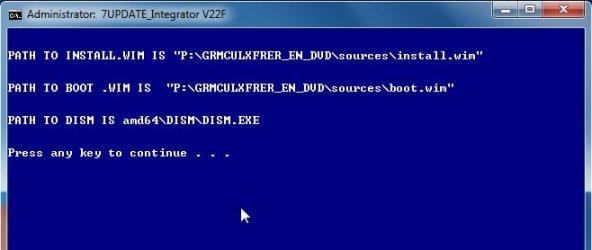
Did it list the paths, like this?

4.jpg


Did it show boot.wim mounting? Your screenshots also tell you where the log file is.
 

My Computers My Computers

  • At a glance

    7 X64i5 84002x8gb 3200mhz
    Computer type
    PC/Desktop
    OS
    7 X64
    CPU
    i5 8400
    Motherboard
    gigabyte b365m ds3h
    Memory
    2x8gb 3200mhz
    Hard Drives
    various
    PSU
    pure power 11 400w cm
    Case
    Coolermaster
    Cooling
    cryorig m9i
  • At a glance

    7x64g54008gb ddr4 2400
    Computer type
    PC/Desktop
    OS
    7x64
    CPU
    g5400
    Motherboard
    ga b365m ds3h
    Memory
    8gb ddr4 2400
    PSU
    xfx pro 450w
Back
Top