Transfering files to thumb drive gets stuck at 5 sec

Ryan915

New member
Member
Local time
6:22 AM
Messages
40
Okay so this is an odd/annoying issue. I am able to copy files no problem that are small roughly around 10 to 50 MB from what I've seen. But large files (1 GB or more) when it gets to around 5 seconds remaining it will completely stall and I'll have to pull it out to get the window to even go away.
image.jpg


I converted the drive from FAT to NTFS. Not sure if that is the problem but yeah.

Also while I'm in here.. I have a 16 GB SD card and a 2 GB thumb drive(the one having issues) and they normally only transfer files at 6 to 10 MB per second. Is this normal? That seems extremely slow for this brand new computer.

When I got it from Dell I had to call them up because my front two USB ports were completely dead. They had to walk me through connecting some green cable into a port.

I have a feeling something else may be wrong.

To sum it all up though. I can't copy large files onto my thumb drive. If I change it back to the default settings though I can transfer just fine but it takes upwards to 5 minutes to accomplish and that's just annoying.
 

My Computer My Computer

At a glance

Windows 7 Home Premium 64bitIntel(R) Core(TM) i7-2600 CPU @ 3.40 GHz12.00 GBAMD Radeon HD 6700 Series
Computer Manufacturer/Model Number
Dell XPS 8300
OS
Windows 7 Home Premium 64bit
CPU
Intel(R) Core(TM) i7-2600 CPU @ 3.40 GHz
Memory
12.00 GB
Graphics Card(s)
AMD Radeon HD 6700 Series
Sound Card
Realtek High Defintion Audio
Monitor(s) Displays
1
Screen Resolution
1920 x 1200
Hard Drives
1 TB ST310000524AS Seagate
Internet Speed
30 MBPS
Sounds like you may have gotten a referb computer not always bad but some problems. To the problem does it freeze and stop the transfer or is it just really slow in the end?
 

My Computer My Computer

At a glance

Windows 7 Home Premium 64 Bit
Computer Manufacturer/Model Number
Asus
OS
Windows 7 Home Premium 64 Bit
The really big files stay at 5 seconds remaining. I haven't let it go for a long time so I don't really know if the transfer actually completes at some point. But medium size files as in 100 MB - 300 MB will transfer about a quarter of the way and then take around 20 to 30 seconds to finish copying. It never shows the speed at which it's copying either.

I don't understand it lol.
 

My Computer My Computer

At a glance

Windows 7 Home Premium 64bitIntel(R) Core(TM) i7-2600 CPU @ 3.40 GHz12.00 GBAMD Radeon HD 6700 Series
Computer Manufacturer/Model Number
Dell XPS 8300
OS
Windows 7 Home Premium 64bit
CPU
Intel(R) Core(TM) i7-2600 CPU @ 3.40 GHz
Memory
12.00 GB
Graphics Card(s)
AMD Radeon HD 6700 Series
Sound Card
Realtek High Defintion Audio
Monitor(s) Displays
1
Screen Resolution
1920 x 1200
Hard Drives
1 TB ST310000524AS Seagate
Internet Speed
30 MBPS

My Computer My Computer

At a glance

Vista, Windows7, Mint Mate, Zorin, Windows 8from 1.6GHz Duo to i7
Computer Manufacturer/Model Number
HP, Dell, Gateway, Toshiba - 4 laptops and 2 desktops
OS
Vista, Windows7, Mint Mate, Zorin, Windows 8
CPU
from 1.6GHz Duo to i7
Monitor(s) Displays
2x HP w2207
Hard Drives
5x HDD, 7x SSD, 12x Externals
Keyboard
with trackball - no mices
Mouse
Trackball mice
Internet Speed
DSL 6000
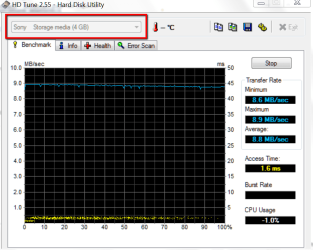
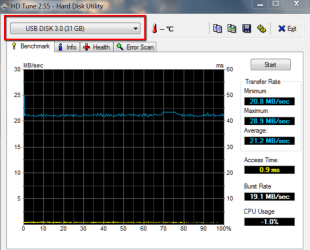
Max transfer rate is 22.7 MB/s
Min transfer rate is 13.7 MB/s
 

My Computer My Computer

At a glance

Windows 7 Home Premium 64bitIntel(R) Core(TM) i7-2600 CPU @ 3.40 GHz12.00 GBAMD Radeon HD 6700 Series
Computer Manufacturer/Model Number
Dell XPS 8300
OS
Windows 7 Home Premium 64bit
CPU
Intel(R) Core(TM) i7-2600 CPU @ 3.40 GHz
Memory
12.00 GB
Graphics Card(s)
AMD Radeon HD 6700 Series
Sound Card
Realtek High Defintion Audio
Monitor(s) Displays
1
Screen Resolution
1920 x 1200
Hard Drives
1 TB ST310000524AS Seagate
Internet Speed
30 MBPS
That is not very fast. Let's say the average is something like 18MB/sec - that compares to 70MB/sec on an average HDD.
 

My Computer My Computer

At a glance

Vista, Windows7, Mint Mate, Zorin, Windows 8from 1.6GHz Duo to i7
Computer Manufacturer/Model Number
HP, Dell, Gateway, Toshiba - 4 laptops and 2 desktops
OS
Vista, Windows7, Mint Mate, Zorin, Windows 8
CPU
from 1.6GHz Duo to i7
Monitor(s) Displays
2x HP w2207
Hard Drives
5x HDD, 7x SSD, 12x Externals
Keyboard
with trackball - no mices
Mouse
Trackball mice
Internet Speed
DSL 6000
How old is the PC? And does it have USB 2.0? If it's 1.0, then that might be why. 1.0 is extremely slow compared to 2.0. It would take roughly an hour to transfer even just a 3 gigabyte file. I suggest waiting at the end where it says 5 seconds left, and see if it finishes. If it doesn't, then your computer is having a serious problem.

If it doesn't finish, I suggest talking to Dell about it, or taking it to a shop somewhere (but a lot of shops will charge you an arm & a leg for it).
 

My Computer My Computer

At a glance

Windows 7 Ultimate 32-BitIntel(R) Core(TM) i7 CPU 920 @ 2.67GHzCorsair DDR3 4GbNvidia Ge-Force GTS250
Computer Manufacturer/Model Number
Custom
OS
Windows 7 Ultimate 32-Bit
CPU
Intel(R) Core(TM) i7 CPU 920 @ 2.67GHz
Motherboard
Gigabyte Technology Co., Ltd. EX58-UD3R
Memory
Corsair DDR3 4Gb
Graphics Card(s)
Nvidia Ge-Force GTS250
Sound Card
High Definition Audio Device
Monitor(s) Displays
Envision 19 inch
Screen Resolution
1280x1024
Hard Drives
2 physical hard drives (4 letter drives) that equal up to 626.3 gigs of space all together. I think both are Maxtors, but primary is a SATA drive, secondary is a SATA, too.
Case
"Elite" style case
Cooling
"Cooler Master"
Mouse
Microsoft Optical USB Mouse.
Internet Speed
Verizon DSL Internet
I literally just got it last week. It's a XPS 8300.

Yes it's USB 2.0.

Keep in mind.. I "converted it". I have no idea what exactly I did but I followed a YouTube video to change a FAT32 system to a NTFS.

With the default settings for the thumb drive it transfers fine but slow.

Same with my SD Card. It only transfers at a peak of about 8 MB/s.

Is this all normal?

EDIT: I checked the transfer rate for the SD card on HD Tune. It says it's 18 MB/s. It transfers at only 8 MB/s as I said. What is going on here?
 

My Computer My Computer

At a glance

Windows 7 Home Premium 64bitIntel(R) Core(TM) i7-2600 CPU @ 3.40 GHz12.00 GBAMD Radeon HD 6700 Series
Computer Manufacturer/Model Number
Dell XPS 8300
OS
Windows 7 Home Premium 64bit
CPU
Intel(R) Core(TM) i7-2600 CPU @ 3.40 GHz
Memory
12.00 GB
Graphics Card(s)
AMD Radeon HD 6700 Series
Sound Card
Realtek High Defintion Audio
Monitor(s) Displays
1
Screen Resolution
1920 x 1200
Hard Drives
1 TB ST310000524AS Seagate
Internet Speed
30 MBPS
Since you're using Windows 7, it is NTFS. NTFS was brought into Windows with Windows XP, pretty much. They haven't used FAT32 since Windows ME.

It may also depend on the flash drives you're using. How old are they?
 

My Computer My Computer

At a glance

Windows 7 Ultimate 32-BitIntel(R) Core(TM) i7 CPU 920 @ 2.67GHzCorsair DDR3 4GbNvidia Ge-Force GTS250
Computer Manufacturer/Model Number
Custom
OS
Windows 7 Ultimate 32-Bit
CPU
Intel(R) Core(TM) i7 CPU 920 @ 2.67GHz
Motherboard
Gigabyte Technology Co., Ltd. EX58-UD3R
Memory
Corsair DDR3 4Gb
Graphics Card(s)
Nvidia Ge-Force GTS250
Sound Card
High Definition Audio Device
Monitor(s) Displays
Envision 19 inch
Screen Resolution
1280x1024
Hard Drives
2 physical hard drives (4 letter drives) that equal up to 626.3 gigs of space all together. I think both are Maxtors, but primary is a SATA drive, secondary is a SATA, too.
Case
"Elite" style case
Cooling
"Cooler Master"
Mouse
Microsoft Optical USB Mouse.
Internet Speed
Verizon DSL Internet
I am not sure to be honest with you. The flash drive was given to me from a friend. It's 2 GB and says USB 2.0 Flash Drive so it can't be super old.

The SD Card is brand new. I got it from Walmart. I have no idea why it only transfers at 7-8 MB/s. It says FAT32 is the default file system. When I format it and switch to NTFS it does the exact same thing my Flash Drive does. It will go about all the way and get stuck on 5 seconds remaining. For smaller files though it copies in a flash.
 

My Computer My Computer

At a glance

Windows 7 Home Premium 64bitIntel(R) Core(TM) i7-2600 CPU @ 3.40 GHz12.00 GBAMD Radeon HD 6700 Series
Computer Manufacturer/Model Number
Dell XPS 8300
OS
Windows 7 Home Premium 64bit
CPU
Intel(R) Core(TM) i7-2600 CPU @ 3.40 GHz
Memory
12.00 GB
Graphics Card(s)
AMD Radeon HD 6700 Series
Sound Card
Realtek High Defintion Audio
Monitor(s) Displays
1
Screen Resolution
1920 x 1200
Hard Drives
1 TB ST310000524AS Seagate
Internet Speed
30 MBPS
I have absolutely no idea why it's having problems. Your PC clearly has the ability to transfer faster. Since your PC is a "refurbished PC" (or is it?), something might've gone wrong when they did it.
 
Last edited:

My Computer My Computer

At a glance

Windows 7 Ultimate 32-BitIntel(R) Core(TM) i7 CPU 920 @ 2.67GHzCorsair DDR3 4GbNvidia Ge-Force GTS250
Computer Manufacturer/Model Number
Custom
OS
Windows 7 Ultimate 32-Bit
CPU
Intel(R) Core(TM) i7 CPU 920 @ 2.67GHz
Motherboard
Gigabyte Technology Co., Ltd. EX58-UD3R
Memory
Corsair DDR3 4Gb
Graphics Card(s)
Nvidia Ge-Force GTS250
Sound Card
High Definition Audio Device
Monitor(s) Displays
Envision 19 inch
Screen Resolution
1280x1024
Hard Drives
2 physical hard drives (4 letter drives) that equal up to 626.3 gigs of space all together. I think both are Maxtors, but primary is a SATA drive, secondary is a SATA, too.
Case
"Elite" style case
Cooling
"Cooler Master"
Mouse
Microsoft Optical USB Mouse.
Internet Speed
Verizon DSL Internet
I ordered it from Dell.com

It should be brand new. I just waited about 3 minutes and it finally stopped hanging on 5 seconds remaining and ended up copying it.

This is frustrating. Check this out. This might have some answers as to why it might be acting up.

This is my Windows Experience Index score:

image.jpg
 

My Computer My Computer

At a glance

Windows 7 Home Premium 64bitIntel(R) Core(TM) i7-2600 CPU @ 3.40 GHz12.00 GBAMD Radeon HD 6700 Series
Computer Manufacturer/Model Number
Dell XPS 8300
OS
Windows 7 Home Premium 64bit
CPU
Intel(R) Core(TM) i7-2600 CPU @ 3.40 GHz
Memory
12.00 GB
Graphics Card(s)
AMD Radeon HD 6700 Series
Sound Card
Realtek High Defintion Audio
Monitor(s) Displays
1
Screen Resolution
1920 x 1200
Hard Drives
1 TB ST310000524AS Seagate
Internet Speed
30 MBPS
Fat32 is an OK format for flash drives and SD cards. I noticed that the transfer is faster with Fat32 than with NTFS (on flash drives).

I have a pretty new XPS 8300 too and do not have this problem. I suspect it is not a hardware problem but something in Win7 is holding it up. Check what processes are running and take time during the data transfer.
 

My Computer My Computer

At a glance

Vista, Windows7, Mint Mate, Zorin, Windows 8from 1.6GHz Duo to i7
Computer Manufacturer/Model Number
HP, Dell, Gateway, Toshiba - 4 laptops and 2 desktops
OS
Vista, Windows7, Mint Mate, Zorin, Windows 8
CPU
from 1.6GHz Duo to i7
Monitor(s) Displays
2x HP w2207
Hard Drives
5x HDD, 7x SSD, 12x Externals
Keyboard
with trackball - no mices
Mouse
Trackball mice
Internet Speed
DSL 6000
Fat32 is an OK format for flash drives and SD cards. I noticed that the transfer is faster with Fat32 than with NTFS (on flash drives).

I have a pretty new XPS 8300 too and do not have this problem. I suspect it is not a hardware problem but something in Win7 is holding it up. Check what processes are running and take time during the data transfer.

How fast do you transfer files on external hard drives? This is driving me nuts now that you said you don't have any problems. I'll check my processes but I'm pretty sure nothing is holding it back.
 

My Computer My Computer

At a glance

Windows 7 Home Premium 64bitIntel(R) Core(TM) i7-2600 CPU @ 3.40 GHz12.00 GBAMD Radeon HD 6700 Series
Computer Manufacturer/Model Number
Dell XPS 8300
OS
Windows 7 Home Premium 64bit
CPU
Intel(R) Core(TM) i7-2600 CPU @ 3.40 GHz
Memory
12.00 GB
Graphics Card(s)
AMD Radeon HD 6700 Series
Sound Card
Realtek High Defintion Audio
Monitor(s) Displays
1
Screen Resolution
1920 x 1200
Hard Drives
1 TB ST310000524AS Seagate
Internet Speed
30 MBPS
Just tried it. Takes about 1 minute for each 100MB.
 

My Computer My Computer

At a glance

Vista, Windows7, Mint Mate, Zorin, Windows 8from 1.6GHz Duo to i7
Computer Manufacturer/Model Number
HP, Dell, Gateway, Toshiba - 4 laptops and 2 desktops
OS
Vista, Windows7, Mint Mate, Zorin, Windows 8
CPU
from 1.6GHz Duo to i7
Monitor(s) Displays
2x HP w2207
Hard Drives
5x HDD, 7x SSD, 12x Externals
Keyboard
with trackball - no mices
Mouse
Trackball mice
Internet Speed
DSL 6000
Okay I'm confused now. I just copied a 100 MB file to my SD card and it only took 14 seconds. I converted it back to FAT32 and it was transferring at 7.5 MB/s.

Maybe it's not slow and I'm just stupid when it comes to computers.

The NTFS thing is still bothering me though. It transfers so fast but gets stuck with 5 seconds left. Weird.
 

My Computer My Computer

At a glance

Windows 7 Home Premium 64bitIntel(R) Core(TM) i7-2600 CPU @ 3.40 GHz12.00 GBAMD Radeon HD 6700 Series
Computer Manufacturer/Model Number
Dell XPS 8300
OS
Windows 7 Home Premium 64bit
CPU
Intel(R) Core(TM) i7-2600 CPU @ 3.40 GHz
Memory
12.00 GB
Graphics Card(s)
AMD Radeon HD 6700 Series
Sound Card
Realtek High Defintion Audio
Monitor(s) Displays
1
Screen Resolution
1920 x 1200
Hard Drives
1 TB ST310000524AS Seagate
Internet Speed
30 MBPS
100mb files shouldn't take a whole minute. Your transfering is slow, for some reason.

Edit: I forgot to ask, though this is probably not the problem: Are all of your drivers installed in "System" in the Control Panel?
 
Last edited:

My Computer My Computer

At a glance

Windows 7 Ultimate 32-BitIntel(R) Core(TM) i7 CPU 920 @ 2.67GHzCorsair DDR3 4GbNvidia Ge-Force GTS250
Computer Manufacturer/Model Number
Custom
OS
Windows 7 Ultimate 32-Bit
CPU
Intel(R) Core(TM) i7 CPU 920 @ 2.67GHz
Motherboard
Gigabyte Technology Co., Ltd. EX58-UD3R
Memory
Corsair DDR3 4Gb
Graphics Card(s)
Nvidia Ge-Force GTS250
Sound Card
High Definition Audio Device
Monitor(s) Displays
Envision 19 inch
Screen Resolution
1280x1024
Hard Drives
2 physical hard drives (4 letter drives) that equal up to 626.3 gigs of space all together. I think both are Maxtors, but primary is a SATA drive, secondary is a SATA, too.
Case
"Elite" style case
Cooling
"Cooler Master"
Mouse
Microsoft Optical USB Mouse.
Internet Speed
Verizon DSL Internet
100mb files shouldn't take a whole minute. Your transfering is slow, for some reason.

Edit: I forgot to ask, though this is probably not the problem: Are all of your drivers installed in "System" in the Control Panel?

He had the minute transfer rate. I had like 13-15 seconds.

I have no idea what you said about the drivers. lol.
 

My Computer My Computer

At a glance

Windows 7 Home Premium 64bitIntel(R) Core(TM) i7-2600 CPU @ 3.40 GHz12.00 GBAMD Radeon HD 6700 Series
Computer Manufacturer/Model Number
Dell XPS 8300
OS
Windows 7 Home Premium 64bit
CPU
Intel(R) Core(TM) i7-2600 CPU @ 3.40 GHz
Memory
12.00 GB
Graphics Card(s)
AMD Radeon HD 6700 Series
Sound Card
Realtek High Defintion Audio
Monitor(s) Displays
1
Screen Resolution
1920 x 1200
Hard Drives
1 TB ST310000524AS Seagate
Internet Speed
30 MBPS
Go to the Control Panel in the Start Menu, and go to "System" in the list.
 

My Computer My Computer

At a glance

Windows 7 Ultimate 32-BitIntel(R) Core(TM) i7 CPU 920 @ 2.67GHzCorsair DDR3 4GbNvidia Ge-Force GTS250
Computer Manufacturer/Model Number
Custom
OS
Windows 7 Ultimate 32-Bit
CPU
Intel(R) Core(TM) i7 CPU 920 @ 2.67GHz
Motherboard
Gigabyte Technology Co., Ltd. EX58-UD3R
Memory
Corsair DDR3 4Gb
Graphics Card(s)
Nvidia Ge-Force GTS250
Sound Card
High Definition Audio Device
Monitor(s) Displays
Envision 19 inch
Screen Resolution
1280x1024
Hard Drives
2 physical hard drives (4 letter drives) that equal up to 626.3 gigs of space all together. I think both are Maxtors, but primary is a SATA drive, secondary is a SATA, too.
Case
"Elite" style case
Cooling
"Cooler Master"
Mouse
Microsoft Optical USB Mouse.
Internet Speed
Verizon DSL Internet
Yeah, I did pick a really slow stick out of the big box for the initial test.

2012-02-17_1747.png

But then I repeated the operation on a fast stick and that took only 4 sec per 100MB. So here you have a range of from - to. Both sticks are formatted Fat32.

2012-02-17_1130.png
 

My Computer My Computer

At a glance

Vista, Windows7, Mint Mate, Zorin, Windows 8from 1.6GHz Duo to i7
Computer Manufacturer/Model Number
HP, Dell, Gateway, Toshiba - 4 laptops and 2 desktops
OS
Vista, Windows7, Mint Mate, Zorin, Windows 8
CPU
from 1.6GHz Duo to i7
Monitor(s) Displays
2x HP w2207
Hard Drives
5x HDD, 7x SSD, 12x Externals
Keyboard
with trackball - no mices
Mouse
Trackball mice
Internet Speed
DSL 6000
Back
Top