Solved Transparency and Aero effects options missing

rick146

New member
Local time
5:49 PM
Messages
5
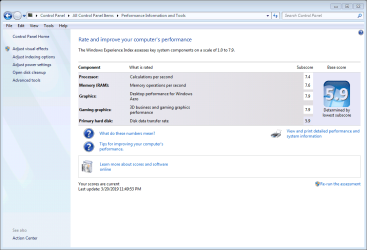
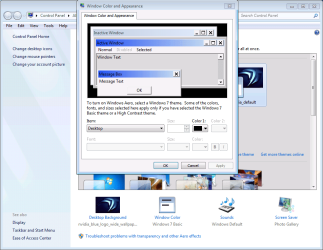
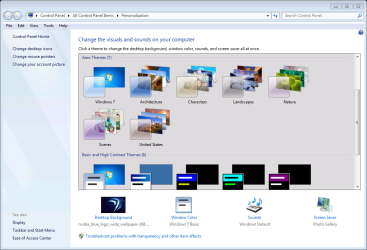
A few days ago I had Aero and transparency options. I noticed a difference while running a game that had locked up, I had to Ctrl Alt Del to shut the game down. Then noticed screen resolution went to 800 x 600 at the desktop. I changed back to 1920 x 1080 default but cannot get Aero effects back. I've tried many of the fixes to stop and start service, using troubleshooter program says it's fine. But it seems that some of the software is now missing that would provide Transparency Aero options. It looks like under personalization screen that Windows color option reverted back to Windows 7 Basic. I have Windows 7 - 64 bit professional version. I have attached several screen shots from my system of particular interest regarding this issue.
Is there a way to re-install that Aero effects option ?

see systems specs.
 

Attachments
  • personalization.png
    personalization.png
    176.9 KB · Views: 1
  • WEI.png
    WEI.png
    123.8 KB · Views: 1
  • windows_color_appearance.png
    windows_color_appearance.png
    146.5 KB · Views: 0
  • performance_options.png
    performance_options.png
    22.3 KB · Views: 33

My Computer

Computer type
PC/Desktop
Computer Manufacturer/Model Number
Custom Build
OS
Windows 7 Professional 64-bit SP1
CPU
Intel Core i7-2600K Sandy Bridge Quad-Core 3.4GHz
Motherboard
GIGABYTE GA-Z68X-UD7-B3
Memory
Corsair Vengeance Pro 32GB (4x8GB) DDR3 DRAM 2133MHz
Graphics Card(s)
GeForce GTX 1070 HYBRID , 8GB GDDR5
Hard Drives
4TB RAID 5 . 2TB, 2TB, 4TB Storage drives. 500GB HyperX Predator SSD
Antivirus
Norton 360
Browser
Google Chrome
Everything looks the same as on my system. One has to choose a Win 7 theme to get the aero, as noted in one of your screen shots.
 

My Computer

Computer type
Laptop
Computer Manufacturer/Model Number
Dell M6500 Precision Work Station
OS
Windows 7 Pro SP1 64 bit
Memory
8 GB
Screen Resolution
1920x
Internet Speed
30 Mbps
Antivirus
Norton Security
Browser
IE 11
Thanks,
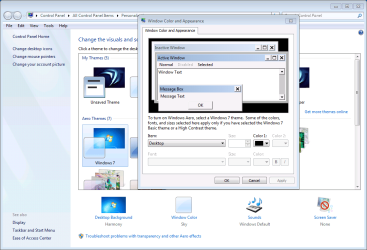
I selected one of the Aero themes but when the window color is selected, it still shows the Windows 7 Basic options only. Not the Aero color effects .
 

Attachments

  • Aero_theme.png
    Aero_theme.png
    148 KB · Views: 1

My Computer

Computer type
PC/Desktop
Computer Manufacturer/Model Number
Custom Build
OS
Windows 7 Professional 64-bit SP1
CPU
Intel Core i7-2600K Sandy Bridge Quad-Core 3.4GHz
Motherboard
GIGABYTE GA-Z68X-UD7-B3
Memory
Corsair Vengeance Pro 32GB (4x8GB) DDR3 DRAM 2133MHz
Graphics Card(s)
GeForce GTX 1070 HYBRID , 8GB GDDR5
Hard Drives
4TB RAID 5 . 2TB, 2TB, 4TB Storage drives. 500GB HyperX Predator SSD
Antivirus
Norton 360
Browser
Google Chrome
I think you have Aero since you're seeing the Aero themes and you can select one and modify it. The message about what you select simply says that some of the choices might not be usable. Windows doesn't specify which choices are and are not available, depending on the type of theme.

For instance, in Vista, the Appearance window allows me to select Windows Aero. It doesn't provide specific Aero themes as in Win 7. None the less, the Appearance screen looks exactly like the one you show when I select Advanced and has a similar message but talks about choosing other types of themes.
 

My Computer

Computer type
Laptop
Computer Manufacturer/Model Number
Dell M6500 Precision Work Station
OS
Windows 7 Pro SP1 64 bit
Memory
8 GB
Screen Resolution
1920x
Internet Speed
30 Mbps
Antivirus
Norton Security
Browser
IE 11
I think you have Aero since you're seeing the Aero themes and you can select one and modify it. The message about what you select simply says that some of the choices might not be usable. Windows doesn't specify which choices are and are not available, depending on the type of theme.

Hello, thanks Wither 2 for taking the time to help me.

That's the thing, I seem to have a portion of Aero , not all of it. Below are some screen shots from a PC with Win 7 Professional 64 bit that I am building for a friend. I have his as a comparison to see what I no longer have.
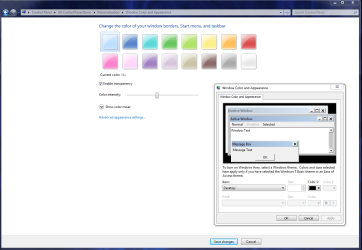
When I click on Personalization and then Window color. I see this
( first image )

When I click on Advanced appearance settings then that would show
( second Image )

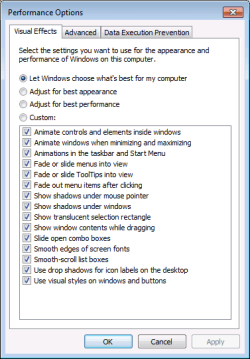
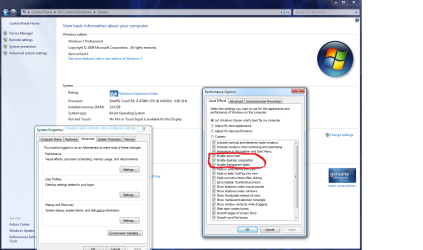
When I go System>Advanced system settings>Advanced>Settings The circled 3 entries are not available as an option to me on my system. But is is on the one that I am building.

Enable Aero Peek
Enable Desktop Composition
Enable Transparent Glass

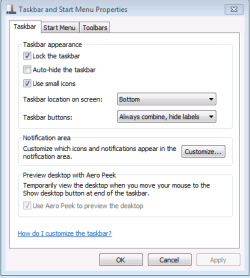
Also when I go to taskbar on my computer, right click>properties , the "use aero peek to preview the desktop" is greyed out. (last image)

So I'm thinking if I can get those options back, that would solve my problem.
I tried system restore but have no backups available. Do these options depend or have any connection to a graphics card driver software.?
If so, I could try to rollback the driver to previous version but if that works that means I will never be able to update the graphics driver going forward.
Is there a way without re-installing windows to just get that part of windows re-installed ?
 

Attachments

  • personalization.PNG
    personalization.PNG
    168.9 KB · Views: 1
  • advanced appearance settings.PNG
    advanced appearance settings.PNG
    204.3 KB · Views: 2
  • win7aero_2.png
    win7aero_2.png
    277.1 KB · Views: 6
  • taskbar_properties.PNG
    taskbar_properties.PNG
    17.8 KB · Views: 29

My Computer

Computer type
PC/Desktop
Computer Manufacturer/Model Number
Custom Build
OS
Windows 7 Professional 64-bit SP1
CPU
Intel Core i7-2600K Sandy Bridge Quad-Core 3.4GHz
Motherboard
GIGABYTE GA-Z68X-UD7-B3
Memory
Corsair Vengeance Pro 32GB (4x8GB) DDR3 DRAM 2133MHz
Graphics Card(s)
GeForce GTX 1070 HYBRID , 8GB GDDR5
Hard Drives
4TB RAID 5 . 2TB, 2TB, 4TB Storage drives. 500GB HyperX Predator SSD
Antivirus
Norton 360
Browser
Google Chrome
The fix is simple.

On the second screenshot from your first post in the middle portion below the base score - just click "Re-run the assessment". It will fix the aero in the middle of the procedure (while testing direct x and stuff) but wait until it is finished entirely which will took few minutes. ;)
 

My Computer

Computer type
PC/Desktop
OS
Windows 7 Professional x64 sp1
CPU
Intel® Core™ i7-4790К@4600MHz/1.26V
Motherboard
ASRock Z97 PRO 4
Memory
16GB ADATA@1800Mhz
Graphics Card(s)
Gigabyte GTX 660 WF OC
Sound Card
Realtek ALC892
Monitor(s) Displays
Toshiba 32HL833 [32" S-IPS FULL LED]
Screen Resolution
1920x1080
Hard Drives
Samsung 840 Pro 128GB; 0,5TB WD + 2TB WD; 3TB SG|
PSU
Seasonic X-650 SS-650KM3 Gold
Case
Fractal Design 3000 USB3
Cooling
Noctua NH-D14
Keyboard
CM Storm QuickFire Ultimate
Mouse
Mionix Naos 7000
Internet Speed
100Mbps
Antivirus
Eset NOD32
Browser
Firefox
Other Info
+ ASUS DRW-1814BLT
+ Trust Dual Stick Gamepad (GM-1520)
+ Repotec 1000VA Line interactive UPS

My Computer

Computer type
Laptop
Computer Manufacturer/Model Number
Dell M6500 Precision Work Station
OS
Windows 7 Pro SP1 64 bit
Memory
8 GB
Screen Resolution
1920x
Internet Speed
30 Mbps
Antivirus
Norton Security
Browser
IE 11
Belgarionbg, thanks for your reply. I did that on 3/20 , but for the hell of it I did it again. No change.
wither 2, I thought option 4 was going to work, but it did not. After changing the registry with the reg file, after a while my screen would flash, flicker and eventually turn black. I disabled it again using the disable .reg and so far no flickering and flashing. Not sure if it had anything to do with changing the registry, who knows. After that I did a clean install of the latest graphics card driver. No flickering screen so far but also no Aero. It's just not showing up as an option in System>Advanced system settings>Settings>Visual effects. Enable Aero Peek, Enable Desktop Composition, Enable Transparent Glass are not listed.
Probably the only way to get it back is re-install Windows, but it's not worth it, I will just have to live with it.
 

My Computer

Computer type
PC/Desktop
Computer Manufacturer/Model Number
Custom Build
OS
Windows 7 Professional 64-bit SP1
CPU
Intel Core i7-2600K Sandy Bridge Quad-Core 3.4GHz
Motherboard
GIGABYTE GA-Z68X-UD7-B3
Memory
Corsair Vengeance Pro 32GB (4x8GB) DDR3 DRAM 2133MHz
Graphics Card(s)
GeForce GTX 1070 HYBRID , 8GB GDDR5
Hard Drives
4TB RAID 5 . 2TB, 2TB, 4TB Storage drives. 500GB HyperX Predator SSD
Antivirus
Norton 360
Browser
Google Chrome
Do you have your monitor set to True Colors (32 bit)?
 

My Computer

Computer type
Laptop
Computer Manufacturer/Model Number
Dell M6500 Precision Work Station
OS
Windows 7 Pro SP1 64 bit
Memory
8 GB
Screen Resolution
1920x
Internet Speed
30 Mbps
Antivirus
Norton Security
Browser
IE 11
Do you have your monitor set to True Colors (32 bit)?


DUDE , winner winner chicken dinner. You nailed it :thumbsup:

It was set to 16 bit color. I was wondering why the graphics looked terrible.

EVERYTHING is back to normal. Thank you for sticking with it even though I about given up.

Solved !

Thanks again wither 2 :geek:
 

My Computer

Computer type
PC/Desktop
Computer Manufacturer/Model Number
Custom Build
OS
Windows 7 Professional 64-bit SP1
CPU
Intel Core i7-2600K Sandy Bridge Quad-Core 3.4GHz
Motherboard
GIGABYTE GA-Z68X-UD7-B3
Memory
Corsair Vengeance Pro 32GB (4x8GB) DDR3 DRAM 2133MHz
Graphics Card(s)
GeForce GTX 1070 HYBRID , 8GB GDDR5
Hard Drives
4TB RAID 5 . 2TB, 2TB, 4TB Storage drives. 500GB HyperX Predator SSD
Antivirus
Norton 360
Browser
Google Chrome
I'm glad we finally found the problem.

Enjoy!
 

My Computer

Computer type
Laptop
Computer Manufacturer/Model Number
Dell M6500 Precision Work Station
OS
Windows 7 Pro SP1 64 bit
Memory
8 GB
Screen Resolution
1920x
Internet Speed
30 Mbps
Antivirus
Norton Security
Browser
IE 11
Back
Top