Transparency - Enable Full Clear Glass Transparency

How to Enable "Full Clear Glass Transparency" in Windows 7

   Information
By default when you enabled transparency in Windows 7, the transparency will be blurred a bit in the window borders. This will show you how to have the window borders fully clear and transparent like glass instead for your current account only, or for all user accounts on the computer.

The Windows 7 Starter and Home Basic editions do not have Aero Transparency included in them.

   Note
This will not make the taskbar clear, on window borders. One side effect though is that when you have a window border with text on top of another window with text, the text will tend to overlap each other since the window is clear instead of with a opaque (blurred) background.
   Warning
You will only be able to apply this while logged in an administrator account.

You will not have the Transparency option if you have a Basic and High Contrast Theme instead of a Aero Theme.

Aero Requirements to be Enabled in Windows 7:
NOTE: If Aero is not enabled, then Transparency will not work even when enabled.
  • 1 GHz 32-bit or 64-bit processor
  • 1 GB of system memory
  • Support for DirectX 9 graphics with 128 MB memory (in order to enable Aero theme)
  • You must be have True Color (32 bit) set instead of High Color (16 bit).
  • The desktop composition and Animate controls and elements inside windows options need to be enabled in Visual Effects.
  • The Desktop Window Manager Session Manager and Themes Services need to be set as Started and Automatic.
  • Refresh or update your WEI score. You will need an WEI score minimum of 2.0 in both Graphics & Gaming graphics in order for Aero to be activated.

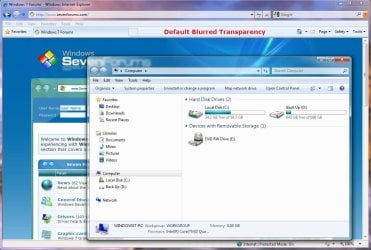
EXAMPLE: Full Clear Transparency and Default Blurred Transparency
NOTE: Notice how the Computer window borders are completely transparent when this is enabled. Enabled.jpg
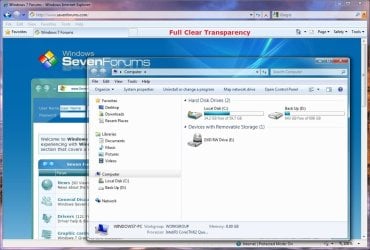
Default.jpg


STEP ONE

Replace System Files to Make this Work


NOTE: Credit goes to LFB for this addition. Thank you LFB. 1. Click on the Download button below to download the DWM_32-bit_7127.zip or DWM_64-bit_7127.zip file for your 32-bit (x86) or 64-bit (x64) Windows 7 version. For 32-bit Windows 7:

Download


For 64-bit Windows 7:

Download


2. Click on Save, and save the .zip file to the desktop.

3. Open the .zip file and extract (drag and drop) the dwm.exe and uDWM.dll files to the desktop.

4. Right click on each the dwm.exe and uDWM.dll files (one at a time) on the desktop and click on Properties, General tab, the Unblock button, and on OK. (See screenshots below)
NOTE: If you do not have a Unblock button under the General tab, then the shortcut is already unblocked and you can continue on to step 5. Unblock1.jpgUnblock2.jpg
5. Stop the Desktop Windows Manager Session Manager Service. (See screenshot below) Services.jpg
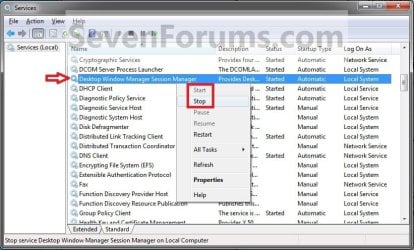
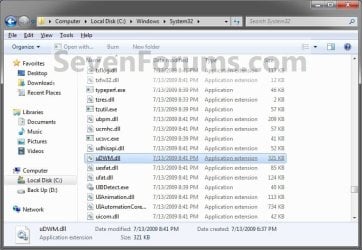
6. In Windows Explorer, navigate to and make a backup copy of the original C:\Windows\System32\dwm.exe and C:\Windows\System32\uDWM.dll files at these locations. (See screenshots below)
NOTE: You will need these backups if you ever would like to restore them. dwm.exe.jpg
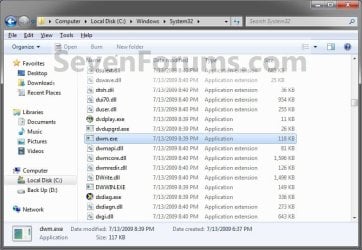
uDWM.dll.jpg

7. In Windows Explorer, take ownership and give yourself full permission of the C:\Windows\System32\dwm.exe and C:\Windows\System32\uDWM.dll files at these locations. (See screenshots above)

8. Copy and Paste the dwm.exe and uDWM.dll files on the desktop into the C:\Windows\System32 folder.

9. Select Copy and Replace and approve the replacement of these default files with the downloaded ones.
NOTE: If you ever run a sfc /scannow command, it will consider these as modified files, and will replace them with the default ones. You'll have to do this tutorial again to have the full clear transparency back.

10. Start the Desktop Windows Manager Session Manager Service. (See screenshot below step 5)

11. Do either OPTION ONE or OPTION TWO below.


OPTION ONE

For Current User Account Only

1. To Enable Current User Full Transparency A) Click on the Download button below to download the file below. Enable_Current_User_Full_Transparency.reg

Download


B) Go to step 4.
2. To Undo Current User Full Transparency A) Click on the Download button below to download the file below. Undo_Current_User_Full_Transparency.reg

Download


3. Save the .reg file to the desktop.

4. Right click on the downloaded .reg file, and click on Merge.

5. Click on Run, Yes (UAC), Yes, and OK when prompted.

6. Log off and log on, or restart the computer to apply.

7. When done, you can delete the downloaded .reg file if you like.


OPTION TWO

For All User Accounts

1. To Enable All Users Full Transparency A) Click on the Download button below to download the file below. Enable_All_Users_Full_Transparency.reg

Download


B) Go to step 4.
2. To Undo All Users Full Transparency A) Click on the Download button below to download the file below. Undo_All_Users_Full_Transparency.reg

Download


3. Save the .reg file to the desktop.

4. Right click on the downloaded .reg file and click on Merge.

5. Click on Run, Yes (UAC), Yes, and OK when prompted.

6. Enable Transparency and adjust the color intensity to the far left in all user accounts on the computer.
NOTE: The current user account will have transparency enabled and color intensity adjusted automatically with this download, but any other user accounts on the computer will need to enable transparency to prevent a blending affect in the window borders.

7. Log off and log on, or restart the computer to apply.

8. When done, you can delete the downloaded .reg file if you like.
That's it,
Shawn


Attachments

Last edited:
Personally, I feel that the blurred glass transparency is more warm and appealing. It just feels more nice even though I don't know why. When a Window is open, seeing my Desktop Icon with Full Clear Glass Transparency feels irky. Thanks for the share anyways. Hopefully I will feel like changing to it after Blurred Clear Glass feels boring.
 

My Computer

Computer Manufacturer/Model Number
Apple Inc.
OS
Windows 7
CPU
Intel(R) Core 2 Duo CPU T8100 @ 2.10GHz
Motherboard
MB41.88Z.00C1.B00.0802091535
Memory
1.00GB
Graphics Card(s)
Mobile Intel 965 Express Chipset Family
Sound Card
Apple Sound Card
Monitor(s) Displays
Apple Display
Screen Resolution
1280 X 800
Hard Drives
Fujitsu MHY2120BH ATA Device 110GB
PSU
The Apple PSU
Case
The Apple Case
Cooling
The Apple Cooling Fan
Keyboard
Apple Keyboard
Mouse
IBM Mouse Model MO32BO
Internet Speed
10MBPS
Hello Pestbest,

Yeah, it's just another one of those fun options to keep things interesting. ;)
 

My Computer

Computer type
PC/Desktop
Computer Manufacturer/Model Number
Self built custom
OS
64-bit Windows 11 Pro for Workstations
CPU
Intel i7-8700K OC'd to 5 GHz
Motherboard
ASUS ROG Maximus XI Formula Z390
Memory
64 GB (4x16GB) G.SKILL TridentZ RGB DDR4 3600 MHz
Graphics Card(s)
ASUS ROG-STRIX-GTX1080TI-O11G-GAMING
Sound Card
Integrated
Monitor(s) Displays
2 x Samsung Odyssey G7 27"
Screen Resolution
2560x1440
Hard Drives
1TB Samsung 990 PRO M.2,
4TB Samsung 990 PRO PRO M.2,
TerraMaster F8 SSD Plus NAS
PSU
Seasonic Prime Titanium 850W
Case
Thermaltake Core P3
Cooling
Corsair Hydro H115i
Keyboard
Logitech wireless K800
Mouse
Logitech MX Master 4
Internet Speed
2 Gb/s Download and 100 Mb/s Upload
Antivirus
Malwarebyte Anti-Malware Premium
Browser
Google Chrome
Other Info
Logitech Z625 speaker system,
Logitech BRIO 4K Pro webcam,
HP Color LaserJet Pro MFP M477fdn,
APC SMART-UPS RT 1000 XL - SURT1000XLI,
Galaxy S23 Plus phone
It's just me... Or this must be fixed? :confused:
 

Attachments

  • confused.png
    confused.png
    26.3 KB · Views: 6,463

My Computer

Computer Manufacturer/Model Number
Clevo - M7X0SU
OS
Windows 7 7600 X64
CPU
Intel Pentium Dual T2410
Motherboard
M7X0SU
Memory
2 X 2GB DDR2
Graphics Card(s)
nVidia 9300 GS
Sound Card
Realtek High Definition Audio Device
Monitor(s) Displays
Built In Display
Screen Resolution
1680 X 1050
Hard Drives
Toshiba - 320 GB
Keyboard
Built in Keyboard
Mouse
Microsoft PS/2
Internet Speed
100 Mbps
I like the full transparency, top notch Shawn, just a shame there's no registry edit to make explorer fully transparent. E.G. The white background where the icons reside
Capture.PNG
 

My Computer

Computer Manufacturer/Model Number
Compaq Desktop
OS
Windows 7 Ultimate x64
CPU
AMD Sempron Dual Core
Memory
3GB
Graphics Card(s)
NVIDIA GeForce 6150SE nForce 430
Screen Resolution
1024x768
Hard Drives
150GB Sata
Last edited:

My Computer

Computer type
PC/Desktop
Computer Manufacturer/Model Number
Self built custom
OS
64-bit Windows 11 Pro for Workstations
CPU
Intel i7-8700K OC'd to 5 GHz
Motherboard
ASUS ROG Maximus XI Formula Z390
Memory
64 GB (4x16GB) G.SKILL TridentZ RGB DDR4 3600 MHz
Graphics Card(s)
ASUS ROG-STRIX-GTX1080TI-O11G-GAMING
Sound Card
Integrated
Monitor(s) Displays
2 x Samsung Odyssey G7 27"
Screen Resolution
2560x1440
Hard Drives
1TB Samsung 990 PRO M.2,
4TB Samsung 990 PRO PRO M.2,
TerraMaster F8 SSD Plus NAS
PSU
Seasonic Prime Titanium 850W
Case
Thermaltake Core P3
Cooling
Corsair Hydro H115i
Keyboard
Logitech wireless K800
Mouse
Logitech MX Master 4
Internet Speed
2 Gb/s Download and 100 Mb/s Upload
Antivirus
Malwarebyte Anti-Malware Premium
Browser
Google Chrome
Other Info
Logitech Z625 speaker system,
Logitech BRIO 4K Pro webcam,
HP Color LaserJet Pro MFP M477fdn,
APC SMART-UPS RT 1000 XL - SURT1000XLI,
Galaxy S23 Plus phone
Hello Dannykard,

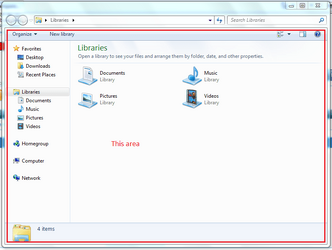
I'm not sure what you are referring to in the image. If you mean how long the address bar is, then you can adjust how long you want it to be instead.

http://www.sevenforums.com/tutorials/3339-windows-explorer-address-search-bar-change-size.html

Hello Brink, first of all I would like to congratulate you by this tutorial, it's just amazing :D.
And second of all I have some (for example) words problems, to explain, please open your browser go to Google, now please open another page (not tab it must be a page) and go to Bing. Maximize the web pages and now look at the title.
Don't you see any problem like mine? (On the picture).
Or please open your Computer and Music and put it on the same position, one under the other.
Do you see any problem or it's just me?

Thanks,
Daniel Cardoso
 

Attachments

  • 2.png
    2.png
    6.8 KB · Views: 3,107
  • 1.png
    1.png
    4.2 KB · Views: 231,016

My Computer

Computer Manufacturer/Model Number
Clevo - M7X0SU
OS
Windows 7 7600 X64
CPU
Intel Pentium Dual T2410
Motherboard
M7X0SU
Memory
2 X 2GB DDR2
Graphics Card(s)
nVidia 9300 GS
Sound Card
Realtek High Definition Audio Device
Monitor(s) Displays
Built In Display
Screen Resolution
1680 X 1050
Hard Drives
Toshiba - 320 GB
Keyboard
Built in Keyboard
Mouse
Microsoft PS/2
Internet Speed
100 Mbps
Hi Daniel,


That's the price you'll pay for having this option enabled. It can get somewhat confusing with having the text bleed through from one window to another. That's mostly why the transparency is opaque by default, so the text doesn't bleed thru like that. If you have this option enabled, you will have to get used to the text overlay, there's no way to fix that except to not have this option enabled. :)
 

My Computer

Computer type
PC/Desktop
Computer Manufacturer/Model Number
Airbot 2.0
OS
Windows 7 Ultimate x64 SP1
CPU
Core i7 920 (D0) @ 4Ghz, *26c idle *65c full load on air
Motherboard
Asus P6X58D Premium - Sata 6Gb/s - USB 3.0
Memory
12GB DDR3 Corsair Dominator -CMD12GX3M6A1600C8 at 1600MHz
Graphics Card(s)
Zotac Geforce GTX 770
Sound Card
ASUS Xonar D2X
Monitor(s) Displays
1 LG 24" Flatron W2453V-PF 1 Samsung 24" P2450H both 2ms RT
Screen Resolution
1920x1080@60hz
Hard Drives
1 Samsung 250GB 840 Evo SSD
1 OCZ Vertex2 180GB SSD
1 TB Samsung Spinpoint F1 7200RPM 32MB cache
2 500GB WD Caviar Blacks 7200RPM 32MB cache (WD5001AALS)

Pioneer DVD Burner DVR-S18M
PSU
Corsair HX1000W
Case
Cooler Master HAF 932
Cooling
Case Fans *3 230mm, *1 140mm/CPU - *Tuniq Tower 120 Extreme
Keyboard
Logitech Wireless MK700
Mouse
Logitech Wireless MK700
Internet Speed
DL 15 Mbps UL 0.98 Mbps
Antivirus
None
Browser
Firefox Nightly
Other Info
Processor-7.7 *RAM- 7.9 *Graphics-7.9 *Gaming Graphics- 7.9 *SSD- 7.8 W.E.I final score= 7.7
*Phone- LG Nexus 5
OK :D Thanks a lot :D
 

My Computer

Computer Manufacturer/Model Number
Clevo - M7X0SU
OS
Windows 7 7600 X64
CPU
Intel Pentium Dual T2410
Motherboard
M7X0SU
Memory
2 X 2GB DDR2
Graphics Card(s)
nVidia 9300 GS
Sound Card
Realtek High Definition Audio Device
Monitor(s) Displays
Built In Display
Screen Resolution
1680 X 1050
Hard Drives
Toshiba - 320 GB
Keyboard
Built in Keyboard
Mouse
Microsoft PS/2
Internet Speed
100 Mbps
Daniel,

Yeah, as Aaron posted, since it is clear, text will tend to overlap like that and appear jumbled if on top of each other. :(
 

My Computer

Computer type
PC/Desktop
Computer Manufacturer/Model Number
Self built custom
OS
64-bit Windows 11 Pro for Workstations
CPU
Intel i7-8700K OC'd to 5 GHz
Motherboard
ASUS ROG Maximus XI Formula Z390
Memory
64 GB (4x16GB) G.SKILL TridentZ RGB DDR4 3600 MHz
Graphics Card(s)
ASUS ROG-STRIX-GTX1080TI-O11G-GAMING
Sound Card
Integrated
Monitor(s) Displays
2 x Samsung Odyssey G7 27"
Screen Resolution
2560x1440
Hard Drives
1TB Samsung 990 PRO M.2,
4TB Samsung 990 PRO PRO M.2,
TerraMaster F8 SSD Plus NAS
PSU
Seasonic Prime Titanium 850W
Case
Thermaltake Core P3
Cooling
Corsair Hydro H115i
Keyboard
Logitech wireless K800
Mouse
Logitech MX Master 4
Internet Speed
2 Gb/s Download and 100 Mb/s Upload
Antivirus
Malwarebyte Anti-Malware Premium
Browser
Google Chrome
Other Info
Logitech Z625 speaker system,
Logitech BRIO 4K Pro webcam,
HP Color LaserJet Pro MFP M477fdn,
APC SMART-UPS RT 1000 XL - SURT1000XLI,
Galaxy S23 Plus phone
That's ok :D It's excellent anyway :D

Thanks for the tutorial,
Daniel Cardoso
 

My Computer

Computer Manufacturer/Model Number
Clevo - M7X0SU
OS
Windows 7 7600 X64
CPU
Intel Pentium Dual T2410
Motherboard
M7X0SU
Memory
2 X 2GB DDR2
Graphics Card(s)
nVidia 9300 GS
Sound Card
Realtek High Definition Audio Device
Monitor(s) Displays
Built In Display
Screen Resolution
1680 X 1050
Hard Drives
Toshiba - 320 GB
Keyboard
Built in Keyboard
Mouse
Microsoft PS/2
Internet Speed
100 Mbps
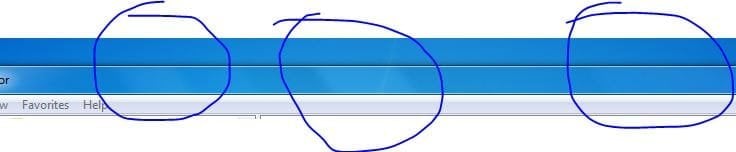
Somewhat related to the topic, to get rid of those slanted stripes that appear on the title bar when you have Aero on go into the Registry and change:

HKEY_CURRENT_USER\Software\Microsoft\Windows\DWMColorizationGlassReflectionIntensity

to a lower value. Zero will get rid of the stripes while a lower number will make them less obvious.

This takes affect after a reboot or you could stop then restart DWM.
 

My Computer

Computer Manufacturer/Model Number
Asus CG5290
OS
Windows 7 x64 RTM Retail
CPU
Intel i7-920 Quad @ 4.0Ghz. Stepping D0.
Motherboard
Asus Rampage II GENE
Memory
9GB DDR3 @ 1600 Mhz. 9-8-8-24-CR1
Graphics Card(s)
XFX ATI HD5870 @ 900/1300
Sound Card
SupremeFX X/Fi HD Audio onboard
Monitor(s) Displays
Samsung 24" WS
Screen Resolution
1920x1200
Hard Drives
OCZ AGILITY-EX (64 GB, SATA-II, SSD SLC NAND Flash)
Hitachi HDT721010SLA360 (1 TB, 7200 RPM, SATA-II)
Cavalry (500 GB, 7200 RPM, eSATA-II)
PSU
Antec TruePower 650 Watts
Case
Ugly but functional.
Cooling
Oversized heat sink, lots and lots of fans.
Keyboard
MS
Mouse
MS wireless explorer
Internet Speed
101/15 - Optimum Online Ultra
Thank you Streetwolf. I have not noticed any slanted stripes yet, at least for me though.
 

My Computer

Computer type
PC/Desktop
Computer Manufacturer/Model Number
Self built custom
OS
64-bit Windows 11 Pro for Workstations
CPU
Intel i7-8700K OC'd to 5 GHz
Motherboard
ASUS ROG Maximus XI Formula Z390
Memory
64 GB (4x16GB) G.SKILL TridentZ RGB DDR4 3600 MHz
Graphics Card(s)
ASUS ROG-STRIX-GTX1080TI-O11G-GAMING
Sound Card
Integrated
Monitor(s) Displays
2 x Samsung Odyssey G7 27"
Screen Resolution
2560x1440
Hard Drives
1TB Samsung 990 PRO M.2,
4TB Samsung 990 PRO PRO M.2,
TerraMaster F8 SSD Plus NAS
PSU
Seasonic Prime Titanium 850W
Case
Thermaltake Core P3
Cooling
Corsair Hydro H115i
Keyboard
Logitech wireless K800
Mouse
Logitech MX Master 4
Internet Speed
2 Gb/s Download and 100 Mb/s Upload
Antivirus
Malwarebyte Anti-Malware Premium
Browser
Google Chrome
Other Info
Logitech Z625 speaker system,
Logitech BRIO 4K Pro webcam,
HP Color LaserJet Pro MFP M477fdn,
APC SMART-UPS RT 1000 XL - SURT1000XLI,
Galaxy S23 Plus phone
These here Shawn, they're really hard to see.


stripes.JPG

Sort of like the stripes you get when you hover over the Show Desktop button, except it's there in the window borders.

Although I set it to zero in the registry and it took them away completely after I logged off/on, it reset itself to 50 when I rebooted. :confused:
 

My Computer

Computer type
PC/Desktop
Computer Manufacturer/Model Number
Airbot 2.0
OS
Windows 7 Ultimate x64 SP1
CPU
Core i7 920 (D0) @ 4Ghz, *26c idle *65c full load on air
Motherboard
Asus P6X58D Premium - Sata 6Gb/s - USB 3.0
Memory
12GB DDR3 Corsair Dominator -CMD12GX3M6A1600C8 at 1600MHz
Graphics Card(s)
Zotac Geforce GTX 770
Sound Card
ASUS Xonar D2X
Monitor(s) Displays
1 LG 24" Flatron W2453V-PF 1 Samsung 24" P2450H both 2ms RT
Screen Resolution
1920x1080@60hz
Hard Drives
1 Samsung 250GB 840 Evo SSD
1 OCZ Vertex2 180GB SSD
1 TB Samsung Spinpoint F1 7200RPM 32MB cache
2 500GB WD Caviar Blacks 7200RPM 32MB cache (WD5001AALS)

Pioneer DVD Burner DVR-S18M
PSU
Corsair HX1000W
Case
Cooler Master HAF 932
Cooling
Case Fans *3 230mm, *1 140mm/CPU - *Tuniq Tower 120 Extreme
Keyboard
Logitech Wireless MK700
Mouse
Logitech Wireless MK700
Internet Speed
DL 15 Mbps UL 0.98 Mbps
Antivirus
None
Browser
Firefox Nightly
Other Info
Processor-7.7 *RAM- 7.9 *Graphics-7.9 *Gaming Graphics- 7.9 *SSD- 7.8 W.E.I final score= 7.7
*Phone- LG Nexus 5
Oh ok, thank your Aaron. Since you can barely notice them, I had though that they were just part of the window behind it bleeding through. :o
 

My Computer

Computer type
PC/Desktop
Computer Manufacturer/Model Number
Self built custom
OS
64-bit Windows 11 Pro for Workstations
CPU
Intel i7-8700K OC'd to 5 GHz
Motherboard
ASUS ROG Maximus XI Formula Z390
Memory
64 GB (4x16GB) G.SKILL TridentZ RGB DDR4 3600 MHz
Graphics Card(s)
ASUS ROG-STRIX-GTX1080TI-O11G-GAMING
Sound Card
Integrated
Monitor(s) Displays
2 x Samsung Odyssey G7 27"
Screen Resolution
2560x1440
Hard Drives
1TB Samsung 990 PRO M.2,
4TB Samsung 990 PRO PRO M.2,
TerraMaster F8 SSD Plus NAS
PSU
Seasonic Prime Titanium 850W
Case
Thermaltake Core P3
Cooling
Corsair Hydro H115i
Keyboard
Logitech wireless K800
Mouse
Logitech MX Master 4
Internet Speed
2 Gb/s Download and 100 Mb/s Upload
Antivirus
Malwarebyte Anti-Malware Premium
Browser
Google Chrome
Other Info
Logitech Z625 speaker system,
Logitech BRIO 4K Pro webcam,
HP Color LaserJet Pro MFP M477fdn,
APC SMART-UPS RT 1000 XL - SURT1000XLI,
Galaxy S23 Plus phone
Yeah, you can move the window around to see them a little better while you're moving it, it makes it truly transparent when getting rid of them, but the registry change for the stripes didn't seem to stay changed for me. :huh:
 

My Computer

Computer type
PC/Desktop
Computer Manufacturer/Model Number
Airbot 2.0
OS
Windows 7 Ultimate x64 SP1
CPU
Core i7 920 (D0) @ 4Ghz, *26c idle *65c full load on air
Motherboard
Asus P6X58D Premium - Sata 6Gb/s - USB 3.0
Memory
12GB DDR3 Corsair Dominator -CMD12GX3M6A1600C8 at 1600MHz
Graphics Card(s)
Zotac Geforce GTX 770
Sound Card
ASUS Xonar D2X
Monitor(s) Displays
1 LG 24" Flatron W2453V-PF 1 Samsung 24" P2450H both 2ms RT
Screen Resolution
1920x1080@60hz
Hard Drives
1 Samsung 250GB 840 Evo SSD
1 OCZ Vertex2 180GB SSD
1 TB Samsung Spinpoint F1 7200RPM 32MB cache
2 500GB WD Caviar Blacks 7200RPM 32MB cache (WD5001AALS)

Pioneer DVD Burner DVR-S18M
PSU
Corsair HX1000W
Case
Cooler Master HAF 932
Cooling
Case Fans *3 230mm, *1 140mm/CPU - *Tuniq Tower 120 Extreme
Keyboard
Logitech Wireless MK700
Mouse
Logitech Wireless MK700
Internet Speed
DL 15 Mbps UL 0.98 Mbps
Antivirus
None
Browser
Firefox Nightly
Other Info
Processor-7.7 *RAM- 7.9 *Graphics-7.9 *Gaming Graphics- 7.9 *SSD- 7.8 W.E.I final score= 7.7
*Phone- LG Nexus 5
some seven builds don't have the hideblur Available...

you have to replace the dwm.exe and uDWM.dll for enable again...

i did in the 7260 rtm... :)

dowmload both files here:
Deposit Files

here how to:

Replace the files on c:\windows\system32\

In order to replace and overwrite dwm.exe and uDWM.dll in Windows 7 system, firstly take ownership and grant full access permissions to the files, and then stop the Desktop Windows Manager Session Manager service in Control Panel -> System and Security -> Administrative Tools -> Services module. Copy the dwm.exe and uDWM.dll to %systemdrive%\Windows\System32 folder
 

My Computer

OS
Windows7 Enterprise SP1 x64 (Technet)
The 'stripes' thingy is very noticeable on my system. Perhaps it the choice of color you use.

There are circumstances where the Reg entry will be reset back to 50. Changing themes will do it and I think changing colors will do it too. There's probably other ways too. I suppose some things that reset DWM.
 

My Computer

Computer Manufacturer/Model Number
Asus CG5290
OS
Windows 7 x64 RTM Retail
CPU
Intel i7-920 Quad @ 4.0Ghz. Stepping D0.
Motherboard
Asus Rampage II GENE
Memory
9GB DDR3 @ 1600 Mhz. 9-8-8-24-CR1
Graphics Card(s)
XFX ATI HD5870 @ 900/1300
Sound Card
SupremeFX X/Fi HD Audio onboard
Monitor(s) Displays
Samsung 24" WS
Screen Resolution
1920x1200
Hard Drives
OCZ AGILITY-EX (64 GB, SATA-II, SSD SLC NAND Flash)
Hitachi HDT721010SLA360 (1 TB, 7200 RPM, SATA-II)
Cavalry (500 GB, 7200 RPM, eSATA-II)
PSU
Antec TruePower 650 Watts
Case
Ugly but functional.
Cooling
Oversized heat sink, lots and lots of fans.
Keyboard
MS
Mouse
MS wireless explorer
Internet Speed
101/15 - Optimum Online Ultra
Aaron, did you change colors or anything as Streetwolf described above before it reset for the stripes?
 

My Computer

Computer type
PC/Desktop
Computer Manufacturer/Model Number
Self built custom
OS
64-bit Windows 11 Pro for Workstations
CPU
Intel i7-8700K OC'd to 5 GHz
Motherboard
ASUS ROG Maximus XI Formula Z390
Memory
64 GB (4x16GB) G.SKILL TridentZ RGB DDR4 3600 MHz
Graphics Card(s)
ASUS ROG-STRIX-GTX1080TI-O11G-GAMING
Sound Card
Integrated
Monitor(s) Displays
2 x Samsung Odyssey G7 27"
Screen Resolution
2560x1440
Hard Drives
1TB Samsung 990 PRO M.2,
4TB Samsung 990 PRO PRO M.2,
TerraMaster F8 SSD Plus NAS
PSU
Seasonic Prime Titanium 850W
Case
Thermaltake Core P3
Cooling
Corsair Hydro H115i
Keyboard
Logitech wireless K800
Mouse
Logitech MX Master 4
Internet Speed
2 Gb/s Download and 100 Mb/s Upload
Antivirus
Malwarebyte Anti-Malware Premium
Browser
Google Chrome
Other Info
Logitech Z625 speaker system,
Logitech BRIO 4K Pro webcam,
HP Color LaserJet Pro MFP M477fdn,
APC SMART-UPS RT 1000 XL - SURT1000XLI,
Galaxy S23 Plus phone
Hi Brink thanks for the tuts , they are really easy to follow and are helping me out heaps :D

I have a question for you ...

When you maximise a window it isn't really transparent is it ? by that i mean if you have a dream playing on your desktop in W7 (Vista as well) it stops and Windows takes a snap shot of the background and uses it.

Any way to make it truly transparent and show a live preview of the desktop ? I know its an odd request , i just like the idea of it...im sure other people will disagree with me lol.

Thanks.
 
Back
Top