Transparency - Enable Full Clear Glass Transparency

How to Enable "Full Clear Glass Transparency" in Windows 7

   Information
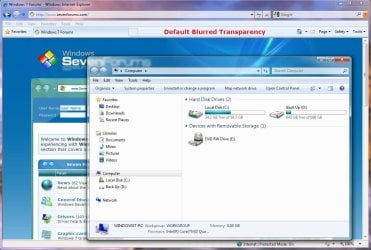
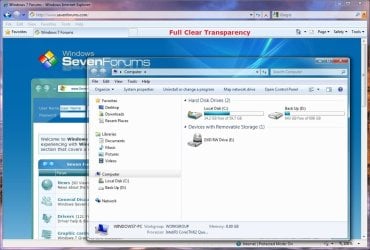
By default when you enabled transparency in Windows 7, the transparency will be blurred a bit in the window borders. This will show you how to have the window borders fully clear and transparent like glass instead for your current account only, or for all user accounts on the computer.

The Windows 7 Starter and Home Basic editions do not have Aero Transparency included in them.

   Note
This will not make the taskbar clear, on window borders. One side effect though is that when you have a window border with text on top of another window with text, the text will tend to overlap each other since the window is clear instead of with a opaque (blurred) background.
   Warning
You will only be able to apply this while logged in an administrator account.

You will not have the Transparency option if you have a Basic and High Contrast Theme instead of a Aero Theme.

Aero Requirements to be Enabled in Windows 7:
NOTE: If Aero is not enabled, then Transparency will not work even when enabled.
  • 1 GHz 32-bit or 64-bit processor
  • 1 GB of system memory
  • Support for DirectX 9 graphics with 128 MB memory (in order to enable Aero theme)
  • You must be have True Color (32 bit) set instead of High Color (16 bit).
  • The desktop composition and Animate controls and elements inside windows options need to be enabled in Visual Effects.
  • The Desktop Window Manager Session Manager and Themes Services need to be set as Started and Automatic.
  • Refresh or update your WEI score. You will need an WEI score minimum of 2.0 in both Graphics & Gaming graphics in order for Aero to be activated.

EXAMPLE: Full Clear Transparency and Default Blurred Transparency
NOTE: Notice how the Computer window borders are completely transparent when this is enabled. Enabled.jpg
Default.jpg


STEP ONE

Replace System Files to Make this Work


NOTE: Credit goes to LFB for this addition. Thank you LFB. 1. Click on the Download button below to download the DWM_32-bit_7127.zip or DWM_64-bit_7127.zip file for your 32-bit (x86) or 64-bit (x64) Windows 7 version. For 32-bit Windows 7:

Download


For 64-bit Windows 7:

Download


2. Click on Save, and save the .zip file to the desktop.

3. Open the .zip file and extract (drag and drop) the dwm.exe and uDWM.dll files to the desktop.

4. Right click on each the dwm.exe and uDWM.dll files (one at a time) on the desktop and click on Properties, General tab, the Unblock button, and on OK. (See screenshots below)
NOTE: If you do not have a Unblock button under the General tab, then the shortcut is already unblocked and you can continue on to step 5. Unblock1.jpgUnblock2.jpg
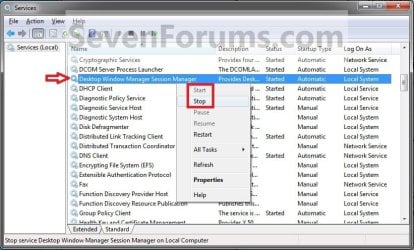
5. Stop the Desktop Windows Manager Session Manager Service. (See screenshot below) Services.jpg
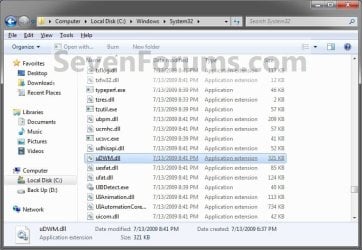
6. In Windows Explorer, navigate to and make a backup copy of the original C:\Windows\System32\dwm.exe and C:\Windows\System32\uDWM.dll files at these locations. (See screenshots below)
NOTE: You will need these backups if you ever would like to restore them. dwm.exe.jpg
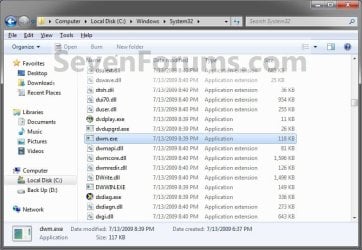
uDWM.dll.jpg

7. In Windows Explorer, take ownership and give yourself full permission of the C:\Windows\System32\dwm.exe and C:\Windows\System32\uDWM.dll files at these locations. (See screenshots above)

8. Copy and Paste the dwm.exe and uDWM.dll files on the desktop into the C:\Windows\System32 folder.

9. Select Copy and Replace and approve the replacement of these default files with the downloaded ones.
NOTE: If you ever run a sfc /scannow command, it will consider these as modified files, and will replace them with the default ones. You'll have to do this tutorial again to have the full clear transparency back.

10. Start the Desktop Windows Manager Session Manager Service. (See screenshot below step 5)

11. Do either OPTION ONE or OPTION TWO below.


OPTION ONE

For Current User Account Only

1. To Enable Current User Full Transparency A) Click on the Download button below to download the file below. Enable_Current_User_Full_Transparency.reg

Download


B) Go to step 4.
2. To Undo Current User Full Transparency A) Click on the Download button below to download the file below. Undo_Current_User_Full_Transparency.reg

Download


3. Save the .reg file to the desktop.

4. Right click on the downloaded .reg file, and click on Merge.

5. Click on Run, Yes (UAC), Yes, and OK when prompted.

6. Log off and log on, or restart the computer to apply.

7. When done, you can delete the downloaded .reg file if you like.


OPTION TWO

For All User Accounts

1. To Enable All Users Full Transparency A) Click on the Download button below to download the file below. Enable_All_Users_Full_Transparency.reg

Download


B) Go to step 4.
2. To Undo All Users Full Transparency A) Click on the Download button below to download the file below. Undo_All_Users_Full_Transparency.reg

Download


3. Save the .reg file to the desktop.

4. Right click on the downloaded .reg file and click on Merge.

5. Click on Run, Yes (UAC), Yes, and OK when prompted.

6. Enable Transparency and adjust the color intensity to the far left in all user accounts on the computer.
NOTE: The current user account will have transparency enabled and color intensity adjusted automatically with this download, but any other user accounts on the computer will need to enable transparency to prevent a blending affect in the window borders.

7. Log off and log on, or restart the computer to apply.

8. When done, you can delete the downloaded .reg file if you like.
That's it,
Shawn


Attachments

Last edited:
No no no, sorry when I initially read LFB post, I thought he meant the bars will disappear from the "Peek Desktop" when I edit that registry key. I didn't know he was specifically talking about the window borders.

Actually that worked just fine, still waiting on the "Peek Desktop" fix though.


Also a side note Brink,
This tutorial was perfect an easier way to do it is if you change "HideBlur" in the registry HKEY_CURRENT_USER\Software\Microsoft\Windows\HideBlur to '1' instead of '0' should also enable the full glass transparency.


Capture-4.png
 

My Computer My Computer

At a glance

Windows 7 Professional (build 7600)4GB installed (2.99GB usable)
Computer Manufacturer/Model Number
HP Pavillion DV6626us Laptop Computer
OS
Windows 7 Professional (build 7600)
Memory
4GB installed (2.99GB usable)
Monitor(s) Displays
1
Screen Resolution
1280x800
Hard Drives
160 GB
Mouse
Logitech wireless VX revolution
LOL, ok. No problem. :)

HideBlur should be in the location below instead, but it is already included in the .reg downloads to set it to 1.

HKEY_CURRENT_USER\Software\Microsoft\Windows\DWM
 

My Computer My Computer

At a glance

64-bit Windows 11 Pro for WorkstationsIntel i7-8700K OC'd to 5 GHz64 GB (4x16GB) G.SKILL TridentZ RGB DDR4 3600...ASUS ROG-STRIX-GTX1080TI-O11G-GAMING
Computer type
PC/Desktop
Computer Manufacturer/Model Number
Self built custom
OS
64-bit Windows 11 Pro for Workstations
CPU
Intel i7-8700K OC'd to 5 GHz
Motherboard
ASUS ROG Maximus XI Formula Z390
Memory
64 GB (4x16GB) G.SKILL TridentZ RGB DDR4 3600 MHz
Graphics Card(s)
ASUS ROG-STRIX-GTX1080TI-O11G-GAMING
Sound Card
Integrated
Monitor(s) Displays
2 x Samsung Odyssey G7 27"
Screen Resolution
2560x1440
Hard Drives
1TB Samsung 990 PRO M.2,
4TB Samsung 990 PRO PRO M.2,
TerraMaster F8 SSD Plus NAS
PSU
Seasonic Prime Titanium 850W
Case
Thermaltake Core P3
Cooling
Corsair Hydro H115i
Keyboard
Logitech wireless K800
Mouse
Logitech MX Master 4
Internet Speed
2 Gb/s Download and 100 Mb/s Upload
Antivirus
Malwarebyte Anti-Malware Premium
Browser
Google Chrome
Other Info
Logitech Z625 speaker system,
Logitech BRIO 4K Pro webcam,
HP Color LaserJet Pro MFP M477fdn,
APC SMART-UPS RT 1000 XL - SURT1000XLI,
Galaxy S23 Plus phone
Know someone this option is available on Windows 7 RTM ??? Because for me it is's working. Also i used that option with HibeBlur registry key but also that isn't working. i remember that i do that full transparency with a special programa but i don't remember the name ??? It isn't windows 7 tweaker i tried it.
 

My Computer My Computer

At a glance

Windows 7
OS
Windows 7
Hello Yoncy,

Be sure to double check that you did every step, and try OPTION TWO for all user accounts. Also, restart the computer afterwards as well.

Hope this helps,
Shawn
 

My Computer My Computer

At a glance

64-bit Windows 11 Pro for WorkstationsIntel i7-8700K OC'd to 5 GHz64 GB (4x16GB) G.SKILL TridentZ RGB DDR4 3600...ASUS ROG-STRIX-GTX1080TI-O11G-GAMING
Computer type
PC/Desktop
Computer Manufacturer/Model Number
Self built custom
OS
64-bit Windows 11 Pro for Workstations
CPU
Intel i7-8700K OC'd to 5 GHz
Motherboard
ASUS ROG Maximus XI Formula Z390
Memory
64 GB (4x16GB) G.SKILL TridentZ RGB DDR4 3600 MHz
Graphics Card(s)
ASUS ROG-STRIX-GTX1080TI-O11G-GAMING
Sound Card
Integrated
Monitor(s) Displays
2 x Samsung Odyssey G7 27"
Screen Resolution
2560x1440
Hard Drives
1TB Samsung 990 PRO M.2,
4TB Samsung 990 PRO PRO M.2,
TerraMaster F8 SSD Plus NAS
PSU
Seasonic Prime Titanium 850W
Case
Thermaltake Core P3
Cooling
Corsair Hydro H115i
Keyboard
Logitech wireless K800
Mouse
Logitech MX Master 4
Internet Speed
2 Gb/s Download and 100 Mb/s Upload
Antivirus
Malwarebyte Anti-Malware Premium
Browser
Google Chrome
Other Info
Logitech Z625 speaker system,
Logitech BRIO 4K Pro webcam,
HP Color LaserJet Pro MFP M477fdn,
APC SMART-UPS RT 1000 XL - SURT1000XLI,
Galaxy S23 Plus phone
Hello Yoncy,

Be sure to double check that you did every step, and try OPTION TWO for all user accounts. Also, restart the computer afterwards as well.

Hope this helps,
Shawn

I tried all the options available, seems not to work, also o serach the registry for that keys modified also them, also i tried the method with replacing the two dwm.exe and it's .dll asociated. I expect confirmation for someone that this works, and how he has done.
 

My Computer My Computer

At a glance

Windows 7
OS
Windows 7
Yoncy,

It's confirmed to work as outlined in the tutorial. Please start over being careful to do and follow each step. Maybe you missed something, a mistake in one or missing one step will cause it to not work.
 

My Computer My Computer

At a glance

64-bit Windows 11 Pro for WorkstationsIntel i7-8700K OC'd to 5 GHz64 GB (4x16GB) G.SKILL TridentZ RGB DDR4 3600...ASUS ROG-STRIX-GTX1080TI-O11G-GAMING
Computer type
PC/Desktop
Computer Manufacturer/Model Number
Self built custom
OS
64-bit Windows 11 Pro for Workstations
CPU
Intel i7-8700K OC'd to 5 GHz
Motherboard
ASUS ROG Maximus XI Formula Z390
Memory
64 GB (4x16GB) G.SKILL TridentZ RGB DDR4 3600 MHz
Graphics Card(s)
ASUS ROG-STRIX-GTX1080TI-O11G-GAMING
Sound Card
Integrated
Monitor(s) Displays
2 x Samsung Odyssey G7 27"
Screen Resolution
2560x1440
Hard Drives
1TB Samsung 990 PRO M.2,
4TB Samsung 990 PRO PRO M.2,
TerraMaster F8 SSD Plus NAS
PSU
Seasonic Prime Titanium 850W
Case
Thermaltake Core P3
Cooling
Corsair Hydro H115i
Keyboard
Logitech wireless K800
Mouse
Logitech MX Master 4
Internet Speed
2 Gb/s Download and 100 Mb/s Upload
Antivirus
Malwarebyte Anti-Malware Premium
Browser
Google Chrome
Other Info
Logitech Z625 speaker system,
Logitech BRIO 4K Pro webcam,
HP Color LaserJet Pro MFP M477fdn,
APC SMART-UPS RT 1000 XL - SURT1000XLI,
Galaxy S23 Plus phone
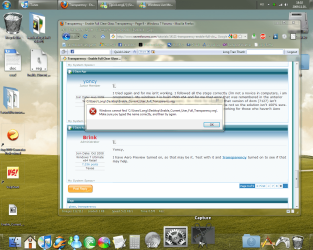
I tried again and for me isn't working. I followed all the steps correctly (i'm not a novice in computers, i am programmer). My windows 7 is build 7600 x64 and for me that error that was remembered in the anterior posts (a .dll is missing dwmredir.dll appears). So i think for some SO that version of dwm (7127) isn't compatible and isn't working. I saw that for someone works but for me not so the solution isn't 100% sure.
PS. i haven't Aero Preview on my 7600 you have this ? maybe isn't working for those who haven't Aero Preview.
 

My Computer My Computer

At a glance

Windows 7
OS
Windows 7
Yoncy,

I have Aero Preview turned on, so that may be it. Test with it and Transparency turned on to see if that may help.
 

My Computer My Computer

At a glance

64-bit Windows 11 Pro for WorkstationsIntel i7-8700K OC'd to 5 GHz64 GB (4x16GB) G.SKILL TridentZ RGB DDR4 3600...ASUS ROG-STRIX-GTX1080TI-O11G-GAMING
Computer type
PC/Desktop
Computer Manufacturer/Model Number
Self built custom
OS
64-bit Windows 11 Pro for Workstations
CPU
Intel i7-8700K OC'd to 5 GHz
Motherboard
ASUS ROG Maximus XI Formula Z390
Memory
64 GB (4x16GB) G.SKILL TridentZ RGB DDR4 3600 MHz
Graphics Card(s)
ASUS ROG-STRIX-GTX1080TI-O11G-GAMING
Sound Card
Integrated
Monitor(s) Displays
2 x Samsung Odyssey G7 27"
Screen Resolution
2560x1440
Hard Drives
1TB Samsung 990 PRO M.2,
4TB Samsung 990 PRO PRO M.2,
TerraMaster F8 SSD Plus NAS
PSU
Seasonic Prime Titanium 850W
Case
Thermaltake Core P3
Cooling
Corsair Hydro H115i
Keyboard
Logitech wireless K800
Mouse
Logitech MX Master 4
Internet Speed
2 Gb/s Download and 100 Mb/s Upload
Antivirus
Malwarebyte Anti-Malware Premium
Browser
Google Chrome
Other Info
Logitech Z625 speaker system,
Logitech BRIO 4K Pro webcam,
HP Color LaserJet Pro MFP M477fdn,
APC SMART-UPS RT 1000 XL - SURT1000XLI,
Galaxy S23 Plus phone
what the hell
 

Attachments

  • Capture (01,18_11_10).png
    Capture (01,18_11_10).png
    319.4 KB · Views: 636

My Computer My Computer

At a glance

Windows 7 RC (build 7100)
OS
Windows 7 RC (build 7100)
Hello Longi, and welcome to Seven Forums.

Did you extract the .reg file from the .zip file before trying to run (merge) it?
 

My Computer My Computer

At a glance

64-bit Windows 11 Pro for WorkstationsIntel i7-8700K OC'd to 5 GHz64 GB (4x16GB) G.SKILL TridentZ RGB DDR4 3600...ASUS ROG-STRIX-GTX1080TI-O11G-GAMING
Computer type
PC/Desktop
Computer Manufacturer/Model Number
Self built custom
OS
64-bit Windows 11 Pro for Workstations
CPU
Intel i7-8700K OC'd to 5 GHz
Motherboard
ASUS ROG Maximus XI Formula Z390
Memory
64 GB (4x16GB) G.SKILL TridentZ RGB DDR4 3600 MHz
Graphics Card(s)
ASUS ROG-STRIX-GTX1080TI-O11G-GAMING
Sound Card
Integrated
Monitor(s) Displays
2 x Samsung Odyssey G7 27"
Screen Resolution
2560x1440
Hard Drives
1TB Samsung 990 PRO M.2,
4TB Samsung 990 PRO PRO M.2,
TerraMaster F8 SSD Plus NAS
PSU
Seasonic Prime Titanium 850W
Case
Thermaltake Core P3
Cooling
Corsair Hydro H115i
Keyboard
Logitech wireless K800
Mouse
Logitech MX Master 4
Internet Speed
2 Gb/s Download and 100 Mb/s Upload
Antivirus
Malwarebyte Anti-Malware Premium
Browser
Google Chrome
Other Info
Logitech Z625 speaker system,
Logitech BRIO 4K Pro webcam,
HP Color LaserJet Pro MFP M477fdn,
APC SMART-UPS RT 1000 XL - SURT1000XLI,
Galaxy S23 Plus phone
Hi

Yes I have extracted it. as you can see in the screenshot it's next to the word document.
 

My Computer My Computer

At a glance

Windows 7 RC (build 7100)
OS
Windows 7 RC (build 7100)
Longi,

Did you do STEP ONE first?

If so, try downloading and extracting the .reg file again. Perhaps something had happened to it when you tried the first time.
 

My Computer My Computer

At a glance

64-bit Windows 11 Pro for WorkstationsIntel i7-8700K OC'd to 5 GHz64 GB (4x16GB) G.SKILL TridentZ RGB DDR4 3600...ASUS ROG-STRIX-GTX1080TI-O11G-GAMING
Computer type
PC/Desktop
Computer Manufacturer/Model Number
Self built custom
OS
64-bit Windows 11 Pro for Workstations
CPU
Intel i7-8700K OC'd to 5 GHz
Motherboard
ASUS ROG Maximus XI Formula Z390
Memory
64 GB (4x16GB) G.SKILL TridentZ RGB DDR4 3600 MHz
Graphics Card(s)
ASUS ROG-STRIX-GTX1080TI-O11G-GAMING
Sound Card
Integrated
Monitor(s) Displays
2 x Samsung Odyssey G7 27"
Screen Resolution
2560x1440
Hard Drives
1TB Samsung 990 PRO M.2,
4TB Samsung 990 PRO PRO M.2,
TerraMaster F8 SSD Plus NAS
PSU
Seasonic Prime Titanium 850W
Case
Thermaltake Core P3
Cooling
Corsair Hydro H115i
Keyboard
Logitech wireless K800
Mouse
Logitech MX Master 4
Internet Speed
2 Gb/s Download and 100 Mb/s Upload
Antivirus
Malwarebyte Anti-Malware Premium
Browser
Google Chrome
Other Info
Logitech Z625 speaker system,
Logitech BRIO 4K Pro webcam,
HP Color LaserJet Pro MFP M477fdn,
APC SMART-UPS RT 1000 XL - SURT1000XLI,
Galaxy S23 Plus phone
Background display issue

Hey,

I'm facing a problem.
Well, sadly, I have the "Mobile Intel(R) 965 Express Chipset Family" VGA, and I think it is the reason of my problem.

The problem that I'm facing is, right after I Start the Desktop Windows Manager again, everything turns black, some parts of the screen shows sometimes, like, when I press Alt+Tab, but everything is messed up.
I had to restore the backed up 2 files to the System32 folder to make it normal again.

Is there any solution for this? or I can't enable full transparency on my VGA?

Thanks in Advance.
 
Last edited by a moderator:

My Computer My Computer

At a glance

Windows 7 Ultimate 64bitIntel(R) Core(TM)2 Duo - 1.83 GHz - 2MB Cach4 GB DDR2-RAMMobile Intel(R) 965 Express Family Chipset
Computer Manufacturer/Model Number
Toshiba Satellite
OS
Windows 7 Ultimate 64bit
CPU
Intel(R) Core(TM)2 Duo - 1.83 GHz - 2MB Cach
Memory
4 GB DDR2-RAM
Graphics Card(s)
Mobile Intel(R) 965 Express Family Chipset
Screen Resolution
1280x800
Hello Tawa, and welcome to Seven Forums.

I'm not sure what the problem may be. Double check to make sure that you have the latest graphics drivers installed, and check to see if you may have made a mistake in the steps somewhere.
 

My Computer My Computer

At a glance

64-bit Windows 11 Pro for WorkstationsIntel i7-8700K OC'd to 5 GHz64 GB (4x16GB) G.SKILL TridentZ RGB DDR4 3600...ASUS ROG-STRIX-GTX1080TI-O11G-GAMING
Computer type
PC/Desktop
Computer Manufacturer/Model Number
Self built custom
OS
64-bit Windows 11 Pro for Workstations
CPU
Intel i7-8700K OC'd to 5 GHz
Motherboard
ASUS ROG Maximus XI Formula Z390
Memory
64 GB (4x16GB) G.SKILL TridentZ RGB DDR4 3600 MHz
Graphics Card(s)
ASUS ROG-STRIX-GTX1080TI-O11G-GAMING
Sound Card
Integrated
Monitor(s) Displays
2 x Samsung Odyssey G7 27"
Screen Resolution
2560x1440
Hard Drives
1TB Samsung 990 PRO M.2,
4TB Samsung 990 PRO PRO M.2,
TerraMaster F8 SSD Plus NAS
PSU
Seasonic Prime Titanium 850W
Case
Thermaltake Core P3
Cooling
Corsair Hydro H115i
Keyboard
Logitech wireless K800
Mouse
Logitech MX Master 4
Internet Speed
2 Gb/s Download and 100 Mb/s Upload
Antivirus
Malwarebyte Anti-Malware Premium
Browser
Google Chrome
Other Info
Logitech Z625 speaker system,
Logitech BRIO 4K Pro webcam,
HP Color LaserJet Pro MFP M477fdn,
APC SMART-UPS RT 1000 XL - SURT1000XLI,
Galaxy S23 Plus phone

My Computer My Computer

At a glance

Windows 7 Ultimate 32bitP43GB256MB ATI
Computer Manufacturer/Model Number
Custom Build
OS
Windows 7 Ultimate 32bit
CPU
P4
Motherboard
Intel 945
Memory
3GB
Graphics Card(s)
256MB ATI
Sound Card
Integrated
Monitor(s) Displays
19" Samsung
Hard Drives
320 GB WD
Hey guys, thanks for the reply,

Brink, I did the steps three times, so it has to be from my driver.

Strangely, the driver of my VGA is newer than the one found on the Intel Website.
As I recall, this driver was automatically downloaded in the windows updates (I check my updates before downloading them). This is why I did not suspect that the reason is from the driver.

Those are my details:
capturec.png


Anyways, I'm downloading the one from the Website, I'll tell you if this will fix my problem.

EDIT: Oh wait, I didn't know they use the mm/dd/2009 date format on Intel Website :p so I guess I was wrong about my driver being up to date.
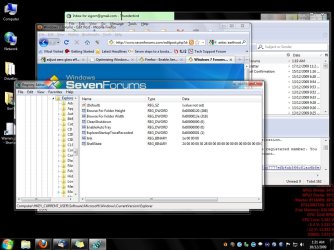
EDIT: Nope, didn't work. I'm starting to loose hope :p

Anything else on mind guys?
 

My Computer My Computer

At a glance

Windows 7 Ultimate 64bitIntel(R) Core(TM)2 Duo - 1.83 GHz - 2MB Cach4 GB DDR2-RAMMobile Intel(R) 965 Express Family Chipset
Computer Manufacturer/Model Number
Toshiba Satellite
OS
Windows 7 Ultimate 64bit
CPU
Intel(R) Core(TM)2 Duo - 1.83 GHz - 2MB Cach
Memory
4 GB DDR2-RAM
Graphics Card(s)
Mobile Intel(R) 965 Express Family Chipset
Screen Resolution
1280x800
is it possible for Windows 7 to use a custom pattern for the glass background?
 
Last edited:

My Computer My Computer

At a glance

Windows 7-RC
OS
Windows 7-RC
Hello Winsev,

Sorry, but not by default. You would need some sort of 3rd party skinning program for something like that instead. :(
 

My Computer My Computer

At a glance

64-bit Windows 11 Pro for WorkstationsIntel i7-8700K OC'd to 5 GHz64 GB (4x16GB) G.SKILL TridentZ RGB DDR4 3600...ASUS ROG-STRIX-GTX1080TI-O11G-GAMING
Computer type
PC/Desktop
Computer Manufacturer/Model Number
Self built custom
OS
64-bit Windows 11 Pro for Workstations
CPU
Intel i7-8700K OC'd to 5 GHz
Motherboard
ASUS ROG Maximus XI Formula Z390
Memory
64 GB (4x16GB) G.SKILL TridentZ RGB DDR4 3600 MHz
Graphics Card(s)
ASUS ROG-STRIX-GTX1080TI-O11G-GAMING
Sound Card
Integrated
Monitor(s) Displays
2 x Samsung Odyssey G7 27"
Screen Resolution
2560x1440
Hard Drives
1TB Samsung 990 PRO M.2,
4TB Samsung 990 PRO PRO M.2,
TerraMaster F8 SSD Plus NAS
PSU
Seasonic Prime Titanium 850W
Case
Thermaltake Core P3
Cooling
Corsair Hydro H115i
Keyboard
Logitech wireless K800
Mouse
Logitech MX Master 4
Internet Speed
2 Gb/s Download and 100 Mb/s Upload
Antivirus
Malwarebyte Anti-Malware Premium
Browser
Google Chrome
Other Info
Logitech Z625 speaker system,
Logitech BRIO 4K Pro webcam,
HP Color LaserJet Pro MFP M477fdn,
APC SMART-UPS RT 1000 XL - SURT1000XLI,
Galaxy S23 Plus phone
It does work! d:

Currently working on Windows 7
Build: 7600.16385.x86fre.win7_rtm.090713-12
Just need the newer files post a couple pages back.

Wonder if the keys in Explorer HKEY_CURRENT_USER\Software\Microsoft\Windows\CurrentVersion\Explorer can be usefull? Anyone try messing with them yet?
 

Attachments

  • scrshttrans.jpg
    scrshttrans.jpg
    132 KB · Views: 568

My Computer My Computer

At a glance

Windows 7 7600.16385.x86fre.win7_rtm.090713-1255AMD Athlon 64 3200+2x Mushkin 991429 1 GB PC3200 DDRSD (2.0-3-2-...2x NVIDIA GeForce 8600 GTS SLi: ON
Computer Manufacturer/Model Number
Me. SiGorN
OS
Windows 7 7600.16385.x86fre.win7_rtm.090713-1255
CPU
AMD Athlon 64 3200+
Motherboard
Gigabyte GA-K8N-SLI
Memory
2x Mushkin 991429 1 GB PC3200 DDRSD (2.0-3-2-6 @ 200 MHz)
Graphics Card(s)
2x NVIDIA GeForce 8600 GTS SLi: ON
Sound Card
Realtek ALC850 @ nVIDIA nForce4 SLI (CK8-04)
Monitor(s) Displays
Lenovo E75 CRT
Screen Resolution
1152 x 864 32bit 75Hz
Hard Drives
Primary: ST312082 7AS (120GB, 7200 RPM, SATA)
Secondary: Maxtor 6Y160P0 (160GB, 7200 RPM, Ultra-ATA/133)
Tertiary: Maxtor 2B020H1 (20GB, 5400 RPM, Ultra-ATA/100)
PSU
Antec EarthWatts 500 Watt Continuous Power ATX12V v2.2
Case
Antec Sonata III 500
Cooling
1x Antec 120mm Case Fan on Rear (out-flow)
Keyboard
Microsoft Comfort Curve 2000 V1.0 -.-
Mouse
Razer DiamondBack Plasma LE Blue
Internet Speed
1.5 WiMax -.- What can I say? I live in the boonies.
Hi Brink Merry Christmas to you sir, :)

I'm just thought I would ask if there is a way i can mod my "dwn.exe" and "uDWM.dll" from my retail build that i currently have?

This is one of the first thing's I still do after a clean install to me it like running a different theme it just makes windows that much clearer.

The reason i ask is this is pretty much a permanent mod for me of every install i do and would like to be able to use up to date system files.

Thanks.
 

My Computer My Computer

At a glance

Windows 7 (x64)i7 870G.Skill Trident (F3-17066CL9D-4GBTDS 2x2GB) -...Evga GTX 460 EE 1GB
Computer Manufacturer/Model Number
Handy manny
OS
Windows 7 (x64)
CPU
i7 870
Motherboard
Evga P55 FTW
Memory
G.Skill Trident (F3-17066CL9D-4GBTDS 2x2GB) - 2133MHz
Graphics Card(s)
Evga GTX 460 EE 1GB
Sound Card
On Board
Monitor(s) Displays
Samsung P2350
Screen Resolution
1920x1080
Hard Drives
1 x 64GB G-Skill Falcon SSD
1 x 60GB Corsair Force Series SSD
1 x 1TB WD Caviar Black
2 x 640GB WD Caviar Black
1 x 1TB Samsung Spinpoint F3
PSU
Corsair 620w
Case
Corsair 800D
Cooling
Corsair H50
Keyboard
Logitech MX5500 Revolution
Mouse
Logitech MX5500 Revolution
Internet Speed
http://www.speedtest.net/result/939062765.png
Other Info
http://www.sevenforums.com/overclocking-case-mods/104136-show-us-your-rig-2-a-4.html#post937213
Back
Top