Tray Program Location

LAUBO

New member
Member
Local time
10:01 AM
Messages
35
Hey guys,

In my system-tray, there are several 'programs' or 'services' or 'drivers' or whatever running, including Skype and Bluetooth Devices.

I would like to know where these programs/services are located. Obviously for Skype, I know the location. But I know it because I installed it. Now I would like to learn the location through the system-tray. In the case of Bluetooth, I do not know the location of the program/service, and it does not seem to be listed in the Task Manager. A similar argument can be made for the program/service/whatever controlling the volume, for example.

Laurens
 

My Computer

OS
Vista and Seven
Check in Program Files and the System32 folder. You can get a clue if you look into the startup tab of msconfig.
 

My Computer

Computer Manufacturer/Model Number
HP, Dell, Gateway, Toshiba - 4 laptops and 2 desktops
OS
Vista, Windows7, Mint Mate, Zorin, Windows 8
CPU
from 1.6GHz Duo to i7
Monitor(s) Displays
2x HP w2207
Hard Drives
5x HDD, 7x SSD, 12x Externals
Keyboard
with trackball - no mices
Mouse
Trackball mice
Internet Speed
DSL 6000
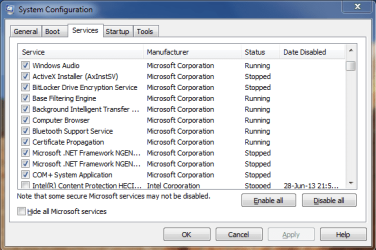
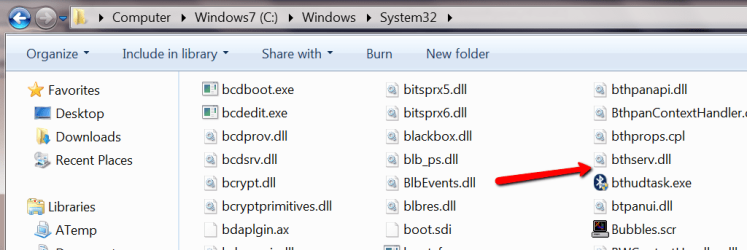
Hey! Thanks for the suggestion. I had already done that, but, for example, for Bluetooth it only mentions 'Bluetooth support service' under the services. There is no startup 'tray.exe', nor anything similar in the System32/SysWow64.

Precisely because these methods (so far) failed, I was hoping there was a more direct route via the system-tray itself, in the sense of a 'right-click > wtf are you?' procedure.
 

My Computer

OS
Vista and Seven
You can use Sysinternals Autoruns to get more info than msconfig/startup shows.
Autoruns for Windows
Look through Autoruns and see if you can find what you are looking for.

Do you have a Bluetooth device that might have installed the program you are looking for?
Can you post a screen print(s) of your msconfig startups?
http://www.sevenforums.com/tutorials/9733-screenshots-files-upload-post-seven-forums.html

You can use Sysinternals Process Explorer to get more info than Task Manager shows.
Process Explorer

You could also do a clean startup to try and determine what startup program adds what tray icon...
http://www.sevenforums.com/tutorial...ation-conflicts-performing-clean-startup.html

Some tray icons are "built into" Windows such as Action Center.
 

My Computer

Computer type
PC/Desktop
Computer Manufacturer/Model Number
home built
OS
Multi-Boot W7_Pro_x64 W8.1_Pro_x64 W10_Pro_x64 +Linux_VMs +Chromium_VM
CPU
AMD Athlon II x4 620
Motherboard
Gigabyte GA-MA785G-UD3H
Memory
6GB GSkill DDR2 800
Graphics Card(s)
AMD 4670 GPU + AMD 4200 IGP
Sound Card
on board Realtek ALC889A
Monitor(s) Displays
RCA 40" LCD TV, Insignia 32" LCD TV, HP 15" LCD monitor
Screen Resolution
1680 x 1050
Hard Drives
OCZ Vertex 3 120GB,
Samsung F3 1TB (3),
Several others - WD, Seagate, Hitachi, ...
PSU
Corsair 500 W
Case
Rosewill mid tower
Cooling
CM 90mm rifle
Keyboard
Gyration wireless, Logitech wireless, Dell USB wired
Mouse
Gyration wireless, Logitech wireless, V7 USB wired
Internet Speed
Spectrum - 100Mbps D / 10Mbps U
Antivirus
Avast, MBAM3, EMET, WinPatrol
Browser
Pale Moon, Firefox, IE
Other Info
2 multi-boot PC's
Mainly HTPC/Office/Gen purpose (no gaming).
Trendnet USB KVM.
LG DVD burner/Blue Ray Player.
Tray system for removable SATA backup drives.

Not currently OCd, under-volted.
I use Hybrid sleep, rarely re-boot or shutdown.

Hauppauge HD-PVR, Avermedia PCIe TV Tuner, Hauppauge PCI TV Tuner.
Thank you David.

The first program you suggested shocked me by showing the numerous things which run in my background... ugh. And here I was thinking CCleaner had allowed me to turn off all the non-sense.

Anyway, neither suggestions really brought me closer, specifically in the case of the 'bluetooth-tray' as there was no clear mention of any such program.

I'm pretty sure the bluetooth-service is the one controlling everything, though I'm not sure a 'service' can produce an icon in my tray.

MsConfig.png
 

My Computer

OS
Vista and Seven
This is the path to the bluetooth service - but that may not help you either. Looks like some .dll.

C:\Windows\system32\svchost.exe -k bthsvcs
 

Attachments

  • 2013-06-30_1855.png
    2013-06-30_1855.png
    25.3 KB · Views: 4

My Computer

Computer Manufacturer/Model Number
HP, Dell, Gateway, Toshiba - 4 laptops and 2 desktops
OS
Vista, Windows7, Mint Mate, Zorin, Windows 8
CPU
from 1.6GHz Duo to i7
Monitor(s) Displays
2x HP w2207
Hard Drives
5x HDD, 7x SSD, 12x Externals
Keyboard
with trackball - no mices
Mouse
Trackball mice
Internet Speed
DSL 6000
Click on "Hide all Microsoft services" and see what it looks like.

Do you use (need) a Bluetooth device?
If you don't, you can uncheck the MS Bluetooth Support Service, reboot, and see what happens.
If you find you do need that service, you can re-enable it.

If you are using a Bluetooth Mouse/Keyboard, don't disable the service - you do need it.
 

My Computer

Computer type
PC/Desktop
Computer Manufacturer/Model Number
home built
OS
Multi-Boot W7_Pro_x64 W8.1_Pro_x64 W10_Pro_x64 +Linux_VMs +Chromium_VM
CPU
AMD Athlon II x4 620
Motherboard
Gigabyte GA-MA785G-UD3H
Memory
6GB GSkill DDR2 800
Graphics Card(s)
AMD 4670 GPU + AMD 4200 IGP
Sound Card
on board Realtek ALC889A
Monitor(s) Displays
RCA 40" LCD TV, Insignia 32" LCD TV, HP 15" LCD monitor
Screen Resolution
1680 x 1050
Hard Drives
OCZ Vertex 3 120GB,
Samsung F3 1TB (3),
Several others - WD, Seagate, Hitachi, ...
PSU
Corsair 500 W
Case
Rosewill mid tower
Cooling
CM 90mm rifle
Keyboard
Gyration wireless, Logitech wireless, Dell USB wired
Mouse
Gyration wireless, Logitech wireless, V7 USB wired
Internet Speed
Spectrum - 100Mbps D / 10Mbps U
Antivirus
Avast, MBAM3, EMET, WinPatrol
Browser
Pale Moon, Firefox, IE
Other Info
2 multi-boot PC's
Mainly HTPC/Office/Gen purpose (no gaming).
Trendnet USB KVM.
LG DVD burner/Blue Ray Player.
Tray system for removable SATA backup drives.

Not currently OCd, under-volted.
I use Hybrid sleep, rarely re-boot or shutdown.

Hauppauge HD-PVR, Avermedia PCIe TV Tuner, Hauppauge PCI TV Tuner.
Hey guys,

Turns out that this service is not what I see in my tray, nor is it the initiator of some sort of 'tray.exe' program, as even with the service disabled, the bluetooth-tray-icon appears. Still no idea what it is, where it is located and how it startsup automatically. Neither MsConfig, nor Autoruns, nor Process Explorer shows anything else seemingly related to Bluetooth...
 

My Computer

OS
Vista and Seven
Seems like that might have something to do with it...

Do you have a Bluetooth icon in Control Panel?
Are you using a notebook with built in Bluetooth?
If so, can it be disabled or turned off?
 

My Computer

Computer type
PC/Desktop
Computer Manufacturer/Model Number
home built
OS
Multi-Boot W7_Pro_x64 W8.1_Pro_x64 W10_Pro_x64 +Linux_VMs +Chromium_VM
CPU
AMD Athlon II x4 620
Motherboard
Gigabyte GA-MA785G-UD3H
Memory
6GB GSkill DDR2 800
Graphics Card(s)
AMD 4670 GPU + AMD 4200 IGP
Sound Card
on board Realtek ALC889A
Monitor(s) Displays
RCA 40" LCD TV, Insignia 32" LCD TV, HP 15" LCD monitor
Screen Resolution
1680 x 1050
Hard Drives
OCZ Vertex 3 120GB,
Samsung F3 1TB (3),
Several others - WD, Seagate, Hitachi, ...
PSU
Corsair 500 W
Case
Rosewill mid tower
Cooling
CM 90mm rifle
Keyboard
Gyration wireless, Logitech wireless, Dell USB wired
Mouse
Gyration wireless, Logitech wireless, V7 USB wired
Internet Speed
Spectrum - 100Mbps D / 10Mbps U
Antivirus
Avast, MBAM3, EMET, WinPatrol
Browser
Pale Moon, Firefox, IE
Other Info
2 multi-boot PC's
Mainly HTPC/Office/Gen purpose (no gaming).
Trendnet USB KVM.
LG DVD burner/Blue Ray Player.
Tray system for removable SATA backup drives.

Not currently OCd, under-volted.
I use Hybrid sleep, rarely re-boot or shutdown.

Hauppauge HD-PVR, Avermedia PCIe TV Tuner, Hauppauge PCI TV Tuner.
Yes.
Yes.
Yes. I use Fn+F3 to toggle it on and off.

I have used Resource Hackers to change the icon inside the .cpl file. The change worked, but the original bluetooth icon still appears in the Control Panel and in the tray. Maybe I should first 'flush' the icons or something, make it reload the (new) icon from the .cpl file. Or something else ?
 

My Computer

OS
Vista and Seven

My Computer

Computer type
PC/Desktop
Computer Manufacturer/Model Number
home built
OS
Multi-Boot W7_Pro_x64 W8.1_Pro_x64 W10_Pro_x64 +Linux_VMs +Chromium_VM
CPU
AMD Athlon II x4 620
Motherboard
Gigabyte GA-MA785G-UD3H
Memory
6GB GSkill DDR2 800
Graphics Card(s)
AMD 4670 GPU + AMD 4200 IGP
Sound Card
on board Realtek ALC889A
Monitor(s) Displays
RCA 40" LCD TV, Insignia 32" LCD TV, HP 15" LCD monitor
Screen Resolution
1680 x 1050
Hard Drives
OCZ Vertex 3 120GB,
Samsung F3 1TB (3),
Several others - WD, Seagate, Hitachi, ...
PSU
Corsair 500 W
Case
Rosewill mid tower
Cooling
CM 90mm rifle
Keyboard
Gyration wireless, Logitech wireless, Dell USB wired
Mouse
Gyration wireless, Logitech wireless, V7 USB wired
Internet Speed
Spectrum - 100Mbps D / 10Mbps U
Antivirus
Avast, MBAM3, EMET, WinPatrol
Browser
Pale Moon, Firefox, IE
Other Info
2 multi-boot PC's
Mainly HTPC/Office/Gen purpose (no gaming).
Trendnet USB KVM.
LG DVD burner/Blue Ray Player.
Tray system for removable SATA backup drives.

Not currently OCd, under-volted.
I use Hybrid sleep, rarely re-boot or shutdown.

Hauppauge HD-PVR, Avermedia PCIe TV Tuner, Hauppauge PCI TV Tuner.
Back
Top