
Tried to delete a system reserved partition, now windows7won't install

g0aky

New member
Local time
11:09 AM
Messages
16
Hi everyone.

Today I received my new samsung SSD and a WD 1TB harddrive which I bought because my old hdd was failing. I installed windows with my dvd which went fine. I installed it on the SSD, obviously. In Windows I couldn't see the WD hdd in My Computer so I formatted it in disk managment as one usually has to do when getting a new hdd. Somehow I accidentally hit a button which created a 100MB system reserved partition from the WD hdd. I couldn't remove it so I followed a guide to do so. It involved booting from my windows dvd, entering command prompt and entering this into cmd:

Diskpart
list disk
select disk x

list partition
select partition
delete partition override

select partition x
active


this was the guide:
TeraByte Unlimited Knowledge Base


After this I tried to boot and it gave me the "bootmgr is missing" even though I did not touch the SSD in cmd (as far as i know). To be honest I have no idea what I did in cmd. It was stupid of me to try this. Anyway I figured I would just boot from the windows dvd and format the SSD and reinstall windows. My current problem is now I cannot seem to install Windows. It starts out fine, but when it restarts the first time to continue the install like a windows installation always does, it never gets any further. It reboots and all I get is a black screen when it should continue.


What the hell do I do? Any help is appreciated. feel free to ask if you need more info.
 

My Computer My Computer

At a glance

64bit Windows 7i5 2500kripjaws x 8gb6950 2 gb
Computer type
PC/Desktop
OS
64bit Windows 7
CPU
i5 2500k
Motherboard
asus p8p67-m pro
Memory
ripjaws x 8gb
Graphics Card(s)
6950 2 gb
Hard Drives
samsung 840 evo ssd 250gb
wd 1 tb hdd
Mark the Windows 7 HD Drive ACTIVE (your new samsung SSD)
http://www.sevenforums.com/tutorials/71432-partition-mark-active.html?ltr=P
Than
Physically disconnect the HDD. (your WD 1TB harddrive)
Make the Windows 7 HD, disk0 & first HD boot in BIOS.Also connected to the first Sata port on the MOBO.
than
http://www.sevenforums.com/tutorials/681-startup-repair.html?ltr=S
Note: You may need to do startup repair 3 to 4 times.
http://www.sevenforums.com/tutorials/105541-startup-repair-run-3-separate-times.html
When Windows is booting OK, Reconnect the other HDD, as Disk1. (your WD 1TB harddrive)
than
Mark the HDD INACTIVE (your WD 1TB harddrive)
http://www.sevenforums.com/tutorials/197157-partition-mark-inactive.html
 

My Computer My Computer

At a glance

ME/XP/Vista/Win7
OS
ME/XP/Vista/Win7
You understood that I currently do not have Windows 7 installed, right? Does this not mean that startup repair cannot help? When I try start up repair like you told me it just tells me that it cannot repair this computer automatically. Again there is no OS since I formatted. Should I start the windows installation and when it black screens should I reboot and do start up repair? or on a clean disk? Sorry I am really confused about this.
 

My Computer My Computer

At a glance

64bit Windows 7i5 2500kripjaws x 8gb6950 2 gb
Computer type
PC/Desktop
OS
64bit Windows 7
CPU
i5 2500k
Motherboard
asus p8p67-m pro
Memory
ripjaws x 8gb
Graphics Card(s)
6950 2 gb
Hard Drives
samsung 840 evo ssd 250gb
wd 1 tb hdd
Unplug the hard drive ( if still attached ) try the install again on the ssd, delete all the partitions then install.
 

My Computer My Computer

At a glance

Windows 10 Pro x64Intel Core i7 6700KGSkill TridentZ RGB 16GB 3600 16-16-16-36EVGA GTX 980 Ti SC x2
Computer type
PC/Desktop
Computer Manufacturer/Model Number
Skylake Special #666
OS
Windows 10 Pro x64
CPU
Intel Core i7 6700K
Motherboard
Asus Sabertooth Z170 Mark 1
Memory
GSkill TridentZ RGB 16GB 3600 16-16-16-36
Graphics Card(s)
EVGA GTX 980 Ti SC x2
Sound Card
Realtek High Definition
Monitor(s) Displays
AOC G2460PG
Screen Resolution
1920 x 1080 144Hz
Hard Drives
Samsung 860 Pro 256GB, Seagate Barracuda 4TB x2
PSU
EVGA 1000 P2, EVGA White Custom Braided Cables
Case
Corsair Vengeance C70 Gunmetal Black
Cooling
Corsair H100i v2, Corsair ML120 x2, Thermal Grizzly Kryonaut
Keyboard
Logitech G910 Orion Spectrum
Mouse
Logitech G700s
Internet Speed
Verizon Fios Quantum Gateway 75/75
Antivirus
Windows Defender, Malwarebytes Free 3.8.3
Browser
Chrome
Other Info
Corsair SP120 x4, LG Blu-ray Drive, Durabrand HT-395 100 Watt Dolby Digital Amp, Corsair H2100 Wireless 7.1 Headset
Never mind, it works! Thank you so much theog! Apparently the startup repair told me that it could not fix it, yet it did. Again thanks so much for the help, this was driving me crazy. Much appreciated! :D
 

My Computer My Computer

At a glance

64bit Windows 7i5 2500kripjaws x 8gb6950 2 gb
Computer type
PC/Desktop
OS
64bit Windows 7
CPU
i5 2500k
Motherboard
asus p8p67-m pro
Memory
ripjaws x 8gb
Graphics Card(s)
6950 2 gb
Hard Drives
samsung 840 evo ssd 250gb
wd 1 tb hdd
That's why it says you need to run Startup Repair - Run 3 Separate Times.

You said you had Win7 on the SSD, so where did you think it went?

Be sure HD doesn't somehow get set to boot first in BIOS setup causing WIn7 to appear not to boot, then in Disk Mgmt delete all of its partitions and repartition as you wish. You may need to run Diskpart Clean Command if boot partition or code somehow got on it.

Please post back a screenshot of Disk Management - Post a Screen Capture Image with all drives connected. so we can look it over to make sure its correct now, and there are no other potential problems.
 
Hi again. The problem apparently has not been completely fixed. I managed to install windows on the SSD and boot from it. I replaced my dvd drive as it had caused some of the issues I was having I think. Anyway, I can now boot from the SSD, but if my WD harddrive is connected it will not boot. It will hang on "Starting Windows". Whenever I try to boot with the WD connected, it always pops up with the option to repair, but when I try to it tells me that there was an i/o error that could be caused by several things like faulty hdd etc. I do not believe the hdd to be bad though, i think i messed everything up by trying to fix my inital partition problem in cmd.

@greg Sorry i do not believe i can access disk management with the wd hdd since it wont boot with it now :shock:

any further ideas?

EDIT: Another thing: It will not boot successfully everytime, even when only the SSD is connected. It hangs on the same spot at "Starting Windows". Maybe like 30% of the time when it's only the ssd.
 

My Computer My Computer

At a glance

64bit Windows 7i5 2500kripjaws x 8gb6950 2 gb
Computer type
PC/Desktop
OS
64bit Windows 7
CPU
i5 2500k
Motherboard
asus p8p67-m pro
Memory
ripjaws x 8gb
Graphics Card(s)
6950 2 gb
Hard Drives
samsung 840 evo ssd 250gb
wd 1 tb hdd
If the ssd is booting fine, then, plug in the power to the hdd after you`ve booted into the ssd, then format the hdd, if that`s what you want to do with it.
 

My Computer My Computer

At a glance

Windows 10 Pro x64Intel Core i7 6700KGSkill TridentZ RGB 16GB 3600 16-16-16-36EVGA GTX 980 Ti SC x2
Computer type
PC/Desktop
Computer Manufacturer/Model Number
Skylake Special #666
OS
Windows 10 Pro x64
CPU
Intel Core i7 6700K
Motherboard
Asus Sabertooth Z170 Mark 1
Memory
GSkill TridentZ RGB 16GB 3600 16-16-16-36
Graphics Card(s)
EVGA GTX 980 Ti SC x2
Sound Card
Realtek High Definition
Monitor(s) Displays
AOC G2460PG
Screen Resolution
1920 x 1080 144Hz
Hard Drives
Samsung 860 Pro 256GB, Seagate Barracuda 4TB x2
PSU
EVGA 1000 P2, EVGA White Custom Braided Cables
Case
Corsair Vengeance C70 Gunmetal Black
Cooling
Corsair H100i v2, Corsair ML120 x2, Thermal Grizzly Kryonaut
Keyboard
Logitech G910 Orion Spectrum
Mouse
Logitech G700s
Internet Speed
Verizon Fios Quantum Gateway 75/75
Antivirus
Windows Defender, Malwarebytes Free 3.8.3
Browser
Chrome
Other Info
Corsair SP120 x4, LG Blu-ray Drive, Durabrand HT-395 100 Watt Dolby Digital Amp, Corsair H2100 Wireless 7.1 Headset
Well there is nothing on the WD HDD anyway. I have formatted it countless times via the windows dvd but it never helped. I don't see how that would help, but please correct me if im wrong, as i am a complete newbie. anyway is it safe to plug the sata cables into the hdd when the power is on?

thanks for the quick reply
 

My Computer My Computer

At a glance

64bit Windows 7i5 2500kripjaws x 8gb6950 2 gb
Computer type
PC/Desktop
OS
64bit Windows 7
CPU
i5 2500k
Motherboard
asus p8p67-m pro
Memory
ripjaws x 8gb
Graphics Card(s)
6950 2 gb
Hard Drives
samsung 840 evo ssd 250gb
wd 1 tb hdd
Of course it is, I wouldn`t be telling you if it wasn`t.
 

My Computer My Computer

At a glance

Windows 10 Pro x64Intel Core i7 6700KGSkill TridentZ RGB 16GB 3600 16-16-16-36EVGA GTX 980 Ti SC x2
Computer type
PC/Desktop
Computer Manufacturer/Model Number
Skylake Special #666
OS
Windows 10 Pro x64
CPU
Intel Core i7 6700K
Motherboard
Asus Sabertooth Z170 Mark 1
Memory
GSkill TridentZ RGB 16GB 3600 16-16-16-36
Graphics Card(s)
EVGA GTX 980 Ti SC x2
Sound Card
Realtek High Definition
Monitor(s) Displays
AOC G2460PG
Screen Resolution
1920 x 1080 144Hz
Hard Drives
Samsung 860 Pro 256GB, Seagate Barracuda 4TB x2
PSU
EVGA 1000 P2, EVGA White Custom Braided Cables
Case
Corsair Vengeance C70 Gunmetal Black
Cooling
Corsair H100i v2, Corsair ML120 x2, Thermal Grizzly Kryonaut
Keyboard
Logitech G910 Orion Spectrum
Mouse
Logitech G700s
Internet Speed
Verizon Fios Quantum Gateway 75/75
Antivirus
Windows Defender, Malwarebytes Free 3.8.3
Browser
Chrome
Other Info
Corsair SP120 x4, LG Blu-ray Drive, Durabrand HT-395 100 Watt Dolby Digital Amp, Corsair H2100 Wireless 7.1 Headset
Ok, I just bluescreened because I connected the sata cables to the HDD while in windows. Weird thing is, this time it booted fine with the wd hdd connected. Surely the problem is not fixed though, so what do you recommend I do now that I have access to the hdd in windows? Should I try formatting it or something else?

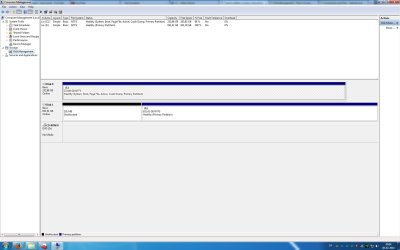
here is my disk management
 

Attachments

  • Untitled.jpg
    Untitled.jpg
    130.4 KB · Views: 15

My Computer My Computer

At a glance

64bit Windows 7i5 2500kripjaws x 8gb6950 2 gb
Computer type
PC/Desktop
OS
64bit Windows 7
CPU
i5 2500k
Motherboard
asus p8p67-m pro
Memory
ripjaws x 8gb
Graphics Card(s)
6950 2 gb
Hard Drives
samsung 840 evo ssd 250gb
wd 1 tb hdd
I would not plug or unplug HD's while there is power to the system, unless you're installed in AHCI mode so you have hotplugging and can Safely Remove Hardware on the drive first.

Did you wipe the HDD with Diskpart Clean Command
yet to remove any code which can interfere?
 
There is nothing wrong with plugging in the sata data or sata power cable when you`re already in windows. It`s a Molex power cable you don`t want to connect while you have power.

If there`s nothing on the drive you need, then yes, format it.

Also do what Greg has suggested.

After that you shouldn`t have any issues with it.
 

My Computer My Computer

At a glance

Windows 10 Pro x64Intel Core i7 6700KGSkill TridentZ RGB 16GB 3600 16-16-16-36EVGA GTX 980 Ti SC x2
Computer type
PC/Desktop
Computer Manufacturer/Model Number
Skylake Special #666
OS
Windows 10 Pro x64
CPU
Intel Core i7 6700K
Motherboard
Asus Sabertooth Z170 Mark 1
Memory
GSkill TridentZ RGB 16GB 3600 16-16-16-36
Graphics Card(s)
EVGA GTX 980 Ti SC x2
Sound Card
Realtek High Definition
Monitor(s) Displays
AOC G2460PG
Screen Resolution
1920 x 1080 144Hz
Hard Drives
Samsung 860 Pro 256GB, Seagate Barracuda 4TB x2
PSU
EVGA 1000 P2, EVGA White Custom Braided Cables
Case
Corsair Vengeance C70 Gunmetal Black
Cooling
Corsair H100i v2, Corsair ML120 x2, Thermal Grizzly Kryonaut
Keyboard
Logitech G910 Orion Spectrum
Mouse
Logitech G700s
Internet Speed
Verizon Fios Quantum Gateway 75/75
Antivirus
Windows Defender, Malwarebytes Free 3.8.3
Browser
Chrome
Other Info
Corsair SP120 x4, LG Blu-ray Drive, Durabrand HT-395 100 Watt Dolby Digital Amp, Corsair H2100 Wireless 7.1 Headset
If you put the HDD in the lowest BIOS boot priority and the SSD in the highest boot priority, then it should be OK. With that setup the BIOS will not even be looking for the HDD.
 

My Computer My Computer

At a glance

Vista, Windows7, Mint Mate, Zorin, Windows 8from 1.6GHz Duo to i7
Computer Manufacturer/Model Number
HP, Dell, Gateway, Toshiba - 4 laptops and 2 desktops
OS
Vista, Windows7, Mint Mate, Zorin, Windows 8
CPU
from 1.6GHz Duo to i7
Monitor(s) Displays
2x HP w2207
Hard Drives
5x HDD, 7x SSD, 12x Externals
Keyboard
with trackball - no mices
Mouse
Trackball mice
Internet Speed
DSL 6000
I used the diskpart clean command on the WD hdd and tried putting it in the lowest boot priority as well as disabling the wd from the boot menu all together. It still will not boot. Also, this time i actually had to try 3-4 times to get it to boot on the ssd alone without the wd hdd connected. It hangs at the same place every time it happens, "Starting Windows". So apparently the problem is present for sure without the wd hdd even connected. what the hell?

Should I try clean all with the diskpart clean instead, or will it not matter? Any other ideas?

EDIT:
I was able to boot now again for the first time with both drives since the diskpart clean command by connecting the wd while i was in windows, then getting bluescreen and then it booted after a restart. To be clear, it still won't boot normally at all with the wdd hdd, and it boots maybe 30%-50% of the time with only the sdd connected.

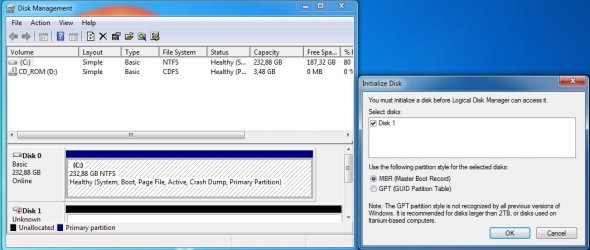
Now which one do I choose out of these?
 

Attachments

  • Untitled.jpg
    Untitled.jpg
    63.1 KB · Views: 2

My Computer My Computer

At a glance

64bit Windows 7i5 2500kripjaws x 8gb6950 2 gb
Computer type
PC/Desktop
OS
64bit Windows 7
CPU
i5 2500k
Motherboard
asus p8p67-m pro
Memory
ripjaws x 8gb
Graphics Card(s)
6950 2 gb
Hard Drives
samsung 840 evo ssd 250gb
wd 1 tb hdd
MBR will be OK.
 

My Computer My Computer

At a glance

ME/XP/Vista/Win7
OS
ME/XP/Vista/Win7
Do you think the hardware might be faulty based on all the info in this thread? I really have no clue why it won't boot the majority of the time I try if it's not because of a hardware issue. Shouldn't all the stuff I did with cmd in the original post have resat now that I cleaned it in diskpart? Should I maybe take this to a another sub-forum on here about hardware?
 

My Computer My Computer

At a glance

64bit Windows 7i5 2500kripjaws x 8gb6950 2 gb
Computer type
PC/Desktop
OS
64bit Windows 7
CPU
i5 2500k
Motherboard
asus p8p67-m pro
Memory
ripjaws x 8gb
Graphics Card(s)
6950 2 gb
Hard Drives
samsung 840 evo ssd 250gb
wd 1 tb hdd
Have you tried another cable, gone over all the connections to make sure they are secure, paid attention to where you connected the SSD based on mobo manufacturer's Manual from its Support Downloads webpage?

Test your hardware from the Troubleshooting Steps for Windows 7

Unplug the HDD and run a few Startup Repairs to see if it finds any issues.

I think I would start over and reinstall following these same steps to get and keep a perfect Clean Reinstall - Factory OEM Windows 7. This time keep the HD unplugged so that it doesn't interfere. Having a System Reserved partition land there is a major problem which might not have completely repaired.

Once you do this then if the problem persists you'll know it's hardware.
 
Back
Top