Triple boot problem - 2x HDDs, 2x Win7s & 1x WinXP. How to work this?

NellyPuff

New member
Local time
4:42 PM
Messages
24
Triple boot problem - 2x HDDs, 2x Win7s & 1x WinXP. How to work this?

I've had this working before, but can't remember how i did it (i've had to format the disks).

What i want is:

Main drive (SSD): Win7 Pro 64bit

Secondary drive (HDD): Win7 pro 64 bit & WinXP Pro

With the boot screen in the order of:

Win7 Pro (HDD)
WinXP Pro (HDD)
Win7 Pro (SSD)

**** Nobody will understand why i am installing Win7 twice on the same machine, albeit 2 different drives. If you REEEEEEEEEEEEEEEEEEEEEEEALLY want to know then PM me & i'll explain, but for now, let's continue...


I've had this working before so i know it can be done, but for some reason it's not letting me do it now since the format.

I can get WinXP (HDD) to boot, i can get Win7 (SSD) to boot, but not Win7 (HDD).

The SSD is the primary boot disk within the BIOS.
I'm running EasyBCD from within the SSD.


I don't FULLY understand how to use EasyBCD so my first 2 successful attempts were probably flukes as i can't remember what i did within EasyBCD to make it possible.


I'm running the latest version of EasyBCD.
I installed in the order of:
Disconnect SSD
Install WinXP (HDD)
Install Win7 (HDD)
re-connect SSD
Install Win7 (SSD)

^^^ this is exactly the order i did it in the last time it worked.

this enables me to boot to the SSD only, from which i run EasyBCD & can then access WinXP when the PC restarts, but not Win7 (HDD)


Would really love a bit of help with this. Thanks to anyone who can.
 

My Computer My Computer

At a glance

Win7 Pro 64bit & WinXP Pro
OS
Win7 Pro 64bit & WinXP Pro
I've had this working before, but can't remember how i did it (i've had to format the disks).

What i want is:

Main drive (SSD): Win7 Pro 64bit

Secondary drive (HDD): Win7 pro 64 bit & WinXP Pro

With the boot screen in the order of:

Win7 Pro (HDD)
WinXP Pro (HDD)
Win7 Pro (SSD)

**** Nobody will understand why i am installing Win7 twice on the same machine, albeit 2 different drives. If you REEEEEEEEEEEEEEEEEEEEEEEALLY want to know then PM me & i'll explain, but for now, let's continue...


I've had this working before so i know it can be done, but for some reason it's not letting me do it now since the format.

I can get WinXP (HDD) to boot, i can get Win7 (SSD) to boot, but not Win7 (HDD).

The SSD is the primary boot disk within the BIOS.
I'm running EasyBCD from within the SSD.


I don't FULLY understand how to use EasyBCD so my first 2 successful attempts were probably flukes as i can't remember what i did within EasyBCD to make it possible.


I'm running the latest version of EasyBCD.
I installed in the order of:
Disconnect SSD
Install WinXP (HDD)
Install Win7 (HDD)
re-connect SSD
Install Win7 (SSD)

^^^ this is exactly the order i did it in the last time it worked.

this enables me to boot to the SSD only, from which i run EasyBCD & can then access WinXP when the PC restarts, but not Win7 (HDD)


Would really love a bit of help with this. Thanks to anyone who can.


Have a felling I know why. JUST A THEORY

On HD
since you installed xp first its prime OS
when you installed win 7 it parked a hidden folder called boot in the XP partition to make those two dual boot.

ON SSD

Win 7 by itself.

XP works fine, win 7 on ssd works fine, wine 7 on HD cant boot because boot folder is in XP partition.

I am not great with BCDedit or Easy but have a feeling there is a way to do it with them.


Hope someone with more loader editing experience is about.

In fact I will ask for someone with more editing experience to help.


Ken J
 

My Computer My Computer

At a glance

Win 8 Release candidate 8400[email protected]4 gigsNvidia 9600M
Computer Manufacturer/Model Number
HP Pavillion dv-7 1005 Tx
OS
Win 8 Release candidate 8400
CPU
[email protected]
Memory
4 gigs
Graphics Card(s)
Nvidia 9600M
Sound Card
HD built-in
Monitor(s) Displays
17" Wxga
Screen Resolution
1440x900
Cooling
none
Internet Speed
45Mb down 5Mb up
Hello NellyPuff Welcome to the Seven Forums!

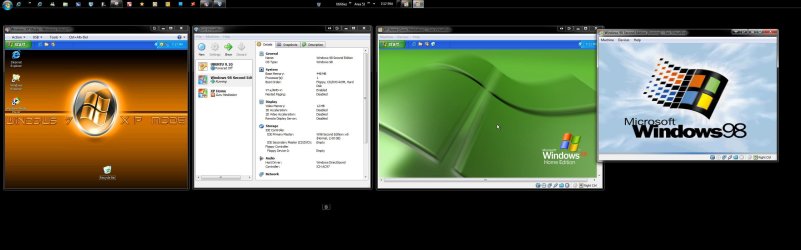
Nobody knows why? I do! I ran two separate 64bit RC installs on two separate drives along with the 32bit on a 3rd. Before that I had a beta build on the second primary of an XP/Vista dual boot across two drives. And even for a time I had the 64bit RC, Vista, and XP across 3 drives before doing away with XP completely!

Once the retail 7 was out the 64bit Ultimate became "the" default OS while others saw virual machines being another option available between the new XP Mode and other VM players like Virtual Box. For a triple boot you already most everything you need there however.

With the SSD set as the default drive you can add both XP Pro and the second 7 install into the Host drive's BCD store there using EasyBCD that zigzag343 was referring to. That's a free bcd editing program used quite a bit by those who wish to dual boot XP along with 7.

The order in how you installed the 7 install on the second drive however if XP went on last would automatically overwrite the 7 mbr entries on that particular drive requireing the startup repair tool or now with the SSD in use if added on later simply add the new entry in for the second 7 install.

The guide for setting up a dual boot of XP with 7 will help here in explaining each step. http://www.sevenforums.com/tutorials/8057-dual-boot-installation-windows-7-xp.html

In the same manner you would add the XP entry in since that is already done you would add the new entry for 7 in as well only not need to copy boot files over to the SSD drive since you already have 7 there. You will need to associate the 7 entry to the correct drive letter presently assigned in the host 7 for this to work however. First you need to assign a drive letter for that 7 install to see it initialized.
 

Attachments

  • Multi Multi Tasking OSs 3.jpg
    Multi Multi Tasking OSs 3.jpg
    186.7 KB · Views: 10

My Computers My Computers

  • At a glance

    W7 Ultimate x64/W10 Pro x64/W11 Pro Triple Bo...AMD Phenom II X4 975 Deneb 3.6ghz - 965 2nd r...Kingston Hyper X DDR3 1600 1.5v 16gb - Hyper ...MSI HD Radeon 5750 1gb - MSI HD Radeon 6450 o...
    Computer type
    PC/Desktop
    Computer Manufacturer/Model Number
    Custom builds = 2
    OS
    W7 Ultimate x64/W10 Pro x64/W11 Pro Triple Boot - Main PC W7 Remote PC Micro ATX W7 Pro x64/W11 Pro
    CPU
    AMD Phenom II X4 975 Deneb 3.6ghz - 965 2nd remote pc
    Motherboard
    Gigabyte GA-790XTA-UD4-Gigabyte GA-880GM-D2H remote pc
    Memory
    Kingston Hyper X DDR3 1600 1.5v 16gb - Hyper X Fury 8gb 2nd
    Graphics Card(s)
    MSI HD Radeon 5750 1gb - MSI HD Radeon 6450 on mini tower
    Sound Card
    Creative Labs X-Fi Xtreme Audio P - Realtek onooard 2nd case
    Monitor(s) Displays
    ASUS VW199T-P 19" HP 2082a Main-HP 2082a 20" remote pc
    Screen Resolution
    Asus 1440x900 - HP 1600x900
    Hard Drives
    WD Black 1TB HD per OS W7, W10, and pending W11 presently on 500gb OS Drive - Pending Triple 1TB HDs for Spanned Storage/backup volume
    Single 2TB external USB enclosure, single 1TB System 7 Host/Boot drive, Pending 8TB external HD for system image b
    PSU
    Corsair 750TX - primary / Corsair CX600 - second
    Case
    Antec 900-2 - SSD compatible / NZXT Vulcan mini tower
    Cooling
    Zalman CNPS9900A
    Keyboard
    AZIO L70 Backlit Letters Gaming - ONN Cordless/USB
    Mouse
    MSI DS200 Programmable, Logitech Cordless
    Internet Speed
    30mbps upgrade - primary hard wired - mini tower usb WiFi
    Antivirus
    GFI VIPRE Internet Security 2014 on W7 2016 beta on W10,
    Browser
    Cyberfox, WaterFox 64bit FF variants, FireFox x64, Pale Moon
    Other Info
    Accomdata fan cooled usb 2.0 PIDE/Sata II, III external enclosure.
    Sambient usb/eSata PATA/Sata II, III external enclosure.
  • At a glance

    W7 Pro x64/W11 ProAMD Deneb 3.6ghz - 965Kingston Hyper X Fury 8gbMSI HD Radeon 6450 DVI Output
    Computer type
    PC/Desktop
    System Manufacturer/Model Number
    CUSTOM ASSEMBLY
    OS
    W7 Pro x64/W11 Pro
    CPU
    AMD Deneb 3.6ghz - 965
    Motherboard
    Gigabyte GA-880GM-D2H remote pc
    Memory
    Kingston Hyper X Fury 8gb
    Graphics Card(s)
    MSI HD Radeon 6450 DVI Output
    Sound Card
    Realtek onooard Creative or Other separate PENDING
    Monitor(s) Displays
    VIZIO 32" LCD TV Separate LCD Pending
    Screen Resolution
    1600x1080
    Hard Drives
    WD 500GB OS Host/Boot WD Green 1TB Storage/Backup
    PSU
    Corsair 600W - THERMALTAKE 600W spare case
    Case
    NZXT Vulcan mini tower
    Cooling
    Twin 120mm Top Fans - 240mm Side Cover
    Keyboard
    ONN Cordless/USB Logitech Cordless
    Mouse
    ONN USB/Cordless - Logitech Cordless
    Internet Speed
    DSL 5G
    Browser
    MS Edge, FireFox, WaterFox x64, FireFox Nightly
    Other Info
    OS Testing-Remote Access to Main TeamViewer
Back
Top