Triple Boot With Win7, XP, and 2K

Yey456726

Banned
Local time
1:22 AM
Messages
43
Location
Within the Boundaries of the Universe
I`m doing a triple boot with Windows 7 Windows XP and Windows 2000 so I need drivers for Windows 2000 first. Just check my system specs for the info.
 

My Computer My Computer

Computer Manufacturer/Model Number
Gateway NV53
OS
Windows 7 Home Premium (x64)
CPU
AMD Athlon II Dual-Core M300 2.00GHz
Memory
4.00 GB
Sound Card
Conexant High Definition Audio
Screen Resolution
1366x768
Hard Drives
(C:) 500GB
Case
NV53 Case in Midnight Blue
Cooling
NV53 Standard Fan
Keyboard
NV53 Standard Keyboard
Mouse
Synaptics TouchPad V7.2
Internet Speed
100.00 Mbps
I`m doing a triple boot with Windows 7 Windows XP and Windows 2000 so I need drivers for Windows 2000 first. Just check my system specs for the info.
To the best of my knowledge, the vast majority of drivers I have used for XP have been compatible with 2K, ie they are identified as "XP2K" or something similar. The same driver you install for XP should work for 2K.

Please have a look at this project I did awhile back:

http://www.sevenforums.com/installation-setup/57634-dual-boot.html

Cheers!
Robert
 

My Computer My Computer

OS
...
Yeah but no i need help generally installing 2K it just bluescreens on me halfway thru loading the files
 

My Computer My Computer

Computer Manufacturer/Model Number
Gateway NV53
OS
Windows 7 Home Premium (x64)
CPU
AMD Athlon II Dual-Core M300 2.00GHz
Memory
4.00 GB
Sound Card
Conexant High Definition Audio
Screen Resolution
1366x768
Hard Drives
(C:) 500GB
Case
NV53 Case in Midnight Blue
Cooling
NV53 Standard Fan
Keyboard
NV53 Standard Keyboard
Mouse
Synaptics TouchPad V7.2
Internet Speed
100.00 Mbps
Well I changed my plans to a dual boot with XP and 2000 but I can`t boot into XP anymore.
 

My Computer My Computer

Computer Manufacturer/Model Number
Gateway NV53
OS
Windows 7 Home Premium (x64)
CPU
AMD Athlon II Dual-Core M300 2.00GHz
Memory
4.00 GB
Sound Card
Conexant High Definition Audio
Screen Resolution
1366x768
Hard Drives
(C:) 500GB
Case
NV53 Case in Midnight Blue
Cooling
NV53 Standard Fan
Keyboard
NV53 Standard Keyboard
Mouse
Synaptics TouchPad V7.2
Internet Speed
100.00 Mbps
If ACPI is enabled in your bios then XP and 2000 will not work until you disable it. Check your bios and make sure that it is disabled. If enabled it can cause the installer to bsod part of the way through the install.
 

My Computer My Computer

Computer Manufacturer/Model Number
Home Built
OS
Windows 7; Server 08; Window Home Server; Vista; XP
CPU
Intel E8400 @ 3.4Ghz
Motherboard
Gigabyte P35 DS3L
Memory
8 Gb Patriot DDr2 800
Graphics Card(s)
NVidia GTX460 OC
Sound Card
Onboard
Monitor(s) Displays
Samsung 21"
Screen Resolution
1920x1080
Hard Drives
Seagate 160Gb x2
Samsung 250Gb
PSU
Cooler Master 650w 52a on 12v
Case
Antec 300
Cooling
Stock
Keyboard
HP Standard USB
Mouse
Logitech 518
Internet Speed
25Mbit Down 1.5Mbit up
Other Info
http://www.speedtest.net/result/723924362.png
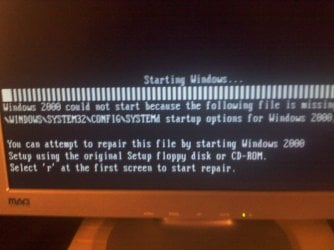
This is what happened...
I installed Win2K in Hard disk J
It boots into Win2k and wont boot XP
I change the boot in Win2K so XP is the default
I get this error (and yes i know it says 2000 but im tring to boot into xp) xperror.jpg
 

My Computer My Computer

Computer Manufacturer/Model Number
Gateway NV53
OS
Windows 7 Home Premium (x64)
CPU
AMD Athlon II Dual-Core M300 2.00GHz
Memory
4.00 GB
Sound Card
Conexant High Definition Audio
Screen Resolution
1366x768
Hard Drives
(C:) 500GB
Case
NV53 Case in Midnight Blue
Cooling
NV53 Standard Fan
Keyboard
NV53 Standard Keyboard
Mouse
Synaptics TouchPad V7.2
Internet Speed
100.00 Mbps
This is what happened...
I installed Win2K in Hard disk J
It boots into Win2k and wont boot XP
I change the boot in Win2K so XP is the default
I get this error (and yes i know it says 2000 but im tring to boot into xp) View attachment 62944
Windows 2000 and XP use boot.ini to identify where and how they are booted. Here is an example:

boot.jpg

The code should look more like this:

[boot loader]
timeout=30
default=multi(0)disk(0)rdisk(0)partition(1)\WINNT
[operating systems]
multi(0)disk(0)rdisk(0)partition(1)\WINNT="Windows 2000 Server" /fastdetect
multi(0)disk(0)rdisk(0)partition(2)\WINNT="Windows XP Professional" /fastdetect

If you were to swap hard drives, the first boot drive is rdisk (0) so if XP is expected to be on the second hard drive, rdisk (1) but you have moved it to rdisk (0), it will not boot. You can edit the boot.ini to match your configuration.

How to edit the Boot.ini file in Windows 2000

Hope this helps?
 

My Computer My Computer

OS
...
Th Problem is i have no access to either 2000 or XP so is there anyway to edit it from maybe DOS? or the Win2k install disk
 

My Computer My Computer

Computer Manufacturer/Model Number
Gateway NV53
OS
Windows 7 Home Premium (x64)
CPU
AMD Athlon II Dual-Core M300 2.00GHz
Memory
4.00 GB
Sound Card
Conexant High Definition Audio
Screen Resolution
1366x768
Hard Drives
(C:) 500GB
Case
NV53 Case in Midnight Blue
Cooling
NV53 Standard Fan
Keyboard
NV53 Standard Keyboard
Mouse
Synaptics TouchPad V7.2
Internet Speed
100.00 Mbps
Th Problem is i have no access to either 2000 or XP so is there anyway to edit it from maybe DOS? or the Win2k install disk
Yes it is possible. Sorry I thought said "It boots into Win2k and wont boot XP"? If you can get back to Win2k you could edit it.

One strategy to use when you are moving stuff around is to add menu entries for both. In other words you would have four:

First where the Win2k drive is first ->
multi(0)disk(0)rdisk(0)partition(1)\WINNT="Windows 2000 Primary" /fastdetect
multi(0)disk(0)rdisk(1)partition(1)\WINNT="Windows XP Secondaryl" /fastdetect

Then when the XP drive is first ->
multi(0)disk(0)rdisk(1)partition(1)\WINNT="Windows 2000 Secondary" /fastdetect
multi(0)disk(0)rdisk(0)partition(1)\WINNT="Windows XP Primary" /fastdetect

Then later you can remove the lines you do not want to use.

Cheers!
Robert
 

My Computer My Computer

OS
...
Yeah it did boot into 2000 but not XP until I screwed it up. Also it would be helpful if I knew the directory of BOOT.INI for Windows 2000 and XP
 

My Computer My Computer

Computer Manufacturer/Model Number
Gateway NV53
OS
Windows 7 Home Premium (x64)
CPU
AMD Athlon II Dual-Core M300 2.00GHz
Memory
4.00 GB
Sound Card
Conexant High Definition Audio
Screen Resolution
1366x768
Hard Drives
(C:) 500GB
Case
NV53 Case in Midnight Blue
Cooling
NV53 Standard Fan
Keyboard
NV53 Standard Keyboard
Mouse
Synaptics TouchPad V7.2
Internet Speed
100.00 Mbps
Yeah it did boot into 2000 but not XP until I screwed it up. Also it would be helpful if I knew the directory of BOOT.INI for Windows 2000 and XP
In both places it is the root. So C:/boot.ini
 

My Computer My Computer

OS
...
Okay Thank's i'll try that ASAP
 

My Computer My Computer

Computer Manufacturer/Model Number
Gateway NV53
OS
Windows 7 Home Premium (x64)
CPU
AMD Athlon II Dual-Core M300 2.00GHz
Memory
4.00 GB
Sound Card
Conexant High Definition Audio
Screen Resolution
1366x768
Hard Drives
(C:) 500GB
Case
NV53 Case in Midnight Blue
Cooling
NV53 Standard Fan
Keyboard
NV53 Standard Keyboard
Mouse
Synaptics TouchPad V7.2
Internet Speed
100.00 Mbps
Okay, I got the Windows 2k partition to load, and now I have no idea what to do so yeah I kind of need help
 

My Computer My Computer

Computer Manufacturer/Model Number
Gateway NV53
OS
Windows 7 Home Premium (x64)
CPU
AMD Athlon II Dual-Core M300 2.00GHz
Memory
4.00 GB
Sound Card
Conexant High Definition Audio
Screen Resolution
1366x768
Hard Drives
(C:) 500GB
Case
NV53 Case in Midnight Blue
Cooling
NV53 Standard Fan
Keyboard
NV53 Standard Keyboard
Mouse
Synaptics TouchPad V7.2
Internet Speed
100.00 Mbps
Back
Top