Trouble accessing a website

To look into the router, type 192.168.1.1 in the address bar of your browser. If that does not work, try 192.168.0.1

Take a look around, it should be pretty easy to find if the site is being blocked.
 

My Computer My Computer

Computer Manufacturer/Model Number
Custom
OS
Windows 7 Professional x64
CPU
Intel i7 2600K OC'd @ 4620 MHz
Motherboard
Asus P8Z68-V Pro
Memory
16GB GSkill Sniper 2133 Mhz (4x4GB)
Graphics Card(s)
EVGA GeForce GTX 480 SuperClocked+
Sound Card
Realtek High Definition Audio
Monitor(s) Displays
2x Acer S273HLbmii 27"
Screen Resolution
2 x 1920x1080
Hard Drives
64GB Crucial M4 SSD

Storage: Hitachi 1TB 5400RPM, Samsung 1.5TB 5400RPM
PSU
Corsair HW Series 750w (modular)
Case
Cooler Master HAF 932 Advanced Blue Edition
Cooling
CM Hyper 212+ CPU cooler, 3x 230mm + 1x 140mm case fans
Keyboard
Logitech MK320 (wireless)
Mouse
Logitech MK320 (wireless)
Internet Speed
30 Mb/s : 2 Mb/s
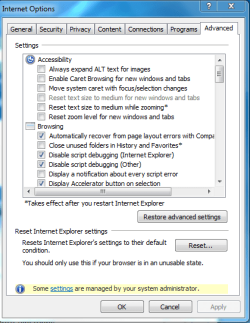
You could also try resetting IE to default settings by hitting the reset button like in the picture below.

With IE open look upper right and click on the "Tools" tab. Then choose Internet Options, then the Advanced tab, then click on the "Reset" button.
 

Attachments

  • IE RESET DEFAULT SETTINGS.PNG
    IE RESET DEFAULT SETTINGS.PNG
    19.8 KB · Views: 9

My Computer My Computer

Computer type
PC/Desktop
Computer Manufacturer/Model Number
Home built
OS
Windows 7 Ult, Windows 8.1 Pro,
CPU
Q9650-4.275GHz, E8600 4.5GHz, E6750-3.8GHz
Motherboard
Evga 780i FTW
Memory
G.Skill PC2 9600 1200Mhz 5 5 5 15 2T
Graphics Card(s)
GTX480
Sound Card
Asus Xonar D2
Monitor(s) Displays
HannsG
Screen Resolution
1680X1050
Hard Drives
GSkill Phoenix Pro 120GB SSD
PSU
ThermalTake Toughpower 1000Watt modular
Case
ThermalTake XaserV
Cooling
Xigmatek S1283
Keyboard
Logitech G15
Mouse
Logitech G9
Internet Speed
T1
Uhm... any of you guys noticed the name of the site? nipissingu
No, that was not an attempt at a lousy joke, I'm trying to make a point, could it be "something" blocking it because there is that word in it? Some sort of censorship?
 

My Computer My Computer

Computer type
PC/Desktop
Computer Manufacturer/Model Number
Custom Build
OS
Windows 7 Home Premium x64
CPU
Intel(R) Core(TM) i5 CPU 660 @ 3.33GHz, 2 cores, 4 l.p.
Motherboard
Asus P7P55D-E
Memory
Corsair CMT8GX3M2A1866C9 Dominator GT 8GB 1866MHz C9 DDR3
Graphics Card(s)
ASUS GeForce GTX 770 DIrectCU II (GTX770-DC2OC-2GD5)
Sound Card
NVIDIA High Definition Audio
Monitor(s) Displays
LG 23EA93-P UltraWide IPS Monitor 21:9
Screen Resolution
2560x1080 HDMI(60hz)
Hard Drives
- Primary(Boot) : Samsung SSD 840 EVO (120GB)
- WDC WD10EADS-00L5B1 ATA Device (931 GB, IDE)
- oxSATA OEM Ext Hard Disk (5YD2D1AQ) [UPT] (2 TB, USB 3.0)
PSU
LC Power ATX 750W V2.2 Prophecy 2 Active PFC
Case
Cooler Master HAF XM RC-922XM-KKN1
Keyboard
Logitech Compact Keyboard K300
Mouse
Logitech Laser Mouse
Internet Speed
Fiber Optic 100/10 Mbps
could be, that's why he should try checking all blocking options as mentioned earlier (check privacy option, try settings it to lowest and see if you can access the site).
As the link I gave earlier was working, it's not a windows 7 problem, but a browser related problem.
There's one thing that hasn't been mentioned before, and basically there's nothing you can do about it (apart from calling), which is that the university administrator might have blocked your IP from their site for some reason.
I don't know if you're on a laptop or something, but if you are, you can easily try connecting to the site while being on another Internet network (which will give you another IP).
The site I gave you earlier was a proxy site, meaning that your IP is hidden. The nice thing about this is that you can basically surf any site completely anonymous (no IP, no location, etc.) The disadvantage of this method however is (as you've mentioned before), you often can't do any security related things, like logging on, posting on forums etc.

I guess it's worth a shot contacting the administrator about the problem, because if they have indeed blocked you for some reason, there's nothing you can do about it. (Apart from hacking into their system, but let's not get you into trouble :P)
 

My Computer My Computer

Computer Manufacturer/Model Number
HP Compaq 8510w
OS
Windows 7
Monitor(s) Displays
Crimson1989
You could temporarily disable your firewall, however this is done at your own risk.
 

My Computer My Computer

OS
Windows 7
Back
Top