- Local time
- 6:52 AM
- Messages
- 165
I'm having trouble with the incredibly simple task of changing a default program association. Following the very clear steps listed on this forum for at least 2 different procedures fail in my case. I could use some help.
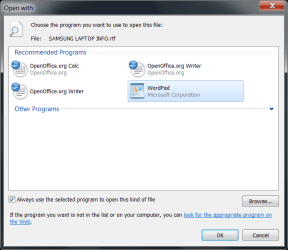
Whether starting with the "Associate ..." function in the control panel or a right click "Open With" on a file I do a "Browse" to get to the old program in the old director and select it. But the file association is not changed - it still shows the new program's icon and still accesses the new program.
Background: I installed a demo of a new version of some software. The installation changed the program associated with the .sib file extension - same program (Sibelius.exe) but a different path.
Is the same program / different path messing me up, or is something else going on?
Whether starting with the "Associate ..." function in the control panel or a right click "Open With" on a file I do a "Browse" to get to the old program in the old director and select it. But the file association is not changed - it still shows the new program's icon and still accesses the new program.
Background: I installed a demo of a new version of some software. The installation changed the program associated with the .sib file extension - same program (Sibelius.exe) but a different path.
Is the same program / different path messing me up, or is something else going on?
My Computer
- Computer type
- PC/Desktop
- Computer Manufacturer/Model Number
- Custom built by Puget Systems
- OS
- Windows 7 x64 Pro
- CPU
- Intel i7 4771 3.50 GHz
- Motherboard
- ASUS Z87-A
- Memory
- Kingston DDR3 - 16GB
- Graphics Card(s)
- Intel HD Graphics 4600
- Sound Card
- M-Audio Delta Audiofile 2496
- Monitor(s) Displays
- Samsung SyncMasterr 2043 BWX
- Hard Drives
- Samsung SSD 840 PRO
WDC WD1002FAEX-00Z3A0
- PSU
- built in - part of case - 650 Watt
- Case
- Fractal Design R4
- Cooling
- Coolmaster Hyper TX3
- Keyboard
- Dell PS/2
- Mouse
- Logitech USB
- Internet Speed
- 50 Mb Cable
- Antivirus
- Kaspersky Internet Security 2015
- Browser
- Firefox