Trouble changing default program association

pokeefe0001

New member
Power User
Local time
10:21 AM
Messages
165
I'm having trouble with the incredibly simple task of changing a default program association. Following the very clear steps listed on this forum for at least 2 different procedures fail in my case. I could use some help.

Whether starting with the "Associate ..." function in the control panel or a right click "Open With" on a file I do a "Browse" to get to the old program in the old director and select it. But the file association is not changed - it still shows the new program's icon and still accesses the new program.

Background: I installed a demo of a new version of some software. The installation changed the program associated with the .sib file extension - same program (Sibelius.exe) but a different path.

Is the same program / different path messing me up, or is something else going on?
 

My Computer

Computer type
PC/Desktop
Computer Manufacturer/Model Number
Custom built by Puget Systems
OS
Windows 7 x64 Pro
CPU
Intel i7 4771 3.50 GHz
Motherboard
ASUS Z87-A
Memory
Kingston DDR3 - 16GB
Graphics Card(s)
Intel HD Graphics 4600
Sound Card
M-Audio Delta Audiofile 2496
Monitor(s) Displays
Samsung SyncMasterr 2043 BWX
Hard Drives
Samsung SSD 840 PRO
WDC WD1002FAEX-00Z3A0
PSU
built in - part of case - 650 Watt
Case
Fractal Design R4
Cooling
Coolmaster Hyper TX3
Keyboard
Dell PS/2
Mouse
Logitech USB
Internet Speed
50 Mb Cable
Antivirus
Kaspersky Internet Security 2015
Browser
Firefox
Doing a System Restore to before you installed the program should fix this.
 

My Computer

Computer type
PC/Desktop
Computer Manufacturer/Model Number
Lenovo IdeaCenter 450
OS
Windows 10 Pro X64
CPU
Intel Quad Core i7-4770 @ 3.4Ghz
Memory
16.0GB PC3-12800 DDR3 SDRAM 1600 MHz
Graphics Card(s)
Intel Integrated HD Graphics
Sound Card
Realtek HD Audio
Monitor(s) Displays
HP 22" LCD
Screen Resolution
1680 x 1050
Hard Drives
250GB Samsung EVO SATA-3 SSD
2TB Seagate ST2000DM001 SATA-2
1.5TB Seagate ST3150041AS SATA
Keyboard
Dell USB
Mouse
Lenovo USB
Internet Speed
Cable via Road Runner 3MB Upload, 30MB Download
Antivirus
Windows Defender, MBAM Pro, MBAE
Browser
Seamonkey
Other Info
UEFI/GPT
PLDS DVD-RW DH16AERSH

My Computer

Computer Manufacturer/Model Number
HP Pavillion dv5t (generation 1)
OS
Vista 64 bit and 32 bit (SP2)
CPU
Intel(R) Core(TM)2 Duo Processor T9400 (2.53 GHz
Memory
4GB DDR2 System Memory (2 Dimm)
Graphics Card(s)
512 MB NVIDIA GeForce 9600M GT
Monitor(s) Displays
15.4" diagonal WSXGA+ High-Definition HP BrightView Widescre
Screen Resolution
1680 x 1050
Hard Drives
320GB 5400RPM SATA Hard Drive with HP ProtectSmart Hard Drive Protection
Keyboard
Built-in HP
Mouse
Built in - Synaptics TouchPad V6.5 on PS/2 Port
Internet Speed
Max
Other Info
~ Intel Next-Gen Wireless-N Mini-card w/Bluetooth ~ Blu-Ray ROM DVD+/-R/RW ~ Integ. HDTV Hybrid Tuner ~ 12 Cell Battery ~ MS Office (Home Premium) 2007 ~
Doing a System Restore to before you installed the program should fix this.

Yes, but I've made other changes that I'd rather not undo. And anyway, changing the default associations is something I should be able to do. A Restore would not help my coping with this if it should happen again.


I'd looked at, and followed to the best of my ability, that first tutorial.

I don't have the Unassociate program. I may get it soon, but I'm a bit afraid of making the situation worse. (I'm hung up on the fact that I'm having trouble doing something that I've successfully done before - something is odd this time.)

I'm stuck on the "Set Default Association" procedure. Neither the old or new version of this application are in the displayed program list. (How do programs get there?)

I'd rather not restore the Windows default list. I've made lots of changes and don't want to have to redo them all. That is my obvious "last gasp" procedure, though.

By the way, I suspect this is significant: the new, demo program appears in my "Open With" list of programs; the old version does not. How do I add it? How do I remove the new version of the program from that list?
 

My Computer

Computer type
PC/Desktop
Computer Manufacturer/Model Number
Custom built by Puget Systems
OS
Windows 7 x64 Pro
CPU
Intel i7 4771 3.50 GHz
Motherboard
ASUS Z87-A
Memory
Kingston DDR3 - 16GB
Graphics Card(s)
Intel HD Graphics 4600
Sound Card
M-Audio Delta Audiofile 2496
Monitor(s) Displays
Samsung SyncMasterr 2043 BWX
Hard Drives
Samsung SSD 840 PRO
WDC WD1002FAEX-00Z3A0
PSU
built in - part of case - 650 Watt
Case
Fractal Design R4
Cooling
Coolmaster Hyper TX3
Keyboard
Dell PS/2
Mouse
Logitech USB
Internet Speed
50 Mb Cable
Antivirus
Kaspersky Internet Security 2015
Browser
Firefox
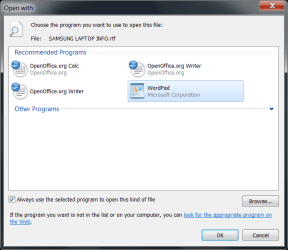
When you do an open with, select the right file and make sure to check the check box that says always do this with this type. Have you tried that?
Capture.PNG
 

My Computers

System One System Two

  • Computer type
    PC/Desktop
    Computer Manufacturer/Model Number
    ALWAYS UNDER CONSTRUCTION
    OS
    Windows 11 Pro
    CPU
    Ryzen 9 5900X
    Motherboard
    Asus X570 Crosshair Viii Hero
    Memory
    32GB G Skill DDR4-3600
    Graphics Card(s)
    EVGA RTX 3080 FTW 3 Ultra
    Sound Card
    On Board/Sennheiser PC37X Headset
    Monitor(s) Displays
    3 X Asus 27"
    Screen Resolution
    2560x1440
    Hard Drives
    2 X 1 TB NVME drives
    PSU
    EVGA 850
    Case
    Phanteks Eclipse P400A
    Cooling
    EVGA 280 AIO
    Keyboard
    Logitech G510s/ Logitech G13
    Mouse
    Logitech G502
    Internet Speed
    24/1
    Antivirus
    ESET/MBAM Pro/SAS Pro
    Browser
    Chrome/ Firefox/ Edge
  • Computer type
    Laptop
    System Manufacturer/Model Number
    Dell 16 Plus
    OS
    Windows 11 Pro
    CPU
    Intel Ultra 9 288V
    Memory
    32 GB LPDDR5X 8533
    Monitor(s) Displays
    16" Mini-LED HDR600 Touch 90 Hz
    Screen Resolution
    2560X1600
    Hard Drives
    1 TB NVME
When you do an open with, select the right file and make sure to check the check box that says always do this with this type. Have you tried that?

When I do (did) that the old program was not in the "Recommended programs" and "Always use ..." was greyed out. Choosing the correct program via Browse did nothing. The "Choose the program ..." panel was unchanged.

I finally gave up and uninstalled the demo program which reset the file association to null. I could then set the association using "Open with". (I'm almost certain the old program appeared in the "Recommended programs" list once the new program was uninstalled, but I may be misremembering.

BTW, the programs, both old and new, have a Repair function that is supposed to set program associations. I have no idea what it does beyond the standard Windows functions. (Maybe it sets multiple associations.) In any case, it didn't work for me.

I do want to reinstall the demo program so I may get a chance to try this all over again. :sarc:
 

My Computer

Computer type
PC/Desktop
Computer Manufacturer/Model Number
Custom built by Puget Systems
OS
Windows 7 x64 Pro
CPU
Intel i7 4771 3.50 GHz
Motherboard
ASUS Z87-A
Memory
Kingston DDR3 - 16GB
Graphics Card(s)
Intel HD Graphics 4600
Sound Card
M-Audio Delta Audiofile 2496
Monitor(s) Displays
Samsung SyncMasterr 2043 BWX
Hard Drives
Samsung SSD 840 PRO
WDC WD1002FAEX-00Z3A0
PSU
built in - part of case - 650 Watt
Case
Fractal Design R4
Cooling
Coolmaster Hyper TX3
Keyboard
Dell PS/2
Mouse
Logitech USB
Internet Speed
50 Mb Cable
Antivirus
Kaspersky Internet Security 2015
Browser
Firefox
Back
Top