
Solved Trouble creating/joining homegroup....

Golden

000
VIP
SF Team
Local time
8:32 PM
Messages
19,301
Location
South Australia
G'day,

I'm having some trouble with homegroups on 1 of 3 computers in my network. I have been able to determine that the trouble lies with my desktop, but am not sure how to proceed.

The network is as follows:

2 x laptops running Home Premium x86 SP1 (wireless)
1 x desktop running Ultimate x64 SP1 (wired)

Both laptops can create homegroups, and both can join a homegroup created by the other laptop.

However, with the desktop, I cannot see the homegroups that the laptops have created. Also, if I create a homegroup with the desktop, then the laptops cannot see it.

The desktop was running VMware and VBox and I suspected that the virtual adapters were causing a problem so I uninstalled those, but this hasn't seemed to help.

I checked the troubleshooting steps in Brink's homegroup tutorial, and as far as I can determine everything looks OK:

- All computers belong to the same Home network
- Times are the same
- IP addresses are within the same range

On the adaptor:
- File and Printer sharing for Microsoft Networks is checked
- IPV6 is checked
- IPV4 is checked

In the home settings:
- Network discovery is ON
- File and Printer sharing is turned ON
- Windows manages homegroup connections

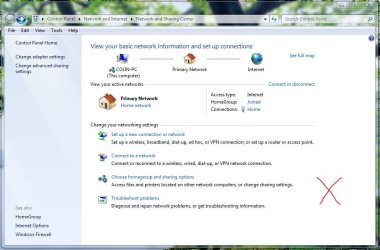
I have run the homegroup troubleshooter several times but this hasn't been able to solved the issues. The connections are shown in the attached images : the one with the red X in it is the problematic desktop.

Can someone suggest some troubleshooting steps I could use to solve this?

Regards,
Golden
 

Attachments
  • 1.JPG
    1.JPG
    77.3 KB · Views: 25
  • 2.PNG
    2.PNG
    74 KB · Views: 24

My Computer

Computer type
PC/Desktop
Computer Manufacturer/Model Number
Golden Mk. I.4
OS
Windows 10 Pro x64 ; Xubuntu x64
CPU
Intel i7 860 @ 2.80 GHz O/C'ed to 4.0GHz
Motherboard
Gigabyte P55A-UD3R Rev.1. Award BIOS F13
Memory
16GB Corsair Vengance DDR3 @ 661 MHz Dual Channel (9-9-9-24)
Graphics Card(s)
EVGA NVidia GTX 560 1024MB
Sound Card
Realtek Integrated
Monitor(s) Displays
Dual Samsung SyncMaster 2494HS
Screen Resolution
1920*1080 and 1920*1080
Hard Drives
1*Samsung 840 EVO 120GB SSD;
1*OCZ Vertex 2 60GB SSD;
2*Samsung F3 SpinPoint 1TB in RAID0;
1*Samsung F1 SpinPoint 1TB;
2*Western Digital 1TB External USB 3.0
1*Western Digital 500GB External USB 3.0
1*Seagate 500GB External USB 2.0
PSU
Thermaltake ToughPower QFan 750W
Case
Thermaltake Element S VK60001W2Z
Cooling
Corsair H60 Water Cooling, 2*230mm and 2*80mm case fans
Keyboard
Logitech G110
Mouse
Logitech MX518
It sounds like you checked most of the possible problems, I'll post this Homegroup trouble shooter just so you can ensure that all the required services are up and running. It may help to set some of the required services to Automatic rather than Manual.
Ultimate Troubleshooting Guide for Windows 7 HomeGroup Connection Issues

It sounds like the wired connection is using a different default gateway than the wireless connection but I'm sure you checked that out. If you can post the ipconfig/all from the desktop and one of the laptops it might help me to spot a problem.

It could also be your A/V software causing the problem but I'm not sure which one you are running.
 

My Computer

Computer type
PC/Desktop
Computer Manufacturer/Model Number
Home built
OS
Windows 7 Ult, Windows 8.1 Pro,
CPU
Q9650-4.275GHz, E8600 4.5GHz, E6750-3.8GHz
Motherboard
Evga 780i FTW
Memory
G.Skill PC2 9600 1200Mhz 5 5 5 15 2T
Graphics Card(s)
GTX480
Sound Card
Asus Xonar D2
Monitor(s) Displays
HannsG
Screen Resolution
1680X1050
Hard Drives
GSkill Phoenix Pro 120GB SSD
PSU
ThermalTake Toughpower 1000Watt modular
Case
ThermalTake XaserV
Cooling
Xigmatek S1283
Keyboard
Logitech G15
Mouse
Logitech G9
Internet Speed
T1
Hi chev,

Thanks for your help with this. I'll check out those services. I'm running MSE and Malwarebytes on all 3 computers.

I'm not sure by the default gateway though - looking at the ipconfig mine show as Google DNS. Is that the issue?

Desktop - homegroup not working
Code:
Microsoft Windows [Version 6.1.7601]
Copyright (c) 2009 Microsoft Corporation.  All rights reserved.

C:\Windows\system32>ipconfig /all

Windows IP Configuration

   Host Name . . . . . . . . . . . . : Colin-PC
   Primary Dns Suffix  . . . . . . . :
   Node Type . . . . . . . . . . . . : Hybrid
   IP Routing Enabled. . . . . . . . : No
   WINS Proxy Enabled. . . . . . . . : No

Ethernet adapter Home:

   Connection-specific DNS Suffix  . :
   Description . . . . . . . . . . . : Realtek PCIe GBE Family Controller
   Physical Address. . . . . . . . . : 6C-F0-49-05-52-37
   DHCP Enabled. . . . . . . . . . . : Yes
   Autoconfiguration Enabled . . . . : Yes
   Link-local IPv6 Address . . . . . : fe80::4c54:e6f2:b469:f0ce%10(Preferred)
   IPv4 Address. . . . . . . . . . . : 192.168.1.3(Preferred)
   Subnet Mask . . . . . . . . . . . : 255.255.255.0
   Lease Obtained. . . . . . . . . . : Wednesday, 27 June 2012 5:59:15 PM
   Lease Expires . . . . . . . . . . : Thursday, 28 June 2012 5:59:15 AM
   Default Gateway . . . . . . . . . : 192.168.1.254
   DHCP Server . . . . . . . . . . . : 192.168.1.254
   DHCPv6 IAID . . . . . . . . . . . : 242020425
   DHCPv6 Client DUID. . . . . . . . : 00-01-00-01-14-9C-A0-94-6C-F0-49-05-52-37
   DNS Servers . . . . . . . . . . . : 8.8.8.8
                                       8.8.4.4
   NetBIOS over Tcpip. . . . . . . . : Enabled

Tunnel adapter isatap.{AF09D17A-49C7-4A57-9B9C-7BBDF9B663ED}:

   Media State . . . . . . . . . . . : Media disconnected
   Connection-specific DNS Suffix  . :
   Description . . . . . . . . . . . : Microsoft ISATAP Adapter
   Physical Address. . . . . . . . . : 00-00-00-00-00-00-00-E0
   DHCP Enabled. . . . . . . . . . . : No
   Autoconfiguration Enabled . . . . : Yes

Tunnel adapter Local Area Connection* 9:

   Connection-specific DNS Suffix  . :
   Description . . . . . . . . . . . : Teredo Tunneling Pseudo-Interface
   Physical Address. . . . . . . . . : 00-00-00-00-00-00-00-E0
   DHCP Enabled. . . . . . . . . . . : No
   Autoconfiguration Enabled . . . . : Yes
   IPv6 Address. . . . . . . . . . . : 2001:0:5ef5:79fb:3451:d37:892d:cdbc(Preferred)
   Link-local IPv6 Address . . . . . : fe80::3451:d37:892d:cdbc%12(Preferred)
   Default Gateway . . . . . . . . . : ::
   NetBIOS over Tcpip. . . . . . . . : Disabled

C:\Windows\system32>
Laptop - homegroup working
Code:
Microsoft Windows [Version 6.1.7601]
Copyright (c) 2009 Microsoft Corporation.  All rights reserved.

C:\Windows\system32>ipconfig /all

Windows IP Configuration

   Host Name . . . . . . . . . . . . : Jessica-PC
   Primary Dns Suffix  . . . . . . . :
   Node Type . . . . . . . . . . . . : Hybrid
   IP Routing Enabled. . . . . . . . : No
   WINS Proxy Enabled. . . . . . . . : No

Wireless LAN adapter Wireless Network Connection:

   Connection-specific DNS Suffix  . :
   Description . . . . . . . . . . . : Broadcom 802.11n Network Adapter
   Physical Address. . . . . . . . . : EC-55-F9-20-07-E2
   DHCP Enabled. . . . . . . . . . . : Yes
   Autoconfiguration Enabled . . . . : Yes
   Link-local IPv6 Address . . . . . : fe80::92f:ecc7:24f3:8f1c%12(Preferred)
   IPv4 Address. . . . . . . . . . . : 192.168.1.4(Preferred)
   Subnet Mask . . . . . . . . . . . : 255.255.255.0
   Lease Obtained. . . . . . . . . . : Wednesday, 27 June 2012 6:56:11 PM
   Lease Expires . . . . . . . . . . : Thursday, 28 June 2012 6:56:12 AM
   Default Gateway . . . . . . . . . : 192.168.1.254
   DHCP Server . . . . . . . . . . . : 192.168.1.254
   DHCPv6 IAID . . . . . . . . . . . : 334255609
   DHCPv6 Client DUID. . . . . . . . : 00-01-00-01-15-21-94-A0-60-EB-69-F6-CD-80

   DNS Servers . . . . . . . . . . . : 192.168.1.254
   NetBIOS over Tcpip. . . . . . . . : Enabled

Ethernet adapter Local Area Connection:

   Media State . . . . . . . . . . . : Media disconnected
   Connection-specific DNS Suffix  . :
   Description . . . . . . . . . . . : Broadcom NetLink (TM) Gigabit Ethernet
   Physical Address. . . . . . . . . : 60-EB-69-F6-CD-80
   DHCP Enabled. . . . . . . . . . . : Yes
   Autoconfiguration Enabled . . . . : Yes

Tunnel adapter Local Area Connection* 9:

   Media State . . . . . . . . . . . : Media disconnected
   Connection-specific DNS Suffix  . :
   Description . . . . . . . . . . . : Microsoft 6to4 Adapter
   Physical Address. . . . . . . . . : 00-00-00-00-00-00-00-E0
   DHCP Enabled. . . . . . . . . . . : No
   Autoconfiguration Enabled . . . . : Yes

Tunnel adapter Teredo Tunneling Pseudo-Interface:

   Connection-specific DNS Suffix  . :
   Description . . . . . . . . . . . : Teredo Tunneling Pseudo-Interface
   Physical Address. . . . . . . . . : 00-00-00-00-00-00-00-E0
   DHCP Enabled. . . . . . . . . . . : No
   Autoconfiguration Enabled . . . . : Yes
   IPv6 Address. . . . . . . . . . . : 2001:0:4137:9e76:28cf:2446:892d:cdbc(Pref
erred)
   Link-local IPv6 Address . . . . . : fe80::28cf:2446:892d:cdbc%13(Preferred)
   Default Gateway . . . . . . . . . : ::
   NetBIOS over Tcpip. . . . . . . . : Disabled

Tunnel adapter isatap.{78450828-40AB-448E-9699-2D6F699BE7F9}:

   Media State . . . . . . . . . . . : Media disconnected
   Connection-specific DNS Suffix  . :
   Description . . . . . . . . . . . : Microsoft ISATAP Adapter #4
   Physical Address. . . . . . . . . : 00-00-00-00-00-00-00-E0
   DHCP Enabled. . . . . . . . . . . : No
   Autoconfiguration Enabled . . . . : Yes

C:\Windows\system32>
Regards,
Golden
 
Last edited:

My Computer

Computer type
PC/Desktop
Computer Manufacturer/Model Number
Golden Mk. I.4
OS
Windows 10 Pro x64 ; Xubuntu x64
CPU
Intel i7 860 @ 2.80 GHz O/C'ed to 4.0GHz
Motherboard
Gigabyte P55A-UD3R Rev.1. Award BIOS F13
Memory
16GB Corsair Vengance DDR3 @ 661 MHz Dual Channel (9-9-9-24)
Graphics Card(s)
EVGA NVidia GTX 560 1024MB
Sound Card
Realtek Integrated
Monitor(s) Displays
Dual Samsung SyncMaster 2494HS
Screen Resolution
1920*1080 and 1920*1080
Hard Drives
1*Samsung 840 EVO 120GB SSD;
1*OCZ Vertex 2 60GB SSD;
2*Samsung F3 SpinPoint 1TB in RAID0;
1*Samsung F1 SpinPoint 1TB;
2*Western Digital 1TB External USB 3.0
1*Western Digital 500GB External USB 3.0
1*Seagate 500GB External USB 2.0
PSU
Thermaltake ToughPower QFan 750W
Case
Thermaltake Element S VK60001W2Z
Cooling
Corsair H60 Water Cooling, 2*230mm and 2*80mm case fans
Keyboard
Logitech G110
Mouse
Logitech MX518
Ok, after a few tests I got some sporadic homegroup connections, but sometimes it just dissapears by itself, or appears incomplete (e.g. no files in folders even though they definately contain files).

I did these tests by changing the laptop to the Google Public IvP4 DNS 8.8.8.8 with 4.4.4.4 alternative. I also set the desktop back to the default DNS (same as the laptops 196.168.1.254)...but get the same behaviour :confused:

I'll check out the services.........
 

My Computer

Computer type
PC/Desktop
Computer Manufacturer/Model Number
Golden Mk. I.4
OS
Windows 10 Pro x64 ; Xubuntu x64
CPU
Intel i7 860 @ 2.80 GHz O/C'ed to 4.0GHz
Motherboard
Gigabyte P55A-UD3R Rev.1. Award BIOS F13
Memory
16GB Corsair Vengance DDR3 @ 661 MHz Dual Channel (9-9-9-24)
Graphics Card(s)
EVGA NVidia GTX 560 1024MB
Sound Card
Realtek Integrated
Monitor(s) Displays
Dual Samsung SyncMaster 2494HS
Screen Resolution
1920*1080 and 1920*1080
Hard Drives
1*Samsung 840 EVO 120GB SSD;
1*OCZ Vertex 2 60GB SSD;
2*Samsung F3 SpinPoint 1TB in RAID0;
1*Samsung F1 SpinPoint 1TB;
2*Western Digital 1TB External USB 3.0
1*Western Digital 500GB External USB 3.0
1*Seagate 500GB External USB 2.0
PSU
Thermaltake ToughPower QFan 750W
Case
Thermaltake Element S VK60001W2Z
Cooling
Corsair H60 Water Cooling, 2*230mm and 2*80mm case fans
Keyboard
Logitech G110
Mouse
Logitech MX518
I don't see any problems with the ipconfig's.

If you noticed some sporadic Homegroup connections or if the Homegroup connections aren't quite working right at that point try leaving the Homegroup from all machines then create a new one and rejoin from all machines, assuming you can actually see the desktop machine.

You should have all of the Homegroup machines turned on for this procedure so they can all see each other during the set up phase.

If you are using a wireless network through a wireless router, then check to make sure that say for example WLAN Partition (D-Link) or Enable Wireless Isolation (Netgear) are unchecked in the router's wireless settings. Examples in the link below.
http://www.sevenforums.com/tutorials/43961-homegroup-create.html
 

My Computer

Computer type
PC/Desktop
Computer Manufacturer/Model Number
Home built
OS
Windows 7 Ult, Windows 8.1 Pro,
CPU
Q9650-4.275GHz, E8600 4.5GHz, E6750-3.8GHz
Motherboard
Evga 780i FTW
Memory
G.Skill PC2 9600 1200Mhz 5 5 5 15 2T
Graphics Card(s)
GTX480
Sound Card
Asus Xonar D2
Monitor(s) Displays
HannsG
Screen Resolution
1680X1050
Hard Drives
GSkill Phoenix Pro 120GB SSD
PSU
ThermalTake Toughpower 1000Watt modular
Case
ThermalTake XaserV
Cooling
Xigmatek S1283
Keyboard
Logitech G15
Mouse
Logitech G9
Internet Speed
T1
Hi,

Yep, I left and rejoined homegroups several times now without success, or the partial success as explained above. I use a Billion router with wirelss connectivity), so I'll have to try and locate the equivalent settings in that.

I'll check out those services this evening.
 
Last edited:

My Computer

Computer type
PC/Desktop
Computer Manufacturer/Model Number
Golden Mk. I.4
OS
Windows 10 Pro x64 ; Xubuntu x64
CPU
Intel i7 860 @ 2.80 GHz O/C'ed to 4.0GHz
Motherboard
Gigabyte P55A-UD3R Rev.1. Award BIOS F13
Memory
16GB Corsair Vengance DDR3 @ 661 MHz Dual Channel (9-9-9-24)
Graphics Card(s)
EVGA NVidia GTX 560 1024MB
Sound Card
Realtek Integrated
Monitor(s) Displays
Dual Samsung SyncMaster 2494HS
Screen Resolution
1920*1080 and 1920*1080
Hard Drives
1*Samsung 840 EVO 120GB SSD;
1*OCZ Vertex 2 60GB SSD;
2*Samsung F3 SpinPoint 1TB in RAID0;
1*Samsung F1 SpinPoint 1TB;
2*Western Digital 1TB External USB 3.0
1*Western Digital 500GB External USB 3.0
1*Seagate 500GB External USB 2.0
PSU
Thermaltake ToughPower QFan 750W
Case
Thermaltake Element S VK60001W2Z
Cooling
Corsair H60 Water Cooling, 2*230mm and 2*80mm case fans
Keyboard
Logitech G110
Mouse
Logitech MX518
OK. I'm lost.....I ensured the critical services listed in Brink's tutorial are all set to automatic, rebooted the computer, but I'm not even able to maintain a sporadic homegroup connection at all - in summary:

- laptop 1 and laptop 2 can network perfectly via homegroup
- desktop will not see homegroups created on laptops, and vice versa

Can anyone suggest anything else?

Regards,
Golden
 

My Computer

Computer type
PC/Desktop
Computer Manufacturer/Model Number
Golden Mk. I.4
OS
Windows 10 Pro x64 ; Xubuntu x64
CPU
Intel i7 860 @ 2.80 GHz O/C'ed to 4.0GHz
Motherboard
Gigabyte P55A-UD3R Rev.1. Award BIOS F13
Memory
16GB Corsair Vengance DDR3 @ 661 MHz Dual Channel (9-9-9-24)
Graphics Card(s)
EVGA NVidia GTX 560 1024MB
Sound Card
Realtek Integrated
Monitor(s) Displays
Dual Samsung SyncMaster 2494HS
Screen Resolution
1920*1080 and 1920*1080
Hard Drives
1*Samsung 840 EVO 120GB SSD;
1*OCZ Vertex 2 60GB SSD;
2*Samsung F3 SpinPoint 1TB in RAID0;
1*Samsung F1 SpinPoint 1TB;
2*Western Digital 1TB External USB 3.0
1*Western Digital 500GB External USB 3.0
1*Seagate 500GB External USB 2.0
PSU
Thermaltake ToughPower QFan 750W
Case
Thermaltake Element S VK60001W2Z
Cooling
Corsair H60 Water Cooling, 2*230mm and 2*80mm case fans
Keyboard
Logitech G110
Mouse
Logitech MX518
Just checked that the router handles IvP6 using ping -6 computer_name from both desktop (wired) and laptop (wireless) and both work perfectly.........so thats not the issue. Gah! Bloody homegroups......

Also turned off all anti-malware products and Windows Firewall as a test .... no joy!
 
Last edited:

My Computer

Computer type
PC/Desktop
Computer Manufacturer/Model Number
Golden Mk. I.4
OS
Windows 10 Pro x64 ; Xubuntu x64
CPU
Intel i7 860 @ 2.80 GHz O/C'ed to 4.0GHz
Motherboard
Gigabyte P55A-UD3R Rev.1. Award BIOS F13
Memory
16GB Corsair Vengance DDR3 @ 661 MHz Dual Channel (9-9-9-24)
Graphics Card(s)
EVGA NVidia GTX 560 1024MB
Sound Card
Realtek Integrated
Monitor(s) Displays
Dual Samsung SyncMaster 2494HS
Screen Resolution
1920*1080 and 1920*1080
Hard Drives
1*Samsung 840 EVO 120GB SSD;
1*OCZ Vertex 2 60GB SSD;
2*Samsung F3 SpinPoint 1TB in RAID0;
1*Samsung F1 SpinPoint 1TB;
2*Western Digital 1TB External USB 3.0
1*Western Digital 500GB External USB 3.0
1*Seagate 500GB External USB 2.0
PSU
Thermaltake ToughPower QFan 750W
Case
Thermaltake Element S VK60001W2Z
Cooling
Corsair H60 Water Cooling, 2*230mm and 2*80mm case fans
Keyboard
Logitech G110
Mouse
Logitech MX518
Stuff homegroups, I reckon its flaky. I've gone back to the old-fashioned folder/sharing and mapping. Problem solved :thumbsup:
 

My Computer

Computer type
PC/Desktop
Computer Manufacturer/Model Number
Golden Mk. I.4
OS
Windows 10 Pro x64 ; Xubuntu x64
CPU
Intel i7 860 @ 2.80 GHz O/C'ed to 4.0GHz
Motherboard
Gigabyte P55A-UD3R Rev.1. Award BIOS F13
Memory
16GB Corsair Vengance DDR3 @ 661 MHz Dual Channel (9-9-9-24)
Graphics Card(s)
EVGA NVidia GTX 560 1024MB
Sound Card
Realtek Integrated
Monitor(s) Displays
Dual Samsung SyncMaster 2494HS
Screen Resolution
1920*1080 and 1920*1080
Hard Drives
1*Samsung 840 EVO 120GB SSD;
1*OCZ Vertex 2 60GB SSD;
2*Samsung F3 SpinPoint 1TB in RAID0;
1*Samsung F1 SpinPoint 1TB;
2*Western Digital 1TB External USB 3.0
1*Western Digital 500GB External USB 3.0
1*Seagate 500GB External USB 2.0
PSU
Thermaltake ToughPower QFan 750W
Case
Thermaltake Element S VK60001W2Z
Cooling
Corsair H60 Water Cooling, 2*230mm and 2*80mm case fans
Keyboard
Logitech G110
Mouse
Logitech MX518
Stuff homegroups, I reckon its flaky. I've gone back to the old-fashioned folder/sharing and mapping. Problem solved :thumbsup:

Yes depending on the router being used it seems that Homegroups sometimes has problems working from a wireless to wired connection although I don't have this problem personally. Other times it seems as if the time/date settings need to be very accurately set on all machines in order for Homegroups to work properly.

I've been using Homegroups for over 3 years with no problems so the Windows 7 side is working fine, though if the machine that created the Homegroup is removed then it's usually required to set it all up again from scratch.
 

My Computer

Computer type
PC/Desktop
Computer Manufacturer/Model Number
Home built
OS
Windows 7 Ult, Windows 8.1 Pro,
CPU
Q9650-4.275GHz, E8600 4.5GHz, E6750-3.8GHz
Motherboard
Evga 780i FTW
Memory
G.Skill PC2 9600 1200Mhz 5 5 5 15 2T
Graphics Card(s)
GTX480
Sound Card
Asus Xonar D2
Monitor(s) Displays
HannsG
Screen Resolution
1680X1050
Hard Drives
GSkill Phoenix Pro 120GB SSD
PSU
ThermalTake Toughpower 1000Watt modular
Case
ThermalTake XaserV
Cooling
Xigmatek S1283
Keyboard
Logitech G15
Mouse
Logitech G9
Internet Speed
T1
Back
Top