
Joining homegroup failure.

marcomax

New member
Local time
3:39 AM
Messages
15
I am trying to connect with a wired LAN connected PC to a homegroup which is composed by wi-fi connected systems, joining fails.

If I connect the same PC by wi-fi joining ok.

If I connect one of the other PC with wired LAN join fails.

So it seems like wired PC cannot join with wi-fi PC, not related to one PC.

Systems can see each other in network and communicate well, the only things that fails is homegroup joining.

I have to keep one machine connected directly wired so I'd like to fix this problem.

All machine have a new Windows 7 x64 installation. Ipv6 is installed and working.

Thanks for your help.
 

My Computer

Computer type
PC/Desktop
Computer Manufacturer/Model Number
custom build
OS
Windows 7 Ultimate x64
CPU
Intel Q6600 2.4G
Motherboard
Gigabite G41M-COMBO
Memory
GEIL GD34GB1333C9SC DDR3 10660 1333 CL 9-9-9-24 4GBX2
Graphics Card(s)
NVIDIA GeForce 650 Ti OC (factory OC)
Hard Drives
Hitachi 1T JPT41B
Antivirus
AVG Free
Browser
IE, Chrome, Firefox, Seamonkey, Opera, Safari.
Usually it's the other way around with wireless machines having problems joining a Homegroup.

Is there more than one router or access point in this network? Rebooting the router and making sure that everything is using the same default gateway, same subnet etc. might be a good idea but I'm sure you checked that, and the workgroup seems to be working as you mentioned.

You might try changing the Peer Networking services setting at ' services.msc from Manual to Automatic delayed start up which can sometimes fix this type of problem "first picture below" right click each service and choose properties to change the setting.

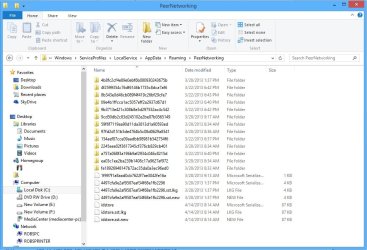
Another possible fix for this would be to first leave the current Homegroup from all machines in this network, then Delete all files that reside in the PeerNetworking folder on each machine. This can often times fix join or leaving the Homegroup type of problems. After that reboot all machines then create a new Homegroup and see if anything changes.

Location> C:\windows\serviceProfiles\LocalService\AppData\Roaming\PeerNetworking


Attachments

  • peer networking remove files name removed.jpg
    peer networking remove files name removed.jpg
    100.1 KB · Views: 3

My Computer

Computer type
PC/Desktop
Computer Manufacturer/Model Number
Home built
OS
Windows 7 Ult, Windows 8.1 Pro,
CPU
Q9650-4.275GHz, E8600 4.5GHz, E6750-3.8GHz
Motherboard
Evga 780i FTW
Memory
G.Skill PC2 9600 1200Mhz 5 5 5 15 2T
Graphics Card(s)
GTX480
Sound Card
Asus Xonar D2
Monitor(s) Displays
HannsG
Screen Resolution
1680X1050
Hard Drives
GSkill Phoenix Pro 120GB SSD
PSU
ThermalTake Toughpower 1000Watt modular
Case
ThermalTake XaserV
Cooling
Xigmatek S1283
Keyboard
Logitech G15
Mouse
Logitech G9
Internet Speed
T1
There is just one router. All PC have a freshly new clean windows installation.

I tried all of your suggestions without success. The machine in wired LAN won't simply join the homegroup, no matter which one it is. I can join the homegroup if I install a wi-fi adapter and if I later connect with LAN, I am in the homegroup perfectly working, but then I'll have the same problem when I'll try to join another homegroup. I'd like to find a permanent solution that doesn't involve connecting to the wi-fi every time.

Thanks for your support.
 

My Computer

Computer type
PC/Desktop
Computer Manufacturer/Model Number
custom build
OS
Windows 7 Ultimate x64
CPU
Intel Q6600 2.4G
Motherboard
Gigabite G41M-COMBO
Memory
GEIL GD34GB1333C9SC DDR3 10660 1333 CL 9-9-9-24 4GBX2
Graphics Card(s)
NVIDIA GeForce 650 Ti OC (factory OC)
Hard Drives
Hitachi 1T JPT41B
Antivirus
AVG Free
Browser
IE, Chrome, Firefox, Seamonkey, Opera, Safari.
There is just one router. All PC have a freshly new clean windows installation.

I tried all of your suggestions without success. The machine in wired LAN won't simply join the homegroup, no matter which one it is. I can join the homegroup if I install a wi-fi adapter and if I later connect with LAN, I am in the homegroup perfectly working, but then I'll have the same problem when I'll try to join another homegroup. I'd like to find a permanent solution that doesn't involve connecting to the wi-fi every time.

Thanks for your support.

I'm not sure what you mean when you say join another Homegroup, there is only one Homegroup allow per network.

It sounds like your router is having a hard time with Homegroup, maybe a problem with IPv6, try updating the firmware on the router.
 

My Computer

Computer type
PC/Desktop
Computer Manufacturer/Model Number
Home built
OS
Windows 7 Ult, Windows 8.1 Pro,
CPU
Q9650-4.275GHz, E8600 4.5GHz, E6750-3.8GHz
Motherboard
Evga 780i FTW
Memory
G.Skill PC2 9600 1200Mhz 5 5 5 15 2T
Graphics Card(s)
GTX480
Sound Card
Asus Xonar D2
Monitor(s) Displays
HannsG
Screen Resolution
1680X1050
Hard Drives
GSkill Phoenix Pro 120GB SSD
PSU
ThermalTake Toughpower 1000Watt modular
Case
ThermalTake XaserV
Cooling
Xigmatek S1283
Keyboard
Logitech G15
Mouse
Logitech G9
Internet Speed
T1
I'm not sure what you mean when you say join another Homegroup, there is only one Homegroup allow per network.

I am currently doing some software development so I often switch between different customers, when I do, I join their homegroup. For now I am working with this homegroup but later I might have to join others and then rejoin this one later. So you see why I'd like to find a definitive solutions.

I cannot really upgrade the router firmware because is the customer hardware, I can advice it if I am sure that is really the problem.

So you think is a router problem? What could be causing the Ethernet ports of the router not to allowing homegroup joining? Is there any data I can supply so you can better troubleshoot the problem?

Router is a ZyXEL P-660HN-T1A

Thanks.
 

My Computer

Computer type
PC/Desktop
Computer Manufacturer/Model Number
custom build
OS
Windows 7 Ultimate x64
CPU
Intel Q6600 2.4G
Motherboard
Gigabite G41M-COMBO
Memory
GEIL GD34GB1333C9SC DDR3 10660 1333 CL 9-9-9-24 4GBX2
Graphics Card(s)
NVIDIA GeForce 650 Ti OC (factory OC)
Hard Drives
Hitachi 1T JPT41B
Antivirus
AVG Free
Browser
IE, Chrome, Firefox, Seamonkey, Opera, Safari.
I'm not sure what you mean when you say join another Homegroup, there is only one Homegroup allow per network.

I am currently doing some software development so I often switch between different customers, when I do, I join their homegroup. For now I am working with this homegroup but later I might have to join others and then rejoin this one later. So you see why I'd like to find a definitive solutions.

I cannot really upgrade the router firmware because is the customer hardware, I can advice it if I am sure that is really the problem.

So you think is a router problem? What could be causing the Ethernet ports of the router not to allowing homegroup joining? Is there any data I can supply so you can better troubleshoot the problem?

Router is a ZyXEL P-660HN-T1A

Thanks.

OK, Windows isn't going to allow you to switch between different Homegroups while you are still a member of the old Homegroup.

You would need to first leave the original Homegroup you are connected too before you attempt to join another Homegroup on a different network. This isn't a bug, it's made this way by design.

Windows won't allow you to join two different Homegroups at the same time.
 

My Computer

Computer type
PC/Desktop
Computer Manufacturer/Model Number
Home built
OS
Windows 7 Ult, Windows 8.1 Pro,
CPU
Q9650-4.275GHz, E8600 4.5GHz, E6750-3.8GHz
Motherboard
Evga 780i FTW
Memory
G.Skill PC2 9600 1200Mhz 5 5 5 15 2T
Graphics Card(s)
GTX480
Sound Card
Asus Xonar D2
Monitor(s) Displays
HannsG
Screen Resolution
1680X1050
Hard Drives
GSkill Phoenix Pro 120GB SSD
PSU
ThermalTake Toughpower 1000Watt modular
Case
ThermalTake XaserV
Cooling
Xigmatek S1283
Keyboard
Logitech G15
Mouse
Logitech G9
Internet Speed
T1
I know that, of course I will leave the group and join another, but I cannot join homegroups anyway unless I connect it by wifi.
 

My Computer

Computer type
PC/Desktop
Computer Manufacturer/Model Number
custom build
OS
Windows 7 Ultimate x64
CPU
Intel Q6600 2.4G
Motherboard
Gigabite G41M-COMBO
Memory
GEIL GD34GB1333C9SC DDR3 10660 1333 CL 9-9-9-24 4GBX2
Graphics Card(s)
NVIDIA GeForce 650 Ti OC (factory OC)
Hard Drives
Hitachi 1T JPT41B
Antivirus
AVG Free
Browser
IE, Chrome, Firefox, Seamonkey, Opera, Safari.
I know that, of course I will leave the group and join another, but I cannot join homegroups anyway unless I connect it by wifi.

If you tried the steps I posted and they didn't work then most likely there is a set up problem with your router. If you can post the ipconfig/all from these machines I can see if there is a gateway problem. :)
 

My Computer

Computer type
PC/Desktop
Computer Manufacturer/Model Number
Home built
OS
Windows 7 Ult, Windows 8.1 Pro,
CPU
Q9650-4.275GHz, E8600 4.5GHz, E6750-3.8GHz
Motherboard
Evga 780i FTW
Memory
G.Skill PC2 9600 1200Mhz 5 5 5 15 2T
Graphics Card(s)
GTX480
Sound Card
Asus Xonar D2
Monitor(s) Displays
HannsG
Screen Resolution
1680X1050
Hard Drives
GSkill Phoenix Pro 120GB SSD
PSU
ThermalTake Toughpower 1000Watt modular
Case
ThermalTake XaserV
Cooling
Xigmatek S1283
Keyboard
Logitech G15
Mouse
Logitech G9
Internet Speed
T1
here you go:

Microsoft Windows [Version 6.1.7600]
Copyright (c) 2009 Microsoft Corporation. All rights reserved.

C:\Users\Marco>ipconfig/all

Windows IP Configuration

Host Name . . . . . . . . . . . . : Marco-PC
Primary Dns Suffix . . . . . . . :
Node Type . . . . . . . . . . . . : Hybrid
IP Routing Enabled. . . . . . . . : No
WINS Proxy Enabled. . . . . . . . : No

Ethernet adapter Local Area Connection:

Connection-specific DNS Suffix . :
Description . . . . . . . . . . . : Marvell Yukon 88E8001/8003/8010 PCI Gigab
it Ethernet Controller
Physical Address. . . . . . . . . : 00-1B-FC-CE-27-CB
DHCP Enabled. . . . . . . . . . . : No
Autoconfiguration Enabled . . . . : Yes
Link-local IPv6 Address . . . . . : fe80::b8cf:d5fc:e4ea:c903%11(Preferred)
IPv4 Address. . . . . . . . . . . : 192.168.1.11(Preferred)
Subnet Mask . . . . . . . . . . . : 255.255.255.0
Default Gateway . . . . . . . . . : 192.168.1.1
DHCPv6 IAID . . . . . . . . . . . : 234888188
DHCPv6 Client DUID. . . . . . . . : 00-01-00-01-19-77-68-71-00-1B-FC-CE-27-CB

DNS Servers . . . . . . . . . . . : 208.67.222.222
208.67.220.220
NetBIOS over Tcpip. . . . . . . . : Enabled

Tunnel adapter isatap.{6B353C4B-79CB-43B7-97EA-A1601ADB6143}:

Media State . . . . . . . . . . . : Media disconnected
Connection-specific DNS Suffix . :
Description . . . . . . . . . . . : Microsoft ISATAP Adapter
Physical Address. . . . . . . . . : 00-00-00-00-00-00-00-E0
DHCP Enabled. . . . . . . . . . . : No
Autoconfiguration Enabled . . . . : Yes

Tunnel adapter Teredo Tunneling Pseudo-Interface:

Connection-specific DNS Suffix . :
Description . . . . . . . . . . . : Teredo Tunneling Pseudo-Interface
Physical Address. . . . . . . . . : 00-00-00-00-00-00-00-E0
DHCP Enabled. . . . . . . . . . . : No
Autoconfiguration Enabled . . . . : Yes
IPv6 Address. . . . . . . . . . . : 2001:0:9d38:6ab8:1cae:980:c2f8:573a(Prefe
rred)
Link-local IPv6 Address . . . . . : fe80::1cae:980:c2f8:573a%13(Preferred)
Default Gateway . . . . . . . . . : ::
NetBIOS over Tcpip. . . . . . . . : Disabled

C:\Users\Marco>

C:\Users\Massimo>ipconfig/all

Windows IP Configuration

Host Name . . . . . . . . . . . . : TOPO
Primary Dns Suffix . . . . . . . :
Node Type . . . . . . . . . . . . : Hybrid
IP Routing Enabled. . . . . . . . : No
WINS Proxy Enabled. . . . . . . . : No

Ethernet adapter Local Area Connection:

Media State . . . . . . . . . . . : Media disconnected
Connection-specific DNS Suffix . :
Description . . . . . . . . . . . : Atheros AR8151 PCI-E Gigabit Ethernet Con
troller
Physical Address. . . . . . . . . : C8-0A-A9-74-84-07
DHCP Enabled. . . . . . . . . . . : Yes
Autoconfiguration Enabled . . . . : Yes

Wireless LAN adapter Wireless Network Connection:

Connection-specific DNS Suffix . :
Description . . . . . . . . . . . : Broadcom 802.11n Network Adapter
Physical Address. . . . . . . . . : 78-E4-00-4E-BE-AA
DHCP Enabled. . . . . . . . . . . : No
Autoconfiguration Enabled . . . . : Yes
Link-local IPv6 Address . . . . . : fe80::7d8f:176b:7239:6fa7%11(Preferred)
IPv4 Address. . . . . . . . . . . : 192.168.1.13(Preferred)
Subnet Mask . . . . . . . . . . . : 255.255.255.0
Default Gateway . . . . . . . . . : 192.168.1.1
DHCPv6 IAID . . . . . . . . . . . : 192472064
DHCPv6 Client DUID. . . . . . . . : 00-01-00-01-18-D1-99-D3-78-E4-00-4E-BE-AA

DNS Servers . . . . . . . . . . . : 192.121.121.14
106.186.17.181
NetBIOS over Tcpip. . . . . . . . : Enabled

Tunnel adapter isatap.{C976DB1C-F834-47EA-9275-E2C7E185DA04}:

Media State . . . . . . . . . . . : Media disconnected
Connection-specific DNS Suffix . :
Description . . . . . . . . . . . : Microsoft ISATAP Adapter
Physical Address. . . . . . . . . : 00-00-00-00-00-00-00-E0
DHCP Enabled. . . . . . . . . . . : No
Autoconfiguration Enabled . . . . : Yes

Tunnel adapter Teredo Tunneling Pseudo-Interface:

Connection-specific DNS Suffix . :
Description . . . . . . . . . . . : Teredo Tunneling Pseudo-Interface
Physical Address. . . . . . . . . : 00-00-00-00-00-00-00-E0
DHCP Enabled. . . . . . . . . . . : No
Autoconfiguration Enabled . . . . : Yes
IPv6 Address. . . . . . . . . . . : 2001:0:9d38:6ab8:381f:c323:c2f8:573a(Pref
erred)
Link-local IPv6 Address . . . . . : fe80::381f:c323:c2f8:573a%13(Preferred)
Default Gateway . . . . . . . . . : ::
NetBIOS over Tcpip. . . . . . . . : Disabled

C:\Users\V>ipconfig/all

Windows IP Configuration

Host Name . . . . . . . . . . . . : V-PC
Primary Dns Suffix . . . . . . . :
Node Type . . . . . . . . . . . . : Hybrid
IP Routing Enabled. . . . . . . . : No
WINS Proxy Enabled. . . . . . . . : No

Wireless LAN adapter Wireless Network Connection 2:

Media State . . . . . . . . . . . : Media disconnected
Connection-specific DNS Suffix . :
Description . . . . . . . . . . . : Microsoft Virtual WiFi Miniport Adapter
Physical Address. . . . . . . . . : 08-86-3B-57-CB-C9
DHCP Enabled. . . . . . . . . . . : Yes
Autoconfiguration Enabled . . . . : Yes

Wireless LAN adapter Wireless Network Connection:

Connection-specific DNS Suffix . :
Description . . . . . . . . . . . : Belkin USB Wireless Adaptor
Physical Address. . . . . . . . . : 08-86-3B-57-CB-C9
DHCP Enabled. . . . . . . . . . . : No
Autoconfiguration Enabled . . . . : Yes
Link-local IPv6 Address . . . . . : fe80::f977:9ff7:156c:f388%11(Preferred)
IPv4 Address. . . . . . . . . . . : 192.168.1.12(Preferred)
Subnet Mask . . . . . . . . . . . : 255.255.255.0
Default Gateway . . . . . . . . . : 192.168.1.1
DHCPv6 IAID . . . . . . . . . . . : 235439675
DHCPv6 Client DUID. . . . . . . . : 00-01-00-01-19-62-B1-ED-08-86-3B-57-CB-C9

DNS Servers . . . . . . . . . . . : 208.67.222.222
208.67.220.220
NetBIOS over Tcpip. . . . . . . . : Enabled

Tunnel adapter isatap.{BFA83B94-9F8A-4AA7-AAAF-B7622C13D26B}:

Media State . . . . . . . . . . . : Media disconnected
Connection-specific DNS Suffix . :
Description . . . . . . . . . . . : Microsoft ISATAP Adapter
Physical Address. . . . . . . . . : 00-00-00-00-00-00-00-E0
DHCP Enabled. . . . . . . . . . . : No
Autoconfiguration Enabled . . . . : Yes

Tunnel adapter Teredo Tunneling Pseudo-Interface:

Connection-specific DNS Suffix . :
Description . . . . . . . . . . . : Teredo Tunneling Pseudo-Interface
Physical Address. . . . . . . . . : 00-00-00-00-00-00-00-E0
DHCP Enabled. . . . . . . . . . . : No
Autoconfiguration Enabled . . . . : Yes
IPv6 Address. . . . . . . . . . . : 2001:0:4137:9e76:3024:b488:c2f8:573a(Pref
erred)
Link-local IPv6 Address . . . . . : fe80::3024:b488:c2f8:573a%13(Preferred)
Default Gateway . . . . . . . . . : ::
NetBIOS over Tcpip. . . . . . . . : Disabled

C:\Users\V>
 

My Computer

Computer type
PC/Desktop
Computer Manufacturer/Model Number
custom build
OS
Windows 7 Ultimate x64
CPU
Intel Q6600 2.4G
Motherboard
Gigabite G41M-COMBO
Memory
GEIL GD34GB1333C9SC DDR3 10660 1333 CL 9-9-9-24 4GBX2
Graphics Card(s)
NVIDIA GeForce 650 Ti OC (factory OC)
Hard Drives
Hitachi 1T JPT41B
Antivirus
AVG Free
Browser
IE, Chrome, Firefox, Seamonkey, Opera, Safari.
Everything looks good there. I'm thinking that this router is having a problem with IPv6 or some other problem with the wired connection or router.

If this is some type of Windows problem I've never seen it before and that goes back to over 5 years ago working right here in the networking forum.
 

My Computer

Computer type
PC/Desktop
Computer Manufacturer/Model Number
Home built
OS
Windows 7 Ult, Windows 8.1 Pro,
CPU
Q9650-4.275GHz, E8600 4.5GHz, E6750-3.8GHz
Motherboard
Evga 780i FTW
Memory
G.Skill PC2 9600 1200Mhz 5 5 5 15 2T
Graphics Card(s)
GTX480
Sound Card
Asus Xonar D2
Monitor(s) Displays
HannsG
Screen Resolution
1680X1050
Hard Drives
GSkill Phoenix Pro 120GB SSD
PSU
ThermalTake Toughpower 1000Watt modular
Case
ThermalTake XaserV
Cooling
Xigmatek S1283
Keyboard
Logitech G15
Mouse
Logitech G9
Internet Speed
T1
I am sooo glad I always get this kind of problems that nobody has ever seen before :rolleyes:

What could be causing the router having problems with ipv6 just with the ethernet ports? Is there anything I can do to troubleshoot the router? If there are problem with ipv6 why the PC can use the homegroup after I join it with wi-fi? It is just the joining part that doesn't work when wired.
 

My Computer

Computer type
PC/Desktop
Computer Manufacturer/Model Number
custom build
OS
Windows 7 Ultimate x64
CPU
Intel Q6600 2.4G
Motherboard
Gigabite G41M-COMBO
Memory
GEIL GD34GB1333C9SC DDR3 10660 1333 CL 9-9-9-24 4GBX2
Graphics Card(s)
NVIDIA GeForce 650 Ti OC (factory OC)
Hard Drives
Hitachi 1T JPT41B
Antivirus
AVG Free
Browser
IE, Chrome, Firefox, Seamonkey, Opera, Safari.
Back
Top