Solved Trouble installing ABBYY FineReader Sprint 9.0?

flycaster

New member
Member
VIP
Local time
7:52 AM
Messages
472
Location
Boynton Beach, FL
The Lexmark Pro915 installation disc contains ABBYY Finereader Sprint 9.0. This program allows you to scan a text document to the computer in the .doc format. I have a laptop (an HP) and a desktop (a Gateway) in which both are configured with the same programs, the same security software, the same general settings, and are home networked. The problem is that the laptop functions as it should in terms of scan to computer and .doc, but I can't get ABBYY to load onto the desktop. Lexmark referred me to ABBYY and ABBYY couldn't solve the probem other than saying that something is blocking the program's installation on the desktop computer.

This is quite interesting as I can't figure out how the program loads on one computer but not the other as these computers operate in essentially the same manner. However, there may have been a difference in the manner in which the programs were loaded. For the laptop, I know that I did use the Lexmark installation disc, but I'm not sure if I initially used the disc with the desktop...just loaded ABBYY from the disc's OCR folder. Could it be that there was something else on the installation disc that was needed and not there for ABBYY? I'm thinking this because as the ABBYY program was loading and then stopped, the error message within the ABBYY FineReader 9.0 Sprint Installer dropdown read:

Error getting file security
C:\Program Data\ABBYY\FineReader Sprint\9.0\Licenses\GetLastError:5

This happened even when all security program were disabled or disabled. But, then again, the ABBYY tech and the Lexmark tech never brought this up.

Also, got this error message after deleting everything related to ABBYY and trying to install from the disc after all security programs were disabled (remember that ABBYY, as part of the whole Lexmark installation disc, was installed in the laptop while all security programs were enabled):
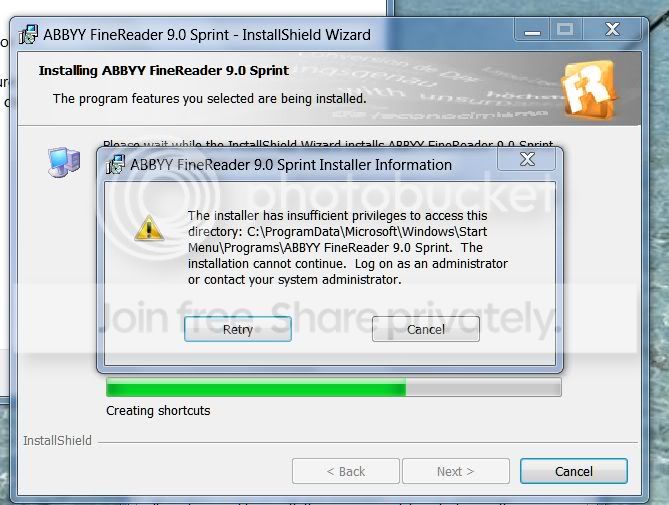
AbbyyAdminNeeded.jpg


I'm not good at working with permissions, but as far as I can tell, I am logged on as the administrator and I also remember (but forgot how) that I designated the folder to be opened by administrator. Could use some help here clearing this administrator matter and what may be blocking installation.
 

My Computer

Computer Manufacturer/Model Number
Gateway DX4720-03/HP Pavilion dv6
OS
Windows 7 HP 64-bit
Memory
4GB/4GB
Antivirus
Avast Pro
Browser
Firefox, the latest
RIGHT click on the icon to install the program and then LEFT click "Run as Administrator". That may allow it to install. Or, it if you have to reinstall all of the the Lexmark software, do the same thing for the the software, run it as Administrator.
 

My Computer

Computer type
PC/Desktop
Computer Manufacturer/Model Number
My Own Build
OS
Windows 10 64 bit
CPU
Intel i7 6700K
Motherboard
ASUS ROG Maximus VIII Hero
Memory
16GB Corsair Dominator
Graphics Card(s)
Intel CPU Graphics
Sound Card
RealTek
Monitor(s) Displays
27" Dell S2719dgf
Screen Resolution
2560X1440
Hard Drives
1 TB Samsung 850 EVO SSD for Win 10 Pro
500GB Samsung 850 EVO SSD for Win 10 Insider
2 TB drive for backup
PSU
EVGA Supernova 750G2
Case
BeQuiet Silent Base 600
Cooling
Deepcool Captain 120EX
Keyboard
Microsoft Wireless 2000
Mouse
Microsoft wireless
Internet Speed
100 MB/sec (Cable)
Antivirus
Microsoft Defender and Malwarebytes
Browser
Edge/Firefox
Other Info
Cakewalk (Sonar) by BandLab and Studio One 4.1 Pro recording studio software. MOTU 896Mk3 Hybrid recording interface, Frontier Tranzport wireless control unit, Behringer X-Touch Control Surface.
Five USB connected optical drives for CD Audio production using Nero BurningROM
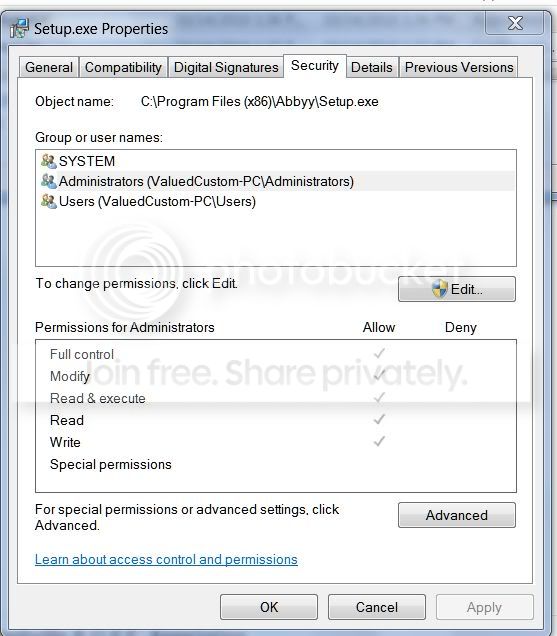
It appears that I am running the setup as an Administrator, but to no avail. As i am never sure about permissions, here are two screen shots of the Setup.exe Propertes that appear to show that it is being run by an Administrator. Also, I might add, I believe that I am logged on as the Administrator. What interests me in these to screens is that the check marks are greyed...shouldn't they be black?

SetupProperties.jpg


And should Inherited permissions be checked? What does this mean?
AdvancedSecuritySettings.jpg


And lastly, note that red alert area within the pictures' icons. What do they signify?

NoteIcon.jpg
 

My Computer

Computer Manufacturer/Model Number
Gateway DX4720-03/HP Pavilion dv6
OS
Windows 7 HP 64-bit
Memory
4GB/4GB
Antivirus
Avast Pro
Browser
Firefox, the latest
That could very well mean that you Advance Security System is stopping things.
Just asking now. Did this program come with some kind of printer/scanner?
Is their a particular reason you have choose this product?
 

My Computer

Computer type
PC/Desktop
Computer Manufacturer/Model Number
Home made Desktop
OS
Windows 10 Pro. 64/ version 1709 Windows 7 Pro/64
CPU
Intel i7-6800K @ 4.3
Motherboard
ASUS X-99 Deluxe II
Memory
Corsair Platinum 16 gig @2400
Graphics Card(s)
EVGA GTX 1070 OC
Monitor(s) Displays
Asus 27" LED LCD/VE278Q
Screen Resolution
1920-1080 or 1280-720 HDMI
Hard Drives
INTEL SSD 730-240 Gb Sata 3.0/
PSU
EVGA Platium 1200W
Case
Phanteks Luxe Tempered Glass 8 fans/ one radiator
Cooling
XSPC/ Water Cooled CPU
Keyboard
Das 4 Professional
Mouse
Logitech M705/MX Anywhere 2-S
Internet Speed
100 mbits
Antivirus
Microsoft Security Essentials/ Malwarebytes Premium 3.0/ SAS
Browser
I.E. 11 default/Firefox/ ISP Time Warner Cable/Spectrum
Other Info
LG BluRay Burner/
Sound system-KLipsch-THX/
Icy Dock ssd Hot Swap bays.
That could very well mean that you Advance Security System is stopping things.
Just asking now. Did this program come with some kind of printer/scanner?
Is their a particular reason you have choose this product?

Correct, the OCR (ABBYY) was part of a Lexmark disc that came with a Lexmark Pro 915 all-in-one printer. Could it be that the whole disc should have been loaded by an Administrator. That's one of the unkinows as i can't remember if I loaded the disc or just set things up through the printer and not have used the disc? But, then again, as I load on as an Administrator, if I did load the disc, then it should have been loaded by an Administrator anyway???
 

My Computer

Computer Manufacturer/Model Number
Gateway DX4720-03/HP Pavilion dv6
OS
Windows 7 HP 64-bit
Memory
4GB/4GB
Antivirus
Avast Pro
Browser
Firefox, the latest
Do you need that program for some reason? Many times programs are added to things like printers, video cards, ect. that you don't need or want. Does your all in 1 work as it should?
 

My Computer

Computer type
PC/Desktop
Computer Manufacturer/Model Number
Home made Desktop
OS
Windows 10 Pro. 64/ version 1709 Windows 7 Pro/64
CPU
Intel i7-6800K @ 4.3
Motherboard
ASUS X-99 Deluxe II
Memory
Corsair Platinum 16 gig @2400
Graphics Card(s)
EVGA GTX 1070 OC
Monitor(s) Displays
Asus 27" LED LCD/VE278Q
Screen Resolution
1920-1080 or 1280-720 HDMI
Hard Drives
INTEL SSD 730-240 Gb Sata 3.0/
PSU
EVGA Platium 1200W
Case
Phanteks Luxe Tempered Glass 8 fans/ one radiator
Cooling
XSPC/ Water Cooled CPU
Keyboard
Das 4 Professional
Mouse
Logitech M705/MX Anywhere 2-S
Internet Speed
100 mbits
Antivirus
Microsoft Security Essentials/ Malwarebytes Premium 3.0/ SAS
Browser
I.E. 11 default/Firefox/ ISP Time Warner Cable/Spectrum
Other Info
LG BluRay Burner/
Sound system-KLipsch-THX/
Icy Dock ssd Hot Swap bays.
Yeah, I need the ABBYY program for the following reason: It enables a text document to be scanned into this computer as a .doc. Otherwise, I would have to scan text document as jpg's.
 

My Computer

Computer Manufacturer/Model Number
Gateway DX4720-03/HP Pavilion dv6
OS
Windows 7 HP 64-bit
Memory
4GB/4GB
Antivirus
Avast Pro
Browser
Firefox, the latest
Advance Security Systems has been known to cause problems. Can you turn it off and then install your program?
 

My Computer

Computer type
PC/Desktop
Computer Manufacturer/Model Number
Home made Desktop
OS
Windows 10 Pro. 64/ version 1709 Windows 7 Pro/64
CPU
Intel i7-6800K @ 4.3
Motherboard
ASUS X-99 Deluxe II
Memory
Corsair Platinum 16 gig @2400
Graphics Card(s)
EVGA GTX 1070 OC
Monitor(s) Displays
Asus 27" LED LCD/VE278Q
Screen Resolution
1920-1080 or 1280-720 HDMI
Hard Drives
INTEL SSD 730-240 Gb Sata 3.0/
PSU
EVGA Platium 1200W
Case
Phanteks Luxe Tempered Glass 8 fans/ one radiator
Cooling
XSPC/ Water Cooled CPU
Keyboard
Das 4 Professional
Mouse
Logitech M705/MX Anywhere 2-S
Internet Speed
100 mbits
Antivirus
Microsoft Security Essentials/ Malwarebytes Premium 3.0/ SAS
Browser
I.E. 11 default/Firefox/ ISP Time Warner Cable/Spectrum
Other Info
LG BluRay Burner/
Sound system-KLipsch-THX/
Icy Dock ssd Hot Swap bays.
How does one turnit off?
 

My Computer

Computer Manufacturer/Model Number
Gateway DX4720-03/HP Pavilion dv6
OS
Windows 7 HP 64-bit
Memory
4GB/4GB
Antivirus
Avast Pro
Browser
Firefox, the latest

My Computer

Computer type
PC/Desktop
Computer Manufacturer/Model Number
Home made Desktop
OS
Windows 10 Pro. 64/ version 1709 Windows 7 Pro/64
CPU
Intel i7-6800K @ 4.3
Motherboard
ASUS X-99 Deluxe II
Memory
Corsair Platinum 16 gig @2400
Graphics Card(s)
EVGA GTX 1070 OC
Monitor(s) Displays
Asus 27" LED LCD/VE278Q
Screen Resolution
1920-1080 or 1280-720 HDMI
Hard Drives
INTEL SSD 730-240 Gb Sata 3.0/
PSU
EVGA Platium 1200W
Case
Phanteks Luxe Tempered Glass 8 fans/ one radiator
Cooling
XSPC/ Water Cooled CPU
Keyboard
Das 4 Professional
Mouse
Logitech M705/MX Anywhere 2-S
Internet Speed
100 mbits
Antivirus
Microsoft Security Essentials/ Malwarebytes Premium 3.0/ SAS
Browser
I.E. 11 default/Firefox/ ISP Time Warner Cable/Spectrum
Other Info
LG BluRay Burner/
Sound system-KLipsch-THX/
Icy Dock ssd Hot Swap bays.
Not the security programs as they were all disabled when trying to load ABBYY.
 

My Computer

Computer Manufacturer/Model Number
Gateway DX4720-03/HP Pavilion dv6
OS
Windows 7 HP 64-bit
Memory
4GB/4GB
Antivirus
Avast Pro
Browser
Firefox, the latest
Does the computer that you were successful installing this program use the same security program?
I'm running out of ideas.
 

My Computer

Computer type
PC/Desktop
Computer Manufacturer/Model Number
Home made Desktop
OS
Windows 10 Pro. 64/ version 1709 Windows 7 Pro/64
CPU
Intel i7-6800K @ 4.3
Motherboard
ASUS X-99 Deluxe II
Memory
Corsair Platinum 16 gig @2400
Graphics Card(s)
EVGA GTX 1070 OC
Monitor(s) Displays
Asus 27" LED LCD/VE278Q
Screen Resolution
1920-1080 or 1280-720 HDMI
Hard Drives
INTEL SSD 730-240 Gb Sata 3.0/
PSU
EVGA Platium 1200W
Case
Phanteks Luxe Tempered Glass 8 fans/ one radiator
Cooling
XSPC/ Water Cooled CPU
Keyboard
Das 4 Professional
Mouse
Logitech M705/MX Anywhere 2-S
Internet Speed
100 mbits
Antivirus
Microsoft Security Essentials/ Malwarebytes Premium 3.0/ SAS
Browser
I.E. 11 default/Firefox/ ISP Time Warner Cable/Spectrum
Other Info
LG BluRay Burner/
Sound system-KLipsch-THX/
Icy Dock ssd Hot Swap bays.
The two computers are essentially mirror images in that they are runing the same programs, including the same security programs.
 

My Computer

Computer Manufacturer/Model Number
Gateway DX4720-03/HP Pavilion dv6
OS
Windows 7 HP 64-bit
Memory
4GB/4GB
Antivirus
Avast Pro
Browser
Firefox, the latest

My Computer

Computer type
PC/Desktop
Computer Manufacturer/Model Number
Home made Desktop
OS
Windows 10 Pro. 64/ version 1709 Windows 7 Pro/64
CPU
Intel i7-6800K @ 4.3
Motherboard
ASUS X-99 Deluxe II
Memory
Corsair Platinum 16 gig @2400
Graphics Card(s)
EVGA GTX 1070 OC
Monitor(s) Displays
Asus 27" LED LCD/VE278Q
Screen Resolution
1920-1080 or 1280-720 HDMI
Hard Drives
INTEL SSD 730-240 Gb Sata 3.0/
PSU
EVGA Platium 1200W
Case
Phanteks Luxe Tempered Glass 8 fans/ one radiator
Cooling
XSPC/ Water Cooled CPU
Keyboard
Das 4 Professional
Mouse
Logitech M705/MX Anywhere 2-S
Internet Speed
100 mbits
Antivirus
Microsoft Security Essentials/ Malwarebytes Premium 3.0/ SAS
Browser
I.E. 11 default/Firefox/ ISP Time Warner Cable/Spectrum
Other Info
LG BluRay Burner/
Sound system-KLipsch-THX/
Icy Dock ssd Hot Swap bays.
Here's what I'm thinking: I am not sure if I loaded the Lemark disc onto the desktop computer. I know that I have loaded this disc onto the laptop and the ABBYY program loaded successfully. When trying to load just the ABBYY (by itself, even an earlier version) onto the desktop computer, I kept getting the noted error messages no matter what I did in terms of Administrator and security programs. I'm quite certain it would be OK to assume that the ABBYY on the Lexmark disc is licensed by Lexmark; and if that is true, it could be that there is some code on that disc that allows the licensed ABBYY to load. In other words, could it be that one has to load the whole kit and kaboodle in order to not get the error alerts??? I will check this thought out with Lexmark.

Lexmark has a great support system. They are always available, have been very successfully helpful with other questions I've had, and would walk me through a whole new set up of their printer. So, if I had to set the printer up again, they would do it for me...worth a try if needs be.
 

My Computer

Computer Manufacturer/Model Number
Gateway DX4720-03/HP Pavilion dv6
OS
Windows 7 HP 64-bit
Memory
4GB/4GB
Antivirus
Avast Pro
Browser
Firefox, the latest
Okay you got me thinking again. I have only used 2 brands of printers/scanners. HP and Kodak. Both of them you could hook up and get basic function without the C/D and go on line at that point and get updates you need. The C/D could be very old.
 

My Computer

Computer type
PC/Desktop
Computer Manufacturer/Model Number
Home made Desktop
OS
Windows 10 Pro. 64/ version 1709 Windows 7 Pro/64
CPU
Intel i7-6800K @ 4.3
Motherboard
ASUS X-99 Deluxe II
Memory
Corsair Platinum 16 gig @2400
Graphics Card(s)
EVGA GTX 1070 OC
Monitor(s) Displays
Asus 27" LED LCD/VE278Q
Screen Resolution
1920-1080 or 1280-720 HDMI
Hard Drives
INTEL SSD 730-240 Gb Sata 3.0/
PSU
EVGA Platium 1200W
Case
Phanteks Luxe Tempered Glass 8 fans/ one radiator
Cooling
XSPC/ Water Cooled CPU
Keyboard
Das 4 Professional
Mouse
Logitech M705/MX Anywhere 2-S
Internet Speed
100 mbits
Antivirus
Microsoft Security Essentials/ Malwarebytes Premium 3.0/ SAS
Browser
I.E. 11 default/Firefox/ ISP Time Warner Cable/Spectrum
Other Info
LG BluRay Burner/
Sound system-KLipsch-THX/
Icy Dock ssd Hot Swap bays.
Doubt whether the CD is very old as the Printer (Pro915) is very new...thus the reason, I think, for the excellent support (which is lifetime, BTW).
 

My Computer

Computer Manufacturer/Model Number
Gateway DX4720-03/HP Pavilion dv6
OS
Windows 7 HP 64-bit
Memory
4GB/4GB
Antivirus
Avast Pro
Browser
Firefox, the latest
Have you tried uninstalling it and then reinstalling it directly from the CD?
 

My Computer

OS
Windows 7 Ultimate x64
Just did what you suggested with the aid of a Lexmark tech. Still no luck!
 

My Computer

Computer Manufacturer/Model Number
Gateway DX4720-03/HP Pavilion dv6
OS
Windows 7 HP 64-bit
Memory
4GB/4GB
Antivirus
Avast Pro
Browser
Firefox, the latest
Bottom line according to the upper level Lexmark techs: Something is wrong with your operating system and/or the computer itself. They recommended that I speak to the two. Doubt if I'll do that. When i want text, I can use my other computer and then transfer over to the desktop computer. I bit winded, but a reasonable work around.
 

My Computer

Computer Manufacturer/Model Number
Gateway DX4720-03/HP Pavilion dv6
OS
Windows 7 HP 64-bit
Memory
4GB/4GB
Antivirus
Avast Pro
Browser
Firefox, the latest
Back
Top