Trouble Mapping Network Drive Windows 7

jgray

New member
Local time
8:58 PM
Messages
8
Hello -

Okay. Here is the scoop. I work in a small office where we have 1 desktop running Windows 7 64 bit connected by a LAN line to the wireless router, which is our "network drive". We have 1 laptop running 64 bit Vista, 1 laptop running 64 bit Windows 7, and 1 laptop running 32 bit Windows 7.

6 months ago, I loaded all of our shared files to the "public documents" folder on the 64bit Desktop, and was able to get all the laptops to access these folders, as well as to map this folder as our "network drive".

However, something happened about 2 weeks ago when we did some windows updates on our Desktop, and now none of us can re-connect / sync with the network drive. the message we get is:

\\RC-PC is not accessible. You might not have permission to use this network resource. Contact the administrator of this server to find out if you have access permissions. A device attached to the system is not functioning.

Oddly enough, however, we can access the folder through the home-group. Just can't seem map the location any longer.

Any ideas?
 

My Computer

OS
windows 7 professional, 32 bit
Your best bet is to try and remove the offending update.
Remove an update

I should also mention that because you seem to have a mixed Op system network you should leave the Homegroup from all the Windows 7 machines and set up a Workgroup instead.

Home groups isn't really made to work in a mixed Op system network at all.
 

My Computer

Computer type
PC/Desktop
Computer Manufacturer/Model Number
Home built
OS
Windows 7 Ult, Windows 8.1 Pro,
CPU
Q9650-4.275GHz, E8600 4.5GHz, E6750-3.8GHz
Motherboard
Evga 780i FTW
Memory
G.Skill PC2 9600 1200Mhz 5 5 5 15 2T
Graphics Card(s)
GTX480
Sound Card
Asus Xonar D2
Monitor(s) Displays
HannsG
Screen Resolution
1680X1050
Hard Drives
GSkill Phoenix Pro 120GB SSD
PSU
ThermalTake Toughpower 1000Watt modular
Case
ThermalTake XaserV
Cooling
Xigmatek S1283
Keyboard
Logitech G15
Mouse
Logitech G9
Internet Speed
T1
Hi. Yes, that was the first thing I did. All computers are on the same work-group: MSHOME. As I said, It is strange, All computers are visible on the Network from each of the computers, and we can all access one another's computers, including accessing the laptops from the desktop. Yet we still cannot access the desktop from the other computers, though it appears on the network :(

Problem with removing the update is that to try to fix the problem, I did an "upgrade" type re-install of the windows 7 operating system on the desktop, so all previous updates are no longer available for removal. Any other advice?
 

My Computer

OS
windows 7 professional, 32 bit
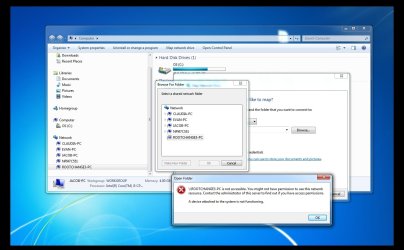
Here is a screen shot - As you can see, I can access Documents through "Homegroup" on ROOTCHANGE3-PC, yet when I try to open ROOTCHANGE3-PC through "Network" I Get the message: \\ROOTCHANGE3-PC is not accessible. You might not have permission to use this network resource. Contact the administrator of this server to find out if you have access permissions. A device attached to the system is not functioning.
 

Attachments

  • screenshot.jpg
    screenshot.jpg
    65.3 KB · Views: 216

My Computer

OS
windows 7 professional, 32 bit
As a test we can try making some adjustments to the sharing and the security permissions of the actual drive "C"? which ever is the main drive for the desktop with the access problem. Follow the steps in the link below.

As I mentioned earlier if you are using Homegroups in a mixed Op system network it will cause endless sharing problems, you should leave the Homegroup on all machines and set up a Workgroup instead.

http://www.sevenforums.com/network-sharing/92521-hdd-sharing.html#post798310
 

My Computer

Computer type
PC/Desktop
Computer Manufacturer/Model Number
Home built
OS
Windows 7 Ult, Windows 8.1 Pro,
CPU
Q9650-4.275GHz, E8600 4.5GHz, E6750-3.8GHz
Motherboard
Evga 780i FTW
Memory
G.Skill PC2 9600 1200Mhz 5 5 5 15 2T
Graphics Card(s)
GTX480
Sound Card
Asus Xonar D2
Monitor(s) Displays
HannsG
Screen Resolution
1680X1050
Hard Drives
GSkill Phoenix Pro 120GB SSD
PSU
ThermalTake Toughpower 1000Watt modular
Case
ThermalTake XaserV
Cooling
Xigmatek S1283
Keyboard
Logitech G15
Mouse
Logitech G9
Internet Speed
T1
Ok. I have disconnected all computers from the homegroup. We are now all on the the same workgroup: MSHOME. In addition, have gone and checked all the boxes for sharing through the properties/security on the c: Unfortunately have same problem.

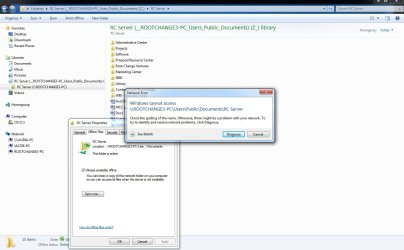
A strange thing I noticed - it looks like the old folder that I had previously mapped as a network drive on the desktop is still "syncing" (I have saved a couple files locally on my laptop that are now appearing on the desktop computer). Yet when I try to manually sync files between laptop and desktop, it sends me another error message. See the screen shot attached. I have tried to "diagnose", but the computer can't solve it.
 

Attachments

  • screenshot2.jpg
    screenshot2.jpg
    92.7 KB · Views: 84

My Computer

OS
windows 7 professional, 32 bit
The problem as I see it is that this network drive is showing up in Library's which isn't the correct place for it to show up as you aren't using Homegroups and therefore not using Library's. It's no wonder things are messed up. :confused:

It looks like you added this drive to your Library's when you had the Homegroup set up. You will want to remove the drive from the Library and remap it. Although it looks like you already have the drive mapped because it's showing up under "Network".

http://www.sevenforums.com/tutorials/49517-map-network-drive.html

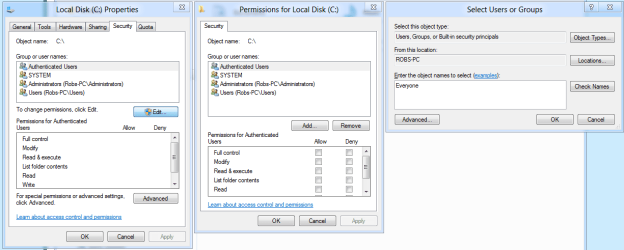
Also besides just checking the boxes on the sharing permissions tab of this drive you will also want to use the Security tab, click "Edit" then next window click "Add" then type in "Everyone" click OK, then second picture notice that "Everyone" is on the access list now, put check marks for full access, hit apply, OK. Second Picture below. This will allow access for this drive to everyone in your network.
 

Attachments

  • security share with Everyone.PNG
    security share with Everyone.PNG
    26.5 KB · Views: 90
  • Everyone added plus check marks.PNG
    Everyone added plus check marks.PNG
    18.3 KB · Views: 96

My Computer

Computer type
PC/Desktop
Computer Manufacturer/Model Number
Home built
OS
Windows 7 Ult, Windows 8.1 Pro,
CPU
Q9650-4.275GHz, E8600 4.5GHz, E6750-3.8GHz
Motherboard
Evga 780i FTW
Memory
G.Skill PC2 9600 1200Mhz 5 5 5 15 2T
Graphics Card(s)
GTX480
Sound Card
Asus Xonar D2
Monitor(s) Displays
HannsG
Screen Resolution
1680X1050
Hard Drives
GSkill Phoenix Pro 120GB SSD
PSU
ThermalTake Toughpower 1000Watt modular
Case
ThermalTake XaserV
Cooling
Xigmatek S1283
Keyboard
Logitech G15
Mouse
Logitech G9
Internet Speed
T1
Ok. I have done both of the above, but still nothing :( When I try to map the drive, you see the same dialog box (see screenshots)
 

Attachments

  • screenshot3.jpg
    screenshot3.jpg
    104.5 KB · Views: 84
  • screenshot4.jpg
    screenshot4.jpg
    93.6 KB · Views: 48

My Computer

OS
windows 7 professional, 32 bit
What are your settings looking like in network and sharing center?

Eg. File and printer sharing = on/off? Network Discovery = on/off? etc.
 

My Computer

Computer type
PC/Desktop
Computer Manufacturer/Model Number
DELL VOSTRO 3650
OS
Windows 8.1 PRO
CPU
3rd Generation Intel Core i7‐3612QM CPU @ 2.10GHZ
Memory
8GB DDR3
Graphics Card(s)
NVIDIA GeForce GT 525M (128 bit), 1GB Grpahics
Screen Resolution
1920X1080
Hard Drives
750GB 5400RPM
Ok. I have done both of the above, but still nothing :( When I try to map the drive, you see the same dialog box (see screenshots)


You shouldn't even have to map the drive in order to gain access if the sharing and more importantly the Security settings allow for it.

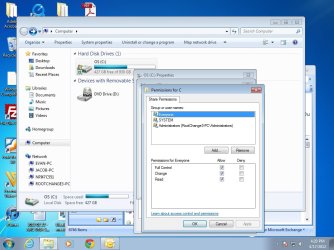
The picture shows the Sharing permissions window but you also need to make the changes I mentioned in the Security settings as well. You need to use the Security tab "second picture" for that, it's not clear if you have done that yet or not?

It also says the device is not functioning so there may be a problem with the drive. You might try changing the sata cable for that drive.
 

My Computer

Computer type
PC/Desktop
Computer Manufacturer/Model Number
Home built
OS
Windows 7 Ult, Windows 8.1 Pro,
CPU
Q9650-4.275GHz, E8600 4.5GHz, E6750-3.8GHz
Motherboard
Evga 780i FTW
Memory
G.Skill PC2 9600 1200Mhz 5 5 5 15 2T
Graphics Card(s)
GTX480
Sound Card
Asus Xonar D2
Monitor(s) Displays
HannsG
Screen Resolution
1680X1050
Hard Drives
GSkill Phoenix Pro 120GB SSD
PSU
ThermalTake Toughpower 1000Watt modular
Case
ThermalTake XaserV
Cooling
Xigmatek S1283
Keyboard
Logitech G15
Mouse
Logitech G9
Internet Speed
T1
Yes. That was the first thing I did. All file sharing/printer sharing is on. Sharing so anyone with network access can read write files in the public folders is on. Password protected sharing is off. Allow windows to manage homegroup connectinos is on. 128 bit encryption is on. Network discovery on.
 

My Computer

OS
windows 7 professional, 32 bit
Back
Top